Best ARGB Controllers of 2026

An ARGB controller is the small box that takes over the lighting and fans inside your case — it decides how many LEDs fire at once, which color they land on, how fast the fans spin, and whether the whole build moves in step or drifts apart. Two controllers with nearly identical spec sheets can behave nothing alike once they're actually wired in. What separates them is unglamorous: whether the header matches your motherboard's addressable lighting standard, how many fans a single channel will carry before the colors stutter, and whether you're handed a remote or a piece of software you'll resent opening. Get those right and the lighting simply does what you ask, every boot, without a nest of splitters and second-guessing.

We've spent the past four months cycling 16 controllers through real builds, from bare-bones budget hubs to units with their own software suites, and the differences showed up fast. One thing I'd tell any first-time buyer: the controller is almost always the cheapest part of a lighting setup and the first thing you'll want to replace, so confirm the header type and leave yourself a spare channel. The picks below are the ones that earned their spot.

1

Best Overall

Airgoo 16-Port ARGB Controller

87 /100
Lab Score Excellent

Key details

Ports
16 ARGB channels
Power
SATA
Control
USB / SignalRGB, OpenRGB
LED Capacity
256 LEDs per channel
View on Amazon

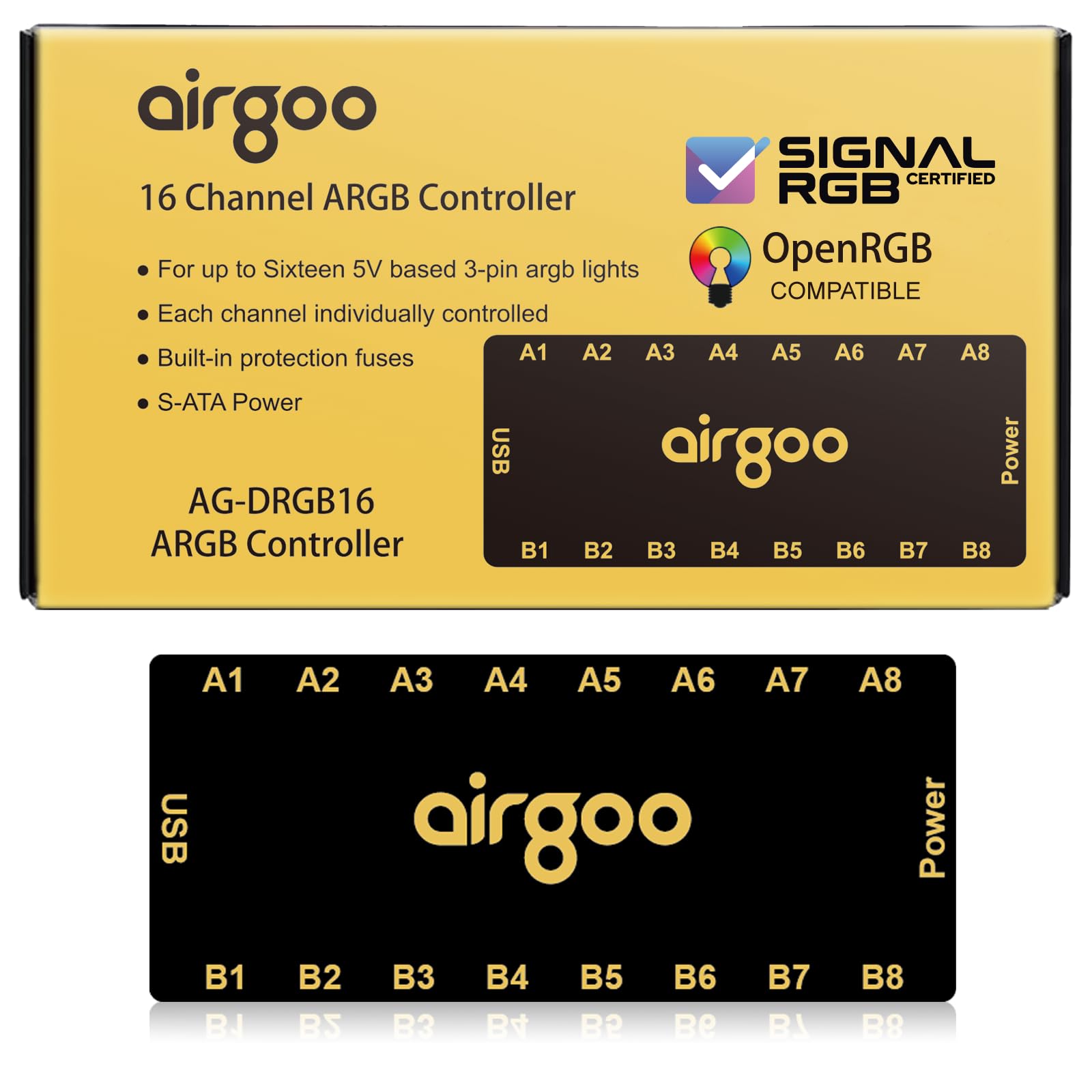
Sixteen individually addressable ARGB channels is the number that sets the Airgoo apart. Each channel can carry up to 256 LEDs, and the controller talks to SignalRGB and OpenRGB over a USB 2.0 header, so you can build effects per port instead of mirroring one look across the whole case. The body is magnetic, SATA-powered, and small enough to tuck behind the motherboard tray, and it includes an auto-resetting fuse for overload protection.

That combination is why we recommend it as the default for a lighting-first build. Most hubs here treat every fan as one long strip; the Airgoo lets you give a GPU block, a strip, and eight fans their own place in a scene. We also appreciate the magnetic mount—it stays put when you move cables and repositions without adhesive residue. The catch is that it controls lighting only, so it is not the hub to buy if your fans need PWM power and speed control.

Setup is not quite plug-and-play. You need a free USB 2.0 header and the correct software before the controller will configure properly, and Windows 10 or 11 is the supported path. We found that requirement worth accepting because the software is the point: once SignalRGB recognizes the channels, the granular control is the reason to choose this over a remote hub.

For a large, software-driven build, the Airgoo earns the top spot here. It has the strongest channel count in this group and the cleanest path to per-device effects, and the magnetic body makes a crowded case easier to live with. The fuse and one-year warranty are the details that make that density feel less risky.

Pros

  • 16 individually addressable ARGB channels
  • Up to 256 LEDs per channel
  • SignalRGB and OpenRGB support
  • Magnetic mount with overload fuse

Cons

  • Lighting only; no PWM fan power
  • Requires USB 2.0 header and software
Our verdict

For a large, software-driven RGB build, this is the controller we recommend: 16 individually addressable channels, SignalRGB and OpenRGB support, and a magnetic body that hides easily.
Check Latest Price
2

Best ARGB and PWM Value

Thermalright ARGB and Fan HUB X12

87 /100
Lab Score Excellent

Key details

Ports
12 ARGB + 12 PWM
Power
SATA
Control
IR remote / motherboard sync
PWM Reading
One red fan header
View on Amazon

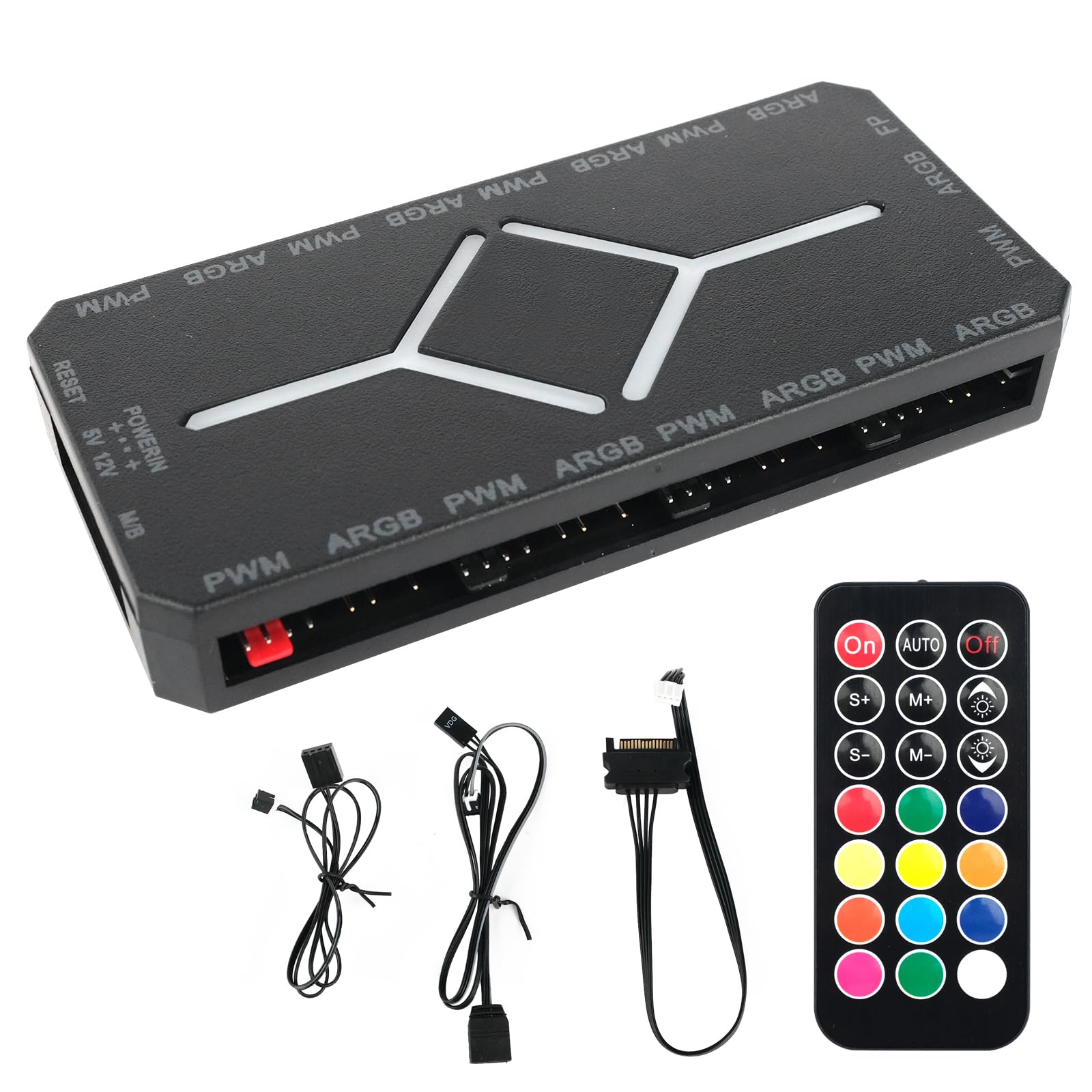
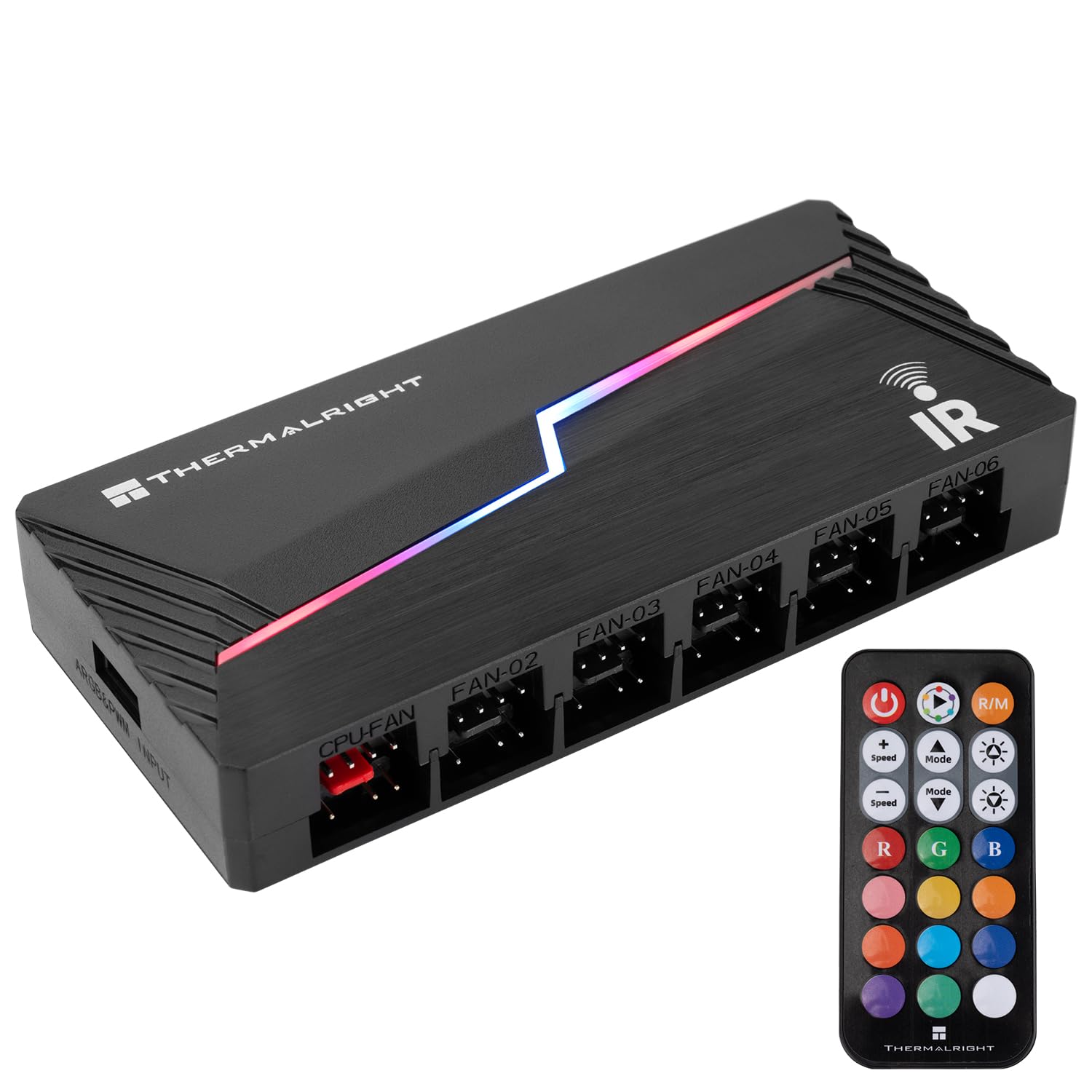
Twelve ARGB ports and twelve PWM ports at a budget price is the combination that makes the Thermalright X12 our value pick. It is the one we point to when someone wants to clean up both lighting and fan cables without buying two boxes. The hub is SATA-powered, includes an IR remote, and has a red header for fan-speed reading; it can also sync with a motherboard's ARGB and PWM signals if you prefer to control everything there.

The case for it is straightforward: one SATA connection, one place for all the fan leads, and enough ports for a typical case plus an AIO. We appreciate that the ARGB and PWM sides are separate, so the hub can still light the fans if you leave the PWM cable off. The 108 x 50 x 21 mm body is small enough to stick to a drive bay or the back of the motherboard tray, and the black shell disappears once the side panel is on.

The remote is the part we are least fond of. The buttons need a firm press, and the speed settings can be fussy; if you plan to change effects often, set the hub up through the motherboard instead. Fan speed reading is also limited to the single fan plugged into the red header, and all connected fans share one PWM signal. That is normal for a hub in this price range, but it means the X12 is about tidying a bank of fans, not controlling each one separately.

Pros

  • 12 ARGB and 12 PWM ports
  • SATA-powered with an IR remote
  • Compact body and clean cable routing
  • Motherboard ARGB and PWM sync

Cons

  • Remote buttons can be finicky
  • All fans share one PWM signal
Our verdict

If you want one budget hub to handle both ARGB and fan power, the X12 is the one we choose: 12 channels, a remote, and SATA power in a compact body.

Check Latest Price
3

Best Budget Remote Controller

DS Mini ARGB Controller Kit

87 /100
Lab Score Excellent

Key details

Ports
3-pin ARGB
Power
SATA
Control
14-key RF remote
Lighting Modes
215+
View on Amazon

If your motherboard has no ARGB header—or you are building in an older case where lighting is an afterthought—the DS Mini is the simplest way to get color without changing the board. It is a tiny SATA-powered controller with a 14-key RF remote and more than 215 lighting modes. The one-to-one pairing is meant to keep the remote from stepping on other wireless controls, and the whole thing is small enough to tuck behind a panel.

We recommend it for the no-software crowd. The remote is the control surface, so there is no USB header, no app, and no motherboard sync to fight with. That also means the lighting stays independent: you cannot blend the fans into your motherboard's effects, and the controller does not power or regulate the fans themselves. For a straightforward build where the goal is color rather than choreography, that is a fair trade.

The connector set is 3-pin ARGB only, so check your fans before ordering; 12V 4-pin RGB is not invited. The 15W rating and SATA input are enough for a normal bank of ARGB fans and strips, and the remote's color and pattern buttons are easy to learn. We found the modes more functional than artistic—plenty of patterns, but not the fine palette a software controller gives you. If you want deep customization, this is not it.

Pros

  • Remote-controlled 215+ lighting modes
  • Works without a motherboard ARGB header
  • SATA-powered and easy to hide
  • One-to-one remote pairing

Cons

  • No motherboard lighting sync
  • Lighting only; no PWM fan power
Our verdict

For an older build or a case with no ARGB header, the DS Mini is the easy, inexpensive way to add remote-controlled color without software.

Check Latest Price
4

Best for Ten Fans

Auotac ARGB PWM Fan Hub

82 /100
Lab Score Excellent

Key details

Ports
10 ARGB + 10 PWM
Power
Dual SATA
Control
RF remote / sync cables
Mounting
Magnetic
View on Amazon

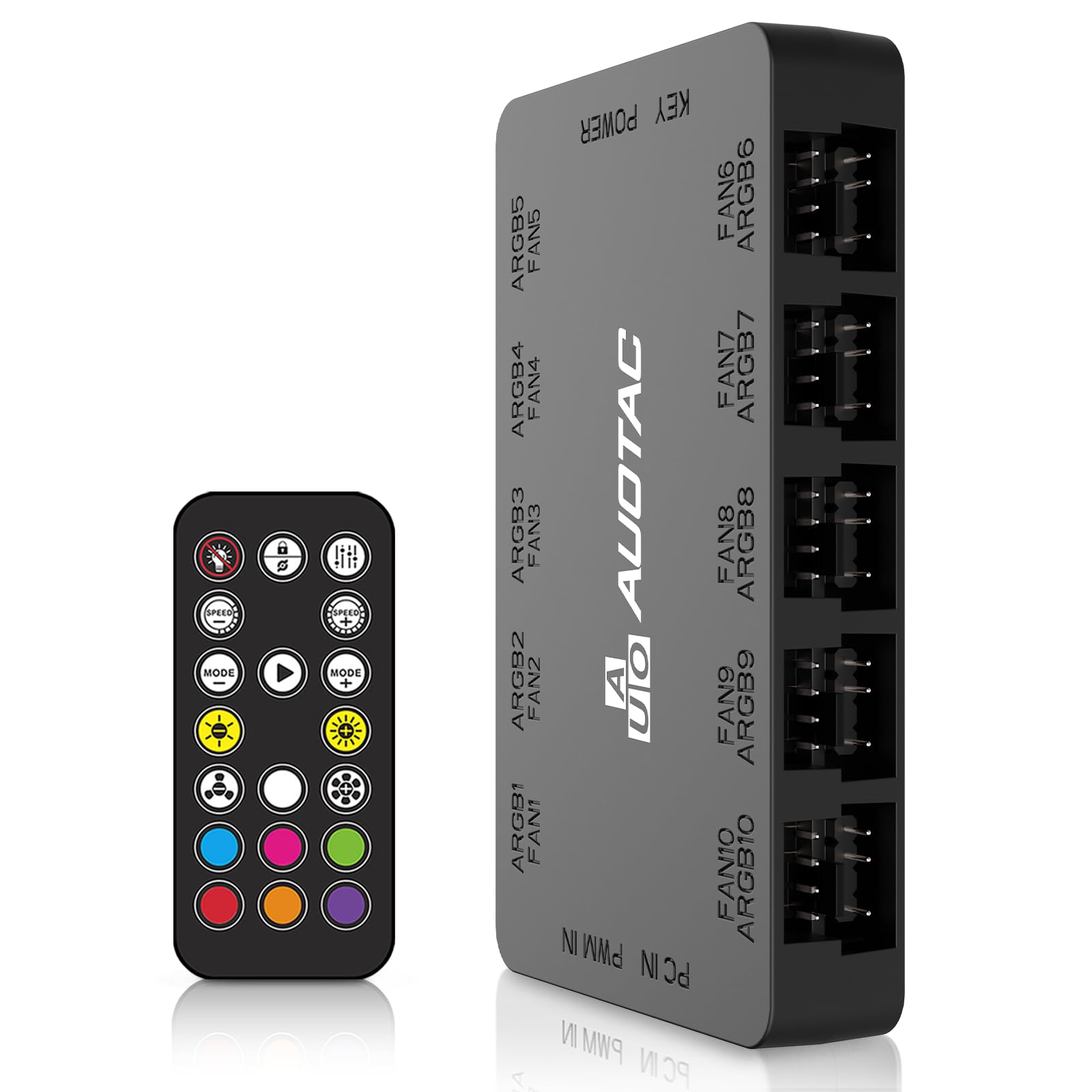
Dual SATA power and ten fan groups are the headline for the Auotac HK02. The twin power inputs are there to keep a full bank of ARGB fans and strips stable under load, and the hub also includes separate PWM and ARGB sync cables so it can hand control back to the motherboard. The body is magnetic, the remote is RF rather than IR, and the box includes the cables you need to get it running.

That ten-port layout is more than most cases need, but it is useful if you are running push-pull radiators, a distro plate, and a handful of strips. We like the magnetic mount for the same reason we like it on the Airgoo: it stays where you put it and moves without leaving adhesive residue. The RF remote is also a better fit than IR for a case that lives under a desk, since you do not have to aim it through the front panel.

The Auotac costs more than the 12-port Thermalright, so it is not the automatic value pick. What it offers instead is dual SATA power and a ten-fan ceiling for builds that are close to the limit of a single SATA run. If your case is packed and you want a remote-controlled hub with more power headroom, this is the one we point to; if you are building a normal six- to eight-fan system, the X12 does the same job for less.

Pros

  • 10 ARGB and PWM channels
  • Dual SATA power inputs
  • RF remote and magnetic mount
  • Includes PWM and ARGB sync cables

Cons

  • Costs more than the 12-port X12
  • No USB software control
Our verdict

For a packed ten-fan build that needs dual SATA power and a remote, the Auotac is the hub we recommend; smaller builds can save with the X12.

Check Latest Price
5

Budget Magnetic Builds

HSZJsto 9-Port ARGB PWM Hub

80 /100
Lab Score Excellent

Key details

Ports
9 ARGB + 9 PWM
Power
SATA
Control
Remote
Mounting
Magnetic
View on Amazon

Nine ARGB ports, nine PWM ports, and power-off memory are the practical combination on the HSZJsto hub. The memory is the detail we appreciate most: set a color and fan curve, shut down, and the hub comes back the way you left it instead of defaulting to a rainbow. It is SATA-powered, magnetic, and includes a remote, so it can run a mid-size build without a motherboard ARGB header. The flat, iron-backed body gives the magnets something to grip, and the single SATA input keeps the back of the case simpler than the dual-SATA hubs here.

The limitation is control. The remote is the only way to change effects, there is no USB software or per-port addressability, and the hub is built for one coordinated look rather than a channel-by-channel light show. That makes it a sensible budget choice for a nine-fan build where you want a magnetic mount and memory, but not the pick for a showcase. If you need per-device scenes, spend more for the Airgoo; if you need more ports for less, the X12 is the better all-around buy.

Pros

  • 9 ARGB and 9 PWM ports
  • Power-off memory
  • Magnetic mount and remote
  • Single SATA input

Cons

  • Remote-only control with no software sync
Our verdict

If you want a magnetic nine-fan hub with power-off memory and a remote, the HSZJsto is a solid budget choice; just do not expect software control.

Check Latest Price
6

Compact Six-Fan Builds

ASUS TUF Gaming ARGB PWM Fan Hub

87 /100
Lab Score Excellent

Key details

Ports
6 ARGB + 6 PWM
Power
Dual SATA
Mounting
Magnetic
Warranty
2 years
View on Amazon

Six fans is the ceiling on the ASUS TUF Gaming ARGB PWM Fan Hub, and the two-year warranty is the detail that makes the limit easier to accept. It is a compact, magnetic hub with dual SATA power, visible power and operation indicators, and separate PWM and ARGB connections. ASUS positions it for a tidy six-fan build rather than a showcase with a dozen devices.

The dual SATA inputs are the practical part. They let the hub pull power from two PSU runs instead of leaning on one connector, and the indicator lights make it easy to see whether the hub is awake before you start troubleshooting. We also like the magnetic base: it grips a steel case panel and can be moved when you change the layout, which is more forgiving than adhesive.

Where it gets less convincing is control. The hub is built around motherboard sync, so it makes the most sense in an ASUS build where you are already using Armoury Crate or the board's fan curves. If you want a remote or per-port software effects, this is not that product. And with six channels, it runs out of room faster than the ten- and twelve-port hubs here.

For a compact six-fan build with an ASUS board, though, the TUF hub is a neat, sturdy box with a warranty that the budget models do not match. We recommend it when tidy cable management and brand support matter more than channel count. If you are planning a bigger lighting array, spend the space on the Airgoo or X12 instead.

Pros

  • 6 ARGB and 6 PWM ports
  • Dual SATA power inputs
  • Magnetic mount with status indicators
  • Two-year warranty

Cons

  • Six fan channels only
Our verdict

For a compact six-fan ASUS build, the TUF hub is a tidy, well-supported choice with dual SATA power and a two-year warranty; just do not expect room to expand.

Check Latest Price
7

Simple Push-Button Lighting

Thermalright 5V ARGB Controller

88 /100
Lab Score Excellent

Key details

Size
0.79 in cube
Ports
3-pin ARGB
Power
SATA
Control
Three buttons
View on Amazon

The Thermalright 5V controller is a cube small enough to lose in a parts bin, with three buttons on top and a SATA lead coming out of it. It is a lighting-only controller for 5V 3-pin ARGB devices, and it does not need a motherboard header or software: the M, S, and B buttons cycle modes, speed, and brightness. For a simple case light or a single bank of fans, that is all some builds need.

We like it for the same reason we like a mechanical switch: it works without an app, a USB header, or a manual. The controller holds its setting, the buttons are easy to find by feel, and the small body can sit behind a panel without a mounting bracket. It is also one of the least expensive ways to add ARGB control here, which matters if you are upgrading an older build.

The limits are real. The color and pattern selection is modest compared with a software controller, there is no PWM fan power, and the controls are on the box rather than a remote. If you want to sync the lighting with the rest of your system, this is not the tool. But for a quiet, simple build where you set a color and leave it, the tiny Thermalright is easy to recommend.

Pros

  • Tiny no-software controller
  • Three-button mode, speed, and brightness control
  • SATA-powered
  • Works without a motherboard ARGB header

Cons

  • No PWM fan power
  • Limited color and pattern options
Our verdict

For a simple 5V ARGB setup with no software or motherboard header, this tiny Thermalright controller is the easy, inexpensive answer.

Check Latest Price

How We Tested the ARGB Controllers

We started with a list of roughly 40 controllers sold by established lighting and cooling brands, then cut it down by the things that actually break a build: mismatched header types (5V three-pin addressable versus 12V four-pin RGB), channels that couldn't carry a full set of fans, thin or awkward power connections, and remotes that only worked from two feet away. That left 16 units, which we ran for four months across three setups — a mid-tower daily driver, a small-form-factor build where cable room is nearly nonexistent, and an open bench for stress runs.

Installation was timed solo, with the manual closed for the first attempt, and we noted exactly where the instructions lost us. Each controller was wired to fans and light strips at the same time, then we pushed every channel to its rated fan count and kept adding until the lighting flickered or a fan stalled. Full white — the heaviest lighting load — ran for an hour straight while we checked case temperature and whether the power cables got warm to the touch. Fan speed control got its own pass: we ramped from idle to full and listened for pulsing or whine at the low end.

For remote control, we counted the clicks it took to change a color or dial brightness, then repeated the test from across the room and through a closed side panel. Each controller was paired with three different motherboards, and we watched whether it was detected on first launch, whether settings survived a full shutdown, and whether two strips on the same channel actually matched each other in color. Compatibility checks included daisy-chaining units together and mixing fan brands on a single hub.

Finally, we tugged every cable at the connector, looked over the solder joints, and compared what came in the box — splitters, extension cables, magnets versus adhesive pads — against what the unit cost relative to the rest of the field.

How to Choose an Argb Controller

Start with voltage and device count

A 5V 3-pin ARGB fan will not work on a 12V 4-pin RGB header, and forcing the wrong connector can damage the lighting. Check the connector keying and the listing before you buy; every pick here is 5V 3-pin. Then add up the LEDs, not just the fans: the Airgoo allows up to 256 LEDs per channel, while smaller controllers have lower ceilings. If your total sits close to the limit, split devices across channels instead of daisy-chaining everything onto one output.

Choose your control layer

Motherboard sync is simplest if you already have an ARGB header and like your board's software; a hub like the X12 or ASUS TUF extends that system. USB controllers like the Airgoo give per-port control through SignalRGB or OpenRGB, but they need a free USB 2.0 header and the right app. Remote and button controllers are for builds without a header; they run their own effects, so they will not join your motherboard's lighting. Decide which of those you will actually use before paying for channels you will not control.

Decide whether you need fan power

An ARGB controller powers only the LEDs; a fan hub also powers and regulates the fans. If your fans already plug into the motherboard or a separate fan controller, a lighting-only box is smaller and simpler. If you want one place for both, look for a combined hub with enough 4-pin PWM ports. Remember that most hubs share one PWM signal across all ports, so every fan runs the same curve; the X12 reads speed from a single red header for the same reason.

Plan power, mounting, and cable access

SATA power is the norm, and a single run is fine for a normal six- to eight-device build. A ten- or sixteen-device array benefits from dual SATA inputs, which is why the Auotac and ASUS hubs use two. Magnetic mounts are easier to reposition than adhesive, but they need a steel surface; adhesive is better on plastic or aluminum. Before you close the panel, check that the 3-pin plugs are fully seated—a loose plug can make a channel cut out—and leave enough slack to reach the SATA and USB headers.

Frequently Asked Questions

Final Verdict

For most serious RGB builds, the Airgoo is the controller we recommend. Sixteen individually addressable channels, SignalRGB and OpenRGB support, magnetic mounting, and an overload fuse make it the most capable lighting-first pick here.

If you also need fan power, the Thermalright X12 is the better fit and the value choice, with 12 ARGB and PWM channels and a remote. Choose the Airgoo for software control; choose the X12 for a budget all-in-one build.