Best Controller Stands of 2026

Game night has a predictable failure point. Someone reaches for a controller, the pile on the TV stand shifts, and the spare slides off the edge mid-race with the charging cable trailing behind it. A controller stand fixes that small, repeated mess: every controller gets a home, the ones you use most stay within reach, and a tangle of cables becomes something that looks intentional on a shelf.

I've bought stands that looked sharp in photos and wobbled the second a controller dropped in, so I'm fussier about the base than I used to be. Over the past three months, my team and I have assembled, loaded, and lived with 14 of them on desks and TV consoles, and the gap in build quality shows up fast. The ones worth owning are stable first and good-looking second, and they hold up whether you keep two controllers or six. The picks below are the ones that earned their spot.

1

Best Overall

Kytok 4-Tier Controller Stand

94 /100
Lab Score Outstanding

Key details

Tiers
4
Material
Aluminum alloy
Dimensions
2.76 x 7.87 x 7.95 inches
Controller Capacity
Up to 8
View on Amazon

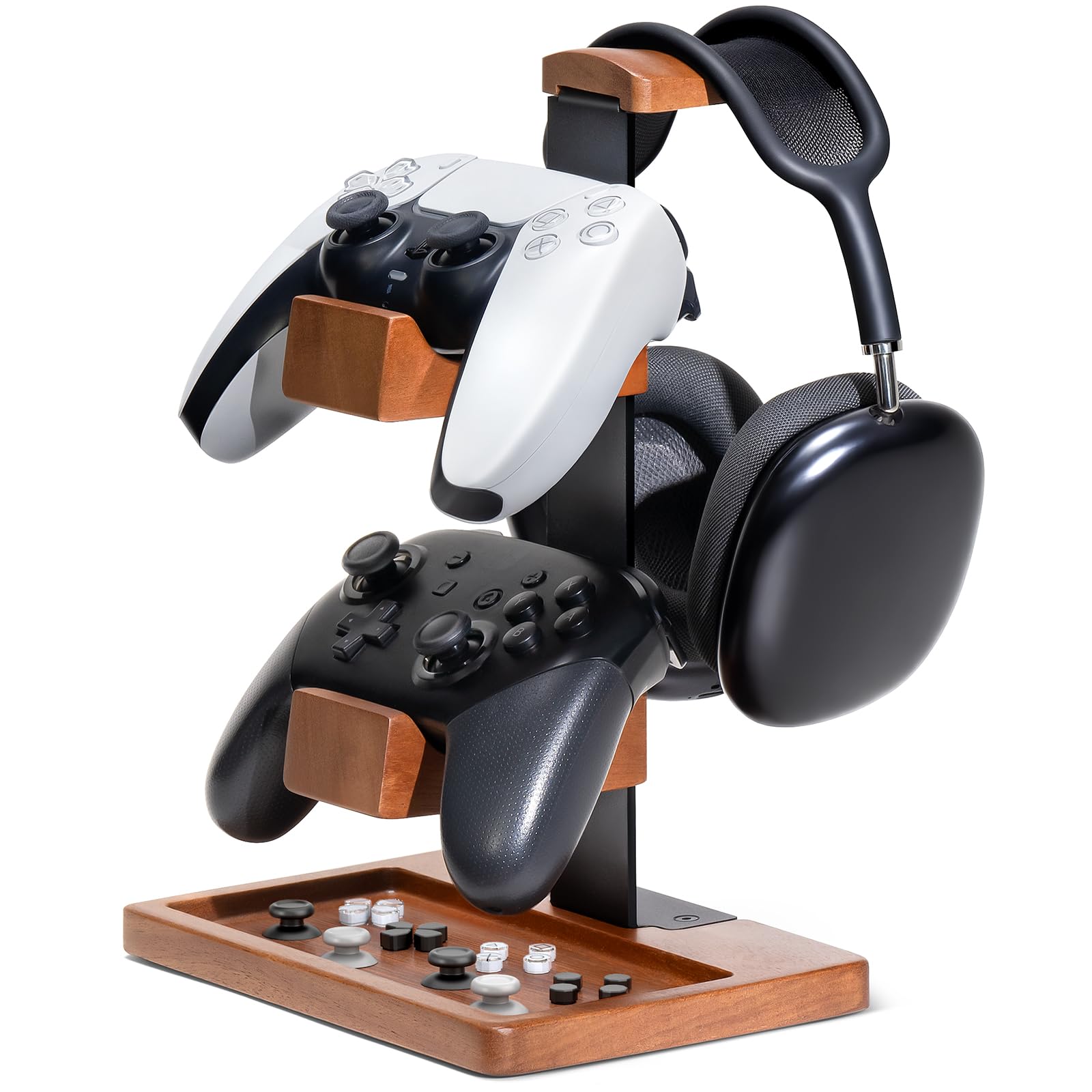
Eight controllers and a headset is a lot of plastic to park, and the Kytok takes the whole lot in a tower about eight inches square. That's the deal it offers: the space it eats is vertical, the sliver behind a monitor or the gap beside a console, rather than the front of the desk where your keyboard lives. For anyone with pads from three or four different consoles, this is the stand we point to first.

Assembly is four steps and no tools. The tiers stack onto the spine one at a time, and they come off again, which is how you shrink the tower to two levels when half the collection migrates to another room. We like that the height stays a decision you can revisit rather than something sealed at the factory.

The headset hook tops the spine, and clips down both sides hold charging cables so they stop dropping behind the desk. Small thing, but it's the difference between a stand that tidies the surface and one that tidies the mess you can't see.

The base plate carries real weight, so a full load on four tiers doesn't leave it top-heavy, and the matte black finish doesn't collect fingerprints the way gloss does. It is more tower than a two-pad household needs, and the compact picks below cover that with far less furniture.

Pros

  • Holds up to eight controllers plus a headset
  • Cable clips on both sides of the spine
  • Tiers come off to shrink the tower
  • Weighted base stays planted when loaded

Cons

  • Cradles are shallow, so pads can shift
  • Tier spacing changes only by removing a tier
Our verdict

If you want one tidy tower for a shelf of pads plus a headset, this is the one we point to: four tiers, eight slots and cable clips at a midrange price.

Check Latest Price
2

Best for Small Desks

Monzlteck Desktop Controller Holder

93 /100
Lab Score Outstanding

Key details

Base
Weighted, padded
Tiers
2
Material
Metal and plastic
Controller Capacity
4
View on Amazon

The base is the first thing you notice: heavy enough that lifting a controller off the top row doesn't drag the whole stand toward you. Four hooks are stacked in two layers, so a pad on the lower row tucks under the one above instead of spreading out across the desk.

That's the whole pitch, and it holds up. Four controllers on a footprint small enough for an end table, soft plastic hooks that won't mark a glossy shell, and a padded base that doesn't skate when you slide it back against the wall. This is the stand we suggest when the desk has room for exactly one object and that object has to earn it.

Switch Pro, PS5 and Xbox pads all hang by the grips, and the two-layer arrangement means a bulky one on the bottom doesn't foul the one above it. One screwdriver and two steps get it assembled, and the plain black finish sits quietly next to anything else on the desk.

Pros

  • Four controllers on two compact tiers
  • Weighted base resists tipping and sliding
  • Soft plastic hooks protect glossy shells
  • Padded base won't mark a desk

Cons

  • No cable hooks or dedicated headset rest
Our verdict

For two to four pads on a desk with no spare room, this is the compact stand we recommend: four soft hooks, a weighted base, and one screwdriver's worth of assembly.

Check Latest Price
3

Best with Lights and Ports

KDD Rotatable Headset Stand

92 /100
Lab Score Outstanding

Key details

Ports
2 USB, 3.5mm, Type-C
Dimensions
12.2 x 7.87 x 1.88 inches
Lighting Modes
9
Controller Capacity
Up to 4
View on Amazon

Nine light modes and a swiveling column make the KDD the one stand here that announces itself. If the rest of your setup already glows, it belongs; if it doesn't, this will be the brightest object on the desk. We ended up leaving it on one static color and ignoring the cycling modes entirely.

The arms detach, which is the part worth understanding. With both fitted you get a headset on the top cradle and a controller on each arm; with them off, the column takes four pads around its base. The column swivels, so reaching the pad at the back doesn't mean standing up to fish for it.

Two USB ports, a 3.5mm jack and a Type-C port run through the base, which is what makes this one a desk fixture rather than shelf decoration: a headset dongle, a phone, a cable you're tired of hunting for. It's hardened plastic assembled from three parts in well under a minute, and it's the widest thing in this guide, so measure the shelf before you commit.

Pros

  • Nine lighting modes with one-button control
  • Arms detach for four-controller or headset setups
  • USB, 3.5mm and Type-C ports in the base
  • Column swivels for easy reach

Cons

  • Not a charging dock despite the USB ports
Our verdict

If your desk is the display and you want lights, a swivel and a USB hub in one tower, this is the stand we hand people, as long as you don't expect it to charge a controller.

Check Latest Price
4

Best for Six Controllers

KELJUN 3-Tier Controller Holder

92 /100
Lab Score Outstanding

Key details

Tiers
3
Material
Metal
Dimensions
6.69 x 6.69 x 14.96 inches
Controller Capacity
Up to 6
View on Amazon

Three tiers that slide up and down the spine, and hooks that turn on their mounts. The KELJUN is built for a collection whose shape keeps changing.

That adjustment is the reason to choose it over a fixed tower. A pad in a charging grip takes more clearance than a bare one, and you can raise or drop a tier to suit instead of leaving a gap you can't use. Six controllers is the realistic load, with room left for a headset.

White is the other half of the pitch. On a light desk or a living-room shelf it all but disappears, which is more than the black towers here can claim, and the metal frame carries enough weight at the bottom to feel planted rather than perched.

Tool-free assembly takes about half a minute, and the low center of gravity keeps a full load upright even when the tiers are unevenly stacked. It's the most adjustable stand in this guide, and for a collection that mixes chunky and slim pads, that flexibility is worth more than extra slots.

Pros

  • Tiers raise and lower to fit different pads
  • Holds up to six controllers plus a headset
  • White finish disappears on a light desk
  • Tool-free assembly in about half a minute

Cons

  • Controllers can slide off the shallow hooks
  • Tiers work loose and need re-tightening
Our verdict

For a mixed collection that keeps changing shape, this adjustable white tower earns its place: six controllers, tiers you can raise or drop, and no tools.

Check Latest Price
5

Best-Looking Wood Stand

UPERGO Walnut Headphone Stand

92 /100
Lab Score Outstanding

Key details

Holds
One controller and one headset
Storage
Hollow base tray
Material
Walnut wood and metal
Dimensions
4.72 x 8.27 x 6.3 inches
View on Amazon

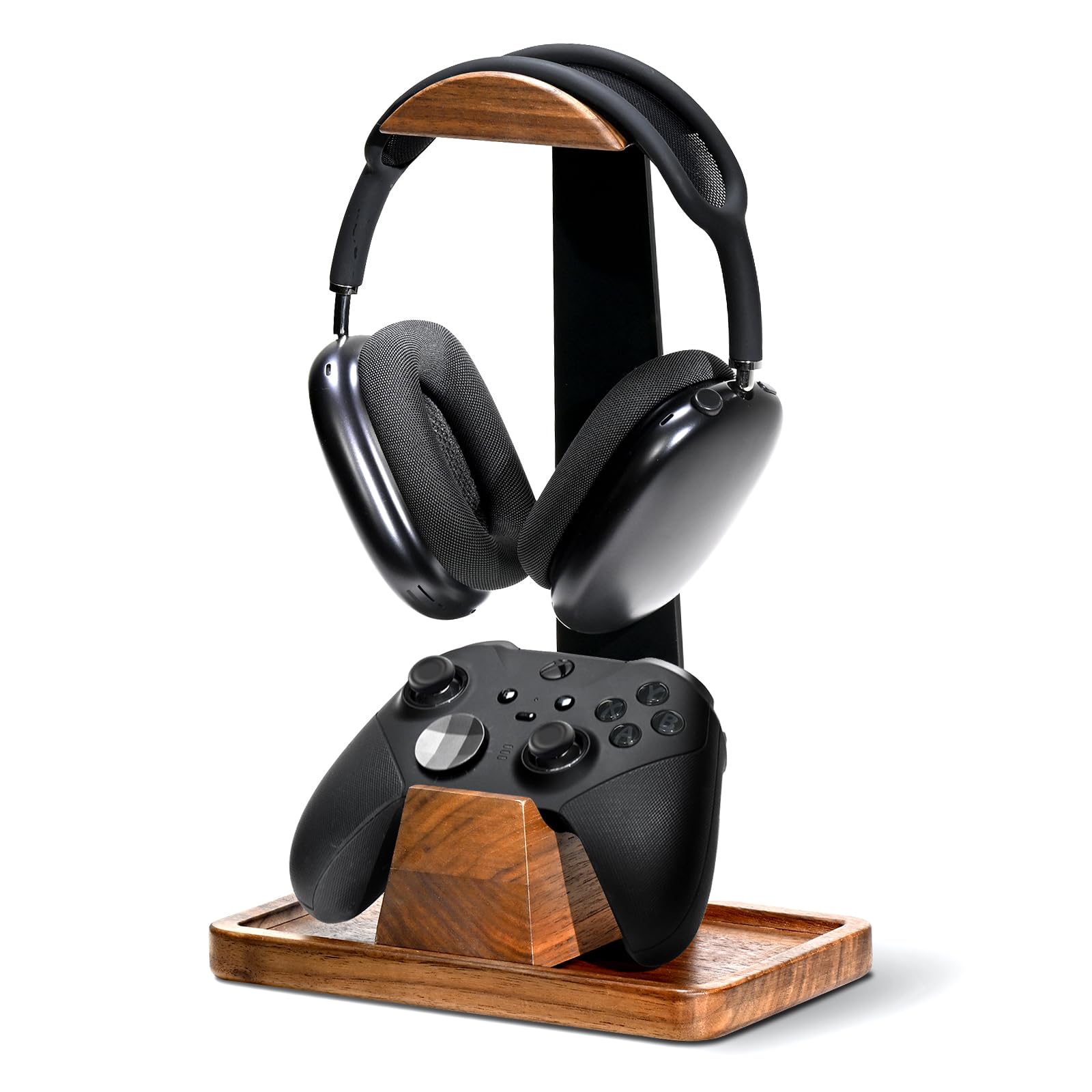
Walnut and black metal, and the first thing anyone notices is that it doesn't look like gaming gear. That's the point. On a desk that doubles as a bookshelf or a video-call background, this is the stand that can stay out when company comes.

The base is hollow, which gives you a tray for earpads, a spare cable or a couple of SD cards, the small stuff that otherwise lives loose in a drawer. The arc on top is wide enough for bulky over-ear headsets, and the controller cradle sits in front of it, so both live on one small footprint.

The cradle isn't fastened down. It lifts out for cleaning and it can shift when you set a pad into it, which is the trade for being able to move it out of the way. Three parts snap together without tools. It costs the most here, and what you're buying is the wood and a stand you don't want to hide.

Pros

  • Solid walnut and metal instead of plastic
  • Hollow base doubles as a storage tray
  • Wide arc takes bulky over-ear headsets
  • Snap-together assembly with no tools

Cons

  • Holds just one controller
Our verdict

If the stand is going to be seen, this is the one we point to: real walnut, a hidden tray, and a cradle that holds a controller and a headset without looking like a peripheral.

Check Latest Price
6

Best Budget Two-Controller Stand

Niubixx 2-Tier Controller Holder

91 /100
Lab Score Outstanding

Key details

Weight
9.88 oz
Assembly
None required
Material
Anodized aluminum
Controller Capacity
2
View on Amazon

No assembly. It arrives in one piece with both tiers already set at their angles, no spine to thread, no screws, no bag of hardware to lose.

Aluminum with a polished silver finish, the Niubixx is the stand that disappears into a desk rather than decorating it, and it's the one we suggest for two pads and a monitor. Rubberized pads sit under the base and on both cradles, so it doesn't skate and the controllers don't knock against bare metal.

The gap between the tiers is the thing to check before ordering. It's cut for standard pads, so a controller in a thick silicone cover or a charging grip can sit high or not seat at all; plain PS5, PS4 and Xbox pads drop in without complaint, and a bulky one is easier on the lower tier.

Pros

  • Arrives fully assembled
  • Rubberized pads on base and cradles
  • Anodized aluminum at a budget price
  • Two tiers in a small footprint

Cons

  • Only two controller slots
Our verdict

For two controllers and no patience for assembly, this aluminum stand is the one we reach for: it arrives built, and it looks more expensive than it is.

Check Latest Price
7

Tight Desks

HUMANCOZY Wood Controller Stand

88 /100
Lab Score Excellent

Key details

Assembly
Three screws
Material
Solid wood and metal
Dimensions
7.6 x 5.1 x 10.2 inches
Controller Capacity
2 plus headset
View on Amazon

The tray in the base is the detail that won us over: a shallow well just big enough for spare thumbstick caps, a charging cable, or the dongle you keep losing. It's the kind of thing you only miss once you've had it.

Above it sit two controller slots and a headset perch, in solid wood and metal rather than plastic. Three screws hold the whole thing together, and at just over ten inches tall it doesn't loom over a monitor the way a four-tier tower does.

On a small desk it earns its place. The base is roughly the size of a hardback, so a pad and a headset come off the desktop without the stand eating the space you just cleared, and the tray catches whatever was living in that space before.

Real wood at a midrange price, and the difference from the walnut UPERGO comes down to what it holds: two controllers instead of one, a plainer finish, and less money. For a pair of pads and a single headset, we haven't found a tidier way to spend the space.

Pros

  • Solid wood and metal, not plastic
  • Base tray for thumb grips and small parts
  • Two controller slots plus a headset perch
  • Three screws to assemble

Cons

  • Holds only two controllers and one headset
Our verdict

For a two-controller household that wants wood on the desk instead of plastic, this is the stand we recommend: two slots, a headset perch, and a tray for the small stuff.

Check Latest Price
8

Single PS5 Pad

Skull & Co. Phantom Stand

92 /100
Lab Score Outstanding

Key details

Weight
2.47 oz
Material
Transparent plastic
Dimensions
5.51 x 3.94 x 2.01 inches
Compatibility
PS5 controller
View on Amazon

One controller, PS5 only, and nothing else. The Phantom Stand is the narrowest pick here, and for a desk with a single DualSense on it, that narrow scope is the whole appeal.

It's clear plastic, so a white controller seems to float above the desk, and the cradle weighs 70 grams, which means you place a pad into it rather than dropping one in. It's shaped for the DualSense specifically, and that's why it looks cleaner than the adjustable stands that have to take everything.

The trade is plain: one pad, no headset hook, no room to grow. What it does, it does without clutter, and the base is barely wider than the controller sitting in it, so nothing about the stand competes with the thing on display.

Pros

  • Clear plastic keeps the controller the focus
  • Weighs 70 grams and moves easily
  • Small base takes almost no desk space

Cons

  • Holds one PS5 controller only
Our verdict

If you own exactly one DualSense, this clear cradle turns it into a display piece for the least money in this guide.

Check Latest Price

How We Tested Controller Stands

We started by gathering every stand we could find that was actually designed to hold controllers rather than repurposed from something else, then filtered by footprint, material, controller capacity, and price so the list covered everything from a single-controller desktop perch to a multi-controller rack. That left 14 stands, which we assembled and used for three months.

Assembly was timed with a stopwatch and a screwdriver set kept nearby. We noted which stands went together without tools, which needed a second pair of hands, and how the hardware felt going in, including stripped threads and inserts that spun before they tightened. Appearance we judged on the shelf rather than in the product photo: how the finish caught light on a wood console, whether seams showed at arm's length, and whether the thing read as furniture or as plastic.

Stability got the roughest treatment. We loaded each stand to its stated capacity, dropped controllers in from about a foot above, pulled one out one-handed, and bumped the table with a knee to see whether the whole unit crept toward the edge. For organization, we counted what actually fit, routed cables through each stand's pass-through, and checked whether a charging cable stayed plugged in with a controller seated. Versatility came down to whether it accepted different controller shapes, including third-party ones with battery packs attached, and whether it worked equally well on a desk, a console, or a wall. At three months we set what each one cost against how it felt in the hand, since a stand that flexes when you grab a controller isn't a bargain at any price.

How to Choose a Controller Stand

Count controllers, then measure the gap above

Six pads or more and you want a tower, because stacking is the only way to keep that many controllers in one place without claiming half the desk. Two to four and a low stand is steadier and easier to reach into. The measurement that catches people is height: the stands here run from about six inches to nearly fifteen, and a tower that clears a monitor shelf in the store may not clear the one at home. Check the clearance above your chosen spot before you order.

Hooks hang, cradles cup

A hook takes a controller by the grips and lets it hang, which is how a tower fits four pads into the height of two. A cradle cups the body from underneath: steadier, but it claims more room per controller. Hooks are the ones that let a pad slide when you set it down one-handed, so if you like to drop a controller in from above, look for deep hooks or a cradle instead.

Either way, a thick silicone cover or a charging grip changes how a pad sits. Check the gap between the cradle arms rather than assuming your controller fits the way the one in the photo does.

Bases, feet and staying put

What goes wrong with a stand is usually movement: it slides when you pull a controller out with one hand, or it tips when a heavy headset goes on top. A weighted base and rubber or silicone feet are what prevent both. Weight is the one place where more is straightforwardly better, and it's easy to compare: the stands here run from 70 grams to nearly a kilo, and the heavier ones are the ones you can load without thinking about it.

Assembly and how much you want it seen

Assembly ranges from nothing at all to three screws to a four-step tower, and none of it is hard, but a stand you have to build is a stand you'll move less often. Material is really a question about the room. Aluminum and black plastic disappear beside a console; walnut and white read as furniture and survive a living room. We care more about the finish than the spec sheet suggests you should, because a stand you like looking at is one you keep tidy.

Frequently Asked Questions

Final Verdict

Start with the Kytok. Four tiers, eight slots, a headset hook and cable clips, all inside a footprint about eight inches square, so a collection spanning several consoles clears the shelf at once.

If the stand sits somewhere guests see it, the walnut UPERGO is worth its premium; if you keep two pads and a headset on a small desk, the HUMANCOZY holds them in less space and in real wood; and if assembly is the thing you resent most, the Niubixx arrives built and costs the least of the two-controller picks.