Best Ergonomic Gaming Keyboards of 2026

An ergonomic gaming keyboard is supposed to make long sessions easier, but the first hour can feel like a compromise: split layouts, odd angles, and keys where your fingers don't expect them. The real test is whether the comfort holds up after the novelty fades — and whether the board still feels solid, quiet enough for a shared room, and reliable when a ranked match goes long. I spent six months with 12 ergonomic gaming keyboards, playing, typing, and swapping wrist rests until the differences were obvious. The right one eases wrist strain without making you relearn how to type.

What surprised me was how much the small stuff mattered: a softer keypress, a tenting angle that stayed put, and lighting that helped in a dim room rather than turning it into a disco. Louder isn't better, either — a crisp, controlled sound beats a hollow clack in a shared space. Customizability matters only if the software doesn't fight you, and value for money came down to the details in the box. Below are the boards that earned a permanent spot on my desk.

1

Best Overall

LEOBOG A75 Alice

87 /100
Lab Score Excellent

Key details

Layout
Alice, 75%, 83 keys
Weight
3.4 lb
Switches
Linear, hot-swap
Connection
2.4GHz, Bluetooth 5.0, USB-C
View on Amazon

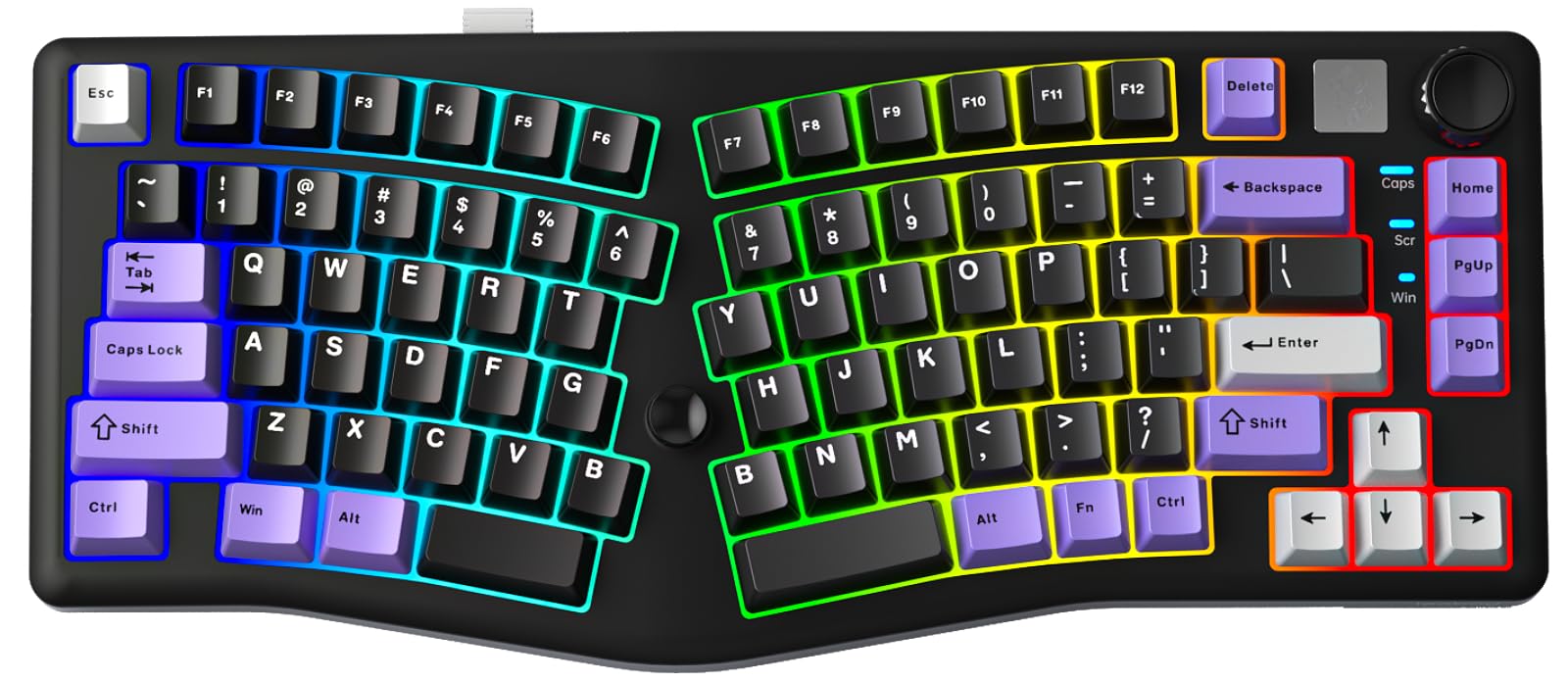
The thumb joystick tucked beside the A75's spacebar is the detail that won us over. It stands in for the arrow and enter keys, and the driver lets you remap it, so a 75% board stops demanding that you reach into a function layer in the middle of a match. That is the whole pitch of this keyboard in miniature: ergonomic geometry that does not cost you a gaming input. The Alice halves angle inward so your wrists sit straighter, and the 83-key frame leaves a wide strip of desk for the mouse.

Feel is where it surprised us. A gasket mount with four layers of foam and silicone under the plate turns each press into a soft, low thump rather than a hard clack, deep enough that it reads as a much pricier board in a quiet room. The switches are light and linear, the PCB is hot-swappable if you want a heavier spring later, and 3.4 pounds of body keeps the whole thing from skating during fast strafing.

Connections cover what we want in a gaming board: the 2.4GHz dongle for play, Bluetooth 5.0 for a work laptop, and USB-C when the battery runs down, with up to five devices paired and a toggle between them. There is RGB in 16 presets and a set of music-reactive modes we cheerfully ignore.

The one gap is the number pad. Eighty-three keys means no numpad, and if your day involves entering figures, that is the reason to look at the Alice98 below rather than this one. Everything else about the layout we were glad to live with, including the trade of a little familiarity for wrists that stop complaining by mid-afternoon.

Pros

  • Alice angles keep wrists straighter
  • Remappable thumb joystick for arrows
  • 2.4GHz, Bluetooth, and wired in one board
  • Gasket mount with four damping layers

Cons

  • No Insert or End key out of the box
  • ABS case rather than metal
Our verdict

We recommend the A75 to most gamers: Alice wrist comfort, low-latency 2.4GHz wireless, and a footprint that leaves your mouse arm room.
Check Latest Price
2

Best With a Numpad

MechLands Feker Alice98

80 /100
Lab Score Excellent

Key details

Layout
Alice, 98 keys with numpad
Switches
Linear, hot-swap
Connection
USB-C wired
Programmability
VIA
View on Amazon

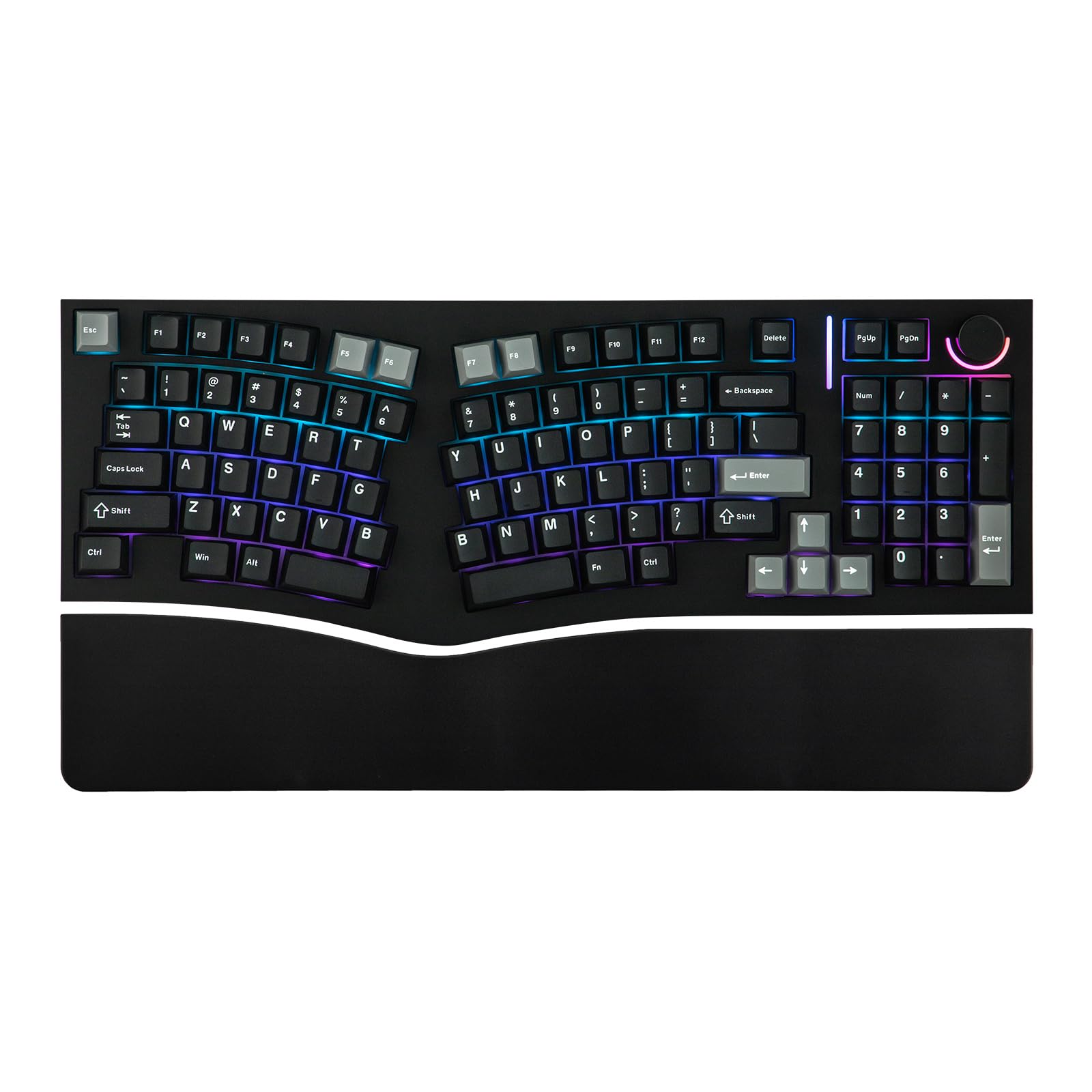
An Alice keyboard usually asks you to give up the number pad. The Alice98 does not. Ninety-eight keys fold a numpad, arrows and a function row into the same inward-angled shape that keeps your wrists from collapsing toward each other, and the body measures 17.15 inches wide, roughly what a full-size board occupies but with geometry a full-size board will not give you.

That combination is why we keep it for the spreadsheet-by-day, match-by-night crowd. VIA support means layers get built in a configurator rather than a brand app, so a game layer travels with the board instead of living on one PC. The mount is gasket, the plate is polycarbonate, and five layers of padding sit underneath, which is why it lands on the deep, thocky side rather than the clicky one. Five-side dye-sub PBT caps in a Cherry profile finish a package that feels more expensive than it is.

It is wired, USB-C, and for a gaming board that is the right call: nothing to charge, nothing to pair, no dongle to lose. The linear switches are light under the finger, and the hot-swap PCB means a heavier switch is a two-minute swap rather than a soldering project.

The risk to plan for is arrival condition. A key that never registers out of the box is the thing that goes wrong, and the socketed switches give you a way to diagnose it: pull the dead switch, drop in a known-good one, and see whether the fault follows the switch or stays with the board. If a replacement also fails, take the return rather than living with workarounds. The width, meanwhile, is real, so measure before you commit a small desk to it.

Pros

  • Numpad inside an Alice layout
  • VIA remapping instead of a brand app
  • Gasket mount and five padding layers
  • Hot-swap PCB with PBT keycaps

Cons

  • Wired only, no wireless mode
  • Full-size width crowds a small desk
Our verdict

We keep the Alice98 for anyone whose work runs on numbers: full numpad, Alice comfort, and VIA remapping for roughly what the top pick costs.

Check Latest Price
3

Best Full-Size Split

Cloud Nine C989M

85 /100
Lab Score Excellent

Key details

Keys
104, full-size
Switches
Kailh Brown, tactile
Connection
USB wired
Split Separation
Up to 8 in
View on Amazon

Eight inches does not sound like much until you have sat with it. That is how far apart the C989M's halves travel, and it is enough to line each one up under a shoulder instead of forcing your arms into a V, which is the thing a one-piece Alice board cannot do however well it is shaped. It is also the most expensive keyboard we are recommending, and that separation is what the money buys.

The rest is built for long sessions. Seven degrees of tenting are molded into the wrist rests, so there is no add-on kit to lose or forget, and the full 104 keys come with a block of programmable macro keys on the left edge that earn their space in MMOs and repetitive work tasks alike. Kailh Brown switches give a distinct bump on the way down, which we prefer for typing-heavy days, and the backlighting is bright enough to read comfortably in a dim room.

It is a loud board, and that is the trade for those tactile switches in a wide case: the clatter carries across a room and straight into an open mic, so push-to-talk is worth planning for. The other caveat is reliability, where intermittent dropouts on one half are the failure to know about, which makes buying from a seller with a straightforward return window the sensible hedge. When it is working, it puts your arms in the most natural position in this group, and for anyone whose shoulders ache by noon that settles the argument.

Pros

  • Halves separate up to 8 inches
  • Seven degrees of tenting built into the rests
  • Full 104 keys with programmable macro keys
  • Tactile switches suit typing and games

Cons

  • USB wired only
  • 28.6-inch width needs a wide desk
Our verdict

The C989M is our answer when shoulder width, not wrist angle, is the problem: no other board here separates far enough to straighten your arms.

Check Latest Price
4

Best Wireless Split

RK Royal Kludge S70

79 /100
Lab Score Very Good

Key details

Layout
75% split, 74 keys
Battery
3150mAh
Tenting
8 adjustable feet
Connection
2.4GHz, Bluetooth, USB-C
View on Amazon

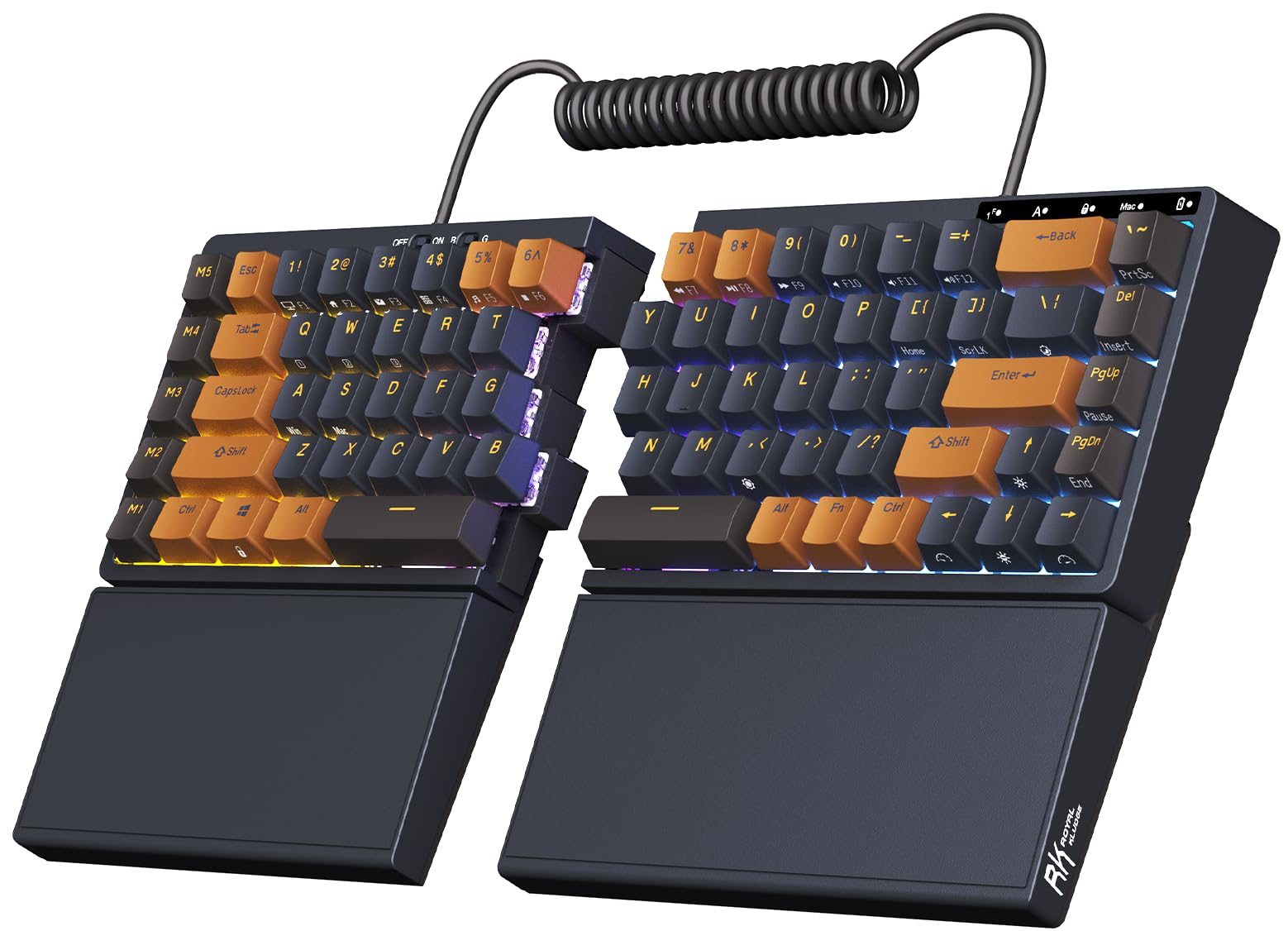
Two separate halves, eight small feet, and nothing joining them on the desk: the S70 is the split to try if the premium split boards feel like a commitment. Each half tents on its own feet, so you can raise the inner edge without hunting for a tenting kit, and you can slide them out to shoulder width and back again between matches without a cable snagging on the mouse.

The 75% layout is the other half of the argument. Seventy-four keys keep the mouse close, the tactile brown switches give a light bump without the stiffness some tactile boards fight you with, and the PBT caps feel like they will outlast the rest of the board. Battery life is rated at up to two weeks with the backlighting off, and with a 3150mAh cell that is a weekend charging habit rather than a nightly one.

Where it gets shaky is the radio. Bluetooth pairing is the weak point, with boards that refuse to go back into pairing mode after a reset, so the 2.4GHz dongle is the safer bet for play anyway. A key that stops registering is the other thing to watch. Neither reaches you if you leave it on the dongle and treat the wireless modes as a convenience for the laptop, which is how we would run it.

Pros

  • Halves tent independently on eight feet
  • 3150mAh battery rated up to two weeks
  • Left half works alone as a wireless pad
  • 75% layout keeps mouse room

Cons

  • Bluetooth pairing can fail after a reset
Our verdict

For a true split without premium money, we suggest the S70: independently tented halves, a 75% layout, and a battery rated at up to two weeks.

Check Latest Price
5

Shallow Desks

Cloud Nine ErgoTKL

78 /100
Lab Score Very Good

Key details

Keys
87, tenkeyless
Switches
Kailh Box Brown, tactile
Connection
USB wired
Split Separation
Up to 6.5 in
View on Amazon

The ErgoTKL rings. A metallic ping follows harder keystrokes, and it is the kind of sound you cannot unhear once you have noticed it; a desk mat under the board takes most of the edge off, but this is not a quiet keyboard and it is not a good fit for a shared room or a live mic. What you get in exchange is the tidiest split here: 87 keys in a tenkeyless frame, halves that slide out to 6.5 inches, and seven degrees of slope molded into the palm supports so nothing has to be clipped on.

The aluminum smart wheel is the detail we ended up using more than the backlighting. It handles volume, scrolling and application switching, and the software lets you assign it something else entirely, which makes it the rare media control that earns its place on a gaming board. There is a USB pass-through for a mouse or a headset dongle, and the spare M keycaps let you mark the keys you reassign so you are not hunting for them later.

The awkward part is positioning. It sits close in price to the C989M, which separates farther and adds a number pad, so the smaller frame has to be worth something to you, and on a shallow desk where a 28-inch board will not fit, it is. The two-year warranty is longer than most here, and on a board this heavily handled that is worth weighing alongside the switches.

Pros

  • TKL frame with 6.5-inch split
  • Aluminum smart wheel for volume and apps
  • Seven degrees of slope with palm support
  • USB pass-through and two-year warranty

Cons

  • USB wired only
  • Palm pads and front feet wear over time
Our verdict

The ErgoTKL makes our list for shallow desks: a 6.5-inch split in a tenkeyless frame, as long as a metallic ring and a cable do not bother you.

Check Latest Price

How We Tested These Ergonomic Gaming Keyboards

We started by narrowing a long list of ergonomic gaming keyboards to layouts that addressed wrist angle — split, Alice-style, tented, and built-in wrist rests — and filtered out models with hard-to-find replacement parts, vague software support, or specs that didn't match their stated dimensions. From that shortlist, I spent six months with 12 boards, using each for full workdays of typing and evening gaming sessions, including a few late-night ranked runs where every dropped input is annoying.

The first test was always the desk setup. I adjusted every board to its highest and lowest tenting angle, typed for two hours with and without the wrist rest, and noted where pressure built up at the heel of my hand. I also checked build quality by flexing the frame, wiggling keycaps, and carrying each board between rooms; a creak or a loose key showed up quickly. For functionality and customizability, I remapped keys, built macros for a few games, dimmed the lighting in a dark room to check legibility, and then reopened the software a week later to see whether my settings had survived.

Sound was judged at desk distance during fast typing and during a voice call, with a phone meter and my own ears — some boards were crisp and controlled, while others produced a hollow clack that carried into the next room. To assess reliability and value, I used each board daily for at least a few weeks, unplugged and reconnected it repeatedly, and compared what came in the box — wrist rest, cable, keycap puller, software — against what it cost. The boards that stayed on my desk were the ones that felt better at hour six than at hour one.

How to Choose an Ergonomic Gaming Keyboard

A True Split and an Alice Board Solve Different Problems

A real split, like the Cloud Nine boards or the RK S70, puts two independent halves on your desk and lets you set the distance: up to 8 inches on the C989M, 6.5 on the ErgoTKL. That is the fix for shoulder tension, because you can park each half under its own shoulder instead of pulling your arms inward all day.

An Alice layout, like the A75 or the Alice98, is one angled piece. It stops your wrists collapsing toward each other without asking you to relearn where the halves live, and it travels far more easily, but it cannot widen. If your shoulders are the problem, only a split reaches it; if it is wrist angle, Alice is the gentler switch.

Match the Layout to Your Desk and Your Number Pad

Key count is really a question about what you give up. A 75% board of 74 to 83 keys keeps the mouse close, a 98-key Alice adds a number pad without going full width, and a full-size 104-key board like the C989M gives you everything across 28.6 inches.

The trap is the word compact, which usually describes length while it is width that decides whether your mouse hand has room. Measure from where the board's right edge will sit to where your mouse actually travels, and check the listed width in inches before anything else.

Wireless Only Counts If It Is the Right Wireless

Bluetooth is handy for hopping to a laptop, but for play you want the 2.4GHz dongle or a cable. Tri-mode boards like the A75 and the S70 give you all three and remember several devices, which is the version worth paying for.

Battery is the trade. The S70's 3150mAh cell is rated for up to two weeks with the lighting off, and RGB shortens that considerably. If the board never leaves your desk, a wired USB-C model is one less thing to think about and one less thing to fail.

Switches, Damping, and the Sound You Will Live With

Tactile switches give you a bump on the way down; linear switches are smoother and generally quieter, which is why people who stream tend to prefer them. The bigger influence on how a board sounds is the mounting, and gasket-mounted designs with foam and silicone layers, like the A75 and Alice98, thump instead of clack.

Buy for the room you will use it in. A loud tactile board in a shared space or on an open mic becomes a daily irritation, and a hollow case can add a ring no software setting removes. A mat or a folded towel under the board is the cheap first test.

Frequently Asked Questions

Final Verdict

The A75 is the board we point most people to. It is the only pick here that pairs a wrist-friendly Alice angle with low-latency 2.4GHz wireless and a frame short enough to leave your mouse arm room, and the remappable joystick means the smaller layout does not cost you the arrow keys.

If your work runs on numbers, move up to the Feker Alice98 and its numpad. If your shoulders rather than your wrists are what aches, only a true split reaches that, and the choice is simple: the C989M for full-size and maximum separation, the S70 if you want the same idea wireless and lighter on the wallet.