12 Best Silent Gaming Keyboard of 2026: Real Quiet Picks Without the Hype

Find the silent gaming keyboard that actually delivers on quietness for late-night gaming or shared spaces, based on real user consensus.

Most keyboards marketed as silent still produce a thock or clack that can annoy roommates. The gap between marketing and real-world noise is especially wide in mechanical keyboards. This guide focuses on models where buyers consistently report genuine quietness, whether membrane or mechanical, so you can game without disturbance.

The quietest keyboards use either rubber dome dampening (membrane) or heavily lubricated switches with foam layers (mechanical). Membrane options like the SteelSeries Apex 3 are impressively silent, while mechanicals like the Cherry MX 3.0S offer a satisfying feel with far less clatter. The key is matching the right technology to your tolerance for noise.

1

Best Overall

SteelSeries Apex 3

93 /100
Lab Score Outstanding

Key details

Switch Type
Membrane (Whisper Quiet)
Noise Output
Very quiet – near-silent
Build Quality
Good (plastic, magnetic wrist rest)
Extra Features
Wrist rest, IP32 water resistance
View on Amazon

The SteelSeries Apex 3 delivers on its whisper-quiet promise through a well-dampened membrane design that produces minimal keystroke noise — a rare feat at this price. The magnetic wrist rest provides consistent palm support, and the IP32 water resistance adds peace of mind against spills. Build quality feels solid for an entry-level board, with a smooth matte finish that resists fingerprints.

Users consistently confirm the near-silent operation in shared spaces and late-night sessions, with the cushioned bottom-out reducing clatter even during rapid typing. The 10-zone RGB illumination adds a mild ambiance but does not brightly backlight the key legends — a tradeoff that matters more in dark rooms than under normal lighting. The wired USB connection ensures zero latency for gaming.

This keyboard suits budget-conscious gamers and office workers who prioritize silence over flashy per-key lighting or mechanical tactility. It is a comfortable step for first-time membrane-to-mechanical switchers wanting a soft, quiet feel. Note that the backlight legends are dimly lit in low-light conditions, and a small number of units may develop unresponsive keys within a year of use — worth checking return policies for peace of mind.

💡 For best backlight visibility, keep the keyboard under moderate ambient lighting rather than a completely dark room.

Pros

  • Exceptionally quiet keystrokes suitable for shared environments
  • High build quality with a smooth matte keycap texture
  • Excellent value
  • Magnetic wrist rest adds reliable ergonomic support

Cons

  • Some units may develop unresponsive keys or stop working within a year
Our verdict

If silence, comfort, and a reasonable price are your priorities, this keyboard delivers without unnecessary frills — just be aware of the dim legends and possible longevity variance.

Check Latest Price
2

Best Mechanical Silent

Cherry MX 3.0S Silent Red

87 /100
Lab Score Excellent

Key details

Switch Type
Cherry MX Silent Red (linear)
Noise Output
Quiet for mechanical
Build Quality
Excellent (aluminum housing)
Extra Features
Per-key RGB, full rollover
View on Amazon

The Cherry MX 3.0S delivers a linear mechanical typing experience that is noticeably quieter than standard mechanical boards, thanks to Cherry’s proprietary Silent Red switches and integrated sound dampening. The extruded aluminum housing gives it a dense, premium feel that resists flex during heavy use — a clear step up from plastic chassis keyboards at a similar price.

This board is best suited for mechanical keyboard fans who want the smooth, responsive travel of a linear switch without the loud clatter typical of the category. The quiet operation is genuine for a mechanical, but it still produces a soft thock that will be audible in a very silent room — it won’t match the near-silence of the top-ranked SteelSeries Apex 3 membrane. Note that the cable is fixed and no wrist rest is included, so plan your desk setup accordingly. A small percentage of units may arrive with inconsistent key registration or double-typing; checking each key on arrival is wise.

Pros

  • Quiet linear switches with dampening
  • Rigid aluminum frame that gives the keyboard a hefty, stable typing feel
  • Smooth, responsive keystrokes described as silky by users

Cons

  • Fixed cable and no wrist rest
  • Occasional key switch defects out of the box, such as double-typing or unresponsive switches
Our verdict

If you want a mechanical keyboard that is genuinely quiet without sacrificing linear switch feel and aluminum build quality, the MX 3.0S fits — just be prepared to live without a detachable cable or bundled wrist rest, and inspect the unit early for any switch defects.

Check Latest Price
3

Best Wireless Silent

AULA F99 Pro Silent

89 /100
Lab Score Excellent

Key details

Switch Type
Silent linear (gasket mount)
Noise Output
Near-silent – thocky
Build Quality
Excellent (gasket mount, foam)
Extra Features
Wireless, hot-swap, 8000mAh battery
View on Amazon

The AULA F99 Pro differentiates itself from membrane options like the SteelSeries Apex 3 by delivering a genuine mechanical feel with a near-silent ‘thock’ sound. Its gasket mount with five-layer dampening, pre-lubed linear switches, and hot-swap capability allow customization without soldering. The 8000mAh battery supports extended wireless sessions over BT or 2.4GHz, and USB-C keeps charging simple.

This keyboard is best suited for gamers and office workers who want wireless quietness in a mechanical form factor without spending a premium. Two compromises stand out: the keycap legends do not shine through, so backlighting only glows around the keys, reducing legibility in dark rooms. Additionally, a small chance of bent pins or unresponsive keys out of the box has been noted, making an inspection on arrival advisable.

The combination of a large battery and hot-swap socket adds flexibility that membrane alternatives cannot match. For those who prioritize silence but want the tactile feedback of a mechanical switch and the convenience of wireless, the F99 Pro delivers where many budget mechanicals fall short.

💡 Use a desk lamp if you frequently type in low light — the backlighting won’t illuminate the keycap legends.

Pros

  • Extremely quiet ‘thock’ ideal for shared workspaces and late-night sessions.
  • Solid typing feel from gasket mount and pre-lubed linear switches.
  • Tri-mode wireless, hot-swap sockets, and 8000mAh battery offer strong value at this price.

Cons

  • Some units may arrive with bent pins or unresponsive keys, requiring exchange.
  • RGB mode switching uses onboard commands only
  • Keycap legends are not shine-through; backlighting glows around keys, not through legends.
Our verdict

If you want a quiet mechanical keyboard with wireless freedom and hot-swap flexibility, the AULA F99 Pro is a strong contender — just be prepared for non-shine-through keycaps and a small chance of initial QC issues.

Check Latest Price
4

Best Budget Runner-Up

HyperX Alloy Core RGB

93 /100
Lab Score Outstanding

Key details

Switch Type
Membrane (rubber dome)
Noise Output
Quiet but some ringing
Build Quality
Good (plastic)
Extra Features
Dynamic RGB, spill resistant, media keys
View on Amazon

The HyperX Alloy Core RGB is one of the quietest membrane keyboards at its price point, using rubber dome switches that dampen keypress noise effectively. While the top pick adds a magnetic wrist rest, the HyperX counters with a full-width RGB light bar that brings vivid lighting to any desk setup.

This keyboard is best for gamers upgrading from a basic office keyboard who want a quieter typing experience without mechanical clickiness. It is not completely silent – certain keys can produce a ringing sound, and key failures (such as the Windows key becoming unresponsive) have been noted in some units. These limitations make it better suited for casual gaming and general use than for ultra-quiet recording sessions.

Dedicated media keys and a spill-resistant design add everyday practicality. The membrane switches offer a soft, quiet landing, though they lack the crisp feedback of mechanical boards – a reasonable tradeoff for the silent operation and low cost.

💡 Place the keyboard on a desk pad to help dampen any ringing from keycaps in quiet environments.

Pros

  • Quieter than typical mechanical keyboards with satisfying tactile feedback.
  • Sturdy build with an attractive design and vibrant RGB lighting bar.
  • Cost-effective for the features offered, including dedicated media keys and spill resistance.

Cons

  • In a quiet room, some keys can produce an audible ringing sound
  • After extended use, occasional key failures like a stuck Windows key have been reported.
Our verdict

For budget-conscious gamers who prioritize quiet keys and RGB flair, the HyperX Alloy Core RGB delivers – just be aware that absolute silence and long-term key durability are not guaranteed.

Check Latest Price
5

Best for Macro Gamers

Razer BlackWidow V4 X

88 /100
Lab Score Excellent

Key details

Switch Type
Razer Yellow (linear, silent)
Noise Output
Quiet for mechanical
Build Quality
Excellent (metal plate)
Extra Features
6 macro keys, roller, Chroma RGB
View on Amazon

Six dedicated macro keys and Razer's quiet Yellow linear switches define the BlackWidow V4 X, a full-size mechanical keyboard that targets gamers who need extra programmable controls. Compared to slimmer TKL mechanicals that lack macro keys, this model adds a media roller, volume wheel, and per-key RGB for deeper customization.

In practice, the foam dampening and lubricated stabilizers keep keypress noise low enough for shared spaces, though the mechanical clatter is still present — quieter than standard mechanicals but not as whisper-quiet as membrane alternatives. The metal top plate and doubleshot ABS keycaps contribute to a premium feel, while per-key Chroma RGB adds visual flair.

This keyboard is best for gamers who want dedicated macro keys in a quiet mechanical package without losing tactile feedback. However, the large footprint (it spans nearly 18 inches) and occasional key responsiveness issues — some keys may become unresponsive or double-type after months of use — mean it requires ample desk space and a willingness to address potential hardware quirks.

💡 Measure your desk and allow for ample clearance — the keyboard's depth may overhang on smaller surfaces.

Pros

  • Quiet Yellow linear switches with foam dampening keep typing noise low.
  • Six dedicated macro keys and a media roller offer extensive customization via Razer Synapse.
  • Solid build with metal top plate and doubleshot ABS keycaps feels durable.

Cons

  • Full-size layout and metal construction add significant weight and width
  • Some keys may become unresponsive or double-type after several months of use, requiring attention.
Our verdict

For macro-focused gamers who value a quiet mechanical and don't mind a large desk footprint, the BlackWidow V4 X delivers solid performance — but those needing a long-term trouble-free experience may find membrane alternatives more predictable.

Check Latest Price
6

Customization

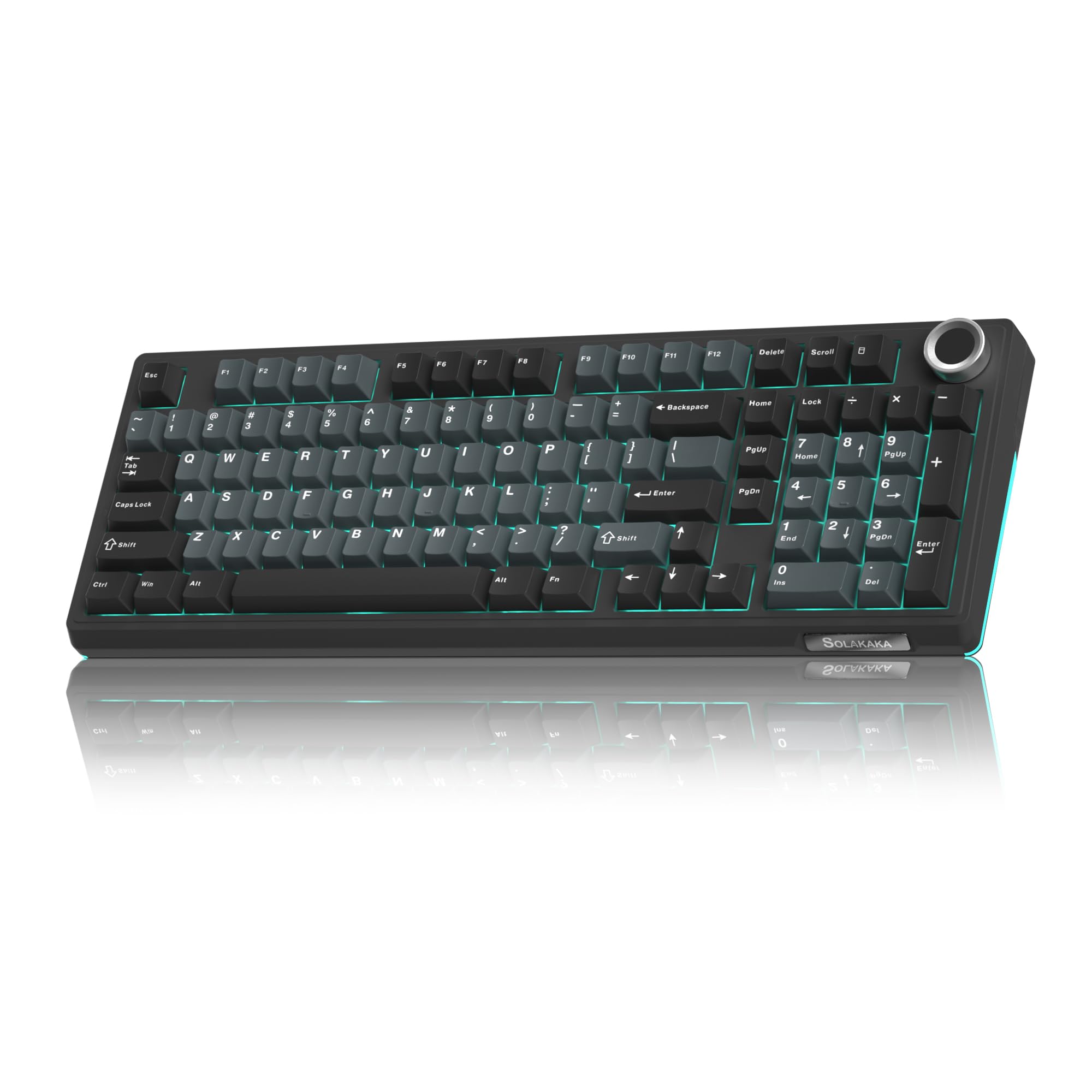
SOLAKAKA KI99 Pro

87 /100
Lab Score Excellent

Key details

Switch Type
Silent linear (hot-swap)
Noise Output
Very quiet – creamy
Build Quality
Excellent (gasket mount)
Extra Features
Wireless, hot-swap, 10,000mAh
View on Amazon

The KI99 Pro delivers genuinely quiet typing with a creamy thock that won't disturb others. Its 10,000mAh battery lasts weeks between charges, and the hot-swap board accepts 3- and 5-pin switches for customization. The keycaps do not let backlight through letters - the glow surrounds keys, not legends, limiting visibility in dim rooms. Long-term durability under heavy use is not yet confirmed, making this a strong pick for those who prioritize silent typing over long-term track record.

💡 Keep a desk lamp handy if you type in low light - the legends won't be visible on their own.

Pros

  • Super quiet typing with a satisfying thock - ideal for shared spaces.
  • Solid build with a weighty feel and premium materials.
  • Cost-effective for a wireless mechanical with gasket mount and hot-swap.

Cons

  • Keycap legends do not illuminate - backlight only glows around keys, not through letters.
Our verdict

A compelling option for well-lit offices or gaming setups where quiet typing and customization matter more than backlit legends or a long warranty history.

Check Latest Price
7

Budget iCUE

Corsair K55 CORE RGB

88 /100
Lab Score Excellent

Key details

Switch Type
Membrane (rubber dome)
Noise Output
Quiet but some audible
Build Quality
Good (plastic)
Extra Features
iCUE compatible, spill resistant
View on Amazon

The Corsair K55 CORE delivers quiet membrane switches with iCUE support at a budget-friendly price. Spill resistance and dedicated media keys add everyday practicality. However, absolute silence seekers may find keypresses audible, and some units have shown key responsiveness issues over months of use. This makes it better suited as a secondary or temporary board than a long-term daily driver for those who demand whisper-quiet operation and consistent key feel.

Pros

  • Membrane switches produce less noise than typical mechanical keyboards
  • iCUE software enables coordinated RGB lighting with other Corsair peripherals
  • Spill-resistant design (up to 300ml) and media keys add convenience

Cons

  • Keypresses may be audible in very quiet rooms
  • Keys can become unresponsive after months of use in some cases
Our verdict

Best suited as a budget gaming keyboard for those who prioritize iCUE lighting and spill resistance over near-silent operation and long-term key consistency.

Check Latest Price
8

Full-Size Wireless

EPOMAKER TH108 Silent

84 /100
Lab Score Excellent

Key details

Switch Type
Sea Salt Silent (linear)
Noise Output
Very quiet – creamy
Build Quality
Excellent (gasket mount, heavy)
Extra Features
Full-size, wireless, 8000mAh, hot-swap
View on Amazon

The EPOMAKER TH108 provides a genuinely quiet, thocky typing experience thanks to its gasket mount and factory-lubed Sea Salt Silent switches, while the full 108-key layout and hot-swap support add versatility for those who want to customize switches down the line. However, the keycaps are not shine-through, so the backlighting does not illuminate the legends — this keyboard is best used in a well-lit environment. Additionally, occasional wireless disconnections have been noted, which can interrupt a session; using the USB-C cable eliminates that concern.

Pros

  • Extremely quiet typing with a satisfying creamy sound profile.
  • Full-size layout with hot-swap sockets and gasket mount for customization and comfort.
  • Solid build quality with good weight and a 5-layer dampening design.

Cons

  • Non-shine-through keycaps make legends invisible when backlighting is on in dark rooms.
  • Wireless connection can become unresponsive or disconnect sporadically.
Our verdict

A quiet full-size mechanical worth considering if you work in a well-lit space and are comfortable using it wired to avoid occasional wireless hiccups.

Check Latest Price
9

Compact Quiet

Razer BlackWidow V3 TKL

89 /100
Lab Score Excellent

Key details

Switch Type
Razer Yellow (linear)
Noise Output
Quiet but some click
Build Quality
Good (metal top plate)
Extra Features
TKL form factor, per-key Chroma
View on Amazon

The Razer BlackWidow V3 TKL delivers a genuinely quiet typing experience thanks to its Yellow linear switches and dampeners, while the military-grade metal top plate gives it a sturdy feel that survives desk shifts and travel. Its tenkeyless layout frees up mouse space for competitive play, and per-key Chroma RGB syncs with the rest of your Razer gear. Where it falls short of silence-seekers’ expectations: some units produce an audible click that becomes noticeable in a quiet room, and there are no dedicated media controls or included wrist rest. This tradeoff matters less if you prioritize desk organization over absolute hush, or if you already have a separate wrist rest.

Pros

  • Quiet linear switches with dampeners reduce keystroke noise significantly
  • Compact TKL design gives extra mouse space on a small desk
  • Solid metal top plate adds durability without extra weight

Cons

  • Not as quiet as advertised
  • No dedicated media keys or wrist rest, which some users find inconvenient for everyday use
Our verdict

Best suited for gamers who want a quiet mechanical in a compact layout and already own a wrist rest or don’t mind adjusting – skip it if you need absolute near-silence or integrated media controls.

Check Latest Price
10

Ultra-Budget

TECKNET Gaming Keyboard

89 /100
Lab Score Excellent

Key details

Switch Type
Membrane (volcano)
Noise Output
Very quiet
Build Quality
Adequate (plastic)
Extra Features
RGB, integrated wrist rest, IP32
View on Amazon

The TECKNET wired gaming keyboard delivers whisper-quiet keystrokes at a price that's hard to beat, making it an appealing choice for extreme budget builds. Its membrane switches offer a soft, responsive feel that's genuinely quiet, ideal for shared spaces. But the low cost comes with tradeoffs: the keycap paint can fade over time, leaving legends hard to read, and some units may develop unresponsive keys or lighting issues within weeks. This makes it better suited as a temporary or backup keyboard rather than a daily driver.

Pros

  • Very quiet operation
  • Great value for money with decent features at entry-level price.
  • Responsive keys with satisfying tactile feedback for a membrane design.

Cons

  • Keycap paint may fade, making legends difficult to read within months.
  • Some units may experience key or lighting failures within a short period.
Our verdict

This keyboard is a practical choice for a temporary build, backup keyboard, or any scenario where low cost and quiet operation matter more than long-term durability.

Check Latest Price
11

Aluminum Build

Redragon K556 PRO

86 /100
Lab Score Excellent

Key details

Switch Type
Redragon Red (linear)
Noise Output
Quiet for mechanical
Build Quality
Excellent (aluminum)
Extra Features
Wireless, hot-swap, aluminum
View on Amazon

Brushed aluminum frame and quiet Redragon Red switches give this keyboard a solid, stable feel that rivals more expensive options. The hot-swap capability allows easy switch changes, appealing to tinkerers on a budget. However, wireless connectivity via Bluetooth can be inconsistent across units, and some keyboards may develop unresponsive keys under extended use. This makes it a suitable choice only for buyers who value the aluminum build and are prepared to address possible hardware quirks through the hot-swap feature or by sticking to wired mode.

Pros

  • Quiet linear switches suitable for shared spaces.
  • Aluminum chassis provides stable, wobble-free typing.
  • Hot-swap sockets allow switch replacement with standard 3/5-pin switches.

Cons

  • Bluetooth connectivity may drop in setups requiring stable wireless.
  • Key responsiveness can become inconsistent over time under heavy daily use.
Our verdict

Ideal for enthusiasts who prioritize build quality and plan to swap switches, provided they are willing to work around potential wireless and key issues.

Check Latest Price
12

Premium Enthusiast

be quiet! Dark Mount Tactile

80 /100
Lab Score Excellent

Key details

Switch Type
Silent tactile mechanical
Noise Output
Extremely quiet
Build Quality
Excellent (aluminum, PBT)
Extra Features
Hot-swap, display keys, detachable numpad
View on Amazon

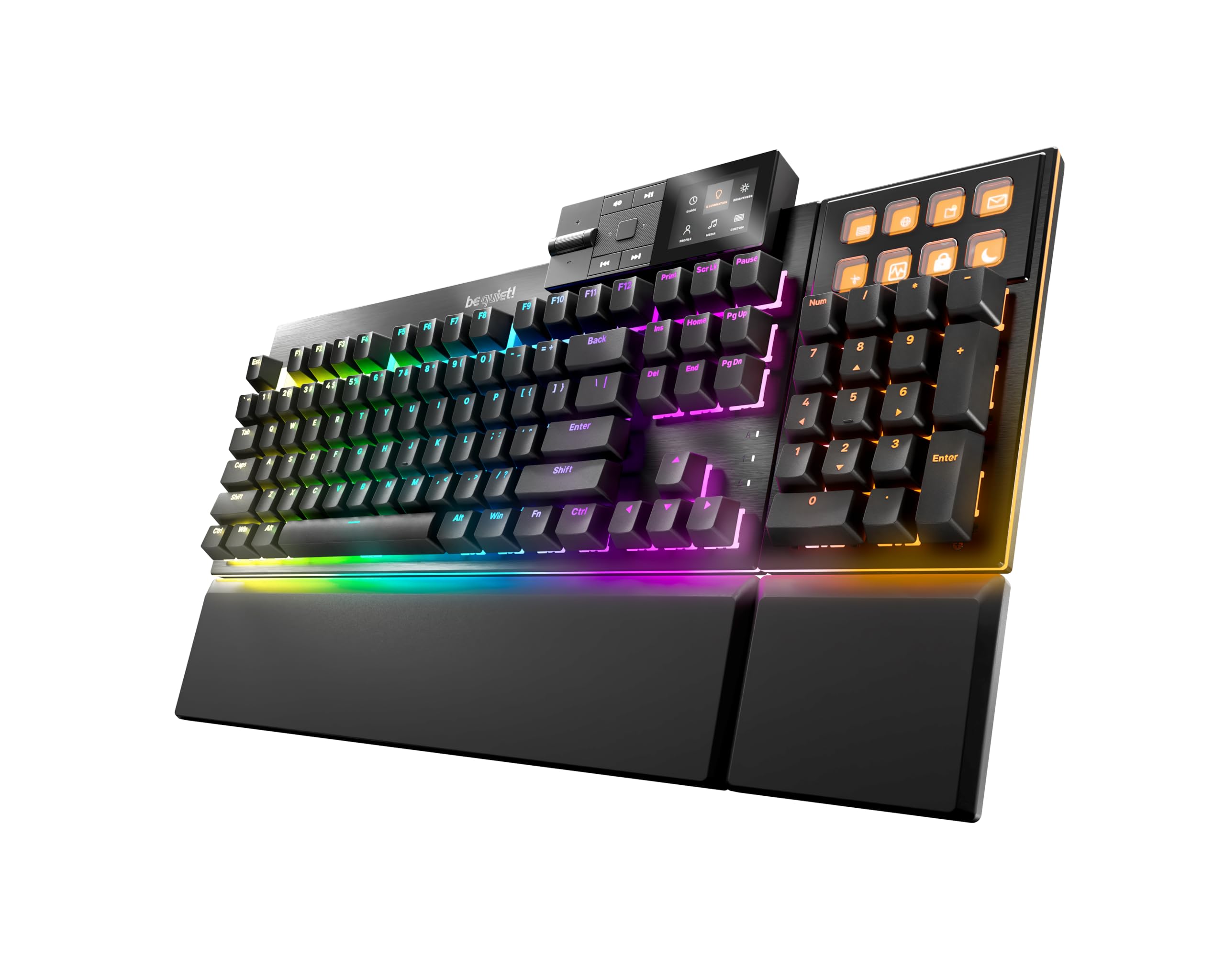
The be quiet! Dark Mount Tactile delivers on its name with triple-layer dampening that makes even tactile switches nearly silent. The detachable numpad and 8 LCD display keys offer customization rarely seen in quiet mechanical boards. However, the iO Center software has connection issues, and some switch units develop double-typing within months. Combined with a premium price and limited long-term data, this keyboard appeals most to enthusiasts who prioritize silence and modularity and can accept occasional software quirks.

Pros

  • Extremely quiet typing confirmed by users with triple-layer foam and silicone dampening.
  • Modular design with detachable numpad and media dock adds workspace flexibility.
  • Hot-swappable switches and 8 programmable LCD display keys allow deep personalization.

Cons

  • iO Center software may fail to detect the keyboard, making adjustments frustrating.
  • Some switches can develop double-typing or unresponsiveness within the first months of use.
Our verdict

Best suited for quiet-focused enthusiasts who value modularity and are comfortable with software and QC uncertainties.

Check Latest Price

How to Choose

Switch Type: Membrane vs. Mechanical

Membrane keyboards use a rubber dome under each key to dampen sound and provide a soft cushion. This design inherently absorbs noise better than most mechanical switches, making membrane boards the go-to for near-total silence. However, they lack the crisp tactile bump and faster actuation that gamers often prefer.

Mechanical keyboards with silent switches, like Cherry MX Silent Red or Razer Yellow, use internal dampeners and pre-lubrication to reduce the clack. But they still produce a bottom-out sound that some find audible. The trade-off is between absolute quietness and superior typing feedback.

Noise Output: Marketing vs. Reality

Many manufacturers label keyboards as 'whisper quiet,' but user reviews often reveal a different truth. A keyboard can be quieter than a standard mechanical yet still too loud for a shared office or bedroom. The only reliable way to gauge noise is through verified buyer reports — a keyboard with 70%+ positive noise feedback is a safe bet.

For absolute silence, prioritize membrane boards or mechanicals with foam-gasket mounts and PBT keycaps, which absorb more sound. Avoid keyboards where negative noise mentions exceed 25% of total reviews, as those indicate a significant chance of audible clatter.

Build Quality and Long-Term Reliability

A solid build reduces vibrations and contributes to quieter operation. Aluminum frames and gasket-mounted PCBs dampen resonance, while cheap plastic housings can amplify key noises. But build quality also affects reliability — models with high review volumes and low failure rates are less likely to develop squeaky or unresponsive keys.

Look for keyboards with thick PBT keycaps and lubricated stabilizers, which resist wear and maintain silence over time. Avoid ultra-budget boards where common complaints include paint fading and keycaps loosening within months.

Extra Features: Wrist Rest, Wireless, Hot-Swap

A magnetic or cushioned wrist rest improves ergonomics for long gaming sessions, but it also prevents the keyboard from sliding and creating noise. Wireless models offer desk clutter freedom, but Bluetooth can introduce slight latency — choose 2.4GHz for gaming. Hot-swap sockets let you replace switches with even quieter ones later, extending the keyboard's life.

Extra features like dedicated macro keys or display panels are valuable for streamers and MMO players but add cost. For pure quietness, prioritize dampening layers and gasket mounts over RGB complexity. A board with simple per-key RGB and a solid frame often outperforms a flashy but rattly alternative.

Frequently Asked Questions