8 Best Gaming Keypad of 2026: Picks With Real Analog Thumbsticks

Which gaming keypads actually include a reliable analog thumbstick for movement control, and which are just macro keypads? Find the one that fits your gaming style.

Many one-handed keypads marketed for gaming are essentially macro keyboards with extra buttons but no directional control. The thumbstick, crucial for movement in FPS and action games, is often an afterthought or omitted entirely.

That gap between marketing and actual gaming utility leads to buyer disappointment. A keypad with 42 keys but no analog stick is less useful for movement-based titles than a simpler one with a quality thumbstick. The right choice depends on what you play and how much you are willing to invest.

This guide separates keypads that deliver real analog movement from those that simply pack more buttons, helping you match the hardware to the games you actually play.

1

Best Overall

Razer Tartarus V2

88 /100
Lab Score Excellent

Key details

Software
Razer Synapse 3
Switch Type
Mecha-Membrane
Thumbstick Type
8-way directional
Programmable Keys
32 keys
View on Amazon

The Tartarus V2 delivers 32 programmable keys and satisfying Mecha-Membrane tactile feedback that blends a snappy click with a cushioned bottom-out. This combination covers most MMO and MOBA needs without the premium cost of analog optical switches found in pricier models.

Long gaming sessions feel comfortable thanks to the sculpted wrist rest and adjustable palm lift. Razer Synapse unlocks deep customization, letting you bind complex macros via Hypershift and sync RGB lighting across devices. The 8-way directional thumbstick handles digital movement, but it's not analog — a tradeoff that matters most for racing or flight sims.

This keypad suits MMO and MOBA players who need abundant hotkeys without stretching into a full keyboard. It also works well for anyone wanting a dedicated left-hand controller at a reasonable price. Heavy users should note that the thumbstick may lose responsiveness over many months, and keycap legends can fade under frequent use. Those requiring precise analog input should consider a model like the Tartarus Pro instead.

💡 The thumbstick is fine for digital directional inputs, but avoid relying on it for precise analog control; consider it a convenience rather than a primary input.

Pros

  • 32 programmable keys with Hypershift macros for complex in-game binds
  • Comfortable shape and wrist rest for extended play sessions
  • Mecha-Membrane switches offer tactile bump with a quiet cushion
  • Mid-range price packs features found on more expensive keypads

Cons

  • Keycap legends may wear off with heavy use over time
  • Occasional button unresponsiveness can occur on certain keys
  • Thumbstick may become less responsive or stop registering after extended use
Our verdict

For MMO and MOBA gamers who prioritize programmable keys and comfort at a mid-range price, the Tartarus V2 delivers a proven feature set — just keep the thumbstick and keycap wear in mind if you game heavily.

Check Latest Price
2

Best Analog Precision

Azeron Cyborg II

85 /100
Lab Score Excellent

Key details

Software
Azeron Configurator
Switch Type
Tactile mechanical
Thumbstick Type
Hall Effect analog
Programmable Keys
30 keys
View on Amazon

The Azeron Cyborg II’s Hall effect thumbstick eliminates drift that plagues conventional analog sticks, granting true 360-degree control. Where the mainstream option relies on a mechanical stick with limited lifespan, this magnetic sensor never degrades. Combined with fully adjustable hand rest and key positions, it offers a level of precision and fit that few keypads match.

This keypad suits enthusiasts who accept the steep learning curve and premium price, and whose hand size aligns with its adjustable range. The handcrafted build quality and analog precision justify the investment for those who want the best possible thumbstick input. Players unwilling to adapt or spend beyond typical keypad budgets will find better value elsewhere.

While the Razer Tartarus V2 remains the easier choice for most due to its lower price and out-of-box familiarity, the Cyborg II offers a unique level of control and customization that dedicated gamers will appreciate. It stands as a specialist tool rather than a general-purpose pick.

💡 Make time to customize key bindings and thumbstick sensitivity in the software — the default layout may not feel natural at first.

Pros

  • Handcrafted build quality with exceptionally durable construction.
  • Fully adjustable ergonomics let you tailor fit to your hand size.
  • Hall effect thumbstick provides drift-free analog control for precise movement.

Cons

  • Fit may not suit all hand sizes despite adjustability.
  • Unique layout and software require time to adapt.
  • Premium pricing limits accessibility for budget-conscious buyers.
Our verdict

This is the analog precision specialist for gamers who want the best thumbstick control and are willing to learn a new input method.

Check Latest Price
3

Classic Gameboard with LCD

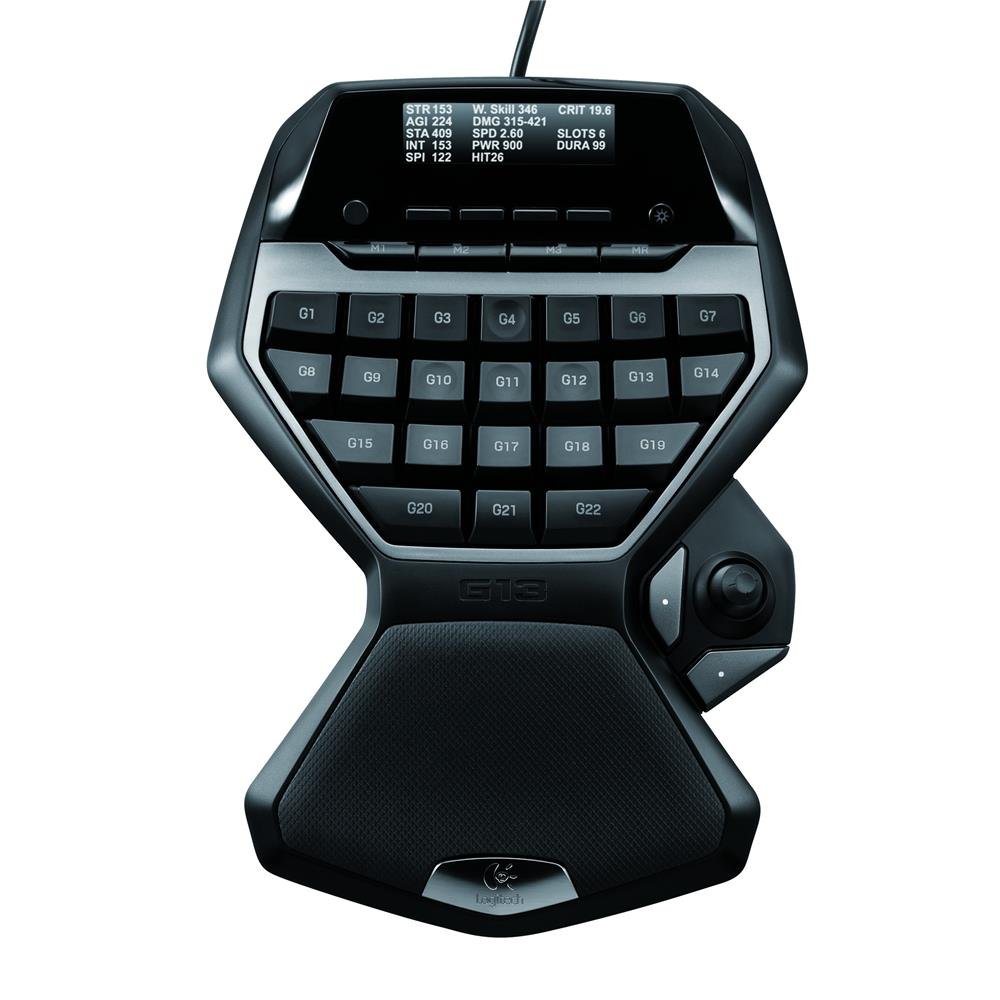
Logitech G13

86 /100
Lab Score Excellent

Key details

Software
Logitech Gaming Software
Switch Type
Membrane
Thumbstick Type
Analog joystick
Programmable Keys
25 keys
View on Amazon

The Logitech G13 stands out with its GamePanel LCD – a feature absent from nearly every other one-handed gameboard. Combined with a sculpted shape that suits long gaming sessions, it offers a distinct experience for those who prioritize on-screen stats and palm-filling comfort.

This gameboard is best suited for MMO players who want quick access to 25 programmable keys and a dedicated LCD for cooldowns or system monitoring. However, it is a discontinued product – Logitech no longer provides software updates or support. The thumbstick is a directional pad rather than a true analog controller, so precise movement in shooters or racing games may disappoint. Additionally, individual keys may stop responding over time, a known limitation of its membrane switches.

As a runner-up to the Razer Tartarus V2, the G13 offers a different priority set: an LCD screen and a classic layout that fans of the Nostromo design will recognize. Buyers willing to accept discontinued support and occasional key issues will find a well-built tool for MMO macros.

💡 Assign the thumbstick to menu navigation or weapon cycling; keep movement on the keyboard for reliable input.

Pros

  • Durable construction that withstands years of use
  • Comfortable ergonomic shape reduces hand fatigue during long sessions
  • LCD display shows real-time game stats and system information

Cons

  • Thumbstick functions as a directional pad, not a true analog stick
  • Some keys may become unresponsive over time due to membrane switch wear
Our verdict

For dedicated MMO players who want an LCD stat display and prefer the classic palm-hugging shape, the G13 remains a functional choice – but its discontinued status and limitations make it a specialized buy rather than a universal recommendation.

Check Latest Price
4

Tech Enthusiasts

Razer Tartarus Pro

84 /100
Lab Score Excellent

Key details

Software
Razer Synapse
Switch Type
Analog Optical
Thumbstick Type
8-way directional
Programmable Keys
32 keys
View on Amazon

Analog optical switches with variable input depth give the Tartarus Pro a unique edge for games that benefit from partial key presses, and the rapid-fire mode can register multiple inputs from a single hold. However, because there is little customer feedback available, it is difficult to confirm how these switches hold up under extended gaming sessions or whether the adjustable actuation delivers a meaningful advantage over traditional mechanical keypads. Pricing and availability are also unclear, which makes direct value comparisons against more established options like the Tartarus V2 challenging. This keypad is best suited for tech enthusiasts curious about analog switches who are comfortable with the uncertainty around long-term durability and overall value.

Pros

  • Adjustable actuation lets you fine-tune key sensitivity per game genre.
  • Rapid-fire mode registers multiple keystrokes from a single press.
  • Eight quick-toggle profiles simplify switching between game setups.

Cons

  • Analog switch durability under extended heavy use is unconfirmed from available user feedback.
  • Without user reports, analog switch responsiveness in fast-paced gaming remains uncertain.
Our verdict

Consider the Tartarus Pro if you want to experiment with analog optical switches and are willing to accept that its long-term reliability and value are not yet verified by the community.

Check Latest Price
5

Macro-Heavy Gamers

Redragon K585 PRO Wireless

85 /100
Lab Score Excellent

Key details

Software
Onboard macros
Switch Type
Hot-swappable (Outemu Red)
Thumbstick Type
None
Programmable Keys
42 keys
View on Amazon

The Redragon K585 PRO Wireless delivers wireless freedom and hot-swappable switch sockets at a budget-friendly price, with 42 keys including 7 macro keys for MMO gaming. The lack of an analog thumbstick means it won't replace a traditional gaming keypad for movement-based games, and wireless range can drop if the receiver isn't close. The magnetic wrist rest may detach, but these tradeoffs are manageable for a desktop setup where the receiver stays nearby.

Pros

  • 42 programmable keys with wireless connectivity for flexible macro setups.
  • Hot-swappable switch sockets allow switch customization without soldering.

Cons

  • Wrist rest can detach during use due to magnetic hold being light.
  • Wireless range is limited and occasional dropouts may occur at distance.
Our verdict

A good fit for MMO players who want wireless convenience and switch customization, as long as analog thumbstick control isn't needed.

Check Latest Price
6

Budget Wired Option

Redragon K585 Wired

84 /100
Lab Score Excellent

Key details

Software
Onboard macros
Switch Type
Hot-swappable (tactile)
Thumbstick Type
None
Programmable Keys
42 keys
View on Amazon

This wired keypad offers 42 keys with 7 onboard macro combos and a sturdy build at a budget-friendly price. The tactile hot-swappable switches and RGB lighting are extras rarely seen at this cost. However, the lack of an analog thumbstick limits movement control in games that rely on precise directional input. Some units may experience key switch failures or a loose USB-C port over time — worth checking early return policy. The wired connection avoids battery concerns, making it a straightforward pick for casual gamers who want macros without spending on wireless.

Pros

  • Budget-friendly price for a fully-featured one-handed keypad with macro keys.
  • Sturdy build quality with a heavy, solid feel.

Cons

  • Key switches can stop registering after months of use.
  • USB-C port may become loose over time, affecting connection stability.
Our verdict

This keypad works best for casual gamers who want macro keys on a tight budget and are comfortable with potential longevity tradeoffs.

Check Latest Price
7

Casual Gamers

RedThunder G30

89 /100
Lab Score Excellent

Key details

Software
Onboard macros
Switch Type
Membrane
Thumbstick Type
None
Programmable Keys
35 keys
View on Amazon

The RedThunder G30 offers the lowest entry price for a gaming keypad, with quiet membrane keys and a comfortable wrist rest. Its 35 keys include two macro sets and RGB lighting, but the printed key legends may fade over time, and some units may stop working after a few months. Without an analog stick, it is best suited as a stopgap for light gaming or travel rather than a daily driver.

Pros

  • Lowest price among functional one-handed keypads, ideal for tight budgets.
  • Quiet membrane keys and a padded wrist rest for comfortable short sessions.

Cons

  • Printed key legends may fade over time, reducing readability in low light.
  • Some units may experience failure within a few months, limiting long-term use.
Our verdict

A functional entry point for casual gaming on a tight budget, but best treated as a disposable travel keypad rather than a permanent setup.

Check Latest Price
8

Budget Clicky Fans

MageGee MK-Axe

83 /100
Lab Score Excellent

Key details

Software
Onboard macros
Switch Type
Mechanical Blue
Thumbstick Type
None
Programmable Keys
35 keys
View on Amazon

The MageGee MK-Axe delivers mechanical blue switches and dedicated macro keys at a budget price — a rare combination in this tier. The clicky feedback and solid build give it a satisfying feel for shortcuts or simple gaming commands. However, the macro keys cannot be reprogrammed beyond the displayed set, which limits customization for complex binds. Additionally, some units have been known to stop working within the first month, making long-term reliability a concern. This keypad also lacks an analog thumbstick, so it won’t replace a full one-handed gamepad for movement control. For users who prioritize clicky switches and a low price over macro flexibility and durability, it fits a narrow use case.

Pros

  • Solid build quality with clicky blue switches that feel satisfying for budget gear.
  • Dedicated macro keys work without separate software, simplifying setup.

Cons

  • Macro keys are locked to the displayed set and cannot be reprogrammed with arbitrary inputs.
  • Some units may stop working within the first month, raising durability concerns.
Our verdict

Fits budget gamers who value clicky mechanical switches and simple macro keys, and are okay with limited programmability and the risk of early unit problems.

Check Latest Price

How to Choose

Analog Thumbstick Quality

A traditional thumbstick uses a potentiometer that can wear out and develop drift over time. Hall effect sensors use magnets to detect position, eliminating physical contact and drift entirely. For competitive FPS or racing games, Hall effect is a clear advantage.

Many budget keypads omit a thumbstick altogether, replacing it with a directional pad or simply keys. If you play games that require analog movement, such as shooters or action RPGs, look for a model that explicitly lists a thumbstick or joystick.

Number of Programmable Keys

More keys is not always better if the layout feels cramped. MMO and MOBA players often need 30+ keys for hotbar shortcuts, while FPS players may need fewer but better-placed ones. The physical size of the keypad and key spacing matters as much as the count.

Consider whether the keypad supports layers or secondary profiles via software. With 25-30 keys and profile switching, you can effectively have hundreds of bindings, so raw key count is less important than the software's flexibility.

Switch Type

Mechanical switches offer tactile or clicky feedback and longer lifespan than membrane, but they are louder. Mecha-membrane (like Razer's) blends a membrane dome with a mechanical click feel for quiet but tactile actuation. Hot-swappable sockets let you change switches without soldering.

For gaming keypads, fast actuation and consistency matter more than sound. Linear switches are quiet and smooth for rapid presses; tactile switches give a bump for feedback. If you share a room, consider quieter switches or membrane options.

Build Durability and Keycap Longevity

Keycap legends on budget keypads are often pad-printed and will fade within months. Doubleshot injection molding or laser-etched legends last the life of the keycap. The thumbstick is the most failure-prone component; check reviews for reports of stick drift or dead zones.

A metal base and braided cable improve structural integrity and reduce wobble. Wrist rest attachments that snap on securely also contribute to long-term comfort and stability.

Software and Macro Capabilities

Proprietary software (like Razer Synapse or Logitech G Hub) enables per-key remapping, macro recording, and profile switching. Onboard memory allows saving profiles directly to the keypad for use on other PCs without software. Some budget models rely entirely on hardware macros with limited customization.

That said, software quality varies. Check for complaints about crashes or complicated interfaces. For competitive play, low-latency execution of macros is critical; test the software before relying on it.

Frequently Asked Questions