6 Best Gaming Soundbar of 2026: Which Deliver Low Latency and Real Atmos

Find the gaming soundbar that matches your setup - from budget RGB desktop bars to true Dolby Atmos for console play.

Many soundbars marketed for gaming skip HDMI entirely, leaving console players with Bluetooth or optical connections that introduce audio lag. That delay can ruin the split-second audio cues competitive shooters rely on, and it prevents Dolby Atmos from working at all.

The real divide isn't between expensive and cheap bars - it's between those built for PC desks and those designed to connect to a TV or console. A compact 2.0 bar with RGB looks great on a monitor stand but won't help you hear footsteps in Warzone. This guide focuses on which soundbars actually match your gaming setup, whether that's a cramped desk or a living room with a PS5.

Reliability also matters here: some budget bars with subwoofers fail within months, while premium models hold up for years. We've mapped out the trade-offs so you can pick the option that fits your use case without surprises.

1

Best Overall Gaming Soundbar

Samsung HW-Q800F

88 /100
Lab Score Excellent

Key details

RGB
Subwoofer
8-inch wireless
Connectivity
HDMI ARC, Bluetooth, Wi-Fi
Gaming Modes
Game Mode Pro
View on Amazon

The Samsung HW-Q800F delivers true 5.1.2-channel Dolby Atmos with up-firing drivers and a dedicated Game Mode Pro that sharpens directional cues. Dialogue remains clear even during chaotic action sequences, and the wireless 8-inch subwoofer adds a tactile bass layer without overwhelming the mids.

Game Mode Pro reduces audio processing latency and emphasizes footsteps, gunfire, and environmental sounds in competitive titles. The soundbar supports HDMI ARC for low-latency audio passthrough, making it a practical fit for PS5, Xbox Series X, and PC gaming setups that prioritize positional accuracy.

Setup is straightforward: HDMI ARC automatically pairs with compatible Samsung TVs, enabling Q-Symphony to blend the soundbar and TV speakers. For non-Samsung displays, pairing may occasionally require a cable reseat or power cycle. The 400W output fills medium living rooms with ease, but in open-plan spaces beyond 400 square feet, the maximum volume may feel underwhelming.

This soundbar is best suited for console gamers who want genuine Atmos immersion without the cost of a full receiver-and-speaker setup. Home theater enthusiasts who also game will appreciate the balance of surround staging and gaming features. It is less ideal for buyers with very large open-plan rooms or those who primarily use non-Samsung TVs, where occasional HDMI handshake issues can surface.

💡 For best results, keep the soundbar centered and at ear level – the 400W output is optimized for rooms up to 350-400 square feet.

Pros

  • Immersive Dolby Atmos with clear dialogue and strong surround effects.
  • Dedicated Game Mode Pro enhances directional audio for competitive play.
  • Good value for the feature set
  • Effortless setup and seamless integration with Samsung TVs via HDMI ARC.

Cons

  • Maximum volume may not fill very large open-plan rooms (over ~400 sq ft).
  • Occasional HDMI pairing dropouts can occur with non-Samsung TVs.
Our verdict

The HW-Q800F earns its place as a top pick for console gamers who want true Atmos and low-latency gaming audio in a medium-sized living room.

Check Latest Price
2

Best Compact PC Gaming Soundbar

Creative GS3

86 /100
Lab Score Excellent

Key details

RGB
Multiple presets
Subwoofer
None
Connectivity
Bluetooth 5.4, USB-C, AUX
Gaming Modes
View on Amazon

The Creative GS3 packs Superwide virtual surround sound into a 16-inch chassis that fits cleanly beneath any monitor, with build quality that holds up well under daily use. This makes it a practical alternative to the larger, ecosystem-locked Razer bar for PC gamers who don't need deep integration.

Connectivity is straightforward: Bluetooth 5.4 pairs quickly, and USB-C audio works without drivers. The RGB lighting offers multiple presets but stays at the preset level — no in-game lighting sync. The absence of a subwoofer is felt in explosion-heavy scenes, but for dialogue or ambient soundtracks the clarity remains strong.

This soundbar suits PC gamers with limited desk space who value sound clarity and RGB aesthetics over deep bass. It doesn't replace a console-oriented system with HDMI and Atmos; rather, it fills a specific niche for compact desktop setups where every inch counts. Gamers playing bass-heavy titles or in larger rooms should consider a model with a dedicated subwoofer.

💡 Keep the soundbar's volume low before pairing to avoid a loud audio prompt.

Pros

  • Wide virtual soundstage creates immersive audio for a compact desktop bar.
  • Budget-friendly price delivers strong value for the sound quality and features included.
  • Plug-and-play setup via USB-C and Bluetooth 5.4 works with minimal effort.
  • Compact 16-inch width fits under monitors with tight desk space.

Cons

  • Bluetooth connection prompt plays audibly on each pairing, which can interrupt quiet moments.
Our verdict

For PC gamers who prioritize desk-space efficiency and clear virtual surround over deep bass, the Creative GS3 is a focused, well-built choice that avoids the durability concerns seen in some budget bars.

Check Latest Price
3

Best Budget 3.1Ch with Subwoofer

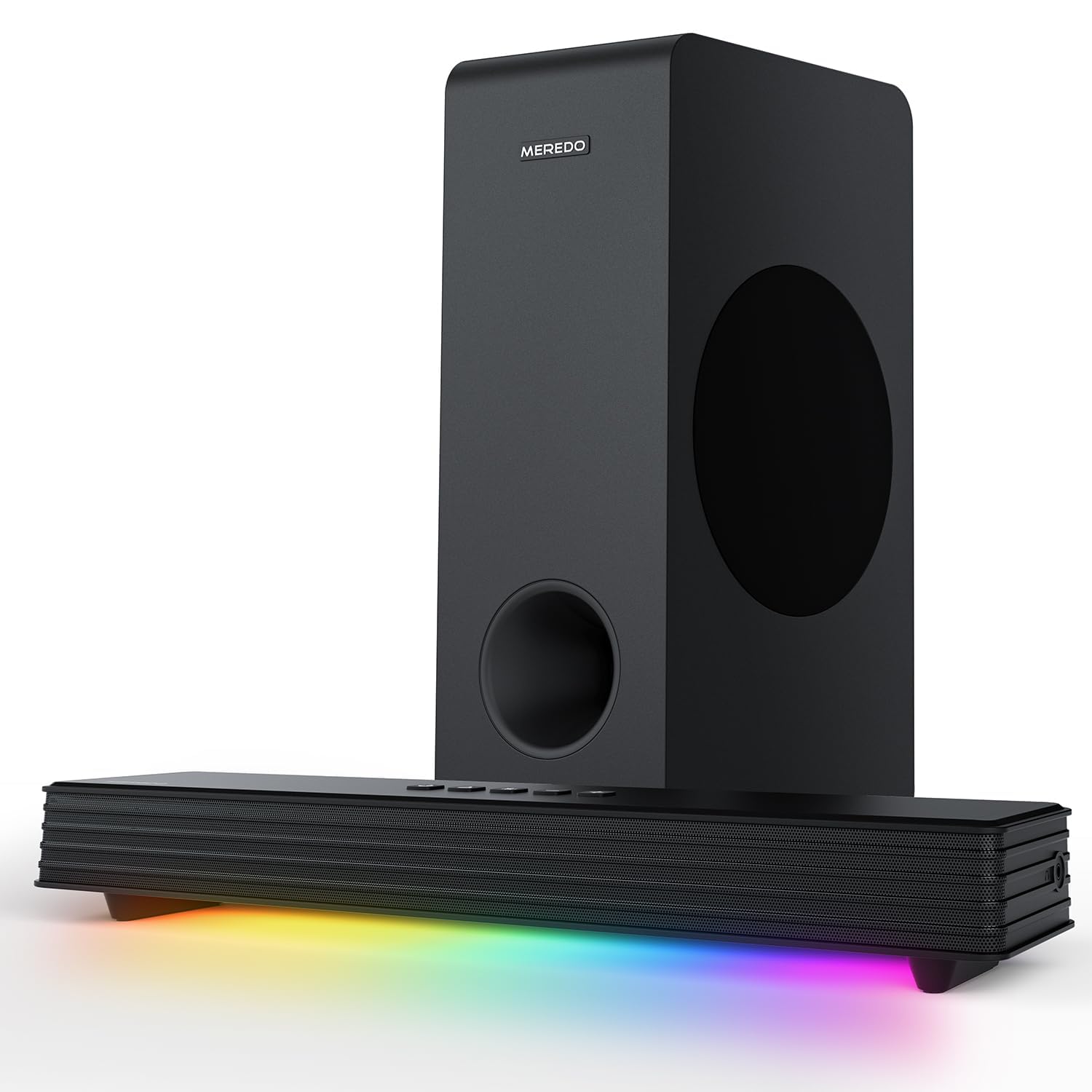
MEREDO G38

86 /100
Lab Score Excellent

Key details

RGB
Audio sync
Subwoofer
5-inch wired
Connectivity
Bluetooth 5.3, HD-ARC, Optical
Gaming Modes
Game EQ
View on Amazon

Where higher-priced gaming soundbars feature Dolby Atmos and HDMI 2.1 for console immersion, the MEREDO G38 focuses on wired bass, Game EQ, and RGB lighting — a combination that speaks directly to PC gamers on a tight budget.

This setup is best for users who want a subwoofer and don't mind treating the soundbar as a short-term upgrade. Some units may experience power loss or reduced output after weeks of use, so it suits secondary gaming rooms or temporary desk setups where an early replacement is acceptable.

Setup is quick with Bluetooth 5.3, HDMI ARC, optical, or USB connections, and the detachable stands make monitor placement flexible. The wired subwoofer adds noticeable punch to explosions and game audio without requiring extra wall power.

💡 Test the soundbar thoroughly within the return period to confirm it meets your expectations for daily gaming.

Pros

  • Powerful bass from a dedicated wired subwoofer adds impact to game audio and soundtracks.
  • Game EQ mode sharpens directional cues for footsteps and positional audio.
  • Multiple connectivity options (Bluetooth 5.3, HDMI ARC, optical, AUX, USB) for easy multi-device setup.
  • RGB lighting syncs with audio for a visually immersive desk setup at this price.

Cons

  • Intermittent audio cutouts or muffled sound may occur during longer gaming sessions.
  • Reliability varies between units; some may require replacement within a few months of use.
Our verdict

This soundbar is for budget PC gamers who want a subwoofer and RGB at a low entry price, and are comfortable with the possibility of an early replacement in a secondary setup.

Check Latest Price
4

Best for PC RGB Setups

Razer Leviathan V2

79 /100
Lab Score Very Good

Key details

RGB
Chroma RGB
Subwoofer
Included
Connectivity
Bluetooth 5.2, USB
Gaming Modes
THX Spatial Audio
View on Amazon

The Razer Leviathan V2 anchors a PC gaming desktop with virtual 7.1 surround through THX Spatial Audio and 18-zone Chroma RGB that syncs with in-game events. Setup is plug-and-play via USB, and the included subwoofer adds punch without taking up desk space.

This is a wired USB soundbar — there is no HDMI input, so console gamers should look elsewhere. For PC users, the THX Spatial processing provides good directional audio in shooters and RPGs, though the 60ms latency means it suits immersive play more than competitive twitch reactions. Bluetooth 5.2 is present but can drop unexpectedly; the USB connection avoids that issue entirely.

Best suited for Razer peripheral owners who want synchronized RGB lighting and spatial audio on a clean desktop. The soundbar's long-term durability has been noted as a potential concern — some units may lose power or connectivity after extended use. That makes it a choice for users comfortable with a shorter lifespan in exchange for ecosystem features and compact design.

💡 Using the USB connection bypasses Bluetooth dropouts — set it up as a wired desktop soundbar for consistent audio.

Pros

  • Plug-and-play USB setup with clean cable management
  • 18-zone Chroma RGB with in-game integration
  • THX Spatial Audio delivers convincing virtual 7.1 surround

Cons

  • Possible for the soundbar to lose power or stop responding after months of use
  • Bluetooth connection can drop or struggle with pairing in some cases
Our verdict

A feature-rich desktop soundbar for PC gamers who already own Razer gear, provided you accept the potential for long-term reliability quirks.

Check Latest Price
5

Ultra-Budget RGB

Redragon GS560

88 /100
Lab Score Excellent

Key details

RGB
Dynamic modes
Subwoofer
None
Connectivity
USB, 3.5mm
Gaming Modes
View on Amazon

The Redragon GS560 brings adjustable RGB backlighting and a simple stereo speaker to any USB port without drivers or power bricks. At this price, the visual flair and zero-friction setup are clear strengths for anyone wanting a modest audio upgrade on a tight budget.

Audio performance is limited to 2.0 stereo with a thin presentation and no subwoofer – background music and voice are fine, but game soundtracks or explosive effects lack depth. There is no low-latency mode, surround processing, or HDMI connectivity, so this is not a gaming soundbar. A portion of units may develop distorted output after several months, making a short warranty period worth verifying before purchase.

Pros

  • Exceptional value for the price
  • Attractive design with customizable RGB lighting to match any desk setup.
  • Truly plug-and-play via USB

Cons

  • In quiet environments, audio can sound thin and lacking in bass
  • Some units may develop audio distortion or output issues after extended use
Our verdict

Works as a cheap, decorative desk speaker for web browsing and video calls, but skip it if you need game-specific audio features or reliable long-term performance.

Check Latest Price
6

TV Viewers

Assistrust KY-8000

86 /100
Lab Score Excellent

Key details

RGB
Subwoofer
None
Connectivity
Bluetooth 5.0, ARC, Optical, AUX
Gaming Modes
View on Amazon

This soundbar delivers clear audio and easy setup at a budget-friendly price, with HDMI ARC, optical, and AUX inputs for flexible placement. However, it lacks any gaming-specific features like low latency or game mode, and the sound quality is average for competitive play. Some units may stop powering on after months of use, and the remote can become unresponsive. This is a casual TV audio upgrade, not a companion for console or PC gaming.

Pros

  • Clear audio and noticeable improvement over built-in TV speakers.
  • Easy setup with all cables included and clear instructions.
  • Great audio upgrade at a low price.

Cons

  • Volume may feel insufficient in larger rooms and dialogue can be muffled.
  • Some units may stop powering on or lose sound after a few months of use.
Our verdict

For casual TV viewers who want a simple, low-cost audio upgrade and don't need gaming features, this is a reasonable option – but reliability and remote issues mean it's best for short-term use.

Check Latest Price

How to Choose

Audio Channels and Surround Technology

The number of channels determines how well a soundbar places sounds around you. A 2.0 bar separates left and right but lacks the depth to make footsteps feel directional. Virtual surround (like Creative's Superwide or Razer's THX Spatial) uses psychoacoustic tricks to widen the soundstage, but it can't match the physical separation of actual up-firing drivers.

For competitive shooters, a 3.1 system with a center channel improves dialogue clarity and front-stage imaging. True Dolby Atmos with 5.1.2 channels adds height cues - useful for hearing enemies above or behind you, but only if your room has flat ceilings for the sound to bounce off. In a cluttered desk setup, the benefit diminishes.

Connectivity Options

HDMI ARC/eARC is the gold standard for consoles: it carries lossless audio and low latency. Optical works in a pinch but tops out at compressed 5.1 and can add 40-60ms of delay. Bluetooth always adds noticeable lag for gaming - fine for cutscenes, not for competitive play. Even Bluetooth 5.2 with aptX Low Latency still sits above 30ms.

USB-C is common on PC soundbars and offers zero-latency digital audio for desktop use. But USB doesn't carry Dolby Atmos signals from consoles. If you switch between PC and PS5, you need a bar with multiple inputs that support HDMI and USB simultaneously.

Gaming-Specific Modes

Game modes generally boost treble and compress the dynamic range so that quiet sounds - like footsteps or reloads - are easier to hear at low volumes. Samsung's Game Mode Pro goes further by running a proprietary DSP that sharpens positional cues without distorting explosions. Cheap 'game EQ' presets often just boost bass, which muddies footsteps.

THX Spatial Audio uses head-related transfer functions to create a virtual surround bubble that works best with headphones or a soundbar designed for it. It's effective for PC games with native 7.1 support, but less so for console titles that rely on standard Atmos or Tempest 3D.

Subwoofer Inclusion

A subwoofer handles the low-end rumble of explosions and engine sounds. Without one, 2.0 soundbars sound thin and tinny, especially at higher volumes. Adding a sub improves immersion significantly, but with a durability catch: many budget wired subs use cheap amplifiers that fail after a few hundred hours of use.

Wireless subs (like Samsung's) are more convenient for placement and tend to be built to a higher standard, but they add $100-200 to the price. If you're on a tight budget, a wired sub at $100 is tempting, but check reliability feedback carefully - frequent failures can turn a bargain into a replacement cycle.

RGB Lighting Customization

RGB adds no audio benefit but can sync with in-game events through software like Razer Chroma or motherboard ARGB headers. This is purely aesthetic and matters most for desktop users who want a cohesive battlestation look. For console or living room setups, RGB is often unnecessary and can even be distracting in a dark room.

Not all RGB is equal: static presets are common on budget bars, while addressable zones allow per-key or per-game lighting patterns. The Creative GS3 and Redragon GS560 offer basic presets; the Razer Leviathan V2 gives granular control via Synapse. Decide whether you want a light show or just a subtle glow before paying extra.

Frequently Asked Questions