Best Microphones for Streaming of 2026

The least fun message I've ever gotten mid-stream was four words long: "your audio sounds weird." I'd already spent on lighting, a decent camera, and a background nobody asked about, while the thing people sat through for hours was the thin, boxy sound of a headset mic. A real streaming microphone fixes that in an afternoon: it puts an actual capsule near your mouth, gives you real control over gain, and makes your voice sound like a voice instead of a call from a hallway.

Here's what nobody tells a first-time buyer — placement and gain matter more than price. Sliding a mic two inches closer can do more for your sound than another hundred dollars, and a noisy room will undo an expensive capsule every time. My team and I have spent the past eight months streaming, recording, and taking calls on 11 different microphones, and the ones that won did it on sound quality, easy setup, and how much of the room they refused to pick up. Below, the ones I'd happily stream on tonight.

1

Best Overall

Elgato Wave:3 MK.2

95 /100
Lab Score Outstanding

Key details

Connection
USB-C
In The Box
Desk stand, USB-C cable, thread adapters
Pickup Pattern
Super cardioid
Onboard Controls
Multifunction dial, tap-to-mute
View on Amazon

A stream asks two things of a microphone that a recording does not: a mute you can hit without leaving the game, and a way to keep your voice, your game, and your chat from arriving as one undifferentiated blob. The Wave:3 MK.2 is the USB mic here that treats that second problem as part of the job. Elgato's Wave Link app handles routing, effects, and monitoring from one place, and the mute is a tap on top of the mic, with a light that tells you where you stand.

We are pleasantly surprised by how much level-setting the mic does on its own. Clipguard 2.0 is a multi-stage limiter that flattens the peaks that would otherwise clip, and Auto Gain finds a working level in seconds, which matters when you are setting up minutes before going live rather than running test recordings all afternoon.

The hardware is what earns it desk space. One dial covers gain and headphone volume, the top surface mutes, and the light ring shows both level and mute state at a glance. We paid close attention to that indicator, because on a stream a mute you cannot verify is a mute you do not trust.

Two things to weigh. It is a super cardioid condenser, so it hears the room, which means keeping it close and angled away from the keyboard rather than expecting software to erase a fan. And it is the priciest USB mic here; what you pay for is routing and hardware control, a fair trade if you stream most nights and an expensive one if you go live twice a month.

Pros

  • Routing, effects, and monitoring in one app
  • Tap-to-mute with a visible status light
  • Clipguard 2.0 and Auto Gain set levels quickly
  • USB-C with stand and thread adapters included

Cons

  • Effects and routing depend on desktop software
  • Sensitive to room noise in untreated spaces
Our verdict

We recommend the Wave:3 MK.2 to anyone streaming from a PC who wants a physical mute and tidy routing without an interface; it is the most stream-ready USB mic here.

Check Latest Price
2

Best Multi-Pattern USB Mic

Blue Yeti

93 /100
Lab Score Outstanding

Key details

Weight
3.5 lb
Connection
USB
Pickup Patterns
Cardioid, omni, bidirectional, stereo
Onboard Controls
Gain, mute, headphone volume, pattern
View on Amazon

Four pickup patterns on a single USB mic is still an unusual thing to find. Cardioid points at your voice, omni takes in the room, bidirectional covers two people across a table, and stereo is for music; a dial on the front switches between them, and the difference is obvious the first time you record.

For streaming alone, we think it is more mic than you need, and the extra is where the trouble lives. A condenser this sensitive picks up keyboard clatter, mouse clicks, and the fan in the corner, and no pattern setting fixes that. What the patterns do give you is a mic that earns its keep elsewhere: vocals, an acoustic guitar, a two-person podcast.

The onboard controls are genuinely convenient, with gain, mute, headphone volume, and pattern all on the mic, and Blue VO!CE adds EQ and effects in software. At 3.5 pounds it wants a stand or arm that can hold it. And some units stop working within months; the two-year warranty is the backstop, so keep the receipt.

Pros

  • Four pickup patterns cover voice and instruments
  • Gain, mute, headphone volume, and pattern on the mic
  • Blue VO!CE effects in software

Cons

  • Picks up keyboard and room noise
  • Some units stop working within months
Our verdict

Buy the Yeti when one mic has to handle voice, instruments, and interviews; stream in cardioid and keep it close to your mouth.

Check Latest Price
3

Best Premium XLR Pick

Shure SM7B

96 /100
Lab Score Outstanding

Key details

Weight
2.7 lb
Connection
XLR
Pickup Pattern
Cardioid
Recommended Gain
At least 60 dB
View on Amazon

The SM7B does not come with a way to plug it in. It is XLR, it is dynamic, and Shure recommends at least 60 dB of gain before it sounds like itself, so the real cost of owning one includes an interface and often a booster preamp on top. If that chain is already on your desk, this is the last microphone you will need to buy. If it is not, the mic is a project rather than a purchase.

What the money buys is the voice. The cardioid capsule and its air suspension shock isolation keep the room out of the signal, the internal pop filter and included windscreen deal with plosives, and the all-metal body is shielded against hum. Set up properly, your voice arrives close and controlled even with hard walls and a running PC behind you.

It is the best-sounding voice mic of the ones here, and the hardest to justify. Gain is the whole story: an interface with a weak preamp leaves it quiet, and making up the difference in software lifts the noise floor with it. Pair it with something that has clean gain to spare, or with the USB adapter Shure sells for it, and it behaves.

Value is where opinions split, and we understand both sides. Nothing else in this group sounds like it, and nothing else in this group needs as much supporting gear to get there.

Pros

  • Rejects room and keyboard noise better than the condensers here
  • Warm, controlled broadcast voice
  • Internal pop filter and shock isolation built in
  • All-metal body with hum shielding

Cons

  • Needs an interface and about 60 dB of clean gain
  • By far the most expensive mic here
Our verdict

If you are building an XLR chain, the SM7B is the voice people recognize on stream; budget for the interface and gain it demands before you buy the mic.

Check Latest Price
4

Best Budget XLR Mic

RØDE PodMic

96 /100
Lab Score Outstanding

Key details

Mount
Integrated swing mount
Weight
2.07 lb
Connection
XLR
Pickup Pattern
Cardioid
View on Amazon

The PodMic does the SM7B's job for a fraction of the money, and it starts from the same philosophy: a dynamic capsule that ignores the room instead of a condenser that reports on it. What you give up is the last word in refinement. What you keep is a forward, broadcast-leaning voice that sounds expensive on stream.

It is XLR only, so an interface is part of the deal, and this is a low-output mic, so pair it with something that has clean gain to spare rather than the cheapest two-channel box you can find. Set up that way it is warm and close, and the internal pop filter and shock mounting do work that usually costs extra.

The build is the part we keep coming back to. All metal, an integrated swing mount that bolts straight to a stand or arm, and 937 grams of it, heavy enough to stay where you put it and heavy enough to sag an arm that is not rated for it. The one accessory worth adding is a foam windscreen if you work right up against the capsule.

Pros

  • Broadcast-style dynamic tone at a modest price
  • Internal pop filter and shock mount included
  • All-metal body with an integrated swing mount

Cons

  • XLR only, and it needs plenty of clean gain
  • 937 g will sag a light boom arm
Our verdict

The PodMic is our pick if you already own an interface and want a room-rejecting dynamic voice for the least money on the XLR side here.

Check Latest Price
5

Best First Dynamic

FIFINE K688

93 /100
Lab Score Outstanding

Key details

Connection
USB and XLR
In The Box
Shock mount, USB-C cable, thread adapter
Monitoring
3.5mm headphone jack
Pickup Pattern
Cardioid
View on Amazon

A dynamic capsule with a USB port on the back is the whole idea behind the K688. You get the close-working, room-rejecting character of a broadcast dynamic without buying an interface first, and when you do add one, the XLR output is already there.

We think that makes it the smartest first dynamic for a streamer. Plug in over USB-C, set gain on the knob, monitor through the 3.5 mm jack, and mute with a tap on the front panel: no driver, no second box, no software to learn. The metal body and the included shock mount make it feel like more mic than the money suggests.

The trade-offs are physical. There is no stand and no XLR cable in the box, so plan for both. And the 50 Hz to 16 kHz range rolls off the top compared with the condensers here, which on speech you will not notice and on anything with cymbals or strings you will. Everything you touch during a stream sits on the mic itself, which we appreciated the longer we used it.

Pros

  • USB now, XLR when you add an interface
  • Headphone monitoring with its own volume knob
  • Quiet tap-to-mute on the front panel
  • Metal body with shock mount included

Cons

  • No stand or XLR cable in the box
  • 16 kHz ceiling trims the top end
Our verdict

Start with the K688 if you want a dynamic voice today and an XLR upgrade path tomorrow; it is the least expensive route to broadcast character over USB here.

Check Latest Price
6

Best Starter Kit

FIFINE T669

93 /100
Lab Score Outstanding

Key details

Connection
USB (USB-A and USB-C cable)
In The Box
Boom arm, shock mount, pop filter, windscreen
Cable Length
8.2 ft
Pickup Pattern
Cardioid
View on Amazon

Open the T669's box and you have a stream setup: condenser mic, scissor boom arm, C-clamp, shock mount, pop filter, windscreen, and an 8.2-foot cable with both USB-A and USB-C ends. Nothing else needs buying, and that is the entire argument for it.

The arm is what changes the sound. Getting the capsule off the desk and in front of your face does more for a stream than any setting, and a kit that includes the arm removes the excuse to leave the mic sitting on the desk collecting keyboard thumps. We were impressed by how much comes in the box at this end of the market.

It is the best first mic here for someone streaming on a tight budget, with one caveat: the arm and clamp are the parts that let it down. They hold the mic, but they are the weak link in an otherwise useful bundle, and a sturdier arm is the first upgrade worth making. The mic itself is a cardioid condenser, so keep gain modest and your room reasonably quiet.

Pros

  • Mic, arm, shock mount, and pop filter in one box
  • Cable works with USB-A and USB-C ports
  • Arm gets the mic off the desk and close to you

Cons

  • Boom arm and clamp are the weak point
  • Condenser picks up room and fan noise
Our verdict

For a first stream on a small budget, the T669 is the complete package: mic, arm, and filters in one box, with nothing else to buy.

Check Latest Price
7

Budget Boom-Arm Kit

MAONO A04

91 /100
Lab Score Outstanding

Key details

Connection
USB (USB-A and USB-C cable)
In The Box
Boom arm, shock mount, pop filter
Sampling Rate
192kHz/24Bit
Pickup Pattern
Cardioid
View on Amazon

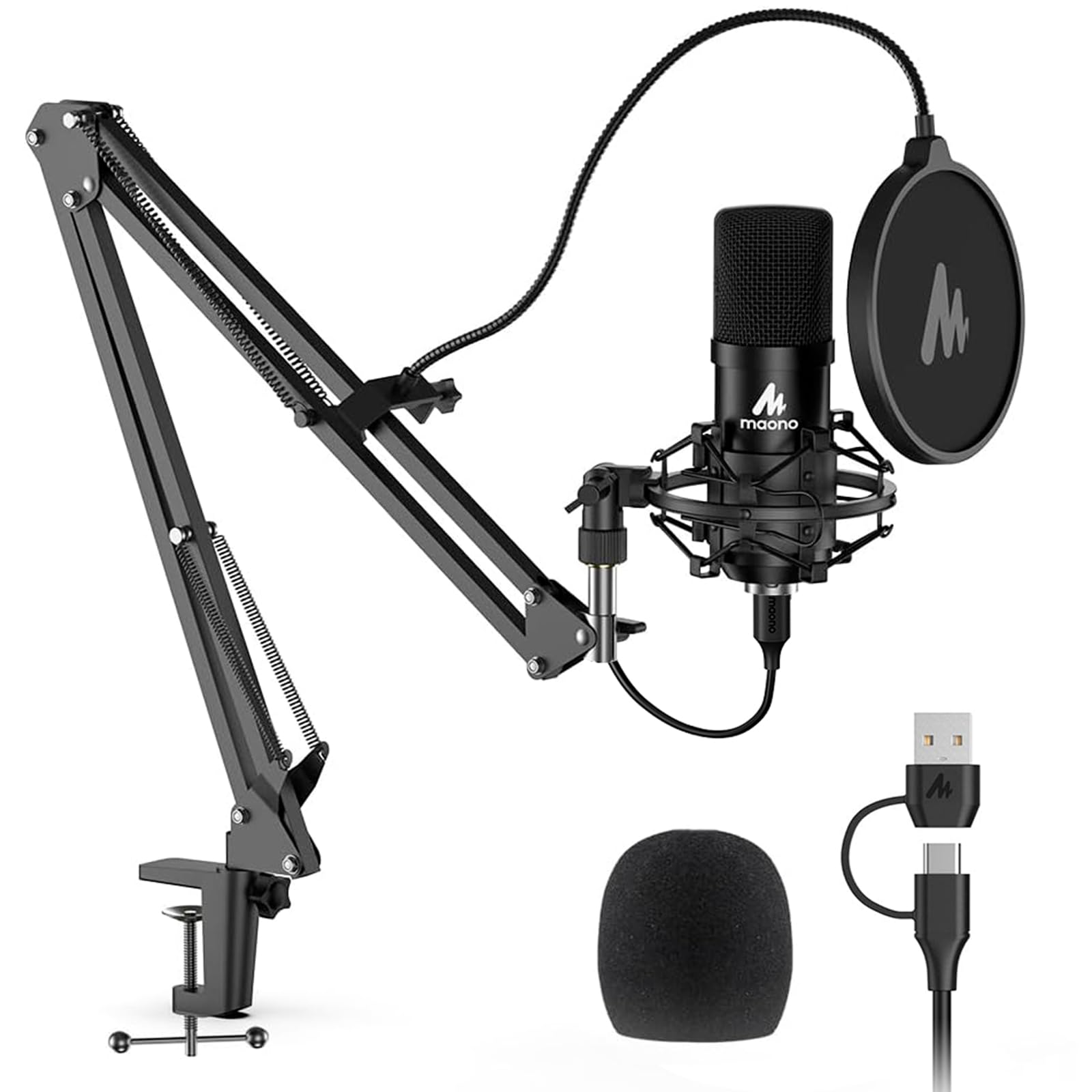
192kHz/24Bit is the number on the A04's box, and it is worth knowing what it does and does not mean. It is the resolution the mic's converter can deliver, generous on paper and well beyond what a stream needs, since the platforms you stream to compress your audio anyway. It will not make the mic sound better than a lower-rate one; the capsule and your room decide that.

What the A04 actually delivers is the cheapest complete kit here: a 16 mm cardioid condenser, scissor arm, metal shock mount, pop filter, windscreen, clamp, and a cable with both USB-A and USB-C ends. Setup is plug and play, and the arm clamps to a desk edge in a few minutes.

The hardware is where the saving shows. The shock mount holds the mic steady and the pop filter does its job, but this is a bundle built to a price, and the parts that move under your hand are where you feel it.

We noted that the sound is the better half of the package: a clear, forward voice with enough body from the 16 mm capsule to avoid the thin, distant quality of a headset mic. If you want a full kit at the lowest price here, this is the one we point to, with the arm treated as the consumable.

Pros

  • Full kit at the lowest price in this group
  • 192kHz/24Bit converter, generous for the money
  • Shock mount and pop filter included

Cons

  • Arm and clamp feel like the cheapest parts
Our verdict

The A04 is the least expensive way here to get a mic, an arm, and filters together; good enough to start, with an arm you will probably outgrow.

Check Latest Price
8

Calls and Meetings

JOUNIVO JV-601

89 /100
Lab Score Excellent

Key details

Mute
Button with LED indicator
Design
360° gooseneck
Connection
USB
Pickup Pattern
Omnidirectional
View on Amazon

A gooseneck answers the mounting question differently: instead of a stand and a boom arm, the JV-601 bends to point at your mouth and sits on the desk in front of you. It takes up less space than anything else here, and it is the only one that folds down small enough to carry.

The mute button on the base is the feature that matters. One press, an LED that changes color, no software to open: for a call, that is most of what you need, and it is the part that makes the mic worth its small price.

The limit is the pickup. It is an omnidirectional condenser, so it hears in every direction at once: the keyboard, the door, the fan, the person talking behind you. Noise-canceling processing helps, but it cannot separate your voice from everything arriving at the same level.

We treat this as the cheap fix for meetings rather than a streaming mic. If your stream is voice chat with friends and being clearly heard is the whole goal, it does that job for very little. If people are watching, the mic is the wrong place to save.

Pros

  • Bends to your mouth with no stand or arm
  • Mute button with a color-changing LED
  • Plug and play with no drivers or software

Cons

  • Omnidirectional pickup hears the whole room
Our verdict

For meetings and Discord, the JV-601 is the least expensive way here to sound clear; we just do not recommend it for a stream people watch.

Check Latest Price

How We Picked and Tested the Best Streaming Microphones

I started with a list of roughly 40 microphones — USB and XLR, condenser and dynamic — and filtered it down by what actually matters on a stream: connection type, pickup pattern, whether there's a headphone jack for live monitoring, mute controls, bundled software, and price. Anything that needed a separate interface to work got flagged rather than banned. The 11 we ended up buying span the range from budget USB mics to broadcast-style dynamics.

Each one lived on a desk for eight months of real use: live streams with chat running, podcast recordings, and voice calls that ran well past midnight. To keep conditions comparable, we recorded the same two paragraphs into every mic from the same distance, first in a carpeted bedroom and then in a room with a mechanical keyboard, a box fan, and a mini-fridge that hums.

Then we listened back on headphones and wrote down what we heard. We pushed gain until the signal clipped to see how much headroom each one had, and recorded 30 seconds of silence to catch hiss or self-noise. We typed through a take to hear how much keyboard clack bled in, and unmuted mid-sentence to check whether the button itself made an audible click. We timed setup from opening the box to a first usable recording, and noted every time a feature turned out to live only inside the companion app.

Durability and reliability got the least glamorous treatment: cables coiled and uncoiled, mics carried in backpacks, knobs and mounts twisted daily, and months of plugging in and out to see if anything drifted, dropped its connection, or started humming. The ones still sitting on our desks at the end earned it.

How to Choose a Microphone for Streaming

Start With the Connection, Not the Mic

A USB microphone is one cable and a driver-free install. An XLR microphone is a mic, a cable, and an interface, and the interface is where clean gain comes from. If you do not own one, price it in before you fall for an XLR mic: the Shure SM7B and the RØDE PodMic sound like themselves only when the preamp has gain to spare, and a weak one leaves them quiet and hissy.

Our rule is simple: buy USB for a first stream, and move to XLR when you know you are staying. The Elgato Wave:3 and the FIFINE kits exist precisely because that first step should not require a second purchase.

Dynamic or Condenser: Match the Mic to Your Room

Condensers, including the Blue Yeti, the Wave:3, and the FIFINE kits, capture detail and everything around it: keyboard, fan, traffic, the dog. Dynamics, including the SM7B, the PodMic, and the K688, are less sensitive and reward working close, which is why they suit small rooms and shared apartments.

If your desk sits near a window on a busy street, a dynamic will improve your stream more than a costlier condenser will. In a quiet room, a condenser gives you more presence for less gain.

Controls You Can Reach Mid-Stream

The controls you touch while live should be on the mic, not three windows deep. A hardware mute with a visible indicator is the most useful feature in this group, and the Wave:3's tap-to-mute and the K688's front-panel button both qualify, followed by a gain knob and a headphone jack.

Monitoring tells you what your audience is hearing while there is still time to fix it. Without it you find out from chat, which is the worst possible moment to learn that your levels drifted.

The Mount Matters as Much as the Mic

A mic sitting on your desk picks up every keystroke through the surface it rests on. A mic on an arm sits between you and the keyboard, above the vibration, angled at your mouth, which is why the FIFINE T669 and MAONO A04 kits are worth a look even though better mics exist: the arm comes included.

If you are buying the arm separately, check its weight rating. The Blue Yeti is 3.5 pounds and the RØDE PodMic is 937 grams, and either will drag a budget arm slowly out of position.

What Software Adds, and What It Costs

Software is where USB mics earn their price now: routing, EQ, compression, and noise suppression, all before the audio reaches your streaming app. The Wave:3's Wave Link is the most complete version of that here, and Blue VO!CE does something similar for the Yeti.

The cost is one more place for settings to reset or go missing. Save a preset you trust, check your levels before you go live, and do not expect software to fix a room a dynamic mic would have sidestepped.

Frequently Asked Questions

Final Verdict

The Elgato Wave:3 MK.2 is the microphone we point a PC streamer to first. Its tap-to-mute and level light solve the problem that actually interrupts a stream, and Wave Link keeps your voice and your game audio manageable without a mixer, a combination nothing else here offers over a single USB cable.

If you already own an interface, the RØDE PodMic is the better buy: the same room-rejecting dynamic idea as the SM7B for a fraction of the money, provided your preamp has clean gain. Starting from nothing, the FIFINE T669 puts a mic, an arm, and filters on the desk for less than the Wave:3 alone.