Best XLR Microphones for Streaming of 2026

An XLR microphone doesn’t plug into your laptop—it runs through an audio interface, which is the extra step that turns streaming audio from “fine” into “that sounds like a podcast.” That handoff also means the mic can’t hide behind USB convenience: a noisy room, a boomy desk, or a gain-hungry model will show up in your stream. I stream near a busy street, so I care as much about what a mic rejects as how warm it sounds.

Over seven months, my team and I tested 12 XLR microphones for streaming, from compact dynamics to full-size condensers. I compared build quality and long-term reliability, timed setup with a standard interface, checked whether the included accessories added real value, and listened for self-noise when I pushed the gain. I also switched between close game commentary, voiceover segments, and Discord calls to see which mics stayed versatile; the picks below are the ones that sounded good without making me fight the gear.

1

Best Overall

Shure SM7B

96 /100
Lab Score Outstanding

Key details

Capsule
Dynamic, cardioid
Connection
XLR
In The Box
Windscreens and yoke mount
Recommended Gain
60dB
View on Amazon

Sixty decibels of clean gain is the number to sort out before anything else, because the SM7B will not flatter a thin preamp. Shure recommends at least that much, the mic takes no phantom power, and the whole question becomes what your interface can deliver before the noise floor rises with the knob. Through a modest interface you get a quiet, distant version of a famous sound. Feed it properly and the voice steps forward and locks in.

The reason to pay for it is the way it handles a room. A dynamic cardioid capsule on air-suspension shock isolation, a built-in pop filter, and a detachable windscreen mean a keyboard, a fan, and a door closing stay roughly where they are while the voice sits in front of them. The electromagnetic shielding earns its keep in a streaming setup, keeping the hum off a PC case and a monitor out of the signal — the kind of noise you notice on someone else's stream long before your own.

All metal, a locking yoke mount, and enough mass that it holds an angle instead of drifting. That mass is also why the mount matters: a light arm will droop under it, and you'll spend the stream adjusting rather than talking. There's no cable in the box, which is worth knowing before the mic arrives.

We keep coming back to this one because it makes an ordinary room sound like a treated one and flatters almost any voice without EQ. That is the entire case for it, and it's a strong one, as long as the gain is there. If it isn't, budget for an inline booster or choose one of the cheaper dynamics here; the requirement is real and it does not bend.

Pros

  • Broadcast-warm voice with the room pushed back
  • Shielding keeps computer hum out of the signal
  • Built-in pop filter and detachable windscreen
  • All-metal build that takes daily use

Cons

  • No XLR cable in the box
  • Heavy; needs a sturdy boom arm
Our verdict

Our pick if your interface can feed it: the SM7B makes an ordinary room sound treated and a voice sound finished, and nothing else here does both as well.

Check Latest Price
2

Best Value

RØDE PodMic

96 /100
Lab Score Outstanding

Key details

Mount
Integrated swing mount
Capsule
Dynamic, cardioid
Connection
XLR
Frequency Range
20Hz–20kHz
View on Amazon

Same job as our top pick, a fraction of the money, and most of the way there. The PodMic is a cardioid dynamic tuned for speech, with an internal pop filter, shock mounting, and an all-metal shell. What it isn't is a cut-down toy: it reads as broadcast gear rather than a gaming accessory, and we think it's the smartest money in this guide.

The swing mount is built into the body rather than bolted on as a separate yoke, which we found convenient. It hangs from a boom arm or threads onto a desk stand and holds its angle once you set it. Because the pop filter lives inside the grille, there's no extra hoop clamped to the front and nothing between you and the capsule. Set it close and slightly off-axis and it does what a broadcast mic should.

Level is where it gives ground. This is a quiet microphone, so a bare interface will leave the gain knob pinned near the top with hiss creeping in behind the voice. Feed it from something with real gain and it delivers a rich, forward tone that sits under a stream without fighting the game audio. Get the gain right and there's very little left to want.

Pros

  • Speech-tuned broadcast tone for very little money
  • Internal pop filter and shock mount built in
  • All-metal body with a clean, broadcast look
  • Integrated swing mount fits stands and arms

Cons

  • Heavy for a lightweight boom arm
Our verdict

We think this is the best value in XLR streaming: broadcast-dynamic tone with a pop filter and shock mount built in, and no accessory shopping beyond a cable and an arm.

Check Latest Price
3

Best Voice Isolation

Shure MV7X

94 /100
Lab Score Outstanding

Key details

Weight
1.12 lb
Capsule
Dynamic, cardioid
Connection
XLR
Frequency Range
50–16,000 Hz
View on Amazon

There's no cable in the box, which is worth knowing before the mic arrives, because you'll need an XLR cable plus a stand or boom arm to use it. What you do get is a yoke mount with a 3/8-inch adapter that fits most arms, and a body compact enough to sit on a small desk without swallowing the corner.

Shure built this one specifically for spoken word, and it shows. The cardioid dynamic capsule is suspended to soak up knocks and desk vibration, and the voice-isolating tuning keeps a mechanical keyboard and a nearby monitor at the edge of the mix rather than in the middle of it. We found the tone warm and finished straight out of the interface, with very little EQ needed. It's XLR only: no USB fallback, no app, no processing.

That single-mindedness is the point. You're buying a microphone rather than a box of software, and the payoff is a signal you can shape however you like downstream. It's the Shure we point to when the top pick's gain appetite is the sticking point, and for a streamer with an ordinary interface it may well be the more sensible buy.

Pros

  • Voice-isolating cardioid keeps desk noise out
  • Warm, finished tone with little EQ needed
  • All-metal body with an adjustable yoke
  • Compact footprint for a small desk

Cons

  • XLR only, with no USB fallback
  • No cable or stand in the box
Our verdict

A purpose-built broadcast dynamic that keeps keyboard and desk noise out of the mix; we recommend it when you want Shure's voice sound in a compact body.

Check Latest Price
4

Best Condenser

Audio-Technica AT2020

95 /100
Lab Score Outstanding

Key details

Power
Phantom power
Weight
1.32 lb
Capsule
Condenser, cardioid
Frequency Range
20Hz–20kHz
View on Amazon

A side-address condenser is the other kind of microphone entirely, one that wants to hear everything, including the parts of the room you'd rather it missed. That's a gift for a singer and a nuisance for a streamer with a mechanical keyboard three inches away. Which one you are decides most of this, and it's the first thing we ask before recommending it.

What it gives back is detail. The custom low-mass diaphragm picks up the edges of consonants and the air around a voice in a way the dynamics here don't, and the high SPL handling means it doesn't flinch when you get loud. It runs on phantom power, so your interface has to supply it, and there's no battery and no USB option.

The box is thin: the microphone and a stand adapter. No cable, no shock mount, no pop filter. Budget for those separately, because on its own the AT2020 won't get you on air, and a shock mount matters more here than with a dynamic since a condenser will happily amplify a bumped desk.

For a quiet, soft-furnished corner and a voice worth the detail, it's the best condenser value here. In a shared room with a clicky keyboard it will test your patience, and that's not a fault so much as a description of what a condenser is for. Buy it for the room you have, not the one you plan to build.

Pros

  • Detailed, airy capture at a modest price
  • Wide dynamic range handles loud and soft
  • Cardioid pattern limits side and rear pickup

Cons

  • Picks up keyboard and room noise
  • A few units fail early
Our verdict

The condenser we point to first: real detail for the money, provided your room is quiet and your interface supplies phantom power.

Check Latest Price
5

Best for Studio Vocals

RØDE NT1 Signature

92 /100
Lab Score Outstanding

Key details

Capsule
Condenser, cardioid
Warranty
10 years with registration
In The Box
Shock mount, pop filter, 6m cable
Self-noise
4 dBA
View on Amazon

Four decibels of self-noise is the number that sells this microphone, and it's the one figure on the page a streamer will actually hear. Hiss is the difference between a voice that sounds close and a voice that sounds like it's arriving down a phone line, and the NT1 Signature carries the lowest self-noise figure among these picks.

What we liked almost as much is the package. The SM6 shock mount with its integrated pop filter, a six-meter XLR cable, and a dust cover all come in the box, and registration extends the warranty to ten years. Add an interface and you're recording, with no accessory run and no second order to wait on.

It's still a condenser, so a passing truck or a hard-walled corner will show up. The compensation is that with self-noise this low you don't need to crowd the grille; working a few inches back gives a more natural read and less plosive trouble. It's the pick for a streamer who also records voiceover, singing, or an instrument, and more microphone than game chat alone requires.

Pros

  • 4 dBA self-noise, the lowest here
  • Shock mount, pop filter, and cable included
  • Warm, detailed vocal tone
  • Ten-year warranty with registration

Cons

  • Hears the room more than a dynamic
  • Needs phantom power from the interface
Our verdict

The quietest mic here and the most complete package; we recommend it to streamers who also record, in a room that behaves itself.

Check Latest Price
6

Best USB/XLR Hybrid

FIFINE AmpliTank K688

93 /100
Lab Score Outstanding

Key details

Weight
1.12 lb
Capsule
Dynamic, cardioid
Controls
Mute, headphone volume
Connection
XLR and USB-C
View on Amazon

Tap-to-mute on the front panel and a headphone jack with its own volume knob are the two details that make this feel like a streaming tool rather than a repurposed studio mic. Muting without reaching for a mouse and hearing yourself without adding a mixer are small things you notice most on the days they're missing, and they're the reason we kept it in the guide.

The dual connection is the real argument: USB-C today, XLR when you add an interface. It runs as a plug-and-play USB mic with a shock mount and windscreen in the box, and the XLR output runs the same capsule down a cleaner path. For someone building a setup in stages, that's a way to buy once. Build quality is better than the price suggests, with metal where it counts and a mute button that feels deliberate.

The risk is longevity. Some units stop working within weeks, so test yours properly in the first week while returns are easy and register the one-year warranty. That caveat aside, the mute button alone is worth the upgrade over a headset mic, and everything past it is a bonus.

Pros

  • Front-panel mute and headphone monitoring
  • USB today, XLR when you add an interface
  • Metal body with shock mount and windscreen
  • Crisp, forward voice tone

Cons

  • USB-C cable only; no XLR cable or stand
Our verdict

Buy it for the mute button, the headphone monitoring, and two ways to connect; we rate it highly for the money as long as you test it early.

Check Latest Price
7

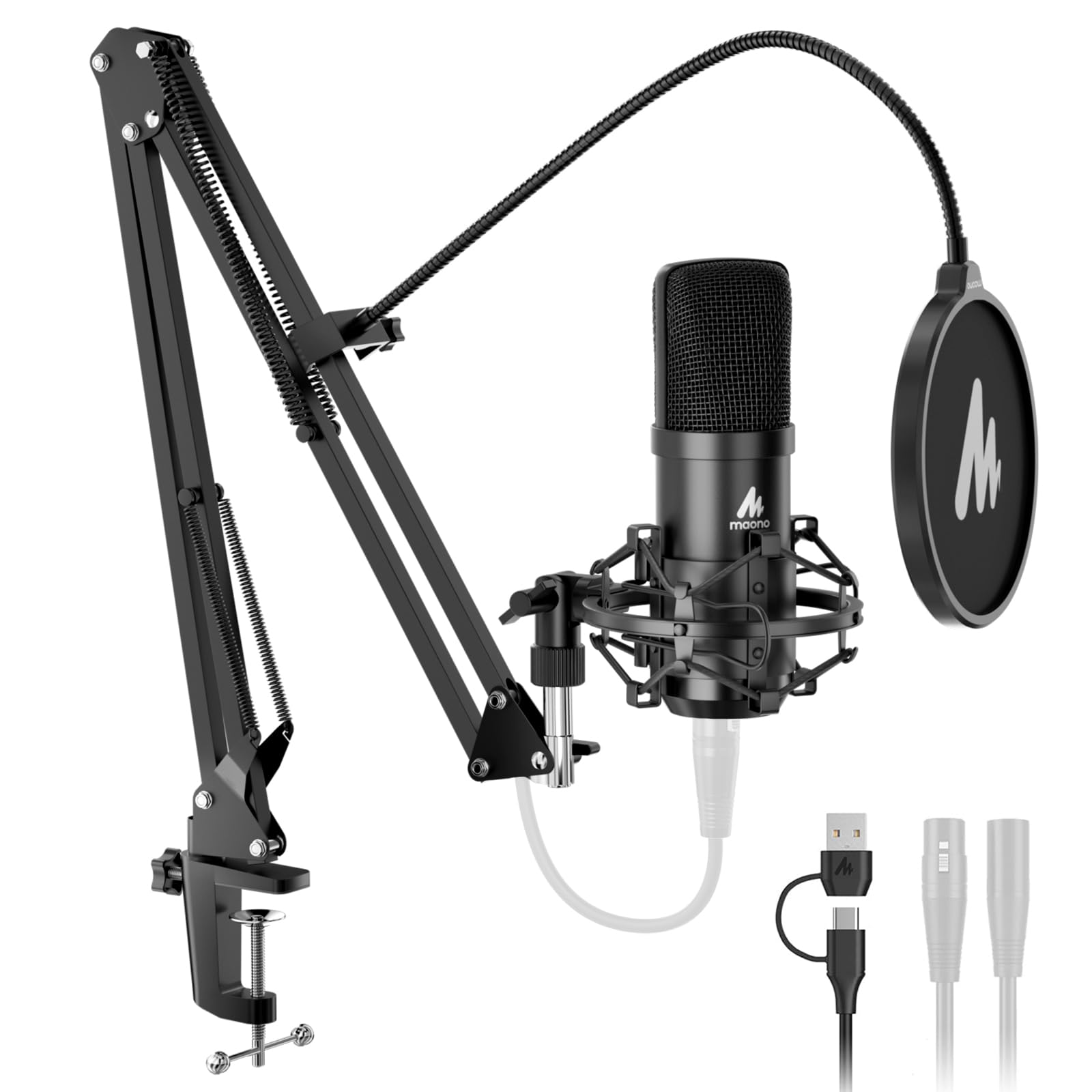
Best All-In-One Kit

MAONO A04 Gen2

91 /100
Lab Score Outstanding

Key details

Capsule
Condenser, cardioid
Connection
XLR and USB-C
In The Box
Boom arm, shock mount, pop filter
USB Capture
192kHz/24-bit
View on Amazon

The box is the pitch: condenser mic, boom arm, shock mount, pop filter, foam windscreen, desk clamp, and a USB-C cable. For someone who has never clamped an arm to a desk, that's the difference between ordering a microphone and having a working setup by the end of the evening. No other pick here includes an arm.

It's USB first and XLR second, and we think that ordering is right at this price. Over USB it's a 192kHz/24-bit mic with software for shaping tone and no interface required; the XLR output is there for the day you add one. Two outputs on one capsule is the reason to choose it over a plain USB mic, because you don't start over when the setup grows.

As a condenser it hears the room, and a hard-walled corner or a loud keyboard will land in the recording. The fix is proximity: get close, use the pop filter, and put something soft behind you. For a first streaming setup where the alternative is a headset mic, that's a great deal of kit for the money.

Pros

  • Boom arm, shock mount, and pop filter included
  • USB and XLR in one microphone
  • 192kHz/24-bit capture over USB
  • Simple to mount and start using

Cons

  • Boom arm and clamp feel flimsy
Our verdict

Everything you need to start streaming arrives in one box, and we think that makes it the easiest first XLR setup here.

Check Latest Price
8

Second Mic

AKG P120

92 /100
Lab Score Outstanding

Key details

Power
Phantom power
Capsule
Condenser, cardioid
Max SPL
150 dB
Frequency Range
20Hz–20kHz
View on Amazon

A 150 dB SPL ceiling isn't a number most streamers need; it's the spec that matters when the mic ends up in front of a drum kit. Which tells you what this is: a general-purpose condenser that happens to be inexpensive, rather than a microphone designed around a speaking voice.

For talking, it's clear and honest, picking up detail without much color, and it handles a loud source without distorting. We think it earns its place as a second microphone, a cheap way to put something decent in front of a guitar, a guest, or a co-host without lending out your main one. As a primary streaming mic it's fine, and not memorable.

What arrives is the microphone and a stand adapter: no cable, no shock mount, no case. Budget for a cable and you're still in for one of the least expensive condensers here, and one that won't flinch in front of a loud source.

Pros

  • Handles 150 dB without distorting
  • Clear, accurate vocal detail
  • Metal body at an entry price

Cons

  • Requires phantom power
  • Hears the room like any condenser
Our verdict

A clear, capable condenser for entry money; we see it as a second mic rather than the one your stream is built around.

Check Latest Price

How We Tested 12 XLR Streaming Microphones

We built the shortlist from current XLR dynamics and condensers, then filtered by pickup pattern, phantom-power needs, price tier, and what came in the box. From that list, 12 mics went onto an arm above my desk for seven months. They lived through live streams, Discord calls, and late-night voiceover recordings in a spare bedroom with bare walls; I typed on a mechanical keyboard, ran a desk fan, and left the window open to street traffic so every mic faced the same mess.

Setup came first: I timed each mic from unboxing to first recording with a standard interface and noted whether I had to supply a cable, stand adapter, or shock mount. For sound, I recorded the same 60-second script at a fixed distance and listened back for plosives, sibilance, room boom, and whether my voice sounded thin or congested. To judge noise, I raised gain until a quiet speaking voice hit a healthy stream level, recorded 30 seconds of room tone, then typed and clicked through a game menu to hear what bled in. None of these mics has active noise cancellation, so off-axis rejection and self-noise did the real work; I noted which ones stayed quiet at high gain and which pulled in the fan.

I also checked build quality the unglamorous way: grille rattle, switch feel, thread wear, and handling noise when I bumped the desk. Over seven months, I plugged and unplugged each mic weekly and watched for reliability issues—crackle, hum, or loose connections. Versatility got a practical test across close commentary, voiceover segments, and group calls, and at the end I weighed what came in the box—cable, shock mount, stand adapter—against what each mic asked for, since missing accessories can erase the value.

How to Choose an Xlr Microphone for Streaming

Match the capsule to your room

A dynamic capsule is less sensitive by design, which is why it forgives hard walls, a fan, and a mechanical keyboard. A condenser returns the favor with detail: more air, more texture, more of everything, including the room. Neither is better, because they answer different questions.

Stream from a shared space with bare walls and a dynamic is the safer start, worked close. Have soft furnishings, a treated corner, and a reason to want detail — voiceover, singing, an instrument — and a condenser earns its sensitivity. The AT2020 and NT1 Signature cover that second case; the SM7B, PodMic, MV7X, and K688 cover the first.

Work out your gain before you fall for a tone

Every XLR mic hands the gain question to your interface. Low-output dynamics need a lot of clean gain: Shure recommends at least 60dB for the SM7B, and an interface that runs out of headroom before that leaves you with the knob pinned and hiss under the voice.

Check the gain your interface can actually deliver, and if it falls short, price in an inline booster or choose a mic with more output. Condensers sidestep the problem by needing phantom power instead, which most interfaces supply with a switch.

Budget for the parts that aren't in the box

Most XLR microphones arrive as a microphone. Cables, shock mounts, pop filters, and arms are usually extra, and together they can rival the cost of the mic. The NT1 Signature is the exception here, arriving with a shock mount, pop filter, and a six-meter cable.

Work backward from the complete cost: a boom arm rated for the mic's weight, a decent XLR cable, and a pop filter if the grille doesn't have one inside. The PodMic hides its pop filter and shock mounting in the body, and the MAONO kit includes the arm that everything else here makes you buy.

Decide whether you need USB as well

An XLR-only mic needs an interface or mixer from day one, which is a real cost on top of the microphone. A hybrid such as the K688 or the MAONO A04 Gen2 runs on USB now and switches to XLR when you add one: the same capsule, two paths.

Buy the hybrid if you're starting from nothing and want to spread the spend across a few months. Buy XLR-only if you already own an interface, or if you'd rather put the money into the capsule than into a second connection you'll stop using.

Plan the mount and the desk space

A heavy broadcast mic needs a boom arm with a real load rating; a light desk stand will tip or sag under it. A condenser on a short stand picks up every keystroke through the desk itself, which is why a shock mount matters more there than it does with a dynamic.

Measure before you order. An arm clamped at the back of the desk reaches further than a stand but needs a free edge to bite, and a desk pushed against a wall is often better served by a compact stand and a short reach than by an arm you can't position.

Frequently Asked Questions

Final Verdict

Most streamers should buy the SM7B, provided the interface can give it the gain it asks for. It turns an ordinary room into a quiet one and makes a voice sound finished with almost no work, and that combination is why it holds the top spot here.

If the gain isn't there, the PodMic delivers the same kind of broadcast tone for a fraction of the money, and the MV7X splits the difference with less fuss and a smaller footprint. Decide the interface first; once you know what's feeding the mic, the choice of microphone gets much easier.