Best Noise-Canceling Gaming Headsets of 2026

The first time I tried to play a ranked match next to a box fan, I learned that “noise canceling” on a gaming headset can mean almost anything. Some sets killed the fan hum but made my voice sound robotic; others sounded great and clamped my ears after an hour. The right one should quiet the room, keep your mic clear, and stay comfortable long enough to forget you’re wearing it. I’ve spent the past six months rotating 10 noise-canceling gaming headsets at my desk.

The ones I kept reaching for made footsteps and reload cues easy to place, put mute and volume controls under my fingers without looking, and lasted several nights between charges. They also switched between my PC, a console, and my phone without much re-pairing. One thing first-time buyers miss: active noise cancellation is only half the battle—a headset that seals well and has a clear mic will feel quieter than one with a fancy mode and a loose fit. The picks below are the ones I’d leave on my desk.

1

Best Overall

JBL Quantum 810 Wireless

84 /100
Lab Score Excellent

Key details

Drivers
50 mm Hi-Res
Charging
Play and charge over USB
Wireless
2.4 GHz and Bluetooth 5.2
Noise Control
Active Noise Cancellation
View on Amazon

Two things put this at the top of our list: it is the least expensive headset here with genuine ear-cup ANC, and it is the model where noise-cancellation satisfaction ran highest in this group. That matters, because this category is crowded with headsets advertising a noise-canceling microphone and nothing more. The Quantum 810 cancels in the cups, so a desk fan or a window unit drops away without hollowing out the low end of an explosion, and it does that while the 50 mm Hi-Res drivers carry JBL's QuantumSURROUND and DTS Headphone:X v2.0 positional processing.

The trick we keep coming back to is the dual radio. Game audio runs over the 2.4 GHz dongle while a Discord call or your phone rides in on Bluetooth 5.2, both mixed into the same pair of cups. It is the difference between a headset you wear for a match and one you wear all evening, and it is the first feature we look for now.

Comfort holds up over a long session. The clamping is medium rather than vise-like, the pads sit around the ear instead of pressing on it, and you are not reaching to take it off between rounds. Play-and-charge over USB means a flat battery does not end the night either: you plug in and keep going. Two things to settle before you order. Xbox is not supported, so this is a PC and PlayStation headset. And the RGB lighting is charming for about a week and then it is just battery drain, so switch it off in the software.

Pros

  • Ear-cup ANC that quiets fans and room hum
  • Game audio and Bluetooth chat mixed at once
  • Charges while you play
  • Least expensive of the ANC picks here

Cons

  • No Xbox support, PC and PlayStation first
  • Boom mic is adequate rather than impressive
Our verdict

Our default ANC pick: the quietest ear cups relative to the money, dual wireless for game and chat at once, and a fit that survives a long night.
Check Latest Price
2

Best for Multi-Device Setups

SteelSeries Arctis Nova Pro Omni

84 /100
Lab Score Excellent

Key details

Devices
Up to five via OmniPlay
Batteries
Two rechargeable, swappable
Noise Control
Active Noise Cancellation
Wireless Audio
Hi-Res 96 kHz/24-bit
View on Amazon

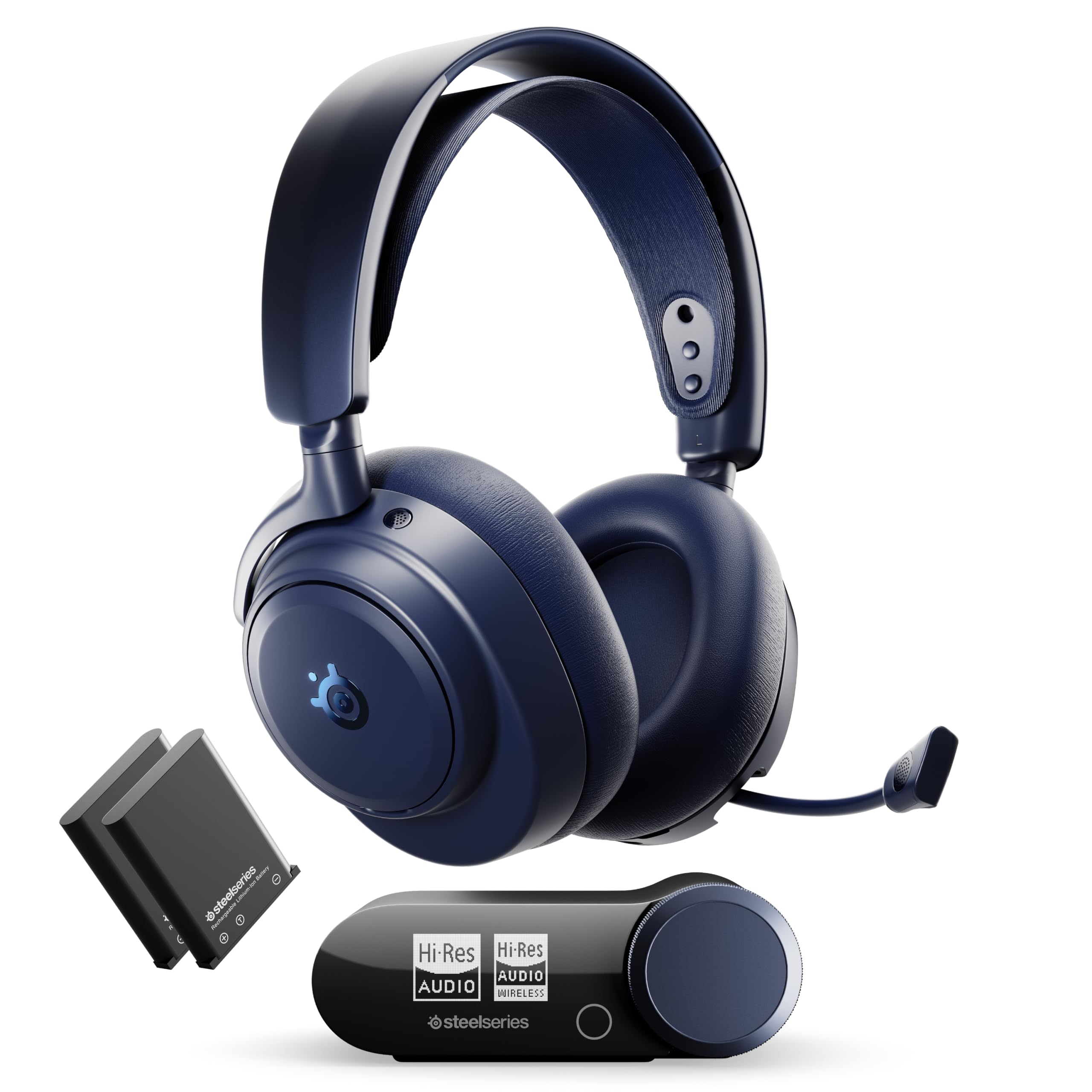
Five sources, one button. The Omni's party piece is OmniPlay: three USB ports, line-in, and Bluetooth, all addressable from the GameHub base station, so a work laptop, a PS5, a Switch, and a phone can stay connected while you switch with a physical press instead of crawling under the desk. If your headset migrates between machines all week, that alone is worth the step up from a dongle-based set.

The noise cancellation is the most capable hardware in this group. SteelSeries quotes an independent lab figure of up to 40% more background noise blocked than the competition, which is the company's number and not ours, and the ANC commentary we turned up was positive, if thinner than for its cheaper sibling. Add the Hi-Res 96 kHz/24-bit wireless certification and you get less compression over the link, a difference you notice in the quiet passages of a game far more than in the middle of a firefight.

Two rechargeable batteries ship in the box, and the base station charges the spare while you play, so a session never has a charging window. The ClearCast Pro boom is omnidirectional with AI noise rejection behind it and it detaches when you want the headset to read as headphones rather than a rig. At 339 g it is light for something this loaded, and the faux leather and metal finish looks like the money you spent. Where it stops making sense is a single-PC desk: you are paying for ports you will never press.

Pros

  • Switches between five connected devices
  • The most capable ANC hardware in this set
  • Two batteries, no charging downtime
  • Hi-Res 96 kHz/24-bit wireless audio

Cons

  • Highest price in this group
  • Mic can sound thin against cheaper models
Our verdict

For a desk with a PC, a console, and a work laptop on it, this is the one we point to: five inputs, a hardware switch, and the most ANC hardware in this set.

Check Latest Price
3

Best for Marathon Sessions

SteelSeries Arctis Nova Pro Wireless

85 /100
Lab Score Excellent

Key details

Drivers
40 mm
Batteries
Hot-swappable, two included
Base Station
OLED with dual USB
Noise Control
Active Noise Cancellation
View on Amazon

Start with the part that matters for this keyword: the noise cancellation is the weakest element of this headset's case. The 4-mic hybrid system is genuinely ANC and transparency mode is there when you need to hear a delivery, but performance divides sharply. Some pairs quiet a fan or an AC unit convincingly; others put a low rumble or a steady hiss in one ear, and the comparisons against headphones built purely for cancellation do not flatter it.

So we keep it on the list for stamina. The Infinity Power System is the best battery idea here: two packs, one in the headset and one charging in the OLED base station, and you hot-swap mid-match without taking the headset off. That base station also carries two USB inputs, which means an Xbox and a PC, or a PlayStation and a PC, can share one desk and switch with a press. Add 2.4 GHz and Bluetooth running simultaneously, plus the Sonar software's EQ and channel balancing, and this is the most flexible headset in the group.

The ear cups clamp firmly, which is comfortable for a couple of hours and noticeably less so by the fourth, particularly with glasses on. There are also units that will not power on straight out of the box, and that is the second reason we do not hand this to someone whose main want is quiet. Buy it because you want the swap, the base station, and the software, and treat the cancellation as a bonus rather than the reason.

Pros

  • Hot-swap batteries with a charging base station
  • Dual USB inputs for console and PC switching
  • 2.4 GHz and Bluetooth audio at the same time

Cons

  • ANC is inconsistent, with rumble or hiss in some units
  • Firm clamp gets uncomfortable over long sessions
Our verdict

We recommend it for stamina rather than silence: the hot-swap battery system is the best in this group, even though its ANC is the weakest part of the package.

Check Latest Price
4

Best for Competitive FPS

Razer BlackShark V3 Pro

81 /100
Lab Score Excellent

Key details

Battery
Up to 70 hours
Drivers
50 mm TriForce Bio-Cellulose
Noise Control
Hybrid Active Noise Cancellation
Wireless Latency
10 ms HyperSpeed Gen-2
View on Amazon

Built for the ranked ladder. Razer's pitch here is reaction time: HyperSpeed Wireless Gen-2 quotes 10 ms of latency, the 50 mm TriForce Bio-Cellulose Gen-2 drivers are tuned for positional cues and frequency separation, and there is a detachable 12 mm full-band mic for shot calls. If you play shooters where hearing a reload a beat early decides the round, this is the headset in the group with the most competitive-first thinking in it.

The ANC is real, a hybrid system that blocks distractions without the suction-cup feeling, but it is the accessory here rather than the headline, and the quiet it creates is thinner than what the SteelSeries pair manage. The mic tells a similar story: clear and natural for comms, a step behind a dedicated broadcast mic, and you want the boom close. Keep an eye on the connection as well. Occasional disconnects and re-pairing are part of living with it, and moving the dongle onto a short extension cable away from the case is the usual fix.

Seventy hours of battery and four ways to connect, 2.4 GHz, Bluetooth 5.3, USB, and 3.5 mm, make it the most versatile headset here after the Omni. The 2.3 lb the listing gives it is the price of those drivers: you feel it around the ears after a few hours, and the clamp does not ease it much. We rate it as a competitive tool with a comfort tax rather than an all-day headset, which is exactly how it should be judged.

Pros

  • 10 ms wireless latency for fast reactions
  • 50 mm bio-cellulose drivers tuned for positional cues
  • Up to 70 hours of battery
  • 2.4 GHz, Bluetooth, USB, and 3.5 mm

Cons

  • 2.3 lb listed weight makes long sessions a chore
  • ANC is thinner than the SteelSeries pair's
Our verdict

This is the ranked-ladder pick: 10 ms wireless and positional tuning that suits shooters, provided you accept the weight and treat ANC as a bonus.

Check Latest Price

How We Tested 10 Noise-Canceling Gaming Headsets

I started by pulling together headsets that actually advertise active noise cancellation, then whittled the list to 10 models covering the major connection types—2.4GHz wireless, Bluetooth, and wired—across a range of prices. Over six months, I used each one as my daily driver: after-work ranked sessions, weekend co-op with friends, late-night solo runs, and a few calls when I was too lazy to switch headsets. I wore glasses for some sessions and tested each set in a small apartment with a box fan, a mechanical keyboard, and a TV going in the next room.

For noise cancellation, I ran the fan at full speed and played a match with the mic muted, noting whether I could still hear the fan, keyboard clacks, or the TV. I also checked transparency mode during a mid-game delivery knock—could I hear the door without pulling the headset off? Comfort got judged at the two-hour mark and again at hour four: headband pressure, ear-cup heat, and whether my glasses pressed into my temples.

For sound, I listened for directional cues in shooters—footsteps left or right, reloads behind me—and whether explosions swallowed the detail. Feature testing meant using the controls without looking: mute, volume, chat mix, EQ presets, and sidetone. I paired each headset to a PC, a console, and a phone, then walked to the kitchen to see where the wireless connection dropped. I also timed battery life from full charge to shutdown over several days, logging how much charge was left after a three-hour session.

To assess value, I compared what each model included—dongles, cases, software support—against the rest of the field rather than by its spec sheet alone. The headsets that rose to the top were the ones I forgot I was wearing and didn’t have to troubleshoot.

How to Choose a Noise-Canceling Gaming Headset

Check the noise-control line before anything else

A headset can claim noise cancellation three ways: active cancellation in the cups, passive isolation from closed-back pads, or a noise-canceling microphone that only affects what your teammates hear. Only the first is what this search means. Look for Active Noise Cancellation in the noise-control field, not in the microphone description.

Even then, keep your expectations calibrated. ANC is strongest against steady low-frequency sound like a desk fan, a window AC unit, or traffic, and only modest against a voice in the next room. If speech is your problem, a closed-back cup and a tight cardioid boom will do more than any circuit.

Comfort is a specification too

The weight figures here run from 339 g on the Arctis Nova Pro Omni to 2.3 lb on the BlackShark V3 Pro, and that spread shows up in hour three rather than minute five. Weight compounds with clamping force and pad shape, so a heavier headset with a gentle clamp can outlast a light one that squeezes.

If you wear glasses, prioritise medium clamp and roomy oval cups, and treat the return window as your trial. Big drivers and metal frames buy you sound and durability; the cost is grams you feel by the end of a long session.

One radio for the game, one for everything else

The most useful feature in this group is not the cancellation at all, it is simultaneous 2.4 GHz and Bluetooth. Game audio takes the low-latency link while your phone or a Discord call runs over Bluetooth, and both mix into the same cups.

Then count your devices. A plain dongle serves one machine; a base station like OmniPlay serves five with a physical switch on the desk. If your headset only ever touches a single PC, you are paying for ports you will never press.

Decide how you will handle a dead battery

Three approaches, three different habits. Hot-swappable packs on both SteelSeries models mean you never charge while playing, with the spare topped up in the base station. Play-and-charge on the JBL means a cable at some point in the evening but no downtime. A single long charge, like the Razer's 70 hours, means plugging in weekly and forgetting about it.

Pick the ritual you will actually keep up with. A superb headset that has to sit on a cable every night is worse in daily use than a good one with a spare pack in the box.

Frequently Asked Questions

Final Verdict

If quiet is the whole point, buy the JBL Quantum 810 Wireless. It is the least expensive ANC headset here and the one whose cancellation held up best in this group, and the dual-radio trick keeps game audio and chat running side by side all evening.

Pay more only for a specific job. The Arctis Nova Pro Omni earns its price when one headset has to serve five machines, and the BlackShark V3 Pro is the competitive shooter's tool if you can live with the weight and the thinner cancellation.