12 Best Rapid Trigger Keyboards 2026: Reliable Picks on a Budget

Which Hall-effect rapid trigger keyboards deliver consistent performance without early failures? A guide for competitive gamers who want the best value.

Many rapid trigger keyboards promise lightning-fast response but suffer from premature key failures. Some units stop functioning within weeks, leaving gamers stranded. The market is flooded with budget options that cut corners on quality control, while premium names aren't immune either.

The key is not just chasing specs like 8000Hz polling or ultra-fine actuation. A board that feels great out of the box but fails after a month is worthless. This guide focuses on models that combine competitive gaming features with proven reliability from real user feedback.

Whether you prioritize a compact 60% layout or a full-featured board with a media knob, the decision often comes down to a trade-off between form factor and dependability. We help you choose the right balance for your setup.

1

Best Overall

Redragon K686 HE

91 /100
Lab Score Outstanding

Key details

Layout
98 keys
Software
PRO Software
RT Accuracy
Switch Type
Redragon UltraMag POM magnetic
View on Amazon

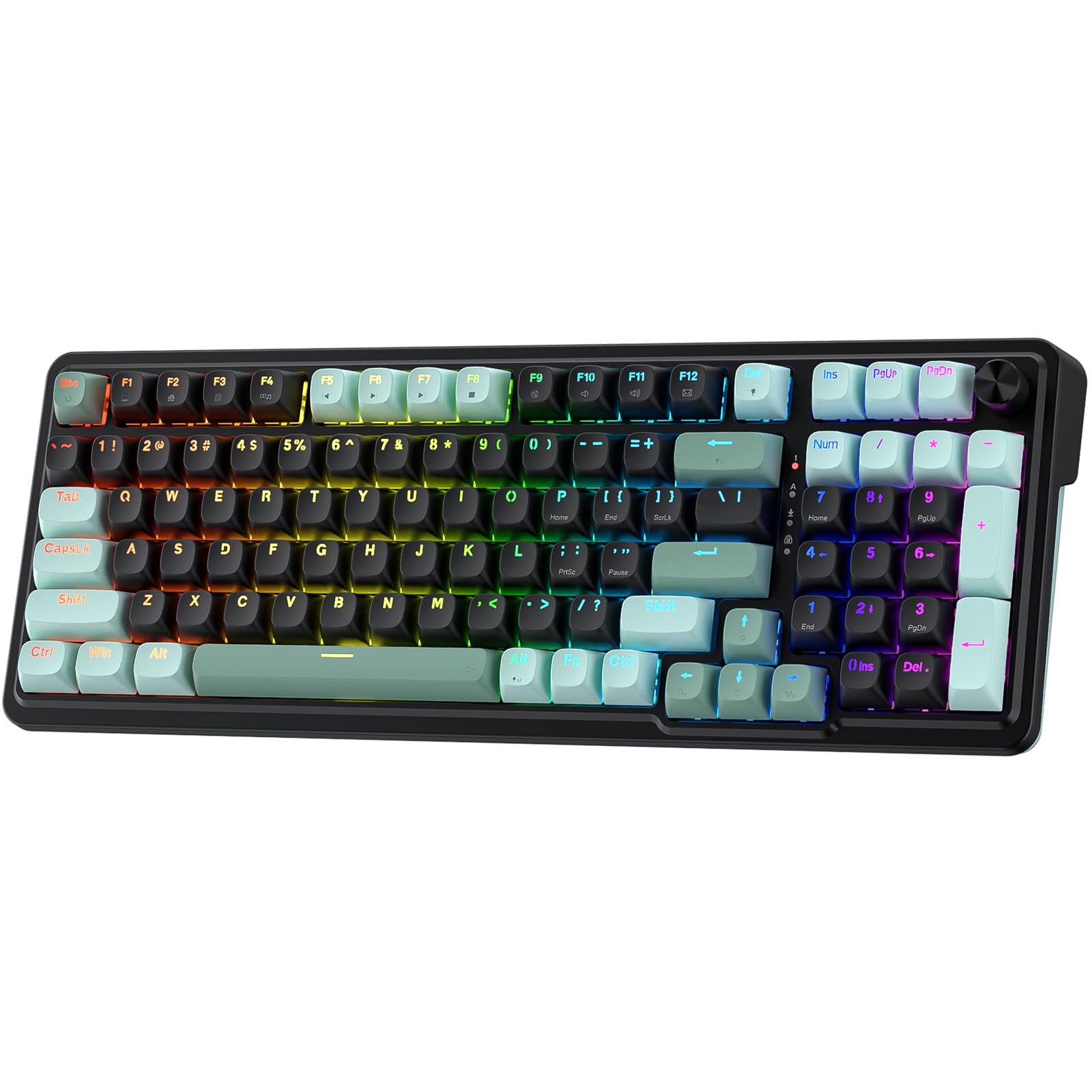
The Redragon K686 HE packs a full 98-key layout, 8000Hz polling, and a multi-function control wheel into a wired chassis that feels noticeably solid. The gasket mount and PBT keycaps are features usually seen in more expensive boards, and the media knob adds convenience for adjusting volume mid-game without leaving your hand position.

Out of the box, the linear magnetic switches produce a creamy, satisfying sound with minimal ping or rattle. The board has a reassuring weight that keeps it stable during fast movements, and the soft-touch keycaps resist fingerprints better than ABS alternatives. The ergonomic angle makes long sessions comfortable, though the wrist rest area is flat - a minor point for those used to contoured rests.

This keyboard is best for gamers who want a complete layout with dedicated function keys, arrow keys, and a volume knob - all without moving to a separate numpad. It suits players who want the rapid trigger performance of Hall-effect switches but prefer a stock sound and feel that needs no modifications. The wired design is a limitation: if you need a cable-free desk or frequently swap between devices, this isn't the right fit. It also won't appeal to those who want a tiny 60% board that leaves more mouse space.

In a market where budget HE keyboards often cut corners on build quality or switch consistency, the K686 HE avoids those compromises. The adjustable actuation from 0.1mm to 3.4mm covers both snappy gaming taps and deeper typing presses, and the 8000Hz polling ensures inputs register with minimal latency. Software control via Redragon's PRO suite allows per-key remapping and macro assignments, though the interface is functional rather than polished.

Pros

  • Solid build quality with a sturdy feel
  • Great stock sound - creamy and satisfying
  • Strong value for a full-featured HE keyboard
  • Comfortable ergonomic design with smooth linear switches

Cons

  • Wired-only connection may be a limitation for those seeking a cable-free desk setup
Our verdict

For anyone wanting a consistent Hall-effect keyboard with a full layout and satisfying stock sound, the K686 HE delivers without the compromises found in cheaper alternatives.

Check Latest Price
2

Best Budget 60%

ATTACK SHARK X68 HE

88 /100
Lab Score Excellent

Key details

Layout
60% (66 keys)
Software
Web driver
RT Accuracy
0.01mm
Switch Type
Hall-effect magnetic
View on Amazon

The X68 HE stands out in the budget Hall-effect segment with its aluminum top plate, PBT keycaps, and specs that match keyboards costing twice as much. The typing feel is solid and the sound is creamy and thocky out of the box, giving it a satisfying acoustic character that belies its price.

This keyboard suits competitive players who want rapid trigger and high polling on a tight budget and are comfortable with the possibility that the unit may develop issues within months. The compact 60% layout saves desk space but requires adjusting to layer-based navigation — a tradeoff that many esports-focused gamers already accept.

The magnetic switches respond instantly to minute finger movements, and the 8000Hz polling rate keeps latency low enough for fast-paced titles. Some units, however, have stopped functioning after a few months of use — a risk that becomes manageable only if you budget for a replacement or pick up an extended return window.

Pros

  • Solid aluminum plate gives the board a rigid, premium feel.
  • Feature-packed at a budget price
  • Satisfyingly creamy, thocky sound right out of the box.
  • Responsive keys with fast rapid trigger for competitive play.

Cons

  • In some cases, the keyboard may stop functioning within months.
  • The 60% layout omits dedicated navigation and arrow keys, requiring layer combinations.
Our verdict

Competitive gamers on a strict budget who can accept a potential early failure will find few better values — just budget for a spare.

Check Latest Price
3

Best Premium TKL

Logitech G PRO X TKL

89 /100
Lab Score Excellent

Key details

Layout
TKL (90 keys)
Software
Logitech G HUB
RT Accuracy
Switch Type
Logitech magnetic analog
View on Amazon

The Logitech G PRO X TKL Rapid sets itself apart with per-key actuation and KEYCONTROL, giving players granular control over trigger points and multi-layer commands through the G HUB software. This TKL design keeps the essential keys while freeing up desk space, and its Hall-effect switches deliver smooth, responsive feedback suited for competitive play.

This keyboard fits competitive esports players already invested in the Logitech ecosystem who want deep customization without stepping up to a full-size board. The 1000Hz polling handles fast inputs reliably, though it doesn't reach the 8000Hz peak seen in some rivals. Additionally, while most units hold up well, isolated cases of keyboards becoming unresponsive after months of use have been noted - something to monitor if long-term durability is a priority.

Quiet, low-profile operation makes it a good neighbor in shared gaming spaces, and the volume roller with dedicated media buttons add convenience without cluttering the layout. A detachable USB-C cable simplifies transport, and the sturdy chassis gives a confidence-inspiring feel during intense matches.

Pros

  • Per-key actuation and multi-layer commands for extensive customization.
  • Smooth, responsive Hall-effect switches with a quiet typing sound.
  • Premium build quality with a sleek, low-profile design.

Cons

  • 1000Hz polling rate is adequate for most but lower than the 8000Hz offered by some competing Hall-effect boards.
  • A small number of units may develop unresponsive keys after extended use.
Our verdict

For esports players who prioritize software customization and already use Logitech peripherals, this is a refined TKL option worth considering, provided the polling and durability trade-offs are acceptable.

Check Latest Price
4

Best Value 60%

Aula WIN60 HE

89 /100
Lab Score Excellent

Key details

Layout
60% (61 keys)
Software
Web-based driver
RT Accuracy
0.02mm
Switch Type
Hall-effect Graywood V3 magnetic
View on Amazon

The WIN60 HE packs 8000Hz polling and magnetic rapid trigger into a small 60% layout for around $40, an aggressive price for these features. Where the top pick (Redragon K686 HE) offers a full 98-key layout with a media knob, the Aula focuses on compact core performance. The build uses a solid aluminum plate and dense foam, giving it an unexpectedly premium feel.

Typing is smooth and the sound profile is thocky without being excessively loud — satisfying for both gaming and regular typing. Keycaps are doubleshot PBT, which resist shine over time. For FPS games, the rapid trigger response is immediate, and the 0.02mm actuation step gives fine control for strafing and peeking.

This keyboard is best for FPS players on a tight budget who want Hall-effect speed, and for newcomers curious about rapid trigger without the high cost. It is also ideal if you prefer the compact 60% size for desk space. Keep in mind that the web driver does not allow remapping of function or Windows keys, and occasional wired disconnections have been reported — these limitations may frustrate users who need deep customization or flawless connectivity.

💡 Keep the USB cable firmly seated to minimize the chance of disconnections.

Pros

  • Build quality and materials feel premium for the price
  • Exceptional value for the feature set at this price point
  • Satisfying thocky sound profile that is not overly loud
  • Pleasant typing experience with smooth, consistent keystrokes

Cons

  • When customizing keybinds, the web driver cannot remap function or Windows keys
  • During fast-paced gameplay, occasional disconnections may occur
  • Long-term durability under consistent heavy use may vary, with some units becoming unresponsive over time
Our verdict

For FPS players seeking Hall-effect speed without spending for a full layout, and willing to accept occasional software and connectivity limitations, the WIN60 HE is a cost-effective pick.

Check Latest Price
5

Best Wireless HE

Keychron K2 HE

86 /100
Lab Score Excellent

Key details

Layout
75% (84 keys)
Software
QMK/Launcher
RT Accuracy
Switch Type
Gateron Double-Rail magnetic
View on Amazon

While most rapid-trigger keyboards are tethered to a cable, the K2 HE brings 2.4GHz and Bluetooth to the Hall-effect segment. The aluminum frame with real wood accents gives it a desk presence that few other magnetic-switch boards match. The Gateron double-rail switches deliver a smooth, thocky keystroke out of the box — this is a board you want to type on, not just game with.

This keyboard suits Mac and Windows users who want one wireless board for both platforms, care about build and sound, and game casually. The wireless connection can drop out in busier RF environments — keep the 2.4GHz dongle within line of sight for stable play. At 1000Hz polling, response times are fine for most titles, but competitive players aiming for single-digit millisecond advantages will feel the difference against 8000Hz boards.

Keychron's QMK/Launcher software offers per-key actuation and rapid trigger tuning without a cloud account, which is a plus for privacy-minded users. The hot-swap sockets accept standard Hall-effect switches, so you can swap switches later. RGB lighting is per-key and bright enough to see in daylight, though it's not as flashy as some gamer-focused brands.

💡 Position the 2.4GHz dongle within three feet and avoid metal obstacles for the most stable connection.

Pros

  • Aluminum and wood build gives a premium, unique look
  • Smooth, thocky keystrokes right out of the box
  • 2.4GHz and Bluetooth support for true wireless use on Mac, Windows, and Linux
  • Per-key actuation and rapid trigger via QMK/Launcher without account signup

Cons

  • Wireless connection can drop when using Bluetooth in crowded rooms or with distance from the dongle
  • A minority of units have been noted to become unresponsive
Our verdict

If you want a wireless Hall-effect board for typing and light gaming, and you value materials and sound over raw polling numbers, this is the one to get.

Check Latest Price
6

Premium TKL Alternative

Corsair K70 PRO TKL

89 /100
Lab Score Excellent

Key details

Layout
TKL (84 keys)
Software
iCUE
RT Accuracy
Switch Type
Corsair MGX Hyperdrive magnetic
View on Amazon

The Corsair K70 PRO TKL delivers a notably quiet and thocky typing experience among magnetic-switch boards, thanks to pre-lubed MGX Hyperdrive switches. The sound is satisfying without being sharp, and the key feel is smooth and responsive out of the box. Combined with the per-key actuation range (0.4mm to 3.6mm) and iCUE software, this board offers the kind of granular control that competitive gamers expect from a Hall-effect keyboard.

Where this Corsair sits apart is the software integration: iCUE allows remapping nearly every parameter, including actuation points and rapid trigger sensitivity, all from one interface. The aluminum frame and volume roller add a tactile premium touch that many TKL boards skip. However, the reliability track record tempers the long-term confidence. A small but notable subset of users have reported LED failures or the keyboard becoming unresponsive after several months of use.

Pros

  • Quiet, thocky sound profile that avoids the plasticky ping of some competitors.
  • Smooth, responsive key feel with minimal wobble out of the box.
  • Deep customization via iCUE including per-key actuation and rapid trigger tuning.
  • Aluminum frame and volume roller add a solid, tactile premium feel.

Cons

  • LEDs or the entire keyboard can become unresponsive after months of use in some units.
  • Premium pricing places it above budget Hall-effect boards with similar spec sheets.
Our verdict

For competitive players who value switch feel and iCUE integration over long-term certainty, this Corsair delivers a refined typing experience that sets it apart from Logitech's TKL, but the occasional hardware failure is worth keeping in mind.

Check Latest Price
7

Extreme Budget

DAREU EK60 HE

89 /100
Lab Score Excellent

Key details

Layout
60% (61 keys)
Software
Dual web/software driver
RT Accuracy
0.01mm
Switch Type
DAREU hall-effect magnetic
View on Amazon

This keyboard packs the complete rapid trigger suite (SOCD, adjustable actuation, 8000Hz polling) into a compact 60% frame for under $35. Early users report a noticeably quieter typing sound and solid build quality for the price. The catch is that only a modest number of buyers have shared their experiences so far, making long-term durability a question mark for anyone expecting years of heavy competitive use. The wired-only design and compact layout are standard tradeoffs at this size, but they narrow the audience to those comfortable with a small desk footprint and no cable-free option.

Pros

  • Quieter key sound than typical mechanical keyboards
  • High approval ratings from early buyers on build and performance

Cons

  • Long-term durability under consistent daily use may vary between units; early data is limited
  • Wired-only design and 60% layout may not suit users who prefer wireless or dedicated navigation keys
Our verdict

Ideal for budget gamers who want the full HE feature set and are willing to accept early-adopter risk on long-term durability.

Check Latest Price
8

Stylish Compact

Womier M68HE PRO

86 /100
Lab Score Excellent

Key details

Layout
60% (67 keys)
Software
Web software
RT Accuracy
Switch Type
Womier custom hall-effect magnetic
View on Amazon

The Womier M68HE PRO stands out with its eye-catching topographic design and web-based software that simplifies key mapping across Mac and Windows. The typing sound is pleasant for a budget-priced board, and the plastic case feels sturdier than expected. However, the 60% layout sacrifices dedicated F-keys, and more critically, some units may develop unresponsive keys – a risk that pushes this keyboard away from competitive play. With limited long-term feedback available, it suits casual gamers or dual-platform users who value aesthetics and cross-platform ease over absolute reliability.

Pros

  • Distinctive topographic keycap design stands out visually
  • Pleasant typing sound for the price range

Cons

  • Compact 60% layout omits dedicated F-key row
  • Some keys can become unresponsive during use, a concern for competitive gaming
Our verdict

Best suited for style-conscious users who work across Mac and Windows and can accept the risk of occasional key responsiveness issues, rather than for competitive gamers seeking unwavering performance.

Check Latest Price
9

Budget Design

DAREU COOL60

88 /100
Lab Score Excellent

Key details

Layout
60% (61 keys)
Software
Dual driver
RT Accuracy
0.01mm
Switch Type
DAREU Fire magnetic
View on Amazon

The topographic keycaps and 0.01mm actuation make this an appealing option for budget-conscious gamers who want the core HE advantages. However, the feature set matches pricier boards without the same volume of user experience to confirm long-term behavior under competitive play. Unlike more established budget options, this model has a shorter history of real-world use, so its reliability during extended sessions is less certain. If you prioritize a distinctive look and low cost over a proven track record, this fits the bill.

Pros

  • Topographic PBT keycaps deliver a textured, durable surface that resists wear over time.
  • Full Hall-effect support with SOCD and 8000Hz polling at an entry-level price point.
  • 0.01mm actuation adjustment allows precise rapid trigger tuning for competitive games.

Cons

  • Lack of detailed software documentation for SOCD and DHA settings makes advanced configuration less straightforward.
  • Long-term durability under extended competitive sessions is not yet established by broad usage history.
Our verdict

This keyboard works best for budget buyers who value a unique look and full HE specs, and are comfortable relying on initial strong ratings rather than a long track record.

Check Latest Price
10

Compact Knob

Redragon K673 HE

82 /100
Lab Score Excellent

Key details

Layout
80% (81 keys)
Software
PRO Software
RT Accuracy
Switch Type
Redragon UltraMag magnetic
View on Amazon

The Redragon K673 HE brings a gasket-mounted frame and PBT keycaps to the budget Hall-effect market, delivering a deeper, thockier typing tone than most boards in its price range. The media knob adds convenient volume control without expanding the footprint. However, RGB flickering can be noticeable in dim settings, and the product's recent release means long-term reliability under heavy use is still unconfirmed. This makes it a secondary pick for buyers who prioritize lighting consistency or need a proven track record.

Pros

  • Gasket mount and PBT keycaps produce a fuller, less hollow typing sound.
  • Media knob offers easy volume control on a compact 80% frame.

Cons

  • RGB lighting flicker may appear in darker viewing conditions
Our verdict

Suitable for competitive players who want a compact wired keyboard with a knob and are willing to accept lighting imperfections for a better out-of-the-box typing feel.

Check Latest Price
11

Early Adopters

LEOBOG A80 RT

81 /100
Lab Score Excellent

Key details

Layout
75% (82 keys)
Software
Web driver
RT Accuracy
0.01mm
Switch Type
LEOBOG magnetic
View on Amazon

The LEOBOG A80 RT packs a 75% layout with a carbon fiber plate and full Hall-effect features including rapid trigger and 8000Hz polling. Real-world data is sparse, so its long-term performance under daily competitive play remains unconfirmed. This board suits early adopters willing to accept some uncertainty in exchange for the lowest price among 75% HE options.

Pros

  • 75% layout offers a compact form with dedicated function row and arrow keys
  • Carbon fiber plate provides a stiff, low-flex typing feel
  • 0.01mm rapid trigger actuation allows fine-tuned responsiveness

Cons

  • Long-term durability under heavy gaming use has not been documented with sufficient real-world data
  • Side-printed keycap legends can be harder to read when RGB backlighting is off or dim
Our verdict

A worthwhile choice for early adopters who want to test a compact Hall-effect board at a low entry price and are comfortable with the limited track record.

Check Latest Price
12

Enthusiasts

SteelSeries Apex Pro Mini Gen 3

91 /100
Lab Score Outstanding

Key details

Layout
60% (61 keys)
Software
SteelSeries GG
RT Accuracy
Switch Type
SteelSeries OmniPoint 3.0 Hall-effect
View on Amazon

SteelSeries OmniPoint 3.0 switches deliver a typing feel that is exceptionally smooth and responsive, with a satisfying acoustic profile. The aluminum frame and PBT keycaps give the board a dense, rigid feel that rivals premium custom builds. Protection Mode and Rapid Tap are well-implemented for competitive play. However, the price is significantly higher than comparable Hall-effect boards, and its recent release means long-term durability under heavy daily use is still unconfirmed — a consideration for those planning years of frequent gaming.

Pros

  • Typing feel is exceptionally smooth and responsive, with a satisfying acoustic profile.
  • Premium aluminum frame and PBT keycaps give a dense, rigid build quality.

Cons

  • Price places it well above most Hall-effect keyboards
  • Long-term durability under heavy daily use is unconfirmed given the product's recent release.
Our verdict

Best suited for competitive gamers who prioritize immediate performance and premium materials over cost and long-term track record.

Check Latest Price

How to Choose

Switch Technology

Hall-effect switches use magnets to detect key movement, eliminating physical contact that wears down over time. This makes them inherently more durable than traditional mechanical switches, but manufacturing quality varies widely. Cheap Hall-effect sensors can drift or fail, leading to inconsistent actuation.

Optical switches are an alternative, but they rely on light interruption and can be affected by dust or misalignment. For rapid trigger, Hall-effect is the standard, but always check user reports for that specific switch model.

Polling Rate

Polling rate determines how often the keyboard reports its position to the PC. 8000Hz means 8,000 reports per second, theoretically offering lower latency than 1000Hz. In practice, the difference is measurable but often imperceptible to most gamers.

The real trade-off is that higher polling rates consume more USB bandwidth and can cause higher CPU usage. For competitive play, 1000Hz is adequate; 8000Hz is a bonus if your system can handle it without stability issues.

Rapid Trigger Accuracy

Rapid trigger accuracy is the smallest distance the keyboard can detect for releasing and re-engaging a key. A step of 0.01mm allows faster resets than 0.02mm, which matters for spamming and movement in games.

However, ultra-fine step distances can cause accidental triggers if the user's finger hovers near the actuation point. Most competitive players are fine with 0.02mm, while 0.01mm is best for those who want maximum responsiveness and can tune their sensitivity.

Layout Size

Layout size affects desk space, key availability, and ergonomics. 60% keyboards save space but lack function keys and dedicated arrow keys, requiring layers. TKL (80%) retains arrows and function row, ideal for gamers who need quick access without a numpad.

Full-size (98 or 104 keys) includes a numpad but takes up more mouse space. The choice depends on your game genre and desk setup. FPS players often prefer 60% for more mouse room, while MMO or productivity users may want more keys.

Software Ecosystem

Software controls key mapping, actuation points, and macros. Dedicated software like Logitech G HUB or iCUE offers deep customization but can be buggy and resource-heavy. Web-based drivers are lighter but often lack features like per-key remapping.

The hidden trade-off is software lock-in: once you invest time in complex profiles, switching brands becomes painful. For most users, a simple web driver with basic customization is sufficient. Power users should check if the software supports SOCD and rapid trigger adjustments.

Frequently Asked Questions