13 Best Switch 2 Grip of 2026: Comfort Without the Cramps

Find a Switch 2 grip that actually fits the new console, reduces hand strain, and works with your dock. No more guessing.

Many grip makers claim dock compatibility, but the Switch 2's tighter dock and redesigned Joy-Con attachment mean some grips simply don't fit or cause frustration. Others focus on comfort but sacrifice durability, with locking mechanisms that loosen after a few weeks.

The real trade-off is between a full case that cushions your palms and adds weight, and a lightweight set that only covers the Joy-Cons but leaves the console exposed. How you play—docked or handheld, solo or multiplayer—determines which side of that trade-off makes sense.

This guide cuts through the marketing to help you pick a grip that matches your hand size, play style, and docking habits. No hype, just what works for the way you actually play.

1

Best Overall

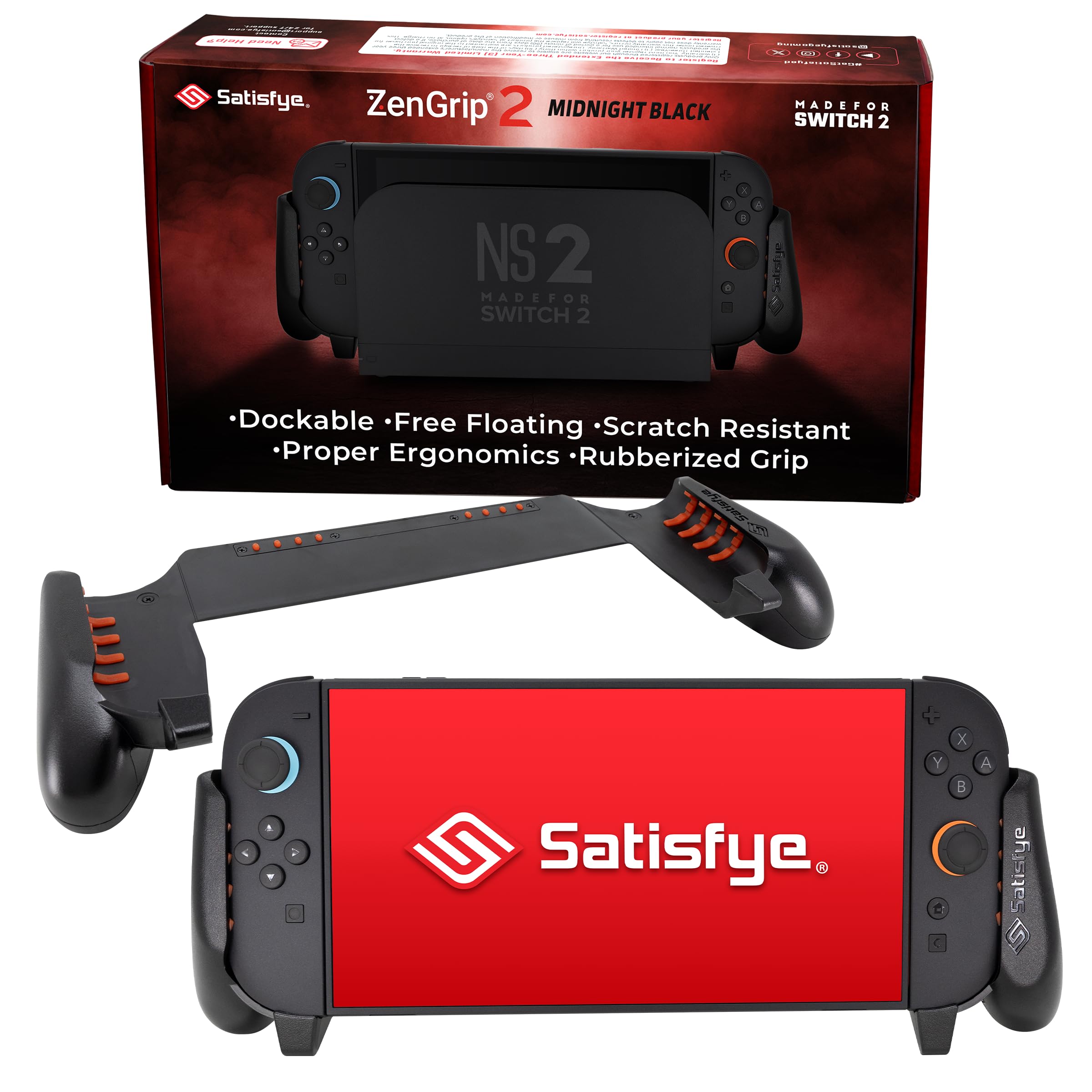
Satisfye ZenGrip 2

95 /100
Lab Score Outstanding

Key details

Grip Type
Full console case
Ergonomics
Asymmetrical, pro-controller feel
Build Material
Silicone/plastic hybrid
Extra Features
Antiscratch tabs
View on Amazon

The Satisfye ZenGrip 2 uses an asymmetrical grip shape that shifts the right hand into a more neutral position, reducing strain during long play sessions. The silicone and plastic hybrid construction provides a firm, wobble-free hold on the Switch 2, and the anti-scratch tabs prevent the console from making direct contact with the case material.

Users consistently report that the grip eliminates the hand cramps common with the bare console, even after three-plus hours of use. The design slides onto the Switch 2 smoothly and stays locked in place without rattling or adding noticeable bulk to the system.

This grip is best for heavy handheld gamers who prioritize comfort over cost and want a single accessory that stays on the console full-time. The premium price — north of most alternatives — is a barrier for budget buyers, and some users note that the grip can leave temporary, non-damaging marks on the Joy-Con shells after extended use. If slight cosmetic impressions bother you, a periodic removal and wipe-down prevents them from building up.

💡 Wipe the interior contact points occasionally to avoid temporary marks on the Joy-Con shells.

Pros

  • Eliminates hand fatigue during extended handheld play
  • Ergonomic shape mimics the feel of a full-sized controller
  • Sturdy construction with no wobble or looseness
  • Slides on and off without effort or tools

Cons

  • Costs more than double the price of many competing grips
  • May leave temporary surface impressions on Joy-Cons over time
Our verdict

For handheld gamers who play for hours at a stretch, the Satisfye ZenGrip 2 is the most comfortable grip available for the Switch 2 — worth the higher investment.

Check Latest Price
2

Best Budget Joy-Con Grips

MystiForge Split Grips

93 /100
Lab Score Outstanding

Key details

Grip Type
Joy-Con-only grips
Ergonomics
Anti-slip, quick release
Build Material
TPU/PC/ABS
Extra Features
View on Amazon

The MystiForge Split Grips manage to feel substantially more expensive than their price tag suggests. While thinner grips cut corners on material thickness to shave weight, MystiForge uses a denser TPU/PC/ABS blend that fills the palm and provides a locked-in feel. The anti-slip texture adds grip without being tacky, so the Joy-Cons stay put during fast movements – a clear advantage over the slimmer options that can shift during play.

These grips are for players who prioritize Joy-Con comfort over full console coverage. If you play mostly with the Joy-Cons detached in tabletop mode or plugged into a grip for TV play, the ergonomic benefit is concentrated where it matters. The tradeoff is clear: there is no shell for the tablet portion, so anyone needing a single accessory that protects the entire Switch 2 should look at full-case solutions instead. Also, those with larger hands should note that the grip is sized for average hands – occasional reports mention it feeling a bit snug for bigger palms.

The quick-release mechanism is genuinely easy to use – the grips snap on and off in seconds without excessive force. They also fit inside the official dock with the Joy-Cons attached, which saves the hassle of removing them each session. For players who frequently toggle between handheld and detached modes, that convenience makes the MystiForge a practical everyday companion.

💡 If your hands are on the larger side, try the grip before purchasing – the design is optimized for average hand sizes.

Pros

  • Palm-filling shape reduces hand fatigue over long sessions
  • Snaps on and off in seconds with a secure latch
  • Anti-slip texture keeps Joy-Cons from shifting during intense play
  • Build quality and feel rival grips costing twice as much

Cons

  • Grip dimensions may not accommodate larger hands comfortably
Our verdict

For budget-conscious players who want Joy-Con ergonomics without the bulk or cost of a full console case, the MystiForge Split Grips are the smart pick.

Check Latest Price
3

Most Customizable Fit

Skull & Co. NeoGrip

87 /100
Lab Score Excellent

Key details

Grip Type
Full console case
Ergonomics
3 interchangeable sizes
Build Material
Hard PC shell
Extra Features
Shock resistant
View on Amazon

The Skull & Co. NeoGrip stands out from the top pick by offering three interchangeable grip sizes that accommodate small, medium, and large hands. This adjustability, paired with an ergonomic hard shell, reduces hand fatigue during extended handheld sessions.

This case is best suited for gamers who want to fine-tune their grip comfort and are willing to accept that the locking mechanism can loosen over time. The plastic shell may also crack under repeated stress, so it is not a set-and-forget option for heavy-handed users.

The shell is dock-compatible, so you can leave it on when sliding into the dock. For those who handle the case gently, it provides long-term comfort, but the lock requires occasional checking to maintain a secure fit.

💡 Periodically check the locking tabs and avoid twisting the case when removing it to reduce wear.

Pros

  • Interchangeable grips fit small to large hands
  • Reduces hand fatigue during long gaming sessions
  • Dock-compatible without removal

Cons

  • Locking mechanism can slip or become loose with frequent use
  • Plastic shell may crack under repeated pressure
Our verdict

An adjustable grip for those who want to dial in the fit, but not for heavy-duty use – expect to monitor the lock and handle with care.

Check Latest Price
4

Slim Alternative for Joy-Cons

IFYOO NexGrip

92 /100
Lab Score Outstanding

Key details

Grip Type
Joy-Con-only grips
Ergonomics
Anti-slip texture
Build Material
TPU/rubberized plastic
Extra Features
View on Amazon

The IFYOO NexGrip uses a diamond-textured TPU surface that gives a secure, non-slip hold during handheld sessions, noticeably reducing hand fatigue. The grip snaps onto Joy-Cons easily and stays dock-friendly, so there is no need to remove it when charging.

This is a Joy-Con-only accessory — it leaves the rest of the Switch 2 console exposed, so anyone needing full-body protection should look at a full case. The grip is designed with a snug fit that suits smaller hands well, but gamers with larger palms may find the shape too tight for extended use.

Pros

  • Comfortable shape reduces hand cramping during long play sessions
  • Textured grip surface stays secure and non-slip even with sweaty hands
  • Solid build quality feels premium for a budget price point
  • Snaps into place and fits into the dock without removal

Cons

  • Only covers Joy-Cons; the console body has no protection
  • The snug fit may feel cramped for gamers with larger hands
Our verdict

A well-made, comfortable Joy-Con grip for smaller-handed players who want texture and ergonomics without spending extra — just know it leaves the console bare.

Check Latest Price
5

Best All-In-One Travel Solution

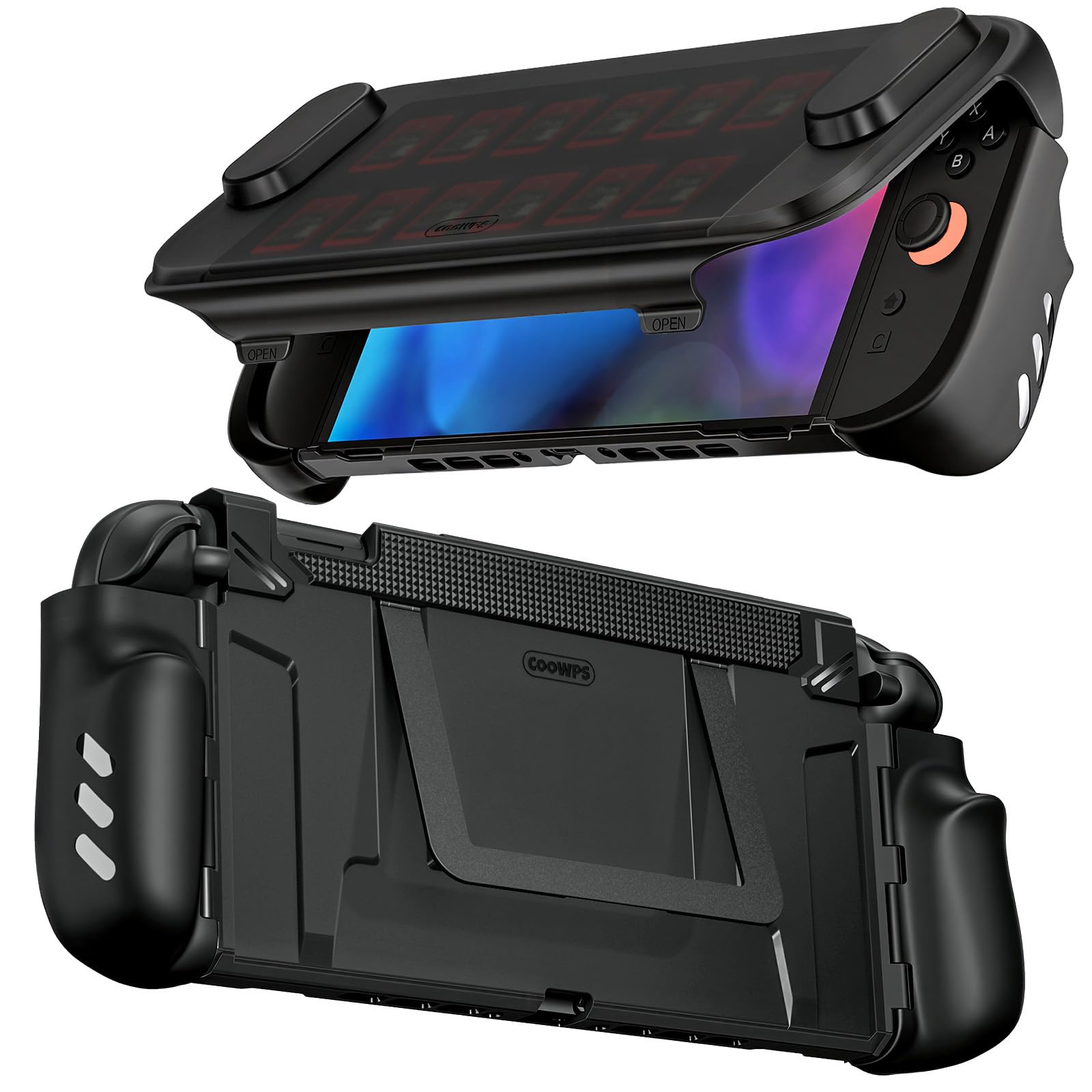
COOWPS P3 Case

91 /100
Lab Score Outstanding

Key details

Grip Type
Full console case w/ front cover
Ergonomics
Larger hands comfortable
Build Material
TPU + PC dual-layer
Extra Features
12 game card slots, adjustable stand
View on Amazon

The COOWPS P3 stands apart by delivering a complete travel-ready solution: a hard front cover that protects the screen during transit, a metal adjustable kickstand for tabletop play, and 12 game card slots built into the cover. The front cover attaches securely and provides full protection for the screen and joysticks when closed. Unlike the StandGrip case that prioritizes screen protection with a built-in cover but offers fewer card slots, the P3 gives you storage and a stand in one piece.

The ergonomic grip shape is contoured to fit larger hands, providing a secure hold during handheld play. The adjustable aluminum kickstand locks at three positions for optimal viewing angles. Game card slots on the front cover hold carts snugly without rattling. During extended sessions, the grip reduces strain compared to flat cases, especially for users with larger hands.

This case is best for travelers who want an all-in-one protective solution without carrying separate accessories. Those who prioritize lightweight portability or need a product with extensive user feedback will find better options elsewhere. Early adopters report solid construction, but the limited user history means durability over months of use remains an open question.

Pros

  • Full front cover and adjustable kickstand protect the console during travel and tabletop use.
  • Contoured grip shape reduces hand strain for larger hands during handheld play.
  • Twelve game card slots on the front cover keep games organized and accessible.

Cons

  • Noticeably heavier than typical cases; extended sessions may cause wrist fatigue.
Our verdict

A complete travel case for Nintendo Switch 2 that combines protection, storage, and a stand — ideal for trips where you want everything in one package.

Check Latest Price
6

Best Value Full Grip Case

BHGift Grip Case

86 /100
Lab Score Excellent

Key details

Grip Type
Full console case
Ergonomics
Ergonomic handles
Build Material
TPU + PC
Extra Features
Kickstand compatible
View on Amazon

Full console protection and dock fit at a low price — the BHGift Grip Case brings a complete shell to handheld Switch 2 gaming without breaking the budget. Unlike slim protective cases that prioritize drop protection over comfort, this one adds substantial ergonomic handles that improve handheld control and reduce hand strain for most players. It fits securely in the vertical dock and travel cases, so you can keep it on during the transition to TV mode.

This case suits budget-conscious gamers who play primarily in handheld mode but occasionally dock. It works well for average to medium-small hands, but individuals with larger hands may feel sharp edges on the palm grips. Additionally, dock fit can be tight on some units — not a dealbreaker, but worth checking your specific console's fit. The tradeoff for the low cost is that it does not deliver the same refined comfort as premium options like the Satisfye ZenGrip 2, but it offers a solid all-in-one solution at a fraction of the price.

💡 If the case feels tight in the dock, try aligning it from the front edge first — it often slips in with a gentle nudge.

Pros

  • Full console protection with dock compatibility for an affordable price.
  • Comfortable grip reduces hand strain during extended handheld sessions.
  • Great value for the price

Cons

  • Dock fit can be tight on some units, requiring careful alignment.
  • Sharp edges on the palm area may dig into larger hands during long sessions.
Our verdict

For budget-focused handheld players who want a full case they can leave on when docking, the BHGift Grip Case delivers solid protection and ergonomic support with minor fit caveats.

Check Latest Price
7

Quick Joy-Con Release

NinABXY Pop-Up Case

87 /100
Lab Score Excellent

Key details

Grip Type
Full console case w/ pop-up release
Ergonomics
Non-slip texture
Build Material
PC hard shell
Extra Features
Quick-release buttons, kickstand cutout
View on Amazon

The NinABXY case stands out with its pop-up release mechanism: pressing a button on the back lets you remove each Joy-Con instantly, no need to peel off the shell. The ergonomic grip and non-slip texture add comfort during long sessions. However, the tight dock fit means re-docking requires extra force and may leave marks on the console — a real limitation if you dock regularly. Additionally, build quality can be inconsistent between units; some arrive with imperfect fit or breakage. This case is best for those who prioritize quick Joy-Con detachment over seamless docking and want a sturdy protective shell for handheld play.

Pros

  • One-press button releases each Joy-Con without removing the case.
  • Sturdy construction with military-grade drop protection.
  • Comfortable ergonomic grip with non-slip texture.

Cons

  • Dock fit is tight, may require extra force and risk scratching the console.
  • Unit-to-unit build quality can vary, with possible fit issues or breakage.
Our verdict

Ideal for handheld gamers who frequently detach Joy-Cons for multiplayer and accept the snug dock fit in exchange for the pop-up convenience.

Check Latest Price
8

Drop Protection

Spigen Dual Grip

85 /100
Lab Score Excellent

Key details

Grip Type
Full console case
Ergonomics
Shallow grips
Build Material
PC back + TPU bumper
Extra Features
Dual-layer drop protection
View on Amazon

This Spigen case combines a polycarbonate back and TPU bumper for solid drop protection while staying thin enough to fit the dock. The textured grips offer a modest improvement over holding the bare console. However, the grips are shallow — those with larger hands may find them cramped during longer sessions. Sharp edges on the seams have also been noted, which detracts from overall comfort. For dedicated handheld gamers seeking extended comfort, a more ergonomic design like the Satisfye full grip is a better fit.

Pros

  • Dual-layer PC+TPU design provides solid drop protection
  • Snug dock fit without needing to remove the case
  • Texture improves grip over bare console

Cons

  • Grips may feel cramped for larger hands during extended play
  • Sharp plastic seams can be present on some units
Our verdict

For budget-conscious owners who prioritize dock compatibility and basic drop protection over comfort, this case does the job — but plan for shorter play sessions if you have larger hands.

Check Latest Price
9

Multiplayer Families

FASTSNAIL 4-Pack Grips

94 /100
Lab Score Outstanding

Key details

Grip Type
Joy-Con-only grips (4 pairs)
Ergonomics
For adult and child hands
Build Material
ABS plastic
Extra Features
12 thumb caps included
View on Amazon

This multi-pack covers every Joy-Con in a four-player household with matching grips and extra thumb caps – a cost-effective way to improve handheld comfort for everyone. The ergonomic shape works well for both adult and child hands, and the ABS plastic snaps on and off without fuss. However, the value stops at grip comfort: there is no protection for the Switch 2 console itself, and the surface texture can feel either slightly slippery or tacky depending on hand moisture. For families who already have a console case or play mostly docked, this bundle solves the Joy-Con ergonomics problem without overspending.

Pros

  • Four complete grip pairs plus twelve thumb caps in one box
  • Comfortable shape that accommodates both small and large hands during extended play.
  • Snaps onto Joy-Cons securely and removes without damaging the controllers.

Cons

  • The grip texture may feel slick or sticky depending on individual hand moisture
  • Leaves the Switch 2 tablet completely exposed
Our verdict

Ideal for families who already own a console case or play docked, this multi-pack delivers affordable ergonomic grips for every Joy-Con in the house – just don't expect it to protect the tablet itself.

Check Latest Price
10

Official Grip Alternative

Bameca Joy-Con Grip

90 /100
Lab Score Outstanding

Key details

Grip Type
Joy-Con controller grip
Ergonomics
Standard grip shape
Build Material
ABS plastic
Extra Features
Magnetic attachment
View on Amazon

The Bameca Joy-Con grip does exactly what the official Nintendo grip does — pairs two Joy-Cons into a single controller — at a budget-friendly price. Strong magnets hold the controllers securely with no wobble, and the cutouts for indicator lights mean nothing is blocked. This is a straightforward replica without any ergonomic enhancements or console protection, so it works best as a spare or for budget-conscious players who already own a full case.

Pros

  • Works exactly like the official Joy-Con grip at a fraction of the cost.
  • Strong magnetic attachment keeps Joy-Cons securely in place with no wobble.
  • Budget-friendly alternative that delivers the same core functionality.

Cons

  • Magnets have slightly less holding force than the official version, though Joy-Cons stay securely attached during gameplay.
  • Adds no ergonomic shaping or hand support
Our verdict

A sensible buy if you need a spare controller grip for multiplayer sessions and don't want to pay for the first-party version.

Check Latest Price
11

Split Design Convenience

JSAUX Split Case

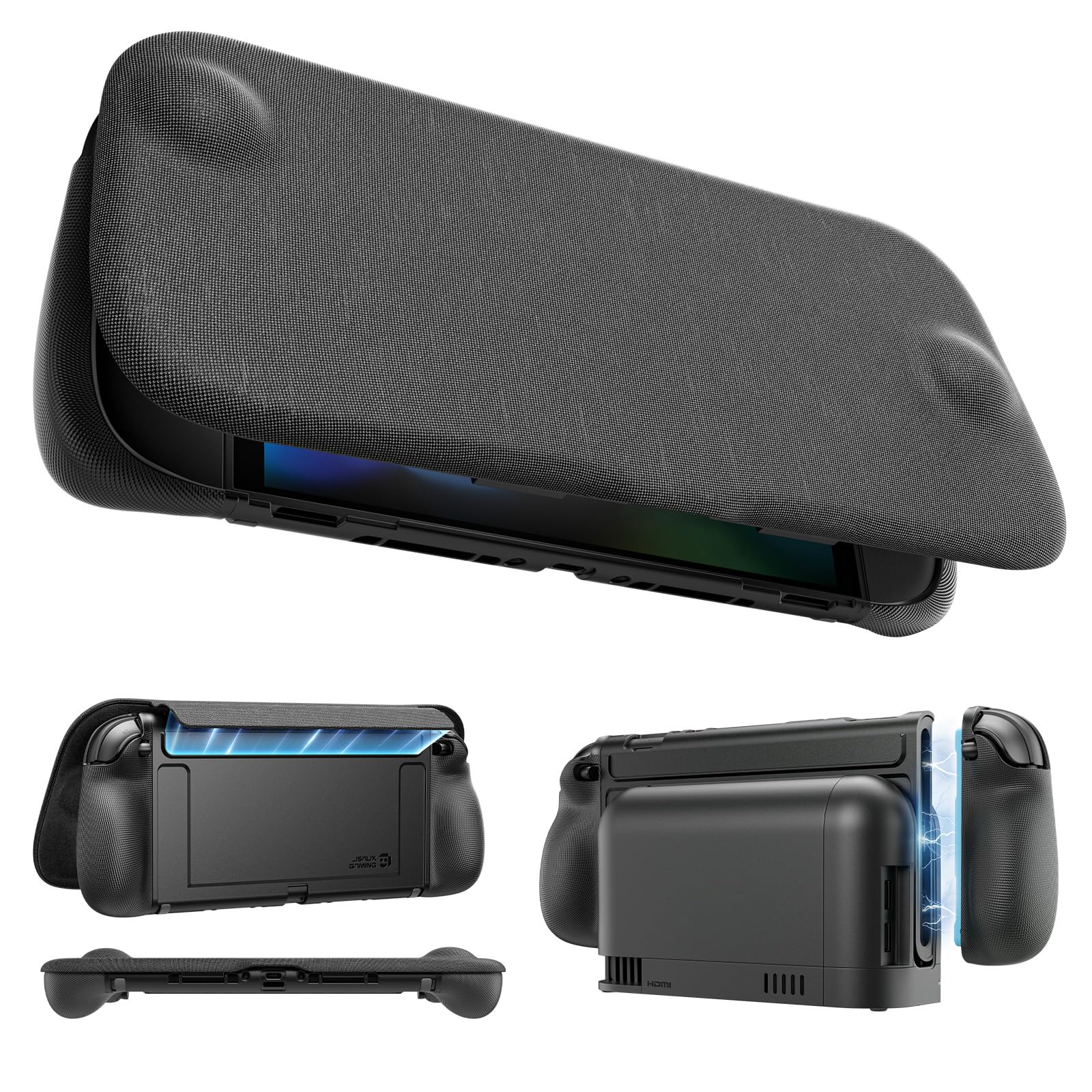
80 /100
Lab Score Excellent

Key details

Grip Type
Full console split case w/ front cover
Ergonomics
Anti-slip texture
Build Material
TPU frame + PC cover
Extra Features
10 game card slots, adjustable stand
View on Amazon

The split design is a standout for anyone who regularly pops the Joy-Cons off for tabletop play; it saves the fumble of removing a full case each time. The textured rubber grips feel secure in hand and reduce fatigue during longer sessions. But the plastic frame can develop cracks at stress points after a few months, the left Joy-Con grip may slide loose, and dock fit varies between tight and misaligned. That combination of tradeoffs makes this a better fit for tinkerers willing to handle occasional part replacements than for someone seeking a set-and-forget grip case.

Pros

  • Split case lets you detach Joy-Cons without removing the whole grip.
  • Ergonomic shape and anti-slip texture keep the console comfortable in hand for long play sessions.

Cons

  • Dock fit can be tight or misaligned
  • Plastic at stress points can crack after several months of regular use.
Our verdict

A practical choice if you frequently remove Joy-Cons and want onboard game card storage, but be ready for potential plastic wear and dock-fit adjustments.

Check Latest Price
12

Handheld-Only Storage

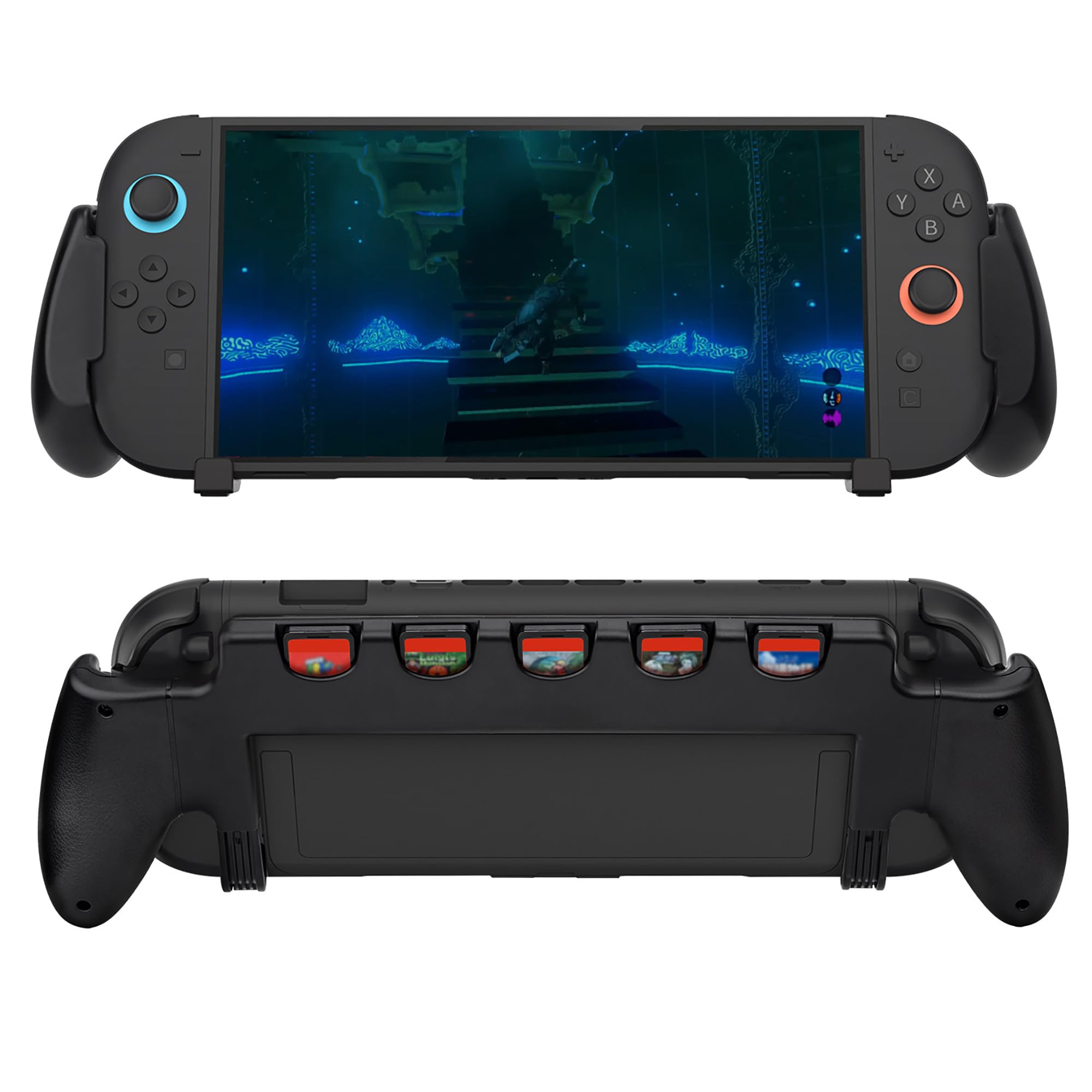
OIVO Grip with Stand

93 /100
Lab Score Outstanding

Key details

Grip Type
Full console case w/ stand
Ergonomics
Ergonomic shape
Build Material
ABS plastic
Extra Features
5 game card slots, 4 thumb caps
View on Amazon

The OIVO grip combines game card slots, an adjustable kickstand, and four thumb caps at a price that undercuts many competitors. The ergonomic shape improves comfort during long handheld sessions, and the storage keeps cartridges accessible. However, this case is not dockable, so it must be removed to connect to a TV. The stand can loosen over time, making it less reliable for tabletop gaming. This setup works well for players who stay in handheld mode and prioritize extra features over dock compatibility or long-term stand durability.

Pros

  • Built-in storage for five game cards keeps extras within reach
  • Ergonomic shape reduces hand fatigue during extended play
  • Budget-friendly price includes thumb caps and adjustable stand

Cons

  • Not compatible with any dock
  • The adjustable stand may loosen after repeated use, affecting stability
Our verdict

Best for handheld-only players who want game storage and comfort on a budget, as long as they don't need to dock or rely on the stand for long-term tabletop use.

Check Latest Price
13

Travel with Screen Protection

Skull & Co. Bundle

92 /100
Lab Score Outstanding

Key details

Grip Type
Full console case w/ front cover
Ergonomics
Medium-sized hands
Build Material
PC (front cover) + plastic
Extra Features
Built-in stand, screen cover
View on Amazon

The bundle's standout feature is the front cover, which eliminates the need for a separate screen protector or travel case when tossing the Switch 2 into a bag. The textured grips improve comfort for medium-sized hands during handheld play, and the overall profile stays slim enough for a backpack. However, the grip contours are designed for smaller hand sizes — users with larger hands may find the handles cramped during longer sessions. The case also adds noticeable weight, making it less suited for lightweight setups. This package is best for travelers who want integrated screen protection and don't mind the tradeoff in grip size and extra heft.

Pros

  • Hard front cover shields the screen from scratches and impacts during travel.
  • Textured side grips keep the console secure in medium-sized hands.
  • Slim enough to slide into a backpack without adding noticeable bulk.

Cons

  • Grip contours are sized for medium hands; larger hands may feel cramped during longer sessions.
  • The case adds noticeable weight, which can fatigue hands during extended handheld gaming.
Our verdict

For travelers who value screen protection over minimal weight and have medium-sized hands, this bundle fits the need.

Check Latest Price

How to Choose

Grip Type: Full Case vs. Joy-Con Only

A full console grip case covers the back and sides of the Switch 2, offering drop protection and a more substantial hold. But it adds weight and can make docking tight or impossible. Joy-Con-only grips are lighter and let you detach the controllers easily, but they leave the main console unprotected and don't improve the overall hand position when playing with the unit attached.

Dock Compatibility

Many grips advertise dock compatibility, but the Switch 2's dock has tighter tolerances than the original. A grip that's even a millimeter too thick can prevent the console from seating properly or cause scratches from forcing it in. Some grips require removal of a front cover or are simply too snug for safe daily docking.

Test the fit immediately after purchase: if it requires force or leaves marks on the dock, consider a different grip. A grip that claims to be dockable but needs the console pushed in with extra pressure will eventually damage the USB-C port.

Ergonomics and Hand Size

Grips with interchangeable inserts accommodate different hand sizes, but the locking mechanism that holds those inserts in place is often the first part to fail. Fixed-shape grips are simpler and more durable, but they must match your hand size from the start.

If you have larger hands, look for grips with extended palm rests or an asymmetrical design that shifts the grip angle. For smaller hands, slim Joy-Con attachments that add minimal bulk can be more comfortable than a full case.

Build Material and Durability

Hard PC shells offer rigid protection but can crack at stress points if dropped or flexed repeatedly. TPU and silicone hybrids are more forgiving and absorb shock better, but they can stretch out over time and feel loose. Dual-layer designs (PC back + TPU bumper) balance both, but inspect the seam quality—sharp edges or misaligned layers cause discomfort.

The weakest component on most grips is the clip or latch that secures it to the console. Metal-reinforced latches last longer than all-plastic ones. Avoid grips that rely on thin plastic tabs to snap into place.

Extra Features: Stands, Storage, Covers

Built-in kickstands, game card slots, and front covers add convenience but increase weight and complexity. Stands on budget grips often loosen or break within weeks, and card slot flaps can add bulk that interferes with docking. A front cover protects the screen but must be removed for docked play.

If you primarily play handheld, an extra stand and card storage are genuinely useful. If you dock frequently, these added features become liabilities—each one is a potential failure point or docking obstacle.

Frequently Asked Questions