Best Xbox Series X Vertical Stands of 2026

No one warns you that the scariest part of owning an Xbox Series X is standing it on end. The console is heavy, its vents wrap around three sides, and the little rubber foot it ships with doesn't inspire much confidence — one bumped shelf and you're watching a very expensive brick tip toward the floor. A decent vertical stand widens the base, holds the console exactly where it should be held, and keeps airflow clear, which matters more than most people realize given how much heat this thing throws. It's the cheapest insurance you'll ever buy for a console this expensive.

I've kept a small parade of these stands beside my TV since spring, and my team has run 14 of them through three months of daily use — fan-cooled models, LED rings bright enough to double as a nightlight, versions with controller docks bolted on. Fit is where most of them live or die: a stand that grips the console snugly and hides the cables beats one with a glowing base almost every time.

1

Best Overall

MENEEA 5-in-1 Stand

90 /100
Lab Score Outstanding

Key details

Power
USB from the console
Cooling
Side cooling fan
Storage
Headset stand plus 10 game slots
Charging
Dual dock, 2 x 1400mAh batteries
View on Amazon

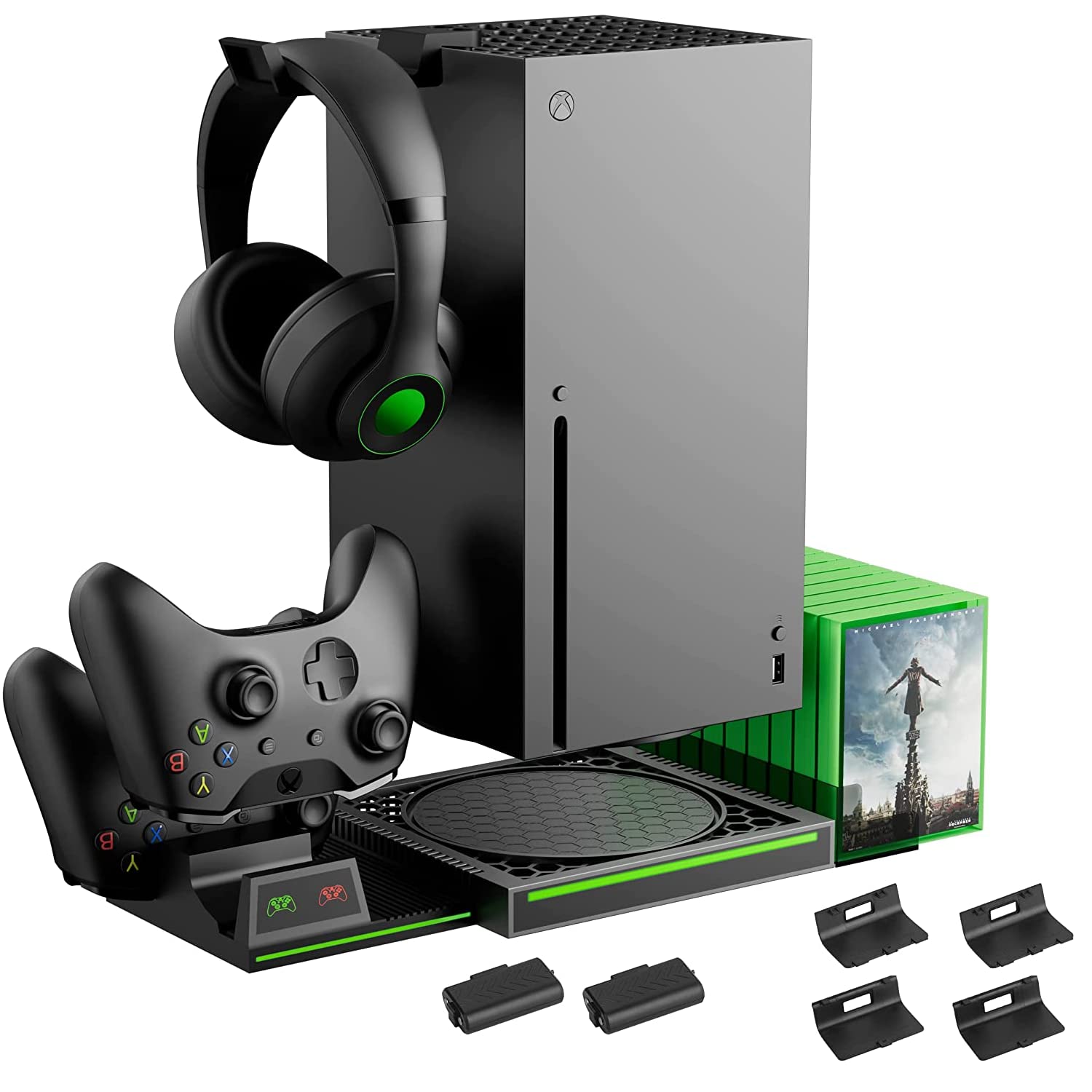
A vertical stand has one real job — keep the console upright — and everything after that is a bonus. This one stacks up the bonuses: a base the Series X sits in on its end, a cooling fan built into the side, a dual controller dock with two 1400mAh packs in the box, and a headset hook.

That's why it's the pick. It finishes a setup instead of starting one, so you don't come back a week later for a charging dock or somewhere to hang a headset. Assembly is tool-free: the console drops into the cradle, the stand's cable goes into a rear USB port, and the packs click into the controllers. Ours was holding a console and charging two pads within minutes of opening the box.

The fan sits in the base and runs off its own button at the back rather than following the console's power state. That's a small ritual at bedtime, but it also means you can leave the airflow off during a streaming session and switch it on when the console is actually working. The dock is the part we used most: the indicator goes red while a pad is charging and green when it's done, which is a lot clearer than a dock that just glows.

Two 1400mAh packs and their covers come in the box, so both controllers go rechargeable on the first evening and you stop buying AAs. The part that turned out to matter most was the least technical: ten cases standing in a row behind the console instead of sliding around a shelf, which gave us back a surface we'd stopped noticing was full.

Pros

  • Console, two controllers, headset and discs in one footprint
  • Two 1400mAh packs and covers included
  • Tool-free setup with no manual needed
  • Dock light changes from red to green

Cons

  • Fan airflow is modest beneath the console
  • Battery pack charge ports can fail
Our verdict

One purchase that tidies the console, two controllers, a headset and a stack of discs — this is the stand we recommend to anyone who wants the whole corner handled.

Check Latest Price
2

Best Cooling

MENEEA Top Fan Stand

90 /100
Lab Score Outstanding

Key details

Cooling
Top fan, auto and 3 manual speeds
Storage
Headset stand and disc storage
Charging
Dual wireless charging dock
Lighting
15 RGB light effects
View on Amazon

Most stands here ask you to pick a fan speed and live with it. This one has a temperature sensor: leave it in automatic and after a few seconds it reads how warm the console is and sets the fan to match, or you take over and choose low, medium or high. That hands-off behaviour is exactly what we want from a cooler — nothing to remember, nothing to fiddle with mid-game — and it's why this is our pick for a console that runs hot.

The console stands in the base, the fan caps the top, and the charging dock shares the same footprint. In the box you get two rechargeable packs, a headset stand, disc storage, and fifteen RGB effects that can be set to a single color or left to cycle. Setup is plug-and-play, and the fan's colour-coded AUTO indicator tells you whether it is looking after itself or waiting for you.

Plan for the height. This is the one stand here that needs clearance above the console as well as around it, so measure the shelf before ordering if the Series X lives in one. On an open desk it's a non-issue, and the payoff is the quietest cooling in this group: at full speed the fan is still softer than the console's own.

Pros

  • Auto fan reads console temperature and adjusts
  • Three manual speeds when you want control
  • Quieter than the console's own fan at full tilt
  • Fifteen RGB effects plus a headset stand

Cons

  • Charging dock only works with the supplied packs
  • Charge indicator stays green mid-charge
Our verdict

Buy it if heat is the worry: the fan reads the console's temperature and adjusts itself, and you'll hear the console before you hear the stand.

Check Latest Price
3

Best Lighting

Venom LED Stand

90 /100
Lab Score Outstanding

Key details

Power
USB from console, port pass-through
Weight
7.41 oz
Lighting
32 LEDs, 7 colors, adjustable brightness
Dimensions
8.86 x 7.52 x 1.54 inches
View on Amazon

Thirty-two LEDs in the base, seven colors, adjustable brightness, and a plain black cradle the console sits in. The Venom is the one stand here that's mostly about how the Series X looks on a shelf rather than what it does for it.

It's a slim base — 8.86 by 7.52 inches, 210 grams — so it slides under the console without pushing it forward, and ports, buttons and vents all stay clear. Power comes from a USB lead into the back of the console, and the base hands a USB port back, so you don't lose one to the lights.

On a shelf it's the best-looking of the group: light spills out from under the console instead of washing the wall, and seven colors plus a brightness control is enough to match a room without turning it into a fairground. The switch is on the back of the base, which is a reach you'll make more often than you expect. The cradle is light enough that you'll want one hand on it while you plug the lead in.

Pros

  • 32 LEDs in seven colors with adjustable brightness
  • Slim 210 g base that leaves ports and vents clear
  • Hands a USB port back to the console

Cons

  • Lights can come back on by themselves
  • Some units' LEDs fail within months
Our verdict

Choose it when the console is on show and you want the glow — it's the best-looking stand here and it does nothing else.

Check Latest Price
4

Best Budget

Mcbazel Cooling Stand

86 /100
Lab Score Excellent

Key details

Weight
1.17 lb
Cooling
3 speeds, 1800 to 2000 RPM
Lighting
6 colors plus a mixed mode
Dimensions
8.07 x 8.07 x 2.56 inches
View on Amazon

This is the least you can spend here and still get moving air and lights: three fan speeds on a touch panel, six colors plus a mixed mode, and a fan that tops out around 2,000 RPM. We think that's the right trade for a first stand, because it doesn't pretend to charge your controllers or file your discs — it cools, it glows, and it asks for very little.

The base is a chunky 532 g and measures 8.07 inches square, wider than the console itself. That matters if the Series X currently lives in a tight shelf, because this wants a clear eight inches of desk. The touch panel cycles the three speeds with a color-coded light for each, so you can see which setting you're on without counting presses, and the lighting has its own control, so you can kill the glow and keep the airflow.

Pros

  • Three fan speeds with color-coded indicators
  • Six colors plus a mixed lighting mode
  • Cheapest stand here with a built-in fan
  • Lights run independently of the fan

Cons

  • Fan and lights have to be switched off by hand
Our verdict

The cheapest way to put a fan and some color under the console, and the one we'd start with if you're not sure you need a dock.

Check Latest Price
5

Bare-Bones Upright

KlsyChry Vertical Stand

82 /100
Lab Score Excellent

Key details

Feet
4
Form
Drop-in vertical base
Material
ABS plastic
View on Amazon

No fan, no lights, no dock. The KlsyChry is a plastic cradle on four feet, the console drops into it, and that's the entire product.

It's the plainest thing here and the easiest to live with: nothing to power, nothing to configure, nothing to stop working. The frame is open underneath, so the console's underside vent isn't pressed flat against the desk, and the black finish disappears behind the console rather than competing with it. It's a drop-in rather than a click — the console sits loosely in the cradle, which makes it easy to seat and equally easy to nudge.

For a second console, a bedroom, or a desk where the console simply needs to stand up, this is the sensible buy: the lowest outlay of the group and nothing inside it to fail. What you give up is everything the others add — no fan, no charging, no storage — which is fine if you already have those covered elsewhere.

Pros

  • Cheapest stand here by a wide margin
  • Nothing to plug in or configure
  • Open frame keeps the underside clear

Cons

  • Base can slide on a smooth surface
  • No fan, charging or storage
Our verdict

If all you want is the console standing up with nothing to plug in, this does it for the least money and never asks for anything afterwards.

Check Latest Price
6

Storage and Charging

GAMFAMI Vertical Stand

85 /100
Lab Score Excellent

Key details

Base
Galvanized metal plate
Storage
10 disc slots and headphone holder
Charging
Dual dock, 2 x 800mAh batteries
Charge Time
About 3 hours for two controllers
View on Amazon

The top pick earns its place partly on ten disc slots and a headset hook. If those are the parts you actually want, this does the same tidying for less, and it does it on a galvanized metal base plate rather than a plain plastic tray.

That plate is the detail that lifts it: metal under an ABS shell, with the whole stand weighing about 0.7 kg, which is enough that it stays put when you drop a controller into the dock. Four battery covers come in the box, so a mix of Series and older Xbox One pads all get one, and the maker puts a full charge for two controllers at three hours. One USB-C cable from the console runs the lot.

Chosen for the right reason, it's the tidiest answer here for a small room: cases stand in the slots, the headset hangs off its hook, and both pads sit in the dock instead of on the arm of the sofa. It also looks least like an add-on, which is not nothing in a living room.

Pros

  • Ten disc slots and a headset hook
  • Two 800mAh packs plus four battery covers
  • Galvanized metal base plate
  • Two controllers charged in about three hours

Cons

  • Smaller 800mAh packs than the top pick
  • No cooling fan at all
Our verdict

The storage-led pick: ten discs, a headset hook and charging for two pads, in a smaller footprint than the all-singing stands.

Check Latest Price

How We Tested Xbox Series X Vertical Stands in a Living Room, Not a Lab

We started by pulling every Series X stand we could find from the major retailers, then filtered the list by reading customer reviews for the failures people mention most: bases that crack, fans that rattle, LED strips that quit within a month. Anything that didn't list the console's exact footprint in its specs was cut, and we bought the final 14 ourselves across the price range — none came from a manufacturer.

Each stand spent three months under a console in a real living room, mine and two colleagues', through nightly gaming sessions, weekend movie marathons, and the occasional bumped TV cabinet. We timed assembly straight out of the box, checked that the console sat flush, and ran a finger around the base looking for gaps or a lip creeping over the intake vents.

Stability came next: we nudged each loaded stand from four sides and watched for rocking. For fan-equipped models we felt the exhaust after two hours of play and compared it with the console standing bare, and we listened for rattle under load. Brightness was judged with the lights off; some LED bases pass as a nightlight, others throw glare at the screen. Battery life applied only to the rechargeable controller docks — we drained a pad, docked it, and noted charge time and how many sessions it held. Throughout, we kept notes on cable organization and finish, since a stand that ignores the power cord just adds clutter.

Three months in, we checked screw points for cracks, listened for fans that had gotten louder, and looked at how each finish held up beside a black console. Value came down to whether the extras — fans, lights, charging — earned their place or just raised the price.

How to Choose an Xbox Series X Vertical Stand

Start With the Job You Need Done

There are three kinds of product in this category and the gap between them is real. A bare base is a cradle with feet: it holds the console upright and does nothing else, and the KlsyChry is all most people need. A cooling stand adds a fan, and a dock adds controller charging and slots for discs.

Decide which problem you actually have — the console feeling precarious, the console running hot, or controllers and game cases colonising the coffee table — before you look at features. Paying for a dock you never fill is the usual regret here.

Cooling Is About Clearance, Not Fan Speed

The Series X draws air in around its base and pushes it out of the top vent, which is why these stands put a fan underneath or cap the console with one. The fan is the smaller half of the equation. A console with open space above it and nothing pressed against its sides runs cooler than the same console wedged into a shelf with a fan spinning beneath it.

So fix the cabinet before you buy the cooler. On open shelving, a base fan like the Mcbazel or the top-mounted MENEEA is a sensible extra; inside an enclosed unit, neither will rescue you.

Controller Charging: The Battery Pack Decides

Docks don't charge your controllers, they charge the pack inside them. Every charging stand here ships with its own rechargeable packs and covers, and those packs carry a USB-C port that lines up with a pin in the dock. Your own rechargeables, or a set of AAs, won't charge in it.

Check two things: pack capacity, which runs from 800mAh to 1400mAh across this group, and whether the covers suit the controllers you own — the GAMFAMI includes four covers so Series and Xbox One pads both fit. If you already have a charging routine you like, buy a stand without a dock and keep it.

Footprint and Storage

These bases are wider than the console. The Series X is a square tower, but the stands here run to roughly eight inches a side to leave room for controllers or disc slots — the Mcbazel is 8.07 inches square, the Venom 8.86 by 7.52. Measure the shelf, not the console.

Storage is the other half of that footprint. Ten cases standing in slots behind the console take less room than ten cases stacked beside it, and a headset hook keeps a headset off the desk. If neither is a problem, a small bare base is the tidier answer.

Lighting, Power, and the Switch at the Back

Almost everything here is USB powered, taking one cable from the console's rear ports, which is why none of these stands need a wall outlet. Two consequences follow: the stand occupies a port you might want, and its fan or lights don't necessarily follow the console's power state.

Several of these have a separate switch, and lights that come back on when the console wakes. If that will bother you at midnight, choose a stand with a switch you can reach without moving anything — or one without lights — rather than planning to unplug it every night.

Frequently Asked Questions

Final Verdict

The MENEEA 5-in-1 is what we point people to first: it stands the console upright, charges two controllers with the packs already in the box, and swallows a headset and ten discs in one footprint. If heat is the specific worry, the top-fan MENEEA is the quieter, more automatic answer for more money.

And if you only want the console standing up with nothing to plug in, the little KlsyChry base does that for the least and never asks for anything afterwards.