Best Custom Keycaps of 2026

Switches get all the credit, but the keycaps are the part your fingers actually touch — every keystroke, all day. Swap a stock set for something thicker and properly sculpted and the same board suddenly sounds deeper, feels steadier, and stops that hollow plasticky ring. The catch is that keycaps are where compatibility gets fussy: a gorgeous set can arrive with a spacebar that won't sit on your stabilizers or a bottom row that ignores your layout entirely, so appearance alone won't save you.

Over the past six months my team and I have been cycling 12 sets through our own boards — some cast in thick double-shot plastic, some dye-sublimated, a few with shine-through legends for late-night work. A pattern emerged fast: the sets worth keeping got the boring stuff right, like row sizes and stem fit and legends you can read at an angle in daylight. Below are the ones we'd happily leave on our boards, sorted by what each does best.

1

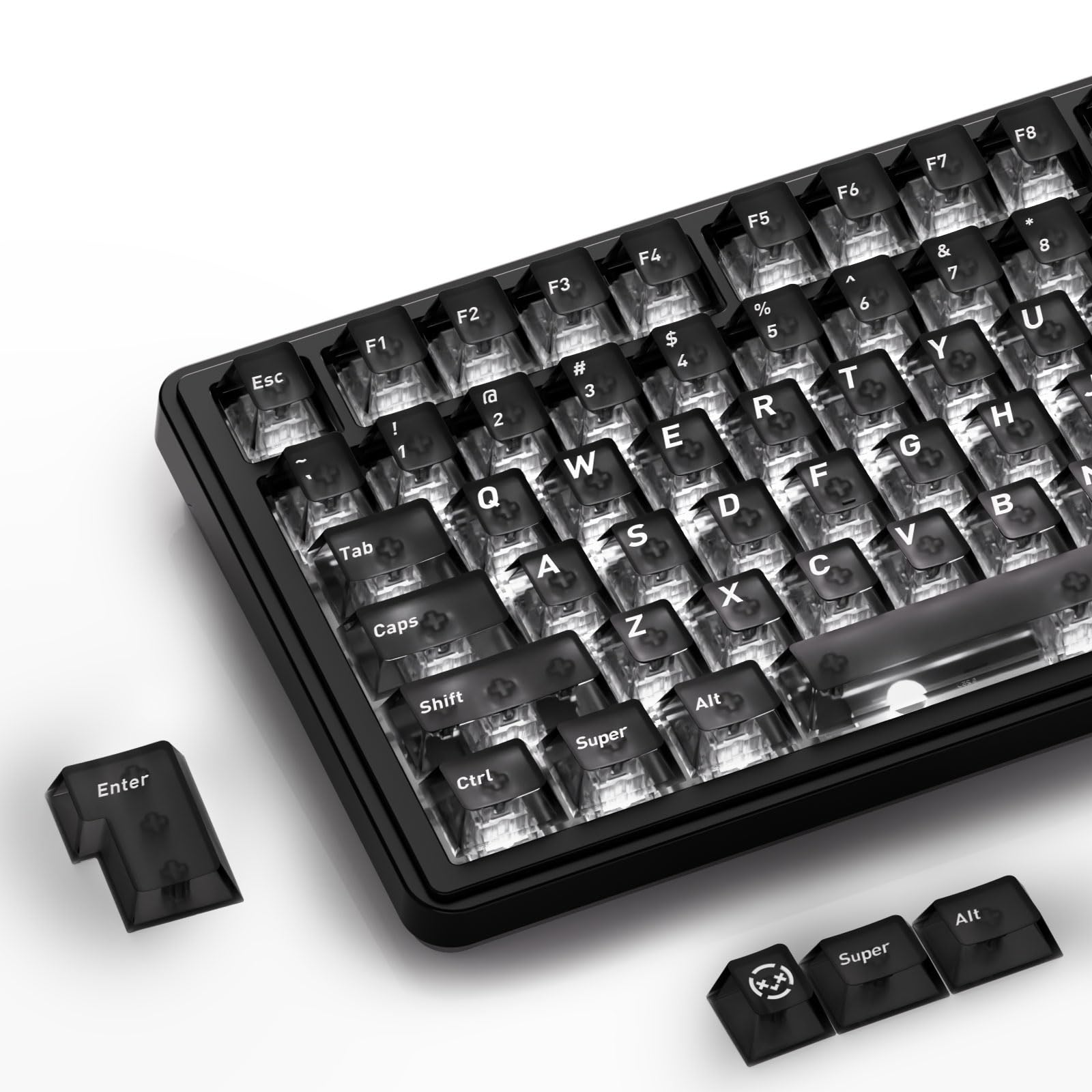
Best Overall

Womier Pudding Keycaps

87 /100
Lab Score Excellent

Key details

Profile
OEM (R1 to R4)
Material
Double-shot PBT
Key Count
143
Legend Style
Pudding shine-through
View on Amazon

A complete set for roughly what one artisan key costs is the arithmetic that puts these at the top of this list. Womier's pudding caps arrive as 143 double-shot PBT keys, enough to fill anything from a 60% board to a full-size one, including the alternate shift and bottom-row sizes that cheaper kits leave out. If you've never swapped a set before, this is the one we hand people: it's the least you can spend to change an entire keyboard, and complete enough that you probably won't need a second purchase to fill the gaps.

The pudding construction is what you notice first. The bottom half of each cap is translucent, so the backlight blooms around the key rather than just under the legend, and a plain black board starts to look deliberate. With the lights off it reads as an ordinary black or white set with a milky skirt, which is a safer long-term look than most of the loud themed sets here. The PBT has a fine texture rather than a gloss, and texture is what keeps a set from looking worn — the polished, shiny patches that show up on the ABS caps most boards ship with.

Fit is the part that gives us pause. The set is listed for Razer, Corsair, SteelSeries, Ducky and the usual roundup, but the spacebar and the bigger modifiers are where full sets stumble, and this one is no exception: on a Logitech G513 neither the spacebars nor the right shift line up. Check the length of your spacebar and right shift against what's in the box before you order. On a standard 65%, 75% or TKL board it's the easiest swap here; on an odd bottom row, it's the one to skip.

The puller and the paper storage box are small things that matter on a first swap: no tool to buy, and somewhere to keep 143 loose caps between boards rather than in a sandwich bag.

Pros

  • 143 keys cover 60% up to full-size
  • Double-shot PBT resists shine and wear
  • Translucent skirt makes RGB bloom
  • Puller and storage box included

Cons

  • Legends read dim at low backlight
Our verdict

We recommend this set to anyone making a first keycap swap: 143 double-shot PBT keys, wide layout coverage, and a pudding look that makes RGB feel deliberate.
Check Latest Price
2

Best Typing Feel

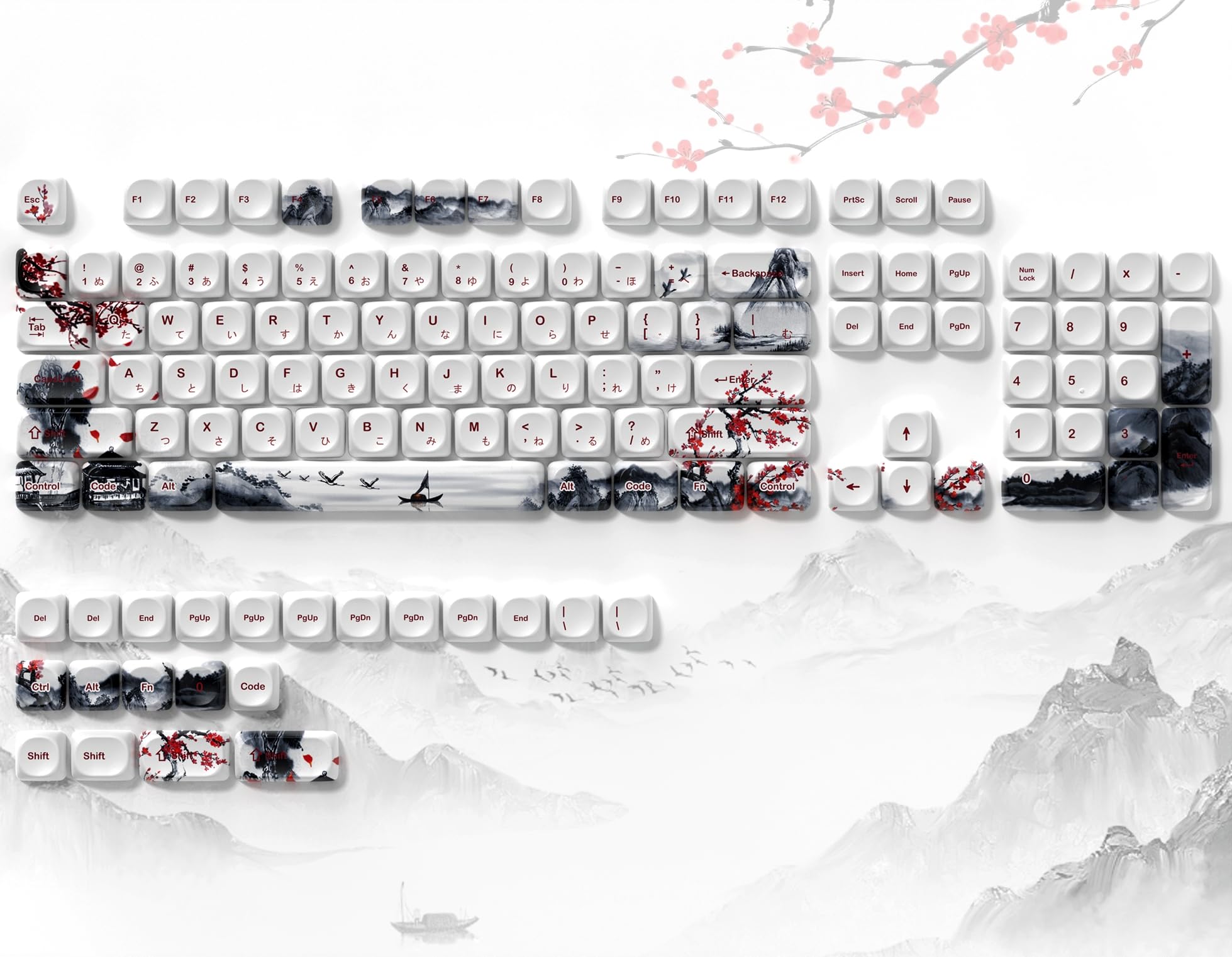
dagaladoo Cherry Blossom MOA

85 /100
Lab Score Excellent

Key details

Theme
Cherry blossom
Profile
MOA
Material
PBT, dye-sublimated
Key Count
134
View on Amazon

MOA is a profile you feel before you see: tall, round-topped caps with a deep dish that pulls your fingertip toward the middle of the key. On this set that shape arrives in pastel cherry blossom, dye-sublimated onto white PBT, and the sound is the first thing we noticed — a taller, rounder cap takes the hollowness out of a thin case and leaves a softer, lower note behind.

This is the set we point to when someone wants a board to feel different, not just look different. The 134 caps cover 60% through full-size, Mac modifiers are in the box, and the PBT has a soft matte surface rather than a slick one, so your fingers register the texture on every press. It's also the full set here with the least fit trouble: it drops straight onto 75% and full-size boards, and it's the one we recommend without a caveat about the spacebar.

The height is the thing to plan for. MOA sits noticeably taller than the OEM or Cherry caps most boards ship with, so the whole typing surface rises and a wrist rest stops being optional over a long session — worth knowing before you fall for the pastel palette. Fit the set, sit down and type a paragraph before you commit, because that's the honest test of any profile change.

Pros

  • Soft matte PBT with crisp dye-sub art
  • 134 keys including Mac modifiers
  • Deep MOA dish guides your fingers
  • Seats cleanly on 75% and full-size boards

Cons

  • Tall MOA profile raises the typing height
  • Spare keys are labelled for standard layouts
Our verdict

This is the set we point to when a board needs to feel different as well as look different — soft matte PBT, a rounded MOA dish, and 134 keys that seat without fuss.

Check Latest Price
3

Best Side-Printed Legends

137-Key Side-Print PBT Set

85 /100
Lab Score Excellent

Key details

Legends
Side-printed, shine-through
Profile
Cherry
Material
PBT, dye-sublimated
Key Count
137
View on Amazon

The legends on this set sit on the front face of each cap instead of the top, which is either the whole point or a waste of money depending on which way your board's LEDs face. Light has to spill sideways under the cap to reach a side-printed legend, so south-facing LEDs make the lettering glow and north-facing ones leave a dark strip where it should be. That isn't a defect — it's the first thing to check before you buy.

Look past the placement and it's a thorough kit: 137 Cherry-profile caps in PBT with dye-sublimated legends, several right-shift sizes, Mac modifiers, and printing that stays crisp instead of looking sprayed on. The surface has a fine, almost velvety texture that we preferred to the smoother finish on the transparent set here, and the typing note lands lower and rounder than a thin stock cap produces.

It's the priciest full set here, and what you pay for is coverage plus that front-printed look — 137 keys with the odd sizes most themed sets make you hunt for. Buy it for a specific combination: a south-facing board, a dim room, and a preference for reading legends from the front rather than the top. If any of those three doesn't describe you, a cheaper set here does the same job.

Pros

  • Side-printed legends light up with south-facing LEDs
  • Fine, velvety PBT texture
  • 137 keys with extra shift sizes and Mac caps
  • Lower, rounder sound than stock caps

Cons

  • Spacebar can sit slightly out of line
Our verdict

Buy this one for a south-facing board you type on in the dark: front-printed legends, a velvety PBT surface, and 137 keys of coverage.

Check Latest Price
4

Best for RGB

HITIME XVX Black Clear

86 /100
Lab Score Excellent

Key details

Finish
Matte top, clear sides
Profile
Cherry
Material
Polycarbonate
Key Count
119
View on Amazon

Two materials in one cap: a matte, frosted top layer your fingers actually touch, and clear polycarbonate sides and skirt that light comes through. It isn't a jelly cap and it isn't quite a pudding cap either — the top stays opaque enough to read as black on the board, and the glow comes from around and underneath rather than through the lettering.

That construction solves the problem clear caps usually have. A frosted top hides fingerprints and gives your fingertip something to grip, so a board full of them doesn't turn into a smudge display by the end of a session. The catch sits upstream of the caps: how much light reaches them depends on your switches. Clear housings give the full effect; opaque black ones swallow most of it and the set falls back toward plain black.

The other adjustment is feel. Polycarbonate is smooth, and next to the textured PBT of our top pick it reads almost glassy — a matter of taste rather than a fault, though if you like grip under each key these will feel different under your fingers. Coverage is 119 Cherry-profile keys, which handles full-size and 75% boards and smaller, and the legends are set in large italics that suit the look.

Where this set earns its place is on a board you look at more than you type on. With clear-housing switches and a bright profile, the whole thing reads as lit from within, and at the same money as our top pick the choice between them is simple: the pudding set for a softer texture and more coverage, this one for a harder, cleaner glow.

Pros

  • Frosted top hides fingerprints
  • Clear sides spread the backlight
  • 119 keys cover full-size and 75%
  • Matte top keeps grip on a clear cap

Cons

  • Stems can grip tight enough to fight removal
Our verdict

This is our pick when the RGB is the point: a frosted top you can still type on, clear sides that spread the light, and 119 keys of Cherry-profile coverage.

Check Latest Price
5

Best Themed Set

Womier Japanese Keycap Set

86 /100
Lab Score Excellent

Key details

Craft
Dye-sub and double-shot
Theme
Cherry blossom
Profile
Cherry
Wall Thickness
1.5mm
View on Amazon

Two printing processes in one cap: dye-sublimation for the cherry-blossom artwork, double-shot for the legends. In practice the pattern looks painted into the plastic rather than stamped on top of it, and the lettering is a separate moulded layer that won't rub away — which is why the set can carry detailed art and still be usable as a keyboard.

The look is what sells it. Cherry-profile caps in a soft, matte PBT with 1.5mm walls and a blossom print that reads as a print rather than a sticker, on a set that covers 60% through full-size. It's the one we picture on a board that lives in a living room: considered with the backlight off, better with it on, and textured enough that your fingers know you changed something.

Watch the spacebar when it arrives. The set covers the usual layouts, but the left stabiliser can seat loose enough that the bar rattles, and that's the kind of fault you hear on every keystroke. Press the bar in, tap both ends, and reseat it if it's slack before you judge the set. Get that right and the rest is quiet and even.

Pros

  • Dye-sub artwork plus double-shot legends
  • Soft matte PBT with 1.5mm walls
  • Cherry profile most people already know
  • Covers 60% through full-size boards

Cons

  • Legends are hard to read unlit
Our verdict

Choose this set for a board that sits out in the open: soft matte PBT, a familiar Cherry profile, and blossom artwork that survives a close look.

Check Latest Price
6

Best Single-Key Upgrade

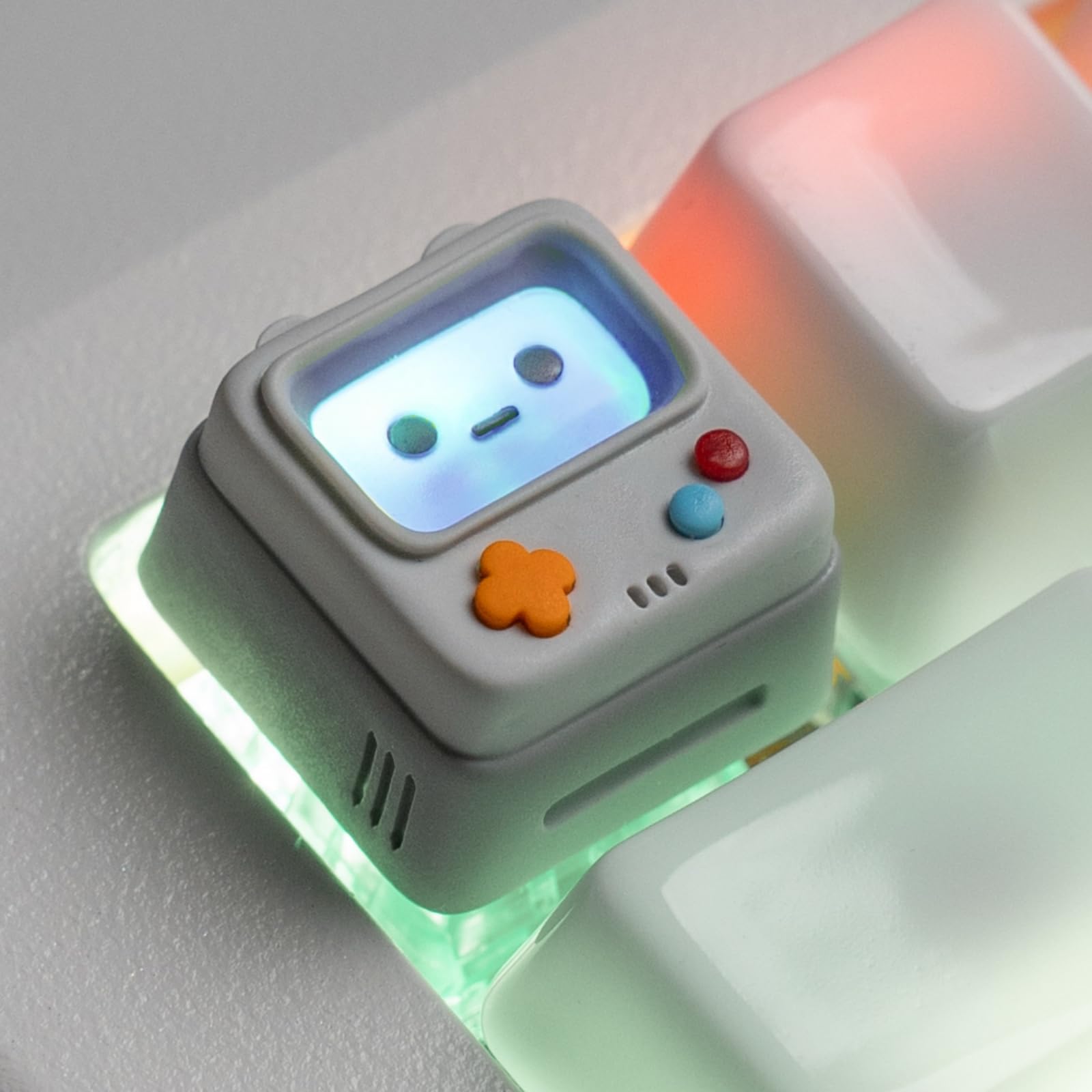
ULTRAEQUIP Console Artisan

89 /100
Lab Score Excellent

Key details

Size
1U
Effect
Shine-through screen
Material
Cast resin
Positions
Esc and F-row
View on Amazon

A full set changes your whole board; this changes one corner, and it's the corner people look at. ULTRAEQUIP's little grey console is a 1U resin cap with a screen that lights up when your backlight reaches it, and of everything here it's the smallest change that makes a stock keyboard look like it belongs to someone. Pull the Esc cap, press this on, done — no layout to relearn.

The casting is the part that holds up. Multi-layer resin means the grey shell, the buttons and the dark screen surround are colour all the way through rather than painted on top, so a key you hit constantly doesn't wear down to blank plastic. It ships with a puller and a six-month warranty, and the stem is a standard MX cross that fits Esc or any F-row position where you want a novelty.

The glow depends on your board. The face is semi-transparent, so it picks up whatever the backlight does: on a board with per-key lighting under Esc the little screen lights like a handheld console, and on one where Esc has no LED it stays dark and you're buying the shape alone. Check where your Esc sits in the lighting before you count on the effect.

Pros

  • Colour cast through the resin
  • Screen picks up backlight glow
  • Standard MX stem fits Esc or F-row
  • Puller included for the swap

Cons

  • Stem can seat loose on some switches
Our verdict

This is the cap we reach for when a board needs one loud detail — cast resin on Esc, a glowing little screen, and a swap that takes ten seconds.

Check Latest Price
7

Custom Legends

BTXETUEL DIY Keycaps

80 /100
Lab Score Excellent

Key details

Count
12 keycaps
Design
Removable clear top
Switch Fit
Cherry MX
Customisation
Paper or sticker inserts
View on Amazon

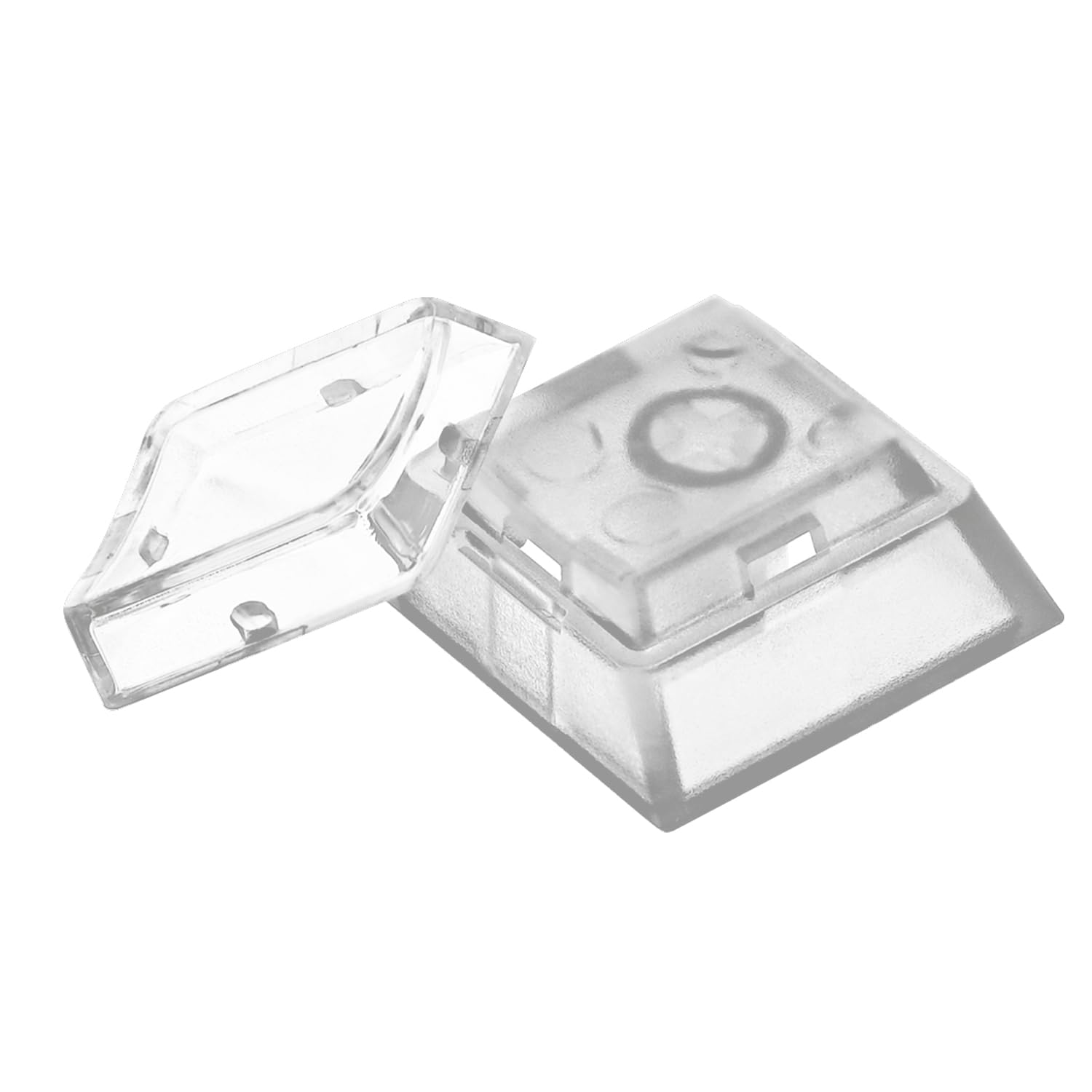
The top of each cap is a separate piece. You work a fingernail under the edge, the clear cover pops off, and you drop a paper label or a sticker into the recess before pressing it back down. It's a low-tech idea aimed at something printed sets can't do: legends that have to change.

Twelve caps come in the pack, all on standard Cherry MX stems, so this is a corner-of-the-board purchase rather than a full swap. Put them on a macro pad, a row of function keys or the four arrows and label them for whatever you keep forgetting — ability keys in a game, shortcuts in an editor, a second alphabet. The cover is clear enough that a printed label reads cleanly through it.

That's the trade, and it's a fair one: this is the only product here that lets you rename a key without buying another key. What we can't tell you is how the covers hold up after months of prying, or whether the plastic yellows in sunlight — treat them as a working label rather than a permanent fixture. If you want the board to look finished rather than labelled, buy a printed set instead.

Pros

  • Legends change without new keycaps
  • Cover pops off with a fingernail
  • Standard Cherry MX stems
  • Clear cover reads the label cleanly

Cons

  • Twelve keys only, so no full-board coverage
  • Legends are only as neat as your label
Our verdict

Buy a pack for a macro pad or a language layout you keep changing; it's the only cap here whose legend you can rewrite in a minute.

Check Latest Price
8

A Gift Cap

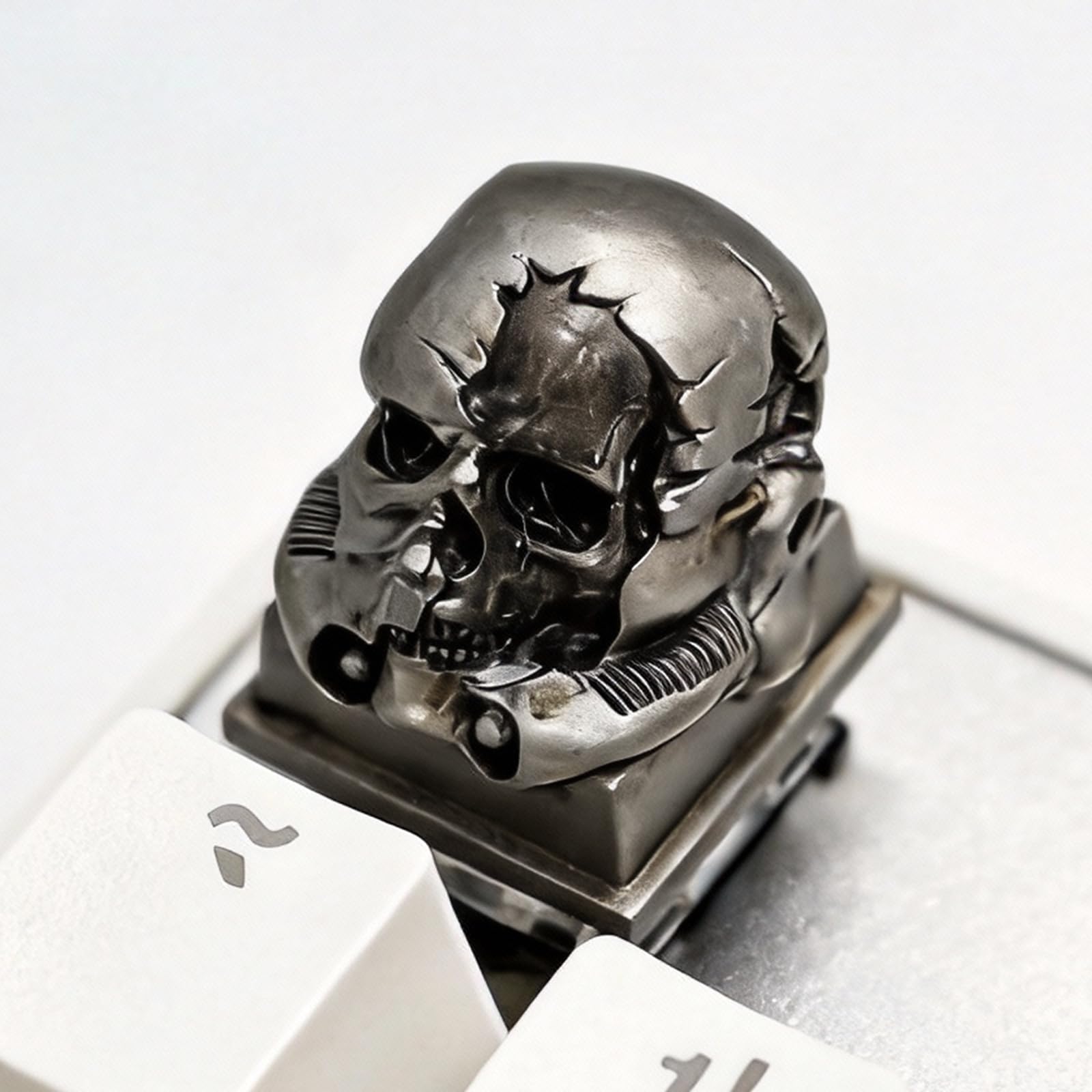
Tapbloom Silver Skull

90 /100
Lab Score Outstanding

Key details

Size
1U
Theme
Silver skull
Material
Handmade resin
Switch Fit
MX-style
View on Amazon

Hand-cast resin in a post-apocalyptic skull design, and it reads more like a tiny model than a keycap — the kind of detail you notice from across a desk before you notice the keyboard it's sitting on.

Layered casting is why it holds up. The silver, the shadows and the exposed mechanics are colour through the material rather than paint sitting on the surface, so the detail survives contact with a fingertip. The stem is a standard MX cross that covers Cherry, Gateron, Kailh and Outemu switches, and the two-year warranty is unusually long for a novelty cap.

It's a 1U cap, so it lives on Esc, an arrow or one of the F-keys, and it's the sort of thing that gets a comment from whoever sits down at your desk. The finish is smooth and the moulding crisp enough that the design doesn't go soft up close.

Buy it as the single loud key on a restrained board. It's also the easiest gift here: it arrives as one finished object rather than a set you install 130 times, and the theme is specific enough that you'll know whether the person you're buying for will get it. What it won't do is change how the board types, and it isn't meant to.

Pros

  • Detail cast through the resin, not painted
  • Fits Cherry, Gateron, Kailh and Outemu
  • Two-year warranty on a novelty cap
  • Crisp moulding holds up close

Cons

  • A single 1U cap, so one focal point
Our verdict

Give this to someone who wants one expressive key on a plain board: cast resin, crisp detail, and a two-year warranty behind it.

Check Latest Price

How We Chose and Tested Custom Keycaps

We started by pulling together sets that shoppers actually shortlist — reading spec sheets, checking which layouts each set covers, and filtering out anything that only ships in a single row height or skips the less popular bottom-row sizes. That left us with 12 sets to live with for six months. Each one went onto at least three boards: a 60% hot-swap, a tenkeyless, and a full-size with a number pad, plus a run on clicky, tactile, and linear switches to hear how the plastic changed the sound.

Fit came first, because it decides whether anything else matters. We pressed every cap onto its stem by hand and noted which ones seated with a clean snap versus a wobble, then checked that the spacebar cleared the stabilizers without binding and that all the modifier sizes matched the board they were meant for. We also weighed each set on a kitchen scale and compared box contents — spare mods, a puller, alternate spacebars — since a set that covers more layouts is worth more than one cheap enough to shrug at.

Then we typed. Real work, not a script: documents, spreadsheets, and long evenings of games, with the lights off half the time so we could judge shine-through legends and whether backlighting bled around the caps or stayed where it should. We checked legibility in daylight from a low angle and looked at whether the sculpt kept our fingers from sliding between rows during fast typing. Finally, we watched the most-used keys — letters, spacebar, the E and A — over weeks of daily use for shiny patches, worn legends, and any shine-through coating starting to cloud.

How to Choose Custom Keycaps

Count the keys your board actually needs

A 134- or 143-key set sounds like more than anyone needs until you reach the one key it doesn't include. Full-size and TKL boards are usually straightforward; 65%, 75% and 96% layouts are where sets fall down, because the right shift shortens and the bottom row rearranges. Check three things against the sizes in the box before ordering: your spacebar length, your right-shift size, and whether your bottom row follows the standard pattern.

The trap here is treating the key count on the box as coverage. It's the number shoppers compare and the least useful one. What matters is whether the specific caps your board needs are in the bag, which is exactly where a set like the pudding Womier caps earns its place over a prettier one.

Stems decide whether any of this works

Everything here uses a Cherry MX-style cross stem, which is what the overwhelming majority of mechanical gaming keyboards take. It won't fit Alps, Topre, buckling spring or a laptop's scissor switches, and no adapter changes that. Pull one cap off your board and look at the switch: a plus-shaped stem is what you need. Past that, the variables are how hard a cap grips and how level it sits on the stem, and those you only learn by fitting one.

Profile changes the height and the feel

Three profiles cover almost everything here. Cherry is the low, sculpted shape most enthusiasts know, with rows that curve toward the fingers. OEM is the taller version of the same idea and what plenty of gaming boards ship with. MOA is the outlier: tall, round-topped and deeply dished, and the one that changes a board most, because it raises the whole typing surface as well as reshaping it.

If you like where your hands sit now, stay close to the stock profile. If you want a change you can feel in the first minute, the dagaladoo MOA set is the loudest example here of a profile doing real work rather than just changing the colour of a board.

Match shine-through to your LEDs

Backlight only reaches a legend if there is a path to it. Pudding caps light the skirt around each key and are the least fussy about LED direction. Front-printed legends need south-facing LEDs, because the light has to spill sideways under the cap. Clear caps need clear switch housings or most of the glow is swallowed before it arrives.

Flip a cap over and see where the LED sits relative to the stem. That one check tells you which of these styles will work on your board. If you type with the backlight off, buy texture and colour instead, since several patterned sets here are genuinely hard to read unlit.

Pick the material for the job the key does

Double-shot PBT is what we want under the fingers daily: legends that go all the way through the plastic and a texture that resists the polish that turns stock ABS caps shiny. Dye-sublimation prints finer art onto PBT and is the right call for a themed set, with the trade-off that print can sit over a shine-through legend. Polycarbonate is the transparent option and feels glassier.

Resin belongs on one key, not sixty. It's a display piece, and a full board of it would be heavy, expensive and no fun to type on for an evening, let alone a workday.

Frequently Asked Questions

Final Verdict

The Womier pudding set is what we tell most people to buy. It covers nearly every standard layout, costs about what a single artisan key does, and the translucent skirt makes a backlit board look intentional rather than decorated. Check your spacebar and right-shift sizes first, because that is where it fails.

If a soft, rounded typing feel matters more than glow, the dagaladoo MOA set is the better purchase. And if you want one expressive key instead of a whole new look, the little resin console for Esc is the smallest change here that still reads as somebody's own keyboard.