Best Dynamic Microphones for Streaming of 2026

The fastest way to lose a viewer is bad audio. A dynamic microphone is the standard fix: its tighter pickup pattern tunes out keyboard clatter, the box fan, and the roommate on a call in the next room. The tradeoff is gain — dynamics need more of it, and cheap ones hiss the moment you push the dial. Get that balance right and your voice lands clean and loud enough to sit above game audio.

I've kept a dynamic mic clamped to a boom arm above my desk for years, and the differences between models show up fast when you're live five nights a week. Over six months my team and I ran 12 of them through real streams, Discord calls, and voiceover sessions, listening for room noise and checking whether each connection held through a two-hour broadcast. One thing I'd tell a first-time buyer: placement beats price. A modest mic two inches from your mouth outruns an expensive one across the desk. The picks below earned their spot on the boom arm.

1

Best Overall

Shure MV7+

93 /100
Lab Score Outstanding

Key details

Connectivity
USB-C and XLR
Live Controls
Touch mute and LED level display
Polar Pattern
Unidirectional
Frequency Response
50 Hz - 16 kHz
View on Amazon

The MV7+ is the microphone we point a new streamer toward when they want Shure's voice character without buying an interface on day one. It gives you both USB-C and XLR, so the first setup can be as simple as one cable to the PC, and the mic can move to an interface later without being replaced. That flexibility is why it tops this group: it fits the person who is still building a setup as well as the person who already has one.

On the USB side, the MV7+ is unusually friendly for a dynamic mic. We used the auto level and the real-time denoiser while moving between close and relaxed speaking positions, and the mic kept the voice consistent without sounding obviously processed. The unidirectional capsule and Shure's voice-isolating tuning do the heavy lifting on room noise, while the touch panel gives you tap-to-mute and a visible level check without digging into software. The 50 Hz to 16 kHz range is voiced for speech, not for capturing a drum kit, which is exactly what we want here.

The LED panel is the kind of extra that could have been decorative, but it earns its place: you can see level and mute state at a glance during a stream. The metal body feels appropriately solid, and the included USB-C cable gets you running without a trip to the cable drawer. The catch is that XLR mode still needs an interface, so the upgrade path is not free. If you already own a good interface and only need XLR, the simpler XLR mics here make more sense; if you want one mic that can start on USB and grow into XLR, this is the one we keep on the desk.

Pros

  • USB-C now, XLR later
  • Auto level and real-time denoiser
  • Touch mute and LED level display
  • Solid metal body

Cons

  • Premium price
Our verdict

The MV7+ is our default streaming mic for USB-first streamers because it starts on USB-C, grows into XLR, and keeps voices consistent with useful live controls.

Check Latest Price
2

Best Broadcast Sound

Shure SM7B

96 /100
Lab Score Outstanding

Key details

Weight
2.7 lb
Connectivity
XLR
Polar Pattern
Cardioid
Frequency Response
50 Hz - 20 kHz
View on Amazon

The SM7B has been the silhouette of a broadcast mic for so long that it is easy to forget how specific its strengths are. It is an XLR-only dynamic with a cardioid pattern, a 50 Hz to 20 kHz range, and a heavy metal body. It rejects room noise well and gives voices that dense, warm broadcast character. That is the sound this mic is built for.

We still think it is one of the best-sounding dynamic mics in this group for a treated or semi-treated room, and its build is the most confidence-inspiring here. The cardioid pattern and internal shock isolation keep desk noise and rear reflections out of the way, but a loud room still gets in. The SM7B rewards close, consistent speaking; it does not flatter a person who wanders away from the mic.

The SM7B is a serious XLR tool, and it feels like one: 2.7 pounds of metal, a detachable windscreen, and a yoke mount that stays where you put it. That weight is part of the appeal on a boom arm, but it is not a mic you move around constantly. We also noticed that it wants a clean, high-gain interface more than any other mic here; pair it with a weak preamp and you will spend the whole stream fighting the noise floor.

Pros

  • Warm, broadcast-style voice
  • Strong room and handling noise rejection
  • Rugged all-metal build

Cons

  • Needs a high-gain interface
  • Premium price for an XLR-only mic
Our verdict

The SM7B is the premium XLR choice for streamers with a quiet room and a high-gain interface who want the weightiest broadcast voice here.

Check Latest Price
3

Best Budget XLR

Rode PodMic

96 /100
Lab Score Outstanding

Key details

Weight
2.07 lb
Connectivity
XLR
Polar Pattern
Cardioid
Frequency Response
20Hz ~ 20kHz
View on Amazon

Value is the whole point of the PodMic: an all-metal XLR dynamic with an internal pop filter and shock mounting for less than most of the alternatives. We like it for the streamer who already has an interface and wants a broadcast-shaped voice without paying broadcast money. The integrated swing mount is a practical touch, because it gets the mic onto a stand without a separate shock mount.

Sound is full and forward, with the kind of low-end warmth that makes speech sit well in a mix. It is not a detail monster, and it is not the quietest mic here in a noisy room, but it flatters a normal speaking voice. The internal pop filter handles close plosives decently; we still kept the mic slightly off-axis rather than speaking straight into the grille.

The PodMic is a low-output design, so it needs a clean interface with enough gain; a weak preamp will make it sound thin and distant. It is also heavier than it looks, which is fine on a boom but worth checking if you use a lightweight desk stand. Those are the trade-offs for a mic that feels purpose-built and costs less than most of the field. If you already own an interface, this is the first XLR mic we point budget-minded streamers toward.

Pros

  • All-metal build with internal pop filter
  • Internal shock mounting
  • Broadcast-style voice at a budget price

Cons

  • Low output needs clean gain
  • Heavier than it looks
Our verdict

The PodMic is the budget XLR pick for interface owners who want an all-metal broadcast voice and can supply clean gain.

Check Latest Price
4

Best for Noisy Rooms

Audio-Technica AT2040

93 /100
Lab Score Outstanding

Key details

Mount
Pivoting stand mount
Weight
2.2 lb
Connectivity
XLR
Polar Pattern
Hypercardioid
View on Amazon

If your streaming desk sits near a window, a keyboard, or a chatty household, the AT2040's hypercardioid capsule is the feature to look at first. It is narrower than the cardioid mics here, so it picks up less from the sides and rear. That is the problem the AT2040 is built to solve.

The mic is an XLR-only dynamic with a large diaphragm, a multistage foam windscreen, and an integrated shock mount. The pivoting stand mount and thread adapter are included, so it goes onto a boom without extra hardware. Voices come through warm and assertive, with the close, broadcast-style presence that suits commentary and podcasts. The hypercardioid pattern is not magic; it still wants you close and on-axis, and it will not fix a room where someone is talking directly behind you.

We think the AT2040 is the best choice in this group for a noisy room and a streamer who already owns an interface. It is less forgiving of sloppy mic technique than a cardioid, and the tight pattern means you need to stay put. But if your main problem is room bleed, the isolation is worth the discipline. It also feels solid on a boom and looks tidy on camera, which is not nothing when the mic is in frame all stream.

Pros

  • Hypercardioid pattern rejects side and rear sound
  • Integrated shock mount and foam windscreen
  • Warm, assertive broadcast sound

Cons

  • XLR-only, needs an interface
  • Tight pattern demands careful placement
Our verdict

The AT2040 is the noisy-room specialist here, with hypercardioid isolation and a warm voice that rewards an XLR interface and careful placement.

Check Latest Price
5

Best Budget USB/XLR

FIFINE K688

93 /100
Lab Score Outstanding

Key details

Monitoring
3.5mm headphone jack
Connectivity
USB-C and XLR
Polar Pattern
Unidirectional
Frequency Response
50Hz-16KHz
View on Amazon

Headphone monitoring is the feature that makes the K688 worth a look for streaming. You can hear your own voice without adding a separate headphone amp, and the front-panel mute lets you kill the mic with a tap when you need to cough or take a call. For a budget USB/XLR mic, that is a lot of live-control convenience.

It works as a USB mic for a first setup and as an XLR mic when you add an interface, and the gain and headphone volume controls are right on the body. The sound is clear and forward for speech, with a 50Hz-16KHz range that is voiced for voice rather than instruments. The shock mount and metal body make it feel more substantial than the price suggests. We did find that the USB side is the easier path; XLR users need to supply their own cable and stand, and the mic does not include either.

We like the K688 as a budget streaming mic because it gives you useful controls, not just a capsule. The caveat is long-term durability: the body feels solid, but this is not the mic we choose for hard travel. If you want a cheap first USB mic with a clear upgrade path, it is a sensible buy. If you need the mic to survive a touring backpack, spend more.

Pros

  • Headphone monitoring with volume control
  • Tap-to-mute on the front panel
  • USB-C and XLR connections
  • Metal body and shock mount

Cons

  • No XLR cable or stand included
  • Long-term durability is a question mark
Our verdict

The K688 is the budget USB/XLR pick for streamers who want headphone monitoring and a quiet mute without giving up a metal body.

Check Latest Price
6

Best Compact XLR

Elgato Wave DX

92 /100
Lab Score Outstanding

Key details

Weight
14.4 oz
Connectivity
XLR
Polar Pattern
Cardioid
Frequency Response
50 hz - 15 khz
View on Amazon

A small desk is where the Wave DX makes sense. It is an XLR-only dynamic with a cardioid pattern, a compact metal body, and a speech-tuned capsule designed to work without an inline booster. That is a useful promise for streamers with a modest interface and no room for another box.

We found the Wave DX easy to live with: it is light, the swivel mount is simple to position, and the voice tuning is clean and forward without much fuss. It does not have the low-end weight of the SM7B or the controls of the FIFINE, but it also does not demand a lot of outboard gear. For a small desk or a camera-facing setup, that compactness is the appeal. The cardioid pattern rejects some room noise, but it is not an isolation champion; keyboard clatter and a loud room still find their way in.

The Wave DX makes the most sense if you are already in the Elgato ecosystem or you want a small XLR mic that does not need an inline booster. It is less flexible than the USB/XLR picks and less isolated than the AT2040, so it is not the default for every streamer. What it does well is stay out of the way: mount it, set gain, and forget it. That is a useful kind of boring.

Pros

  • No inline booster required
  • Compact, light metal body
  • Speech-optimized cardioid capsule

Cons

  • XLR-only, no USB
  • Average room-noise rejection
Our verdict

The Wave DX is the compact XLR pick for small desks and modest interfaces, with clean speech tuning and no inline booster required.

Check Latest Price
7

All-In-One Kit

MAONO PD200XS

90 /100
Lab Score Outstanding

Key details

Includes
Boom arm and shock mount
Connectivity
USB-C and XLR
Polar Pattern
Unidirectional
Frequency Response
40Hz-16kHz
View on Amazon

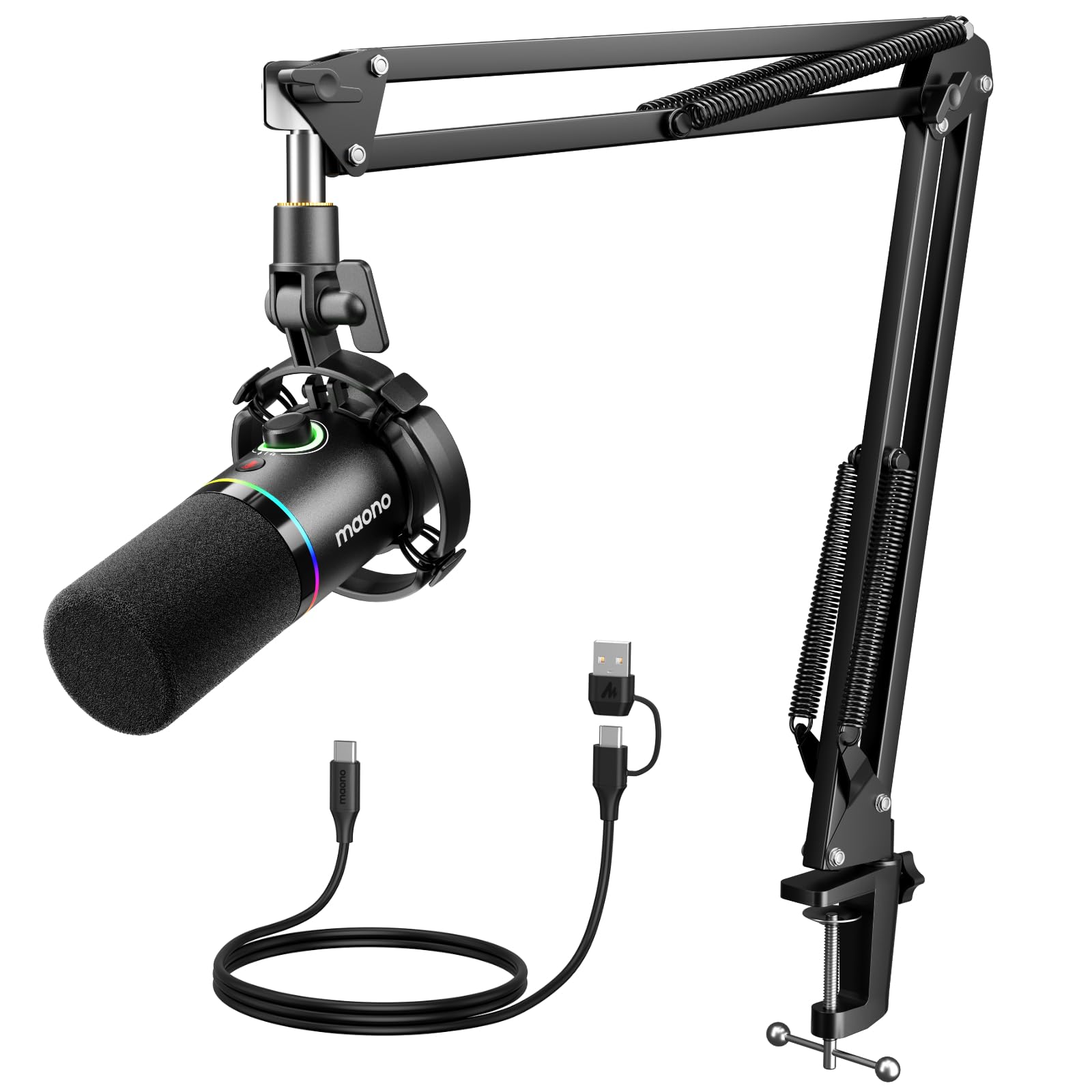
A complete desk setup is the reason the PD200XS exists. The box includes the mic, a shock mount, a boom arm, and a USB-C cable, so you can clamp the arm to a desk, plug in, and be live without buying the usual extras separately. That completeness is the reason to look at it.

The mic itself is a dynamic with a unidirectional capsule, a 40Hz-16kHz range, a metal body, RGB lighting, a mute button, and a smart knob for gain and headphone volume. It works over USB-C or XLR, and the software gives you more control over the RGB and voice settings. The sound is clear and full for a budget mic, and the arm is a genuine convenience rather than a throwaway extra.

The trade-offs are the usual ones for a kit at this level. The boom arm is not as sturdy as the mic, and phone or camera compatibility is not guaranteed; the USB-C path is the one to trust. Long-term reliability is also less certain than on the Shure or Rode, so buy it as an affordable first setup rather than a forever mic.

We recommend the PD200XS when the budget has to cover the whole desk, not just the microphone. It is not the mic we choose for the cleanest voice or the longest service life, but it gets a new streamer on air with monitoring, mute, and a boom arm in one go. That is a real job, and it does it without pretending to be a broadcast flagship.

Pros

  • Complete kit with boom arm and shock mount
  • USB-C and XLR connections
  • Mute, gain, and headphone volume controls
  • Software and RGB customization

Cons

  • Boom arm feels less sturdy than the mic
  • Phone and camera compatibility is not guaranteed
Our verdict

The PD200XS is the all-in-one budget kit for a first streamer who needs a boom arm, mute, and USB/XLR flexibility in one box.

Check Latest Price

How We Tested These Streaming Mics

We started with a shortlist of roughly 40 dynamic mics sold for streaming and pared it down by reading spec sheets and manuals: does it run XLR or USB, does it ship with a desk stand or expect a boom arm, can you reach the gain dial mid-session without knocking the mic off axis. Value was one of the things owners mentioned most, so we kept a spread of budgets and cut anything that duplicated a feature set we already had covered.

Twelve mics made the cut, and each spent six months on the same boom arm above my desk, cycling through live streams, late-night voice chats, and recorded voiceover. I ran a mechanical keyboard and a box fan through every session, then listened back to hear whether the keystrokes registered and at what point the gain dial introduced audible hiss. I weighed each mic and noted whether the arm sagged under it, and I knocked each one off the desk onto carpet more times than I'd like to admit to see whether the grille, switches, and finish shrugged it off.

For connectivity, I unplugged and replugged each cable a few dozen times and wiggled the connector mid-session to see if the signal dropped or the computer re-detected the device. Volume got its own pass: I set each mic to a comfortable speaking level, pushed it until it clipped to find the headroom, then checked whether the headphone monitoring lagged behind my voice. Reliability showed up over those months rather than in a single sitting — the mics that never needed a re-plug or a driver restart are the ones still on the arm.

How to Choose a Dynamic Microphone for Streaming

Start With the Connection

A USB dynamic mic is the shortest path from box to stream: one cable, no interface, and usually a headphone jack or mute button on the body. An XLR mic is the more flexible long-term choice, but it needs an audio interface or mixer, and that is part of the real cost. Dual USB/XLR models such as the Shure MV7+ and FIFINE K688 let you start on USB and move to XLR later; the trade-off is that you pay for both connections even if you use only one.

A USB-C port on a mic is not the same as phone support. If you plan to stream from a phone or tablet, check the maker's device list before you buy rather than assuming the connector settles it.

Match the Pattern to the Room

Most streaming dynamics are cardioid, which picks up best in front and rejects the rear. That is enough for a normal bedroom, but a hypercardioid mic such as the Audio-Technica AT2040 narrows the pickup further and is the better fit when a window, keyboard, or second speaker sits close by. The trade-off is placement: the tighter the pattern, the more you need to stay on-axis.

A dynamic mic reduces room sound, but it does not make an untreated room disappear. Budget for a boom arm and a little acoustic softness before blaming the capsule.

Plan for Gain and Monitoring

Dynamic mics put out less signal than condensers, and the quietest models expose a weak interface. The Shure SM7B asks for about 60 dB of clean gain, and the Rode PodMic also wants a preamp with headroom; if your interface gets noisy when you turn it up, a USB/XLR mic or an inline booster makes more sense than fighting the knob.

A headphone jack on the mic is a genuine streaming convenience because you can monitor your voice without a separate mixer. Check that the jack and volume control work the way you expect before you commit.

Weigh Mounting and Live Controls

A streaming mic lives on a desk, so weight and mounting matter. The SM7B is 2.7 pounds and wants a sturdy boom; the Elgato Wave DX is compact enough for a small arm; the MAONO kit includes a boom arm so you do not have to buy one separately. A mute button is worth having if you take calls or cough mid-stream, and a shock mount helps with desk thumps.

Thread adapters are easy to lose, so confirm the mount matches your stand: 5/8-inch is common, with 3/8-inch adapters on many mics.

Frequently Asked Questions

Final Verdict

The Shure MV7+ is the dynamic mic we recommend first for streaming because it solves the two decisions most streamers face: it works over USB-C today and XLR later, and its auto level and denoiser make a normal room sound presentable. If you already own a capable interface and want the most broadcast-weight voice, the SM7B is the step up; for a tight budget with an interface, the Rode PodMic is the value pick. The MV7+ is the one that fits the widest range of desks.