Best Flight Sim Rudder Pedals of 2026

The first time I tried to hold a centerline in a crosswind, my rudder input was a twist of the wrist — and the airplane wagged down the runway like it was annoyed with me. Pedals fix that: they put yaw back under your feet, and coordinated turns, tailwheel taxis, and helicopter hover inputs stop being guesswork. The catch is that rudder pedals are the one part of a sim setup most people buy blind. They're bulky, they aren't cheap, and a bad set squeaks, slides across the floor, or clunks back to center.

My team and I have spent six months with seven sets under our desks, from light plastic pairs to metal ones heavy enough that you notice when you lift the box. We flew the same approaches and the same taildraggers on repeat, and the gaps in smoothness, centering, and build quality showed up within a few landings. Value mattered as much as feel — the priciest set didn't win. The picks below are the ones still plugged in.

1

Best Overall

Turtle Beach VelocityOne

86 /100
Lab Score Excellent

Key details

Brakes
Differential brakes
Sensors
Hall effect on all axes
Compatibility
PC, Xbox One, Xbox Series X/S
Pedal Adjustment
Width, angle, swappable springs
View on Amazon

The feature that won us over is the adjustable pedal width. Most rudder pedals ask your feet to fit them; the VelocityOne lets you set the stance, which matters on long sessions and for anyone who has found compact sets too narrow. That adjustment sits alongside swappable springs and two pedal shapes, so you can tune the feel rather than simply accept it.

We think the Hall-effect sensing is the bigger long-term win. The rudder axis feels smooth and linear, and the 13.3-pound body gives it enough mass to stay planted without a cockpit. Differential brakes are there for taxiing and crosswind work, and the two pedal sets let you switch between a lighter general-aviation feel and a heavier airliner stance. Xbox compatibility is the one place to slow down: the set can need the matching Turtle Beach hardware, so confirm your setup before ordering.

Nothing about the VelocityOne is dainty. It measures 19.26 inches wide and 15.2 inches deep, so it wants a permanent spot under a desk or rig rather than a shelf. The width adjustment is the detail we noticed every time we sat down, and it turns a generic pedal set into one that fits the person using it.

Pros

  • Adjustable width fits a wider range of feet
  • Hall-effect axes feel smooth and linear
  • Heavy body stays planted on the floor
  • Differential brakes and swappable pedals add versatility

Cons

  • Long-term axis reliability is the main question
Our verdict

We recommend the Turtle Beach VelocityOne as the best all-round set for most simmers: adjustable width and Hall-effect axes make rudder work feel natural on PC or Xbox.

Check Latest Price
2

Best High-End

Thrustmaster TPR

93 /100
Lab Score Outstanding

Key details

Brakes
Differential toe brakes
Sensors
Hall effect (H.E.A.R.T.)
Compatibility
PC
Pedal Positions
Five positions, 35° to 75°
View on Amazon

The TPR is the premium option in this group, and we think the extra spend goes into the parts you touch and the mechanism you feel. Its suspended PENDUL R design gives the rudder a smooth, fluid action, while the Hall-effect sensor keeps that action frictionless and consistent. This is the set that makes a desk rig feel less like a toy.

We appreciated the tuning range. The pedals move through five positions between 35 and 75 degrees, and the spring positions can be changed with the two included springs, so you can set a lighter general-aviation feel or a firmer airliner resistance. The metal base is heavy enough to stay put, and the four M6 mounting holes let you bolt it into a cockpit if you have one. The adjustment is mechanical and easy to understand, which matters when you are chasing a center feel.

The footprint is the main practical cost: at roughly 18.7 inches deep and 9 kg, the TPR is a permanent fixture rather than something you tuck away. The two brake pedals also arrive detached, so plan on a short assembly session with the included Allen keys before your first flight.

Pros

  • Metal base and suspended mechanism feel premium
  • Hall-effect sensor stays smooth and precise
  • Five pedal angles and adjustable spring resistance
  • Differential toe brakes included

Cons

  • PC-only compatibility
Our verdict

For a PC cockpit where feel matters most, we think the Thrustmaster TPR is the realism pick: a metal base, Hall-effect sensing, and adjustable springs make it feel like serious equipment.

Check Latest Price
3

Best Value

Logitech G Pro

90 /100
Lab Score Outstanding

Key details

Brakes
Differential toe brakes
Compatibility
Windows 7–10
Axis Resolution
9-bit Rudder axis, 7-bit Toe Brake axis
Pedal Adjustment
Adjustable tension dial
View on Amazon

The G Pro is the set we reach for when the goal is straightforward PC rudder control rather than a cockpit showpiece. It has been around long enough to feel familiar, and the design is simple: self-centering pedals, a tension dial, and differential toe brakes. That simplicity is the appeal if you want to add rudder control and get flying.

The tension dial is the part we adjusted most. It lets you move between a lighter, quicker return and a firmer feel, which is useful if you fly a mix of light aircraft and airliners. The 9-bit rudder and 7-bit toe-brake axes are not the highest-resolution specs here, but they give you enough range for ordinary sim work. Setup is about as easy as it gets: USB, Windows, and a quick calibration.

Where it shows its price tier is the build. The body is lighter and more plastic than the metal sets here, so it can feel less substantial underfoot, and the tension dial's effect can soften over time. We still think it earns a place because it delivers the controls most PC simmers actually use, including toe brakes, at a midrange price. The G Pro is the set we hand to someone who wants a known quantity rather than a premium experiment.

Pros

  • Adjustable tension dial tunes centering feel
  • Differential toe brakes for ground handling
  • Easy USB setup on Windows

Cons

  • PC-only compatibility
Our verdict

We recommend the Logitech G Pro for PC simmers who want a proven, adjustable pedal set without premium pricing; the tension dial and toe brakes cover the basics well.

Check Latest Price
4

Best Budget

Thrustmaster TFRP

89 /100
Lab Score Excellent

Key details

Rails
Four aluminum rails
Brakes
Differential braking
Rudder Axis
Self-centering, long travel
Compatibility
PC, PS4/PS5, Xbox Series X/S
View on Amazon

The TFRP is the budget entry in this group, and it feels like it: compact, light, and a little close underfoot. Thrustmaster uses four aluminum rails for the sliding mechanism, which gives the rudder a longer, smoother travel than the simple construction suggests. The self-centering action is there, and differential braking is included, so the core controls are covered.

We think it earns its place as a first set because it gets the fundamentals right without asking for much. The 4.9-pound body is easy to move, and the pedals are small enough to tuck under a desk. The main daily compromise is the stance: the pedals sit close together, and on a hard floor the base can slide unless you add a rug or mount it. Those are the two things we noticed first.

The 14 x 12 x 8-inch footprint is the useful part: it fits under a desk without dominating the room. The rails and self-centering action are the reason it works as a starter set, and the light body makes it easy to move between sessions. That combination is what makes a first pedal set feel less like a commitment.

Pros

  • Self-centering rudder with long travel
  • Differential braking included
  • Light and compact for desk setups

Cons

  • Xbox compatibility is uncertain
  • Rudder can feel sticky over time
Our verdict

The TFRP is the budget set we point first-time simmers toward: self-centering rudder and toe brakes for very little money, as long as you can live with narrow spacing.

Check Latest Price
5

Permanent PC/Mac Rigs

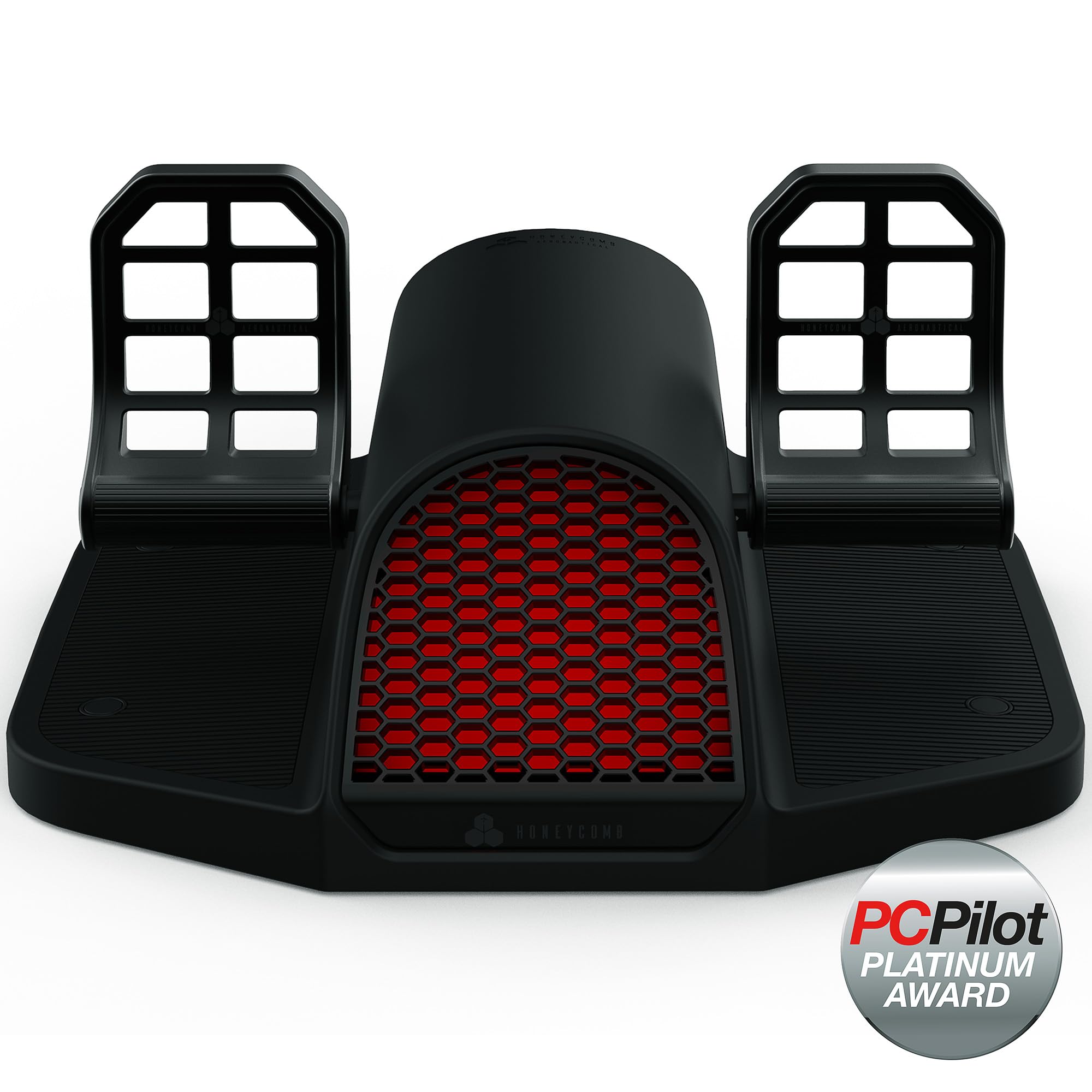
Honeycomb Charlie

84 /100
Lab Score Excellent

Key details

Build
Aluminum, belt drive
Sensors
Hall effect
Stability
Grip pads and carpet spikes
Compatibility
PC, Mac; Xbox with hub
View on Amazon

The Charlie is the pedal set that feels most like furniture: 10 kg of aluminum and a belt-drive mechanism that gives the rudder a smooth, planted feel. We were struck by how much the mass changes the experience. On carpet, it stays put, and the mass does most of the work.

The adjustability is useful rather than decorative. You can change the pedal angle and the tension at the back of the case, and the high-friction strips or carpet spikes let you match the floor. The Hall-effect sensors are the same contactless idea used by the other premium sets here, and the belt drive gives the action a different, more connected feel than a simple spring-loaded pedal.

The practical catch is the size. At 21 by 11 by 22 inches and 10 kg, it wants a dedicated rig or a corner it can own; moving it between rooms is a chore. The specification leaves toe brakes open, so confirm before ordering if you need differential braking.

Pros

  • Aluminum build and belt drive feel premium
  • Hall-effect sensors for smooth, contactless control
  • Adjustable pedal angle and tension
  • Carpet spikes and grip pads improve stability

Cons

  • Xbox requires Honeycomb hub
  • Can slide on smooth floors under hard rudder input
Our verdict

We think the Honeycomb Charlie is the premium PC/Mac set for a permanent cockpit: aluminum construction, Hall-effect sensing, and a belt drive give it a precise, planted feel.

Check Latest Price

How We Tested the Best Flight Sim Rudder Pedals

We started by pulling together every set we could find that was actually in stock and supported by the major sim platforms, then trimmed the list by price, footprint, and whether the pedals would play nicely with a joystick people already own. That left seven sets, which we ran for six months. Two editors used them, partly so we could compare foot sizes and seating positions — one of us is a size 9, the other a 12.

Setup was the first checkpoint. We timed each set from box to first usable axis, installed whatever software shipped with it, and noted whether the sim recognized the pedals on its own or needed a plugin to keep them from fighting an existing controller. Then we flew: crosswind landings and pattern work at the desk on weekday evenings, helicopter hover practice and tailwheel taxis on weekend afternoons, sometimes in socks, sometimes in shoes. Each set got time on carpet and on a hardwood floor to see whether the base crept during long sessions.

Along the way we watched for small things. Whether a tiny correction arrived as a tiny correction or jumped; whether the pedals returned to center cleanly or needed a dead zone dialed in; whether footplates flexed, squeaked, or developed stiction after a few weeks of use. We moved pedals in and out for different leg lengths and noted which spacing and tension adjustments needed a hex key and which could be done by hand, and we weighed each base to see how much of the stability was coming from mass alone. At the end we set each set's price against what it actually gave us.

How to Choose Flight Sim Rudder Pedals

Start With Your Platform

Platform is the first filter because it removes the most options. PC is the simplest path: most sets here connect by USB and work with Microsoft Flight Simulator and X-Plane. Xbox and PlayStation support is narrower, and an Xbox-ready label may still require a hub or matching yoke. Decide whether you need console compatibility before you fall for a pedal set. If you fly only on PC, you can ignore the console caveats and shop on feel, width, and brakes.

Look at the Sensing, Not Just the Numbers

Hall-effect sensors use magnetic fields and no rubbing contact, so they tend to stay smooth and consistent; the Thrustmaster TPR, Turtle Beach VelocityOne, and Honeycomb Charlie all use them. The Logitech G Pro lists 9-bit rudder and 7-bit toe-brake axes, which is enough for ordinary sim flying but a step below the contactless sets in feel. We put a smooth center ahead of a big number. Centering, spring tension, and a linear response matter more than a flashy specification.

Fit the Stance to Your Feet

Pedal width and spacing are the most personal specs, and they rarely show up in a headline. Compact sets like the TFRP put the pedals close together, which can feel cramped over a long session; the Turtle Beach VelocityOne makes width adjustable, and the TPR and Honeycomb Charlie let you change pedal angle. If you fly in socks, leave a little room for your heels to pivot; if you fly in shoes, check the width before you commit. A comfortable stance is worth more than an extra dial you never touch.

Decide Whether You Need Toe Brakes

Toe brakes let you brake each wheel separately, which matters for taxiing, crosswind landings, and taildraggers. The Logitech G Pro, Thrustmaster TFRP, Thrustmaster TPR, and Turtle Beach VelocityOne all specify differential brakes. The Honeycomb Charlie's specification leaves toe brakes open, so confirm before ordering if that function is important to you. If you fly mostly airliners and use a separate brake axis, you can deprioritize toe brakes; if you fly light aircraft, they are part of the fun. Do not assume every rudder pedal has them.

Plan for Sliding and Storage

Pedals slide because the forces you apply are not straight down. Carpet helps, and grip pads or deployable spikes help more; the Honeycomb Charlie includes both, while the TPR gives you four M6 mounting holes for a permanent rig. Weight is your friend for stability and your enemy for storage: the Turtle Beach VelocityOne is 13.3 pounds, the TPR is 9 kg, and the TFRP is 4.9 pounds. Measure the floor space and decide whether the set will live in one spot or move between desk and closet.

Frequently Asked Questions

Final Verdict

For most simmers, the Turtle Beach VelocityOne is the set we recommend first. The adjustable width and Hall-effect axes solve the two things that make rudder pedals annoying: cramped feet and grainy movement. If you fly PC-only and want maximum realism, the Thrustmaster TPR is the upgrade; if you want a simple PC set for less, the Logitech G Pro is the value alternative. The Honeycomb Charlie is the premium choice for a permanent PC/Mac rig, provided you confirm toe brakes and the Xbox hub.