8 Best Flight Sim Yoke of 2026: The Ones That Actually Feel Smooth and Last

Find the flight sim yoke that delivers smooth controls and long-term reliability for PC and Xbox, from budget to premium.

Shopping for a flight sim yoke means wading through claims about realism and immersion. But once you start flying, the real difference is how the yoke feels in your hands — smooth precision versus a sticky, jerky motion that ruins fine adjustments. Many affordable options sound good on paper but degrade after a few hundred hours of use.

The key is understanding which components matter most: yoke rotation, build materials, and whether the controls stay responsive over time. Not every yoke that looks the part delivers the consistent tactile feedback needed for VFR approaches or airliner crosswind landings.

This guide cuts through the marketing to focus on the yokes that deliver lasting performance and realistic feel — whether you are building a home cockpit on PC or plugging into an Xbox for the first time.

1

Best Overall

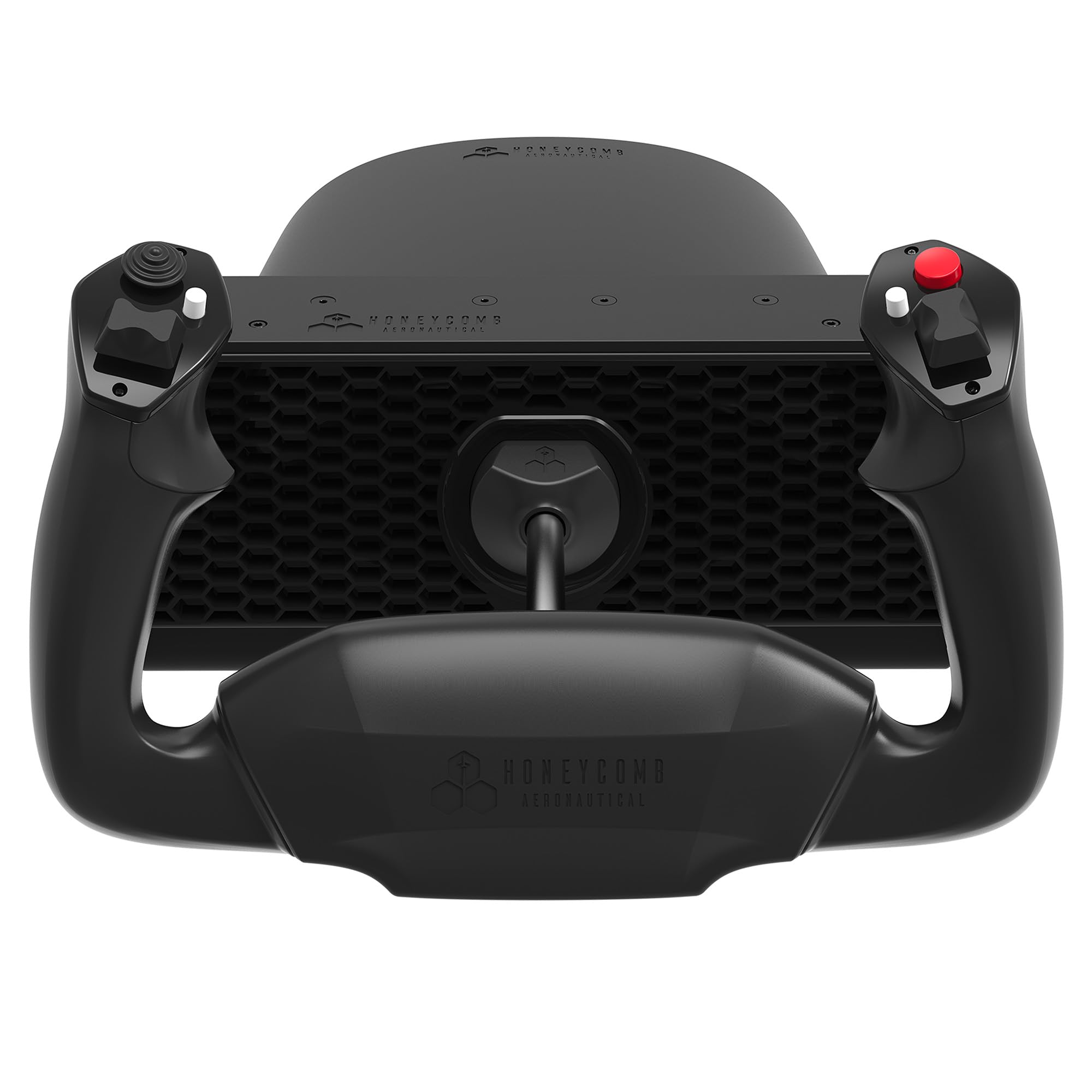
Honeycomb Alpha Yoke

91 /100
Lab Score Outstanding

Key details

Yoke Rotation
180°
Build Materials
Steel shaft
Included Peripherals
Switch panel
Platform Compatibility
PC, Mac
View on Amazon

The Honeycomb Alpha’s steel shaft with dual linear ball bearings delivers a yoke movement that is smooth across its full 180-degree rotation, with no detents or stickiness. The integrated switch panel adds tactile immersion with solid-feeling toggles for ignition, avionics, and lights. Combined with 33 programmable buttons, this yoke offers a level of control that justifies its mid-range price.

The dual clamp and micro-suction pad mounting system keeps the base firmly in place during aggressive maneuvers. The 180-degree rotation matches the range of many GA aircraft, making the yoke feel natural for both pattern work and cross-country simming. The switch panel reduces the need for additional peripherals, though the toggles are smaller than full-size aircraft switches – a minor compromise for the integration.

This yoke is built for PC and Mac simmers who want a premium-feeling controller without spending over $300. If you plan to use it with an Xbox, this is not the solution – there is no native support. The absence of a throttle quadrant in the box means you will need a separate throttle unit, such as Honeycomb’s Bravo, to complete the setup.

The Alpha’s solid construction and smooth mechanics set it apart from plastic-heavy alternatives in the same price bracket. It handles regular use without developing the stickiness or play that plagues lower-tier yokes. For dedicated flight sim enthusiasts and student pilots, this yoke provides the tactile feedback needed for realistic practice sessions.

💡 The mounting clamps accommodate desks up to 2 inches thick – measure before buying to ensure a secure fit.

Pros

  • Solid construction with realistic tactile feedback
  • Competitive pricing for the build quality
  • Fluid 180-degree rotation with no detents or jerkiness
  • Integrated switch panel with solid toggles reduces need for extra peripherals

Cons

  • No native Xbox support
  • No throttle quadrant included; separate purchase required
Our verdict

If you are a PC or Mac simmer who values build quality and can budget for a separate throttle, this yoke delivers a level of realism rarely seen under $300. Console users should look elsewhere.

Check Latest Price
2

Best Complete Pro Setup

Honeycomb Alpha+Brav Bundle

85 /100
Lab Score Excellent

Key details

Yoke Rotation
180°
Build Materials
Steel shaft
Included Peripherals
Yoke + throttle
Platform Compatibility
PC, Mac
View on Amazon

The Honeycomb Alpha and Bravo bundle unites two award-winning flight controls into one integrated setup, giving simmers a full yoke, throttle quadrant, autopilot panel, and trim wheel without mixing brands. The yoke offers 180-degree rotation with a steel shaft and ball bearings for a smooth, precise feel that matches far more expensive hardware.

This bundle is built for dedicated flight simmers constructing a home cockpit who demand professional-grade controls. It is a premium investment — nearly $600 — suited for those who prioritize immersion over budget. Occasional throttle quadrant reliability issues have been noted, so purchasing from a retailer with a solid return policy is wise. Also, this setup is PC and Mac only, not compatible with consoles.

Setting up the bundle may require some configuration time, especially for mapping all controls to a preferred flight sim. Once dialed in, the tactile feedback from the yoke and the smooth levers of the throttle quadrant elevate the simulation experience significantly, making the initial effort worthwhile.

💡 Allocating an hour for initial calibration and control mapping can help avoid frustration and ensure all features work as intended.

Pros

  • High build quality with steel shaft and ball bearings for smooth, immersive control
  • Configurable six-lever throttle quadrant supports single to four-engine aircraft
  • Integrated autopilot panel, gear lever with LEDs, and trim wheel add real-world cockpit feel

Cons

  • Throttle quadrant may exhibit reliability issues that require replacement under warranty
  • Initial setup and control mapping can be time-consuming for those new to flight sim peripherals
Our verdict

For simmers committed to building a dedicated cockpit, this bundle delivers the most comprehensive control suite available at a premium cost.

Check Latest Price
3

Best for Xbox & PC Boeing Fans

Thrustmaster TCA Boeing

85 /100
Lab Score Excellent

Key details

Yoke Rotation
Pendular
Build Materials
Metal internal, plastic exterior
Included Peripherals
Throttle with autopilot
Platform Compatibility
Xbox, Windows
View on Amazon

Officially licensed for the Boeing 787, this yoke uses a pendular motion mechanism that mirrors the real aircraft's feel more closely than standard spring-loaded yokes. Its 35 action buttons and integrated autopilot module reduce the need for separate peripherals, while Xbox Series X|S and Windows compatibility opens the door for console simmers who cannot use the PC-only top pick.

The exterior plastic may feel less substantial than the price implies, though the internal structure is metal. Some units have shown occasional twitching after extended periods, so awareness of this possibility is sensible. This yoke suits Boeing enthusiasts who value authentic replica design and console support over all-metal construction, and who are willing to accept periodic calibration attention.

Compared to the alternative Thrustmaster Boeing yoke at a lower price point, this version has generated a broader base of user experience, giving buyers more reference points for their decision. Both share the same licensed design and pendular motion, so the choice comes down to review volume versus budget.

💡 Keep the firmware updated through Thrustmaster support to minimize occasional control quirks.

Pros

  • Officially licensed Boeing 787 replica with pendular motion for realistic flight feel
  • Integrated autopilot module and 35 action buttons reduce need for add-on peripherals
  • Compatible with Xbox Series X|S and Windows, broadening options beyond PC-only yokes
  • 100% metal internal structure provides durability in the core mechanism

Cons

  • In quiet cockpits, the plastic exterior may feel less premium than the price suggests
  • Throttle lever alignment can vary between units, occasionally requiring adjustment around half throttle
  • Some yokes may develop sporadic twitching after months of use, potentially affecting immersion
Our verdict

For console simmers who want a licensed Boeing yoke and can accept the possibility of occasional calibration quirks, this set offers a more established track record than its stablemate.

Check Latest Price
4

Best Budget Yoke with Throttle

Logitech G PRO Yoke

87 /100
Lab Score Excellent

Key details

Yoke Rotation
Build Materials
Stainless steel shaft + plastic
Included Peripherals
Throttle quadrant
Platform Compatibility
Windows
View on Amazon

The Logitech G PRO Yoke bundles a yoke and throttle quadrant at a price that undercuts most competitors — delivering a complete control package for under $210. While the Honeycomb Alpha offers metal internals and smoother operation over the long term, the Logitech provides an accessible entry point with a stainless steel shaft and dual desk clamps for stability. Customer feedback highlights the solid build for its price segment, making it a reasonable starting point for new sim pilots.

This system is for PC simmers on a budget who want a ready-to-fly setup for MSFS or X-Plane without separate components. Note: it is not compatible with Xbox or consoles. Under heavy use, some units may lose function after several hundred hours — a tradeoff that casual flyers may never encounter, but frequent simmers should weigh against premium alternatives.

💡 If the yoke begins to feel rough after many sessions, recalibration may restore smoothness — though eventual replacement is a possibility under heavy use.

Pros

  • Complete yoke and throttle bundle at a budget-friendly price.
  • Solid build quality with stainless steel shaft and stable desk clamps.
  • Wide software compatibility with MSFS and X-Plane.

Cons

  • PC-only
  • Control precision and longevity trail behind premium options
Our verdict

For new pilots building their first cockpit, this yoke-throttle bundle offers the best value under $250 — but those logging daily hours should consider the Honeycomb Alpha for longer service life.

Check Latest Price
5

Best Value Bundle with Pedals

Logitech Yoke+Peds Bundle

86 /100
Lab Score Excellent

Key details

Yoke Rotation
Build Materials
Stainless steel shaft + plastic
Included Peripherals
Yoke + throttle + pedals
Platform Compatibility
Windows
View on Amazon

The Logitech G Pro Flight Yoke System + Rudder Pedals Bundle delivers a complete flight control set in one box — a yoke with integrated throttle quadrant and rudder pedals that share the same software ecosystem. This coordinated package eliminates the need to source pedals separately, a convenience no other product in this roundup offers at this price.

This bundle suits PC simmers who want a single-box solution for getting airborne without researching separate components. The tradeoff is that the yoke inherits the same mechanism used in Logitech's standalone model, which can develop looseness with heavy use; the pedals use plastic construction that feels basic compared to metal units. For casual users or those on a tight budget, these compromises are manageable, but simmers expecting long-term precision may be better served by a Honeycomb Alpha-based setup.

The throttle quadrant includes three levers with adjustable friction, and the yoke offers 14 buttons plus 54 programmable commands through Logitech's software. The pedals' differential toe brakes and adjustable footrests add useful functionality for ground handling and comfort.

Pros

  • Complete yoke, throttle, and rudder pedal set in a single box
  • 14 physical buttons with up to 54 programmable functions for flexible aircraft control.
  • Differential toe brakes on pedals allow independent braking for ground maneuvers.

Cons

No notable drawbacks to flag.

Our verdict

For PC simmers who value convenience and brand consistency over premium materials, this bundle offers the most straightforward path to a full control system. Just be aware of the yoke's durability ceiling and the pedals' plastic build before committing.

Check Latest Price
6

Xbox All-In-One

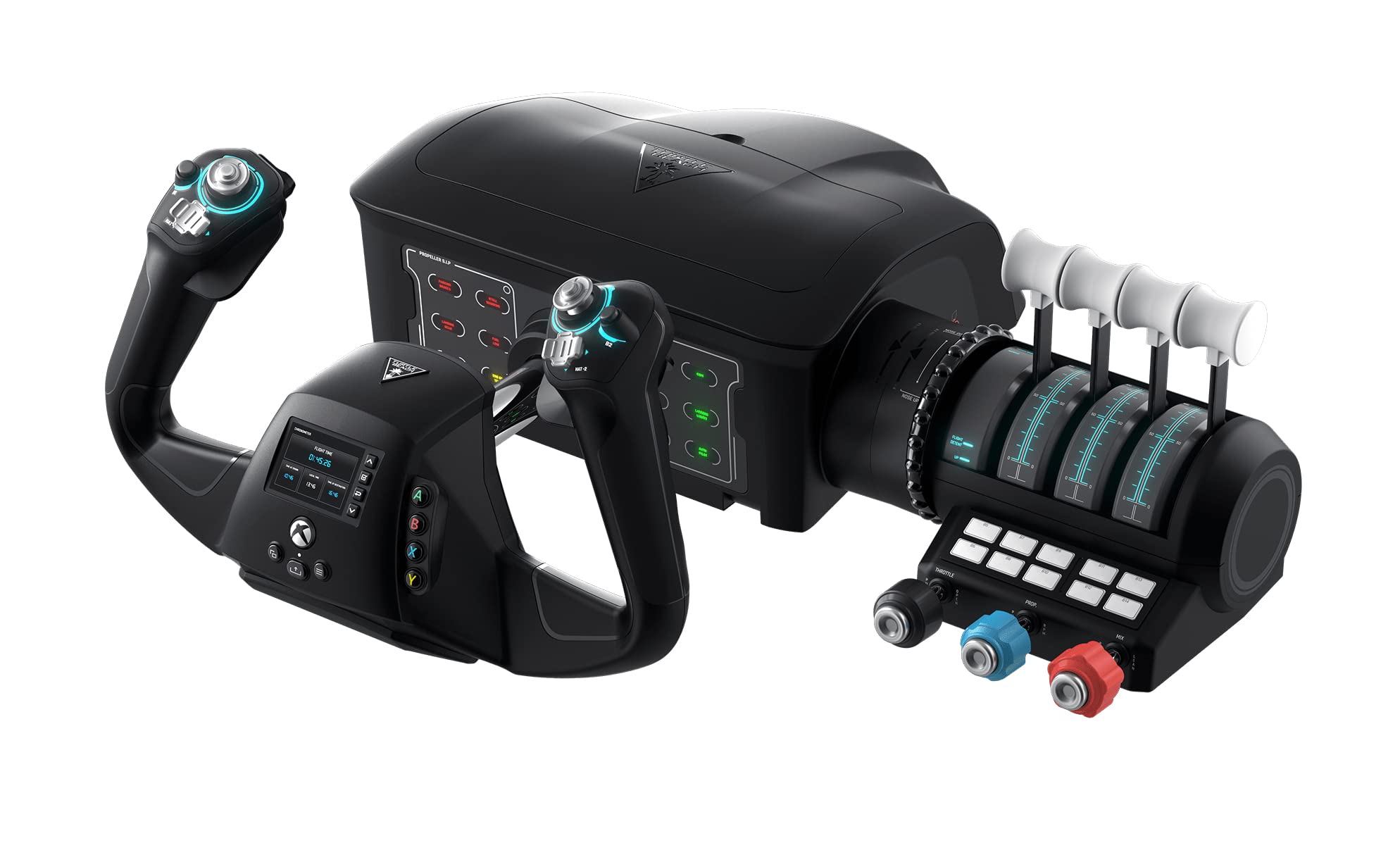
Turtle Beach VelocityOne

81 /100
Lab Score Excellent

Key details

Yoke Rotation
180°
Build Materials
Plastic, Hall effect sensor
Included Peripherals
Integrated rudder
Platform Compatibility
Xbox, Windows
View on Amazon

The VelocityOne packs a Hall-effect yoke, integrated rudder, and 26 buttons into a single Xbox-ready unit. The 180-degree rotation matches real aircraft, and the hand rudder controls add immersion without extra pedals. However, the yoke movement can feel stiff, which makes fine adjustments during landing or altitude changes a challenge. Xbox compatibility has been partial — phantom inputs or limited function have occurred in some setups. Drift and calibration issues have also been noted after extended use. This system suits Xbox simmers who want an all-in-one solution and are willing to accept possible setup quirks for the convenience of integrated rudder controls.

Pros

  • Integrated hand rudder eliminates the need for separate pedals.
  • Hall effect sensors provide durable, contactless input detection.
  • 26 programmable buttons and trim wheel offer extensive control mapping.

Cons

  • Yoke movement can feel sticky, making small corrections imprecise during approach or taxi.
  • Some units may develop drift or calibration issues that disrupt flight sessions.
Our verdict

Best considered for Xbox simmers who prioritize an integrated rudder over buttery-smooth yoke feel and are comfortable with potential compatibility quirks.

Check Latest Price
7

Ultra-Budget Option

Logitech Saitek PRO (Renewed)

81 /100
Lab Score Excellent

Key details

Yoke Rotation
Build Materials
Plastic
Included Peripherals
Throttle quadrant
Platform Compatibility
Windows
View on Amazon

The lowest-priced yoke-and-throttle combo available, this renewed Logitech Saitek PRO offers a full control set for under $170. The catch: renewed units carry unknown usage history, and the 90-day warranty is short. Some units may develop stickiness or electrical issues over time — a risk that only makes sense for simmers on the strictest budget who prioritize cost over long-term longevity.

Pros

  • Budget-friendly entry point: full yoke and throttle set at the lowest price available.
  • Compatible with major Windows flight simulators without additional software.

Cons

  • Condition varies
  • Short warranty period offers limited recourse if the yoke develops issues soon after purchase.
Our verdict

Only consider this if a rock-bottom price is non-negotiable and you are prepared for the possibility of early wear or failure.

Check Latest Price
8

Xbox Boeing Alternatives

Thrustmaster TCA Boeing

83 /100
Lab Score Excellent

Key details

Yoke Rotation
Pendular
Build Materials
Metal internal, plastic exterior
Included Peripherals
Throttle with autopilot
Platform Compatibility
Xbox, Windows
View on Amazon

This TCA Yoke Pack replicates the Boeing 787 cockpit feel with its pendular motion, 35 action buttons, and magnetic sensor technology. The metal internal frame gives it a solid foundation, and the included throttle quadrant with autopilot module adds depth for PC and Xbox simmers. Where it differs from the more established option is in the amount of user feedback: limited long-term data means some uncertainty about consistency across units, and the plastic exterior panels can feel less premium than all-metal alternatives. Given the premium price, the higher-rated sibling offers more buyer confidence for those who want fewer unknowns.

Pros

  • Officially licensed Boeing 787 replica with pendular motion for realistic flight feel.
  • 35 programmable buttons and magnetic sensors offer extensive control customization.
  • 100% metal internal structure provides a sturdy base for the yoke.

Cons

  • In a quiet home cockpit, the plastic exterior panels can feel less substantial compared to metal alternatives.
  • Some units may develop control twitching after extended use, a possibility noted in similar Thrustmaster yokes.
Our verdict

Best considered when the cost savings matter more than the assurance of a longer track record — or for Thrustmaster enthusiasts who already accept the brand's build variances.

Check Latest Price

How to Choose

Yoke Rotation

Yoke rotation determines how far you can turn the column left and right. A 180-degree rotation mimics real aircraft control and allows for natural hand movements during sharp turns and crosswind landings. Yokes with less rotation feel twitchy and require smaller, less intuitive hand motions, which can make minor corrections difficult.

For most flight sims, especially MSFS and X-Plane, a full 180-degree rotation is the standard. If you primarily fly airliners or do IFR training, the extra rotation provides the precision needed for small bank adjustments. Budget yokes often cut this to 90 degrees, limiting realism.

Build Materials

The shaft material and internal bearings directly affect longevity and feel. A solid steel shaft with dual linear ball bearings delivers smooth, wobble-free movement that lasts years. Plastic shafts or cheaper bushings develop play over time, leading to a loose, inconsistent feel that forces you to overcorrect.

Example: The Honeycomb Alpha uses a steel shaft and ball bearings, while many Logitech units use plastic internals that can degrade after 300 hours. If you fly more than a few hours a week, investing in metal internals saves you from replacing the yoke within a year.

Included Peripherals

A yoke alone is just the start. The throttle quadrant, rudder pedals, and switch panel are what turn a basic controller into a cockpit. Buying a bundle saves money and ensures compatibility, but check that the included peripherals match your flight style. For example, a six-lever throttle is overkill for GA flying but essential for airliner simmers.

Separate purchases let you upgrade piece by piece, but may result in mismatched mounting systems or software conflicts. If you want a complete station from day one, a bundle like the Logitech Yoke+Peds delivers everything in one box at a lower cost than buying separately.

Button and Control Count

More buttons and programmable controls allow you to map every important function—autopilot, flaps, landing gear, trim—without reaching for the keyboard. But raw count matters less than placement. Buttons that are hard to reach or feel spongy break immersion. Look for tactile switches and a hat switch for POV view control.

A yoke with 14 physical buttons plus a mode switch (like the Logitech G Pro) effectively gives 54 commands. That is plenty for most simmers. The Honeycomb Alpha’s 33 buttons are laid out in intuitive positions, while the Thrustmaster Boeing uses a 35-button layout that mimics the real 787 panel. Choose based on how dedicated you are to memorizing button positions.

Platform Compatibility

PC simmers have the widest choice—most yokes work with Windows and macOS. Xbox compatibility is more limited; only a handful of yokes, like the Thrustmaster TCA Boeing and Turtle Beach VelocityOne, natively support consoles. Even then, integration varies. Some Xbox-compatible yokes lose features like full button mapping or require firmware updates via PC.

If you play on Xbox, verify that the yoke works with your specific flight sim (e.g., MSFS on Xbox). The Thrustmaster Boeing is the most reliable Xbox option, with official licensing and consistent driver support. Avoid yokes that claim Xbox compatibility but have user reports of phantom inputs or limited function.

Reliability and Longevity

Long-term durability separates entry-level yokes from serious gear. The most common failure point is the internal mechanism: plastic gears strip, potentiometers develop jitter, and springs weaken. Yokes with Hall effect sensors or magnetic contactless sensors, like the Honeycomb Alpha, avoid the wear that plagues potentiometer-based models.

Reliability is not just about build—it is also about consistent performance over hundreds of hours. The Logitech G Pro, despite good initial feel, has a notable failure rate after 300 hours. For regular flyers, spending a bit more on a yoke with a proven track record (like the Honeycomb Alpha) avoids the frustration of mid-flight dropouts.

Frequently Asked Questions