13 Best Gaming Computer Speakers of 2026: Balance Bass, RGB, and Value

Which gaming speakers deliver clear sound and modern connectivity without sacrificing desk space? This guide helps you choose between compact 2.0 RGB sets and powerful 2.1 systems.

Many gaming speakers promise immersive sound but often fall short on connectivity or reliability. The market is split between compact 2.0 speakers that fit any desk and 2.1 systems that deliver deep bass but take up space. This guide cuts through the noise to help you pick based on your actual setup and priorities.

The core trade-off is simple: do you want a subwoofer for punchy low-end or a clean, clutter-free desktop? Speakers with Bluetooth and USB are more versatile but often lack the bass punch of dedicated 2.1 systems. The right choice depends on whether you value desk space and RGB over subwoofer thump.

1

Best Overall

Edifier G2000

92 /100
Lab Score Outstanding

Key details

RGB
12 effects
Connectivity
Bluetooth, USB, AUX
Power & Config
32W peak, 2.0
View on Amazon

Sound quality from the G2000's 2.75-inch drivers is impressively clear and loud for their size, with bass that extends deeper than most 2.0 systems at this price. The 32-watt peak power easily fills a medium room, and the multiple connectivity options - Bluetooth, USB, and AUX - allow seamless switching between PC, console, and phone without a separate switcher.

The RGB lighting offers 12 effects that stay subtle and customizable, fitting into a clean desk aesthetic without looking over-the-top. Volume range is wide: the upper end can feel too intense in smaller spaces, but the mid-range remains controlled and detailed. The subwoofer output provides an upgrade path for those who eventually want deeper bass, though the built-in 2.0 performance already punches above its size.

This set suits gamers and desktop users who prioritize sound clarity and multiple device connections over subwoofer bass. Those wanting room-shaking low frequencies out of the box should consider a 2.1 system. The G2000's subwoofer output allows adding one later, but as a standalone 2.0 it offers a balanced sound profile that handles games, music, and videos without fatigue.

Against pricier 2.1 options, the G2000 holds its own with cleaner midrange and more input flexibility, though it sacrifices low-end rumble. The value proposition is strong - the combination of audio clarity, build quality, and modern connectivity is hard to beat under $100.

💡 If you frequently listen at high volumes, test the G2000 at your typical listening distance - the upper range is powerful and may be too much for small rooms.

Pros

  • Clear, loud audio with surprising bass depth from compact 2.0 drivers
  • Multiple input options: Bluetooth, USB, AUX, and subwoofer output for future expansion
  • Subtle RGB with 12 effects that doesn't overpower a desktop setup
  • Strong value - sound and features comparable to more expensive competitors

Cons

  • At maximum volume, output can be uncomfortably loud in smaller rooms
Our verdict

If you want clear audio, multiple inputs, and a clean desktop look without needing floor-shaking bass, the Edifier G2000 delivers across the board at a sensible price.

Check Latest Price
2

Best Sound Quality (2.1)

Klipsch ProMedia 2.1

91 /100
Lab Score Outstanding

Key details

RGB
None
Connectivity
3.5mm AUX only
Power & Config
200W peak, 2.1
View on Amazon

Crystal-clear highs and a tactile, room-filling bass define the Klipsch ProMedia 2.1 — a system that has set the benchmark for computer speakers for years. Where most gaming-oriented speakers prioritize RGB lighting or wireless convenience, this 2.1 setup delivers pure acoustic performance: the 3-inch satellites handle vocals and sound effects with precision, while the 6.5-inch side-firing subwoofer produces deep low-end that makes explosions and music feel physical. No software, no app, no fuss — just plug into the 3.5mm jack and the control pod lets you adjust volume and subwoofer gain on the fly.

The trade-off for this audio fidelity is a deliberately simple feature set. Connectivity is limited to a single analog AUX input — no Bluetooth, no USB, no optical — so connecting to a console, phone, or newer laptop requires a separate adapter. Additionally, there is no physical power switch; the system stays in standby whenever the computer is on, drawing a small amount of power. Some units have also shown right-channel or subwoofer failure within a couple of years, so this is not a set you can ignore for a decade without checking on it.

This speaker set is best suited to the PC gamer who values sound quality above all else and doesn’t mind a fixed wired setup. If you play at a desk, want immersive single-player audio without worrying about console compatibility or Bluetooth pairing, and are comfortable plugging the system into a power strip to control standby draw, the ProMedia 2.1 still offers the best acoustic value in its price range. Those who need flexible inputs, a clean power-off option, or long-term zero-maintenance reliability should look at the top pick instead.

💡 Plug the subwoofer into a switched power strip so you can easily cut standby power when the system isn’t in use.

Pros

  • Crystal-clear sound with crisp highs and punchy, tactile bass that outperforms many pricier systems.
  • Exceptional value for money
  • True plug-and-play setup with a wired connection and a simple control pod for volume and sub gain.

Cons

  • No power switch
  • Only a 3.5mm AUX input
  • Long-term durability can be a concern
Our verdict

For the desktop gamer who prioritizes raw audio performance over wireless convenience and doesn’t mind a fixed wired setup, the Klipsch ProMedia 2.1 remains a benchmark choice. Just be prepared for the lack of a power switch and the possibility of needing a replacement down the road.

Check Latest Price
3

Best for Competitive Gaming

Logitech G560

89 /100
Lab Score Excellent

Key details

RGB
LIGHTSYNC game-driven
Connectivity
Bluetooth, USB, AUX
Power & Config
240W peak, 2.1
View on Amazon

The Logitech G560 delivers DTS:X Ultra 7.1 surround sound and LIGHTSYNC RGB that reacts to in-game events, setting it apart from simpler 2.1 systems like the Logitech Z313. Its 240W peak power and 6.5-inch subwoofer produce room-filling bass that adds impact to explosions and soundtracks.

This is a system for PC gamers who want positional audio in competitive shooters and enjoy the visual immersion of synchronized lighting. However, reliability has been inconsistent — some units may experience power loss or audio cutouts within months, and the G Hub software can be sluggish with RGB resets. Bluetooth disconnects have also been reported. These tradeoffs are manageable for enthusiasts willing to tinker, but they rule out a set-it-and-forget-it experience.

The RGB lighting is a standout feature, syncing with supported games to change colors based on health, ammo, or environment. The surround sound is convincing for a 2.1 setup, but it requires compatible content to shine. The subwoofer's 6.5-inch driver delivers punchy lows that complement the satellites' clear mids and highs. Connection options include Bluetooth, USB, and AUX, making it easy to switch between a PC, phone, and tablet. For gamers who want to feel the action, the G560 offers a visceral experience.

💡 If using Bluetooth, keeping devices within 10 feet without obstacles can reduce dropouts.

Pros

  • Immersive 7.1 surround with DTS:X Ultra provides precise positional audio in games
  • Powerful bass from 6.5-inch subwoofer fills rooms with deep, punchy lows
  • RGB lighting syncs with games via LIGHTSYNC for added immersion
  • Versatile connectivity with Bluetooth, USB, and AUX works across multiple devices

Cons

  • Bluetooth connection may drop unexpectedly during use
  • G Hub software can be sluggish with RGB resets and a clunky interface
  • Some units may experience power loss or audio cutouts within months of use
Our verdict

For gamers who prioritize surround immersion and RGB integration, the G560 delivers — but only if you're prepared for the possibility of software quirks and hardware inconsistency.

Check Latest Price
4

Best Modern 2.1 Value

Bluedee SK900 Pro

88 /100
Lab Score Excellent

Key details

RGB
Multiple modes
Connectivity
Bluetooth 5.4, USB, AUX
Power & Config
80W peak, 2.1
View on Amazon

Unlike compact soundbars that trade bass for size, the Bluedee SK900 Pro is a proper 2.1 system with a dedicated subwoofer. The 80W peak output delivers deep, room-filling bass, and the DSP tuning keeps the satellites clear at higher volumes. Bluetooth 5.4 and USB-C inputs make it easy to switch between a PC, phone, or game console without swapping cables.

This setup is best for gamers who want modern connectivity and strong bass without moving into premium pricing. The RGB lighting on both the speakers and subwoofer adds desk ambiance, but the primary draw is the audio performance and input flexibility. It competes directly with older wired 2.1 systems by offering Bluetooth and USB-C out of the box.

Pros

  • Deep, punchy bass from the subwoofer fills a desk setup.
  • Bluetooth 5.4 and USB-C provide modern, flexible connectivity.
  • RGB lighting on both speakers and subwoofer adds desk ambiance.

Cons

No notable drawbacks to flag.

Our verdict

If you want a modern 2.1 system with the latest Bluetooth and USB-C, the SK900 Pro delivers strong bass and flexible inputs at a mid-range price.

Check Latest Price
5

Best Budget 2.1

Logitech Z313

89 /100
Lab Score Excellent

Key details

RGB
None
Connectivity
3.5mm AUX only
Power & Config
25W RMS, 2.1
View on Amazon

The Logitech Z313 delivers the lowest-cost entry to 2.1 audio with a subwoofer that adds noticeable low-end presence to game explosions and movie soundtracks. Setup is genuinely plug-and-play: connect the satellites to the sub, plug in the 3.5mm cable, and adjust volume via the wired pod.

That subwoofer gives a solid thump for the price, but the bass lacks adjustment – at higher volumes it can overwhelm the satellites, making dialogue or footsteps less distinct. The system is entirely wired (3.5mm only), so you'll need an AUX adapter for modern consoles or phones.

This setup suits budget gamers who just want cheap bass without Bluetooth, RGB, or wireless clutter. Buyers should also be aware that the right satellite speaker has been known to stop producing sound after several months of use – a tradeoff that comes with the low price point.

Pros

  • Clear, punchy sound with noticeable subwoofer presence for the price
  • Minimal setup
  • Cost-effective way to get 2.1 audio without spending much

Cons

  • Only wired 3.5mm input
  • Bass knob is missing
  • Right satellite may stop producing sound after extended use
Our verdict

A bare-bones 2.1 system for buyers who prioritize low cost and straightforward wiring over modern features or long-term durability.

Check Latest Price
6

Best Budget 2.0

OHAYO C6

89 /100
Lab Score Excellent

Key details

RGB
None
Connectivity
Bluetooth, USB, RCA, AUX
Power & Config
60W peak, 2.0
View on Amazon

The OHAYO C6 delivers a surprisingly clean and balanced audio profile for its price, with a 0.75-inch silk dome tweeter and 3-inch carbon fiber woofer housed in an MDF enclosure that adds weight and rigidity to the soundstage. The 30W per channel (60W peak) gives enough headroom for desktop listening without distortion, and the tonal balance leans toward clarity rather than artificial bass boost.

Bluetooth 5.3 pairs quickly with phones and tablets, while the three wired inputs (USB, RCA, 3.5mm AUX) cover nearly any source. The volume knob is a mechanical potentiometer – some units may exhibit slight scratchiness or uneven channel balance, but this is typical for the price bracket and usually resolves with use.

This setup suits gamers who value speech clarity and musical accuracy over room-shaking low end, and anyone with a compact desk where a subwoofer won't fit. The bass from the 3-inch drivers is decent for small to medium rooms, but if deep lows are essential, a 2.1 system is a better match.

💡 The volume potentiometer may feel slightly loose on arrival – exchanging under warranty is simple if it affects channel balance.

Pros

  • Clear, balanced sound with punchy bass for the driver size
  • Solid MDF wood cabinet gives a premium feel at a budget price
  • Bluetooth 5.3 plus USB, RCA, and AUX inputs for flexible connectivity

Cons

  • Volume knob may be inconsistent or scratchy on some units
  • No dedicated subwoofer
Our verdict

If your priority is clear, balanced audio with modern connectivity at a low cost, and you're willing to accept that deep bass requires a separate subwoofer, the OHAYO C6 is a strong contender for your desktop.

Check Latest Price
7

Budget Bookshelf

Sanyun SW208

88 /100
Lab Score Excellent

Key details

RGB
None
Connectivity
Bluetooth, USB, AUX
Power & Config
30W RMS, 2.0
View on Amazon

The Sanyun SW208 delivers audio clarity and detail that belie its size, especially when connected via the built-in USB DAC. The dual tweeter and woofer arrangement, along with adjustable bass and treble controls, give beginners room to shape the sound. However, these speakers carry two meaningful tradeoffs: Bluetooth connectivity can be inconsistent, with occasional dropouts during use, and some units have shown power-related issues after several months of regular operation. That makes this set better suited as a budget entry-point or secondary desktop option rather than a daily driver for competitive gaming where audio reliability is critical.

Pros

  • Impressive sound quality for the price, particularly through the USB DAC connection.
  • Compact bookshelf design fits neatly on a desk and is available in black or white.
  • Easy plug-and-play setup with Bluetooth 5.0 and USB audio included.

Cons

  • Bluetooth connectivity can be inconsistent
  • Some units may lose audio output following extended daily use
Our verdict

Fine as a beginner 2.0 setup or secondary desk pair for listeners willing to accept potential Bluetooth hiccups and the possibility of early failure.

Check Latest Price
8

Budget RGB Speakers

Nylavee SK400

89 /100
Lab Score Excellent

Key details

RGB
6 modes
Connectivity
3.5mm AUX only
Power & Config
5W USB, 2.0
View on Amazon

The Nylavee SK400 brings six touch-controlled RGB lighting modes to an entry-level price point, making it a straightforward way to add desk flair without breaking the budget. Sound quality is surprisingly clean for music and casual games given the size, but the 5W power output limits volume in medium-to-large rooms, and the lack of Bluetooth means wired placement is the only option.

Pros

  • Six touch-controlled RGB modes add desk flair without requiring software or drivers.
  • USB-powered plug-and-play setup works with any computer or laptop instantly.
  • Surprisingly clear sound for music and casual games at this budget-friendly price.

Cons

  • No Bluetooth
  • 5W output means volume fills a small desk area but falls short in larger rooms or with loud game audio.
Our verdict

Best for budget gamers who prioritize RGB aesthetics over volume and bass – works well as a secondary setup or for a child's desk.

Check Latest Price
9

Compact 2.1 System

Nylavee SK100 Pro

86 /100
Lab Score Excellent

Key details

RGB
None
Connectivity
Bluetooth, AUX, RCA
Power & Config
60W peak, 2.1
View on Amazon

The Nylavee SK100 Pro delivers a clean, punchy 2.1 experience from a soundbar that fits neatly under a monitor and a subwoofer that disappears under a desk. The Bluetooth 5.4 pairs quickly and stays stable, and the 60W peak output produces clear mids and surprising low-end depth for the size. The side-mounted knob handles power, input, and volume with minimal fuss. However, the lack of USB or optical input limits connection options to AUX and Bluetooth, meaning it won't suit setups that rely on digital audio from a PC or console. For gamers who primarily use Bluetooth or analog sources and want a space-saving package that outperforms its price bracket, this is a solid consideration.

Pros

  • Clear, crisp sound with deep bass from the subwoofer for the price
  • Easy setup and reliable Bluetooth connection
  • Compact soundbar design fits under monitor, subwoofer hides easily

Cons

  • No USB or optical input
Our verdict

A good fit if you can work with analog or Bluetooth connections and want a powerful 2.1 setup without spending much; skip it if you need USB audio or a long review history.

Check Latest Price
10

Budget Soundbar

Bluedee SK010

88 /100
Lab Score Excellent

Key details

RGB
Ambient strips
Connectivity
Bluetooth, AUX, USB
Power & Config
15W USB, 2.0
View on Amazon

The Bluedee soundbar delivers clean midrange and treble that makes dialog and music sound natural at typical desk distances, and its compact bar tucks neatly under any monitor with just a single USB cable for power. That’s the upside. For anyone shopping gaming speakers, though, the context matters: the 15W drivers lack the bass depth needed for explosions or immersive game soundtracks, and Bluetooth pairing can occasionally hang between connections. Those tradeoffs make sense if you prioritize desk simplicity over audio immersion and won’t push the soundbar beyond moderate volume in a small room.

Pros

  • Clear midrange and treble for dialog and music at close range.
  • Compact design fits under any monitor with minimal cable clutter.
  • Budget-friendly upgrade from built-in monitor speakers.

Cons

  • For gamers expecting deep lows or room-filling bass, the 15W drivers can't deliver subwoofer-level thump.
  • Bluetooth pairing may need a manual reset now and then—fine for casual listening but less ideal if you switch devices frequently.
Our verdict

Best suited for those who prioritize desk simplicity over gaming immersion and don’t mind occasional Bluetooth quirks—not a fit for anyone wanting bass-heavy audio or large-room sound.

Check Latest Price
11

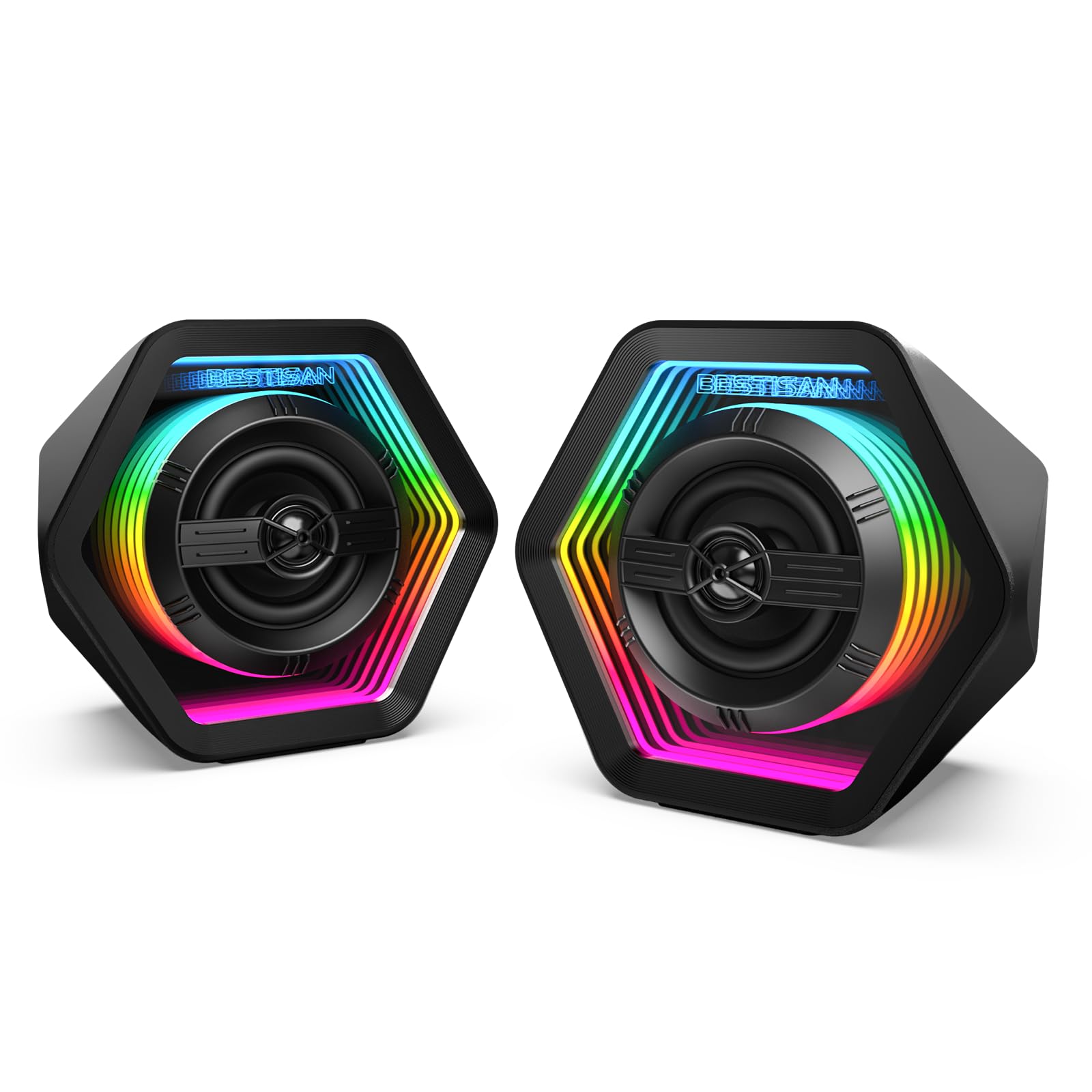
Unique RGB Design

BESTISAN GM06

84 /100
Lab Score Excellent

Key details

RGB
Infinity mirror RGB
Connectivity
Bluetooth, AUX, Type-C
Power & Config
50W peak, 2.0
View on Amazon

The BESTISAN GM06 brings a standout infinity mirror RGB design that creates a 3D tunnel effect, making it a visual centerpiece for any gaming desk. It offers Bluetooth 5.3, AUX, and Type-C connections for easy pairing with modern devices. However, some units have experienced volume knob or LED problems after a few months, so long-term reliability is a gamble. Compared to simpler wired RGB speakers, this one adds wireless convenience and a unique look, but the quality control concerns keep it from being a safe recommendation for heavy daily use.

Pros

  • Good sound quality with clear vocals and decent bass for the size
  • Eye-catching infinity mirror RGB design with 3D tunnel effect
  • Great value at this price point

Cons

  • Volume knob or LED issues can appear after a few months of use
Our verdict

Best for gamers who prioritize desk aesthetics over long-term dependability and are willing to accept possible control issues.

Check Latest Price
12

Premium 2.0 RGB

Edifier G2000 Pro

80 /100
Lab Score Excellent

Key details

RGB
270° RGB, 7 modes
Connectivity
Bluetooth 5.4, USB-C, AUX
Power & Config
64W peak, 2.0
View on Amazon

The G2000 Pro delivers clear positional audio for gaming and eye-catching 270° RGB lighting that spans the desktop. Virtual 7.1 surround works well enough to distinguish footsteps and gunfire, while Bluetooth 5.4 and USB-C provide the modern connections you'd expect. However, USB audio dropouts have been reported during use, and Bluetooth connectivity can be inconsistent — a wired AUX input serves as a reliable backup. Some units have stopped being recognized by the computer after short use, raising questions about long-term dependability. At its premium price, the standard G2000 offers similar sound quality for less, making this upgrade a better fit for early adopters willing to troubleshoot occasional software and driver quirks.

Pros

  • Virtual 7.1 surround gives clear directional cues for competitive gaming.
  • 270° RGB lighting with multiple effects enhances desk aesthetics.
  • Modern connectivity via Bluetooth 5.4, USB-C, and AUX.

Cons

  • USB audio connection can drop out during use
  • Some units have stopped being detected after a month, making long-term dependability uncertain.
Our verdict

Best for early adopters who want the latest RGB and USB-C and are willing to troubleshoot occasional connectivity hiccups — wait for price drops or firmware updates otherwise.

Check Latest Price
13

Premium 2.1 RGB

Klipsch ProMedia Lumina

82 /100
Lab Score Excellent

Key details

RGB
App-controlled
Connectivity
Bluetooth, USB-C, AUX
Power & Config
View on Amazon

The ProMedia Lumina delivers the signature Klipsch clarity and deep bass enthusiasts expect, wrapped in a sleek design with adjustable RGB that can sync with on-screen content. USB-C and Bluetooth 5.3 bring modern connectivity. However, this is an expensive upgrade over the original ProMedia 2.1, which offers comparable audio for less. Additionally, some units have experienced software glitches with the Klipsch Control app and Bluetooth timeouts. The model is too new to have a long-term reliability track record, making this a pricey gamble for those seeking proven performance.

Pros

  • Rich, detailed sound with deep bass that fills a room.
  • Sleek design with tasteful RGB that can sync with screen content.
  • USB-C and Bluetooth 5.3 for modern device connectivity.

Cons

  • Klipsch Control app may glitch occasionally and Bluetooth connection can time out.
  • Significantly more expensive than the classic ProMedia 2.1 with similar audio performance.
Our verdict

Best suited for Klipsch loyalists who value modern connectivity and RGB enough to pay a premium over the classic model, and are willing to accept some software quirks.

Check Latest Price

How to Choose

Power Rating and Driver Configuration

Speaker power is often advertised as peak watts, but RMS (continuous) power is more meaningful for real-world loudness. A 32W RMS system can outperform a 60W peak system with weak drivers.

Driver configuration determines bass: 2.0 speakers rely on small full-range drivers, while 2.1 systems add a dedicated subwoofer for low frequencies. For games with explosions and soundtracks, a 2.1 system provides more immersion, but 2.0 speakers save desk space.

Surround Sound Support

Virtual 7.1 surround sound is software-processed and only works over USB on a PC. It does not function via AUX or Bluetooth, and console compatibility is rare. If you play on PS5 or Xbox, check for explicit USB surround support.

True surround requires multiple physical speakers. Virtual implementations like DTS:X can improve positional audio in FPS games, but the effect varies by game and speaker quality. For most gamers, a good 2.1 system is more impactful than virtual surround.

Connectivity Options

Bluetooth is convenient for music and movies but introduces latency that can desync audio in games. USB provides a direct digital connection with lower latency and enables virtual surround on PC. AUX is universal but analog.

For a gaming setup, prioritize USB or AUX for the primary gaming connection and Bluetooth as a secondary input for mobile devices. Systems with multiple inputs let you switch between PC, console, and phone without unplugging cables.

RGB Lighting Integration

RGB can be purely cosmetic (static colors or cycling) or game-driven, syncing with in-game events via software. Game-driven RGB (Logitech LIGHTSYNC, Razer Chroma) adds immersion but requires compatible games and always-on software.

Static RGB is simpler and looks clean, but some implementations feel gimmicky after a few weeks. If you value aesthetics, choose a system with multiple lighting modes and easy control, but don't let flashy lights distract from sound quality.

Build Quality and Subwoofer Size

A larger subwoofer driver (6.5-inch vs 5.25-inch) generally produces deeper bass with less distortion, but cabinet construction matters more. MDF enclosures reduce resonance and sound more solid than plastic.

Reliability varies widely. Older models like the Klipsch ProMedia 2.1 have known failures after 1-2 years, while newer brands lack long-term data. Check review mentions of speaker failure or mute channels before buying.

Frequently Asked Questions