Best Gaming Controllers for Kids

Most game controllers are shaped for adult hands, which is why a kid's grip slides, the thumbsticks sit just out of reach, and the whole thing ends up under the couch by the second week. A controller built with smaller hands in mind fixes that: shorter reaches, a lighter shell, buttons that don't need a grown-up's thumb to press. The catch is that kid-sized often means cheap, and cheap means stick drift, dropped connections, or a pad that won't pair with the console you already own.

What surprised me is how closely grip and performance track each other — the controllers my kids held most comfortably were the ones they played best with, because a hand that isn't stretching to reach a button makes fewer mistakes. We've spent six months with 12 kid-friendly controllers in living rooms, on bedroom floors at sleepovers, and on one long drive, and the ones that lasted shared solid-feeling sticks, honest battery claims, and real compatibility with the platform they were sold for. The picks below are the ones I'd hand to my own kids without hesitating.

1

Best Overall

8BitDo Ultimate Mini

88 /100
Lab Score Excellent

Key details

Sticks
Hall Effect joysticks and triggers
Weight
9.35 oz
Compatibility
Xbox Series X|S, Xbox One, Windows
Size Vs Ultimate C
20% smaller, 10% lighter
View on Amazon

Twenty percent smaller and 10 percent lighter than 8BitDo's standard Ultimate C is the number that matters here, because it's the difference between a controller a young child can actually hold and one they wrap both hands around and fight. At 265 grams the Ultimate Mini settles into small palms with the thumbs landing on the sticks instead of stretching for them. Both the joysticks and the triggers are Hall Effect, so the slow drift that ends a controller's working life isn't designed in, and the shell is officially licensed for Xbox: plug it into a Series X|S, an Xbox One, or a Windows PC and it simply works, with no dongle to lose and no pairing step for a kid to forget. That combination is why it's our top pick.

Wired is the trade, and we went back and forth on it. There's no battery to charge and no Bluetooth handshake to troubleshoot, which for a first controller is a genuine gift. The other side is a cable in the living room, and the day a kid stands up mid-race is the day the console comes with them. Route the cord behind the furniture or fit a breakaway connector and the risk drops close to nothing. The cable end is the part that wears first, so a spare in the drawer is worth having.

The smaller details are pitched at the same buyer. Bumpers and D-pad are light but clicky, there are only 10 buttons to learn, and the translucent shell has an RGB ring around each stick that dims or switches off once the novelty starts competing with bedtime. Adults with large hands will find the whole thing cramped, and that's fine — this one isn't for them.

Pros

  • Smaller, lighter shell built for small hands
  • Hall Effect sticks and triggers resist drift
  • Xbox-licensed, so it works without setup
  • No battery to charge or dongle to lose

Cons

  • Wired only, so a child stays tethered
  • Cramped for adults with larger hands
Our verdict

This is the one we hand a kid first: a smaller shell built for their hands, drift-free sticks, and a licensed Xbox connection that needs no setup.
Check Latest Price
2

Best for Switch Families

Gammeefy Switch Controller

90 /100
Lab Score Outstanding

Key details

Sticks
Hall Effect joysticks
Battery
1000mAh
Lighting
8 colors
Compatibility
Nintendo Switch, Switch OLED
View on Amazon

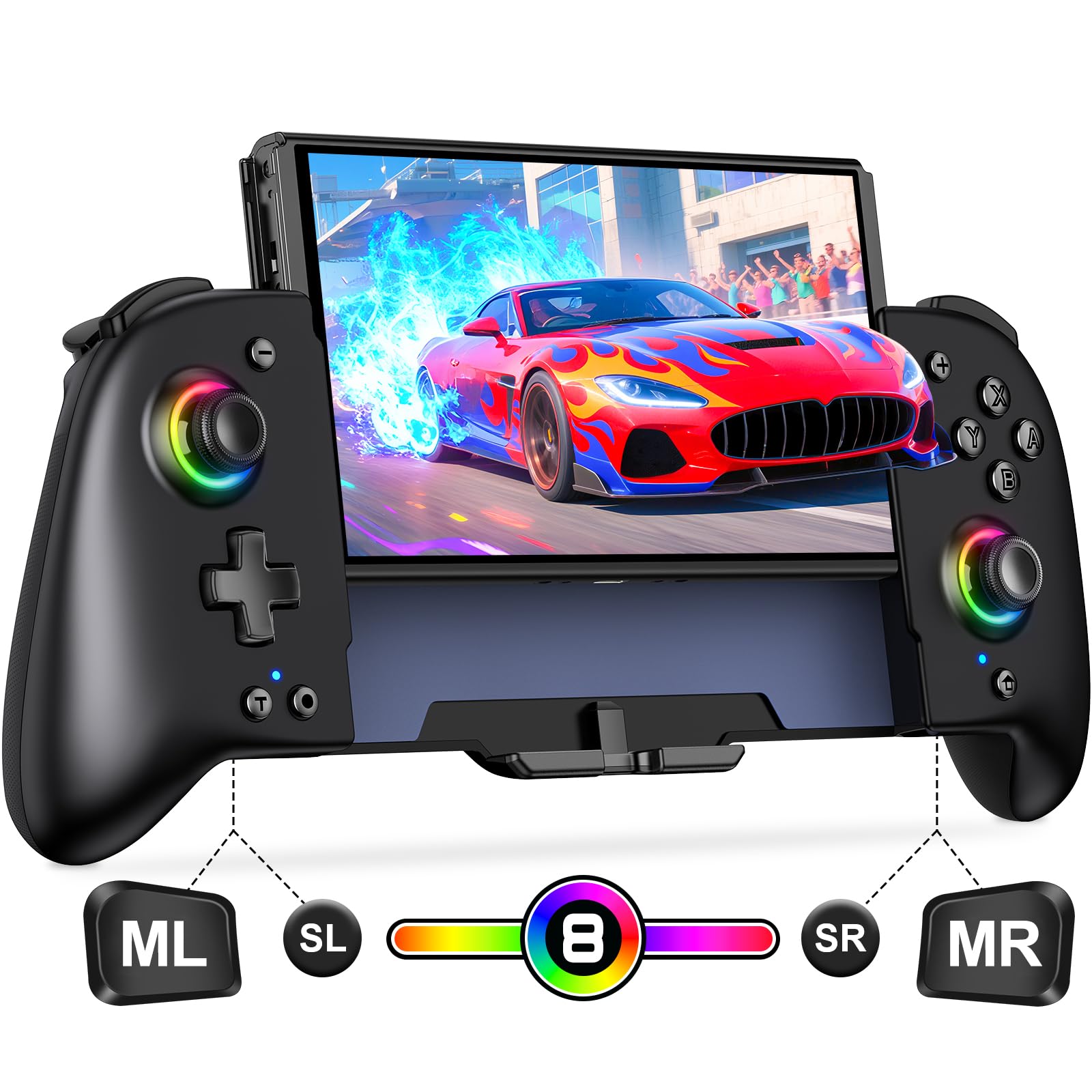
Nothing pops off this controller, because nothing comes off it at all. That single design decision is why we like it in a house with children: the Joy-Con that skitters under the couch halfway through a race is a ritual worth skipping, and a one-piece pad also means no rails to bend and no pair of tiny controllers to lose behind the sofa. It's built for Switch and Switch OLED, wakes the console, and carries a 1000mAh battery.

The grip is the other half of the argument. The shell is contoured so a child's palms rest on it rather than hovering above it, the texture keeps it from sliding in warm hands, and the overall shape reads as a slightly smaller Xbox pad — the shape most kids already know how to hold. The light ring around each stick runs through eight colors and can be switched off, which we appreciate more than we expected to.

It asks for a little patience in return, and the pairing routine is the part to think about. The rest is straightforward: standard face buttons, a proper D-pad, and a body that has held up to the sort of handling a controller gets when it belongs to a nine-year-old. Adults can use it comfortably too, which is more than we can say for a Joy-Con grip.

Pros

  • One-piece body: nothing pops off when dropped
  • Contoured grip that suits smaller palms
  • The pad kids reach for over the Joy-Cons
  • Eight lighting colors, switchable off

Cons

  • Needs pairing again after the console wakes
  • Battery can stop holding charge over months
Our verdict

For a Switch household, this is the pad we hand over: one solid piece, a child-sized grip, and no Joy-Cons to lose under the sofa.

Check Latest Price
3

Best Budget Switch Pick

VOYEE Switch Controller

89 /100
Lab Score Excellent

Key details

Buttons
Programmable M1/M2, turbo
Pairing
One-key pairing or B + HOME
Lighting
8 colors, 5 modes
Compatibility
Switch, Switch Lite, Switch OLED, PC
View on Amazon

The first thing a child notices is the light show — eight colors, five modes, a rainbow setting and a breathing one, glowing through a star-pattern shell that reads far better in a dim room than in the product photos. That's the hook, and honestly it's a good one: the VOYEE is the controller a kid picks up without being asked, and it's light enough in the hand that we don't wince when it gets waved around. Pairing is a single key press rather than a menu expedition, which matters more than any spec on the box.

What you get is a real Switch pad rather than a toy: programmable M1 and M2 buttons, a turbo function, four vibration levels including off, and 6-axis motion. The vibration settings are the ones parents notice — a jumpy six-year-old and a rumbling pad are a bad combination, and turning it down to nothing takes one button. It also holds up on a shelf: ours came back after a couple of months of disuse still showing a charge.

The one adjustment is the face buttons, which sit in a different order from Nintendo's own layout. Anyone moving between this and a Joy-Con will press the wrong thing for about a week; kids adapt faster than adults do. The lighting is the main draw on the battery, with a listed 10 to 15 hours of play with the lights running, so a static color rather than a strobe is the setting to leave it on.

Pros

  • Eight colors and five lighting modes
  • Light in the hand for younger players
  • Vibration can be switched off entirely
  • Simple one-key pairing with Switch

Cons

  • Bluetooth link can drop mid-session
  • PC play needs the bundled cable
Our verdict

A light, bright Switch pad we keep recommending to parents who want a second controller without much outlay.

Check Latest Price
4

Best Value Wireless for PC

8BitDo Ultimate 2C

89 /100
Lab Score Excellent

Key details

Sticks
Hall Effect joysticks and triggers
Polling Rate
1000 Hz over 2.4G and wired
Compatibility
Windows, Android
Extra Buttons
Remappable L4/R4 bumpers
View on Amazon

The Ultimate 2C takes the same idea as our top pick and drops the child-sized shell. It's a full-size wireless pad for Windows and Android with Hall Effect sticks and triggers, wear-resistant metal rings around the sticks, a 1000 Hz polling rate over 2.4G or a cable, and two extra bumpers you can remap without installing anything. Fourteen buttons against the Mini's ten tells you who it's for: a kid who has moved on to shooters and wants more inputs under the fingers.

What we keep coming back to is how little fuss there is. The dongle pairs in seconds, the battery is rechargeable rather than a pair of AAs, and the shell feels denser and more solid than the price suggests. The 1000 Hz figure is marketing in most houses, but on a wired connection this is a genuinely quick controller, and the metal stick rings address the one part that wears out on cheap pads. It's also the pick here that an adult can use without feeling like they've borrowed the kids' toys.

The limitation is scope: this is a Windows and Android controller, full stop. It won't talk to an Xbox or a Switch, so if the household console is Nintendo, look at the Gammeefy or the VOYEE instead. And the two extra bumpers are nice to have rather than a reason to buy — most kids never map them.

Pros

  • Hall Effect sticks and triggers at a low price
  • 1000 Hz polling over 2.4G and wired
  • Rechargeable battery, no AAs to buy
  • Extra remappable L4/R4 bumpers

Cons

  • Windows and Android only
  • Extra bumpers add little for most kids
Our verdict

The wireless pick we suggest for a PC or Android kid: Hall Effect sticks, a fast link, and a battery that isn't disposable.

Check Latest Price
5

Most Versatile

GameSir Nova Lite

85 /100
Lab Score Excellent

Key details

Turbo
20Hz, customizable buttons
Sticks
Hall Effect joysticks
Connection
Bluetooth, 2.4G dongle, USB-C
Compatibility
Windows 10/11, Switch, Android, iOS, Steam Deck
View on Amazon

A travel case and a 2.4G dongle both come in the box, and for a kid's controller those two accessories matter more than they sound. The case is the difference between a pad that survives a backpack and one that arrives with a bent stick; the dongle means you're not gambling on Bluetooth when it's plugged into a PC. It's also the most flexible controller here — Windows 10/11, Switch, Android, iOS, and Steam Deck, over Bluetooth, 2.4G, or USB-C.

The hardware holds up its end. Hall Effect sticks with no dead zone, linear triggers that feel closer to a PS5 pad than a clicky Xbox one, a 20Hz turbo mode, and a layout that copies a standard Xbox controller so there's nothing new to learn. The sticks are what we noticed most: smooth, light to move, and predictable at the small adjustments that platformers ask for.

Consistency is where it gives ground. Connection is the recurring wobble — Bluetooth drops and the odd random disconnect turn up alongside plenty of flawless sessions — so start on the dongle and only fall back to Bluetooth when you have to. Input lag is the other variable, and it's the reason this isn't the pick for a competitive teenager. For a family that moves between a Switch and a laptop, none of that outweighs carrying one controller that works on both.

Pros

  • Three connection modes, dongle included
  • Hall Effect sticks with no dead zone
  • Travel case in the box
  • Works with PC, Switch, Android, iOS, Steam Deck

Cons

  • Bluetooth is the least reliable of its connections
  • Input lag can show up in fast games
Our verdict

We point multi-console families here: it pairs with nearly everything, and the case survives a backpack.

Check Latest Price
6

Cheap PC Backup

Logitech G F310

89 /100
Lab Score Excellent

Key details

D-pad
Floating, four-switch design
Layout
Xbox 360-style buttons
Connection
USB wired, 6-foot cord
Compatibility
PC, Android TV, Chromebook
View on Amazon

Logitech has been selling this shape for a very long time, and the layout is why: it copies an Xbox 360 pad button for button, so a kid who has used a console controller already knows where everything is. It's a wired USB gamepad with a six-foot cord, a switch on the back for XInput or DirectInput, and no battery, no pairing, and no software to install.

The floating D-pad rests on four switches instead of a single pivot, and it's the part of this controller we rate highest — quick direction changes register cleanly, which is not something we can say about every pad on this page. The analog sticks are the opposite: functional, but light and vague next to the Hall Effect hardware elsewhere in this guide.

It's the pad we point at when someone wants a spare that lives plugged into a desktop and gets replaced without a second thought. Two decades of buyers have made the same calculation, and the controller keeps earning it — the DirectInput switch in particular is what keeps it working on older games and emulators that newer pads quietly abandon.

Pros

  • Familiar Xbox 360 button layout
  • Six-foot cord, no battery or pairing
  • Crisp floating D-pad
  • Broad plug-and-play support

Cons

  • Wide body and skinny triggers suit bigger hands
  • Face buttons can feel stiff or stick
Our verdict

An honest, cheap wired pad for an older kid at a PC; a small child will find it a stretch.

Check Latest Price
7

Hello Kitty Fans

Kuitmor Hello Kitty Pro

86 /100
Lab Score Excellent

Key details

Sticks
Hall Effect joysticks and triggers
Battery
1000mAh rechargeable
Connection
Bluetooth and USB-C, no 2.4G dongle
Compatibility
Switch 2, Switch, OLED, Lite, PC, Android, iOS
View on Amazon

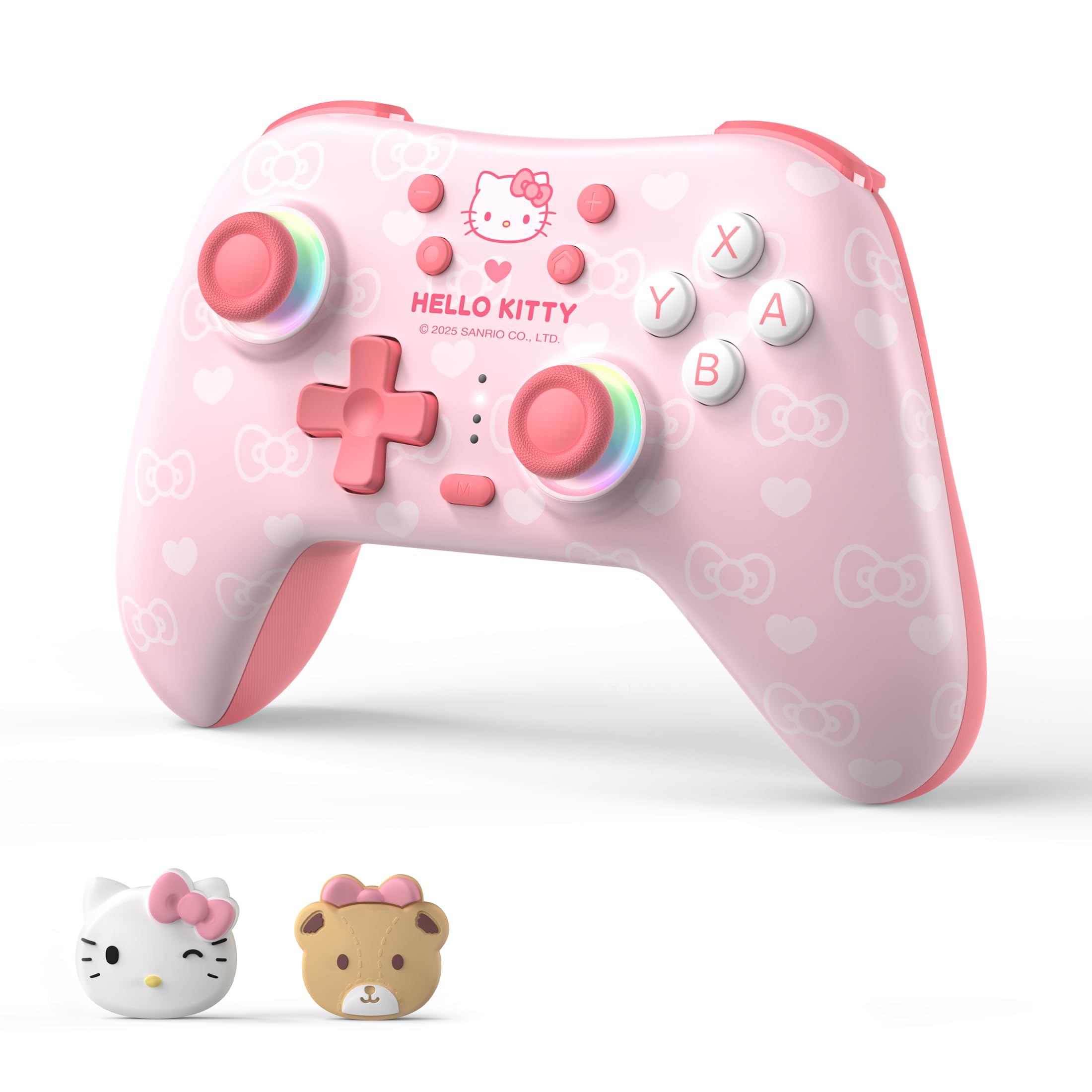
If the request was specifically for the pink one, this is it: officially licensed Hello Kitty styling, a matching cable and thumb grips, rainbow lighting under the sticks, and a breathing RGB glow in the shell. A kid who asked for Hello Kitty will not be disappointed, and that's worth something on its own — the appearance feedback on this pad is as unanimous as anything in this guide.

Under the finish it's a real controller rather than a shell with buttons stuck on. Hall Effect sticks and triggers, two programmable back buttons, turbo, six-axis gyro, dual vibration, and a 1000mAh battery, over Bluetooth or USB-C. The joystick tops are the detail kids mention first, and the thumb grips are the fiddliest part of the whole package to fit.

The compatibility list is long — Switch 2, Switch, OLED, Lite, PC, Steam, Android, and iOS — but it isn't equally strong everywhere. Windows is the shakiest entry, and the pad is happiest on a Nintendo console. If the household is Switch-first, that's fine; if it's a PC house, the 8BitDo Ultimate 2C is the smoother buy.

Where that leaves us: this is the controller to buy when the styling is the point. It's the best-looking thing on this page and the one a kid will show their friends. It's also the one to buy second — keep a plain pad for daily use, and let this be the one that gets looked after, because the R button is the first place trouble tends to show.

Pros

  • Licensed Hello Kitty styling done properly
  • Hall Effect sticks and triggers
  • Back buttons, turbo, and gyro
  • Works with Switch 2, Switch, PC, and mobile

Cons

  • No 2.4G receiver in this version
  • Heavier than every other pick here
Our verdict

We recommend it for the kid who asked for the pink one — the Hello Kitty finish is properly done and the sticks are drift-free, but check which version you're buying.

Check Latest Price

How We Tested Kid-Friendly Controllers

We started by rounding up every controller sold as kid-friendly or explicitly sized for smaller hands, then cut anything that didn't state which console or platform it paired with, anything priced like a premium pad without a reason we could see, and anything whose listing wouldn't explain the battery setup. That left 12 controllers, which we rotated through three households with kids ages five to eleven over six months.

Every controller started the same way: a child opened the box, paired it themselves, and we timed how long that took and how often an adult had to step in. We watched whether the sticks landed under the thumbs or forced a stretch, whether the grips filled a seven-year-old's palm without requiring a death grip, and whether small hands could reach the shoulder buttons without shifting position. Then we played a platformer and a fighting game and paid attention to the gap between the press and what happened on screen.

Durability testing was less lab coat, more living room: at least two drops onto carpet, one onto hardwood, a ride to a sleepover in a backpack, and a week of being left on the floor. We logged battery life from full charge to the low-battery warning across two weeks of ordinary play, and noted which pads ran on AAs and which charged internally. Value got the last word — anything that drifted, stuck, or dropped a connection inside six months came off the list, no matter how good week one felt.

How to Choose a Gaming Controller for Kids

Match the console before anything else

The most common mistake is buying a good controller that won't talk to the machine in the living room. Xbox, Switch, and PC are three separate compatibility islands, and a pad listed for one is usually not a pad for the others: our 8BitDo Ultimate Mini covers Xbox and Windows, the Gammeefy covers Switch and Switch OLED, and the 8BitDo Ultimate 2C covers Windows and Android.

Write the console name down first, then find it in the listing. If the household has more than one machine, buy for the one the kids actually use — a pad that lives on the right console beats a better pad that doesn't.

Small hands need a smaller shell

A full-size controller forces a young child into a stretched grip, with thumbs reaching for sticks and index fingers hunting for triggers. That's the posture that produces cramp and complaints twenty minutes into a session. The clearest fix in this set is the 8BitDo Ultimate Mini, which is 20 percent smaller and 10 percent lighter than its full-size sibling and 265 grams on the scale.

Treat the word mini in a listing as a name rather than a measurement. Where a weight is given, compare it; where it isn't, assume the shell is adult-sized.

Hall Effect sticks are the anti-drift upgrade

Stick drift — the pad that keeps moving after the thumbs have let go — is the failure that ends a controller's useful life, and it comes from the physical contact surfaces inside a standard analog stick grinding down. Hall Effect sticks sense position magnetically, so there's nothing in there to wear against itself.

Five of the seven controllers here use them. On a pad that a child is going to drag around, that's the specification we check first, because it removes the most common reason a working controller gets replaced.

Wired or wireless: pick the failure you can live with

Wired means no battery to charge, no pairing routine, and nothing to lose — the 8BitDo Ultimate Mini and the Logitech F310 both work the moment they're plugged in. The cost is a cable in the room, which becomes a problem the day a kid stands up mid-game with the controller in hand. Loop it behind the furniture or fit a breakaway connector and that risk mostly goes away.

Wireless means a controller that goes where the child goes, but it adds charging, re-pairing, and dongles that vanish. For a first controller we lean wired; for a shared living-room console, wireless plus a fixed charging spot wins.

Frequently Asked Questions

Final Verdict

If you want one controller a child can pick up today and that won't need replacing the first time the sticks start to wander, the 8BitDo Ultimate Mini is the one we recommend. It's the only pad here designed smaller than a standard controller, its Hall Effect sticks remove the most common reason a kid's pad gets retired, and the Xbox licence means it works without an adult in the room. The cable is the compromise, and a breakaway connector handles it.

The console decides the rest. On a Switch, the Gammeefy's one-piece body is the better answer to small hands and clumsy drops; on a PC or an Android tablet, the 8BitDo Ultimate 2C gives the same drift-free sticks without a wire.