12 Best Gaming PC Case of 2026: Match Your Style, Budget, Cooling Needs

Not all gaming PC cases deliver on airflow or include fans you can actually use. This guide helps you pick one that fits your components and tastes without hidden costs.

A great gaming PC case should disappear into your setup — quietly keeping components cool and looking good while doing it. But many cases that shine in marketing photos reveal problems once you start building: fragile glass panels, cramped cable routing, or fans that sound like a jet engine under load.

The market has shifted toward panoramic glass 'fish tank' designs and dual-chamber layouts, but more glass doesn't mean better airflow. The real test is how well a case balances aesthetics with practical cooling, build ease, and component clearance.

This guide cuts through the spec sheets and focuses on what actually matters during a build and years of daily use. Whether you prioritize fan count, noise levels, or a living-room-friendly look, you will find a case that matches your priorities without surprises.

1

Best Overall

Corsair 4000D RS

93 /100
Lab Score Outstanding

Key details

Style
Modular, gamer aesthetic
Build Ease
Easy, good cable routing
Airflow & Fans
3x 120mm ARGB, mesh front
Build Materials
Steel, tempered glass
View on Amazon

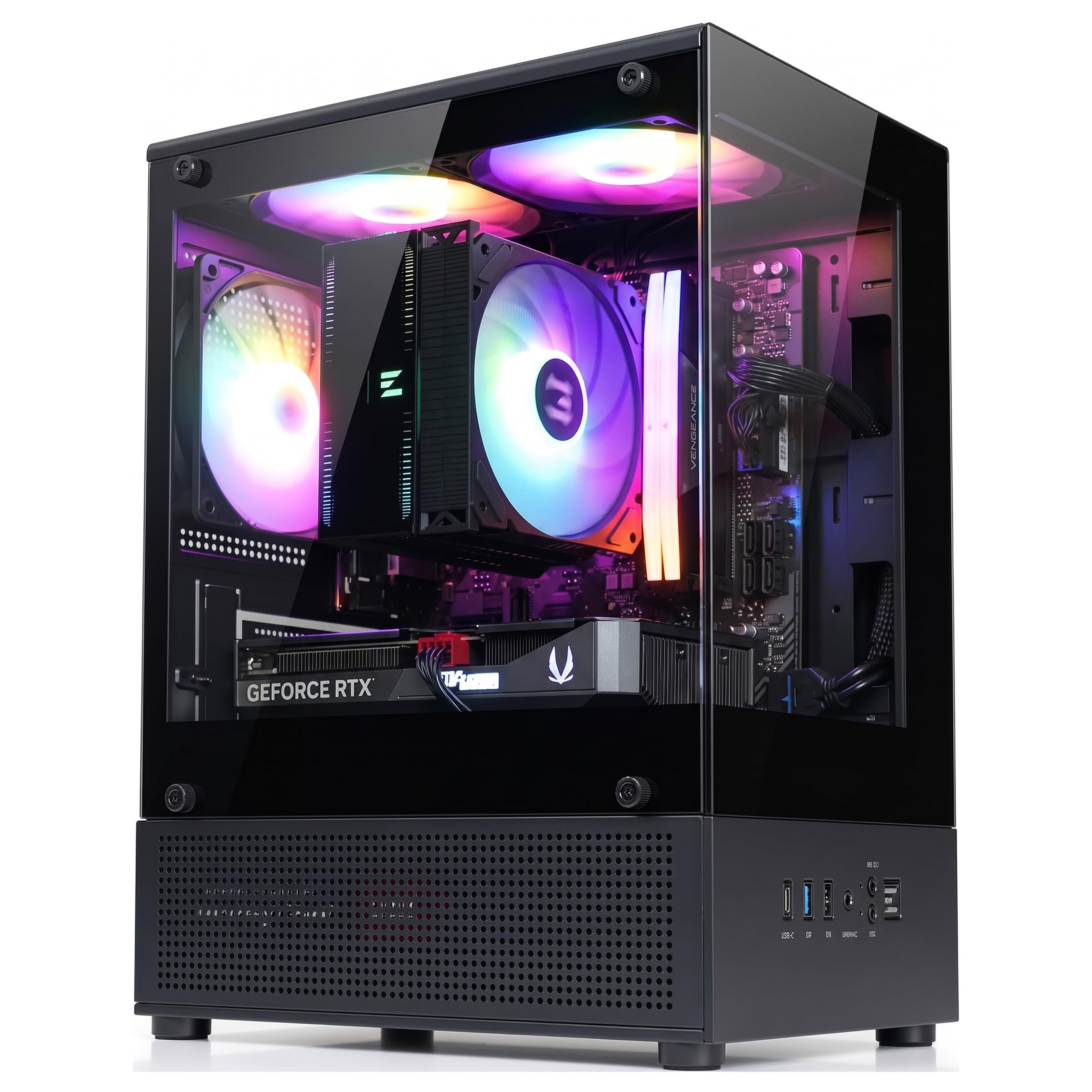
The FRAME modular system lets you reposition fan and radiator mounts without swapping the entire chassis, while the steel mesh front panel with 3D Y-pattern airflow feeds three pre-installed RS ARGB fans. Interior space clears GPUs up to 460mm and accommodates multiple radiator configurations, making future upgrades less of a guessing game.

Assembly stays smooth for first-time builders: the dual-chamber layout leaves room for cable routing behind the motherboard tray, and the InfiniRail mounting system attaches fans with a sliding mechanism instead of individual screws. The included PWM fan hub reduces cable clutter, though the glass side panel needs a firm but careful hand when removing — the four thumbscrews hold tightly, and the panel rests on metal tabs that require deliberate lifting.

This case suits gamers who want a customizable platform without overspending, especially those planning to upgrade components over time. Builders who prefer a completely tool-less experience or expect a fully premium metal-and-glass construction should look at higher-priced options — the front panel and some interior clips are plastic, and glass panel removal demands patience. The modular FRAME system offsets these compromises by allowing reconfiguration rather than replacement.

At a mid-range price point, the 4000D RS delivers three ARGB fans, a PWM hub, and the FRAME ecosystem that cheaper cases omit. Competitors at similar cost often skimp on fan count or modularity, making this a balanced buy for anyone prioritizing airflow and future flexibility over panoramic glass or ultra-premium materials.

💡 When removing the glass side panel, lay the case flat and lift the panel straight up off the metal tabs to avoid stress on the glass edge.

Pros

  • Exceptional airflow and cooling capacity across a wide range of configurations.
  • Modular FRAME system with InfiniRail fan mounting simplifies upgrades and reconfiguration.
  • Smooth build experience with well-placed cable management channels and included hub.
  • Solid value for the included features, fans, and build quality at a mid-range price.

Cons

  • Glass panel removal requires care, and certain units may exhibit fragile plastic or metal components.
Our verdict

For builders who want a well-ventilated, upgrade-friendly case without paying a premium for panoramic glass or all-metal construction, this is the most balanced mid-tower on the market right now.

Check Latest Price
2

Best Premium Aesthetic

Fractal North

94 /100
Lab Score Outstanding

Key details

Style
Minimalist, furniture-grade
Build Ease
Easy, clean cable management
Airflow & Fans
2x 140mm PWM, wood mesh
Build Materials
Steel, walnut wood, glass
View on Amazon

The Fractal North stands apart with a genuine walnut wood front panel and tempered glass side that looks more like a piece of furniture than a gaming rig. Where most cases push RGB and aggressive lines, this one brings a minimalist, natural aesthetic that blends into a living room or home office.

This case suits builders tired of the gamer RGB look and who value quiet operation. The two included 140mm fans are quiet and move air effectively. However, radiator clearance is tight: a front 360mm radiator cuts GPU space to 300mm, and the top only fits 280mm. Plan your cooling layout carefully.

Assembly is straightforward, with good cable management channels behind the motherboard tray. The solid construction and mesh panels keep temperatures in check without adding noise. It delivers on its promise of premium looks without sacrificing day-to-day performance.

Pros

  • Stunning furniture-grade appearance with real walnut wood front
  • Premium build quality using solid materials and precise fit
  • Easy building experience with well-designed cable management
  • Smart airflow design with quiet 140mm fans that cool efficiently

Cons

  • GPU clearance tightens to 300mm when a front 360mm radiator is installed
  • Top radiator mount supports only 280mm, limiting larger AIO options
Our verdict

The Fractal North delivers a genuinely unique aesthetic for those who want their PC to blend into the room. Accept its water-cooling limits, and you get a quiet, well-built case that stands out from the crowd.

Check Latest Price
3

Best Panoramic Showcase

Hyte Y70

93 /100
Lab Score Outstanding

Key details

Style
Panoramic, dual-chamber
Build Ease
Moderate, dual chamber
Airflow & Fans
0 included, supports 10
Build Materials
Steel, panoramic glass
View on Amazon

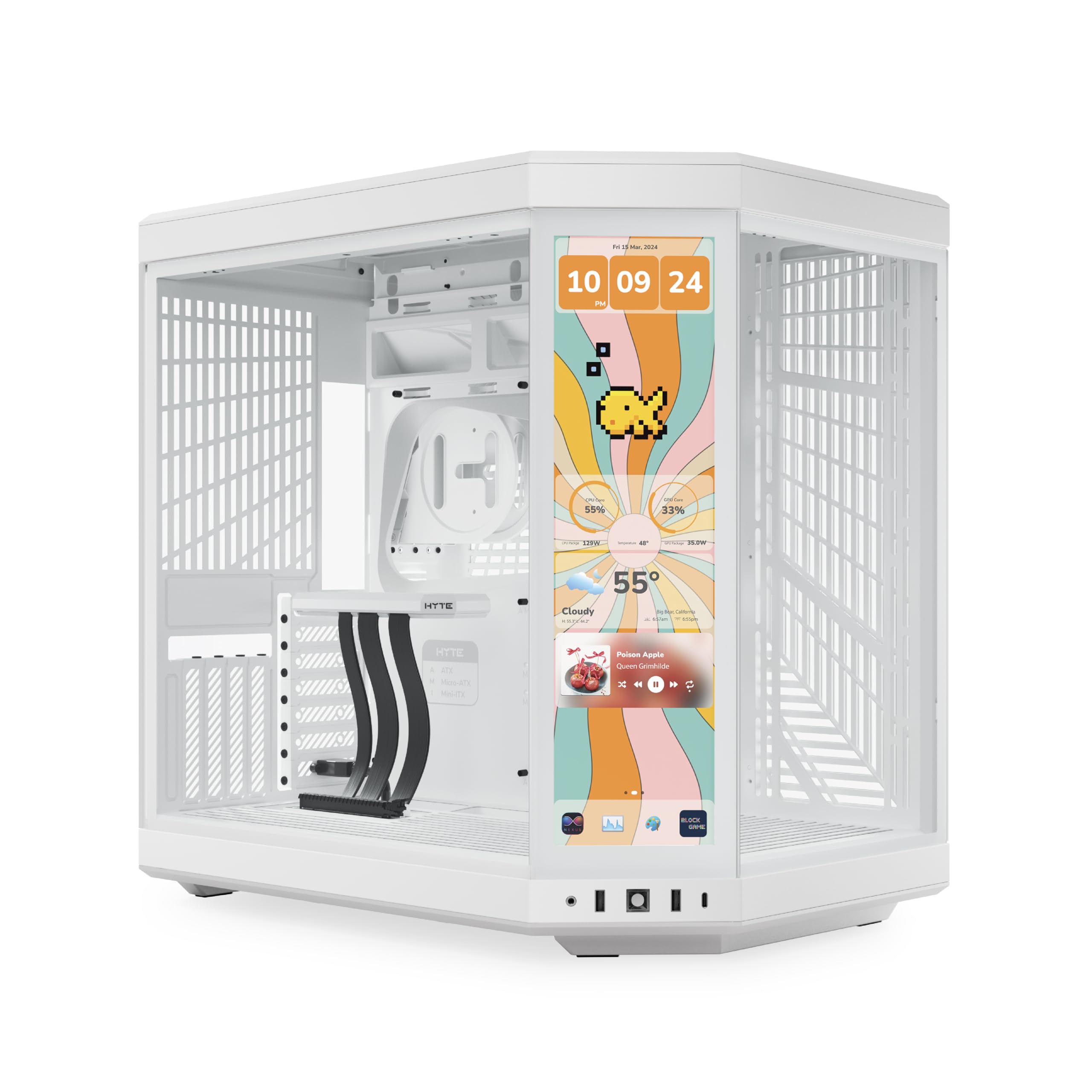
The Hyte Y70 stands out with its panoramic three-piece glass that wraps around the front and side, giving an unobstructed view of your components. The dual-chamber layout keeps the motherboard and GPU on display while hiding PSU and cables behind a steel panel. Build quality is solid – the frame doesn't flex, and the tempered glass panels align cleanly.

Unlike many dual-chamber cases that use a single curved glass piece, the Y70’s three-segment design reduces distortion and makes interior access simpler – each panel lifts off individually. The included PCIe 4.0 riser is a practical addition for showing off a vertical GPU, though the case itself is wide enough that horizontal mounting also looks balanced.

This case is built for enthusiasts who enjoy selecting every component, especially fans. The Y70 supports up to ten fans and triple 360mm radiators, but you’ll need to budget for high-quality fans to unlock that cooling potential. The wide footprint (over 9 inches) may not suit shallow desks – measure your space. If you prefer a ready-to-run package with fans included, the top pick in this category offers better value.

💡 Budget for at least three 120mm intake fans (or two 140mm) to maintain positive pressure – the wide interior benefits from high-static-pressure models.

Pros

  • Panoramic three-piece glass offers a clear, distortion-free view of internal hardware.
  • Sturdy steel frame and precise panel alignment support long-term durability.
  • Spacious interior with generous cable routing channels and included velcro straps.
  • Supports up to triple 360mm radiators and ten fans for extensive cooling options.

Cons

  • No fans are included
  • The case is notably wide and may overhang standard desk depths or tight corners.
Our verdict

The Hyte Y70 rewards builders who want full control over their fan setup and value a pristine showcase. If you prefer a case that arrives ready to cool, consider a model with pre-installed fans.

Check Latest Price
4

Best Budget Value

Lian Li V100

93 /100
Lab Score Outstanding

Key details

Style
Modern, RGB strip
Build Ease
Easy, tool-less panels
Airflow & Fans
4x 120mm ARGB, mesh
Build Materials
Steel, tempered glass
View on Amazon

With four pre-installed ARGB fans, tool-less side panels, and a tempered glass window, the V100 delivers a complete building experience without requiring additional fan purchases – a significant advantage over cases that ship with fewer or lower-quality fans. Its build quality rivals cases costing $30 more, though the omission of a front USB-C port is a clear tradeoff. While the category leader offers modularity and a front USB-C header, the V100 prioritizes fan count and price.

Budget gamers and first-time builders who don't need front USB-C will appreciate the V100's out-of-box readiness. The included four fans deliver solid airflow and RGB lighting without extra investment. However, if you rely on front-panel USB-C for fast file transfers or have plans for extensive water cooling, cases like the O11D EVO offer more room and connectivity.

Pros

  • Four 120mm ARGB PWM fans pre-installed
  • Tool-less side panels and integrated cable management simplify building.
  • Sturdy steel construction with tempered glass side panel.

Cons

  • No front USB-C port
Our verdict

For builders seeking maximum value under $100, the V100 is a pragmatic choice – just confirm that sacrificing USB-C is acceptable for the fan and build quality savings.

Check Latest Price
5

Best Rugged Durability

ASUS TUF GT501

95 /100
Lab Score Outstanding

Key details

Style
Rugged, military
Build Ease
Easy, Velcro straps
Airflow & Fans
4x 120mm/140mm, mesh
Build Materials
Steel, smoked glass
View on Amazon

Steel construction and integrated carry handles rated for up to 65 lbs make the GT501 the go-to case for anyone who needs to move a fully loaded system. Four pre-installed fans move a lot of air out of the box — a clear win over many competitors that skimp on included cooling. Unlike the flagship ROG option, this case prioritizes durability over showpiece materials.

This case suits gamers and builders who regularly transport their rigs — LAN parties, dorm moves, or desk-to-desk relocation. The spacious interior fits large GPUs up to 420mm and 360mm radiators without clearance headaches. Cable routing is clean and the build process feels logical, which reduces installation time. Just be aware that the front panel lacks USB-C (only USB 3.0 and 2.0), a tradeoff that matters more if you use modern peripherals frequently.

The premium price tag compared to similarly featured cases will give some buyers pause, especially given the absence of USB-C. The included fans function well for airflow, though their appearance may feel basic against the case's otherwise sturdy build. For those who value moving a heavy PC without worrying about structural flex, this cost is easier to accept.

💡 If fan aesthetics matter, consider swapping the stock units — they perform well but look basic against the rugged chassis.

Pros

  • Integrated carry handles and steel frame rated for 65 lbs
  • Spacious interior fits GPUs up to 420mm and 360mm radiators
  • Good airflow out of the box with four pre-installed fans
  • Cable management and overall build process are straightforward

Cons

  • Stock fans may feel cheap to users expecting a premium appearance
  • No USB-C front port; only USB 3.0 and USB 2.0
  • Premium pricing may not match the feature set for some buyers
Our verdict

The GT501 is the right choice if you need a case that can handle heavy hardware and frequent moves without flexing — just plan around the missing USB-C and the cost premium.

Check Latest Price
6

Best Dual-Chamber for Custom Builds

Lian Li O11D EVO

91 /100
Lab Score Outstanding

Key details

Style
Dual-chamber, ARGB strips
Build Ease
Moderate, dual chamber
Airflow & Fans
0 included, up to 10
Build Materials
Aluminum, steel, glass
View on Amazon

Unlike value-oriented cases that bundle fans, the O11D EVO RGB is a blank canvas for those who want to curate their own cooling and lighting. The reversible design lets you flip the glass panel to either side, and the removable front pillar opens up a panoramic view of your components. Radiator support up to 420mm gives custom-loop builders plenty of headroom.

The dual-chamber layout makes cable management straightforward even for first-time builders in this price bracket. Steel construction feels solid, and the included anti-sag GPU bracket adds peace of mind for heavy cards. The integrated ARGB strips sync with major motherboard ecosystems, providing a cohesive lighting foundation without requiring additional controllers.

This case suits enthusiasts who plan their fan and radiator configuration before buying. The lack of pre-installed fans means you will need to budget for at least three 120mm or two 140mm fans to achieve basic airflow, and the total cost quickly climbs beyond the initial price. It also occupies significant desk space, so those after a compact tower should look elsewhere.

💡 Budget for at least three 120mm or two 140mm fans to match the case's airflow potential.

Pros

  • Solid steel construction with anti-sag GPU support built in
  • Dual-chamber design makes cable management clean and accessible
  • Panoramic glass with removable front pillar for an uninterrupted view
  • Accepts up to 420mm radiators and supports multiple cooling configurations

Cons

  • No fans included; total cost rises when adding quality fans for airflow
Our verdict

For builders who already have a fan and radiator plan, this is a premium platform with exceptional flexibility and aesthetics.

Check Latest Price
7

Fan Count per Dollar

MUSETEX K2

91 /100
Lab Score Outstanding

Key details

Style
Full-view RGB
Build Ease
Moderate, tight cable
Airflow & Fans
7x 120mm ARGB PWM
Build Materials
Steel, dual glass
View on Amazon

The MUSETEX K2 delivers on its core promise: seven pre-installed ARGB fans in a mid-tower with full-view tempered glass, all at a budget-friendly price. This makes it a compelling option for budget-conscious gamers who want a visually striking build without spending extra on fans. The interior accommodates large GPUs up to 400mm and 360mm radiators, so component compatibility is not an issue. However, the cable routing space behind the motherboard tray is limited, which can be a challenge when using a full-size ATX power supply and multiple drives. Additionally, some fans may exhibit LED inconsistencies or require a separate adapter for full ARGB control — a minor inconvenience for those comfortable with basic troubleshooting. For builders willing to work around tighter cable management, this case offers exceptional fan count per dollar.

Pros

  • Incredible value with seven pre-installed ARGB fans
  • Good build quality and attractive appearance
  • Spacious interior that fits large GPUs and 360mm AIOs

Cons

  • Cable management can be tight, especially with full-size ATX
  • Fan performance and proprietary connectors may cause issues
Our verdict

A strong pick for budget builders who prioritize fan count over cable routing ease.

Check Latest Price
8

Fan Bundle Value

Antec C5 ARGB

90 /100
Lab Score Outstanding

Key details

Style
Seamless glass, dual chamber
Build Ease
Challenging, tight rear
Airflow & Fans
7x 120mm ARGB PWM
Build Materials
Steel, seamless glass
View on Amazon

The Antec C5 delivers a complete fan package with six reverse-blade units that keep the seamless glass look unobstructed. The spacious interior fits large GPUs and 360mm AIOs. However, the tight rear compartment makes cable routing fiddly, and fitting an ATX motherboard takes longer than expected. This case is best for builders who prioritize fan value over quick assembly.

Pros

  • Seven ARGB fans, including six reverse-blade, provide strong visual uniformity and airflow without obstructive fan frames.
  • Seamless tempered glass front and side panels give a clean, premium look that stands out.
  • Ample interior room supports long GPUs up to 410 mm and 360mm radiators.

Cons

  • Cable management can be cramped in the rear compartment, requiring careful routing for a tidy result.
  • Assembly, especially with ATX motherboards, may be more involved than expected for some builders.
Our verdict

Suits builders who want a fan-rich case with a glass-heavy look and are willing to spend extra time on cable routing.

Check Latest Price
9

Low-Cost Panoramic

Corsair 3500X RS

89 /100
Lab Score Excellent

Key details

Style
Panoramic, budget
Build Ease
Easy, intuitive layout
Airflow & Fans
3x 120mm ARGB side
Build Materials
Steel, panoramic glass
View on Amazon

At under $80, the Corsair 3500X RS delivers the panoramic glass look that usually costs more, with a spacious interior that fits large GPUs and an easy build experience. However, it arrives with only three side-mounted fans (no rear exhaust), so you will need to add a fourth fan for balanced airflow. Additionally, shipping can cause glass or chassis damage in some deliveries – inspecting the case upon arrival is wise. If these tradeoffs fit your budget and willingness to add a fan, this is the cheapest way into a well-known brand's fish-tank design.

💡 Inspect the case upon delivery – Corsair's support handles damage claims within the standard return period.

Pros

  • Panoramic glass design at a price that competes with basic cases
  • Spacious interior with intuitive cable management
  • Good cooling performance out of the box for CPU and GPU

Cons

  • No rear exhaust fan included
  • Glass panel or chassis may arrive damaged from shipping
Our verdict

Ideal for budget builders who prioritize the panoramic aesthetic and are comfortable adding a rear exhaust fan and checking for shipping damage.

Check Latest Price
10

ASUS Fans, Showpiece

ASUS Helios GX601

93 /100
Lab Score Outstanding

Key details

Style
Premium ROG flagship
Build Ease
Moderate, finicky cables
Airflow & Fans
4x 140mm, mesh front
Build Materials
Aluminum, tempered glass
View on Amazon

The ASUS Helios GX601 stuns with its brushed aluminum frame, tempered glass panels, and integrated Aura Sync lighting – a case that signals flagship status before you even install a component. Interior space accommodates large GPUs and up to 420mm radiators, and the build quality feels substantial. The tradeoffs become clear once you look past the surface: the high price raises questions about value, cable routing behind the motherboard can be awkward despite the included covers, and the weight makes relocation a two-person job. That is why this case remains a niche pick for ASUS enthusiasts who want the matching ROG ecosystem, rather than a universal recommendation for all mid-tower builders.

💡 Plan extra time for cable routing; using custom-length cables may reduce frustration.

Pros

  • Stunning design with brushed aluminum and tempered glass
  • Spacious interior supports large components and radiators
  • Solid build quality with premium materials

Cons

  • Value for money is questionable at its high price
  • Cable management can be finicky despite covers
Our verdict

This case fits ASUS fans building a showpiece who are willing to pay a premium and work through cable routing – not the pick for budget or convenience-focused builders.

Check Latest Price
11

Cheap Panoramic Look

RUIX OV303

90 /100
Lab Score Outstanding

Key details

Style
Fish-tank, infinity fans
Build Ease
Easy, decent cable space
Airflow & Fans
4x 120mm Prism ARGB
Build Materials
Steel, panoramic glass
View on Amazon

The RUIX OV303 offers a striking panoramic glass design and four pre-installed Prism ARGB PWM fans at a price that undercuts most fish-tank cases. Assembly is straightforward, and airflow keeps components cool under load. However, the budget focus shows in thinner metal panels and breakaway PCI slot covers that cannot be reused once removed. This case suits builders who want the aesthetic without spending more and plan to stick with one GPU and expansion configuration.

💡 Plan your GPU and expansion cards before assembly — once those PCI slot covers are knocked out, they cannot be reinstalled.

Pros

  • Panoramic glass and four ARGB fans for under $80
  • Clean, premium-looking appearance for the cost
  • Good airflow keeps temperatures in check

Cons

  • Metal panels can feel thin and have some play
  • PCI slot covers are breakaway type
Our verdict

Best suited for first-time builders on a tight budget who want the panoramic glass look and are okay with some plasticky touches and non-reusable expansion slots.

Check Latest Price
12

Unique Angled Glass

darkFlash DY470

88 /100
Lab Score Excellent

Key details

Style
Angled glass, dual chamber
Build Ease
Airflow & Fans
4x 120mm PWM ARGB
Build Materials
Steel, angled glass
View on Amazon

The darkFlash DY470 stands out with its angled top glass panel that gives the build a sculpted, non-uniform look compared to standard fish-tank cases. It supports back-connect ATX motherboards for hidden cable routing and includes a vertical GPU riser and four ARGB fans, all at a mid-range price. The full-tower footprint is larger than typical mid-tower cases, which may be noticeable on smaller desks. The angled glass also limits top radiator clearance, so dual 360mm setups may not fit. This case suits builders who value the unique aesthetic and back-connect feature, though alternative cases with more established feedback exist for those who prefer a safer bet.

Pros

  • Angled top glass creates a distinctive visual look that stands out from typical fish-tank cases.
  • Supports back-connect ATX motherboards for cleaner cable routing without visible connectors.
  • Includes four ARGB fans and a vertical GPU riser at a competitive mid-range price.

Cons

  • Full-tower size takes up more desk space than typical mid-tower cases.
  • Angled top glass may reduce clearance for thick radiators or dual 360mm setups.
Our verdict

Best for builders who want an angled glass look and back-connect support and are comfortable with a less-established case that prioritizes visual distinctiveness over size flexibility.

Check Latest Price

How to Choose

Airflow Design and Fan Configuration

A case with a solid glass front looks clean but chokes intake fans, forcing them to work harder and create more noise. Mesh or perforated fronts allow unrestricted airflow, which means lower fan speeds and quieter operation.

Pre-installed fans often have lower static pressure and may not push air through dense radiators. If you plan a high-end liquid cooling loop, budget for aftermarket fans that deliver higher static pressure.

Motherboard and GPU Compatibility

Max GPU length listed on a spec sheet often assumes no front radiator. Once you mount a 360mm AIO in the front, that clearance can shrink by 50-80mm, blocking many large graphics cards. Always measure your exact radiator thickness and fan depth.

Check CPU cooler height as well: cases that support tall air coolers (over 160mm) give you more silent cooling options, but narrow designs may force you into liquid cooling.

Ease of Assembly and Cable Management

A dual-chamber design hides cables behind the motherboard tray, but the rear compartment depth determines how easily you can close the side panel. Cases with less than 20mm of clearance make routing thick PSU cables frustrating, especially with non-modular power supplies.

Tool-less panels and hinged glass doors reduce assembly time, but some tool-less mechanisms use plastic clips that break after multiple removals. Steel thumb screws are more durable over the long term.

Build Materials and Panel Quality

Tempered glass panels can crack if removed incorrectly or if the case has sharp edges that contact the glass. Cases with rubber gaskets around the glass edges reduce stress points and prevent shattering during installation.

Steel frames with 0.8mm or thicker gauge resist flex when carrying a heavy system. Thin steel (0.6mm or less) can warp over time, causing panel alignment issues and rattling.

Aesthetic Style

Panoramic glass cases offer an unobstructed view of components but often require careful cable management and RGB coordination to look clean. Dual-chamber designs hide the cable mess, making a tidy build easier for beginners.

If you want a case that blends into a living room, look for wood accents or brushed aluminum instead of aggressive gamer styling. These materials also hide smudges better than glossy black plastic.

Frequently Asked Questions