9 Best Graphics Card for Ryzen 5 9600X 2026: 16GB VRAM Without Overpaying

Which mid-range GPU pairs best with the Ryzen 5 9600X for 1440p gaming – balancing VRAM, performance, and budget without bottleneck.

The Ryzen 5 9600X is a capable mid-range CPU, but the GPU you pair it with determines whether you're gaming at 1440p with headroom or stuck lowering textures two years in. The biggest fork in the road today: how much VRAM matters vs. how much you value ray tracing and upscaling.

Cards with 8GB are tempting at lower prices, but texture-heavy titles are already pushing past that limit at 1440p. The good news is that the mid-range market now offers strong options at $350–$500 that balance performance and longevity.

This guide focuses on picking the right trade-offs for your use case – whether that means prioritizing 16GB of VRAM for future-proofing, or spending more for NVIDIA's DLSS 4 if image quality is your priority.

1

Best Overall

XFX Swift RX 9060 XT 16GB

91 /100
Lab Score Outstanding

Key details

VRAM
16 GB GDDR6
Memory
GDDR6
Cooling
XFX SWFT dual fan
Boost Clock
3320 MHz
View on Amazon

With 16GB of GDDR6 memory and a boost clock pushing 3320 MHz, the XFX Swift RX 9060 XT lands as one of the few mid-range cards that pairs generous VRAM with PCIe 5.0 bandwidth. In 1440p gaming, it holds high frame rates across demanding titles without breaking a sweat — the kind of raw raster performance that makes the $125 savings over the RTX 5060 Ti feel like a steal for anyone not chasing ray tracing.

The dual-fan SWFT cooler keeps temperatures in check so effectively that the fans often stop spinning entirely during lighter loads. Out of the box, the card runs quietly and without the stability hiccups that plague some budget alternatives. For a build anchored by a Ryzen 5 9600X, this card matches the CPU’s performance tier naturally — no bottleneck, no wasted headroom.

This card is best for 1440p gamers who want to maximize value per dollar and plan to keep their GPU for several years. The 16GB VRAM buffers against future texture demands, while the quiet operation suits silent PC builders. However, ray tracing performance lags behind NVIDIA’s RTX 50-series cards at the same price point — if DLSS 4 and RT-heavy titles are dealbreakers, the RTX 5060 Ti is the better match. Additionally, 4K ultra gaming without FSR will not deliver playable frame rates; this is a 1440p-first card through and through.

Pros

  • Smooth 1440p frame rates across modern titles without major compromises
  • 16GB VRAM at a mid-range price point that future-proofs against larger textures
  • Quiet and cool operation that keeps fans still during lighter workloads
  • Stable driver and hardware behavior right out of the box with minimal reported issues

Cons

  • Ray tracing performance falls behind similarly priced NVIDIA cards in RT-heavy titles
  • Native 4K gaming without upscaling is not viable for ultra settings in demanding games
Our verdict

For anyone pairing a Ryzen 5 9600X with a GPU that matches its 1440p aspirations and gives extra VRAM headroom, the XFX Swift RX 9060 XT is the straightforward pick — just don't expect ray tracing to be a highlight.

Check Latest Price
2

Best for Ray Tracing & DLSS

ASUS RTX 5060 Ti 16GB

91 /100
Lab Score Outstanding

Key details

VRAM
16 GB GDDR7
Memory
GDDR7
Cooling
Boost Clock
2632 MHz
View on Amazon

The ASUS Dual RTX 5060 Ti delivers ray tracing performance that rivals higher-tier cards thanks to DLSS 4, and the 16GB GDDR7 memory provides headroom for both future games and AI workloads. Compared to the XFX Swift RX 9060 XT, raster performance is similar, but the ASUS pulls ahead in ray tracing and upscaling quality. That advantage comes at a premium — roughly $125 more — which is worth checking if you prioritize image fidelity over raw frames.

This card suits gamers who play at 1440p or 4K with ray tracing enabled, especially those who rely on DLSS to maintain smooth frame rates. The 16GB VRAM also benefits users dabbling in local AI models or content creation. If you rarely use ray tracing or don't care about DLSS, the XFX alternative offers better value for the same raster performance.

Thermal performance is solid — under load the card stays in the low 60s Celsius with minimal fan noise, and its 9-inch length fits most SFF cases. The PCIe 5.0 interface and DisplayPort 2.1b outputs ensure compatibility with current and future monitors.

Pros

  • Smooth 1440p gaming with ray tracing enabled; handles 4K with DLSS upscaling.
  • 16GB GDDR7 memory provides headroom for future games and AI workloads.
  • Runs cool and quiet under load, with temperatures in the low 60s Celsius.
  • Compact 9-inch length fits well in SFF cases.

Cons

  • Costs about $125 more than the XFX RX 9060 XT with similar raster performance.
Our verdict

For a Ryzen 5 9600X build, this GPU makes sense if ray tracing and DLSS are central to your experience; otherwise the XFX alternative gives you the same frames for less.

Check Latest Price
3

Best Budget Pick

GIGABYTE RTX 5060 8GB

91 /100
Lab Score Outstanding

Key details

VRAM
8 GB GDDR7
Memory
GDDR7
Cooling
WINDFORCE dual fan
Boost Clock
2512 MHz
View on Amazon

The GIGABYTE RTX 5060 WINDFORCE OC is the lowest cost RTX 50-series card with DLSS 4, making it a natural match for the Ryzen 5 9600X in 1080p high-refresh builds. While the XFX Swift RX 9060 XT offers double the VRAM at a slightly higher price, this card delivers the latest NVIDIA features at a budget-friendly entry point.

The 8GB GDDR7 memory is adequate for 1080p ultra settings and entry 1440p, but may become a limitation for texture-heavy games at 1440p in the next couple of years. This card is best for gamers building a 1080p system with the 9600X who prioritize savings over VRAM longevity and don't plan on maxing out 1440p textures later.

The WINDFORCE dual-fan cooling keeps noise low during normal gaming sessions, and installation is straightforward with a standard case. At 1080p, it handles high-refresh gaming smoothly, and the GDDR7 memory and DLSS 4 add headroom for upscaling.

💡 For 1440p gaming, setting texture quality to high instead of ultra helps stay within the 8GB memory limit.

Pros

  • Delivers smooth gameplay at 1080p high refresh rates and handles entry-level 1440p gaming.
  • Good value for a budget GPU with GDDR7 and DLSS 4.
  • Fans stay quiet under normal gaming loads.
  • Fits standard cases and requires minimal setup.

Cons

No notable drawbacks to flag.

Our verdict

For a 1080p-focused build with the Ryzen 5 9600X, this is the most affordable way to get DLSS 4 and GDDR7, provided you accept the VRAM ceiling.

Check Latest Price
4

Best for 4K & Raw Power

GIGABYTE RX 9070 XT 16GB

89 /100
Lab Score Excellent

Key details

VRAM
16 GB GDDR6
Memory
GDDR6
Cooling
WINDFORCE triple fan, RGB
Boost Clock
3060 MHz
View on Amazon

The GIGABYTE RX 9070 XT Gaming OC 16G delivers strong 4K frame rates in demanding titles, making it one of the best raw-performance options at its price point. Where the top pick (XFX Swift RX 9060 XT) focuses on 1440p with quiet, balanced operation, this card targets higher resolution and higher fps for less money.

Cooling is effective — temperatures stay within a comfortable range even during extended gaming sessions. The tradeoff is that the fans become audible under load, and some units exhibit coil whine at higher RPMs. Setting a custom fan curve addresses most of the noise without compromising thermals.

This card suits buyers who value raw 4K performance and are comfortable tweaking fan settings. It pairs well with a Ryzen 5 9600X for high-frame-rate gaming, but the fan noise means it’s not for silence-focused users or small-form-factor builds.

💡 Set a custom fan curve to reduce noise during demanding games — the card runs fine with a less aggressive profile.

Pros

  • Handles 4K ultra settings with high frame rates across demanding titles.
  • Offers strong raster and ray tracing performance per dollar in the high-end segment.
  • Cooling system keeps temperatures in check even during extended gaming sessions.

Cons

  • Fans can become noticeably loud under heavy load; some units exhibit coil whine at higher RPMs.
Our verdict

For gamers targeting 4K performance without overspending, this card delivers where it counts — just be prepared to dial in a custom fan curve for quieter operation.

Check Latest Price
5

Best Balanced High-End

GIGABYTE RTX 5070 12GB

89 /100
Lab Score Excellent

Key details

VRAM
12 GB GDDR7
Memory
GDDR7
Cooling
WINDFORCE triple fan, SFF-ready
Boost Clock
2600 MHz
View on Amazon

The GIGABYTE RTX 5070 WINDFORCE stands out for its quiet triple-fan cooler and reliable out-of-box performance. While cards like the RX 9070 XT push higher raw 4K frames, this card focuses on delivering a refined experience at 1440p max settings with DLSS 4 and ray tracing enabled. The 12GB GDDR7 memory handles current titles well, and the cooler keeps noise low even under sustained load.

This card fits gamers who prioritize quiet operation and NVIDIA's feature set over raw VRAM capacity. If your primary monitor is 1440p and you value smooth frame rates with ray tracing, the RTX 5070 is a strong match for a Ryzen 5 9600X build. The 12GB VRAM is adequate for today's games, but buyers planning to keep the card for five years may want to consider 16GB options for extra headroom.

The WINDFORCE cooler dissipates heat effectively, with fan speeds staying low during typical gaming sessions. The card's SFF-ready design also makes it easy to fit in compact cases without sacrificing airflow.

Pros

  • Strong 1440p and solid 4K gaming performance
  • Quiet operation with effective cooling
  • Good value for the performance tier

Cons

  • 12GB VRAM is sufficient for current titles but may become a bottleneck for future high-resolution textures
  • For native 4K at ultra settings, the card's memory capacity and bandwidth can limit performance in demanding games
Our verdict

If quiet operation, DLSS 4, and strong 1440p performance are your priorities, this card delivers a polished experience at a competitive price. Just factor in the VRAM ceiling if you plan to keep it for years of high-resolution gaming.

Check Latest Price
6

1440P Budget

ASUS Dual RX 9060 XT 16GB

91 /100
Lab Score Outstanding

Key details

VRAM
16 GB GDDR6
Memory
GDDR6
Cooling
2 Axial-tech, 0dB mode
Boost Clock
3250 MHz
View on Amazon

The ASUS Dual RX 9060 XT delivers the same 16GB VRAM and strong 1440p raster performance as the XFX Swift, but with a slightly higher cost. Its dual-fan cooling keeps noise low and temperatures under 70 °C in most gaming loads, making it a quiet option for a Ryzen 5 9600X build.

The main trade-off is memory heat: some units show elevated memory junction temperatures during extended sessions. This doesn’t affect typical gaming but is worth monitoring if you plan long, uninterrupted play.

💡 Keep case airflow positive to help manage memory temperatures during long gaming sessions.

Pros

  • Solid 1440p performance at max settings
  • 16GB VRAM provides texture headroom for future titles
  • Quiet fan operation under gaming loads

Cons

  • Carries a small price premium over comparable 16GB models
  • Memory temperatures can climb during sustained use
Our verdict

This ASUS card suits buyers who value ASUS warranty and support and want 16GB VRAM without moving to NVIDIA, as long as case cooling is adequate.

Check Latest Price
7

1080P High-Refresh

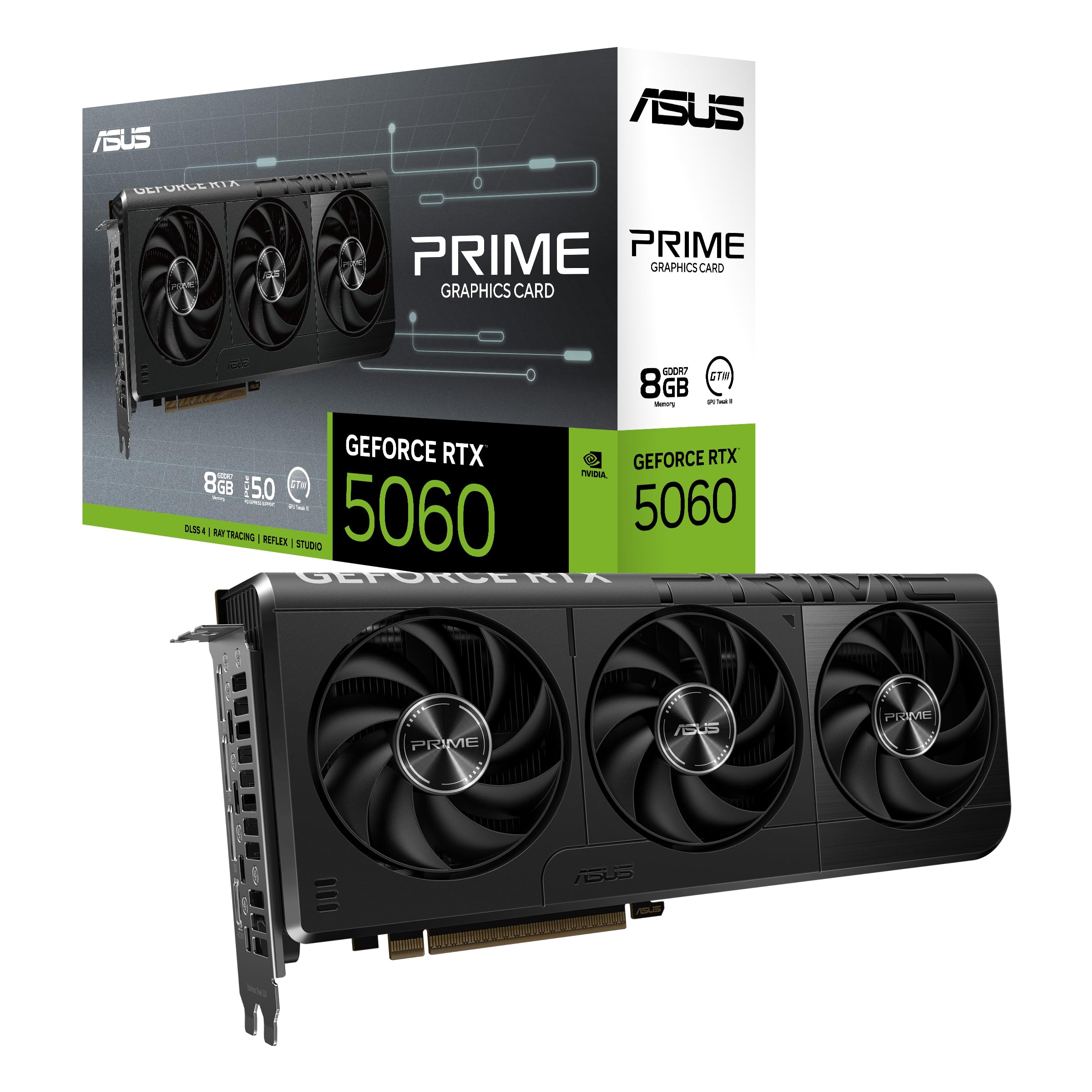
ASUS RTX 5060 8GB

91 /100
Lab Score Outstanding

Key details

VRAM
8 GB GDDR7
Memory
GDDR7
Cooling
Boost Clock
2565 MHz
View on Amazon

The ASUS Dual RTX 5060 delivers smooth 1080p high-refresh-rate gaming and makes DLSS 4 accessible at a budget-friendly price. It handles entry-level 1440p well in current titles. However, the 8GB GDDR7 VRAM means future AAA games at higher texture settings or ray tracing may require compromises. This card is best suited for 1080p gamers who want NVIDIA's latest upscaling technology and don't plan to push 1440p ultra settings. It's a solid alternative to the GIGABYTE RTX 5060 if that model is unavailable, given its similar performance and slightly lower cost.

Pros

  • Smooth 1080p gaming at high settings with DLSS 4 support
  • Cost-effective entry point into the RTX 50-series
  • Dual-fan design stays cool under load

Cons

  • 8GB VRAM may limit texture quality in upcoming AAA titles at 1440p
  • Not suitable for VR or heavy texture mods that demand more memory
Our verdict

A good pick for 1080p gamers on a budget who want DLSS 4, but not the card for future 1440p ultra settings.

Check Latest Price
8

1080P Gaming

PNY RTX 5060 8GB

89 /100
Lab Score Excellent

Key details

VRAM
8 GB GDDR7
Memory
GDDR7
Cooling
Triple fan, ARGB
Boost Clock
2280 MHz
View on Amazon

The PNY RTX 5060 Epic-X delivers quiet, cool operation and ARGB lighting without a price premium over plain dual-fan models. Its 8GB GDDR7 memory handles 1080p high-refresh gaming and moderate 1440p but will limit ultra texture settings in newer titles. The GIGABYTE version is a more established option with similar pricing, so choose the PNY if the triple-fan look and lighting matter to you.

Pros

  • Delivers solid 1080p high-refresh gaming and capable 1440p performance
  • Good value at sale prices, considered a strong budget option
  • Quiet and cool operation thanks to triple-fan design

Cons

  • 8GB VRAM may limit texture quality at higher resolutions or future titles
Our verdict

If you want ARGB lighting and triple-fan cooling in a budget RTX 5060 and can accept the 8GB VRAM limit, the PNY Epic-X fits that preference.

Check Latest Price
9

Budget 1440P

ASRock RX 7700 XT 12GB

88 /100
Lab Score Excellent

Key details

VRAM
12 GB GDDR6
Memory
GDDR6
Cooling
Dual fan with 0dB mode
Boost Clock
2584 MHz
View on Amazon

The ASRock RX 7700 XT delivers solid 1440p gaming performance with its 12GB VRAM, handling modern AAA titles at high settings without hiccups. It frequently drops to price points that undercut similarly specced rivals, making it tempting for cost-conscious builders. However, some units have been reported to stop working or exhibit black screen crashes within weeks of use, and the dual-fan cooler can generate noticeable fan noise and occasional coil whine under load. These issues make it a riskier choice than alternatives with more consistent quality control — only consider if you find a steep discount and are comfortable with the potential need for a return.

Pros

  • Strong 1440p gaming performance with 12GB VRAM for AAA high settings.
  • Good value when on sale, often priced below competitors with similar specs.

Cons

  • Some units may stop working or crash to black screen within weeks; check return policy before buying.
  • Under load, fan noise and occasional coil whine can be distracting in quiet setups.
Our verdict

Best for budget-focused 1440p gamers who can tolerate swap-out risk and aren’t bothered by fan hum; wait for a steep discount.

Check Latest Price

How to Choose

VRAM Capacity

Textures load directly into VRAM; once full, the GPU starts swapping to system RAM, causing stutter and dropped frames. At 1440p, Cyberpunk 2077 with ultra textures uses about 9GB. That leaves only 3GB headroom on an 8GB card, meaning future titles pushing 10-12GB will force lower settings.

For a Ryzen 5 9600X paired with a mid-range GPU, 16GB is the sweet spot for 1440p longevity. 12GB is workable for current titles but tight for 2027 releases. 8GB is adequate for 1080p high-refresh gaming but not for higher resolutions.

Memory Type and Bandwidth

GDDR7 offers roughly 30% higher bandwidth than GDDR6 at the same clock speeds, which helps with ray tracing and high-resolution textures. However, the real-world difference between a GDDR6 and GDDR7 card at similar memory capacity is modest in rasterized games.

The bigger factor is memory bus width. A 128-bit bus with GDDR7 can transfer less data per cycle than a 256-bit bus with GDDR6. Check both bandwidth figures, not just the memory generation label.

Core Clock and Boost Clock

Boost clock is the maximum frequency the card can sustain under good cooling. Higher numbers look better on paper, but actual framerates depend more on the GPU architecture and memory bandwidth. A card with a 2600 MHz boost can outperform one at 3300 MHz if it has a wider memory bus or better drivers.

Thermal throttling is the real limiter. Cards with efficient cooling (triple fans, large heatsinks) maintain their boost longer under load. A card that reaches its boost clock for only 30 seconds then drops 200 MHz will perform worse than a slightly lower-clocked card that holds steady.

Cooling Solution and Noise

Larger fans spin slower to move the same air, resulting in less noise. Triple-fan cards generally run quieter than dual-fan models at the same thermal load, but also take up more space. Fan-stop modes (0dB) allow complete silence when the GPU is idle or under light tasks.

Coil whine is an electrical noise that varies between individual units. It's not a defect per se, but if you are noise-sensitive, buy from a retailer with a lenient return policy. Some brands (like XFX and GIGABYTE) have better noise consistency than others.

Power Connector and TDP

Most mid-range GPUs draw between 150W and 250W. A Ryzen 5 9600X system with such a card needs a 550W to 650W power supply. Check the PSU for the required PCIe power connectors — typically one or two 6+2 pin connectors for cards under 250W.

Cards like the RTX 5060 draw all power from the PCIe slot, simplifying installation. Higher-end cards require a 12VHPWR connector or dual 8-pin. Using a cheap power supply or daisy-chaining cables can cause instability, so invest in a quality unit.

Frequently Asked Questions