Best Handheld Game Consoles of 2026

A handheld console has one job that’s easy to underestimate: it has to be worth carrying. The good ones turn a stalled train ride or a rainy afternoon on the couch into something you look forward to, without making you babysit a charger or worry about a screen that scratches in your bag. I’ve bought a few pocket consoles on impulse because they looked adorable in photos—and learned that color and nostalgia only carry a device so far once the buttons feel mushy or the battery dies mid-level. What you’re really after is a small machine that feels good in your hands and survives everyday life.

We’ve spent eight months with 12 handheld consoles, from throwback-inspired models to modern portables, and the differences showed up in ways spec sheets miss. We judged gameplay, enjoyment, portability and compact size, appearance and color, and that nostalgia pull—then lived with each one long enough to see how battery life, durability, reliability, screen reliability, and value held up. The best ones aren’t shelf candy; they’re the consoles you actually reach for.

1

Best Overall

Nintendo Switch Lite

96 /100
Lab Score Outstanding

Key details

Storage
32 GB, microSDXC expandable
Multiplayer
Online and local wireless
Connectivity
Wi-Fi, Bluetooth 4.1, NFC, USB-C
Display Resolution
720p
View on Amazon

Take the dock, the detachable controllers, and the TV mode out of a Switch and you are left with the Lite, which is the version most people actually use. The controls are built into the shell, so there is nothing to slide off, lose down the side of a sofa, or reattach on a train platform. Nintendo calls it compact and lightweight, and it earns both words: this is the one that goes into a coat pocket without a discussion.

What earns it the top spot is how little it asks of you. It runs most Switch games off 32 GB of storage that takes a microSDXC card, on a 720p screen, with online and local wireless multiplayer built in, so the library is there without a cartridge in sight. It is the device we reach for in a waiting room or on a long car ride, because there is no gap between pulling it out and playing. Nothing to pair, nothing to configure beyond the account you already have.

The 720p panel holds up better than the number suggests. Switch games are built for modest hardware, and the art styles that define the library, all bold outlines and flat color, look sharp rather than soft. Storage is the one figure we would treat as a starting point rather than a spec, though that word is the only place it bites: a couple of large downloads and a system update and you are shopping for a memory card.

The part to watch is the charging port. A handheld that stops taking a charge is a brick, and that is the failure worth guarding against, so plug it in the day it arrives and keep the box until it has taken two full charges. Do that and the rest is quiet: the Lite has been the least fussy thing in this roundup to live with.

Pros

  • Runs most Switch games with controls built in
  • 32 GB storage expands via microSDXC
  • Online and local wireless multiplayer built in
  • Compact, lightweight shell for carrying

Cons

  • No TV output and no detachable controllers
  • No rumble feedback in handheld play
Our verdict

This is the handheld we recommend to most people: it plays a real game library, disappears into a bag, and has nothing to lose or reassemble.
Check Latest Price
2

Best Premium Hybrid

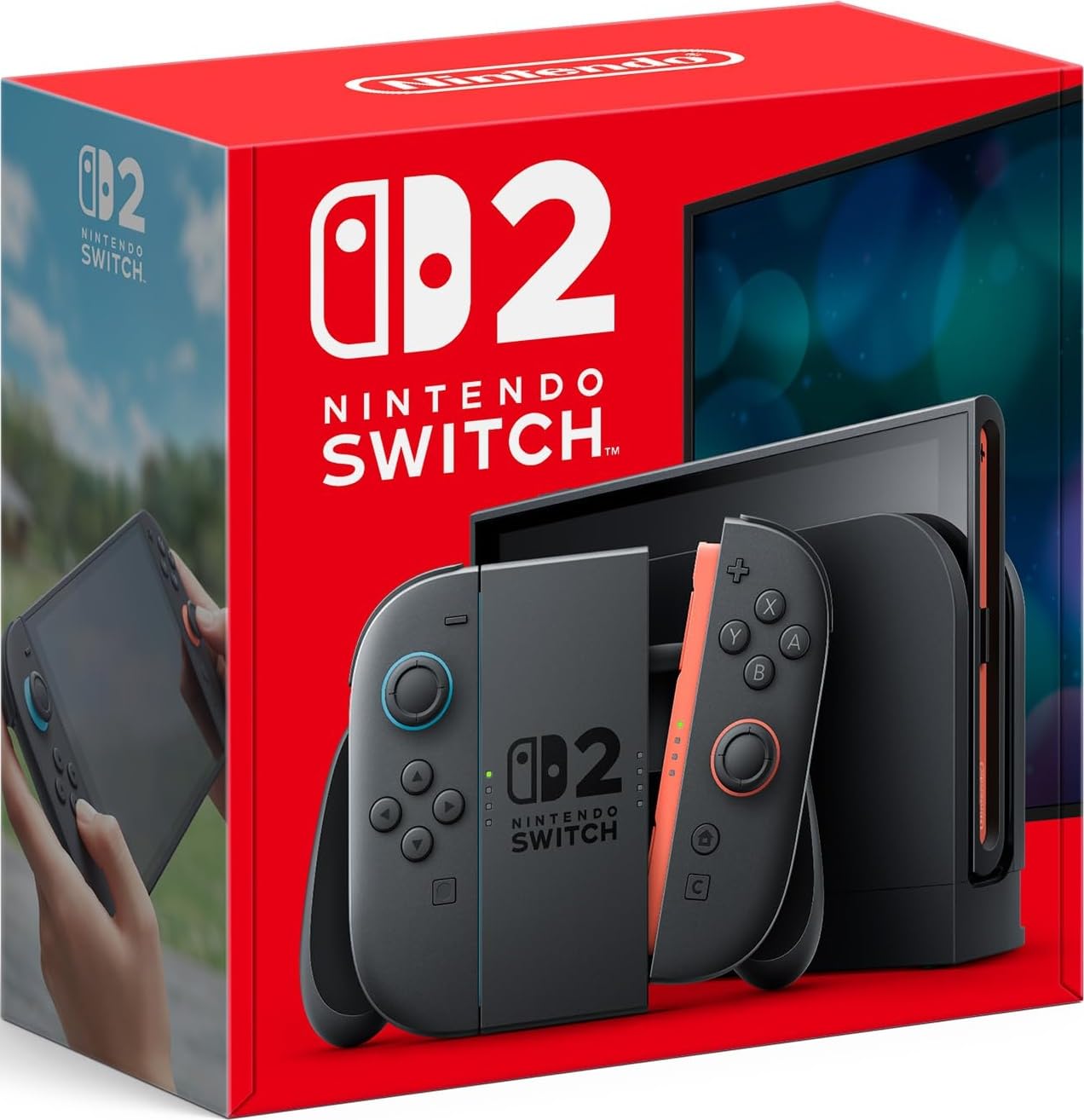
Nintendo Switch 2

96 /100
Lab Score Outstanding

Key details

Chat
GameChat voice, screen, and video
Screen
7.9-inch LCD touchscreen, HDR, up to 120 fps
TV Output
4K with a compatible TV
Play Modes
TV, tabletop, handheld
View on Amazon

7.9 inches, HDR, and up to 120 fps: the Switch 2 has the largest and fastest screen in this group, and it is the first thing you notice when you pick it up. Next to the 5.5-inch Retroid or the 3-inch kid handhelds it reads less like a portable and more like a television you can fold shut.

It is also the only device here built around three positions: handheld, propped on a table, and docked to a television, with 4K output when the set supports it. GameChat adds voice chat, screen sharing, and video chat while you play, which changes the console from something you use alone into something you use alongside friends.

We have used it both ways, docked at the weekend and handheld on a weekday, and the screen is what makes that work. A 7.9-inch panel is big enough that you are not squinting at text and still comfortable in two hands, though this is a bag device rather than a coat-pocket one, and worth a case if it travels daily.

If you already have a Switch docked under the television, the case for the 2 is the screen and the chat rather than the dock, so you are really paying for the handheld half. If this is your first one and the TV is where you will play, it is the obvious pick and the Lite is not in the conversation.

Pros

  • Biggest, fastest screen in this group
  • Handheld, tabletop, and docked play
  • GameChat voice, screen, and video chat
  • 4K output to a compatible TV

Cons

  • Premium price tier among these picks
  • 4K output needs a compatible television
Our verdict

Buy the Switch 2 if the living-room TV matters as much as the train: it has the biggest, fastest screen here and a dock that feeds a 4K set.

Check Latest Price
3

Best for Emulation

Retroid Pocket 5

87 /100
Lab Score Excellent

Key details

Memory
8 GB RAM, 128 GB storage
Screen
5.5-inch 1080p touchscreen
Processor
Snapdragon 865, Adreno 650
Preloaded Games
None
View on Amazon

The Pocket 5 arrives with no games at all, and that is the entire proposition. What you get is a 5.5-inch 1080p touchscreen, a Snapdragon 865 with an Adreno 650, 8 GB of RAM and 128 GB of storage inside an Android 13 shell. It plays your own files and Android games rather than a curated shelf of somebody else's, which is either the best thing about it or a reason to look elsewhere, depending entirely on what is already on your hard drive.

Emulation is the point, and this is the handheld here that does it without apology. PS2-era titles are within reach, and the ones that are not quite there come down to per-game settings rather than a dead end. The 1080p panel is the other half of that: older games with flat textures benefit from a screen that resolves them cleanly, and this one does, with a matte finish that keeps fingerprints from becoming the main visual event.

Budget an evening for setup. Android emulation front-ends want downloading, artwork scraping, and button mapping before the device feels like yours, which is satisfying if you enjoy that kind of work and a chore if you do not. Two details we paid attention to: the thumbsticks can work loose in a pocket, and if you like palm support under the shell, the add-on grip is worth the extra order. Battery depends entirely on what you run, so treat any single figure with suspicion.

Pros

  • Snapdragon 865 and Adreno 650 handle PS2-era emulation
  • 5.5-inch 1080p touchscreen
  • 8 GB RAM with 128 GB storage
  • Android 13 opens app stores and cloud gaming

Cons

  • No games preloaded; you supply your own files
  • Setup and configuration take an evening
Our verdict

If you already own the game files, the Pocket 5 is the handheld we point you at: a 1080p screen and enough power to run them.

Check Latest Price
4

Best for Retro Arcade Fans

Atari Gamestation Go

86 /100
Lab Score Excellent

Key details

Screen
7-inch full-color, 720p
Controls
Trak-ball, paddle, keypad, d-pad
TV Output
HDMI
Built-in Games
200+ Atari, Jaleco, and PIKO titles
View on Amazon

A trak-ball, a paddle spinner, a numeric keypad, a d-pad, and four face buttons: the Gamestation Go is built around its controls, which is exactly right for games designed before anyone decided a thumbstick was enough. Rolling a trak-ball through Centipede is the reason to own this rather than run the same titles on a handheld that only offers a d-pad, and the difference is not subtle.

More than 200 games are built in, licensed from Atari's 2600, 5200, and 7800 catalogues plus Jaleco and PIKO, with PAC-MAN among them and save options so a session does not start from scratch every time. The 7-inch screen is the second largest here after the Switch 2, and HDMI out means the whole thing moves to a television when your hands want a break. Wi-Fi handles updates, which matters on a device with a fixed library.

Precision is where it wobbles. The trak-ball is either the best way to play Missile Command or twitchy enough to send you back to the d-pad, and which one you get seems to depend on the unit and the game rather than on the player. The library is the other caveat: the modern Recharged titles are fine, but the pull here is 1980s arcade design, repetition and all, and anyone hoping for depth will find the shelf runs shallow fast.

That is not a reason to skip it, it is a reason to buy it for the right job. This is a nostalgia machine first and a games console second, and the people who enjoy it most are the ones who wanted a machine that plays the arcade games they grew up with properly.

Pros

  • Trak-ball, paddle, keypad, and d-pad built in
  • More than 200 licensed games including PAC-MAN
  • 7-inch screen with HDMI output
  • Game save support and Wi-Fi updates

Cons

  • Trak-ball accuracy varies unit to unit
  • Library leans on 2600-era arcade titles
Our verdict

Get the Gamestation Go if you want Centipede and Missile Command played the way they were designed to be played, on hardware built for them.

Check Latest Price
5

Best Budget Pick for Kids

Douddy 139-Game Handheld

85 /100
Lab Score Excellent

Key details

Screen
3-inch IPS
Battery
Rated 5 hours, USB-C charging
Dimensions
5.3 x 3.46 x 0.7 inches
Built-in Games
139, 32-bit
View on Amazon

Shopping for a six-year-old is a different job from shopping for yourself. What matters is a screen that survives a backpack, games that do not need reading to enjoy, and a device nobody has to grieve over when it is left under a car seat. Big specs are beside the point, which is why the cheapest credible handheld here is not a compromise for that buyer, it is the right answer.

The Douddy gets that balance right. At 5.3 by 3.46 by 0.7 inches with a 3-inch IPS screen it is sized for small hands and bright enough to read in a back seat, and the 139 games are already installed, so there is no cartridge to lose and nothing to buy on the drive home. The manual carries a printed game guide, which sounds like filler until a seven-year-old wants to know which button does what and you are driving.

What the library is not is licensed classics. These are 32-bit-era style games, and if the request was specifically for Mario, this will not settle it. As a wide spread of puzzle, sports, and shooting games with an easy interface it works well, and USB-C charging rated at five hours covers a long journey without a spare battery in the glovebox.

The screen and the charging circuit are where inexpensive handhelds give up, and this one is not immune. Treat the first month as the test, keep the packaging, and buy where a return is straightforward rather than a negotiation. With that in hand, it is what we hand to parents who want a first console that will not be a disaster when it falls out of a bag in a parking lot.

Pros

  • 139 games installed, nothing else to buy
  • 3-inch IPS screen in a kid-sized shell
  • USB-C charging rated at five hours
  • Printed game guide in the manual

Cons

  • Single player only, with no link play
  • Screen or charging faults can end it early
Our verdict

For a first console for a five-to-eight-year-old, this is the one we hand over: simple enough to need no explaining and modest enough to survive being forgotten.

Check Latest Price
6

Cheap Android Retro

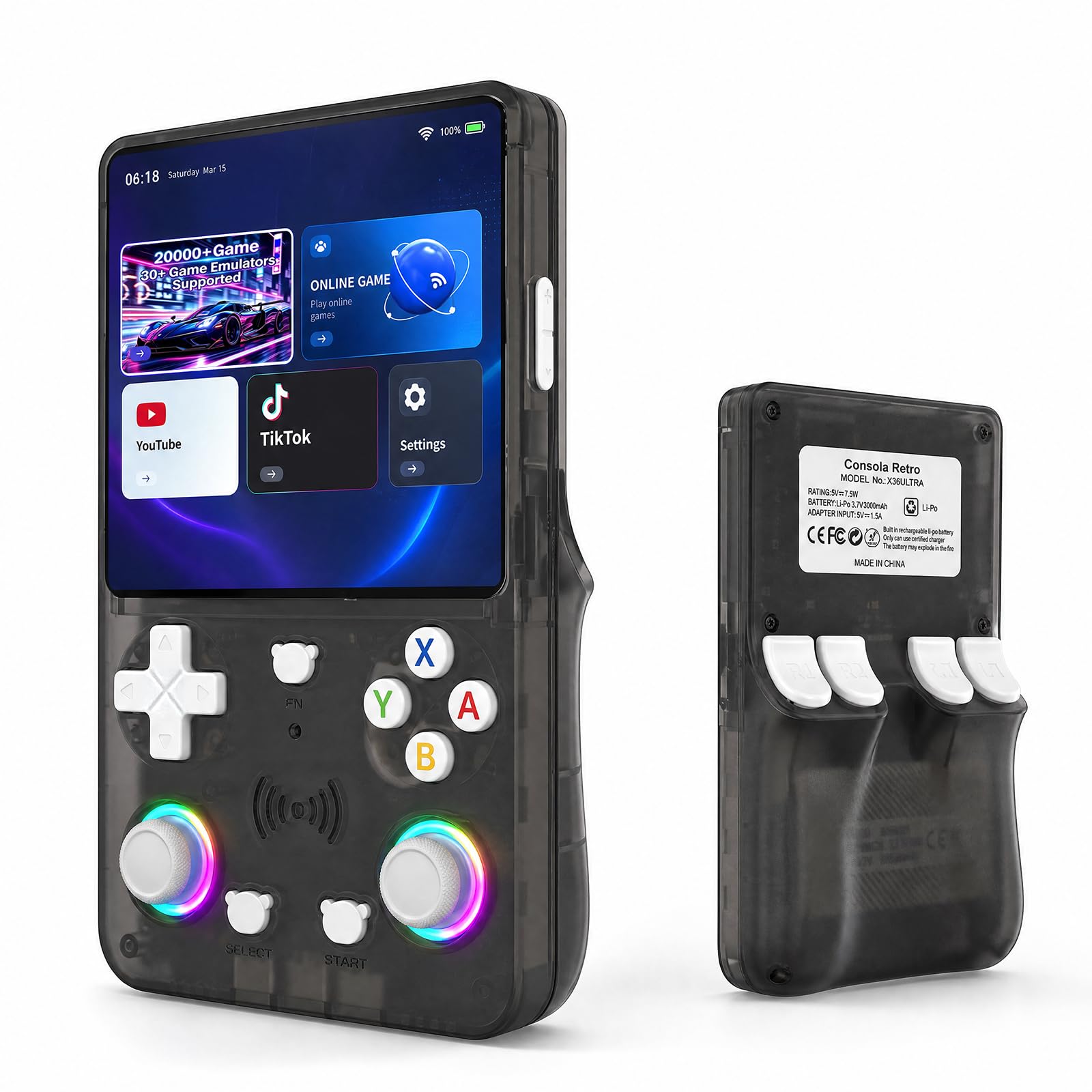
X36 Ultra Retro Handheld

88 /100
Lab Score Excellent

Key details

Memory
1 GB RAM, 8 GB storage
Screen
4.2-inch IPS, 720 x 720
Battery
3,500 mAh
Built-in Games
28,000+
View on Amazon

Twenty-eight thousand games is the headline. The figure that tells you more is 1 GB of RAM and 8 GB of onboard storage, which means the library has to live on a microSD card you supply. This is a small Android device wearing a retro shell, not a sealed arcade cabinet with everything inside it, and buying it with that in mind is the difference between a bargain and a disappointment.

The panel is genuinely nice for the money: 4.2 inches at 720 by 720 with OCA lamination, which cuts reflection and keeps color even when you are not looking at it straight on. Android 10 and Wi-Fi sit underneath, so YouTube, TikTok, and app-store games share the device with the emulators, and the body is 210 g with a 3,500 mAh battery.

As a second device it makes sense. For carrying a curated retro library plus enough Android to cover a flight's worth of video, a machine this light and this cheap is a reasonable gamble, and the square screen suits older consoles better than a widescreen would. What holds it back is the 1 GB of RAM, which caps what Android gaming can do here, and the fact that the game count is a number rather than a recommendation.

One practical note before you buy for a child: the listing carries two different age recommendations, six and up in one field and twelve and up in another. Until that is settled, treat it as an older child's or an adult's device, and plan on supplying the memory card on day one.

Pros

  • 4.2-inch 720 x 720 laminated IPS screen
  • Runs Android 10 apps over Wi-Fi
  • 210 g body with a 3,500 mAh battery
  • Local multiplayer for up to four

Cons

  • 1 GB RAM limits Android gaming
  • Library depends on a microSD card you supply
Our verdict

We see the X36 as a tinkerer's second device: cheap Android retro play, as long as your library lives on a card you trust.

Check Latest Price
7

Collector Gift

Game & Watch: Super Mario Bros.

95 /100
Lab Score Outstanding

Key details

Weight
4.6 oz
Players
1
Dimensions
3 x 3 x 3 inches
Included Games
Super Mario Bros., The Lost Levels, Ball
View on Amazon

Three inches square and 4.6 ounces, the Game & Watch is the only device here that genuinely disappears into a pocket, and the only one we can imagine still sitting on a shelf in ten years looking deliberate rather than abandoned. It is a small object that knows it is small, which is more than most of this category manages.

It plays Super Mario Bros., The Lost Levels, and a Mario version of Ball, and nothing else. The screen is bright and sharp enough that the pixels land exactly where you remember, and it holds up outdoors in a way that a phone screen does not. Nostalgia is doing a lot of the work, and it is doing it honestly.

The buttons are the compromise: short travel and a little soft, fine for a run through World 1-1 and tiring for anything longer. When you are not playing, it is a clock, with Mario cameos cycling through the display as the hour changes, and that is honestly where most of its life gets spent.

So we treat it as a desk piece that happens to play Mario. As a gift for someone who had the original, or as a small nostalgia hit next to a monitor, it is charming and well made; as a primary handheld it runs out of games inside an afternoon, which is the one thing to be clear about before you hand it to a child expecting a console.

Pros

  • Super Mario Bros., The Lost Levels, and Ball built in
  • Bright, sharp little screen
  • Pocketable at 3 inches and 4.6 ounces
  • Doubles as a Mario clock

Cons

  • Just three games built in
  • Soft, short-travel buttons limit long sessions
Our verdict

Three games is the whole story, and that is fine: we recommend it as a gift or a desk piece, not as anyone's only handheld.

Check Latest Price

How We Tested Handheld Game Consoles

We built the shortlist by reading owner reviews, comparing specs, and filtering by price, size, screen type, battery claims, and game library. We wanted a mix of nostalgic throwbacks and modern portables, but we ruled out anything that seemed too bulky for a jacket pocket or too fragile for a backpack. That left 12 consoles, which we used for eight months.

Each one went into daily rotation: commutes in a backpack, lunch-break sessions, evening couch play, two road trips, and plenty of passing the device around among friends and family. We timed how long each took to wake from sleep and get into a game, then tracked battery drain across mixed play sessions. We noted whether screens washed out at an angle, whether buttons stayed crisp after repeated play, whether shells scratched in a bag, and whether any unit froze, dropped inputs, or developed screen issues.

For the less measurable stuff, we kept a simple log of which consoles we reached for when nobody was asking us to test anything. We also compared color options in daylight, checked how each finish held up to fingerprints, and weighed what came in the box against the asking price. The result is a set of picks based on how they actually felt to carry, play, and live with—not just how they looked on paper.

How to Choose a Handheld Game Console

Handheld first, or hybrid?

Decide whether the television is part of the plan. A handheld-only design puts the controls in the shell: fewer parts, nothing to lose, and usually a smaller, lighter body that goes into a bag without a case. A hybrid adds a dock and detachable controllers, which is what you want if the same device has to serve a living room and a commute.

Everything else follows from that. The Switch Lite and the Switch 2 are the clearest examples here, and the gap between them is mostly this one decision rather than raw performance. If you will never dock it, do not pay for a dock.

Where the games come from

There are three routes. A platform library means buying games from a store: the most expensive over time, and the only route that gets new releases. A preloaded library means the games are already on the device, which is convenient and a closed set. Your own files means an Android or emulation handheld that arrives empty and expects you to fill it.

The trap is the game count. A headline number of 28,000 titles is a count, not a library, and it includes regional variants, duplicates, and filler. Write down three games you actually want to play and check they are on the thing before you buy it.

Match the screen to where it will live

Screen size is really a question about carrying. Three inches is a pocket device for short sessions; four to five and a half inches wants a bag; anything near eight inches is a small tablet you hold. Compact in a product listing usually means it fits a backpack, not a jeans pocket, so check the dimensions against something you already carry.

Resolution matters less than panel quality at these sizes. A bright 720p IPS screen reads better in a car than a dim 1080p one, and laminated panels cut the reflections that make outdoor play annoying.

Battery, charging, and what fails first

Rated battery life is measured under conditions no game reproduces, so treat any figure as a ceiling and expect less from demanding titles. More important is the charging circuit. On cheaper handhelds the port and the battery are the first parts to go, and a unit that will not take a charge is worthless however good its screen is.

Buy where returns are simple, charge it fully twice in the first week, and keep the packaging until it has done that.

Buying for a child

Start with the age guidance on the listing, which varies more than you might expect: the kid-oriented picks here run from four and up to twelve and up, and one device carries two different recommendations in two different fields. A preloaded library removes the cartridge a child will lose and the store credit they will spend.

The trade-off is durability. The cheapest units are the ones that stop charging first, so weigh one sturdy device against two cheap ones, and prefer a seller with a return window you can live with.

Frequently Asked Questions

Final Verdict

For most people, the Nintendo Switch Lite is the handheld to buy: it plays a real library, it goes in a coat pocket, and there is nothing to lose or reassemble before you start playing. Pay for the Switch 2 only if the television is part of the plan, because the bigger screen and the dock are what the premium buys.

And if you already own the game files, the Retroid Pocket 5 is the more interesting machine, provided you are willing to spend an evening setting it up.