10 Best Handheld Emulator Console 2026: Find Your Ideal Setup Balance

Which handheld emulator gives you the performance you need without requiring hours of tinkering? We break down the trade-offs.

Choosing a handheld emulator console often means picking between raw power and ready-to-play simplicity. Many devices ship without ROMs, expecting you to configure emulators and find your own games. That initial setup can take one to three hours, especially on Android-based handhelds.

The real trade-off isn’t just chip speed or screen size – it’s how much effort you want to invest before you can play. Linux-based models are nearly plug-and-play, while Android units offer more flexibility but require tinkering. Meanwhile, build quality varies: some clamshell designs add portability but introduce hinge concerns, while solid-body alternatives trade screen protection for durability.

This guide matches each device to the buyer who will actually enjoy using it, based on your tolerance for setup, your target game systems, and the physical features that matter most during daily use.

1

Best Overall

Retroid Pocket Flip 2

86 /100
Lab Score Excellent

Key details

OS
Android 13
Screen
5.5" AMOLED 1080p
Battery
5000mAh
Chipset
Snapdragon 865
View on Amazon

The Retroid Pocket Flip 2 handles PS2 and GameCube titles with consistent smoothness, making it one of the stronger options for retro gaming on the go. The 5.5-inch AMOLED screen delivers vivid colors and sharp 1080p resolution, which brings older games to life without the washed-out look of cheaper panels.

The clamshell design keeps the screen safe in a bag or pocket, and the hall-effect analog sticks remove any drift concerns – a practical advantage over traditional joysticks. That said, the hinge can develop wobble or cracks after weeks of use in some units, so it’s worth inspecting early and being prepared for a return if needed.

This device is best suited for retro gamers who want powerful emulation in a truly portable package and are comfortable spending time on initial setup. The Android system requires configuring emulators and sourcing your own ROMs – plan for a few hours of tinkering before play. If you prioritize absolute hinge durability or expect a plug-and-play experience, designs without a clamshell or with a simpler OS may suit you better.

💡 Plan on a few hours to install emulators and transfer your game library – the device ships without games preloaded.

Pros

  • Handles PS2 and GameCube emulation with smooth performance
  • AMOLED display offers vibrant colors and sharp 1080p clarity
  • Clamshell design protects the screen during travel
  • Hall-effect analog sticks eliminate joystick drift

Cons

  • Initial setup demands several hours to configure emulators and load ROMs
  • Hinge wobble or cracks can appear after weeks of use in some units
Our verdict

If you need a pocketable clamshell that runs demanding retro systems well, the Flip 2 is a strong match – just set aside setup time and keep an eye on the hinge early on.

Check Latest Price
2

Best for 2D Retro Gaming

Retroid Pocket Classic

91 /100
Lab Score Outstanding

Key details

OS
Android 14
Screen
3.92" OLED 1240×1080
Battery
5000mAh
Chipset
Unspecified
View on Amazon

The 3.92-inch OLED display delivers deep blacks and vibrant colors that make GBA, SNES, and PS1 games look their best, outperforming many LCD competitors in this price range. Build quality is solid with tactile buttons and a comfortable grip, and the 5000mAh battery easily handles hours of retro gaming. The tactile D-pad and face buttons offer satisfying feedback that rivals dedicated retro consoles.

For retro purists who value screen quality above all else, the Classic offers a focused experience that doesn't try to do everything. It cannot play N64, PS2, or any 3D titles requiring analog sticks — that's a deliberate design choice. The Android 14 interface offers flexibility for emulator apps, but expect a time-consuming initial setup if you want to load your own ROMs. This is not a device for those wanting a jack-of-all-trades, but it excels at its intended range.

Pros

  • Vibrant OLED display with deep blacks and vivid colors
  • Solid build with tactile buttons and comfortable ergonomics
  • Great battery life lasting through extended play sessions

Cons

  • Initial Android setup requires multiple hours of configuration
Our verdict

For fans of GBA, SNES, and PS1 who want a premium screen and tactile controls, the Classic delivers exactly that — no compromises within its narrow focus.

Check Latest Price
3

Best Budget All-In-One

Anbernic RG40XX H

80 /100
Lab Score Excellent

Key details

OS
Linux
Screen
4.0" IPS 640×480
Battery
3200mAh
Chipset
Quad-core ARM Cortex-A53
View on Amazon

The RG40XX H skips the typical setup friction by arriving with thousands of pre-installed retro games and a clear Linux launcher. Under $90, it offers a 4-inch IPS screen and a 3200mAh battery that keeps the action going for hours. The Linux OS boots quickly and presents games in a clean menu — this is the rare budget handheld that works as advertised without requiring immediate tinkering.

It excels for gamers targeting PS1 and below – N64 and Dreamcast will stutter, so those systems are best left to more powerful devices. Quality control is a known variable: some units arrive with screen imperfections or battery charging issues, so buying from a retailer with an easy return policy is a practical safeguard. First-time buyers and kids will appreciate the simplicity, while power users should look elsewhere.

💡 Purchase from a retailer with an easy return policy to handle any unit variance.

Pros

  • Budget-friendly price with thousands of preloaded games
  • Simple Linux interface that even non-technical users can navigate without frustration.
  • Large library out of the box across multiple retro systems.

Cons

  • Performance ceiling at PS1
  • Quality control can be inconsistent
Our verdict

For a no-fuss retro handheld with a huge game library at a low price, this is the clear choice for casual gamers.

Check Latest Price
4

Best Premium Powerhouse

Anbernic RG477M

80 /100
Lab Score Excellent

Key details

OS
Android 14
Screen
4.7" 1280×960
Battery
5300mAh
Chipset
Dimensity 8300
View on Amazon

The Dimensity 8300 chipset inside the RG477M delivers the highest raw performance available in this group, running PS2, GameCube, and even some Wii titles without slowdown. The full aluminum alloy shell gives it a premium feel that stands out from plastic rivals, though the compact shape keeps it pocketable. Unlike the top pick’s clamshell design, this device prioritizes raw power and build material over portability.

This handheld is best for collectors who value a metal chassis and power users who want maximum emulation headroom. The trade-off for the small size and active cooling is that larger hands may find the controls cramped, and the fan produces audible noise during demanding games. Buyers sensitive to either condition should consider a larger or fanless alternative.

💡 Keep headphones handy—the fan is audible during extended play sessions.

Pros

  • Dimensity 8300 chip handles PS2, GameCube, and some Wii games smoothly
  • Full aluminum alloy construction feels premium and durable
  • 4.7-inch screen delivers sharp colors and good clarity

Cons

  • Compact controls may feel cramped for larger hands; shoulder buttons are loud
  • Active cooling fan produces audible noise during demanding games
Our verdict

Choose the RG477M if you want the highest emulation performance in a pocketable metal shell, and you are comfortable with the cramped controls and fan noise.

Check Latest Price
5

Best for DS/3DS Emulation

Anbernic RG DS

79 /100
Lab Score Very Good

Key details

OS
Android 14
Screen
Dual 4.0" 640×480 touch
Battery
4000mAh
Chipset
RK3568
View on Amazon

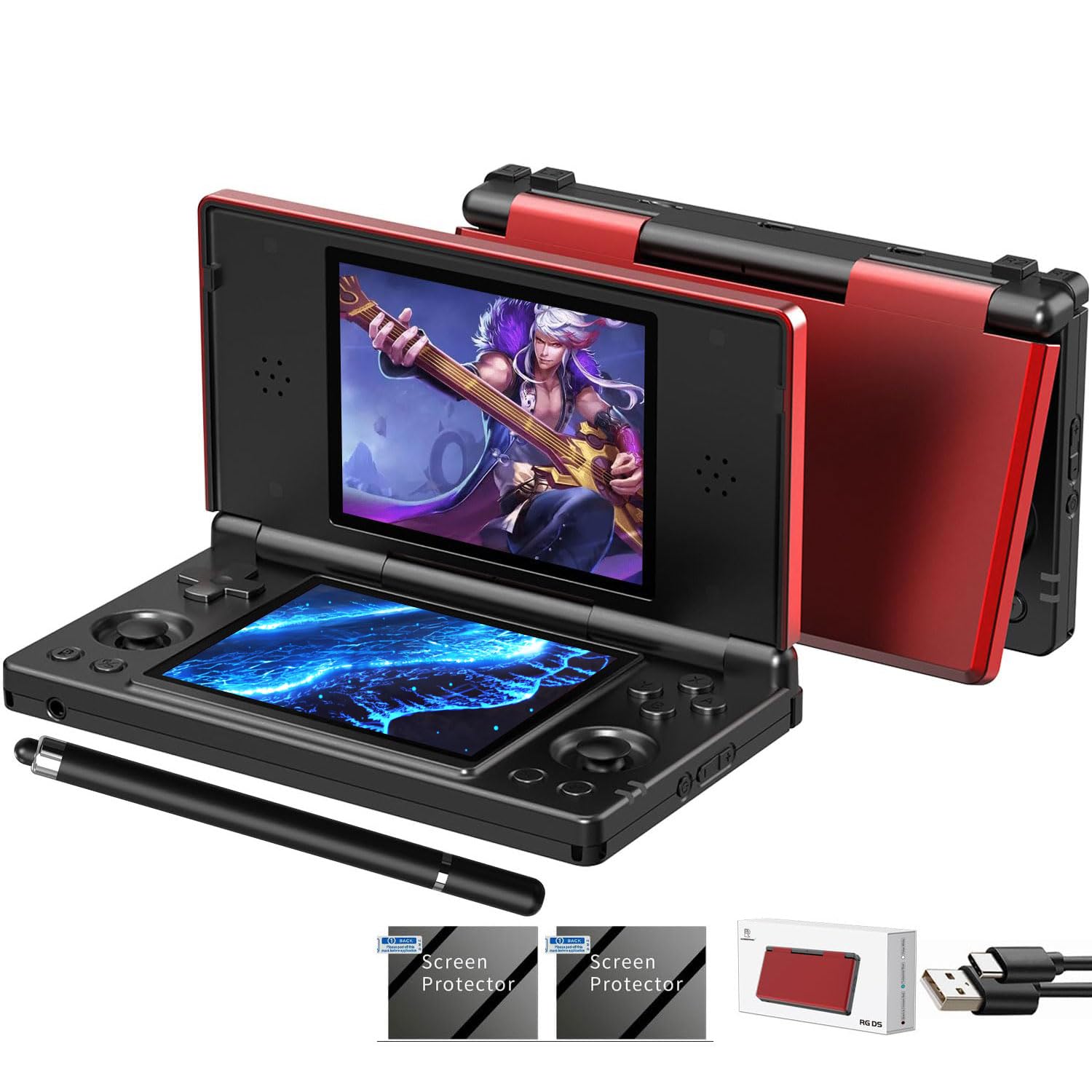
The Anbernic RG DS is the only handheld in this roundup built specifically for Nintendo DS emulation, with two 4-inch 640×480 OCA full-touch displays stacked vertically inside a clamshell. The dual-screen layout mirrors the original hardware, making games that rely on touch input and simultaneous display — like The World Ends with You or Professor Layton — feel natural. Android 14 powers the RK3568 chip, and while the interface can stutter under heavier loads, DS titles run smoothly with proper mapping of the secondary touchscreen.

This device is for collectors and DS fans who value form-factor authenticity over raw power. The battery drains faster than the flip-style competitors — expect around 3-4 hours of active play rather than the advertised 4000mAh would suggest. 3DS games struggle with stuttering and occasional overheating, and the lack of Google Play means you'll need to sideload emulators and apps. If your library is mostly DS and GBA titles and you want a dedicated clamshell that protects the screens in transit, this fills that niche well.

💡 Keep a USB-C power bank handy for longer sessions — battery life suits quick commutes or 30-minute bursts better than all-day marathons.

Pros

  • Authentic dual-screen clamshell design matches the original DS layout for accurate emulation
  • Solid build quality feels sturdy for the price
  • Cost-effective way to replay DS and GBA titles without hunting original hardware

Cons

  • Battery life falls short of spec
  • Performance drops on 3DS and heavier games; UI can lag under load
Our verdict

A focused DS emulator that prioritizes form-factor accuracy; buy it if your game collection is heavy on Nintendo's dual-screen library, and accept the shorter battery life as part of the trade-off.

Check Latest Price
6

Atari Fans

Atari Gamestation Go

86 /100
Lab Score Excellent

Key details

OS
Proprietary
Screen
7" 720p
Battery
Chipset
Proprietary
View on Amazon

The Atari Gamestation Go offers 200+ officially licensed Atari classics including Pac-Man, with a 7-inch screen and unique paddle/trackball controls that feel authentic for titles like Centipede. However, the system is closed — you cannot add your own ROMs or emulate non-Atari systems. Some units may experience glitchy game loading or unresponsive controls, so buying from a retailer with a return policy is advisable.

Pros

  • 200+ officially licensed Atari games with paddle/trackball inputs for an authentic retro feel
  • 7-inch screen plus multiple control options (paddle, trackball, d-pad) support varied gameplay

Cons

  • Cannot add additional games
  • Inconsistent game loading and trackball sensitivity can affect gameplay on some units
Our verdict

Best for dedicated Atari collectors who want an official portable with authentic controls and don't need to run other systems. Buy from a retailer with easy returns to account for possible unit variance.

Check Latest Price
7

PSP Enthusiasts

Anbernic RG476H

82 /100
Lab Score Excellent

Key details

OS
Android 13
Screen
4.7" LTPS 1280×960 120Hz
Battery
5000mAh
Chipset
Unisoc T820
View on Amazon

The RG476H delivers strong performance for PSP and PS1 games, with the 120Hz screen making motion feel fluid and responsive. Battery life supports several hours of play and holds charge well in standby. The trade-off is that quality control can be inconsistent; some units may arrive with the battery not charging or missing preloaded content. This makes it a reasonable pick for buyers willing to accept the gamble, especially if purchased from a retailer that accepts easy returns.

Pros

  • PSP and PS1 games run smoothly on the 120Hz screen.
  • Battery lasts for hours of play with good standby endurance.

Cons

  • Some units may arrive with battery charging issues or missing preloaded games.
Our verdict

A capable performer for PSP and PS1 if you are OK with the QC gamble and buy from a retailer with a straightforward return policy.

Check Latest Price
8

Budget Preloaded

RG56PRO

83 /100
Lab Score Excellent

Key details

OS
Linux
Screen
5.5" IPS 1280×720
Battery
5000mAh
Chipset
RK3562
View on Amazon

The RG56PRO skips the hassle of sourcing ROMs by packing a massive library out of the box. For casual gamers or gift buyers who just want to pick up and play classic titles, this is a tempting entry point. However, at the same price, the RG40XX H offers more consistent build quality and a larger support community, making it the safer pick for anyone planning to keep the device long-term.

Pros

  • Over 31,000 preloaded games ready to play immediately with no setup.
  • Large 5.5-inch IPS screen delivers good image quality at a budget price.

Cons

  • The RG40XX H offers better build quality and community support for a similar cost.
Our verdict

A good fit for gift buyers or casual players who prioritize game volume over long-term durability and are willing to accept some uncertainty.

Check Latest Price
9

Large Screen Budget

Trimui Smart Pro

80 /100
Lab Score Excellent

Key details

OS
Linux
Screen
4.96" IPS 1280×720
Battery
5000mAh
Chipset
Allwinner A133P
View on Amazon

The Trimui Smart Pro delivers a large, sharp 4.96-inch 720p display at a budget price, with an open-source RetroArch system. The out-of-box game library is thin — no N64 or PS1 preloaded — and performance struggles above PS1 with frame drops on Dreamcast and N64. It works for 8- and 16-bit gaming with a big screen, but the RG40XX H provides a stronger library and performance for the same budget.

Pros

  • Large 4.96-inch 720p display offers clear visuals for under $100.
  • Open-source RetroArch system makes it easy to organize and add your own games.

Cons

  • Preloaded game library is limited
  • Performance drops noticeably when emulating N64 or Dreamcast
Our verdict

A solid pick if you're focused on 8- and 16-bit games and want the largest screen for the price, but not the choice for broader retro emulation.

Check Latest Price
10

Open-Faced Power

Retroid Pocket 5

87 /100
Lab Score Excellent

Key details

OS
Android 13
Screen
5.5" 1080p touch
Battery
5000mAh
Chipset
Snapdragon 865
View on Amazon

The Retroid Pocket 5 matches the Flip 2's Snapdragon 865 chipset, handling PS2 and GameCube emulation smoothly, while omitting the clamshell hinge for a simpler, more rigid body. This design choice avoids hinge-related vulnerabilities entirely. However, the device has a smaller base of user feedback, making its long-term behavior under heavy use less documented than the Flip 2; buyers who want maximum assurance may prefer the more widely reviewed alternative.

Pros

  • Snapdragon 865 delivers smooth PS2 and GameCube emulation
  • Unibody construction eliminates hinge durability concerns

Cons

  • Long-term performance consistency is less documented than similar models, so some uncertainty remains
Our verdict

Best for buyers who want the same emulation capability as the Flip 2 in a hinge-free shape and are comfortable with a less-established track record.

Check Latest Price

How to Choose

Chipset

The chipset determines which consoles you can emulate smoothly. Snapdragon 865 and Dimensity 8300 handle PS2 and GameCube at full speed, while Unisoc T820 or ARM Cortex-A53 top out at PSP and Dreamcast with some stuttering. Budget chips like Allwinner A133P are best for PS1 and below. If you want to play Metroid Prime or God of War, don't settle for anything less than a Snapdragon 800-series or Dimensity 8000+.

Lower-end chips also struggle with upscaling and filters. You may need to play at native resolution with minimal enhancements, which can look blurry on larger screens. Know your target library first, then pick the chip that covers it.

Screen

OLED screens provide deeper blacks and more vibrant colors, but they are rarer and more expensive. IPS displays are adequate for most retro games, though viewing angles and contrast are noticeably worse. Resolution matters: 1080p screens let you upscale PS1 games cleanly, while 480p or 720p panels can look pixelated on modern eyes.

If you primarily play 4:3 content (SNES, GBA, PS1), a square or nearly square screen like the 4.7" 1280×960 panel uses pixels efficiently. Widescreen 16:9 screens add black bars for 4:3 games but are better for PSP widescreen titles.

Analog Sticks

Hall-effect sticks use magnets to detect position, eliminating the drift that plagues traditional potentiometer sticks after months of use. They are a must-have if you play any 3D games that require precise camera control or aiming. Many cheap handhelds omit analog sticks entirely, limiting you to 2D games.

Capacitive joysticks (found on some Anbernic models) are a middle ground but can feel mushy and lack the precision of hall-effect. If you plan to play PS2, GameCube, or N64, prioritize hall-effect sticks even if it means spending more.

Operating System

Android offers the widest app selection, including standalone emulators with advanced features, but requires 1-3 hours of configuration to install emulators, set up BIOS files, and map controls. Linux-based devices are nearly plug-and-play with a curated launcher, but adding new emulators or customizing settings is more limited.

If you want a device for a child or someone who just wants to play immediately, pick Linux. If you enjoy tinkering and want the best performance per dollar, Android is the better long-term investment.

Battery

Battery capacity is only half the story – actual drain depends heavily on the chipset and screen. A 5000mAh battery in a Snapdragon 865 device may last 4-5 hours running PS2 games, while the same capacity in a budget Linux handheld can push 7-8 hours on PS1 titles. Active cooling fans also draw power.

If you commute or travel frequently, aim for at least 5000mAh with a chipset that matches your expected game load. Lower-capacity batteries (3200mAh-4000mAh) will leave you hunting for a charger by lunch.

Frequently Asked Questions