10 Best MoCA Adapters for Gaming 2026: True 2.5 Gbps Performance

Find the MoCA adapter that delivers low latency and full 2.5 Gbps throughput for competitive gaming, without bottleneck ports or stability issues.

Many MoCA 2.5 adapters advertise high speeds, but a surprising number still ship with a 1 Gbps Ethernet port — effectively capping the standard's potential. For gamers, that bottleneck can mean the difference between a lag-free win and a frustrating disconnect.

This guide cuts through the spec sheet noise to find adapters that actually deliver on the MoCA 2.5 promise. Whether you need proven stability for tight matches or multi-gig ports for future-proofing, we've focused on the adapters that keep your connection solid where it counts.

1

Best Overall

ScreenBeam ECB6250K02

89 /100
Lab Score Excellent

Key details

Stability
Stable, rare drops
Configuration
2-pack
Ethernet Port
1 Gbps
MoCA Standard
2.5
View on Amazon

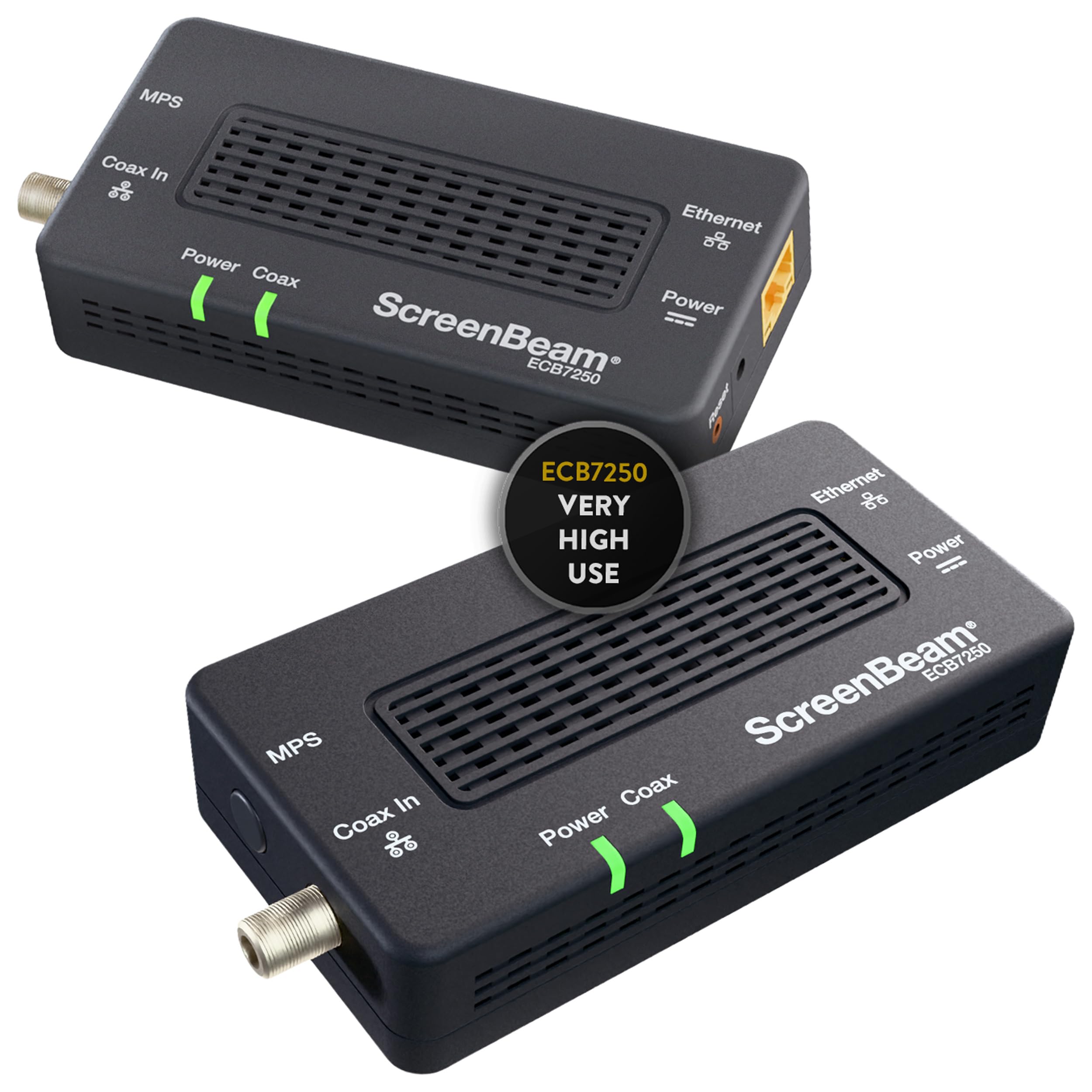
The ScreenBeam ECB6250K02 delivers consistent gigabit speeds with low latency over coaxial cable, making it a straightforward solution for gamers seeking a wired connection where Ethernet is impractical. Its MoCA 2.5 standard allows up to 2.5 Gbps throughput internally, but the 1 Gbps Ethernet port sets the practical ceiling — a detail that matters only for those with faster internet plans.

Setup takes roughly five minutes with the included coax cables and splitter. The adapters lock onto the network without manual configuration, and they maintain a stable link through regular use. Occasional disconnections have been noted in some households, typically tied to splitter quality or coaxial signal strength rather than the adapters themselves.

This kit is best suited for gamers with gigabit internet who value rock-solid stability over the theoretical maximum. The 1 Gbps port cap means it cannot take advantage of multi-gig plans, so households with faster connections should look at adapters with 2.5 GbE ports. Budget-conscious buyers may find cheaper 2-packs, but reliability track records are less consistent.

Compared to other MoCA 2.5 kits, the ScreenBeam stands out for its consistent uptime. Many alternatives offer faster ports on paper but introduce connection drops or pairing difficulties that compromise gaming sessions. The ScreenBeam's focus on stability makes it the practical choice for those who cannot tolerate network hiccups.

💡 If you experience drops, check that all splitters in your coax path are rated for MoCA frequencies (5-1675 MHz) and consider a MoCA PoE filter at the service entry.

Pros

  • Almost zero configuration needed
  • Maintains stable gigabit speeds with low latency.
  • Stays connected without drops in typical setups.
  • Includes all necessary cables and splitters for immediate use.

Cons

  • Connectivity drops may occur in some environments, especially with older splitters.
Our verdict

The ScreenBeam ECB6250K02 is the pragmatic choice for gamers who prioritize a stable, low-latency MoCA connection over multi-gig speed — its 1 Gbps port is a non-issue for gigabit internet.

Check Latest Price
2

Best for Multi-Gig & Dual Ports

Kiwee KB-M3-02

89 /100
Lab Score Excellent

Key details

Stability
Stable, limited data
Configuration
2-pack
Ethernet Port
2.5 Gbps (dual)
MoCA Standard
2.5
View on Amazon

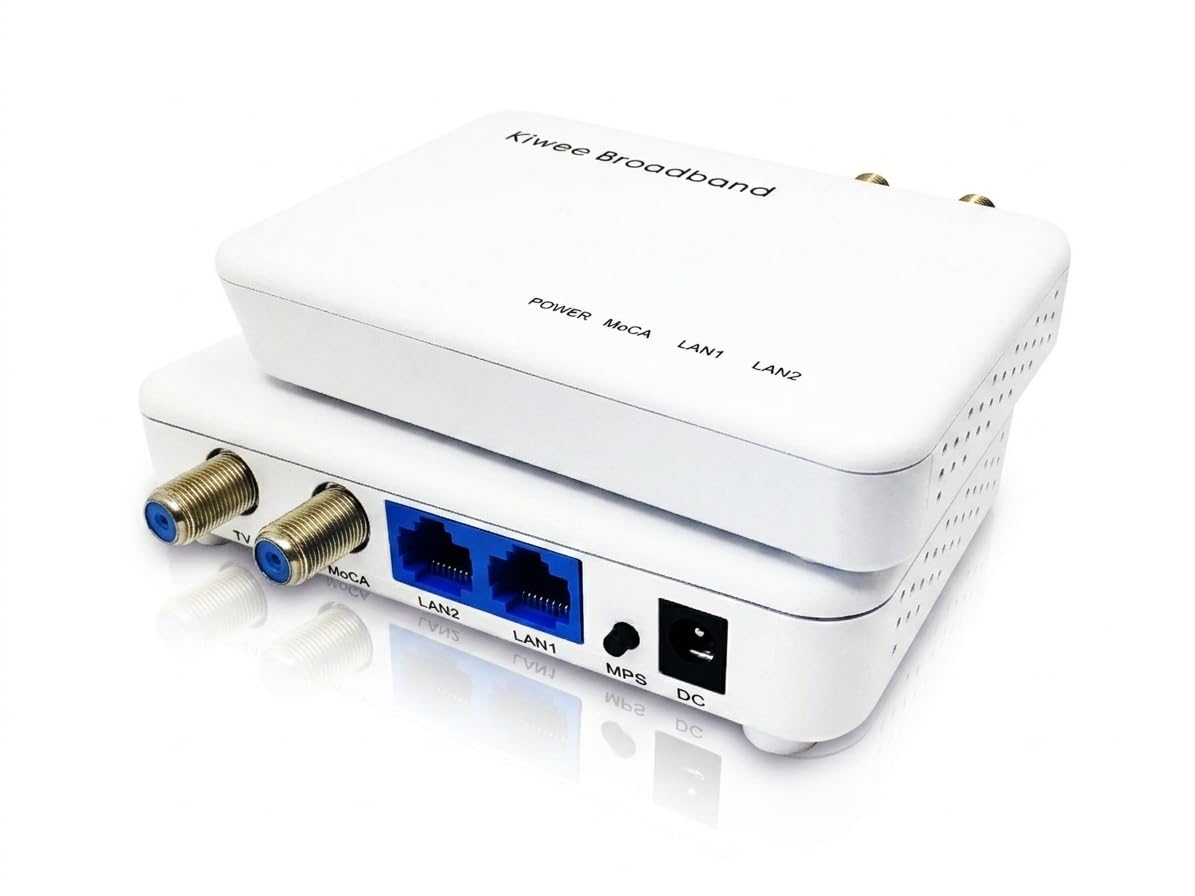
Dual 2.5 Gbps Ethernet ports per adapter set this kit apart from every other MoCA 2.5 option on the market. Instead of one port limiting you to a single device per room, each adapter supports a console and a PC simultaneously, both at full multi-gig speed. The top pick from ScreenBeam offers only one 1 Gbps port per adapter, making this a clear advantage for households with multiple gaming systems or a workstation plus streaming device in the same space.

This is the adapter for gamers who already have multi-gig internet and need to hardwire two devices per coax outlet. The plug-and-play setup lives up to the promise: connect coax, attach Ethernet, and the link is active within seconds. Latency matches a direct Ethernet connection, so competitive play sees no downside. The tradeoff appears in the box — the included Ethernet cables measure just 12 inches, which forces most buyers to purchase longer cables separately. Position your modem, router, and devices accordingly, or factor in a few extra dollars for proper-length patch cables.

Performance holds steady across extended sessions. Throughput hits near the full MoCA 2.5 theoretical ceiling in real use, and the dual ports share bandwidth without noticeable contention. The 2.5GbE ports auto-negotiate with slower hardware, so existing gigabit devices work without issue. The only physical limitation is the short included cables — a minor annoyance that doesn't affect the adapter's core capability.

💡 Keep a supply of longer Ethernet cables handy; the included ones are too short for most placements.

Pros

  • Two 2.5GbE ports per adapter let you wire a gaming console and PC from one coax outlet
  • Latency and throughput match a direct Ethernet connection, ideal for competitive gaming
  • No configuration required

Cons

  • Included Ethernet cables are 12 inches long, which may not reach your devices in typical setups
Our verdict

If multi-gig internet and two wired devices per room are your reality, this adapter delivers a feature no competitor matches — just budget for longer Ethernet cables.

Check Latest Price
3

Best Budget Single Adapter

goCoax MA2500D

85 /100
Lab Score Excellent

Key details

Stability
Stable, minimal issues
Configuration
Single
Ethernet Port
2.5 Gbps
MoCA Standard
2.5
View on Amazon

The goCoax MA2500D packs a full 2.5 Gbps Ethernet port into a compact adapter at a price that undercuts most MoCA 2.5 two-packs. Setup is genuinely plug-and-play: connect coax and Ethernet, and the link establishes without any configuration. In practice, latency remains low enough for competitive gaming, and throughput hits the advertised multi-gig speeds when paired with a matching node.

This adapter is best for budget-conscious gamers who already own a MoCA 2.5 node and need to extend a wired connection to a gaming PC or console. It also suits buyers who want to build an affordable two-adapter network by purchasing two units separately. Keep in mind that the package contains only one adapter and no PoE filter; a complete point-to-point setup requires buying a second MA2500D and a filter, which adds roughly $20–$30 to the total cost.

The single coax port per adapter is a manageable tradeoff: in a room with one coax outlet shared with a cable modem or TV, you will need a splitter. This is common across most single-port adapters, and the adapter itself runs cool and maintains a stable link over long coax runs. The 2.5 GbE port future-proofs the connection for internet plans above 1 Gbps, a feature absent from the more popular 1 Gbps MoCA adapters in the same price range.

💡 A PoE filter is required if you connect this to a coax line that also carries cable TV or internet; it prevents signal leakage and is sold separately.

Pros

  • Full 2.5 Gbps Ethernet port for multi-gig internet plans or local transfers
  • No-configuration setup; connect cables and the link establishes immediately
  • Cost-effective way to add a 2.5 GbE node to an existing MoCA network

Cons

  • Sold as a single unit; a complete two-adapter setup requires a second purchase and a PoE filter
  • Only one coax port per adapter; sharing the coax line with a TV or modem may need a splitter
Our verdict

If you already have one MoCA 2.5 node and want a 2.5 GbE port on a budget, this adapter delivers. For a complete out-of-box solution, factor in the cost of a second unit and a filter.

Check Latest Price
4

Best Mid-Range 2.5Gbps 2-Pack

Hitron HTEM5 2-Pack

88 /100
Lab Score Excellent

Key details

Stability
Intermittent drops
Configuration
2-pack
Ethernet Port
2.5 Gbps
MoCA Standard
2.5
View on Amazon

The Hitron HTEM5 avoids the common MoCA 2.5 bottleneck by equipping each adapter with a true 2.5 Gbps Ethernet port — a feature the top pick (ScreenBeam) lacks despite its solid reliability. However, some users experience intermittent disconnections, which makes this kit a speed-first alternative with a tradeoff in consistent uptime.

Setup is plug-and-play, and the adapters have a solid feel. Performance handles 4K streaming and competitive gaming well, delivering the multi-gig throughput needed for fast internet plans.

This kit suits gamers who need the full 2.5 Gbps speed and can accept an occasional drop, or those who have confirmed their cable modem is compatible — some DOCSIS 3.1 gateways may conflict with these adapters. Buyers who cannot tolerate any downtime should consider the top pick instead.

💡 If you experience intermittent disconnections, a quick power cycle of the adapters often restores stability.

Pros

  • True 2.5 Gbps Ethernet port on each adapter prevents a speed bottleneck.
  • Plug-and-play installation with a robust build quality.
  • Low-latency performance for 4K streaming and competitive gaming.

Cons

  • In sessions where every millisecond counts, occasional disconnections can be disruptive
  • Certain DOCSIS 3.1 cable gateways may not work properly
Our verdict

The Hitron HTEM5 offers genuine 2.5 Gbps speeds at a mid-range price, but its occasional drops make it a better fit for tolerant gamers than for those who demand perfect uptime.

Check Latest Price
5

Best Wall-Mountable Option

ASUS MA-252-PK

84 /100
Lab Score Excellent

Key details

Stability
Stable, pairing issues
Configuration
2-pack
Ethernet Port
2.5 Gbps
MoCA Standard
2.5
View on Amazon

The ASUS MA-252-PK stands apart from the ScreenBeam top pick with a 2.5 Gbps Ethernet port and a wall-mountable design that keeps adapters off shelves and desks. The included cables and mounting brackets simplify installation for those with existing coax wiring. While the top pick caps at 1 Gbps, this kit unlocks multi-gig speeds for local network transfers and future internet plans. Setup is largely plug-and-play for a two-adapter network, delivering steady throughput for gaming and streaming.

This kit targets ASUS fans who appreciate the brand's networking pedigree and want a clean, wall-mounted MoCA solution for hardwired gaming. Buyers should be aware that retail pricing was not confirmed at review time. Most connections remain steady, but pairing additional adapters beyond the two included can be inconsistent — a coax filter or factory reset may help. A small number of units have shown early failure, though the three-year warranty provides some backup. For competitive gaming, low latency over coax meets expectations, but expanding the network over time may require extra patience.

💡 If you plan to expand beyond two adapters, consider a MoCA filter and factory reset sequence to simplify pairing.

Pros

  • Steady, uninterrupted connection suitable for gaming sessions
  • Simple installation with plug-and-play setup out of the box
  • Full multi-gig throughput delivers near 2.5 Gbps for local transfers

Cons

  • Retail pricing was not available during review, making value comparison difficult
  • Pairing additional adapters beyond the two included can be inconsistent
  • Some units may stop working within the first few months of use
Our verdict

ASUS loyalists who want a 2.5Gbps wall-mounted MoCA network get a solid kit, but the occasional pairing and durability concerns make it a cautious buy compared to the more proven top pick.

Check Latest Price
6

Budget Bring-Your-Own

TRENDnet TMO-312C

84 /100
Lab Score Excellent

Key details

Stability
Stable, occasional drops
Configuration
Single (no cables)
Ethernet Port
1 Gbps
MoCA Standard
2.5
View on Amazon

The TRENDnet TMO-312C is a budget-friendly way to add MoCA 2.5 to an existing coax network, and it works without any configuration once connected. However, the lack of included coax and Ethernet cables means an extra purchase is required, and the 1 Gbps Ethernet port cannot take advantage of MoCA 2.5's full 2.5 Gbps potential. Connection stability has been noted to vary in some setups. For gaming on a gigabit internet plan, the 1 Gbps port is sufficient, but buyers hoping for multi-gig readiness should look elsewhere. This adapter suits users who already own the necessary cables and need a simple, cost-effective extension of their wired network.

Pros

  • Affordable MoCA 2.5 adapter from a familiar networking brand
  • Easy plug-and-play setup with no configuration needed
  • Delivers near gigabit throughput on compatible networks

Cons

  • Does not include coax or Ethernet cables, requiring separate purchase
  • 1 Gbps Ethernet port caps MoCA 2.5's potential for multi-gig connections
Our verdict

Best for budget buyers who already have coax and Ethernet cables on hand and don't need speeds beyond 1 Gbps - a smart choice for adding MoCA to an existing setup without overspending.

Check Latest Price
7

MoCA 2.0 Reliability

ScreenBeam ECB6200K02

88 /100
Lab Score Excellent

Key details

Stability
Stable, legacy platform
Configuration
2-pack
Ethernet Port
1 Gbps
MoCA Standard
2.0 Bonded
View on Amazon

The ScreenBeam ECB6200K02 delivers the same straightforward plug-and-play experience that made its 2.5 sibling a top pick, but it sticks with the older MoCA 2.0 standard. For homes with internet plans under 1 Gbps, this kit provides stable gigabit throughput without any configuration headaches. However, the price sits close to modern 2.5 Gbps kits that offer nearly double the speed ceiling, making this a weaker value for anyone planning to upgrade or with multi-gig fiber. The 1 Gbps port is a hard cap - no path to faster speeds later. This suits budget buyers who prioritize ease of use and consistent performance over raw bandwidth, but not gamers chasing every millisecond of latency or future-proof setups.

Pros

  • Plug-and-play setup with minimal configuration needed
  • Consistent gigabit throughput within MoCA 2.0 limits
  • Dependable connection stability for daily streaming and browsing

Cons

  • Speed capped at 1 Gbps with no upgrade path to 2.5 Gbps - acceptable for sub-gigabit plans but limiting for future-proofing
  • Occasional connectivity drops can occur in some setups, and similar pricing to faster alternatives makes it a weaker value
Our verdict

A dependable choice for budget-conscious homes with sub-1 Gbps internet who value stable, hassle-free setup over speed - but if you foresee upgrading or game competitively, a MoCA 2.5 kit better fits future needs.

Check Latest Price
8

Motorola Loyalists

Motorola MM1025

85 /100
Lab Score Excellent

Key details

Stability
Connectivity issues
Configuration
Single
Ethernet Port
2.5 Gbps
MoCA Standard
2.5
View on Amazon

The Motorola MM1025 delivers the promised 2.5 Gbps MoCA 2.5 speeds and low latency for gaming, with straightforward setup. However, some users report that the adapter does not establish a link light or maintain a stable connection — a notable inconsistency for those relying on a wired gaming backbone. Its single-adapter format suits users expanding an existing MoCA network, but as a standalone purchase its value is harder to gauge since the price was not available during analysis. For a single adapter with a true 2.5 GbE port, the goCoax counterpart offers similar performance without the same connectivity concerns, making it a steadier alternative for budget-conscious gamers.

Pros

  • 2.5 Gbps MoCA 2.5 speeds help maintain low latency during gaming
  • Setup is straightforward with included coax and Ethernet cables
  • Provides a more stable connection than WiFi for streaming and gaming

Cons

  • Some units do not establish a link light, requiring extra troubleshooting
  • Price not listed during review, making value hard to assess against competitors
Our verdict

Suited for existing Motorola MoCA users who want to add a 2.5 Gbps node and are prepared to troubleshoot any connection issues.

Check Latest Price
9

Satellite TV Users

Kiwee KB-M3-02E

84 /100
Lab Score Excellent

Key details

Stability
Limited data
Configuration
2-pack
Ethernet Port
2.5 Gbps (dual)
MoCA Standard
2.5 E band
View on Amazon

The Kiwee KB-M3-02E targets satellite TV households exclusively, delivering MoCA 2.5 speeds over the E-band (400-900MHz) to avoid signal conflict with DirecTV or Dish. Each of the two adapters features dual 2.5GbE Ethernet ports, supporting multi-gig local network speeds. The catch: this adapter is limited to satellite TV setups -- it cannot work with cable or fiber internet, DOCSIS, CATV, or standard D-band MoCA. For gamers on cable or fiber, the ScreenBeam ECB6250K02 provides a more broadly compatible and consistent MoCA experience.

Pros

  • Dual 2.5GbE ports per adapter enable multi-gig LAN throughput.
  • Includes two adapters and all necessary cables for immediate setup.

Cons

  • Only works in satellite TV homes; incompatible with cable, fiber, DOCSIS, CATV, or standard D-band MoCA.
  • E-band frequency prevents pairing with existing D-band MoCA adapters, making it a standalone solution.
Our verdict

Best for satellite TV gamers who need a wired backbone without interfering with their dish signal. Skip it if you use cable or fiber internet.

Check Latest Price
10

MoCA 2.0 Add-On

Actiontec ECB6200

85 /100
Lab Score Excellent

Key details

Stability
Stable, legacy
Configuration
Single
Ethernet Port
1 Gbps
MoCA Standard
2.0 Bonded
View on Amazon

This MoCA 2.0 adapter is a solid choice if you already have a MoCA 2.0 network and need one more unit — plug it in, and it works without fuss. However, it's limited to 1 Gbps (MoCA 2.0) and sold as a single adapter, so gaming at modern speeds or building a full network requires buying a second unit and accepting the older standard.

Pros

  • Dependable operation with near-zero setup friction
  • Easy setup and consistent connectivity right out of the box

Cons

  • MoCA 2.0 limits throughput to 1 Gbps, with no future upgrade path to multi-gig
  • Sold as a single adapter; requires buying a second unit to create a MoCA network
Our verdict

Best for someone adding a node to an existing MoCA 2.0 setup; for a new gaming network, consider a MoCA 2.5 two-pack instead.

Check Latest Price

How to Choose

MoCA Standard

MoCA 2.0 delivers up to 1 Gbps throughput, which is fine for most gigabit internet plans. MoCA 2.5 bumps that to 2.5 Gbps, but only if the Ethernet port on the adapter also supports that speed. Many 2.5 adapters still ship with a 1 GbE port, creating a hidden bottleneck.

For gamers, MoCA 2.5 with a matching 2.5 GbE port is future-proof if you have multi-gig internet or transfer large files locally. Sticking with MoCA 2.0 saves money but locks you out of higher speeds down the road.

Ethernet Port Speed

A 2.5 Gbps MoCA adapter with a 1 Gbps Ethernet port is like a highway that narrows to a single lane at the exit. The coax connection can handle more, but your device sees the port limit. If your internet plan is 1 Gbps or less, a 1 GbE port is perfectly adequate.

If you pay for 2 Gbps or more, or you run a local NAS, a 2.5 GbE port is essential to realize the full MoCA 2.5 speed. Check the port spec before buying — it's the most commonly ignored spec in this category.

Number of Ports per Adapter

Standard adapters have a single Ethernet port, which means one wired device per adapter. If you need to connect a PC and a console in the same room, you either need a second adapter or an external switch. A dual-port adapter like the Kiwee KB-M3-02 gives you two wired connections directly, saving space and power.

The trade-off: dual-port adapters are rarer and cost more per unit. For most gamers, a single-port adapter plus a cheap switch is more cost-effective.

Configuration: Kit vs Single

A starter kit includes two adapters and often a PoE filter and coax cables — everything needed for a point-to-point link. Buying a single adapter assumes you already have one MoCA node or plan to buy two separately. The hidden cost of single adapters is that you may need extra splitters and filters.

For first-time MoCA buyers, a kit is simpler and usually cheaper than sourcing components separately. Single adapters are best for expanding an existing network.

Reliability and Stability

Not all MoCA adapters are equally stable. Some models experience intermittent disconnects that can ruin a gaming session. The problem is often caused by signal interference from other devices on the coax line, or by poor chipset design. A PoE filter at the point of entry often helps, but some adapters just have a higher failure rate.

Check user reports for disconnection frequency. Products with large review bases and low complaint rates, like ScreenBeam, are the safest bet. Newer brands may offer better specs but carry unknown long-term reliability.

Frequently Asked Questions