9 Best Retro Console Upscaler of 2026: Which Actually Improve Picture Quality

Find the retro console upscaler that actually cleans up classic consoles' output — not just adds HDMI. From plug-and-play Nintendo adapters to zero-lag OSSC.

Plug a cheap RCA-to-HDMI converter into an N64 and you get a picture — but it's often blurry, laggy, and no better than the original composite signal. Many so-called upscalers just add a digital port without actually cleaning up the video. The result? A lot of wasted cash and frustration.

The real fix is matching the converter to your console's output type. Consoles with RGB or component output can look dramatically sharper through a proper line doubler like the OSSC. Even Nintendo's analog port can be tapped for a clean 480p signal with a dedicated adapter. This guide walks through the right tool for each setup — from a simple plug-and-play cable for PS2 to a premium scaler for multi-console RGB rigs.

1

Best Overall

Kaico OSSC 1.8

88 /100
Lab Score Excellent

Key details

Latency
Zero lag
Input Types
RGB SCART, component, VGA
Ease of Setup
Complex setup
Output Resolution
Up to 1080p
View on Amazon

The OSSC processes RGB video signals through line doubling, delivering a crisp 720p or 1080p image with no added latency. The aluminum enclosure and robust connectors hold up well to frequent plugging and unplugging of retro console cables.

Setup involves navigating a deeply configurable on-screen menu system that controls sampling, timing, and filter options. The learning curve is real, but for those with the patience to dial in settings per console, the reward is a pixel-accurate image that faithfully reproduces the original look of CRT-era games.

This converter is best suited for retro enthusiasts who have invested in RGB-capable consoles — like a modded N64, SNES, or PlayStation — and want the cleanest possible image on a modern display. It is not a casual plug-and-play solution; expect to spend time sourcing high-quality RGB SCART cables and learning the menu. Those looking for a simple adapter for composite-only consoles or a budget-friendly option will find better alternatives in simpler line doublers.

💡 The menu system is worth exploring — optimal settings vary by console and display.

Pros

  • Zero-lag processing preserves the original response time of CRT-era games.
  • Wide compatibility with RGB SCART, component, and VGA sources covers most retro consoles.
  • Metal housing and quality ports hold up to frequent cable swaps without degradation.
  • Image filters including scanlines and HDR mode let users tailor the retro aesthetic.
  • Output up to 6x resolution (1080p) provides a sharp image on large modern TVs.

Cons

  • Premium pricing puts it above casual converters, requiring a larger investment.
  • Requires high-quality RGB SCART cables that can be costly and hard to source.
  • Menu system and calibration take time to learn, especially for first-time users.
Our verdict

For retro gamers who already own RGB consoles and prioritize image accuracy and zero latency, the Kaico OSSC 1.8 is the reference standard.

Check Latest Price
2

Best for PS2/PS1

LEVELHIKE PS2/PS1 HDMI

89 /100
Lab Score Excellent

Key details

Latency
Low latency
Input Types
PS2/PS1 RGB
Ease of Setup
Plug-and-play
Output Resolution
720p HDMI
View on Amazon

The LEVELHIKE is the only dedicated PS2/PS1 HDMI adapter that uses true RGB signal output, producing a visibly cleaner and brighter image than generic composite-to-HDMI converters. It focuses solely on these two consoles, avoiding the compromises of multi-converter designs, and latency remains low enough for responsive gameplay.

This adapter is for PS2/PS1 owners who want a significant visual upgrade without moving to a full-frame upscaler. However, some units can exhibit audio buzzing or color tint variations, and it requires USB power, so it suits buyers comfortable with these potential quirks and willing to check their unit on arrival. It is not intended for use with other consoles like GameCube or Xbox.

Setup is plug-and-play — no drivers needed — and the 4:3/16:9 switch gives flexibility for different games. The output locks to 720p, which is a clean resolution for modern TVs, but there is no scaling or filter option for users who want to fine-tune the image. The picture quality improvement is most noticeable on games that support progressive scan via component video, and the adapter’s minimal processing preserves the original look without adding smoothing artifacts.

💡 The USB power cable can be plugged into the TV's USB port — ensure your TV provides sufficient power (at least 500mA) for stable operation.

Pros

  • True RGB signal produces a much sharper, more colorful image from PS2/PS1 than composite or S-video.
  • Simple plug-and-play operation with no software or configuration needed.
  • Cost-effective upgrade compared to dedicated upscalers like the OSSC.

Cons

  • Draws power from a USB port, requiring an available slot on the TV or a separate charger nearby.
  • Some units can produce a green tint or dull colors
  • In quiet game scenes, a low buzzing noise may be audible from the audio output, which can be distracting in a silent room.
Our verdict

For PS2/PS1 owners seeking a straightforward, budget-friendly HDMI upgrade, this adapter delivers on its promise — just be prepared to return it if audio or color issues appear.

Check Latest Price
3

Best for Nintendo Consoles

Kaico Analogue x2 Nintendo

84 /100
Lab Score Excellent

Key details

Latency
Low latency
Input Types
Analogue port (N64/SNES/GameCube)
Ease of Setup
Plug-and-play
Output Resolution
480p HDMI
View on Amazon

The Kaico Analogue x2 plugs directly into the console’s video output and delivers a clean 480p signal over HDMI without requiring a separate power adapter or any configuration. This makes it the most straightforward option for Nintendo retro gamers who want a quick connection to a modern TV without fussing with cables or settings.

It is best suited for casual players who mostly play progressive scan titles on GameCube or SNES. With non-progressive games, especially many N64 titles, the image can appear darker and softer, so enthusiasts expecting sharp 720p or 1080p upscaling will be better served by a dedicated scaler like the OSSC.

Pros

  • Plug-and-play connection for Nintendo consoles
  • No separate power adapter required; draws power from the console.
  • Cost-effective entry point for HDMI output on classic Nintendo hardware.

Cons

  • Image can appear dark or blurry on non-progressive scan games, especially N64 titles.
  • Output limited to 480p
Our verdict

For Nintendo owners who want a simple, no-fuss HDMI connection without chasing higher resolutions, this adapter delivers exactly that — just don’t expect it to sharpen blurry N64 games.

Check Latest Price
4

Best Budget Multi-Console

BITFUNX RetroScaler2x

78 /100
Lab Score Very Good

Key details

Latency
Some lag reported
Input Types
AV composite, S-Video, component
Ease of Setup
Moderate tweaking
Output Resolution
480p/576p HDMI
View on Amazon

The RetroScaler2x accepts composite, S-Video, and component inputs — covering a wider range of retro consoles than the top pick OSSC, which requires RGB SCART. This makes it a practical hub for gamers juggling PS2, N64, Dreamcast, Saturn, and older Nintendo systems through a single HDMI connection.

This converter targets retro enthusiasts who own multiple consoles and are comfortable adjusting settings to dial in the best picture. Image clarity can fluctuate depending on the console and cable quality — some setups produce blurring or flickering. Similarly, the advertised zero-lag performance may not hold up in fast-paced games like rhythm titles, where perceptible input delay has been noted.

The line doubler mode outputs a cleaner 480p signal that modern TVs handle well, while filter and pass-through modes add flexibility for different game types. Stable power delivery matters: using a consistent 5V/1A source prevents the occasional blackouts some users experience.

💡 Keep a quality USB power source handy — the adapter relies on stable 5V/1A to avoid blackouts during play.

Pros

  • Accepts composite, S-Video, and component signals for broad console support.
  • Line doubler mode delivers a cleaner 480p image on modern displays.
  • Filter and pass-through modes provide flexibility for different game types and preferences.

Cons

  • Image sharpness can be inconsistent across different consoles and cable setups.
  • Input lag may be noticeable in rhythm games despite marketing claims of zero lag.
  • Power supply must deliver stable 5V/1A to prevent dropouts; adapter not included.
Our verdict

The RetroScaler2x fits retro gamers who want one converter for multiple consoles and are willing to tweak settings, but those needing consistent quality and true zero lag should look toward a dedicated scaler like the OSSC.

Check Latest Price
5

Best for RGB/Component Enthusiasts

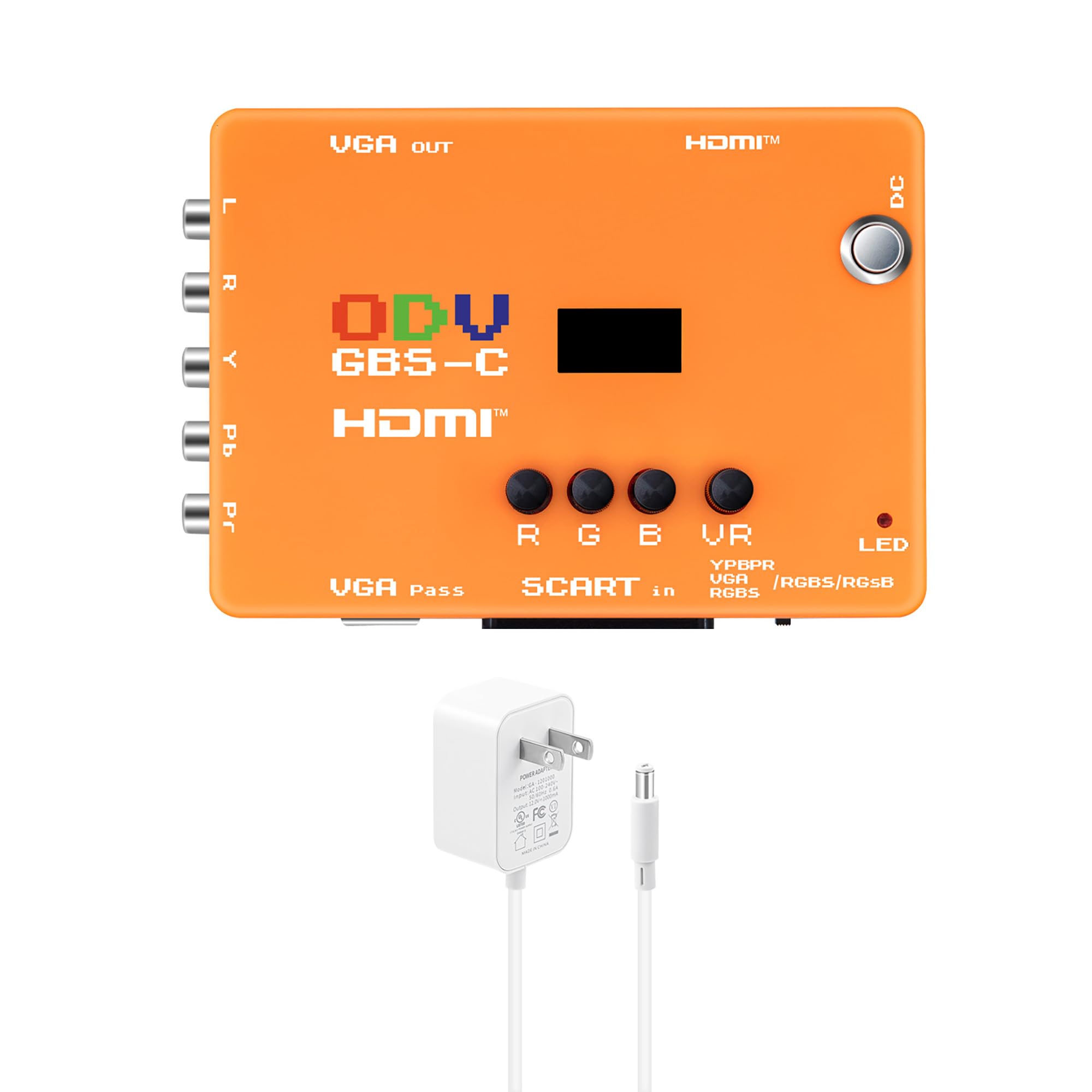
Mcbazel ODV-GBS-C

81 /100
Lab Score Excellent

Key details

Latency
Low latency
Input Types
RGBS/SCART, YPbPr, VGA
Ease of Setup
Complex (WiFi config)
Output Resolution
Variable (HDMI, VGA)
View on Amazon

The Mcbazel ODV-GBS-C is well-built and offers WiFi-based fine-tuning of RGB signals, a capability that sets it apart from simpler converters. While the top-pick OSSC focuses on zero-lag line doubling, this unit gives enthusiasts hands-on control over signal parameters.

WiFi control allows real-time adjustments of RGB levels, but the signal processing can introduce jitter or tearing in some setups — a tradeoff for the flexibility. Picture quality generally benefits the dedicated RGB or component user who is willing to dial in settings.

Best suited for PS2, Dreamcast, or Saturn owners using component cables who are comfortable with a learning curve. Requires an additional ODV-II adapter for N64 or GameCube, and the documentation is poor — not for those seeking instant results.

💡 Keep the manual handy and be prepared to experiment with settings — WiFi tuning helps once you learn the interface.

Pros

  • Sturdy build and capable upscaling for RGB and component sources.
  • WiFi-enabled configuration lets you fine-tune signals without touching the unit.
  • Wide input support (RGBS, SCART, YPbPr, VGA) at a mid-range price.

Cons

  • Picture quality may show jitter or tearing depending on the source and settings.
  • Not compatible with N64 or GameCube without an add-on ODV-II adapter.
  • Complex setup with many parameters and sparse documentation.
Our verdict

If you own a PS2, Dreamcast, or Saturn with component cables and enjoy tweaking settings, this converter offers value and flexibility that simpler alternatives lack.

Check Latest Price
6

GameCube Owners

Retro-Bit Prism GC HDMI

90 /100
Lab Score Outstanding

Key details

Latency
Low latency
Input Types
GameCube digital port
Ease of Setup
Plug-and-play
Output Resolution
1080p HDMI
View on Amazon

The Retro-Bit Prism HDMI Adapter connects to the GameCube's digital AV port to output 1080p video with noticeably sharper image on games that support progressive scan. No external power is needed — it draws from the console. The IR remote must be aimed directly at the adapter, and some commands may require multiple presses. This adapter only works with the GameCube; it won't help with N64, SNES, or other retro consoles. For GameCube enthusiasts who already own progressive scan titles, this is a clean upgrade path.

Pros

  • Sharp, clean 1080p output from GameCube's digital port
  • Plug-and-play setup with no external power required
  • Good value for dedicated GameCube use

Cons

  • IR remote requires direct line-of-sight and can be slow to respond
  • Only compatible with GameCube digital port
Our verdict

Best for GameCube owners with a library of progressive scan games who want a simple HDMI upgrade without soldering.

Check Latest Price
7

VHS Digitization

SoundBeast AV to HDMI 2.0

84 /100
Lab Score Excellent

Key details

Latency
Noticeable lag
Input Types
AV composite
Ease of Setup
Plug-and-play
Output Resolution
1080p HDMI
View on Amazon

The SoundBeast delivers solid image quality when converting VHS tapes to digital files, and the built-in USB capture means you don’t need a separate recorder. Colors can shift toward green or red in some scenes, and the noticeable input lag eliminates any possibility of using this for real-time gaming. This makes it a practical tool for digitizing old home videos or transferring camcorder footage, but not for connecting a retro console to a modern TV.

Pros

  • Produces clean 1080p output from composite sources for tape digitization.
  • Built-in USB video capture simplifies recording without extra hardware.
  • Includes remote control and aspect ratio switch for basic image adjustments.

Cons

  • Color accuracy can drift, with a green tint or reddish hue on skin tones in some clips.
  • Input lag is present, making it unusable for any interactive gaming use.
Our verdict

If your goal is to archive old VHS tapes with minimal fuss, this converter works well — just don’t expect it to serve double duty as a gaming upscaler.

Check Latest Price
8

Basic Connectivity

Setuact RCA to HDMI

89 /100
Lab Score Excellent

Key details

Latency
Noticeable lag
Input Types
AV composite
Ease of Setup
Plug-and-play
Output Resolution
1080p/720p HDMI
View on Amazon

For a budget-friendly converter, the Setuact gets the job done for basic connectivity. It accepts composite AV from VCRs, DVD players, and older consoles, then outputs a 720p or 1080p HDMI signal that modern TVs can display. The plug-and-play setup works with many devices, and the included cables save a trip to the store. However, the picture quality is a clear tradeoff. The output is blurred and shows no real upscaling improvement over direct composite — colors look washed out and fine details are lost. Input lag makes it unusable for retro gaming, and the USB power adapter is not included, so you'll need a spare phone charger. The plastic casing feels flimsy when connecting cables, but it holds up for occasional use. This is a bare-minimum adapter for verifying that old hardware still works, not for enjoying games or movies with decent visuals.

Pros

  • Extremely affordable and simple to set up with included cables
  • Works with a wide range of legacy devices like VCRs, DVD players, and older consoles

Cons

  • Picture quality is blurred and lacks real upscaling
  • Requires a USB power adapter that is not included; some units may flicker without a stable power source
Our verdict

Pick the Setuact only when you need to quickly check if an old VCR or console still outputs video, but skip it for any gaming or quality-sensitive use.

Check Latest Price
9

Extreme Budget

GINGIN AV to HDMI

88 /100
Lab Score Excellent

Key details

Latency
Noticeable lag
Input Types
AV composite
Ease of Setup
Plug-and-play
Output Resolution
1080p/720p HDMI
View on Amazon

Works with a wide range of devices including PS1, PS2, N64, and VCRs, and setup takes seconds with the included cables. The image, however, appears noticeably soft and blurry, making detailed gaming or movie watching unsatisfying. The lightweight plastic housing feels insubstantial, and a USB power adapter must be supplied separately. These tradeoffs keep it from being a serious upscaling solution but fine for a quick functionality test.

Pros

  • Very cheap and easy to use
  • Works with many devices

Cons

  • Image quality is soft and blurry
  • Requires external USB power, but no adapter is included
Our verdict

Best for verifying that an old console powers on and produces video, not for actual gameplay or picture quality.

Check Latest Price

How to Choose

Input Types Supported

Every retro console outputs video through one of several signal types: composite (yellow RCA), S-Video, component (YPbPr), or RGB SCART. The input type determines how much detail the upscaler has to work with. Composite combines color and brightness into one wire, which produces dot crawl and soft edges that no upscaler can fully fix.

Component and RGB carry separate color and luminance channels, giving the line doubler a clean signal to multiply. If your console only outputs composite (like the N64 without a mod), even a premium scaler will look mediocre. For best results, use a console that supports component or a modded RGB output.

Output Resolution and Upscaling Quality

Not all upscalers actually increase resolution. Basic converters under $20 simply convert analog to digital without line doubling — they output 480i as 480p with worse timing and added lag. A proper upscaler uses a line doubler or frame buffer to produce 480p, 720p, or 1080p by intelligently scaling each scan line.

Higher output resolution isn't always better. Some scalers force 1080p on a 480p source, adding softening and artifacts. The best approach is to double to 480p and let your TV handle the final upscale, or use a scaler that matches the console's native resolution before scaling.

Latency

Input lag is the delay between pressing a button and seeing the action on screen. Retro games were designed around CRT response times of under 8ms. Cheap converters buffer multiple frames for processing, introducing 30-60ms of lag that makes rhythm games and platformers feel sluggish.

True zero-lag upscalers like the OSSC use a technique called line doubling that processes each scan line in real time without buffering a full frame. The trade-off is that they require a clean incoming signal — any noise in the analog source becomes visible on screen. If you play twitchy games like Super Metroid or fighting games, zero-lag is worth the extra cost.

Console Compatibility

Some upscalers are universal (accepting composite, S-Video, component), but many are console-specific and tap directly into the console's digital or analog video port. Dedicated adapters like the Kaico Analogue x2 for Nintendo or the LEVELHIKE for PS2 offer simpler setup and better image quality for those consoles because they skip the messy analog conversion.

Multi-console scalers like the BITFUNX RetroScaler2x work with many machines but often require fiddling with settings per console. If you own only one or two retro systems, a dedicated adapter saves hassle. If you have six consoles on a shelf, a multi-input scaler with RGB support is more cost-effective.

Ease of Setup

Plug-and-play adapters require no configuration — just connect and power on. They're ideal for casual gamers who want a quick HDMI solution without reading manuals. However, they often lock you into a fixed output resolution and may not support all game refresh rates.

Configurable scalers like the Mcbazel ODV-GBS-C and OSSC allow fine-tuning of brightness, scanlines, and timing via remote, WiFi, or on-device menus. The learning curve is steep, but the payoff is customizable picture quality that adapts to each console's quirks. Enthusiasts who enjoy tweaking get more value; anyone else should stick with a dedicated adapter.

Frequently Asked Questions