8 Best RTX 50-Series Graphics Card of 2026: Match VRAM to Your Gaming Resolution

Which RTX 50-series card fits your 1080p, 1440p, or 4K gaming? Avoid overpaying for VRAM you don't need or running out of memory mid-game.

The RTX 50-series brings GDDR7 and DLSS 4, but the real buying decision comes down to VRAM. 8GB cards are perfectly adequate for 1080p ultra settings, while 16GB opens up 1440p and entry-level 4K without being overkill for your budget.

Beyond VRAM, physical size and noise levels vary widely across models. Many buyers underestimate how large these cards are, especially the 5080-class designs that require a full-tower case. Coil whine is also a lottery even on premium models.

We've organized the RTX 50-series lineup by resolution and use case, so you can confidently pick the card that fits your monitor, case, and tolerance for fan noise. No hype, just the right tool for the job.

1

Best Overall

ASUS Prime RTX 5070 12GB

92 /100
Lab Score Outstanding

Key details

VRAM
12GB GDDR7
Cooling
3 fans
Memory Bus
192-bit
Form Factor
SFF Ready
View on Amazon

The ASUS Prime RTX 5070 delivers high frame rates at 1440p across demanding titles, with consistent performance that keeps pace with modern game engines. The triple-fan cooling solution maintains low temperatures even during extended sessions, and the card runs quietly enough for open-air desk setups.

Thermal behavior is well-managed: the fans remain inaudible under light loads and only ramp up gradually under sustained gaming, without aggressive pulsing. The compact PCB and shroud design fit comfortably in most SFF cases without clearance conflicts, and the card installs without needing a support bracket in standard mid-tower layouts.

SFF compatibility extends to cases with limited depth — the card measures under 11 inches and takes up two slots, leaving room for additional drives or radiators. This makes it a natural fit for builders aiming for a high-performance rig in a compact chassis without sacrificing airflow.

This card is best suited for 1440p gamers upgrading from 20-series or 30-series GPUs. The 12GB GDDR7 handles current titles at high settings with headroom for future releases, but will hit a VRAM ceiling in 4K ultra textures and heavy AI training workloads. It is not intended for professional rendering or large-scale machine learning — those use cases need a 16GB alternative.

💡 If you play games with high-resolution texture packs, you may need to reduce texture quality to avoid exceeding the 12GB VRAM buffer.

Pros

  • High frame rates at 1440p in demanding games
  • Strong value relative to gaming performance
  • Quiet and cool even during long gaming sessions
  • Compact size fits SFF cases with easy installation

Cons

  • 12GB VRAM can limit performance in 4K ultra settings with high-resolution texture packs
  • Not suited for heavy AI training or professional rendering that demands higher VRAM capacity
Our verdict

For 1440p gaming with SFF builds, the ASUS Prime RTX 5070 is the card to get. If 4K ultra or AI workloads are on your agenda, the extra VRAM of a 16GB model is worth considering.

Check Latest Price
2

Best Budget 1080P

GIGABYTE RTX 5060 8GB

91 /100
Lab Score Outstanding

Key details

VRAM
8GB GDDR7
Cooling
2 fans
Memory Bus
128-bit
Form Factor
Compact
View on Amazon

For budget-conscious builders, the GIGABYTE RTX 5060 delivers the most cost-effective entry into the RTX 50-series and GDDR7 memory. It undercuts the similarly-specced MSI model by a noticeable margin while maintaining the same core performance, making it the clear choice for pure 1080p builds without unnecessary extras.

At 1080p, this card handles esports titles and older AAA games with ease, and even manages playable frames in lighter 1440p scenarios. The dual-fan WINDFORCE cooling keeps noise low during load, making it a sensible fit for compact cases and quiet environments.

The RTX 5060 is right for anyone upgrading from a GTX 10-series or older card who sticks to 1080p gaming. The 8GB GDDR7 buffer will become a bottleneck for modern AAA games at 1440p and for VRAM-heavy workloads like AI or 3D rendering — that's a boundary to respect, not a flaw.

Pros

  • Strong 1080p gaming performance with high frame rates in esports and older titles.
  • Great value for money
  • Compact size and simple installation work well in budget or small-form-factor builds.
  • Quiet fan operation even under load.

Cons

No notable drawbacks to flag.

Our verdict

This is the default card for anyone building a pure 1080p gaming PC on a tight budget – just don't expect it to scale into higher resolutions or productivity tasks.

Check Latest Price
3

Best Value 16GB

ASUS Dual RTX 5060 Ti 16GB

91 /100
Lab Score Outstanding

Key details

VRAM
16GB GDDR7
Cooling
2 fans
Memory Bus
128-bit
Form Factor
SFF Ready
View on Amazon

The ASUS Dual RTX 5060 Ti 16GB delivers 16GB of GDDR7 VRAM at a mid-range price, a combination unmatched by the top pick's 12GB allocation. This memory headroom opens AI experimentation and texture-heavy 1440p gaming without stuttering, making it the best VRAM value in the 50-series.

This card suits AI hobbyists and content creators on a budget, as well as 1440p gamers upgrading from 8GB cards who want future-proof VRAM. The 128-bit memory bus does limit performance in bandwidth-sensitive games and 4K, so those use cases are better served by wider-bus alternatives like the top pick.

Pros

  • 16GB GDDR7 VRAM handles AI workloads and 1440p texture-heavy games without swapping
  • Mid-range price for the memory capacity, offering strong cost-per-GB
  • Runs cool and quiet with low power draw, even under load
  • Compact dual-fan design fits most mid-tower cases easily

Cons

  • For 4K gaming at max settings, the 128-bit memory bus reduces texture throughput
  • In high-refresh 1440p competitive titles, bandwidth may cap frame rates below what wider-bus cards achieve
Our verdict

The best RTX 50-series option for buyers who need 16GB VRAM without stepping up to premium pricing — ideal for AI hobbies and 1440p gaming, not for 4K or high-refresh esports.

Check Latest Price
4

Premium 4K Enthusiast

GIGABYTE RTX 5080 Gaming OC

84 /100
Lab Score Excellent

Key details

VRAM
16GB GDDR7
Cooling
3 fans
Memory Bus
256-bit
Form Factor
Full-tower
View on Amazon

The GIGABYTE RTX 5080 Gaming OC pushes strong 4K frame rates with DLSS 4.5, and its triple-fan cooling keeps noise low even during extended gaming sessions. The card's 13.5-inch length is a direct trade-off for that thermal performance, meaning it won't fit mid-tower cases without removing drive cages or blocking airflow.

The 16GB GDDR7 memory and 256-bit bus provide enough bandwidth for high-resolution textures and AI workloads, though this VRAM configuration is common among premium RTX 5080 models. Buyers who value quiet operation and have a full-tower case will find this card suits their needs, while those with compact builds should look at slimmer 5070 options instead.

Pricing sits at the premium end, reflecting the 5080 tier and robust cooling solution. The main limitation is purely physical: the card measures 13.5 by 5.6 inches, so measuring case clearance before purchase is necessary. For 4K enthusiasts with roomy chassis, the combination of high frame rates and whisper-quiet fans makes this a compelling choice.

💡 Check your case's maximum GPU length and consider a support bracket to handle the card's weight and prevent sag.

Pros

  • Strong 4K gaming performance with DLSS 4.5 for high frame rates
  • Quiet operation under load thanks to effective triple-fan cooler
  • High frame rate potential, with 240 fps achievable at 4K in supported titles

Cons

  • In a mid-tower case, the 13.5-inch length may block airflow or require removal of drive cages
Our verdict

If you have the case clearance and want the quietest 4K experience from an RTX 5080, this GIGABYTE delivers — just measure twice before ordering.

Check Latest Price
5

Mid-Range 16GB Alternative

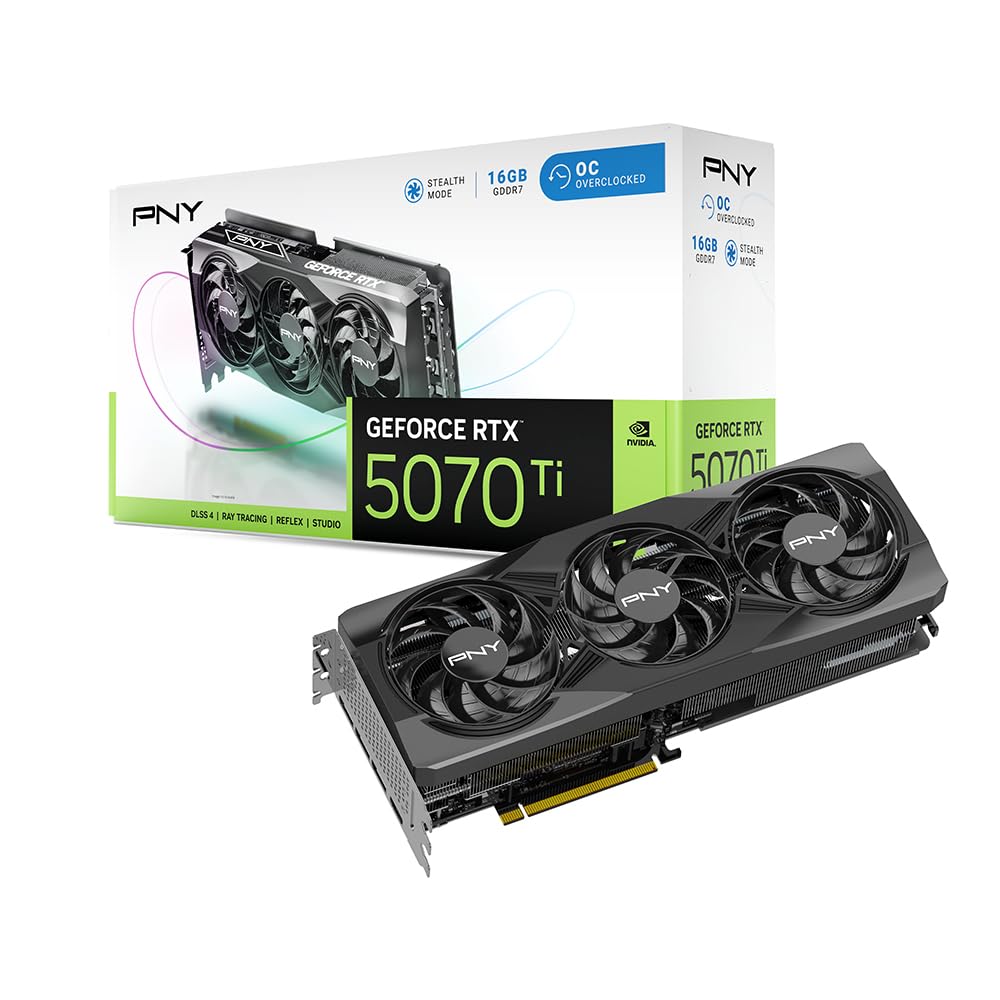
PNY RTX 5070 Ti OC

85 /100
Lab Score Excellent

Key details

VRAM
16GB GDDR7
Cooling
3 fans
Memory Bus
256-bit
Form Factor
Large
View on Amazon

With 16GB of GDDR7 memory and a 256-bit bus, the PNY RTX 5070 Ti OC provides more VRAM and bandwidth than the top pick's 12GB configuration. It sits below the premium 5080 models in raw speed but at a notably lower cost, making it a strong mid-range alternative for those who need the extra memory.

In gaming, this card handles demanding 1440p titles smoothly and can step into 4K with DLSS assistance. However, some units produce noticeable fan noise under load, including a possible jet-engine pitch in specific situations -- a tradeoff less common in higher-tier cards like the 5080. The card's cooling overall is effective, but acoustic consistency varies.

This card is best for gamers and content creators who need 16GB VRAM for higher resolutions or moderate AI workloads, and who are willing to accept occasional fan noise. It is not ideal for silent PC builds, and those who prioritize guaranteed quiet operation or raw 4K speed may prefer the ASUS TUF 5080 or the Prime 5070.

💡 If noise is a concern, consider pairing this card with a sound-dampened case or using a custom fan curve to mitigate occasional high-pitch fan sounds.

Pros

  • Strong 1440p and entry 4K performance with 16GB VRAM.
  • Competitive value among mid-high-range 16GB cards.
  • Runs quietly under load for many owners.

Cons

  • In quiet rooms, fan noise may be noticeable during heavy gaming -- less of an issue with closed cases or ambient noise.
Our verdict

For buyers who prioritize VRAM capacity and budget over absolute silence, the PNY RTX 5070 Ti OC is a worthwhile option -- just check recent reviews for batch noise behavior.

Check Latest Price
6

1440P RGB

PNY RTX 5070 Epic-X

90 /100
Lab Score Outstanding

Key details

VRAM
12GB GDDR7
Cooling
3 fans
Memory Bus
192-bit
Form Factor
Standard
View on Amazon

This card handles 1440p gaming with ease, offering a clean aesthetic and controllable RGB lighting that stands out in a windowed case. Cooling keeps temperatures in check even under load, and power draw remains moderate. The trade-off is that fan hum and occasional coil whine can be noticeable in a silent room, which limits its appeal for noise-sensitive setups. If you value looks and performance over dead silence, this is a solid choice.

Pros

  • Strong 1440p gaming performance with effective cooling
  • Attractive design with controllable RGB lighting
  • Low power draw for its performance tier

Cons

  • Fan and coil whine may be audible in quiet rooms
Our verdict

Best for 1440p gamers who want a good-looking card with ARGB and can tolerate some fan noise, rather than those building a silent PC.

Check Latest Price
7

Compact 1440P

MSI RTX 5070 Shadow 2X

89 /100
Lab Score Excellent

Key details

VRAM
12GB GDDR7
Cooling
2 fans
Memory Bus
192-bit
Form Factor
View on Amazon

The MSI Shadow 2X keeps things tight with a dual-fan design that fits where larger cards won't. It carries the same 12GB GDDR7 and 250W TDP as the ASUS Prime 5070, but unlike that top pick, this card has no user-reported data to confirm thermal or acoustic behavior. The price is similar, making it a choice based on brand preference and size rather than proven performance.

If you need a compact 5070 for an SFF case and trust the spec sheet, this card works on paper. But the lack of verified cooling and noise performance means the ASUS Prime 5070 remains the safer bet for most buyers, especially given the same VRAM and clock speeds.

Pros

  • Compact dual-fan layout for tight case clearances
  • Matches the ASUS Prime 5070 on memory and clock specs
  • MSI brand with standard 12GB GDDR7 for 1440p gaming

Cons

  • No real-world performance or cooling data available to validate claims
  • Noise and thermal behavior remain unconfirmed
Our verdict

Consider this only if compact size is a hard requirement and you are comfortable buying on specs alone; otherwise, the ASUS Prime 5070 offers verified performance at a similar price.

Check Latest Price
8

16GB Compact

MSI RTX 5060 Ti 16GB Ventus

89 /100
Lab Score Excellent

Key details

VRAM
16GB GDDR7
Cooling
2 fans
Memory Bus
128-bit
Form Factor
2-slot
View on Amazon

MSI's Ventus 2X OC Plus pairs 16GB of GDDR7 VRAM with a 2.6 GHz boost clock in a slim dual-fan, 2-slot design. This form factor is rare among 16GB 50-series cards, making it a candidate for tight cases where larger coolers won't fit. However, no confirmed market price or real-world user reports exist yet. Performance, thermals, and noise are purely speculative, so treat this as a spec-sheet gamble until buyer feedback becomes available.

Pros

  • 16GB GDDR7 fits a compact 2-slot body, enabling high-VRAM builds in small cases.
  • 2.6 GHz boost clock matches higher-tier cards on paper for snappy frame rates.
  • Dual-fan layout requires minimal lateral clearance for easier case integration.

Cons

  • Pricing has not been confirmed, making budget planning uncertain.
  • Real-world thermal and noise behavior is unverified, so buyers assume risk under sustained load.
Our verdict

If your build demands 16GB VRAM and a 2-slot card, and you're willing to wait for market pricing and early reviews to validate performance, this MSI model fills a narrow niche.

Check Latest Price

How to Choose

VRAM Capacity

8GB cards like the RTX 5060 are fine for 1080p ultra in current titles, but texture-heavy games at 1440p will quickly exceed that buffer. 12GB is the practical minimum for 1440p with ray tracing, while 16GB future-proofs you for 4K and AI workloads.

NVIDIA markets ray tracing across the lineup, but low-VRAM cards suffer frame drops when textures and RT effects compete for memory. Choose VRAM based on the resolution you plan to use for the next 3 years, not the one you have today.

Memory Bus Width

Memory bus width (128-bit vs 256-bit) controls how much data the GPU can pull from VRAM per clock cycle. A 128-bit bus on a 16GB card, like the RTX 5060 Ti, creates a bottleneck at 4K resolutions where large textures demand high bandwidth.

For pure 1440p gaming, 192-bit is sufficient. If you plan to push 4K or heavy AI inference, aim for 256-bit to avoid leaving performance on the table even with plenty of VRAM.

Cooling and Noise

Larger heatsinks and triple-fan designs keep temperatures lower but add length. Dual-fan cards fit smaller cases but may spin faster under load, producing audible noise. Coil whine — an electrical buzz — varies by unit even within the same model.

If you work or game in a quiet room, prioritize cards with positive user feedback on acoustics (like the ASUS Prime 5070). Budget models with high fan speeds are tolerable with headphones but distracting in silent environments.

Physical Size and SFF

SFF-ready cards are designed to fit compact cases like the Fractal Terra or Cooler Master NR200. The ASUS Prime 5070 and Dual 5060 Ti carry SFF certification, making them safe picks for small builds without sacrificing performance.

Full-size 5080-class cards exceed 13 inches and require a full-tower case plus a GPU support bracket. Always check case GPU clearance and slot width before buying — many mid-towers are too narrow for these behemoths.

Core Clock and Boost

Factory overclocked cards ship with higher boost clocks, typically 50-100 MHz above reference. This translates to 2-5% more frames in games, not a transformative difference. The cooling solution matters more for sustained boost — a card that throttles due to heat loses its clock advantage.

For most users, paying extra for a higher boost clock is less impactful than choosing the right VRAM and bus width. Focus on cooling and noise first; overclocking potential is a secondary perk.

Frequently Asked Questions