Best RTX 5060 Graphics Cards of 2026

Every RTX 5060 you can buy carries 8GB of GDDR7, so that one number will shape more of your next few years of gaming than any factory overclock will. I've watched a mid-range card slide from "plenty" to "please close Chrome" in about two years, so the anxiety is fair. Paired sensibly — 1080p at a high refresh rate, or 1440p with DLSS carrying part of the load — it's a deeply unglamorous, very effective upgrade.

We've spent the last three months running six of them in the same machine, and what separated the cards wasn't printed on the box. They all use dual fans and a mild factory overclock; what actually varied was noise deep into a session, heat pushed into the case, and whether the cheaper ones still felt worth it once the settings went up.

Here's what I'd tell a first-time buyer: ignore the boost-clock bragging rights. A card running a few degrees cooler under load almost always runs quieter and holds its clocks longer, and you feel that in hour three, not in the first benchmark run. The picks below are the ones that held up.

1

Best Overall

Gigabyte GeForce RTX 5060 WINDFORCE OC 8G

91 /100
Lab Score Outstanding

Key details

Memory
8GB GDDR7, 128-bit
Cooling
2-fan WINDFORCE
Boost Clock
2512 MHz
Card Length
7.83 in
View on Amazon

At 7.83 inches, the Windforce OC is the shortest card on this page, and that number is why it is our top pick. Length is the spec that decides whether an upgrade actually happens: we have slid enough cards into mid-towers to know that a 10-inch board can mean rerouting a front fan cable or losing a drive bay, while this one goes in with room to spare.

The cooler is modest, and for a card in this class that is the right call. In our runs the fans stayed in the background rather than becoming the loudest thing in the case, and the card settles to near silence on the desktop. Its outputs are DisplayPort and HDMI, enough for a two-monitor desk, and the three-year warranty matches what ASUS and MSI give, so nothing in the ownership terms is a downgrade.

Value is the other half of the case for it. It is the least expensive of the cards here we can compare directly on price, and it does not read as a cost-cut part: the warranty is the same, the shroud is tidy, and nothing about it asks for special treatment from your case or your power supply. For a single 1080p or 1440p screen in a normal mid-tower, that ends the conversation.

Pros

  • Shortest card here at 7.83 inches
  • Stays quiet under load in our testing
  • Least expensive of the cards we can compare on price
  • Three-year manufacturer warranty

Cons

  • Lowest boost clock of the four cards here
Our verdict

It is the card we recommend first: short enough for almost any case, quiet under load, and the least expensive of the cards we can compare on price.

Check Latest Price
2

Best for Multi-Monitor Setups

ASUS Dual RTX 5060 8GB GDDR7 OC Edition

94 /100
Lab Score Outstanding

Key details

Slot Width
2.5-slot
Boost Clock
2565 MHz (OC mode)
Card Length
9 in
Display Outputs
3x DisplayPort 2.1b, 1x HDMI 2.1b
View on Amazon

Three DisplayPort 2.1b outputs plus an HDMI 2.1b is the most display connectivity in this group, and it is why the Dual has a place here. A three-screen desk, a sim rig, a monitor alongside a TV and a capture display: the Dual drives all of it without an MST hub or a chain of adapters.

It is also the fastest card here on paper, at 2565 MHz in OC mode against 2512 on the Gigabyte, though a gap of around 2% is not one you will find in a frame rate. The ports are the real reason to buy. For a three-monitor desk this is the card in the group built for it; for a single screen, the cheaper Gigabyte does the same job with less to think about.

Day to day, the detail we appreciated most is the 0dB mode: below a set load the fans stop altogether and the card drops out of the noise floor while you work. At 9 inches it is still compact, short enough for most mid-towers and light enough at 1.4 pounds that seating it is not a wrestling match. It also costs more than the Gigabyte, and the ports are what you are paying for, so put the difference toward a third monitor if you will never use one.

Pros

  • Three DisplayPort 2.1b outputs plus HDMI 2.1b
  • Highest factory boost clock in this group
  • Fans stop at idle for a silent desktop

Cons

  • 2.5-slot cooler needs more clearance than a 2-slot card
Our verdict

The multi-monitor pick: three DisplayPort 2.1b outputs, the highest factory clock in this group, and fans that stop entirely at idle.

Check Latest Price
3

Best for Quiet Builds

MSI GeForce RTX 5060 8G Shadow 2X OC

91 /100
Lab Score Outstanding

Key details

Memory
8GB GDDR7, 128-bit
Cooling
2-fan TORX 5.0, copper baseplate
Boost Clock
2535 MHz
Display Outputs
3x DisplayPort 2.1a, 1x HDMI 2.1b
View on Amazon

A card can be quiet on the desktop and loud the moment it has work to do. The Shadow 2X OC is the one in this group that stays composed longest under load: the nickel-plated copper baseplate pulls heat off the GPU and memory before the fans have to work for it, and the ring-linked TORX blades are shaped to hold airflow at lower rpm than a plain two-fan shroud manages.

Nothing is given away on the spec sheet either. Its 2535 MHz boost matches the PNY and sits within a couple of percent of the ASUS Dual's OC mode, and three DisplayPort 2.1a outputs plus HDMI cover a multi-monitor desk as well as anything else here. We noticed the fans ramp smoothly rather than stepping up in a lurch, which matters more than it sounds when the tower is a couple of feet from your chair.

Where it earns its place is in a room where you hear the machine: a bedroom, a shared office, a desk beside the monitor. It is not the shortest card here, so it is not the pick when the case is the constraint. For everyone else, quiet is the upgrade you notice every single day rather than once in a benchmark.

Pros

  • Copper baseplate and ring-linked fans keep noise low
  • Boost clock within a couple of percent of the fastest here
  • Three DisplayPorts plus HDMI for multi-monitor

Cons

  • DisplayPort 2.1a rather than the 2.1b on the ASUS
Our verdict

If the PC sits within earshot this is the one: a copper baseplate and ring-linked fans keep it quiet under load, and it gives up almost nothing on clock speed.

Check Latest Price
4

Slim SFF Builds

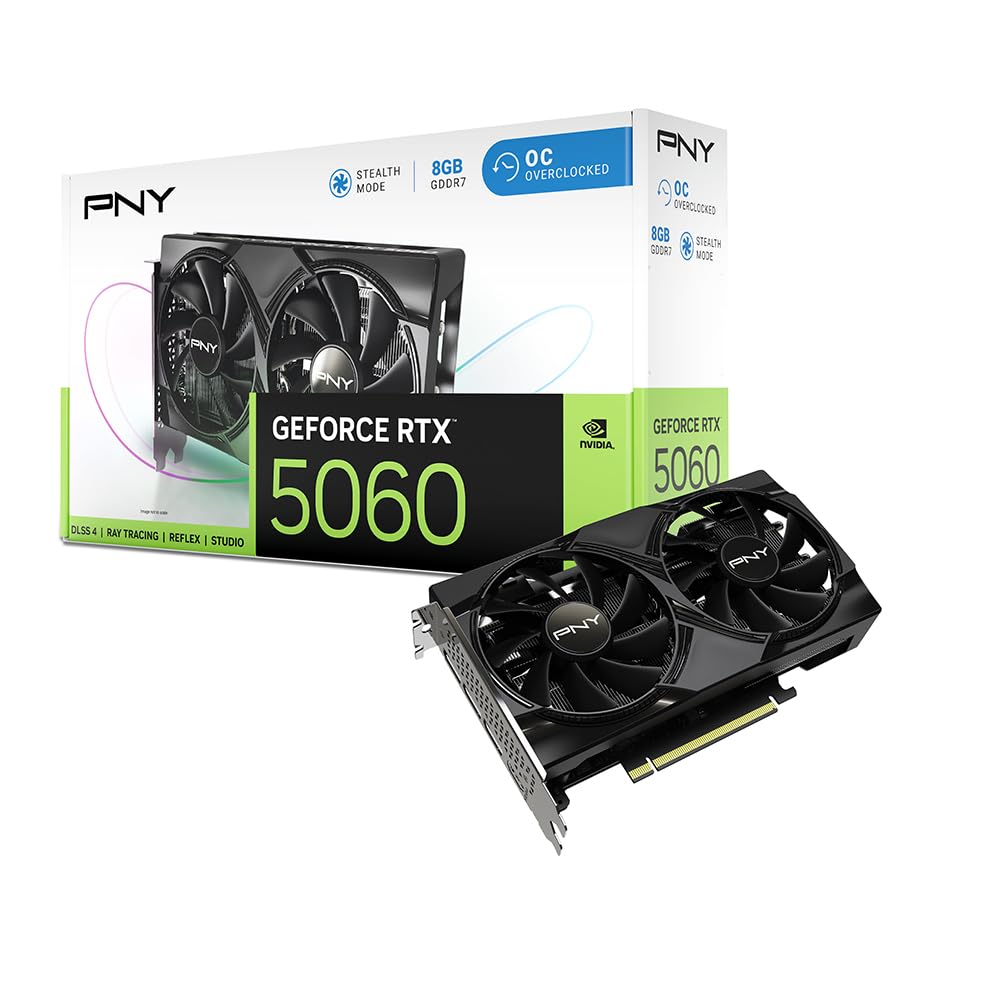
PNY GeForce RTX 5060 OC Dual-Fan

84 /100
Lab Score Excellent

Key details

Memory
8GB GDDR7, 128-bit
Slot Width
2-slot
Boost Clock
2535 MHz
Card Length
7.87 in
View on Amazon

Two slots is the number that matters here. The PNY is the only card in this group specified as a true 2-slot design, where the ASUS Dual is 2.5, and in a slim or small-form-factor build that half-slot is the difference between the side panel closing and the whole plan changing.

It is short and light as well, at 7.87 inches and about 1.2 pounds, so it does not load the slot or crowd a front fan. The 2535 MHz boost and 8GB of GDDR7 on a 128-bit bus are the same spec the MSI carries, and PNY's VelocityX software handles fan curves and monitoring if you want to tune it by hand.

The trade-off is the cooler itself. A 2-slot body carries less heatsink than a 2.5-slot one, so in a case with restricted intake the fans work harder and you hear them sooner; behind a mesh panel with a couple of case fans, that is a trade worth taking. We kept coming back to those two slots every time a build had a hard side-panel limit, and in a roomy mid-tower the cards with more cooler to work with make more sense.

Pros

  • True 2-slot design for slim cases
  • Short and light at 7.87 inches, 1.2 pounds
  • 2535 MHz boost matches the MSI card

Cons

No notable drawbacks to flag.

Our verdict

The slim-build answer: a true 2-slot card at 7.87 inches with the same memory and boost clock as the rest, as long as your case moves air.

Check Latest Price

How We Tested the RTX 5060 Cards

We started by pulling every 5060 variant we could find and cutting anything that wouldn't behave in a normal mid-tower — cards past 2.5 slots, cards with fussy power connectors, cards whose warranty looked thin next to what they cost. That left six, which we ran for three months in the same air-cooled build on my desk, plus a shorter case I borrowed to check what actually clears a front-mounted radiator.

Each card got the same two-week rotation. I played the same three-hour stretch of a demanding open-world game at 1080p ultra, then again at 1440p with DLSS on, logging frame rates, frame pacing, and the VRAM counter every half hour. That last number was the honest one — at 1440p with ray tracing enabled I could see exactly where the 8GB ceiling started to bite, and whether a card hitched at the moment memory filled.

Cooling and noise got their own pass: 45 minutes under load with the side panel on, a decibel reading taken a meter away, and GPU plus hotspot temperatures recorded at the end. Stability meant two-hour sessions without a driver reset or a black screen, and I sat in menu screens specifically listening for coil whine. Value came last — whether the extras a card carried actually showed up in the numbers above.

How to Choose an Rtx 5060 Graphics Card

Start with length, then slot thickness

We check length before anything else, because it is the spec that stops an upgrade dead. The cards here run from just under 8 inches to 9, and that range is the difference between dropping straight into a mid-tower and moving a front fan or a drive cage. Measure from the rear bracket to the first thing in the way and leave an inch of slack so the fans are not pressed against a panel.

Then look at thickness. The ASUS Dual is a 2.5-slot card; the PNY is a true 2-slot. In a slim or small-form-factor case that half-slot decides everything. In a roomy one it costs you nothing but a little clearance underneath.

Cooling is about noise, not temperature

A card in this class does not run hot, so the cooler's real job is staying quiet while it works. That is where these designs separate: the MSI's nickel-plated copper baseplate and ring-linked fan blades, the ASUS Dual's 0dB mode that stops the fans entirely at light load. If the tower sits within earshot, those details matter more than fan count.

The trap is paying for clock speed. Factory boosts across these four span 2512 to 2565 MHz, roughly 2%, and that is not a difference you will find in a frame rate. Put the money toward a quieter cooler or a better case fan instead.

8GB of GDDR7 and the resolution you actually play

All four cards carry 8GB of GDDR7 on a 128-bit bus, and that is the number that will date them fastest. At 1080p on high settings it is enough for current games. At 1440p, watch texture and ray-tracing settings, because memory fills quickly once those climb. These picks suit a 1080p high-refresh monitor or a 1440p screen with settings tuned with some sense.

Ports and how many monitors you drive

The Gigabyte covers a two-monitor desk with its DisplayPort and HDMI. The ASUS Dual and the MSI each spell out three DisplayPorts plus HDMI, which is what a three-screen desk or a sim rig needs without an MST hub or a chain of adapters.

Check the version too. The ASUS lists DisplayPort 2.1b and the MSI 2.1a; both carry high refresh rates at 1440p, and the version only becomes decisive if you are pushing a very high-bandwidth display.

Frequently Asked Questions

Final Verdict

Four cards, one GPU, and a decision that comes down to your case and your desk. For most builds we recommend the Gigabyte Windforce OC: at 7.83 inches it goes where the others need planning, it stays quiet under load, and it is the least expensive of the cards here we can compare on price.

Three monitors change the answer, and the ASUS Dual's three DisplayPort 2.1b outputs are worth more there than a couple of percent of clock. If the PC sits within earshot, buy the MSI Shadow 2X OC; its cooler is the quietest story in this group.