10 Best 32-Inch OLED Gaming Monitor of 2026: Balance Glossy Clarity and Speed

Which 32-inch OLED gaming monitor delivers the best picture, refresh, and reliability? We cut through dual-mode hype and glossy vs matte confusion to match you with the right pick.

Shopping for a 32-inch OLED gaming monitor means choosing between glossy panels that deliver stunning contrast and matte screens that handle reflections. Many buyers discover after purchase that the dual-mode feature they wanted comes with unexpected blackouts or that the glossy screen they loved in the store washes out in a bright room. This guide helps you navigate those trade-offs by focusing on real-world performance and reliability, not just spec sheets.

The sweet spot around $750 to $900 offers the best balance of performance and value, where glossy QD-OLED and dual-mode become standard. But not all monitors handle the transition between 4K and FHD smoothly, and burn-in warranty terms vary widely. We have broken down the key differences to help you pick the monitor that matches your gaming habits and room lighting.

1

Best Overall

LG 32GX850A-B

89 /100
Lab Score Excellent

Key details

Warranty
2 years
Panel Type
WOLED glossy
Connectivity
DP, HDMI, USB
Refresh Rate
165Hz dual 330Hz
View on Amazon

The WOLED panel on the LG 32GX850A-B produces deep blacks and saturated colors that give games a tangible sense of depth, while the 0.03ms response time eliminates motion blur during fast-paced action. Dual-mode switching lets you run 4K at 165Hz for detailed single-player titles or drop to FHD at 330Hz for competitive shooters, offering flexibility without a second monitor.

Setup is quick: the stand includes tilt, height, swivel, and pivot adjustments, and the OSD joystick makes menu navigation straightforward. The glossy coating enhances contrast in dim rooms, though reflections can be noticeable under direct light. Brightness at 275 nits typical is enough for most gaming sessions, with Micro Lens Array+ providing a modest luminance boost for HDR highlights without washing out blacks.

This monitor is built for gamers who want a polished glossy OLED without chasing the highest refresh rates or peak brightness figures. You will need external speakers because there are none built in, and the 2-year warranty is shorter than the 3-year coverage some competitors offer. For buyers who prioritize display clarity and a hassle-free out-of-box experience over spec-sheet extremes, the 32GX850A-B is the most consistent choice in its class.

💡 Use the headphone port for audio output; the monitor lacks internal speakers.

Pros

  • Stunning OLED contrast with perfect blacks and vivid colors
  • Dual-mode switching between 4K 165Hz and FHD 330Hz for versatile gaming
  • Simple setup and responsive on-screen controls
  • Glossy panel delivers exceptional clarity and depth in controlled lighting
  • Adequate brightness for most indoor gaming with improved luminance from Micro Lens Array+

Cons

  • No built-in speakers
  • 2-year warranty is shorter than the 3-year coverage offered by some rivals
  • Some units may exhibit flickering or black screen issues; worth checking the unit on arrival
Our verdict

For a glossy OLED that balances price, performance, and reliability, the 32GX850A-B is the strongest contender – just budget for a separate speaker set.

Check Latest Price
2

Best for High Refresh Rate Gaming

LG 32GX870A-B

83 /100
Lab Score Excellent

Key details

Warranty
2 years
Panel Type
WOLED matte
Connectivity
DP2.1, HDMI2.1, USB-C
Refresh Rate
240Hz dual 480Hz
View on Amazon

The LG 32GX870A-B delivers a native 240Hz refresh rate with a dual-mode option to hit 480Hz at FHD, along with a peak brightness of 1300 nits for HDR content. This makes it a stronger choice for competitive gamers seeking the fastest motion handling than the glossy-panel top pick, which lacks DP2.1 and built-in speakers.

Competitive gamers who prioritize high refresh rates and brightness will find this monitor compelling. Some units have experienced power supply failures or no-signal detection after a few weeks of use, so buyers should verify return policies and warranty coverage. The matte anti-glare coating is effective in brightly lit rooms, though it does not deliver the same contrast pop as glossy OLEDs.

The inclusion of DP2.1, HDMI 2.1, and USB-C covers modern GPU and peripheral connections, and the built-in speakers are audible enough for game audio without requiring external ones.

💡 The sparse manual means you'll likely need to consult online guides for optimal settings.

Pros

  • Peak 1300-nit brightness with seamless dual-mode switching between 4K 240Hz and FHD 480Hz.
  • Deep OLED blacks and accurate color reproduction with sharp text readability.
  • DP2.1, HDMI 2.1, and USB-C inputs along with functional built-in speakers.

Cons

  • Setup requires some trial and error due to a minimal quick-start guide.
  • Some units may experience power supply failures or no-signal detection after weeks of use.
Our verdict

Competitive gamers who want the brightest and fastest dual-mode display should consider this monitor, provided they secure a purchase with solid return protection.

Check Latest Price
3

Best Value QD-OLED

MSI MAG 321UPX

85 /100
Lab Score Excellent

Key details

Warranty
3 years
Panel Type
QD-OLED glossy
Connectivity
HDMI2.1, DP, USB-C 15W
Refresh Rate
240Hz
View on Amazon

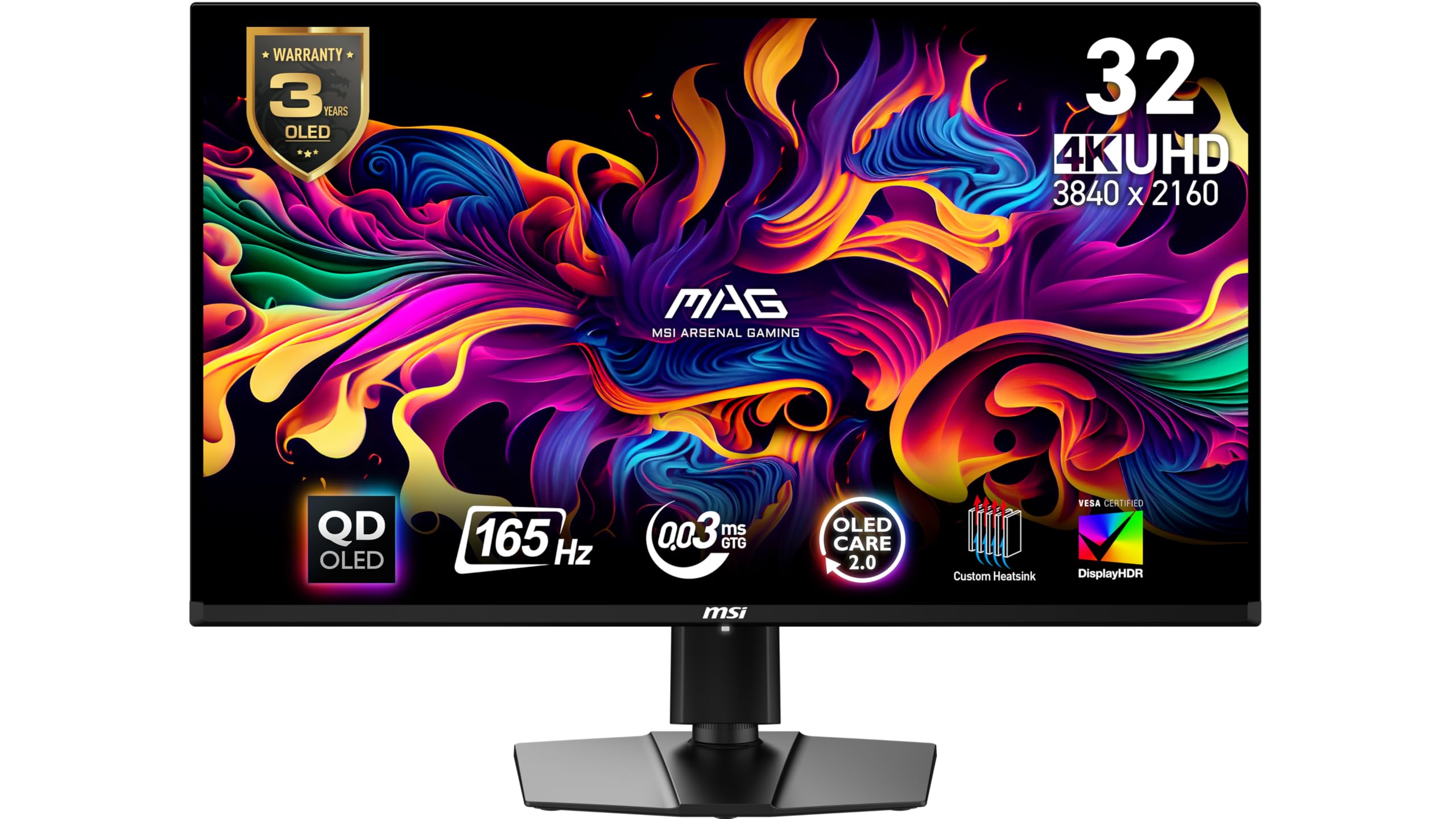
The MSI MAG 321UPX delivers a true 4K 240Hz QD-OLED experience at a price that undercuts most competitors, including the curved 165Hz model in this roundup. Its glossy panel produces deep blacks and vibrant HDR that make scenes pop, outperforming matte-coated OLEDs in color saturation. With a 0.03ms response time, motion stays crisp during fast-paced gameplay, and the 240Hz refresh rate keeps animations smooth. The USB-C port with 15W charging adds convenience for peripheral connectivity.

This monitor is built for gamers who want flagship-level picture quality without the flagship price. A minority of units can require multiple power-on attempts to wake, and the lack of firmware update support means any quirks are permanent. Those who need absolute out-of-box reliability may prefer the LG 32GX850A-B, but for budget-focused buyers willing to accept occasional startup hiccups, the value proposition is unmatched. MSI includes a 3-year warranty that covers burn-in, providing reassurance for heavy use.

💡 Keeping the monitor powered on rather than turning it off completely can minimize the need to power-cycle it on startup.

Pros

  • Deep blacks and vibrant colors from the QD-OLED panel deliver strong HDR performance.
  • One of the most affordable 4K 240Hz QD-OLED monitors available, offering great value.
  • Glossy screen finish makes colors pop and text appear sharper than matte panels.

Cons

  • Power-on can require multiple attempts in some cases, causing occasional startup hiccups.
  • No firmware update path means any bugs or quirks cannot be resolved after purchase.
Our verdict

For gamers who prioritize raw performance per dollar over hassle-free out-of-box experience, the MSI MAG 321UPX offers the best value in 32-inch QD-OLED. The occasional power-on hiccup is a manageable tradeoff for the savings.

Check Latest Price
4

Best for QD-OLED Enthusiasts

ASUS PG32UCDMR

86 /100
Lab Score Excellent

Key details

Warranty
3 years inc. burn-in
Panel Type
QD-OLED matte
Connectivity
DP2.1, HDMI2.1, USB-C 90W
Refresh Rate
240Hz
View on Amazon

The PG32UCDMR delivers vibrant QD-OLED color volume and deep blacks at 240Hz, with DP 2.1 that pushes beyond HDMI 2.1 bandwidth limits. For those who want uncompressed 4K gaming at high refresh rates, this is the connection standard to aim for.

The matte anti-glare coating keeps reflections at bay in bright rooms, but it slightly diffuses light compared to glossy alternatives. The 0.03ms response time is essentially instantaneous, and the OLED Care Pro with proximity sensor automatically dims when you step away — a practical burn-in safeguard that requires no manual intervention.

This monitor suits enthusiasts who value peak motion clarity and DP2.1 future-proofing over glossy panel clarity. The premium pricing and matte finish mean it's not ideal for buyers preferring the deeper perceived contrast of a glossy screen. Brightness is adequate for most indoor lighting but won't match high-nit LED monitors in very sunlit rooms.

💡 In bright rooms the matte coating helps readability, but if you mainly game in a dark space and prefer punchy contrast, a glossy panel may feel more immersive.

Pros

  • DP 2.1 port enables uncompressed 4K 240Hz without chroma subsampling
  • QD-OLED panel delivers vivid colors and true black levels with minimal blooming
  • OLED Care Pro with Neo Proximity Sensor reduces burn-in risk automatically
  • 240Hz refresh rate with 0.03ms response time for fluid competitive play

Cons

  • Matte finish reduces perceived sharpness and contrast compared to glossy OLEDs in dim rooms
  • At this price, some buyers may find the overall feature set lacking a glossy option
Our verdict

If DP2.1 bandwidth and matte reflection handling are priorities, the PG32UCDMR is unmatched in this roundup — but glossy lovers and budget-focused buyers should look at the LG 32GX850A-B instead.

Check Latest Price
5

Best Glossy Dual-Mode

ASUS XG32UCWMG

87 /100
Lab Score Excellent

Key details

Warranty
3 years inc. burn-in
Panel Type
WOLED glossy
Connectivity
DP1.4, HDMI2.1, USB-C
Refresh Rate
240Hz dual 480Hz
View on Amazon

The ASUS ROG Strix XG32UCWMG delivers a glossy 4K OLED experience with a 3-year burn-in warranty that outpaces most competitors. Its dual-mode allows seamless switching between 4K@240Hz and FHD@480Hz, giving competitive gamers flexibility without sacrificing clarity. The Neo Proximity Sensor automatically dims the display when you step away, a thoughtful addition for OLED longevity that the top-rated LG glossy lacks.

This monitor suits enthusiasts who prioritize ASUS build quality and want the reassurance of burn-in coverage. The glossy panel provides striking contrast and deep blacks, though reflections will be noticeable in bright rooms. Compared to the more affordable glossy option in this set, the XG32UCWMG commands a premium for the warranty and sensor, but skips DisplayPort 2.1 — a connectivity gap that matters if you plan to drive 4K at high refresh without compression.

💡 Disabling Frame Rate Boost may resolve occasional blackouts during gameplay.

Pros

  • Premium build and glossy OLED deliver a sharp, vivid image with strong contrast
  • Dual-mode refresh rates let you switch between 4K 240Hz and FHD 480Hz without stutter
  • Neo Proximity Sensor and 3-year burn-in warranty provide long-term peace of mind

Cons

  • Random blackouts during gaming can occur when Frame Rate Boost is enabled
  • Premium price tag feels steep given DP1.4 instead of the more future-proof DP2.1
Our verdict

If glossy clarity and a no-hassle burn-in warranty are your priorities, the XG32UCWMG delivers. For buyers who want DP2.1 or a lower entry price, the top pick or the budget glossy option are better fits.

Check Latest Price
6

Best Curved OLED

MSI MAG 321CUP

86 /100
Lab Score Excellent

Key details

Warranty
3 years
Panel Type
QD-OLED glossy
Connectivity
DP1.4a, HDMI2.1, USB-C 15W
Refresh Rate
165Hz
View on Amazon

The MSI MAG 321CUP wraps its QD-OLED panel in a 1700R curve that pulls the edges into peripheral vision, making it the only curved option among the 32-inch OLED monitors tested. Colors pop out of the box with minimal tuning, and brightness holds up well against glossy alternatives. This combination of curve and vivid output at a mid-range price gives it a distinct identity versus the flat, higher-refresh top pick.

This monitor suits gamers who prioritize immersive curved screens and value pricing over flat-panel clarity or high-refresh competition. Keep in mind that sleep/wake reliability may require a power cycle in some cases, and the 165Hz cap means it won't match 240Hz panels for competitive esports. The curve also makes multi-monitor setups tricky, so single-display gamers get the most out of it.

💡 If the monitor fails to wake from sleep, a full power cycle usually resolves it.

Pros

  • 1700R curve draws you into games with peripheral immersion rare in this size and price range
  • QD-OLED colors are vivid and accurate straight out of the box with no calibration needed
  • Price undercuts most curved QD-OLEDs while maintaining strong HDR and 4K clarity

Cons

  • Curved design limits multi-monitor alignment and won't appeal to flat-panel purists
  • 165Hz refresh rate is a step behind the 240Hz options available for competitive gaming
  • Monitor may not wake from sleep reliably, occasionally needing a manual power cycle
Our verdict

This curved OLED is a strong value for immersive gaming, provided you can tolerate the occasional wake hiccup and don't need 240Hz.

Check Latest Price
7

Budget Glossy

ASUS XG32UCWG

81 /100
Lab Score Excellent

Key details

Warranty
3 years inc. burn-in
Panel Type
WOLED glossy
Connectivity
DP1.4, HDMI2.1, USB-C
Refresh Rate
165Hz dual 330Hz
View on Amazon

This ASUS delivers the true glossy OLED look that brings games to life with deep blacks and vibrant colors at a price that undercuts most competitors. The dual-mode lets you switch between 4K at 165Hz for immersive single-player titles and FHD at 330Hz for faster-paced competitive play. However, brightness is on the lower side for a WOLED panel, meaning a bright room will wash out some details. More concerning, some units exhibit random screen flashes or dead pixels, so checking the panel upon arrival is wise. This monitor is best suited for budget-focused gamers who want glossy clarity and dual-mode flexibility and are willing to accept minor brightness tradeoffs and a possible QC check.

💡 Test the monitor for dead pixels and random flashes during the first 30 days — the 3-year burn-in warranty provides peace of mind.

Pros

  • Glossy OLED panel delivers deep blacks and vivid colors for immersive gaming.
  • Dual-mode provides flexibility between 4K@165Hz and FHD@330Hz.
  • Budget-friendly price for a 32-inch 4K OLED with 3-year burn-in warranty.

Cons

  • Brightness may feel limited in well-lit rooms compared to IPS or mini-LED panels.
  • Occasional screen flashes or dead pixels have been noted on some units.
Our verdict

A capable glossy OLED for budget-conscious gamers who want dual-mode flexibility and are comfortable checking the unit for defects on arrival.

Check Latest Price
8

Smart Monitor

Samsung G80SD

77 /100
Lab Score Very Good

Key details

Warranty
3 years
Panel Type
QD-OLED matte
Connectivity
DP, HDMI, Wi-Fi
Refresh Rate
240Hz
View on Amazon

The Samsung G80SD delivers vivid QD-OLED picture quality with deep blacks and smooth 240Hz gameplay, plus a built-in Tizen smart platform that eliminates the need for a separate streaming device. Color accuracy requires adjustment out of the box, and some units can experience random blackouts or disconnects under normal use. Build quality concerns, such as speakers and the navigation button, may also surface. These reliability tradeoffs prevent it from competing with more dependable options for buyers who want a no-hassle primary monitor.

Pros

  • Stunning picture quality with deep blacks and vibrant HDR
  • Sleek metal design and integrated smart TV platform
  • High 240Hz refresh rate and G-Sync compatibility

Cons

  • Random blackouts or disconnects can occur during use
  • Speakers and navigation button may fail under normal use
Our verdict

Best suited for gamers who want a multi-functional smart display and can accept occasional quirks in exchange for integrated streaming.

Check Latest Price
9

Glare-Free Choice

Samsung G81SF

82 /100
Lab Score Excellent

Key details

Warranty
3 years
Panel Type
QD-OLED matte
Connectivity
DP, HDMI
Refresh Rate
240Hz
View on Amazon

The Samsung G81SF’s effective anti-glare coating sets it apart in bright rooms, keeping reflections at bay while still delivering the vibrant colors and sharp text expected from a QD-OLED panel. The stand offers full ergonomic adjustment, and the 240Hz refresh rate with 0.03ms response suits fast-paced gaming. However, potential hardware issues such as unresponsive buttons or sudden shutdowns have been noted in some cases, and the plastic cable management cover feels cheap for a mid-range monitor. Out-of-the-box color accuracy requires manual tuning to reach satisfactory levels. These compromises hold it back from the top pick in this set, but if you find it at a steep discount and can accept the possibility of minor defects, it remains a capable 32-inch OLED option.

Pros

  • Glare-free coating cuts reflections effectively in bright rooms.
  • Vibrant QD-OLED picture with sharp text and strong HDR.
  • Fully adjustable stand with tilt, swivel, and height.

Cons

  • In some cases, the monitor may become unresponsive or buttons may stop working after months of use.
  • Plastic cable management cover feels flimsy and detracts from the overall build.
Our verdict

For gamers who prioritize glare reduction and are comfortable with potential hardware quirks, the G81SF offers good value when found at a steep discount.

Check Latest Price
10

White Aesthetic

LG 32GS95UV

82 /100
Lab Score Excellent

Key details

Warranty
2 years
Panel Type
WOLED matte
Connectivity
DP1.4, HDMI2.1
Refresh Rate
240Hz dual 480Hz
View on Amazon

The LG 32GS95UV delivers OLED performance in a white housing, with dual-mode 4K 240Hz / FHD 480Hz and a 1300-nit peak brightness that makes HDR content pop. The tradeoff: this WOLED panel uses DisplayPort 1.4 instead of DP 2.1, and its premium price puts it above several competitors. For anyone not building around a white-and-light build theme, monitors with glossy QD-OLED panels, DP2.1, or longer warranties are available for less. The white aesthetic is the primary reason to choose this monitor — and that's a valid one for the right build.

Pros

  • White monitor design that stands out in custom PC builds.
  • 1300-nit peak brightness produces strong HDR highlights for gaming and media.

Cons

  • Premium price for a WOLED monitor without DisplayPort 2.1 connectivity.
  • Two-year warranty is shorter than some OLED competitors' three-year burn-in coverage.
Our verdict

Fit for builders committed to a white-and-light aesthetic; for everyone else, higher-value OLED options exist with better connectivity and warranty.

Check Latest Price

How to Choose

Panel Type: WOLED vs QD-OLED

WOLED uses a white subpixel layer to produce color, resulting in slightly lower color volume but excellent black uniformity. QD-OLED adds quantum dots for wider color gamut and higher brightness, but the panel can appear raised in blacks in bright rooms due to the lack of a polarizer.

For most gamers in controlled lighting, QD-OLED provides more vibrant HDR. If your room is dark, WOLED's black levels are nearly identical and often cheaper.

Refresh Rate and Dual-Mode

Dual-mode lets you switch between 4K at high refresh (165Hz-240Hz) and 1080p at even higher rates (330Hz-480Hz) for competitive shooters. The trade-off: the transition can cause a brief blackout, and not all GPUs handle it seamlessly.

A 165Hz panel covers 95% of gamers' needs. The jump to 240Hz is noticeable only in fast twitch scenarios. The real benefit of dual-mode is the FHD boost for those who want extreme frame rates without buying a separate monitor.

Screen Finish: Glossy vs Matte

Glossy screens deliver richer contrast and more pop because there is no anti-glare coating to diffuse light. However, they act like a mirror in bright rooms or with windows behind you.

Matte finishes eliminate reflections but slightly soften text and reduce perceived sharpness. The choice depends entirely on your ambient lighting; if you can control light, glossy wins every time.

Burn-In Warranty and OLED Care

Burn-in from static HUDs is a real risk over thousands of hours. Most 2025 monitors include pixel shift, logo dimming, and proximity sensors that reduce brightness when you leave the desk.

Warranty terms vary: ASUS offers 3-year burn-in coverage on many models, while LG sticks to 2 years. A longer warranty is worth paying extra for if you play the same game daily.

Connectivity: DP2.1 vs HDMI 2.1

DisplayPort 2.1 handles 4K at 240Hz without display stream compression, future-proofing for next-gen GPUs. HDMI 2.1 is sufficient for 4K 120Hz on consoles and most PCs.

USB-C with power delivery (90W) can charge a laptop, reducing cable clutter. Most monitors in this range offer at least 15W USB-C, but only premium models provide full laptop charging.

Frequently Asked Questions