6 Best 34-Inch Ultrawide OLEDs of 2026: Warranty Is Everything

Which 34-inch ultrawide OLED gaming monitors actually cover burn-in in their warranty and deliver smooth, immersive visuals.

Shopping for a 34-inch ultrawide OLED gaming monitor can feel like staring at a wall of identical spec sheets — all promise 0.03ms response, HDR True Black 400, and infinite contrast. The panel technology is so good now that you’ll rarely notice a difference in pure picture quality between models.

Where they diverge — and where buyers get burned — is warranty language. Some warranties slap a 3-year badge on the box but never explicitly protect against image retention. Others require a pixel refresh that yanks you out of a raid every four hours. These real-world behaviors matter more than an extra 10Hz you’ll never feel.

This guide cuts through the ambient glow. You’ll find exactly which monitors offer genuine burn-in coverage, which trade-offs are just use-case boundaries, and which hidden quirks turn a dream panel into a daily annoyance.

1

Best Overall

Alienware AW3423DWF

86 /100
Lab Score Excellent

Key details

Adaptive Sync
FreeSync Premium Pro
Burn-in Warranty
3-year with burn-in
Curvature & Ergo
1800R, height/tilt/swivel
Panel & Color Gamut
QD-OLED, 99.3% DCI-P3
View on Amazon

Alienware's AW3423DWF pairs a 34-inch QD-OLED panel with a 3-year warranty that specifically includes OLED burn-in coverage — the only monitor in this set to offer that long-term assurance. The 3440x1440 resolution, 165Hz refresh, and 0.1ms gray-to-gray response time deliver smooth motion clarity for fast-paced gaming. AMD FreeSync Premium Pro keeps frames tear-free, while 99.3% DCI-P3 coverage and DisplayHDR True Black 400 certification produce colors that remain accurate and shadows that stay truly black.

The 1800R curve and 21:9 aspect ratio create an expansive field of view that pulls you into open-world games and sims. For media, the DCI-P3 color space and true blacks make movies feel cinematic. HDR content displays bright highlights and deep shadow detail, though the 400-nit peak brightness performs best in dimmer rooms. The glossy QD-OLED surface enhances contrast but can reflect bright light sources — positioning the screen away from windows helps. The stand adjusts for height, tilt, and swivel, and VESA mounting is supported. The rear OSD joystick offers intuitive menu navigation, and a single HDMI input can drive 1440p at 120Hz for console gaming.

This monitor suits mainstream gamers seeking immersive OLED visuals backed by a burn-in warranty. It handles fast shooters and cinematic RPGs with equal ease, and Dell's Advanced Exchange program means a replacement if burn-in occurs. However, a unit may occasionally arrive with physical defects like scratches or cracks, or develop intermittent screen blackouts — a risk worth considering before purchase.

At a mid-range price, the AW3423DWF undercuts many QD-OLED alternatives while delivering comparable color depth and motion clarity. The burn-in warranty removes the biggest hesitation around OLED adoption, making it a pragmatic step into the technology for anyone who has been watching from the sidelines. It is the only monitor here that covers this risk head-on, securing its spot as the top pick.

💡 Schedule the pixel refresher to run when you step away from the desk, so it rarely interrupts an active session.

Pros

  • QD-OLED panel delivers deep black levels and rich, accurate color across the entire screen.
  • Immersive gaming with strong HDR highlight detail and a surround-view curve.
  • Three-year warranty explicitly covers OLED burn-in with Advanced Exchange service.
  • 165Hz refresh and 0.1ms response time keep fast motion fluid and sharp.

Cons

  • Mandatory pixel refresh every four hours pauses gameplay; can be delayed up to 20 hours but will eventually demand attention.
Our verdict

The AW3423DWF is the sensible choice for gamers ready to upgrade to OLED ultrawide — rich blacks and vivid color backed by a burn-in warranty that no other monitor here matches.

Check Latest Price
2

Best for Competitive Speed

LG 34GS95QE

84 /100
Lab Score Excellent

Key details

Adaptive Sync
FreeSync Premium Pro, G-Sync Compatible
Burn-in Warranty
2-year, no explicit burn-in
Curvature & Ergo
800R, height/tilt/swivel
Panel & Color Gamut
OLED, 1.5M:1 contrast
View on Amazon

With a 240Hz refresh rate and 0.03ms response time, the LG 34GS95QE shuns smart TV interfaces and streaming apps to deliver the raw speed competitive FPS players chase. This 34-inch ultrawide OLED uses an 800R curve that wraps around your field of view, making it easy to spot movement at the edges in games like Valorant or Apex Legends. Where other OLEDs in the category add built-in webOS or cloud gaming, the LG boots directly into your PC signal — no overlays, no distracting widgets.

The OLED panel produces deep blacks and saturated colors that outshine VA or IPS alternatives, and its anti-glare coating keeps reflections at bay without dulling the picture. The stand adjusts for height, tilt, and swivel, so you can dial in a comfortable viewing angle. Just keep expectations grounded for text work: the subpixel layout makes small fonts look slightly soft, a known tradeoff with WOLED panels.

This monitor is for gamers who value motion clarity above all else. It's the right pick for esports enthusiasts who run high frame-rate shooters and want a display that matches their 240Hz-capable GPU without any input lag penalties. The trade-off is peace of mind: units can develop vertical lines or stop working within months, and the two-year warranty doesn't explicitly cover burn-in. If you also need a monitor for daily document editing or coding, the fuzzy text and reliability unknowns make another panel a better fit.

💡 Use Windows ClearType tuning to sharpen text for messaging or web browsing; for long writing sessions, a secondary IPS monitor will be kinder on your eyes.

Pros

  • Vivid OLED colors and true blacks create immersive contrast in games.
  • 240Hz refresh rate and near-instant pixel response deliver sharp motion clarity.
  • Ergonomic stand offers height, tilt, and swivel for comfortable positioning.
  • Pure gaming focus without smart TV interfaces or streaming apps cluttering the experience.

Cons

  • Text can look fuzzy due to the OLED subpixel layout, reducing sharpness in productivity apps.
  • Vertical lines or premature panel failure can occur, and the 2-year warranty lacks explicit burn-in coverage.
Our verdict

If pure gaming speed is your only priority and you're willing to forgo a burn-in guarantee and risk the occasional panel anomaly, the LG 34GS95QE offers one of the fastest 34-inch OLED experiences available.

Check Latest Price
3

Best Value QD-OLED

MSI MAG 341CQP

85 /100
Lab Score Excellent

Key details

Adaptive Sync
FreeSync
Burn-in Warranty
2-year manufacturer
Curvature & Ergo
1800R, tilt
Panel & Color Gamut
QD-OLED
View on Amazon

MSI brings QD-OLED to a lower price bracket than the top pick, combining a 175Hz panel with a built-in KVM switch for seamless single-setup control. Aggressive pricing puts the panel within reach for builders who would otherwise settle for non-OLED ultrawides. Where the top pick offers a longer burn-in warranty, this model bets on raw panel performance and integrated convenience without the premium.

QD-OLED self-emissive pixels deliver infinite contrast and wide-gamut colors, eliminating backlight bleed. True Black HDR 400 certification preserves shadow detail without clipping highlights. At 175Hz and 0.03ms response, motion stays clear and responsive, with FreeSync smoothing out any tearing. The 3440x1440 ultrawide canvas and gentle 1800R curve immerse without making productivity a chore.

This monitor suits budget-conscious gamers who prioritize OLED picture quality and can work around its protection routine. The mandatory pixel refresh every four hours requires planning around breaks — a tradeoff for panel longevity. The two-year warranty lacks explicit burn-in coverage, so extended peace of mind may require a separate plan. For single-system setups, the KVM switch adds practical convenience.

💡 Run a manual pixel refresh before long gaming sessions to avoid forced interruptions mid-play.

Pros

  • Rich, accurate QD-OLED colors and deep blacks produce lifelike contrast.
  • 175Hz refresh and near-instant response deliver fluid motion across fast-paced and cinematic games.
  • Aggressive price puts true OLED picture quality within reach for budget-conscious builds.
  • Built-in KVM switch lets you control two devices with one set of peripherals.

Cons

  • Micro-scratches may appear on the screen coating after light contact.
  • The forced pixel refresh every four hours can interrupt gameplay and reset custom monitor settings.
Our verdict

The MSI MAG 341CQP is the entry point for buyers who want OLED immersion and can live with a shorter warranty and occasional screen maintenance. If budget is the primary driver, this monitor makes the tradeoffs clear.

Check Latest Price
4

Best Smart Gaming Monitor

LG 34GX90SA-W

86 /100
Lab Score Excellent

Key details

Adaptive Sync
FreeSync Premium, G-Sync Compatible
Burn-in Warranty
2-year, no explicit burn-in
Curvature & Ergo
800R, USB-C 65W PD
Panel & Color Gamut
OLED, 98.5% DCI-P3
View on Amazon

Unlike speed-focused 240Hz OLED monitors, the LG 34GX90SA-W adds a full webOS layer, turning the display into a standalone smart TV capable of Netflix, YouTube, and cloud gaming services without a PC. USB-C with 65W power delivery means a single cable can charge a laptop and carry video, while built-in speakers handle casual audio. The 34-inch WQHD OLED panel delivers rich colors and inky blacks, backed by a 240Hz refresh rate and near-instantaneous 0.03ms response time that keeps motion sharp.

This monitor targets buyers who want a one-display entertainment center for streaming, cloud gaming, and immersive single-player titles. The aggressive 800R curve wraps tightly around your perspective, enhancing depth in racing and flight sims. For desktop productivity or document work, this curvature can feel disorienting, and some may experience dizziness over extended periods. Intermittent screen-blanking may appear when waking the monitor or switching inputs, requiring a manual cable replug — a nuisance if you regularly hop between devices.

💡 To minimize occasional display dropouts, use a certified high-bandwidth HDMI or DisplayPort cable and avoid deep-sleep power settings on connected devices.

Pros

  • OLED panel offers high brightness and deep contrast for vivid gaming and movie visuals
  • Built-in webOS gives this monitor smart TV independence, with streaming apps and cloud gaming ready to go
  • 240Hz refresh and 0.03ms response time provide fluid, tear-free motion in fast-paced scenes

Cons

  • The 800R curvature can cause dizziness or discomfort during non-gaming tasks like office work or web browsing
  • Intermittent screen blanking or no-signal scenarios may force you to replug the video cable, especially after sleep or input changes
Our verdict

If a built-in smart OS and an enveloping curved view matter more than flawless multi-device handshakes, this LG offers a distinct hybrid of OLED gaming monitor and home theater hub.

Check Latest Price
5

Creative Work

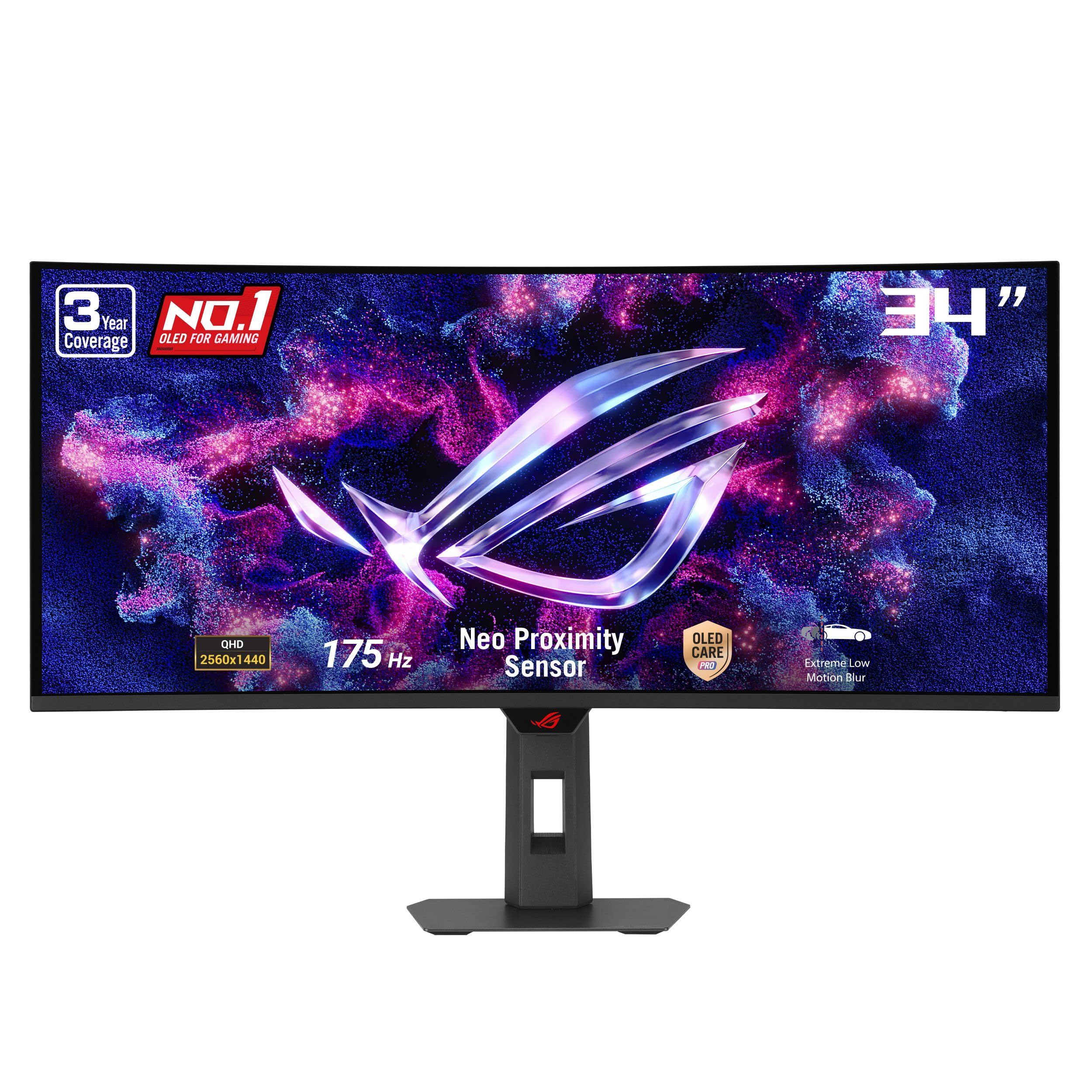
ASUS ROG XG34WCDG

87 /100
Lab Score Excellent

Key details

Adaptive Sync
G-Sync Compatible
Burn-in Warranty
3-year with burn-in
Curvature & Ergo
1800R, adjustable stand
Panel & Color Gamut
QD-OLED, true 10-bit
View on Amazon

The 34-inch QD-OLED panel produces vivid, contrast-rich images with the deep blacks OLED is known for. True 10-bit color and factory calibration deliver Delta E<2 accuracy, making this a legitimate option for color-sensitive editing without a separate reference monitor.

For pure gaming immersion, similar QD-OLED monitors offer comparable 175Hz performance at lower prices. The premium here buys color precision and ASUS's 3-year burn-in coverage — worthwhile if editing is part of the daily workflow, but harder to justify if you only game. The proximity sensor designed to dim the display when stepping away doesn't always trigger as expected, so manual burnout prevention habits still matter.

💡 For burn-in protection, manually activate the screen saver or power off the monitor when stepping away — don't rely solely on the proximity sensor.

Pros

  • QD-OLED panel delivers vibrant, accurate colors and inky blacks for immersive HDR.
  • Sleek, premium build with a design that stands out on any desk.
  • True 10-bit color and Delta E<2 accuracy make it suitable for color-critical content work.

Cons

  • The proximity sensor for burn-in protection may not reliably dim the display when stepping away.
Our verdict

If color-critical work demands true 10-bit accuracy and the burn-in warranty is non-negotiable, this ASUS justifies its premium over cheaper gaming OLEDs.

Check Latest Price
6

Glare-Free View

Samsung G85SD

83 /100
Lab Score Excellent

Key details

Adaptive Sync
FreeSync Premium Pro, G-Sync Compatible
Burn-in Warranty
3-year, no explicit burn-in
Curvature & Ergo
1800R, glare-free coating
Panel & Color Gamut
QD-OLED, HDR10+
View on Amazon

The matte panel cuts reflections without raising blacks, making it usable in sunlit offices. The built-in Tizen hub streams apps and doubles as a media center, and the minimalist aluminum design fits cleanly on a desk. However, the three-year warranty does not explicitly cover burn-in, and there have been isolated instances of permanent image retention within a year. The smart platform can occasionally glitch, switching inputs unprompted or requiring a restart after black screens. These reliability quirks prevent it from being a worry-free recommendation, but for Samsung ecosystem users who want a glare-busting gaming display with streaming smarts, it still holds appeal.

💡 Disable the Tizen auto-launch and keep the firmware updated to minimize smart-hub interruptions.

Pros

  • Matte QD-OLED screen keeps blacks deep and reflections minimal, even in well-lit rooms.
  • Slim metal design with included remote and built-in streaming apps.

Cons

  • Potential burn-in despite pixel-shift and other mitigations; warranty does not explicitly cover it.
  • Smart OS can interrupt PC gaming with random input switches and occasional black flashes.
Our verdict

For bright-room gamers willing to accept occasional smart-platform hiccups and the risk of burn-in without explicit warranty coverage, this monitor’s glare-free QD-OLED picture and streaming convenience deliver a distinct advantage.

Check Latest Price

How to Choose

Refresh Rate and Response Time

165Hz to 240Hz is the range, and the jump from 165Hz to 240Hz is less dramatic than it sounds — you gain about 2ms per frame, which competitive FPS players can exploit but casual gamers won’t notice. Response times of 0.03ms vs 0.1ms are both so fast that ghosting is essentially nonexistent on any OLED, so focus on frame rate only if you regularly push beyond 165fps.

A hidden trade-off: some 240Hz panels reduce color fidelity slightly at maximum refresh to hit the pixel clock, though on these models the difference is marginal. If you play cinematic single-player titles more than twitch shooters, a 165Hz or 175Hz QD-OLED will look identical in motion.

Panel Type and Color Gamut

QD-OLED panels add a quantum dot layer on top of a blue OLED emitter, resulting in purer red and green output and a wider color volume, especially in HDR highlights. Standard OLED (often WOLED) uses a white subpixel to boost brightness, which can slightly desaturate bright scenes.

For gaming, both look spectacular, but if you also edit photos or grade video, a QD-OLED with full DCI-P3 coverage and true 10-bit signal path — like the ASUS and Alienware models — will display gradients without banding. Note that OLED subpixel layouts can make text appear slightly fuzzy, so pure productivity work isn’t their strong suit.

Adaptive Sync Support

All current 34-inch OLEDs support either FreeSync Premium Pro or are G-Sync Compatible, which means variable refresh rate works on both AMD and Nvidia GPUs. However, ‘G-Sync Compatible’ is a certification, not a guarantee of flawless sync at every frame rate.

Real-world stuttering or flickering can still occur below 48Hz on some panels, particularly during loading screens or dark scenes. If you run an Nvidia card, a monitor that is explicitly validated for G-Sync Compatible will generally offer a smoother experience, but FreeSync Premium Pro monitors connect just as well on modern drivers.

Burn-in Warranty Length and Coverage Terms

This is the single most overlooked factor. A 3-year warranty does not automatically mean burn-in is covered. Only Alienware and ASUS explicitly state that image retention and burn-in are included in their 3-year plans. Others offer a 3-year warranty that refers to manufacturer defects but stays silent on OLED degradation.

If you game with static HUDs for hours daily, the lack of explicit coverage could leave you with a ghosted screen and no recourse after 18 months. Always read the warranty terms before buying, not just the marketing badge.

Curvature and Ergonomic Adjustments

An 800R curve (the LG models) wraps the screen tightly around your field of view, increasing immersion in racing and flight sims but causing visual distortion on spreadsheets and text documents. A 1800R curve is more versatile for mixed use.

Ergonomics matter too: monitors with height, tilt, and swivel let you align the display to eye level without an aftermarket arm. If you use a monitor arm anyway, a VESA-compatible design is all you need, but check the weight capacity — OLED ultrawides are heavier than typical 27-inch panels.

Frequently Asked Questions