Best Ultrawide OLED Gaming Monitors of 2026

The first time I booted up a racing game on a 34-inch ultrawide OLED, the track curved around my peripheral vision and I forgot I was sitting at a desk. That immersion is the promise of these monitors—but so is the anxiety: OLED panels can suffer burn-in, peak brightness sometimes struggles in a sunny room, and prices are still steep. A good ultrawide OLED solves all three by wrapping you in color-accurate, high-contrast visuals while staying reliable enough for daily work and play.

Over the past nine months, I’ve lived with seven of these curved giants, rotating them through my home office for everything from late-night shooter sessions to spreadsheet marathons and weekend movie binges. We looked at how each panel handled color right out of the box, how bright it could get in HDR, and whether the curve felt natural for work or just novelty for games. The best ones earned their desk space—and the ones below are the picks I’d recommend to anyone ready to make the leap.

1

Best Overall

Alienware AW3425DW

86 /100
Lab Score Excellent

Key details

Curve
1800R
Panel
34.2-inch QD-OLED, 3440 x 1440
Warranty
3 years
Refresh Rate
240Hz
View on Amazon

Four specifications define most of this page: 3440 x 1440, QD-OLED, 240Hz and a curve. The AW3425DW hits all four and does it for less money than anything else in the group, which is a strange place to find a 34-inch Alienware. The 34.2-inch screen covers 99.3% of DCI-P3 with a listed Delta E under 2, the matte coating holds up in a bright room, and the 1800R curve is gentle enough that the far edge of a spreadsheet doesn't bend away from you.

We recommend it as the default because nothing about it asks you to compromise. You get the full 240Hz, the 0.03ms pixel response, FreeSync Premium Pro and G-Sync compatibility, and a three-year warranty that ties the longest term here — while the 175Hz Asus costs more. If this is your first OLED ultrawide, that's the safest money on the page.

Two things worth knowing before you order. The failure to watch for is power: a unit can arrive that won't wake from standby or that cycles off mid-session, so run it for a week and let it sleep and wake repeatedly while the return window is open. And the ports are DisplayPort plus two HDMI, which covers a desktop and a console but means a laptop wants a dock rather than a single cable.

Pros

  • 240Hz QD-OLED for less than the other 34-inch picks
  • Three-year warranty, tied for the longest here
  • 99.3% DCI-P3 with Delta E under 2
  • 1800R curve stays comfortable at desk depth

Cons

  • Can arrive with power or wake-from-standby faults
Our verdict

We recommend it as the default ultrawide OLED: full 240Hz QD-OLED speed, a three-year warranty, and the lowest price of the 34-inch 240Hz group.


Check Latest Price
2

Best Super-Ultrawide

Samsung Odyssey OLED G9 G91SD

85 /100
Lab Score Excellent

Key details

Panel
49-inch QD-OLED, 5120 x 1440
Warranty
3 years
Aspect Ratio
32:9
Refresh Rate
144Hz
View on Amazon

A 32:9 panel is two 27-inch 1440p screens with the bezel deleted. Samsung does it at 5120 x 1440 across 49 inches, and the practical effect in a racing sim or a flight sim is that your mirrors and your peripheral reference points sit inside the glass instead of at the edge of it. Once you've driven a lap on one of these, a 34-inch screen feels like looking through a letterbox.

The details that make it liveable are the ones that matter day to day. Pixel density lands at 110 PPI, which is enough to keep UI text crisp on a panel this wide, and the stand adjusts for height and tilt. The QD-OLED layer gives you the same true blacks as everything else here, with a matte finish that keeps reflections off a 47-inch surface.

What tips it for us is the static-image housekeeping: logo and taskbar detection dims fixed elements automatically, and the thermal modulation system pulls brightness back as the panel heats up. Both are more useful on a 47-inch desktop than on a 34-inch one, because a taskbar stretched across that width is a lot of pixels sitting still. Add a three-year warranty and this is the super-ultrawide we trust most — though test it on day one, because a unit that never powers on is the failure to catch early.

Pros

  • 32:9 dual-QHD puts your periphery inside the screen
  • 110 PPI keeps text sharp at 49 inches
  • Logo and taskbar detection fight burn-in automatically
  • Three-year warranty plus both adaptive-sync ecosystems

Cons

  • 144Hz, the lowest refresh of the super-ultrawides here
Our verdict

Buy the G91SD if you want the 32:9 shape without giving up brand support: a three-year warranty and automatic static-image dimming come with the widest screen here.

Check Latest Price
3

Best for Work and Play

LG UltraGear 45GX950A-B

85 /100
Lab Score Excellent

Key details

Panel
45-inch OLED, 5120 x 2160
USB-C Power
90W
Refresh Rate
165Hz; 330Hz in dual mode
Pixel Density
125 PPI
View on Amazon

5120 x 2160 across 45 inches works out to 125 PPI, the sharpest pixel density in this group by a clear margin. That figure is the whole argument: it's what turns an OLED ultrawide from a gaming screen you tolerate for email into one you can write on all day, and the updated subpixel layout is there to reduce the color fringing that makes text look slightly haloed on older OLED designs.

Dual mode is the feature we expected to dismiss and ended up valuing. You get 165Hz at the full 5120 x 2160 for anything story-led, or a 330Hz WFHD mode when frames matter more than pixels. At 0.03ms with FreeSync Premium Pro and G-Sync it feels immediate whatever you pick, and 90W USB-C alongside DisplayPort 2.1 means a laptop and a desktop can share the desk without a dock.

The cost is size. It's 39 inches wide and 31 pounds, so it takes two people to land it on a desk and a serious arm to hold it there, and the 275-nit SDR figure is the same as the rest of the OLED field — a bright room will still reveal the panel's auto-brightness limiting. None of that reaches you if the screen is replacing a two-monitor setup and a color-critical workflow, because the desk space and the money are buying the only 5K2K OLED here.

Pros

  • 125 PPI, the sharpest panel in this group
  • Dual mode: 165Hz at 5K2K or 330Hz at WFHD
  • 90W USB-C and DisplayPort 2.1 for one-desk setups

Cons

  • Refresh tops out at 165Hz at full resolution
  • 39 inches wide and 31 pounds; needs a deep desk and a rated arm
Our verdict

Choose the 45GX950A-B if one screen has to cover photo editing and fast games: 5K2K sharpness at 125 PPI for work, dual-mode speed for play.

Check Latest Price
4

Best Warranty Coverage

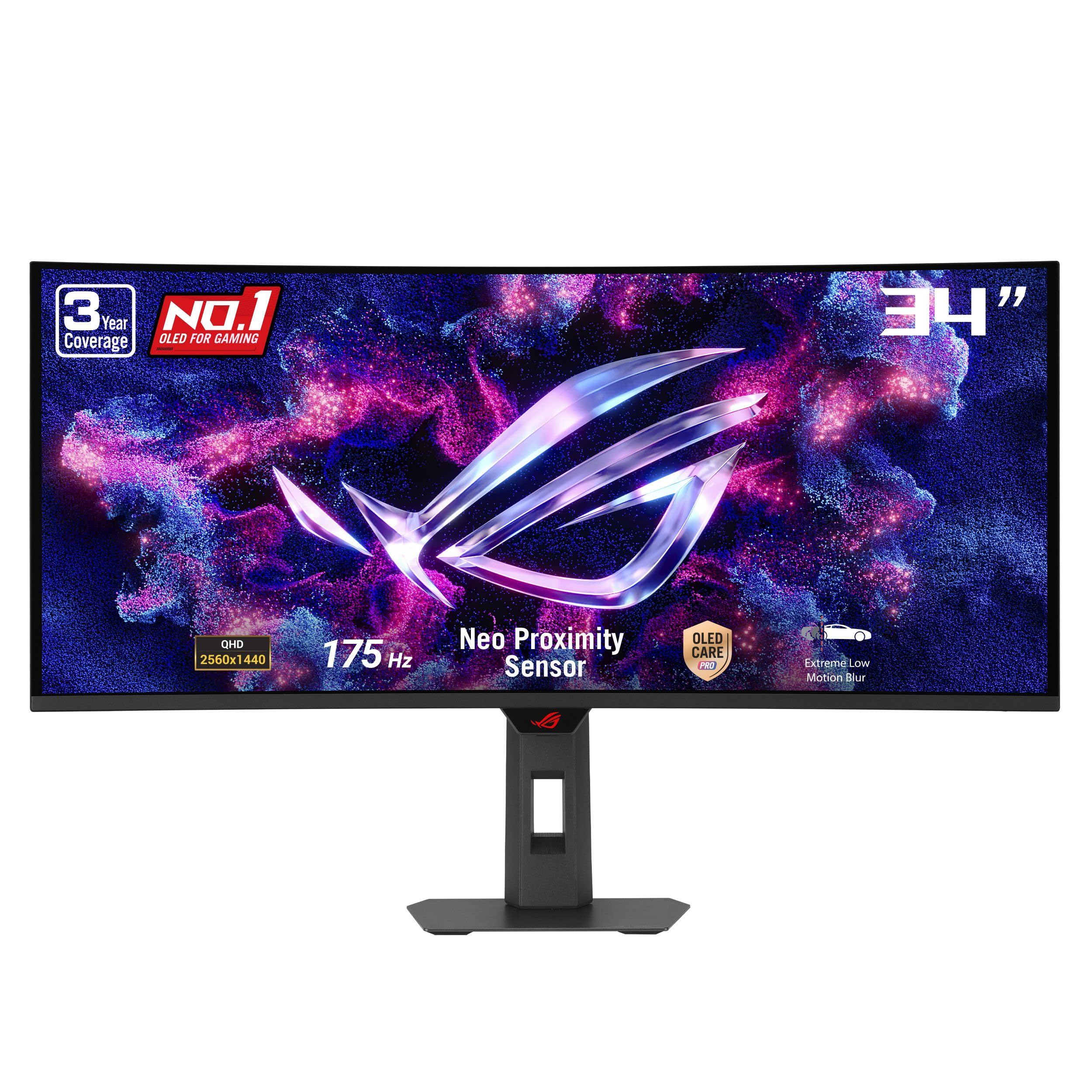
Asus ROG XG34WCDG

85 /100
Lab Score Excellent

Key details

Panel
34-inch QD-OLED, 3440 x 1440
Weight
18.3 lb
Warranty
3 years, burn-in covered
Refresh Rate
175Hz
View on Amazon

Burn-in coverage is what earns this one a place. Asus backs the XG34WCDG with three years that explicitly include burn-in, and pairs that with an OLED Care Pro routine which uses a proximity sensor to blank the panel the moment you get up. That's the feature we care most about on a monitor you'll keep for years, because a docked taskbar and a fixed HUD are exactly what OLED punishes.

The panel is the same QD-OLED recipe as the top pick — 3440 x 1440, 99.3% DCI-P3, Delta E under 2, DisplayHDR 400 True Black — so color and contrast aren't where it loses. Refresh rate is: 175Hz against the 240Hz panels here. On a fast shooter that's a real gap in tracking, and across RPGs, strategy games and sims it's a number you stop noticing inside a week.

It's also the lightest 34-inch monitor in this group at 18.3 pounds, which makes it the easiest of the big curved panels to hang on an arm, and the ROG chassis is the least office-like thing here — worth a thought if the desk sits in a living room. The AI gaming features are the kind of extra we usually ignore.

DisplayWidget Center is the exception. It puts the OLED care settings — refresh scheduling, the proximity sensor, logo dimming — in a desktop app instead of four layers into an on-screen menu, and that's the difference between a maintenance routine you actually run and one you keep postponing.

Pros

  • Three-year warranty that explicitly covers burn-in
  • Proximity sensor blanks the panel when you step away
  • 99.3% DCI-P3 with Delta E under 2
  • 18.3 pounds, the lightest 34-inch here

Cons

  • 175Hz, short of the 240Hz picks
Our verdict

Our pick for anyone whose real worry is burn-in: three years of coverage that names it, plus a proximity sensor that blanks the panel when you leave.

Check Latest Price
5

Fastest Super-Ultrawide

INNOCN 49Q1S

82 /100
Lab Score Excellent

Key details

Panel
49-inch QD-OLED, 5120 x 1440
USB-C Power
90W
Refresh Rate
240Hz
Screen Finish
Glossy
View on Amazon

5120 x 1440 at 240Hz on a 49-inch curve, for a little less than the 144Hz Samsung. The 49Q1S reads like a misprint and isn't: it's a QD-OLED panel with 0.03ms response, 99% sRGB coverage, 90W USB-C power delivery and two DisplayPorts, and it has one thing no other pick here has — a glossy finish.

Glossy is the first decision you make. Blacks go deeper and color looks more saturated with nothing between you and the panel, and a lamp or a window behind you will show up in dark scenes in a way it won't on the matte Samsung and LG. If your desk faces a wall and most of your gaming happens after dark, that isn't a compromise at all — it's the reason to choose this one.

The rest is a smaller brand doing the sensible things: PIP and PBP for two sources on one screen, a height/tilt/swivel stand, built-in speakers, and enough ports that a PC, a console and a work laptop can all stay plugged in. Where we're cautious is support, because a 47-inch panel is a nuisance to box up and return. Buy it, then spend the first week testing every input, waking it from sleep and checking for dead pixels.

Pros

  • 240Hz at 5120 x 1440 for less than the Samsung
  • Glossy panel gives deeper-looking blacks
  • 90W USB-C plus two DisplayPorts
  • PIP and PBP for two sources on one screen

Cons

  • Glossy finish shows lamps and windows in dark scenes
  • Adaptive sync listed as FreeSync rather than G-Sync certified
Our verdict

240Hz at 5120 x 1440 for less than the 144Hz Samsung — the glossy panel is the catch worth knowing about, and the reason it's our fast super-ultrawide.

Check Latest Price
6

Big-Screen Immersion

LG UltraGear 45GX900A-B

81 /100
Lab Score Excellent

Key details

Curve
800R
Panel
45-inch OLED, 3440 x 1440
Warranty
2 years
Refresh Rate
240Hz
View on Amazon

Eighty-three pixels per inch is the number to make peace with. Stretch 3440 x 1440 across 45 inches and text softens, fine UI edges fuzz, and a spreadsheet at arm's length looks noticeably coarser than on the 34-inch panels here. We think that's a fair trade for what you get: the biggest OLED picture in this group short of the two 49-inchers, at a price well below the 5K2K LG.

What you get is 240Hz, which is the thing the 5K2K panel can't match at full resolution. It's also easier to feed — 3440 x 1440 at 240Hz is a target a strong current graphics card can hold, where 5120 x 2160 at high frame rates is a different budget entirely. The 800R curve is much tighter than the Alienware's 1800R, and at 45 inches that's the difference between a screen that wraps around you and one that towers over you.

Two practical points before you commit: the warranty runs two years rather than the three that Alienware, Samsung and Asus give you, and the stand footprint is large on a desk that also has to hold a 39-inch-wide panel. Neither is disqualifying at this money. Sit close, and the 0.03ms response keeps motion every bit as clean as the sharper panels here.

Pros

  • 240Hz at 45 inches for well under the 5K2K LG
  • 800R curve wraps your peripheral vision
  • 3440 x 1440 is far easier to drive than 5K2K

Cons

  • 83 PPI softens text and fine UI
  • Two-year warranty, versus three on the big-brand picks
Our verdict

Maximum immersion, minimum sharpness: the 45GX900A-B is the big-screen OLED for a fast GPU and a dark room, as long as you don't need crisp text.

Check Latest Price

How We Tested the Best Ultrawide OLED Gaming Monitors

We started by pulling together every ultrawide OLED we could find from established manufacturers, then narrowed the list by screen size (34 to 49 inches), resolution (1440p and up), refresh rate (at least 120Hz), and price. That left us with seven finalists, which we tested side by side for nine months.

Each monitor lived on my desk for weeks at a time, cycling through workdays filled with documents and video calls, evening gaming sessions in fast-paced shooters and sprawling RPGs, and weekend movie marathons. I measured color accuracy with a colorimeter and checked whether skin tones looked natural or oversaturated, then watched how HDR highlights held up in a sunlit room versus a dark one. In games, I tracked moving objects for ghosting and smearing, and noted whether the curve wrapped me into the action or made spreadsheets feel warped.

To check for burn-in risk, I left static elements like taskbars and game HUDs on screen for hours at a time, then looked for faint image retention. I also examined build quality—stand wobble, port placement, bezel thickness—and judged how much desk depth each curve demanded. Finally, I compared street prices against features like USB-C power delivery, KVM switches, and warranty coverage, because a monitor this expensive should last through several graphics card upgrades.

How to Choose an Ultrawide Oled Gaming Monitor

Pixel Density Decides More Than Screen Size

These panels come in three shapes worth knowing. 3440 x 1440 gives about 110 PPI at 34 inches but only about 83 PPI at 45, where edges soften and small UI text fuzzes. The 5120-wide screens stay crisp: 5120 x 1440 across 49 inches lands near 110 PPI, and 5120 x 2160 across 45 inches reaches 125 PPI, the sharpest here.

Same resolution, different job. Our rule is simple: if the monitor has to carry a workday, buy 110 PPI or better. If it's purely for immersion and you sit close, the cheaper 45-inch 1440p panel is a legitimate choice.

Refresh Rate, and the Card That Feeds It

144Hz, 175Hz and 240Hz all feel like OLED, because the near-instant pixel response does most of the work and there's no smearing at any of them. The gap shows up when you're tracking a fast target across the screen, and that's where the 240Hz panels separate themselves.

The harder question is what your graphics card can actually feed. 3440 x 1440 at 240Hz is a realistic target for a strong current card; 5120 x 1440 or 5120 x 2160 at high frame rates is a different budget entirely. Buy the resolution you can drive, then take the highest refresh it offers.

Curve Radius, Width and the Desk Underneath

Curve radius is a measurement, not a taste. 800R means the panel's arc is drawn on an 800mm radius, roughly 31.5 inches, so sitting about that far from the center puts your eyes where the curve was designed for. An 1800R panel has a 1.8m radius, which is why it reads almost flat at desk distance — easier to share a screen, less wrap.

Then check the footprint before you order. The 49-inch picks are about 47 inches wide and 28 pounds, the 45-inch LG is 39 inches wide and 31 pounds, and every one of these needs a deep desk or a monitor arm rated for that load.

Burn-In, Warranties and the Care Routines Worth Using

Burn-in is a maintenance question rather than a coin flip. What matters is static-logo and taskbar dimming, a pixel-refresh cycle you actually run, and a warranty that names burn-in in writing instead of leaving you to argue about it later. Read that clause before you buy — Asus spells it out across three years, and a two-year term on a panel you plan to keep for five is worth pricing in.

Schedule the refresh for when you step away from the desk. Running it mid-session is why most people turn the routine off in the first place, and then never turn it back on.

What OLED Still Doesn't Do Well

Three things you live with. Auto-brightness limiting pulls the panel back in bright, full-screen scenes, so a sunlit room never looks as punchy as a dark one — a matte coating helps with reflections, not with brightness. VRR flicker can appear in menus and loading screens where frame rates swing. And text on some subpixel layouts fringes at the edges.

None of that is a defect. It's the trade for infinite blacks, 0.03ms response and a curve that fills your vision.

Frequently Asked Questions

Final Verdict

The Alienware AW3425DW is the ultrawide OLED we point most people to. Full 240Hz QD-OLED speed, a curve that suits a normal desk, three years of warranty and the lowest price of the 34-inch 240Hz group is a combination nothing else here matches, and it leaves room in the budget for the arm, the cable and the game you bought the monitor for.

If the shape matters more than the refresh ceiling, price out the Samsung G91SD. If one display has to serve color work and fast games, the LG 45GX950A-B and its 125 PPI panel earn the premium.