Best Capture Card for Nintendo Switch of 2026

A capture card sits between your Switch's dock and your computer, turning the HDMI signal into something your laptop can record or broadcast. That part is simple. What separates one card from another is what happens to the signal next: whether the picture holds steady at 1080p60, whether your game audio arrives in sync with the video, and whether you feel a delay in your hands while you're playing. Get one of those wrong and you'll spend more time troubleshooting than gaming.

I've lost more evenings than I'd like to admit to propping a phone on a stack of books in front of the TV, and the footage was never worth the trouble. My team and I have spent the past six months putting 12 cards through docked sessions, handheld setups, and late-night streams, and the gaps show up fast. One thing worth knowing before you shop: the Switch tops out at 1080p, so you don't need to pay for 4K capture unless you're also recording from another console. The picks below are the ones that plugged in and then disappeared from my attention entirely.

1

Best Overall

Acer USB 3.0 Capture Card

85 /100
Lab Score Excellent

Key details

Mic Input
3.5mm for headset or mic
Connection
USB-A and USB-C
Pass-through
4K HDMI loop-out
Capture Resolution
1080p at 60fps
View on Amazon

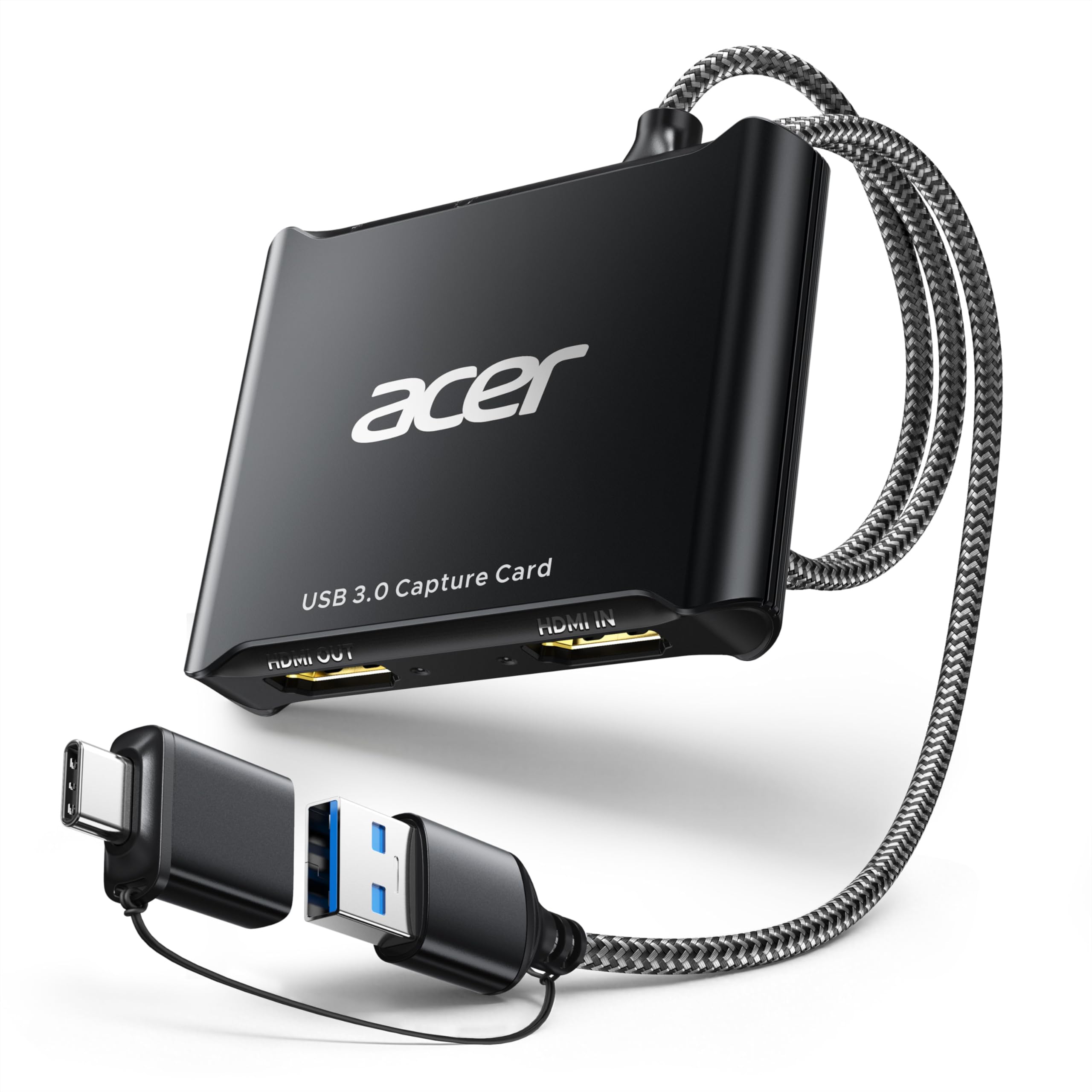
A metal case, a braided cable, HDMI in and out, USB-A and USB-C, and a 3.5mm jack: the Acer looks like a card that costs considerably more than it does. It is one of the least expensive picks in this guide, which is exactly where a default recommendation should live.

Wiring it to a Switch takes a minute of thought and no software. The dock's HDMI goes into the card, the card's loop-out goes into the television, and the USB end goes into the laptop, after which OBS lists the thing as an ordinary camera. We played on the TV and let OBS record, which is the arrangement a capture card should give you: the game stays where you want it and the recording happens quietly behind it. Of the budget cards here, this is the one we stopped worrying about.

Two details earn it the top spot. The first is the ceiling: 1080p60 is exactly what a docked Switch sends, so nothing is wasted and nothing is missing. The second is the mic input, which takes a headset or a standalone microphone straight into the card, so commentary needs no separate interface while game audio keeps arriving over HDMI. Acer backs it for a year, which is more than most of the no-name cards in this corner of the market offer.

Pros

  • 1080p60 capture matched to the Switch's output
  • 4K loop-out keeps the TV live while recording
  • Mic input takes a headset or mic directly
  • USB-A and USB-C connections plus a one-year warranty

Cons

  • Capture tops out at 1080p60, so no 4K for Switch 2
Our verdict

The card we point Switch owners to first: 1080p60 capture, a live 4K loop-out and a mic input that takes a headset directly, with nothing in the design working against it.
Check Latest Price
2

Best for Switch 2

Elgato 4K S

89 /100
Lab Score Excellent

Key details

Audio Input
3.5mm analog
Pass-through
1440p120 or 1080p240
Capture Resolution
4K at 60fps
System Requirements
Windows 11, macOS 13 or later
View on Amazon

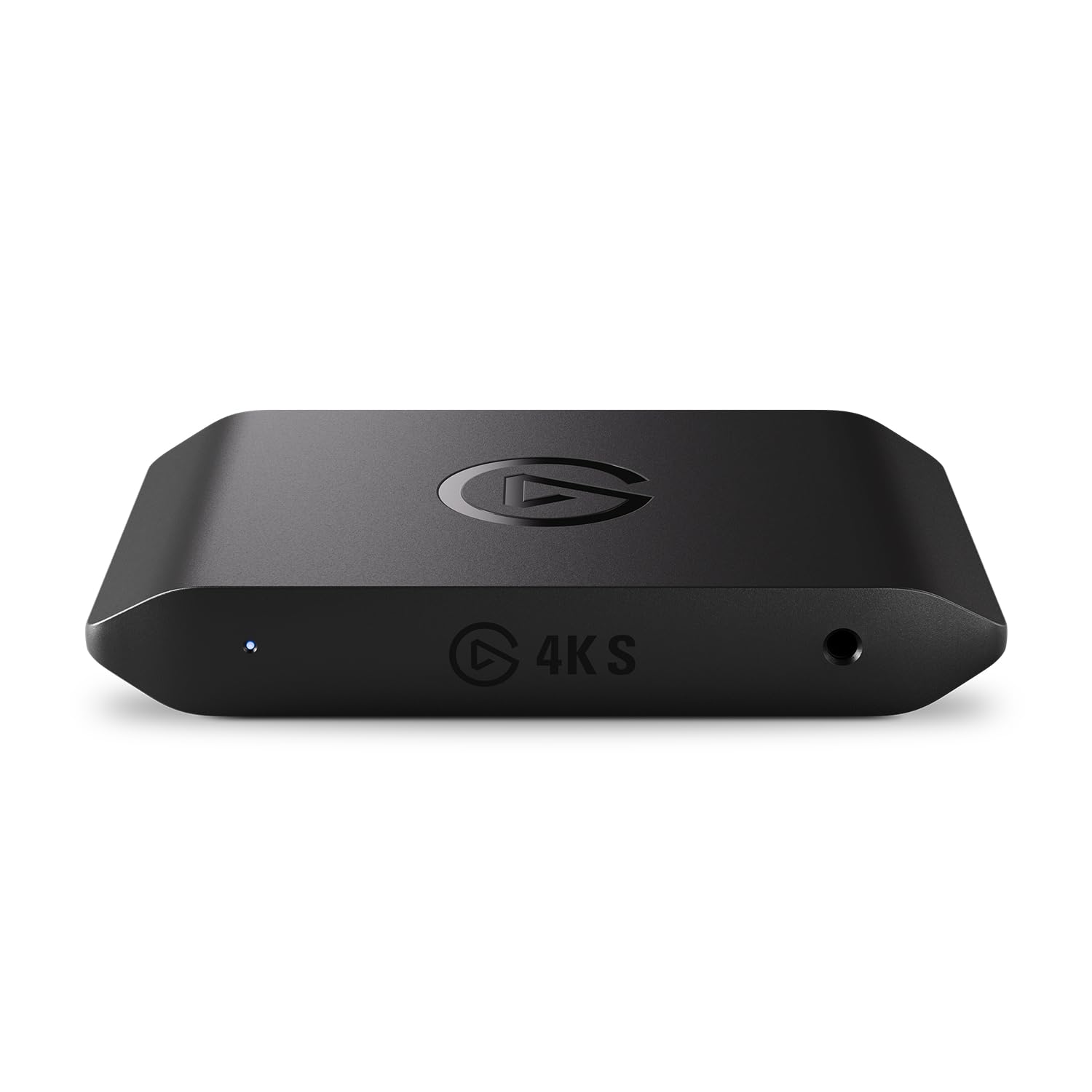
The 4K S is built for one shopper: someone whose Switch 2, or PS5, is worth recording at 4K and who owns a computer new enough to do it. It captures 4K60, passes through at 1440p120 or 1080p240 for a high-refresh monitor, tone-maps HDR10 on Windows, and takes analog audio in over 3.5mm. Nothing else in this guide records above 1080p, and the gap is not a subtle one.

The gate is the host machine, and it is a real gate. Elgato lists Windows 11 or macOS 13 and later, an 8th-generation Core i5 or a Ryzen or an M1, and a recent graphics card. A desktop still running Windows 10 is out, with no compatibility mode to fall back on. Meet the requirements and what arrives is a flat slab about the size of a small remote, powered over USB-C, with a two-year warranty behind it.

On an ordinary Switch the resolution goes to waste, because the console tops out at 1080p60 docked. Buy this when the Switch 2 is the reason you are shopping, when the same desk records a PS5, or when a high-refresh monitor is sitting there waiting for something to feed it. Otherwise the Acer does the Switch job for a fraction of the money and leaves you with nothing to configure.

Pros

  • 4K60 capture for Switch 2 and PS5
  • 1440p120 and 1080p240 pass-through
  • HDR10 tone mapping on Windows
  • Analog audio in and a two-year warranty

Cons

  • Requires Windows 11 or macOS 13 and a recent CPU
  • More card than a standard Switch can use
Our verdict

Buy this when a Switch 2 and a 4K display are the point and your computer is new enough to meet Elgato's requirements; for a standard Switch it is money spent on unused resolution.

Check Latest Price
3

Best Value

Dcyfol 4K HDMI Capture Card

85 /100
Lab Score Excellent

Key details

In The Box
Card, HDMI cable, USB-C adapter, USB extension
Pass-through
4K HDMI loop-out
Capture Resolution
1080p at 60fps
View on Amazon

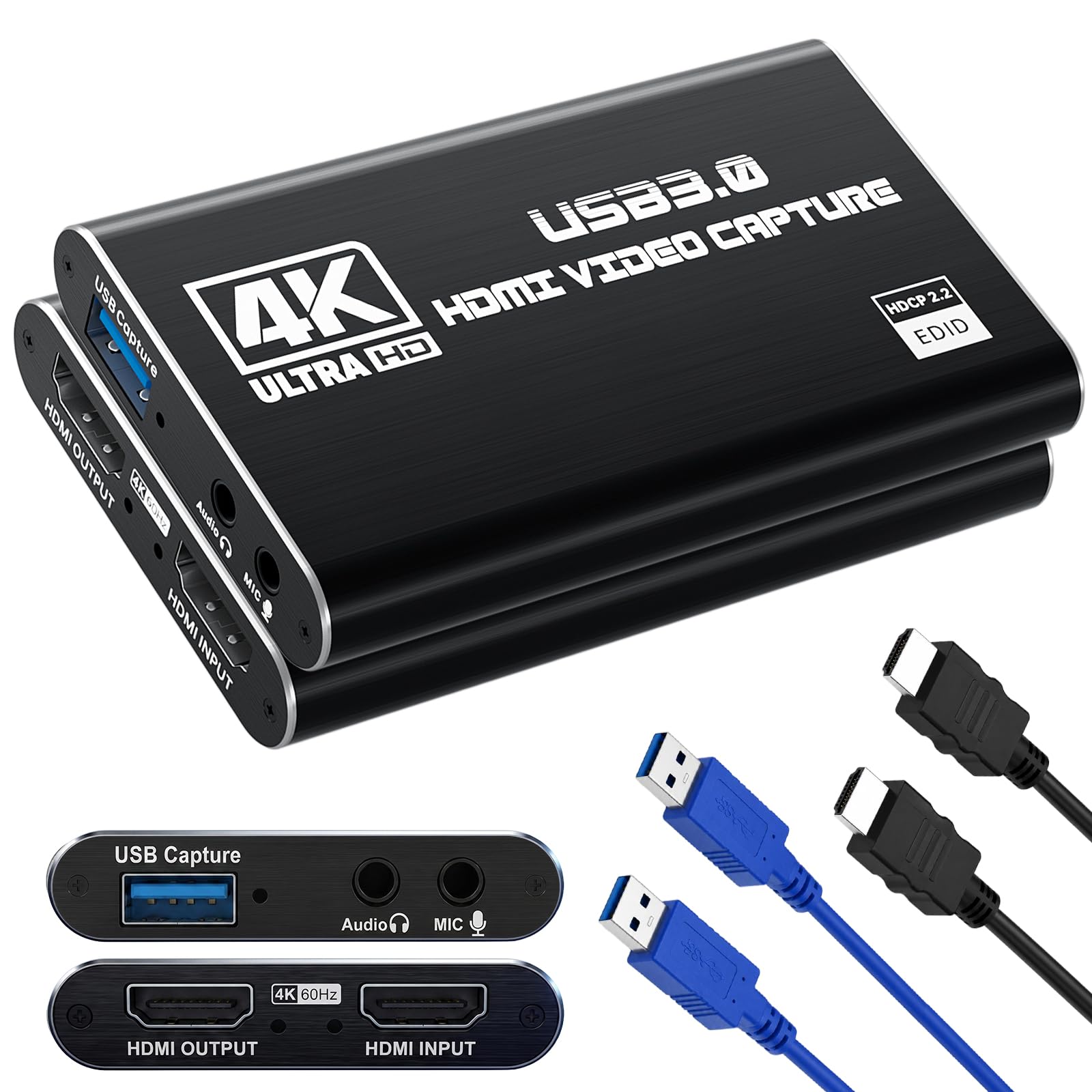
The Dcyfol box is the reason it is in this guide. Inside: the card, an HDMI-to-HDMI extension cable, a USB-to-USB-C adapter and a USB extension cable. Buy a bare dongle instead and the first evening goes on hunting for the one HDMI cable in the house that is not already doing a job behind the television.

On a Switch it does the straightforward thing well. The dock feeds it 1080p60, the loop-out keeps the television live so you play at full speed, and OBS picks the card up as a camera without a driver. Real-time 4K preview is listed for the input side, which matters more when you are framing a shot than when you are playing one.

The USB extension is the quiet hero of the kit. A desktop under a desk puts its USB 3.0 ports at ankle height, and a short dongle hanging off the back of a tower is how cards get broken. Dcyfol moves the connection up to the desk for almost nothing, and that single cable is the difference between a card you use and one you stop bothering with.

For a first streaming setup, the completeness is the argument: nothing else here arrives with the cabling already solved at this end of the price range. The ceiling is 1080p60, which suits a Switch and not a Switch 2. And make a short test recording before you go live, because audio is the part of this card to check rather than assume.

Pros

  • 1080p60 capture with a 4K loop-out
  • HDMI cable, USB-C adapter and USB extension included
  • Driver-free setup that OBS finds on its own

Cons

  • Audio can cut out mid-capture
  • Frame drops in busy scenes
Our verdict

The one to buy if you want a Switch stream running without a second shopping trip, because the HDMI cable, USB-C adapter and USB extension are already in the box.

Check Latest Price
4

Best for Commentary

Guermok GM-34A Capture Card

81 /100
Lab Score Excellent

Key details

Weight
2.33 oz
Audio Ports
Mic in, line in, headphone, speaker
Pass-through
4K at 60Hz
Capture Resolution
1080p60 or 2K30
View on Amazon

Four audio connections on a card this cheap is unusual: a 3.5mm mic input, a line input, headphone monitoring and a speaker output, alongside HDMI in, HDMI loop-out and USB. For a Switch streamer who wants to hear themselves while they play, that headphone jack is the whole argument, since you can monitor your voice at the card instead of routing it back through OBS and living with the delay.

The rest is competent rather than remarkable. It captures 1080p60, with 2K stopping at 30 frames per second, passes 4K60 through to the television, and works with OBS, Streamlabs and Zoom without a driver. Picture quality is the part we are least sure about and the audio routing is the part we are sure of, so buy it for the ports and judge the image on your own setup. It arrives as the card alone, so plan for a cable.

Pros

  • Mic, line-in, headphone and speaker ports
  • 4K60 pass-through to the TV
  • Driver-free with OBS, Streamlabs and Zoom

Cons

  • Card only, no cables in the box
  • 2K capture capped at 30fps
Our verdict

Buy it for the audio ports: mic in, line in and headphone monitoring on a cheap card let you hear your own commentary without routing it through OBS.

Check Latest Price
5

Step-Up 1080P60

Swudloe C7-01 Capture Card

85 /100
Lab Score Excellent

Key details

Warranty
1 year
Mic Input
3.5mm
Pass-through
4K at 30Hz
Capture Resolution
1080p at 60fps (YUY2)
View on Amazon

Two things separate the Swudloe from the anonymous dongles around it: a genuine USB 3.0 chipset rather than a USB 2.0 part wearing a 4K label, and a one-year manufacturer warranty. Neither is exciting, and both are the sort of thing you appreciate when the picture has to hold together under motion or when something goes wrong in month three.

In use it is a tidy 1080p60 card. HDMI from the dock, USB to the laptop, no driver, and OBS finds video and audio together, which sounds like the bare minimum until you have spent an evening with a card that only ever shows up as a video device. There is a 3.5mm mic input for commentary, and the body is small enough to sit behind the dock and be forgotten.

Where it lands in this guide: it costs more than the Acer and captures exactly the same resolution, so the step-up price buys warranty, build and a cleaner signal path rather than features. If your Switch is the original model and your television is 1080p, the cheaper card is the better buy. If a stated warranty is what gets you over the line on a budget card, this one has it.

Pros

  • Genuine USB 3.0 chipset with 1080p60 capture
  • 4K pass-through keeps the TV live
  • One-year manufacturer warranty

Cons

  • 4K pass-through drops to 30Hz
  • Mic input picks up hum and static
Our verdict

A solid 1080p60 card with a stated warranty, worth the step-up price if manufacturer cover matters more to you than saving the last few dollars.

Check Latest Price
6

Several HDMI Sources

XIIXMASK 5-Port Capture Card

86 /100
Lab Score Excellent

Key details

Cable
USB-A and USB-C
Mic Input
3.5mm
Pass-through
4K loop-out
Capture Resolution
1080p60 or 1440p30
View on Amazon

Five ports, including HDMI in, a 4K loop-out and a 3.5mm mic input, plus a USB cable that terminates in both USB-A and USB-C. For a card near the bottom of this guide's price range that is more connectivity than the money suggests, and it means one card can move between a desktop, a laptop and a camera without an adapter hunt.

It captures 1080p60, or 1440p at 30 frames per second, and the aluminum shell keeps it cool enough to leave sitting on the desk between sessions. Latency is the part that impressed us: the preview keeps up with the game, so framing a capture is not a chore.

Two things to plan around. The USB cable is short, which decides where the card lives: near the tower, not near the television. And this is the pick in the guide we have the least confidence in over the long haul, so it suits a simple single-source setup you can put through its paces early rather than a shoot you cannot repeat.

Pros

  • Five ports including 4K loop-out and mic in
  • USB cable ends in both USB-A and USB-C
  • Low-latency preview

Cons

  • Short USB cable limits placement
  • 1440p capture capped at 30fps
Our verdict

A lot of connectivity for very little money, best suited to a simple single-source desk you can put through its paces in the first few weeks.

Check Latest Price
7

First-Timer Kit

Newhope HDMI Capture Card

82 /100
Lab Score Excellent

Key details

Warranty
2 years
Mic Input
3.5mm TRS
Pass-through
4K HDMI loop-out
Capture Resolution
1080p at 60fps
View on Amazon

A two-year manufacturer warranty and a box containing an HDMI cable, a USB cable and a USB adapter: the Newhope is the one to hand someone who does not keep a drawer of spare cables. For a first capture setup, that completeness removes a whole category of evening.

It captures 1080p60, passes 4K through to the television, and takes a 3.5mm mic for commentary. Setup is the familiar driver-free routine, and at 0.2 kg the card is light enough to hang off a laptop without any drama.

The practical note: if the picture glitches or the color goes strange, swap the HDMI cable that came in the box before you blame the card. A bundled cable is the cheapest link in the chain and the easiest to rule out. Beyond that this is a straightforward 1080p60 card whose two-year warranty matches Elgato's, and for a Switch and a headset that covers what the job asks for.

Pros

  • Two-year manufacturer warranty
  • HDMI cable, USB cable and adapter included
  • 4K pass-through and a 3.5mm mic input

Cons

  • 2K capture capped at 30fps
Our verdict

Worth a look for the boxed cables and the two-year warranty, which together cover everything a 1080p60 Switch setup with commentary actually needs.

Check Latest Price

How We Tested Switch Capture Cards

We started with spec sheets, narrowing dozens of listings down to 12 cards that claimed clean 1080p60 capture, HDMI passthrough, and driver-free USB video support. Anything that topped out at 30 frames per second or locked recording behind its own software got cut before it arrived. I also wanted at least one option in each price bracket, from pocket-sized dongles to dock-style boxes with a monitor output.

Setup was the first real test. I timed each card from box to first saved clip, noting whether it appeared in OBS on the first try, whether I had to install anything, and whether the passthrough kept the TV live while my laptop recorded. Every card also had to work through a hub on a single-port USB-C laptop, since that's how a lot of people actually stream.

The playing happened where the Switch really lives: docked to the living room TV with a laptop on the coffee table, and handheld with a portable dock after dinner. I recorded 45-minute sessions and four-hour marathons, watching for dropped frames, audio drifting out of sync over time, and whether game audio and commentary held separate tracks. Audio got its own pass at higher gain, with headphones on, listening for buzz and hiss.

For latency, I played a rhythm game and a precision platformer twice — once through the card, once straight into the TV — and filmed both screens in slow motion to compare timing. Cards that made me feel the input delay ranked lower, and the ones that ran hot or needed a re-plug mid-session lost ground on reliability. Value for money, in the end, came down to which of those problems a card didn't have.

How to Choose a Capture Card for a Nintendo Switch

Match the card to what the console sends

A docked Switch sends 1080p at 60 frames per second over HDMI, so 1080p60 capture is the target and almost everything here reaches it. What varies is the meaning of the 4K badge: on most of these cards it describes the input or the pass-through, not the recording. The Acer takes a 4K signal and records 1080p60; the Elgato is the only one in this guide that records above 1080p.

If you are on the original Switch, paying for 4K capture buys you nothing you can use. Put the money into a better mic chain or a longer warranty instead.

Insist on a pass-through, then check its ceiling

A loop-out, sometimes called pass-through, sends the HDMI signal back out to your television while the USB side feeds the computer. Without one you play from the preview window, where the delay is whatever your software and USB link add to it. Every pick here has one, so the useful question is the ceiling.

The Swudloe passes 4K at 30Hz, which drops a 4K television to 30 frames per second even though the console is running at 60. Most of the others pass 4K60. If a 4K set and a Switch 2 are in your future, that number in the spec list is worth more of your attention than the capture resolution.

Work out the audio path before you buy

Game audio rides over HDMI and lands in OBS alongside the video, which is the easy half. Your voice is the harder half. Most cards here take a 3.5mm mic or headset input; a couple add headphone monitoring so you can hear yourself at the card rather than through software. The quality of those small inputs varies more than the video does.

Decide the chain now: headset into the card, or microphone into a separate interface. Then record a short test clip before anything live, because a hum or a dropout is far easier to fix when nobody is watching.

Your USB port and your operating system are part of the spec

These are driver-free UVC devices, but they need a real USB 3.0 port to hold 1080p60. A hub, or an older USB 2.0 port, will quietly drop you into a lower mode and you will blame the card. Plug straight into the machine and check which port you used.

Host requirements climb with the card. The Elgato asks for Windows 11 or macOS 13 and a recent processor; the budget cards run on machines that are several years old. If your laptop is still on Windows 10, that rules out the best capture hardware here before you spend anything.

What the extra money actually buys

At the bottom you get 1080p60 capture, a loop-out and usually a mic input, sometimes with no cables in the box. A step up buys a warranty, a metal body and a cleaner uncompressed signal path. At the top you get 4K60, HDR and high-refresh pass-through, which only makes sense when both the console and the computer can use them.

Frequently Asked Questions

Final Verdict

For a Switch that lives in a dock and a television that is 1080p, the Acer is the card to buy. It captures 1080p60, keeps the TV live through its loop-out, takes a headset straight into the mic input, and covers both USB-A and USB-C laptops. We have not found the nagging flaw that the other budget picks here each carry.

If a Switch 2 and a 4K set are on the horizon, put the money into the Elgato 4K S instead and check your machine meets its Windows 11 or macOS 13 requirement first. And if you want the cabling solved on day one, the Dcyfol kit is the cheaper way in.