15 Best Capture Card of 2026: Find True 4K60 Capture Value

Find the best capture card for your setup – whether you need 4K60 streaming, budget 1080p, or internal PCIe. Avoid misleading specs and audio pitfalls.

Every capture card listing screams '4K.' But most of those budget cards under $30 only accept a 4K signal – they output 1080p60 at best. Real 4K60 HDR capture starts above $100, and even then, passthrough specs and latency matter more than the headline number.

The real divide isn't price – it's how well the card handles your specific setup. Console gamers need zero-lag passthrough at their monitor's refresh rate. Dual-PC streamers prioritize internal PCIe for stability. Beginners just want something that works out of the box without audio headaches.

This guide cuts through the marketing noise. Whether you're streaming PS5 on a 144Hz monitor or testing the waters with a Switch, these picks match the right tool to the right job – no hype, just specs that deliver.

1

Best Overall

Elgato 4K S

91 /100
Lab Score Outstanding

Key details

Capture
4K60 HDR10
Latency
Near-zero
Interface
USB-C 3.0
Passthrough
1440p120 / 1080p240
View on Amazon

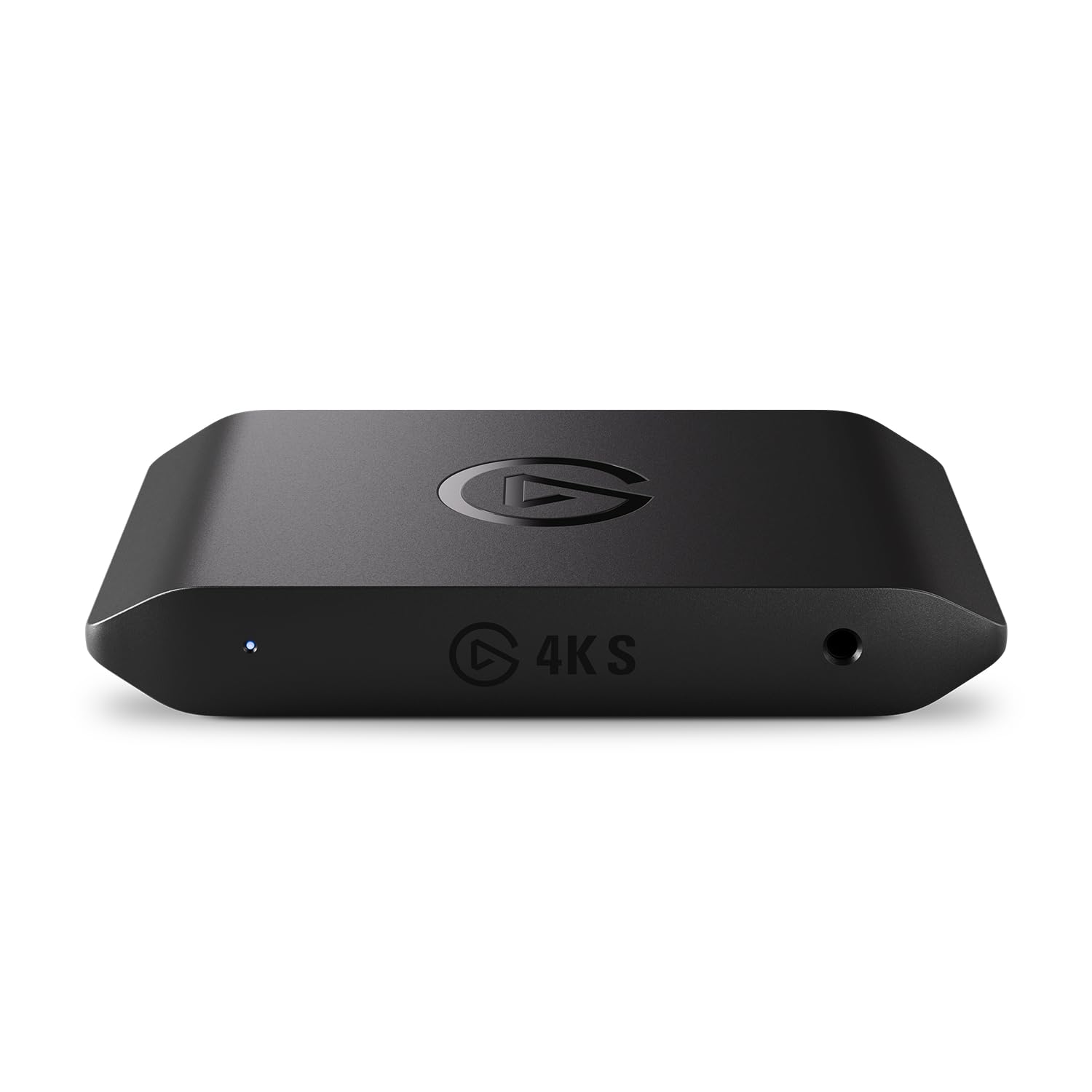
The Elgato 4K S captures 4K60 HDR10 video with near-zero latency, so gameplay feeds into streaming software without perceptible delay. Its passthrough supports 1440p120 or 1080p240, letting players on high-refresh monitors game at full speed while recording or streaming at 4K. A built-in analog audio input accepts party chat from consoles, eliminating the need for a separate mixer for voice capture.

Build quality holds up under extended sessions — no overheating or signal glitches reported. Plugging in via USB-C and setting up with OBS on Windows takes minutes; most users find the card recognized immediately. The compact housing stays cool enough for desk placement near other gear.

This card targets console gamers who stream or record on a Windows PC and want 4K capture without sacrificing high-refresh passthrough. Mac users should be aware that HDR support can be inconsistent — some configurations output SDR only. On the audio side, party chat from Xbox or PlayStation requires Elgato's Chat Link cable, a separate purchase for that specific use case.

Against alternatives like the AVerMedia GC553G2, the 4K S trades HDMI 2.1 capability for proven stability across a large user base. For anyone comfortable with USB 3.0 speeds and HDR capture that works reliably on Windows, it avoids the audio and reliability complaints that sometimes surface with newer HDMI 2.1 cards.

💡 If you need party chat capture, budget for Elgato's Chat Link cable to use the analog audio input.

Pros

  • Captures 4K60 HDR10 with near-zero latency for smooth streams.
  • Plug-and-play setup with consoles and OBS on Windows.
  • Solid build quality with no overheating or glitching over time.
  • Passthrough supports 1440p120 and 1080p240 for high-refresh gaming.

Cons

  • In a Mac-based streaming setup, HDR support may be limited to SDR output.
  • Connecting console party chat requires a separate Chat Link cable, not included.
Our verdict

For PC-based console streamers, the 4K S offers a balanced feature set at a mid-range price — the macOS caveat is the one boundary to check before buying.

Check Latest Price
2

Budget Champion

Guermok Capture Card

89 /100
Lab Score Excellent

Key details

Capture
1080p60
Latency
Ultra-low
Interface
USB-A & USB-C
Passthrough
View on Amazon

The Guermok Capture Card delivers true plug-and-play 1080p60 capture across Windows, Mac, Linux, and iPadOS at an entry-level price. While the top pick balances 4K capture with low latency, this card focuses on zero-fuss compatibility for budget setups.

This card suits streamers testing the waters or mobile streamers who need a small, lightweight device with both USB-A and USB-C. It accepts 4K30 input but only captures 1080p60 — so buyers expecting 4K output should look elsewhere. Latency is noticeable in fast-paced games, and occasional audio static may require a quick settings adjustment.

Video quality is adequate for casual streaming — detail is sharp enough for most viewers, though color accuracy won't match premium cards. The compact form factor fits easily in a laptop bag alongside a console.

Pros

  • Incredible value at an entry-level price
  • Wide OS compatibility with true plug-and-play
  • Satisfactory 1080p60 video quality for the price

Cons

  • 4K input accepted but capture limited to 1080p
  • Audio can drop out or introduce static after setup, requiring occasional tweaks.
  • Latency is noticeable in fast-paced games
Our verdict

For budget-conscious streamers who need a functional 1080p capture card without the premium price, the Guermok does the job with minimal fuss.

Check Latest Price
3

Best Internal Card

AVerMedia GC571

87 /100
Lab Score Excellent

Key details

Capture
4K30 / 1080p120
Latency
Ultra-low
Interface
PCIe x1
Passthrough
4K60 VRR
View on Amazon

4K60 passthrough with VRR and 1080p120 capture at a mid-range PCIe price – that’s the core appeal of the GC571. It brings features usually reserved for more expensive cards to a desktop streaming build, and installation is driver-free on Windows, so you can get going quickly.

In practice, the VRR support keeps gameplay tear-free during passthrough, and the 1080p120 capture is a solid match for high-refresh monitor streams. Some users have noted occasional image artifacts or frame drops, so consistency can vary between units.

This card suits desktop gamers who already have an open PCIe slot and want a cost-effective way to offload encoding to a second PC. It’s not for laptop users or anyone needing USB portability – and if you require 4K60 capture (not just passthrough), look at external options or the pricier HDMI 2.1 internal cards.

Pros

  • 4K60 passthrough with VRR and 1080p120 capture at a mid-range price
  • Plug-and-play Windows installation, no drivers needed
  • VRR passthrough eliminates screen tearing during gameplay

Cons

  • Requires an available desktop PCIe slot
  • Image artifacts or frame drops may occur with some units
Our verdict

A solid internal card for streamers who value VRR passthrough and don’t need 4K capture – just confirm your desktop has a free PCIe slot.

Check Latest Price
4

Future-Proof Premium

Elgato 4K Pro

89 /100
Lab Score Excellent

Key details

Capture
4K60 HDR10
Latency
Ultra-low
Interface
HDMI 2.1 PCIe
Passthrough
8K60
View on Amazon

While the top external card delivers excellent 4K60 HDR capture, the Elgato 4K Pro takes passthrough further with HDMI 2.1 support, enabling 8K60 output and 4K60 HDR10 capture that no USB card can match. The PCIe interface also keeps latency near zero with VRR support, making it a natural choice for dual-PC streamers who want uncompromised gaming performance on a high-refresh 4K monitor.

This card is designed for desktop PC users with an open PCIe slot – laptop owners need not apply. The target buyer is someone building a dedicated streaming rig alongside a 4K or 8K gaming monitor, who values maximum passthrough bandwidth over portability or lower cost.

A small number of users have noted occasional black screens or freezing in certain hardware configurations. These cases appear linked to specific motherboard or GPU combinations, so checking compatibility forums before purchase is wise, but not a universal issue.

💡 If you encounter screen dropouts, check HDMI cable quality and GPU driver version – this often resolves the issue.

Pros

  • 8K60 passthrough and 4K60 HDR10 capture via HDMI 2.1
  • Ultra-low latency with VRR support keeps gameplay smooth on high-refresh monitors.
  • Capture quality at 4K60 HDR10 is clean and handles high frame rates well.
  • Internal PCIe connection avoids USB bottlenecks and frees up ports for other peripherals.

Cons

  • Desktop-only installation
  • Some configurations may experience occasional black screens or freezing; compatibility varies by hardware.
  • Premium-priced compared to external 4K capture cards, though the HDMI 2.1 support justifies the cost for those who need it.
Our verdict

Best suited for desktop enthusiasts building a dual-PC stream rig with a 4K or 8K monitor who need the highest passthrough bandwidth available.

Check Latest Price
5

Best Budget Alternative

UGREEN 2K Capture Card

90 /100
Lab Score Outstanding

Key details

Capture
1080p60 / 2K30
Latency
Ultra-low (5 Gbps)
Interface
USB-A & USB-C
Passthrough
View on Amazon

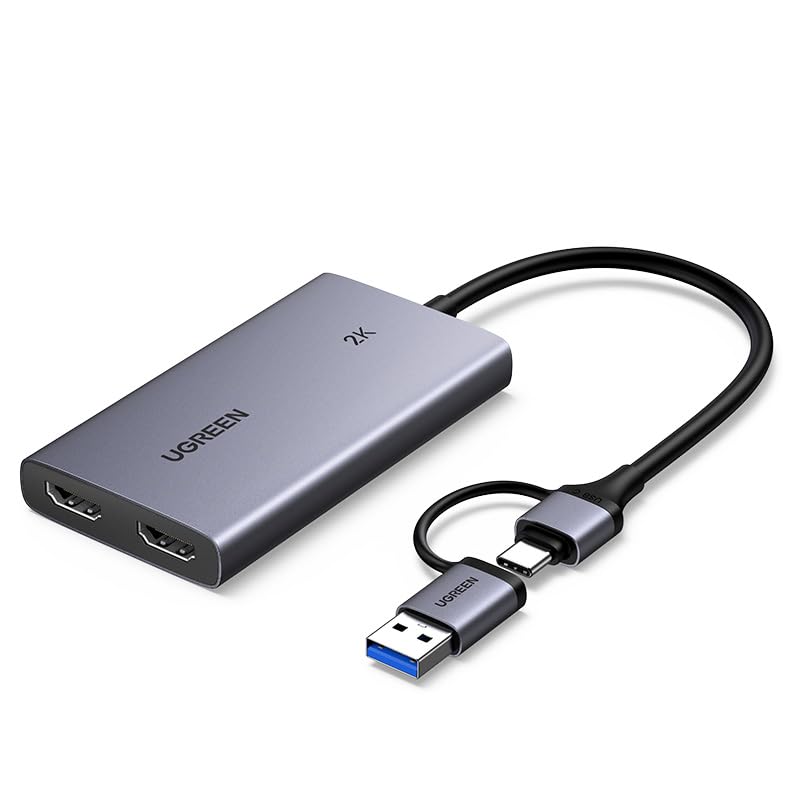
The UGREEN 2K Capture Card offers 1080p60 capture at a budget-friendly price, with both USB-A and USB-C connectors that simplify mobile streaming setups with iPads or laptops. It accepts 4K HDMI input but captures at 1080p60 or 2K30, making it suitable for casual streaming from Switch or older consoles.

Setup requires no driver installation — the card is recognized automatically across Windows, macOS, Linux, and iPadOS. This plug-and-play simplicity removes a common friction point for beginners testing the waters of game streaming.

This card fits streamers on a tight budget who prioritize portability and simple setup, especially those using mobile devices. However, latency can be noticeable in fast-paced games, so it is not ideal for competitive play. The 2K30 output limits its utility for high-refresh-rate capture, but for casual use it delivers adequate results.

💡 For less demanding games like turn-based or slow-paced titles, the latency is manageable – competitive shooters will benefit from a card with higher passthrough refresh rates.

Pros

  • Strong value
  • Works across Windows, Mac, Linux, and iPadOS with no additional drivers needed.
  • Video quality at 1080p60 is adequate for casual streaming with low latency.

Cons

  • Output limited to 2K30
  • In fast-paced games, latency may be noticeable
Our verdict

This capture card is the right choice for streamers on a tight budget who value portability and simple setup over high-refresh capture and near-zero latency.

Check Latest Price
6

Best HDMI 2.1 External

AVerMedia GC553G2

82 /100
Lab Score Excellent

Key details

Capture
4K60
Latency
Ultra-low
Interface
USB-C 3.2 Gen 2
Passthrough
4K144 HDR/VRR
View on Amazon

The GC553G2 is the only external card offering 4K144 HDR/VRR passthrough via HDMI 2.1 — players with high-refresh 4K monitors see their game at full resolution and frame rate, without the downscaling typical of cheaper capture devices. The USB 3.2 Gen 2 Type-C interface keeps setup simple, and the card's compact build fits easily into most streaming rigs. Support for HDR and VRR preserves visual fidelity and eliminates screen tearing without extra configuration.

Integrated party chat is a standout — console streamers can include voice from PlayStation or Xbox without extra cables or a separate audio mixer. Combined with 5.1 channel audio support, the card handles multi-channel game sound natively, reducing the need for post-processing.

This card suits streamers who own a 144Hz+ 4K monitor and want the cleanest passthrough path for both gaming and streaming. The built-in party chat eliminates the need for a separate audio interface, reducing cable clutter. However, audio sync inconsistencies and occasional unit variability mean it's best for those who can tolerate some tweaking or maintain a backup capture card. For buyers who prioritize out-of-the-box stability, the top pick in this category offers more consistency.

💡 If audio sync becomes an issue, adjusting delay in OBS or using a separate mixer can restore alignment.

Pros

  • 4K144 HDR/VRR passthrough for high-refresh monitors
  • Built-in party chat support without extra cables
  • Solid build quality and straightforward setup

Cons

  • Audio crackling or sync drift may occur in quiet streams
  • Occasional unit inconsistency has been noted
Our verdict

A feature-forward capture card for 4K144 gamers who prioritize passthrough quality and integrated chat, but best adopted with an awareness of possible audio and reliability quirks.

Check Latest Price
7

DSLR Webcam Use

Elgato Cam Link 4K

93 /100
Lab Score Outstanding

Key details

Capture
1080p60 / 4K60
Latency
Ultra-low
Interface
USB 3.0
Passthrough
View on Amazon

The Cam Link 4K makes it simple to connect a DSLR or mirrorless camera to a computer for high-quality streaming or recording. It works with OBS, Zoom, and other software across PC, Mac, and iPad without needing drivers, and delivers crisp 1080p60 or 4K60 video when paired with a suitable camera. Its compact size is convenient for on-the-go setups.

This device is designed for camera capture, not console gaming — it lacks HDMI passthrough, so you can't play on a monitor while streaming. Additionally, some units may stop functioning after weeks or months of use, so long-term dependability is not guaranteed. It's a precise tool for a specific use case: turning a good camera into a better webcam.

Pros

  • Captures 1080p60 and 4K60 from compatible cameras with consistent image quality in streaming software.
  • Simple setup on PC, Mac, and iPad

Cons

  • No HDMI passthrough makes it unsuitable for console gaming or any scenario where you need live monitor output.
  • Some units may stop working after weeks or months of use, so consider a return policy before purchasing.
Our verdict

Ideal for streamers and content creators who already own a good camera and need a simple HDMI-to-USB bridge — but not for console gamers or anyone wanting a general-purpose capture card.

Check Latest Price
8

Tight Budget

Rybozen 4K Capture

86 /100
Lab Score Excellent

Key details

Capture
1080p60
Latency
Interface
USB 3.0
Passthrough
Loop-out 2K30
View on Amazon

The Rybozen 4K Capture Card delivers a loop-out port for zero-lag display monitoring and supports 1080p60 capture over USB 3.0, making it a budget-friendly option for those already familiar with OBS. The low price is its main draw, but the audio path can produce no sound, static, or sync issues depending on your setup, and the video output may not consistently hold 1080p60 — some users see blur or choppiness. This card suits buyers on a tight budget who are willing to adjust settings and accept the possibility of audio or video quirks; for a more predictable experience, spending a bit more on an alternative reduces the troubleshooting overhead.

Pros

  • Budget-friendly 1080p60 capture with loop-out for zero-lag monitoring
  • Quick OBS integration for straightforward streaming setup
  • Low price point compared to alternatives

Cons

  • Audio capture can deliver no sound, static, or sync issues depending on your setup
  • Video performance at 1080p60 may be inconsistent with blur or choppiness in some cases
Our verdict

Fits when budget is the absolute priority and you are prepared to adjust audio and video settings — a gamble that can pay off for the price.

Check Latest Price
9

Beginners

Dcyfol Capture Card

87 /100
Lab Score Excellent

Key details

Capture
1080p60
Latency
Interface
USB 3.0
Passthrough
Loop-out yes
View on Amazon

The Dcyfol Capture Card delivers smooth 1080p60 streaming with a loop-out that lets you monitor gameplay without delay – a solid entry point for budget streamers. Setup is quick with OBS and consoles, and the video quality is good for the price. However, the advertised 4K capture is misleading: the card accepts a 4K input but records at 1080p60, so anyone needing true 4K recording should look elsewhere. Audio can also produce static in some configurations, which may require adjustment. This card suits streamers who prioritize cost over high-end features and are comfortable working around these quirks.

💡 If audio static occurs, adjusting the audio buffer size in OBS or using an external audio source may help.

Pros

  • Smooth 1080p60 streaming at a budget price
  • Plug-and-play setup with OBS and consoles
  • Low latency and good video quality for the price

Cons

  • Marketed as 4K but captures only 1080p60
  • Audio can produce static or pop sounds depending on your setup
Our verdict

Best for budget streamers who want a simple 1080p capture card with loop-out and can accept the overstated 4K claim and occasional audio tweaks.

Check Latest Price
10

Budget Video Quality

Acer Capture Card

87 /100
Lab Score Excellent

Key details

Capture
1080p60
Latency
Low
Interface
USB-A & USB-C
Passthrough
Loop-out 4K
View on Amazon

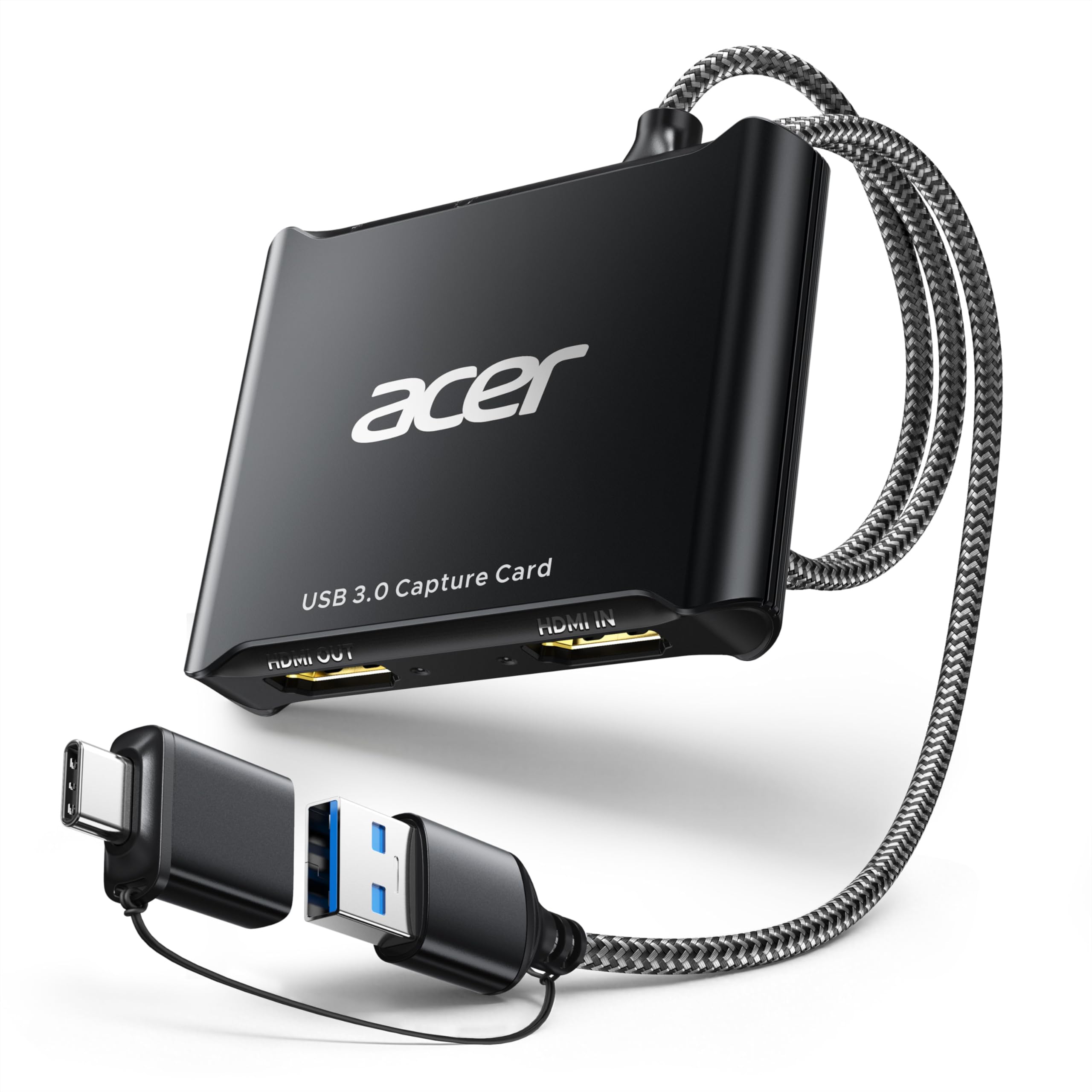
At under $25, the Acer USB 3.0 Video Capture Card pairs good build quality with consistent 1080p60 video capture, low latency, and plug-and-play setup across Windows, Mac, and Linux. The inclusion of both USB-A and USB-C ports adds flexibility for laptops and iPads. However, audio capture can be hit-or-miss – sync drift or crackling has been noted, so streamers relying on clean audio without software adjustments may need to budget extra setup time. This keeps it from competing with more expensive options like the Elgato 4K S for audio reliability, but for video-focused budget streams it offers strong value.

💡 If audio sync drifts, adjust the audio offset in OBS – a quick software fix that most streaming software supports.

Pros

  • Good value
  • Simple plug-and-play setup with Windows, Mac, and Linux
  • Low latency and consistent 1080p60 video capture

Cons

  • Audio capture can present sync drift or crackling, which may require software adjustment
Our verdict

Best for budget streamers who prioritize video quality and are willing to manage occasional audio quirks.

Check Latest Price
11

Single Monitor

XIIXMASK Capture Card

88 /100
Lab Score Excellent

Key details

Capture
1080p60 / 2K30
Latency
Interface
USB-A & USB-C
Passthrough
Loop-out 4K60
View on Amazon

The XIIXMASK Capture Card delivers clean 1080p60 video capture and a 4K60 loop-out that keeps your gaming display free of lag – useful for setups with a single monitor. Setup is quick and the price is low. The catch is audio: some units produce no sound or distorted output, and signal reliability (including HDCP handshakes) can be inconsistent. This card works best if you already capture audio separately (e.g., via a mixer or game chat) and don't mind occasional tinkering with signal sources.

Pros

  • Clean 1080p60 video capture suitable for streaming gameplay
  • Easy setup with minimal latency for casual use
  • 4K60 loop-out provides zero-lag monitoring on a single display at a budget price

Cons

  • Audio output may be missing or poor through the capture path, requiring a separate audio solution
  • Signal dropouts or HDCP conflicts can occur with some sources or displays
Our verdict

Pick this card if you need a cheap loop-out for a single monitor and have a separate audio capture setup; otherwise, the audio inconsistencies make it a gamble for plug-and-play use.

Check Latest Price
12

HDR Passthrough

Elgato HD60 S+

93 /100
Lab Score Outstanding

Key details

Capture
1080p60 HDR10
Latency
Ultra-low
Interface
USB 3.0
Passthrough
4K60 HDR10
View on Amazon

The HD60 S+ delivers 4K60 HDR10 passthrough so your game feed stays uncompromised while you stream at 1080p, and Flashback Recording catches moments you missed hitting record on. Its price is steep for only 1080p capture; the Elgato 4K S offers 4K60 capture at half the cost. Some units can develop issues after several months of use, and there is no analog audio input for party chat. This card makes sense if you already depend on Elgato's ecosystem and specifically need HDR passthrough, but for most streamers the 4K S is a better value.

Pros

  • 4K60 HDR10 passthrough keeps your game feed uncompromised while you stream at 1080p.
  • Flashback Recording lets you retroactively capture moments you didn't record.

Cons

  • Some units can experience issues after several months of use
  • No analog audio input
Our verdict

This card is worth considering if you specifically need HDR passthrough and Flashback Recording within the Elgato ecosystem, and can accept 1080p capture at a premium price – the 4K S is the better buy for most.

Check Latest Price
13

24/7 Reliability

Magewell Gen 2

92 /100
Lab Score Outstanding

Key details

Capture
2048x1080 60fps
Latency
Ultra-low
Interface
USB 3.1 Gen 1
Passthrough
View on Amazon

This capture card excels in continuous 1080p60 capture for professional AV setups that require non-stop uptime. Its FPGA-based scaling and plug-and-play compatibility across Windows, Mac, Linux, and Chrome OS make it a dependable tool for live production or video conferencing. However, it lacks 4K capture and runs noticeably warm under extended use. For the premium price, you get a purpose-built device for 1080p workflows, not a gaming card or a future-proof 4K solution.

💡 Position the device with adequate ventilation to manage heat during long sessions.

Pros

  • True plug-and-play across multiple operating systems with no driver installation needed.
  • Sharp 1080p60 picture quality with low CPU usage thanks to on-board FPGA processing.
  • Stable 24/7 operation for continuous streaming or recording without interruptions.

Cons

  • No 4K capture
  • Runs warm during extended operation
Our verdict

Best for AV professionals who need a rock-solid 1080p capture card for continuous use, but not the right choice for gaming or 4K workflows.

Check Latest Price
14

Pro AV Monitoring

Magewell HDMI Plus

86 /100
Lab Score Excellent

Key details

Capture
1080p60 / 720p120
Latency
Ultra-low
Interface
USB 3.1 Gen 1
Passthrough
Loop-through
View on Amazon

The Magewell USB Capture HDMI Plus is built for environments where zero-lag monitoring and clean analog audio matter more than 4K capture. It accepts 4K30 input and outputs up to 1080p60 through its loop-out port, so you can watch a live feed without any software delay while recording on a computer. The 3.5mm audio in/out lets you integrate an external microphone or feed audio to monitors — a feature missing from most consumer cards. However, this focus on reliability and pro-level I/O comes at a luxury price (premium-priced) for what is essentially 1080p capture, and the unit can run noticeably warm in continuous operation. It is not meant for gamers or budget buyers; its value lives in 24/7 streaming environments or enterprise AV where signal integrity and uptime take priority over cost.

Pros

  • Zero-lag HDMI loop-through for real-time monitoring without software
  • 3.5mm audio input and output for external mics or monitoring feeds

Cons

  • Premium price for 1080p-only capture
  • Unit can run hot during long sessions; some users add heatsinks
Our verdict

Best reserved for professional AV rigs that need dependable loop-through and analog audio — not a fit for gaming or cost-sensitive buyers.

Check Latest Price
15

Legacy Consoles

Elgato HD60 S

93 /100
Lab Score Outstanding

Key details

Capture
1080p60
Latency
Ultra-low
Interface
USB 3.0
Passthrough
1080p60
View on Amazon

The HD60 S delivers smooth 1080p60 capture with Elgato's well-regarded Game Capture software, making it a straightforward pick for streamers using PS4 or Xbox One. It falls short for modern consoles because it lacks 4K passthrough, and Mac users may encounter compatibility hiccups. The build quality and latency performance hold up for its legacy use case, but with better-value alternatives on the market, it's hard to recommend for new buyers seeking 4K or high-refresh-rate capture.

Pros

  • Straightforward setup with intuitive software for beginners
  • Stable 1080p60 capture with ultra-low input lag
  • High build quality and broad software support from a large user base

Cons

  • Mac compatibility can be inconsistent
  • No 4K passthrough
Our verdict

Only consider if you already own it and need a replacement for an older console setup, or if you specifically want Elgato's software for 1080p streaming and can find it at a discount.

Check Latest Price

How to Choose

Capture Resolution & Frame Rate

A card advertising '4K input' often captures only 1080p60. True 4K60 capture requires a dedicated processor and higher bandwidth – you'll find it in cards above $100. For most streamers, 1080p60 is enough for crisp gameplay, but if you want to record native 4K clips, check the fine print on the 'Capture' spec, not the input.

Budget cards cap at 1080p60 or 2K30. That's fine for Nintendo Switch or PS4, but for PS5/Xbox Series X you'll lose detail. If you're capturing for YouTube, 1080p60 still looks great – but if you plan to edit and crop, 4K capture gives you flexibility.

Passthrough Resolution

Passthrough is what your monitor sees while you stream. A card with 4K60 passthrough lets you game at 4K60 while streaming 1080p. But if your monitor runs 1440p120 or 4K144, a card limited to 60Hz passthrough will lock your display to 60Hz – causing stutter in fast games. Match passthrough to your monitor's refresh rate, not just resolution.

Variable refresh rate (VRR) support in passthrough eliminates screen tearing. Cards with HDMI 2.1 passthrough (like the Elgato 4K Pro or AVerMedia GC553G2) handle 4K144 VRR, while older USB cards typically cap at 4K60 without VRR.

Latency

Latency is the delay between your console output and what you see on stream. Near-zero latency (under 50ms) is standard for USB 3.0 cards and essential for real-time gameplay. Budget cards with USB 2.0 or cheap chipsets can introduce 100-200ms, making games feel unresponsive on stream.

For competitive gaming, even 50ms can be noticeable when reacting to opponents. If you play fighting games or fast twitch shooters, a card with ultra-low latency (like the Elgato 4K S or AVerMedia GC571) is worth the investment.

Form Factor & Connectivity

External USB cards are plug-and-play with consoles and laptops. Internal PCIe cards offer lower latency and avoid USB bandwidth issues, but require a desktop PC with an open slot. Laptop-only users must choose USB. For dual-PC setups, PCIe frees up USB ports and reduces CPU overhead.

Interface matters: USB 3.0 is standard for 1080p60; USB-C with Gen 2 speeds handles 4K60 capture. HDMI 2.1 is needed for 4K144 passthrough. Also check cable included – some budget cards omit the cable, forcing an extra purchase.

Frequently Asked Questions