11 Best Fighting Game Controller for PC 2026: Find Your Perfect Match Without Overpaying

From leverless to fight pads, find the PC fighting controller that fits your playstyle, budget, and hand size without wasting money on the wrong form factor.

Choosing a fighting game controller for PC used to be simple: pick a stick or a pad. Now you have leverless controllers, fight pads, and budget sticks that claim tournament-grade performance. The real challenge isn't which one is 'best' - it's which one matches your hand size, preferred inputs, and willingness to mod.

Many new players jump into leverless expecting instant improvement, only to spend weeks adjusting and still feeling cramped. Others buy a cheap stick and quickly outgrow it, spending more on upgrades than a mid-range option would have cost upfront. This guide cuts through the confusion by matching controllers to specific use cases - from wireless freedom to premium PS5 compatibility.

The key trade-off is between immediate comfort and long-term customization. A controller that fits your hands today and can be upgraded as you improve will serve you far better than one that requires immediate mods or is too small for extended sessions.

1

Best Overall

8Bitdo Arcade Stick

93 /100
Lab Score Outstanding

Key details

Form Factor
Arcade stick, 16 buttons
Connectivity
Bluetooth, 2.4G, Wired USB-C
Build Quality
Solid build, mod-friendly
Customizability
Easy modding, Sanwa parts
View on Amazon

The 8Bitdo Arcade Stick sets itself apart with wireless Bluetooth and 2.4G connectivity that delivers no perceptible lag, matching wired performance in practice. The build quality feels substantial for its price, with a sturdy case and responsive buttons that satisfy out of the box.

Competitive players will notice the stock joystick and buttons lack the crisp feedback of Sanwa parts — they feel adequate for learning but may feel mushy during extended sessions. Upgrading to Sanwa components is straightforward and common, and the stick's design encourages tinkering.

This stick is best for PC fighting game players who value wireless flexibility and want a mod-friendly platform without spending over $100. It suits newcomers who plan to grow their skills and experienced players willing to swap parts for top performance. It is not a leverless controller, nor does it work on Xbox, so those boundaries matter.

The ability to swap joystick, buttons, and artwork with zero soldering makes it a favorite among modders. At its price, no other wireless stick offers this level of customization with a proven community and thousands of reviews backing its reliability.

💡 If you're used to arcade-quality components, budget for Sanwa joystick and button replacements – the stock parts are serviceable for learning but not for tournament-level play.

Pros

  • Outstanding build quality and value for a mid-price stick
  • Wireless connectivity with low latency (Bluetooth and 2.4G)
  • Highly moddable
  • Excellent value for money

Cons

  • Stock joystick and buttons feel adequate but may feel mushy to experienced players
  • Bluetooth performance can be inconsistent for some units
Our verdict

For PC fighting game players seeking wireless freedom and a moddable platform, this stick hits the sweet spot between cost, performance, and community trust.

Check Latest Price
2

Best Leverless Value

Haute42 T16 Pro V2

88 /100
Lab Score Excellent

Key details

Form Factor
Leverless, 16 buttons
Connectivity
Wired USB-C
Build Quality
Plastic, compact
Customizability
Hot-swap, OLED, RGB
View on Amazon

The Haute42 T16 Pro V2 packs 16 buttons, hot-swappable switches, and a small OLED screen for under $80. Where the top pick 8Bitdo stick focuses on wireless versatility and proven build quality, this leverless prioritizes giving you more physical controls and personalization options. It also includes a full top row of buttons absent from the cheapest 16-button leverless, making it a step up in functionality.

This controller suits competitive PC players who want dedicated buttons for shortcuts, L3/R3, or SOCD functions - especially those with larger hands who find compact leverless cramped. The extra top row and generous spacing reduce finger fatigue during long sessions. However, build quality can vary: some units have shown USB port or switch failures after months of heavy use, and the edges can feel sharp enough to require sanding or grip tape. These are real but not universal issues, and the customization options outweigh them for many.

Hot-swappable switches let you adjust feel without soldering, while the RGB lighting and OLED display add flair that is rare at this price. The display can show custom art or performance stats, and the 16-button layout accommodates complex input mapping for modern fighters.

💡 Sanding the sharp edges or adding grip tape can improve comfort significantly.

Pros

  • Extra buttons and OLED screen at a mid-range price
  • Button spacing fits larger hands better than compact alternatives
  • Highly customizable with hot-swappable switches and RGB/OLED

Cons

  • Edges may be sharp and require sanding or grip tape for comfortable use
  • USB port or switch failures have been noted in some units after extended heavy use
Our verdict

For PC players who want the most features for their money and don't mind the potential for minor QC issues, the T16 Pro V2 is a compelling leverless alternative to the top pick.

Check Latest Price
3

Best Wireless Leverless

8BitDo Leverless

90 /100
Lab Score Outstanding

Key details

Form Factor
Leverless, all-button
Connectivity
2.4G wireless, wired USB-C
Build Quality
Premium build, sturdy
Customizability
Hot-swappable Kailh switches, RGB
View on Amazon

The 8BitDo All-Button Arcade Controller brings the leverless form factor to Xbox and PC with a wireless connection that doesn't compromise on latency. Unlike the top-pick 8BitDo Arcade Stick (a traditional joystick), this is built for players who want the precision of directional buttons and the freedom of no cable. The 2.4G wireless holds up in competitive play – inputs register as fast as wired.

Construction feels dense and stable on a lap or desk, thanks to a solid plastic shell that weighs enough to stay put during intense matches. The Kailh Wizard low-profile mechanical switches provide a crisp, tactile response that suits fighting games, though the clicky sound is noticeable – more so in quiet spaces. The hot-swappable PCB lets you replace switches easily if the noise becomes an issue.

This controller is best for Xbox and PC players who want a wireless leverless without the hassle of dongles or Bluetooth lag. Programmable buttons and on-the-fly mapping add flexibility for different fighting games. The clicky switches will be louder than membrane or linear options, so if you share a room or play late at night, consider swapping to a quieter switch – the hot-swap socket makes it simple.

💡 The hot-swappable PCB makes it easy to replace the stock switches with quieter linear or tactile alternatives.

Pros

  • Solid build with enough weight to stay planted during matches.
  • 2.4G wireless with no perceptible input lag on Xbox and PC.
  • Competitive price for a wireless leverless with official Xbox license.

Cons

  • Stock switches are very clicky
Our verdict

If you want a wireless leverless for Xbox or PC and don't mind the clicky stock switches (or plan to swap them), this is the best option currently available.

Check Latest Price
4

Best Premium Stick

HORI Fighting Stick Alpha

90 /100
Lab Score Outstanding

Key details

Form Factor
Arcade stick, 17 buttons
Connectivity
Wired USB
Build Quality
Large plastic chassis, heavy
Customizability
Replaceable artwork, easy modding
View on Amazon

The HORI Fighting Stick Alpha sets itself apart with tool-free modding and official PS5 licensing, a combination not found on the wireless 8Bitdo top pick. The top panel swaps without tools, and the Hayabusa lever and buttons offer responsive inputs out of the box. The plastic hinge and button sensitivity are tradeoffs — the hinge can feel less solid than the rest of the chassis, and the buttons may trigger accidentally for some players. These compromises matter less if your focus is on customizing the stick to your preferences.

The stick's weight keeps it planted during intense matches, and the wired connection eliminates latency concerns. The Hayabusa lever has a shorter throw than Sanwa sticks, which some players prefer for faster directional inputs.

This stick suits competitive PS5 and PC players who intend to upgrade components over time. The tool-free design makes swapping the joystick, buttons, and artwork simple without voiding the license. If you want wireless freedom or a lower entry price, the 8Bitdo arcade stick is a better fit. But for those committed to a modding path, the Fighting Stick Alpha delivers where it counts.

💡 If the Hayabusa buttons feel too sensitive, consider swapping to Sanwa parts — the tool-free design makes this an easy mod.

Pros

  • Tool-free panel and artwork swaps simplify customization
  • Solid weight keeps the stick stable during play
  • Official Sony license guarantees compatibility on PS5 and PS4
  • Hayabusa lever offers quick, responsive directional inputs

Cons

  • Plastic hinge can feel less premium than the rest of the chassis
  • Hayabusa buttons may be too sensitive for players who prefer firmer actuation
  • Premium price puts it out of reach for budget-minded buyers
Our verdict

For competitive PS5/PC players who mod their sticks, the Fighting Stick Alpha is a strong choice — just factor in the premium price and accept the plastic hinge compromise.

Check Latest Price
5

Best Budget Stick

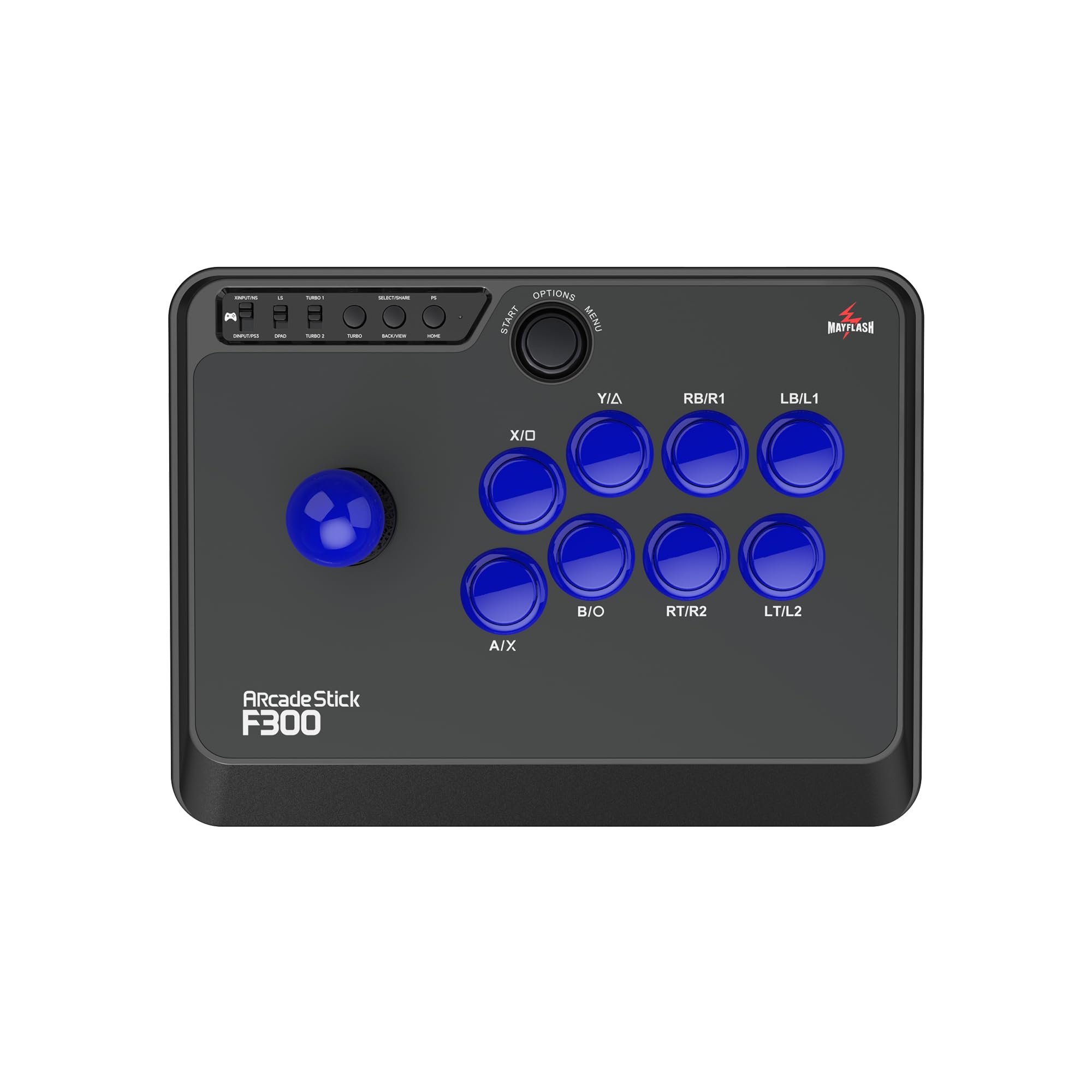
MAYFLASH F300

91 /100
Lab Score Outstanding

Key details

Form Factor
Arcade stick, 8 buttons
Connectivity
Wired USB
Build Quality
Lightweight plastic
Customizability
Easy to mod with Sanwa parts
View on Amazon

The MAYFLASH F300 works with nearly every platform you can name: Switch, PS4, Xbox, PC, and more out of the box. That breadth of compatibility, paired with a straightforward modding process, makes it a natural entry point for anyone curious about arcade sticks without a big upfront investment.

Hundreds of thousands of players have bought this stick, and the community support is substantial. But the stock joystick and buttons use basic components — they feel mushy and lack the crisp response you'd expect for competitive play. Most owners end up swapping to Sanwa parts, which adds about $40-60 to the total cost.

This stick suits two buyer profiles: first-time arcade stick owners on a tight budget who plan to learn modding, and experienced modders looking for a cheap base to customize. If you want a stick that plays well without any tweaks or you prefer a wireless setup, the 8Bitdo arcade stick is a better out-of-the-box experience for PC fighting games.

💡 Placing the stick on a non-slip mat keeps it stable during fast inputs.

Pros

  • Hundreds of thousands of players use this design
  • Easy to mod: opening the case and swapping joystick and buttons takes minutes, with lots of guides available.
  • Works out of the box with almost every console and PC, so you can use it across multiple systems.

Cons

  • Stock joystick and buttons feel mushy and lack the crisp response needed for competitive play
  • Lightweight body slides around on smooth surfaces during intense matches without a mat or grip pad.
Our verdict

The F300 makes sense if you're willing to invest extra in replacement parts and enjoy modding. For a ready-to-play PC stick, the 8Bitdo is the safer choice.

Check Latest Price
6

Best Fight Pad

8Bitdo M30 Wired

83 /100
Lab Score Excellent

Key details

Form Factor
Fight pad, 6 buttons
Connectivity
Wired USB-C
Build Quality
Compact plastic body
Customizability
View on Amazon

The 8Bitdo M30 delivers the same Sega Saturn-style D-pad that many 2D fighting veterans prefer, at a fraction of the cost of an arcade stick. Its six-face button layout matches the classic Saturn controller, making it a direct upgrade over a standard gamepad for retro fighters on PC and Xbox.

This pad is best suited for players with smaller hands who want an authentic and responsive D-pad for fighting games without spending over $100. The compact form factor and closely spaced buttons can feel cramped for larger hands, and the controller is noticeably smaller than a standard Xbox controller.

In use, the D-pad offers precise diagonal inputs with minimal false triggers, a notable upgrade from cheaper gamepads. The wired USB-C connection keeps latency low, and Xbox certification ensures plug-and-play compatibility. However, the tight face button layout may slow down rapid multi-button presses for those with larger fingers.

💡 The tight button spacing rewards accuracy; players with larger fingers may want to test before committing.

Pros

  • Sega Saturn-style D-pad delivers precise diagonals with minimal false inputs
  • Affordable dedicated fight pad for Xbox and PC without arcade stick investment
  • Plug-and-play compatibility with Xbox Series X|S, Xbox One, and Windows via USB-C

Cons

  • In rapid combos, the closely spaced face buttons can feel crowded for players with average or larger fingers
  • Players with larger hands may find the controller too small to grip comfortably during extended sessions
Our verdict

If you prefer a D-pad over an arcade stick and have smaller hands, this is the most affordable way to get a Saturn-style fight pad for Xbox and PC.

Check Latest Price
7

Budget Leverless Entry

Haute42 G16 Leverless

88 /100
Lab Score Excellent

Key details

Form Factor
Leverless, 16 buttons
Connectivity
Wired USB-C
Build Quality
Solid plastic, compact
Customizability
Hot-swap switches, RGB
View on Amazon

The Haute42 G16 delivers a solid 16-button leverless layout at a budget-friendly price, with a rigid case that feels more substantial than its tag suggests. Hot-swap sockets and a web-based configurator let you tailor switches, lighting, and SOCD behavior without soldering. Its compact footprint keeps the desk tidy, but the same size can leave larger hands feeling cramped during long sessions. The stock switches produce a distinct click that stands out in quiet rooms, though swapping them is straightforward. Compared to the feature-rich T16 Pro V2, this strip-down model skips the OLED screen and extra buttons in favor of pure affordability — a trade-off that makes sense for players testing leverless on a tight budget.

Pros

  • Solid build quality for an entry-level price
  • Hot-swappable switches and web configurator for custom lighting and SOCD modes
  • Works out of box with low latency for PC fighting games

Cons

  • Compact layout may feel cramped during extended play for larger hands
  • Stock switches produce a loud click that may not suit quiet environments
Our verdict

Best for budget-conscious players who want a full 16-button leverless to try the form factor and are willing to accept a smaller chassis and clicky switches.

Check Latest Price
8

Portable Mini Stick

HORI Fighting Stick Mini

83 /100
Lab Score Excellent

Key details

Form Factor
Arcade stick, 8 buttons
Connectivity
Wired USB
Build Quality
Lightweight plastic, small
Customizability
View on Amazon

This is the lowest-cost official arcade stick you can plug into a PS5 or PC, and its small size makes it easy to toss in a bag. For a child or a casual player curious about arcade controls without spending much, it works. But the compact layout — with tighter button spacing and a shorter joystick — feels cramped for adults with medium or large hands, and the lightweight plastic body slides around on a lap during faster inputs. On a desk or for small hands these issues fade, but for anyone aiming at competitive or serious PC fighting game play, even entry-level full-size sticks or leverless controllers offer a far better experience.

Pros

  • Budget-friendly way to test arcade stick feel without a large investment
  • Compact design that stores and carries easily

Cons

  • Button spacing and joystick height feel cramped for medium to large hands during extended sessions
  • Lightweight plastic body shifts on a lap during intense motions
Our verdict

Serves as a cheap travel stick for casual use or smaller hands, but serious PC fighting game players should invest in a larger stick or leverless controller.

Check Latest Price
9

D-Pad Fight Pad

HORI Fighting Commander OCTA

82 /100
Lab Score Excellent

Key details

Form Factor
Fight pad, 6 buttons
Connectivity
Wired USB-C
Build Quality
Plastic, variable build
Customizability
Adjustable D-pad sensitivity
View on Amazon

The HORI Fighting Commander OCTA brings an officially licensed six-button layout and a D-pad with adjustable sensitivity to PS5, PS4, and PC. For pad-focused fighting game players, the core layout works well once the D-pad is dialed in. However, quality control affects long-term confidence: some units can develop disconnects or button issues, and the face buttons are sensitive enough to trigger accidental inputs during intense play. This makes it a plausible choice for casual-to-serious pad users who accept the gamble on unit variance, rather than a safe bet for tournament-goers needing consistent durability.

💡 null

Pros

  • Adjustable D-pad sensitivity lets you tune response to your play style.
  • Six-button layout and official Sony license ensure compatibility with fighting games on PS5, PS4, and PC.

Cons

  • Build consistency varies; some units may experience disconnects or button faults over months of use.
  • Hyper-sensitive buttons can lead to accidental presses during quick sequences.
Our verdict

A solid fit for pad players who value Sony licensing and adjustable D-pad control, provided they are comfortable with the possibility of unit-level quality issues.

Check Latest Price
10

Sanwa Parts Stick

Qanba B1 Titan

83 /100
Lab Score Excellent

Key details

Form Factor
Arcade stick, 16 buttons
Connectivity
Wired USB
Build Quality
Heavy, non-slip base
Customizability
Sanwa joystick/buttons
View on Amazon

The Qanba B1 Titan delivers genuine Sanwa components right out of the box, which competitive PC fighting game players typically add themselves. For PS5/PS4 owners who want a licensed stick with premium parts and no assembly, this is a direct fit. Its long-term durability under heavy tournament use is still being established, and at this price point the HORI Alpha offers a more extensively documented alternative. If budget is a concern, sticks with comparable input quality exist for less.

Pros

  • Genuine Sanwa JLF joystick and OBSF buttons factory-installed for responsive controls.
  • Heavy base with non-slip bottom keeps the stick stable during intense play.

Cons

  • Long-term durability under frequent competitive play is not yet known
  • Priced similarly to the HORI Alpha, which has a far larger base of long-term user reports for reliability assessment.
Our verdict

Best for PS5/PS4 players who want genuine Sanwa parts without modding and accept less long-term data than premium competitors.

Check Latest Price
11

Portable Leverless

Haute42 B16 Mini-Plus

82 /100
Lab Score Excellent

Key details

Form Factor
Leverless, 16 buttons
Connectivity
Wired USB-C
Build Quality
Ultra-compact plastic
Customizability
Hot-swap, RGB
View on Amazon

This controller offers good value with hot-swappable switches and firmware upgrades, letting you customize button feel. Its tiny footprint slips into a bag or fits on a cluttered desk. However, the extreme size sacrifices comfort: the small form factor can feel cramped during extended sessions, especially for larger hands or lap use. Additionally, Xbox compatibility is absent, limiting use to PC, PS3, PS4, and Switch. This is a niche tool for players who need the smallest possible controller for on-the-go training, not a primary competitive device.

Pros

  • Affordable and portable
  • Hot-swappable switches and firmware upgrades for personalization.

Cons

  • Xbox compatibility is missing, which may be an issue if you play on that platform.
  • Lap use or larger hands may find the compact layout uncomfortable over time.
Our verdict

This controller suits players who value extreme portability for training on the go and can accept a cramped layout along with the lack of Xbox support.

Check Latest Price

How to Choose

Form Factor

Leverless controllers replace the joystick with four directional buttons, allowing faster finger movements and reduced travel time. This is now the dominant choice among competitive PC fighting game players, especially for games like Street Fighter 6 that reward precise, frame-perfect inputs.

Traditional arcade sticks remain popular for their tactile feedback and muscle memory that transfers from arcade cabinets. Fight pads (D-pad + six face buttons) are ideal for players who grew up on console controllers but want dedicated button spacing for 2D fighters.

Latency

Sub-1ms polling and low frame delay are critical for executing combos and reacting to opponents. Wired connections are the standard for zero latency, but modern 2.4G wireless solutions can achieve imperceptible lag - Bluetooth, however, often introduces 2-4ms of additional delay that matters in high-level play.

A controller with consistent low latency allows you to rely on muscle memory without adjusting for input lag. Most leverless controllers advertise <1ms polling, but real-world performance depends on the PCB and firmware quality.

Connectivity

Wired USB-C is the safest bet for zero-lag competitive play and works with any PC. Wireless (2.4G) offers freedom without sacrificing performance, but Bluetooth is only acceptable for casual gaming due to higher variance in response time.

If you plan to use the controller on multiple platforms, check for native support or required adapters. Many PS5 sticks require a Brook Wingman adapter for full PC compatibility, while Xbox-compatible controllers often need an official license to work wirelessly.

Customizability

Hot-swappable switches let you dial in button feel - linear for quiet actuation, clicky for tactile feedback, or silent for noise-sensitive environments. SOCD cleaning modes (Up+Priority, Neutral, Last Input) are essential for leverless players to avoid unintended inputs in games like Street Fighter 6.

Artwork replacement and button mapping extend the controller's lifespan as your preferences evolve. A mod-friendly design means you can upgrade joystick, buttons, or even the PCB later, turning a budget stick into a premium one over time.

Build Quality

Weight and stability matter - a lightweight stick slides around on your lap or desk without a mat, while a heavier chassis stays put during intense matches. Plastic construction is common in budget models, but premium sticks use reinforced frames that survive drops and travel.

Button and switch quality directly affects feel and durability. Cheap stock switches may develop inconsistencies after months of heavy use, while Sanwa or Hayabusa parts are rated for millions of presses. If you plan to play daily, investing in better stock components saves you the cost of immediate upgrades.

Frequently Asked Questions