10 Best Fighting Game Controller 2026: Which Type Suits Your Play Style

Fighting game controllers range from arcade sticks to leverless and fight pads; find the one that matches your platform and skill level without wasting money on upgrades.

Picking a fighting game controller used to be simple: arcade stick or pad. Today the market splits three ways — traditional sticks, leverless (hitbox-style) all-button controllers, and fight pads with six-face-button layouts. Each form factor changes how you input directional movements, which directly affects execution speed, hand fatigue, and the games you'll play best.

Many entry-level controllers arrive with stock parts that feel mushy or imprecise. That doesn't mean you have to spend $200 from the start — but you should budget for potential upgrades like Sanwa joysticks or hot-swappable switches if you plan to compete. Meanwhile, leverless designs promise faster inputs but come with a steep learning curve and limited console compatibility.

This guide helps you match the right form factor and build quality to your primary platform, hand size, and competitive goals. Whether you're a beginner on PC, a PlayStation tournament player, or an Xbox fighter looking for wireless freedom, the options here balance performance, moddability, and long-term reliability.

1

Best Overall (Switch & PC)

8Bitdo Arcade Stick

93 /100
Lab Score Outstanding

Key details

Form Factor
Arcade stick
Connectivity
Wireless + wired
Button Quality
Stock (moddable)
Customizability
Yes
View on Amazon

The 8Bitdo Arcade Stick has earned a place as the default recommendation for Switch and PC fighting game players. Its Bluetooth, 2.4G, and USB-C connections cover every setup without cable clutter, and latency is low enough for competitive play across all three modes. This wireless flexibility is rare at the mid-range price point.

What sets this stick apart from newer budget options is the community it has built. Over years of use, the build holds up to regular play sessions, and the internal layout is straightforward to modify. Enthusiasts frequently swap the stock buttons and joystick for Sanwa parts, transforming a good stick into a great one. The modding path is documented and accessible for first-time tinkerers.

This stick suits Switch and PC players who want a wireless arcade stick they can personalize over time. First-time buyers will appreciate the low entry barrier — no soldering required for button swaps. It is not designed for PlayStation or Xbox users, and serious competitors may want to budget for Sanwa parts upfront rather than settling for the stock buttons.

💡 If you want the clicky feel of Sanwa parts from day one, factor the upgrade cost into your total budget before buying.

Pros

  • True wireless with Bluetooth and 2.4G, plus low-latency USB-C for tournament venues
  • Large modding community with clear upgrade paths for buttons and stick
  • Built to handle regular play without developing loose parts or connectivity drops
  • Covers both Switch and Windows out of the box with no adapter needed

Cons

  • Stock buttons feel passable rather than precise
  • No support for PlayStation or Xbox consoles, limiting its use to Switch and Windows ecosystems
Our verdict

For Switch and PC players who want a wireless, moddable arcade stick with a proven track record, this is the one to start with and keep using.

Check Latest Price
2

Best Budget for PS5 & PS4

Qanba Drone 2

88 /100
Lab Score Excellent

Key details

Form Factor
Arcade stick
Connectivity
Wired USB
Button Quality
Qanba B30 (OMRON)
Customizability
Easy modding
View on Amazon

The Qanba Drone 2 is one of the few officially licensed PlayStation 5 arcade sticks available at an entry-level price. Its wired connection ensures lag-free play on PS5, PS4, and PC, and swapping out the joystick and buttons is straightforward — a clear advantage for those planning to upgrade parts over time. This positions it as a practical alternative to the top-pick 8Bitdo, which is wireless but lacks native PS5 support.

This stick suits PS5 and PS4 players new to arcade sticks who want a reliable out-of-the-box experience and room to customize. The lightweight build (3.9 lbs) can slide on smooth surfaces during intense play, so it works best on a desk or with a non-slip pad rather than in a lap. The stock lever feels basic, but that’s the tradeoff for the low entry price — and it's easily replaced with a premium part.

💡 Using a rubber mat or lap pad can help keep the stick stable during play.

Pros

  • Officially licensed for PS5 and PS4 with plug-and-play PC support.
  • Easy to swap joystick and buttons for personalized feel.
  • Lag-free wired connection for responsive fighting game inputs.

Cons

  • Stock joystick may feel basic to some players, though it can be replaced.
Our verdict

For PS5 players starting out with arcade sticks, the Drone 2 offers a licensed, moddable foundation at a reasonable price — just keep a desk nearby or add grip to prevent sliding.

Check Latest Price
3

Best Leverless for Xbox & PC

8BitDo All-Button Leverless

90 /100
Lab Score Outstanding

Key details

Form Factor
Leverless
Connectivity
2.4G wireless + USB
Button Quality
Kailh low-profile
Customizability
Hot-swappable
View on Amazon

The 8BitDo All-Button is the only leverless controller with an official Xbox license that supports 2.4G wireless, cutting the cord without sacrificing input responsiveness. The solid construction and balanced weight give it a premium feel that matches its mid-range price point.

This controller is built for Xbox Series X|S, Xbox One, and PC players who want a wireless leverless experience. The platform lock means PlayStation and Switch owners will need a different controller. The low-profile mechanical switches are quick but may feel too light for players used to heavier actuation forces.

The 2.4G connection holds up well in practice, with no noticeable lag or dropouts during extended sessions. Battery life supports several hours of play, and the USB-C port offers a backup wired connection.

💡 Hot-swappable switches let you adjust feel – try a heavier Kailh variant if the default actuation is too light.

Pros

  • Solid construction with balanced weight for a premium feel.
  • Strong value compared to other wireless leverless options on Xbox.
  • 2.4G wireless delivers lag-free performance.

Cons

  • Only works on Xbox and PC
  • Low-profile switches may feel too sensitive for players preferring heavier actuation.
Our verdict

For Xbox and PC players seeking a wireless leverless with a premium build, this is the most focused option available.

Check Latest Price
4

Best Value Leverless (PC/PS4/Switch)

Haute42 T16 Pro V2

88 /100
Lab Score Excellent

Key details

Form Factor
Leverless
Connectivity
USB-C wired
Button Quality
Low-profile mech
Customizability
Hot-swappable
View on Amazon

The Haute42 T16 Pro V2 brings RGB lighting, hot-swappable mechanical switches, and a wide button layout to the leverless market at a price that leaves competitors scrambling. Compared to the ultra-budget options, you get a sturdier build and a more complete feature set without a major jump in cost. The 16 low-profile buttons are responsive out of the box, and the layout is wide enough for lap play with average to large hands.

This controller suits leverless beginners on PC, PS4, or Switch who want the RGB and customization without spending over $100. It also fits players curious about the all-button form factor who aren't ready to invest in premium hardware. Note that Xbox and PS5 native users will need a separate adapter, and those prioritizing absolute long-term reliability may find the occasional durability reports — some units have developed loose USB ports or internal issues after a few months — worth factoring into their decision.

The button feel earns consistent praise for being responsive and comfortable, and the hot-swappable switches let you swap in different mechanical keys if the stock ones don't suit your preference. While most owners have a smooth experience, a minority of units have shown port or component looseness over time. The design's mod-friendly approach makes minor repairs easier, but the possibility adds a layer of uncertainty for those expecting years of heavy tournament use.

💡 Keep the USB-C connection seated firmly and avoid excessive cable tugging to reduce strain on the port.

Pros

  • Exceptional value for a feature-packed leverless
  • Button quality and feel are highly praised
  • Great button size and layout for lap play

Cons

  • Long-term durability can vary
Our verdict

If you want RGB, hot-swap switches, and a solid leverless experience without spending mid-range money, this is the best value pick — just be aware that a small durability gamble comes with the territory.

Check Latest Price
5

Best Budget Multi-Platform Stick

MAYFLASH F300

91 /100
Lab Score Outstanding

Key details

Form Factor
Arcade stick
Connectivity
USB wired
Button Quality
Stock (mushy)
Customizability
Highly moddable
View on Amazon

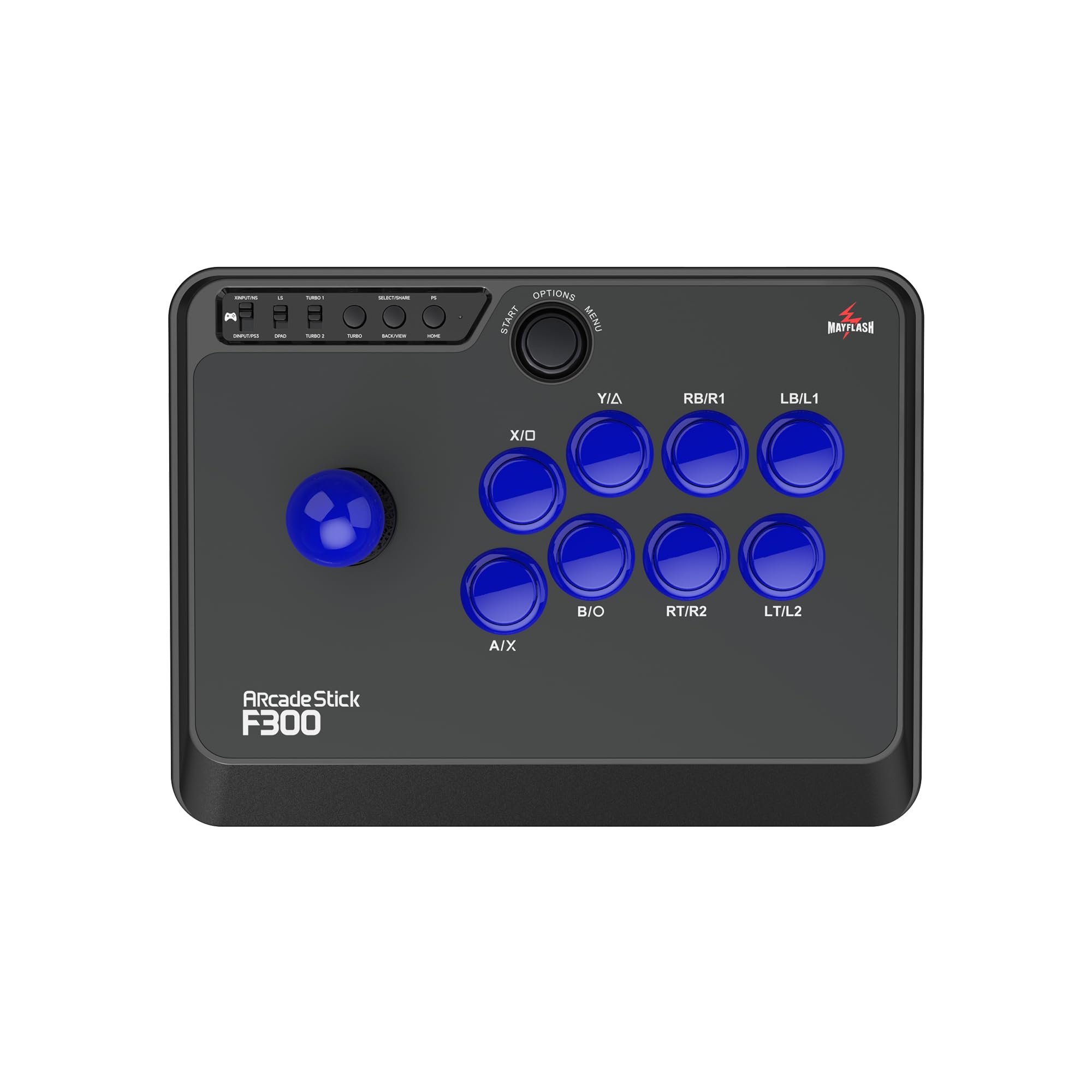
At a budget-friendly price the F300 supports Switch, PlayStation, Xbox, PC, macOS, Steam Deck, and Android via optional adapters. This cross-platform reach is rare at this cost, though setting up on Xbox One and some other consoles requires a pass-through controller — a small logistical hurdle for the flexibility.

This stick is for beginners wanting to try an arcade stick without a large investment, modders seeking a cheap base for custom artwork and Sanwa parts, or budget-conscious players planning to upgrade later. The stock buttons can feel mushy and the layout may be misaligned on some units, so out-of-the-box feel won't match higher-priced sticks. Additionally, a supported console controller is needed for pass-through activation on certain platforms.

The real appeal lies in its easy modding: the community has documented swapping joysticks, buttons, and artwork with minimal effort. Once upgraded, the F300 performs well for learning stick fundamentals and casual play. It won't satisfy tournament competitors or those wanting a premium experience without modifications, but it offers a solid foundation at an entry cost that's hard to beat.

💡 For Xbox One and some consoles, have a supported controller ready for pass-through activation.

Pros

  • Exceptional value at a low price point
  • Great fighting performance for beginners
  • Highly customizable and easy to mod
  • Broad platform compatibility with adapters

Cons

  • Stock buttons can feel mushy and layout may be misaligned on some units
  • Setup on Xbox One and some other consoles may require a pass-through controller and can be unresponsive
Our verdict

If you're willing to swap buttons and keep a pass-through controller nearby, the F300 is the cheapest path to a moddable arcade stick for multiple platforms.

Check Latest Price
6

Premium PS5 Stick with Sanwa Parts

Nacon Daija

87 /100
Lab Score Excellent

Key details

Form Factor
Arcade stick
Connectivity
USB-C wired
Button Quality
Sanwa OBSF 30mm
Customizability
Faceplate, mapping
View on Amazon

The Nacon Daija arrives with genuine Sanwa parts out of the box — a joystick and buttons that many players consider the standard for arcade sticks. Combined with a metal front plate that can be swapped or customized with artwork, this stick targets the PS5 competitor who wants a premium build without immediately reaching for tools.

At 7.7 pounds, this is a desk anchor. The rubber base keeps it planted during rapid inputs, and the palm rest makes extended sessions more comfortable. But that weight works against lap play — expect it to tire your legs over time. The wired USB-C connection (3-meter cable) means no latency concerns and no battery management.

This stick suits the PS5 player who values stability and customization over portability and wants Sanwa reliability from day one. However, some units have shipped with lever or button mapping issues — worth checking your stick's inputs right away. If you prefer something lighter for lap use or travel, consider the slimmer options in this set.

💡 Test all inputs early — a quick factory mapping check avoids surprises mid-match.

Pros

  • Genuine Sanwa joystick and buttons for consistent feel and responsiveness
  • Customizable faceplate, button mapping, and software profiles for personalization
  • Non-slip rubber base and palm rest keep the stick steady during play

Cons

  • Some units may have incorrect factory mapping or lever input quirks
  • Heavy build can be tiring when used on the lap for long sessions
Our verdict

A premium PS5 stick that delivers on build and customization, but occasional QC checks are wise and this is strictly a desk companion.

Check Latest Price
7

PS5 Leverless

Qanba Sapphire S1

87 /100
Lab Score Excellent

Key details

Form Factor
Leverless
Connectivity
USB wired
Button Quality
Adjustable throw
Customizability
Remappable buttons
View on Amazon

This leverless controller delivers native PS5 compatibility and Cherry MX-compatible buttons with adjustable throw, letting players fine-tune actuation distance. The licensed Street Fighter 6 artwork and premium materials give it a tailored feel for Juri fans. However, the controller does not support Xbox or Switch, and its premium price targets players who value direct Sony license over broader platform coverage. It's a dedicated tool for PS5 fighting game enthusiasts committed to the all-button form factor.

Pros

  • Premium build with licensed Street Fighter 6 artwork
  • Adjustable button layout with full remapping
  • Competitive pricing among native PS5 leverless options

Cons

  • Premium price limits accessibility for budget-focused buyers
  • No support for Xbox or Switch consoles
Our verdict

Best for PS5 players who want a native leverless with adjustable buttons and official Sony license, and who are not concerned about Xbox or Switch compatibility.

Check Latest Price
8

Multi-Platform Leverless

MAYFLASH F500 FLAT

86 /100
Lab Score Excellent

Key details

Form Factor
Leverless
Connectivity
USB wired
Button Quality
Stock (small)
Customizability
Artwork plate
View on Amazon

The MAYFLASH F500 FLAT offers a cost-effective entry into leverless play with its anodized aluminum plate providing stable lap positioning and a transparent top panel for easy artwork customization. It supports a wide range of platforms including PS4, Xbox, Switch, and PC, and avoids the part-swapping needed with entry-level arcade sticks. The tradeoff: the stock buttons are smaller than standard arcade sizes, which can feel cramped during longer sessions for players with larger hands.

Pros

  • Cost-effective way to try all-button play without spending on high-end leverless.
  • Metal base plate gives stable lap feel and durable build.
  • Swappable clear top panel and standard mounting for easy customization.

Cons

  • Some units may have sticky buttons or connection issues after use.
Our verdict

If you're exploring leverless fighting on a budget and have average-sized hands, this is a sensible starting point that won't lock you into one platform.

Check Latest Price
9

Travel, Small Hands

HORI Fighting Stick Mini

83 /100
Lab Score Excellent

Key details

Form Factor
Arcade stick (mini)
Connectivity
USB wired
Button Quality
Stock (8 buttons)
Customizability
Limited
View on Amazon

Its compact build fits easily into a backpack and serves well for travel or players with smaller hands. However, the lack of a touchpad button makes navigating PS5 menus awkward in many games, and the lightweight construction can feel less substantial during extended sessions.

Pros

  • Great value for a compact, licensed stick
  • Good quality for the price

Cons

  • Lightweight construction may feel less premium during play
  • Missing touchpad button limits navigation on PS5 in games that require it
Our verdict

For traveling players or those with smaller hands who don't rely on touchpad functionality, this stick offers a budget-friendly, licensed option.

Check Latest Price
10

2D Fighters Xbox

8Bitdo M30 Fighter Pad

83 /100
Lab Score Excellent

Key details

Form Factor
Fight pad
Connectivity
Wired USB-C
Button Quality
6 face buttons
Customizability
No
View on Amazon

The 8Bitdo M30 delivers a responsive D-pad and classic six-button layout that feel natural for 2D fighters like Street Fighter or retro beat-em-ups. Its wired USB-C connection ensures low latency on Xbox and PC. However, the compact form factor – while portable – becomes uncomfortable for larger hands, and the closely spaced face buttons may cause accidental presses in fast combos. The pad format limits its use to 2D and retro fighters; it won't replace an arcade stick for 3D fighters or leverless precision. As an entry-level fight pad, it works best for players with small to medium hands who prioritize D-pad accuracy and don't mind the wired restriction.

Pros

  • High-precision D-pad delivers reliable inputs for fighting game commands.
  • Six-button layout matches the classic arcade feel for retro and 2D fighters on Xbox and PC.

Cons

  • Compact shell can cause discomfort for players with larger hands.
  • Face button spacing is tight, increasing the chance of accidental presses during fast sequences.
Our verdict

Best suited for Xbox/PC players with small to medium hands who want a budget-friendly pad for 2D fighting games and don't need wireless or a full arcade stick layout.

Check Latest Price

How to Choose

Form Factor

Arcade sticks use a joystick for directional inputs and large buttons for actions. They mimic cabinet feel, which helps muscle memory for many classic fighters, but they take up desk space and require larger hand movements.

Leverless (all-button) controllers replace the stick with four directional buttons. This reduces travel distance and can speed up inputs like double taps and dashes, but the learning curve is steep — expect a week or two of dropped combos.

Platform Compatibility

Not all controllers work on every console. PS5 and Xbox have licensing requirements, so many budget sticks rely on third-party adapters or pass-through controllers. Native support is more reliable but costs more.

If you play on multiple platforms, look for a model that explicitly lists that support. The Mayflash F300 covers nearly everything via adapter, but performance varies by console — Xbox One pass-through users report setup issues.

Button Quality

Stock buttons are often the weak point in entry-level sticks. Mushy or misaligned buttons hurt execution and feel. Upgrading to Sanwa OBSF or Seimitsu buttons (typically $20-$30) transforms the feel, but requires basic soldering or screwdriver work.

Leverless controllers often use low-profile mechanical switches that are hot-swappable — you can change switches without soldering. This makes them more accessible for tinkerers, but the stock switches may feel too light or too stiff depending on your preference.

Customizability

Moddability is a key value driver. Many sticks have easy-open shells, standard button sizes, and artwork plates. The Mayflash F300 and 8Bitdo Arcade Stick are famous for being modding-friendly, letting you swap joysticks, buttons, and even the entire top panel.

However, some premium sticks (like the Nacon Daija) offer software remapping and profile storage, which is more convenient than hardware mods but locks you into the original components. Decide whether you want to tinker or just plug and play.

Connectivity

Wired controllers offer zero latency and no battery worries, but the cable can be restrictive. Wireless options (2.4G or Bluetooth) add freedom but introduce potential interference and require charging.

Modern wireless standards like 2.4G are nearly indistinguishable from wired in terms of latency. Bluetooth can have slightly higher lag. For competitive play, wired or 2.4G is preferred. Note that wireless often adds $20-$50 to the price.

Frequently Asked Questions