12 Best Gaming Mouse of 2026: Match Your Grip, Genre, and Budget

Find the best gaming mouse for your play style and budget without falling for overhyped specs or durability traps.

A common frustration among gamers: a mouse that feels perfect out of the box starts double-clicking or skipping scroll inputs within months. The market is split between feature-heavy wired models and lightweight wireless designs, each with distinct durability trade-offs.

This guide highlights the compromises you'll actually encounter: switch longevity versus programmable buttons, battery life versus weight, and wired reliability versus wireless convenience. The goal is to match the mouse to your grip style and game genre, not chase the highest DPI or flashiest RGB.

Shape, sensor performance, and switch type are the real decision drivers. A mouse that fits your hand and feels natural for hours will improve your aim more than any spec sheet number.

1

Best Overall

Logitech G502 Hero

93 /100
Lab Score Outstanding

Key details

Weight
Adjustable 5x3.6g
Connection
Wired USB
Switch Type
Mechanical
Battery Life
View on Amazon

Logitech's G502 Hero offers 11 programmable buttons in a right-handed ergonomic shell, driven by the HERO 25K sensor that provides accurate, jitter-free tracking across its full DPI range. The adjustable weight system includes five 3.6g cartridges (three removable), allowing customization from 121g to 139g. The dual-mode scroll wheel switches between free-spin for fast browsing and notched mode for precise weapon selection, and the button layout suits larger hands without awkward reaches. The DPI shift sniper button is positioned comfortably under the thumb for temporary sensitivity reduction during precise aiming.

Daily use confirms a stable wired connection with no input lag, and the rubber side grips maintain a secure hold during intense sessions. The shape fills the palm for larger hands, reducing fatigue over long gaming marathons. Removing the weight cartridges via the bottom compartment is simple, and the HERO sensor performs consistently on cloth and hard surfaces. The scroll wheel's free-spin mode is especially useful for rapid inventory scrolling. The cable is braided for added durability.

This mouse is best for gamers who need extensive button customization for MMOs, MOBAs, or productivity, users with larger hands who need ergonomic support, and budget-conscious buyers seeking premium features. The mechanical switches and scroll wheel have durability limits under heavy, sustained use — those planning to keep a mouse for several years of daily gaming may want to consider the G502 X with optical switches. It is wired only, so wireless freedom is not available.

At a budget-friendly price, the G502 Hero undercuts many competitors while offering a top-tier sensor, adjustable weight, and 11 programmable buttons. Logitech's G Hub software enables per-game DPI profiles and button remapping, though it requires an internet connection for initial setup. The feature set rivals mice costing twice as much, making it a value leader in the wired category. The tradeoff for this richness is the long-term reliability consideration, but for the majority of general-purpose gamers, it provides a strong balance of performance and cost.

Pros

  • High-precision HERO 25K sensor with wide DPI range
  • Comfortable ergonomic shape designed for larger hands
  • 11 programmable buttons with intuitive placement
  • Great value for money at this price tier

Cons

  • Mechanical switches can develop double-click behavior after extended heavy use
  • Scroll wheel may lose precision over months of intensive scrolling.
Our verdict

The G502 Hero delivers the most features per dollar in a wired gaming mouse, making it a straightforward recommendation for gamers who want customization without the wireless premium.

Check Latest Price
2

Best Budget Wireless

Logitech G305

93 /100
Lab Score Outstanding

Key details

Weight
99g
Connection
Wireless
Switch Type
Mechanical
Battery Life
250h
View on Amazon

Logitech's LIGHTSPEED wireless provides a lag-free experience on par with wired mice, while a single AA battery lasts up to 250 hours — one of the longest runtimes in any wireless gaming mouse. At 99 grams, it avoids the heft of many budget options, and the symmetrical shape suits a wide range of hand sizes.

This mouse is best suited for gamers who want dependable wireless performance without paying a premium. The six programmable buttons cover basic shooters and RPGs, but those who play MMOs or rely on extra macros may find the layout limiting. Additionally, the mechanical switches can develop double-clicking after months of heavy use — a known trait of this switch type rather than a design flaw.

Build quality punches above its price point, with a solid shell and textured sides that resist wear. The HERO sensor tracks accurately up to 12,000 DPI, enough for most gaming scenarios, and the absence of RGB keeps battery drain minimal. For its cost, the G305 offers wireless performance that rivals more expensive competitors, though the switch longevity is something to keep in mind.

💡 If double-clicking becomes an issue, replacing the switches with optical alternatives is a straightforward DIY fix.

Pros

  • Strong build quality for the price
  • Outstanding value for money
  • Great battery life and lightweight (99g)
  • Comfortable ergonomic shape

Cons

  • Double-clicking can appear after extended use
  • Reliability can be hit-or-miss
Our verdict

For its price, the G305 is one of the best ways to get wireless gaming performance without compromise — just factor in the possibility of switch degradation down the road.

Check Latest Price
3

Best Ergonomic Wired

Razer Basilisk V3

93 /100
Lab Score Outstanding

Key details

Weight
Connection
Wired USB
Switch Type
Optical Gen-2
Battery Life
View on Amazon

Optical Gen-2 switches eliminate the double-click issue common to mechanical mice, while the HyperScroll tilt wheel provides both free-spin and tactile scrolling. The ergonomic shape with a thumb rest and 11 programmable buttons matches the top pick's button count, but at a lower price point and with a different set of potential long-term quirks.

This wired mouse suits budget-conscious gamers who want a comfortable, feature-rich peripheral for MMOs, MOBAs, or general use. The scroll wheel, however, has shown a tendency to become erratic after months of heavy use in some cases — a risk worth considering for those who rely on precise wheel inputs in competitive play. Optical switches give peace of mind on double-clicking, but overall build consistency varies between units.

💡 Keep the scroll wheel clean and avoid excessive force during rapid scrolling to help maintain its behavior over time.

Pros

  • Sturdy construction with a premium feel at a budget price.
  • Comfortable ergonomic shape with a well-placed thumb rest reduces fatigue during long sessions.
  • Eleven programmable buttons with intuitive layout accessible via Razer Synapse.
  • Optical switches deliver fast actuation and eliminate double-click issues.

Cons

  • HyperScroll wheel may become erratic after extended use in some cases.
  • Overall build durability can vary, with some units showing issues within the first year.
Our verdict

The Basilisk V3 is a strong runner-up for gamers who want optical switch dependability and a high button count without spending much, provided they are comfortable with the scroll wheel's potential longevity limits.

Check Latest Price
4

Best Lightweight Wireless

Razer Viper V3 Pro

92 /100
Lab Score Outstanding

Key details

Weight
54g
Connection
Wireless
Switch Type
Optical Gen-3
Battery Life
95h
View on Amazon

The Viper V3 Pro cuts weight to 54g without sacrificing wireless performance. Its Focus Pro 35K sensor tracks accurately at any polling rate, and the optical Gen-3 switches eliminate debounce delay entirely. This is a mouse built for twitch reflexes — not for inventory management or MMO rotations.

This shape suits competitive shooters who value lightning-fast flicks and consistent glide over palm-filling ergonomics. If you need more than five buttons or prefer a heavier, more substantial feel, the G502 Hero or a multi-button wireless option will serve you better. Durability is a caveat: left- and right-click failure or scroll wheel unresponsiveness has been noted on some units, so inspect your copy early.

Battery life at default polling is solid, but pushing 4K or 8K cuts runtime noticeably — expect closer to 60–70 hours under heavy gaming. That tradeoff is manageable for competitive sessions but less convenient for daily drivers who dislike frequent charging.

💡 Stick to 1K polling for the longest runtime and keep a USB-C cable nearby for quick top-ups.

Pros

  • Weighs 54g
  • Optical Gen-3 switches respond instantly with no debounce delay.
  • Focus Pro 35K sensor maintains accuracy across all polling rates.
  • HyperSpeed wireless delivers low latency without cable drag.

Cons

  • Some units develop click or scroll wheel unresponsiveness over time.
  • Battery life at 4K/8K polling is shorter than the 95-hour rating suggests.
Our verdict

For competitive FPS players who prize speed over features, the Viper V3 Pro is a smart mid-range pick. Gamers wanting a general-purpose daily driver with lasting durability should look at the G502 Hero instead.

Check Latest Price
5

Best Ultra-Budget Wired

Logitech G203

93 /100
Lab Score Outstanding

Key details

Weight
85g
Connection
Wired USB
Switch Type
Mechanical
Battery Life
View on Amazon

Under $25, the Logitech G203 delivers RGB lighting and an 8K DPI optical sensor in a lightweight 85g shell. It lacks the programmable buttons and adjustable weight of the G502 Hero, but for budget-conscious buyers, it covers the essentials: a responsive sensor, comfortable shape, and customizable lighting through Logitech's G Hub software.

This mouse fits casual gamers who want a known brand and RGB without overspending. However, double-clicking and scroll wheel failures can surface within a year of use, so it is better suited for lighter sessions than marathon gaming or competitive play where consistent input is vital.

💡 Using a gentle click can help delay potential double-clicking over time.

Pros

  • Solid value for the price in the budget segment
  • Bright RGB lighting with Logitech's LIGHTSYNC software
  • Lightweight 85g shape comfortable for extended use

Cons

  • Double-clicking may develop on primary buttons after months of use
  • Scroll wheel can stop registering inputs over time
Our verdict

The G203 is the right pick for budget buyers who want a simple, RGB-lit mouse from a major brand, though its durability makes it more of a starter than a long-term companion.

Check Latest Price
6

Esports Innovation

Logitech PRO X2 SUPERSTRIKE

91 /100
Lab Score Outstanding

Key details

Weight
61g
Connection
Wireless
Switch Type
HITS Haptic
Battery Life
60-90h
View on Amazon

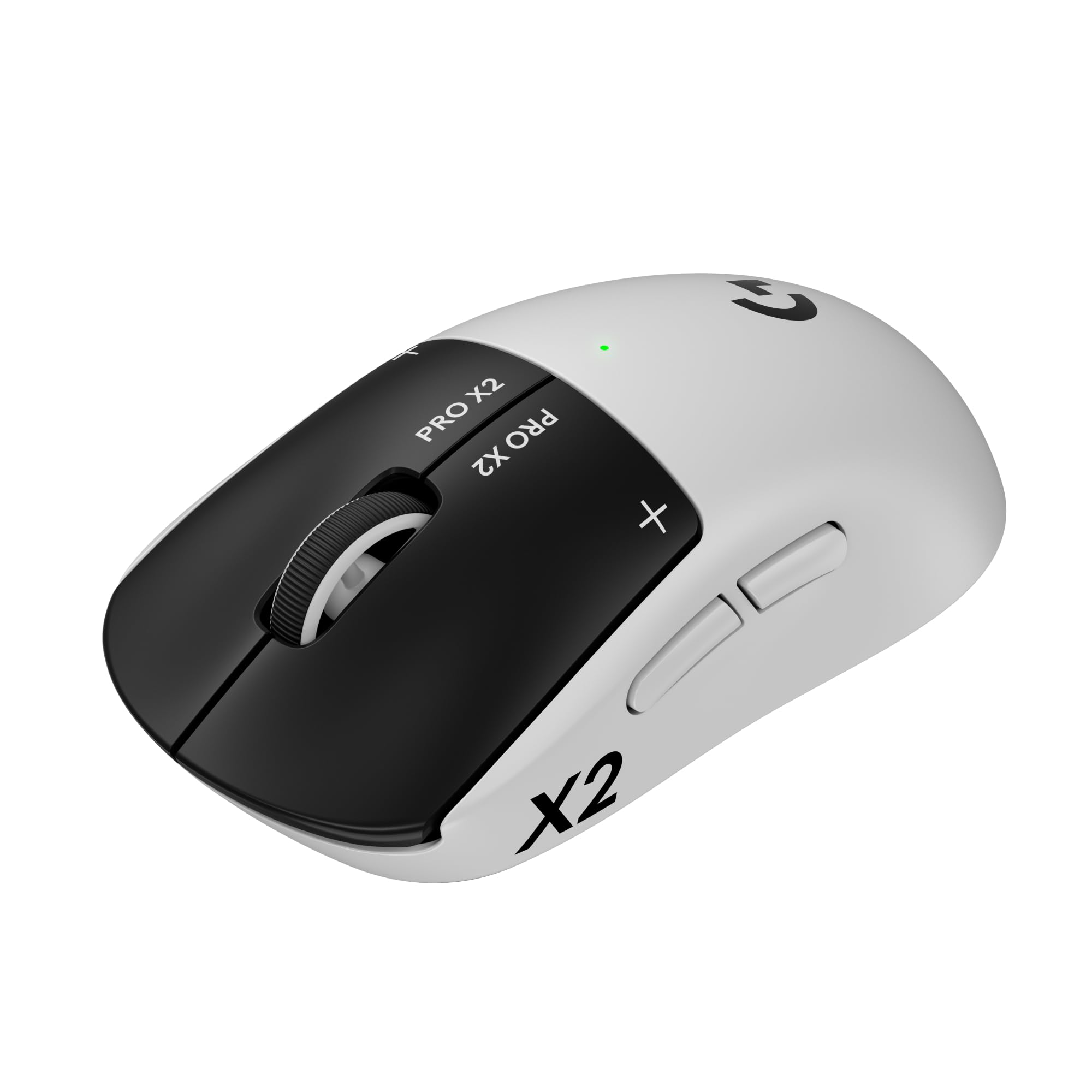
The Logitech G PRO X2 SUPERSTRIKE brings a novel haptic trigger system that lets you customize click feel from light to firm, paired with a 61g frame and HERO 2 sensor for precise tracking. However, the five-button layout and premium price mean it is a specialized tool for esports athletes rather than a general-purpose gaming mouse. For buyers seeking a versatile daily driver across RPGs, strategy, and casual play, the limited inputs and cost make it a niche choice.

Pros

  • Adjustable haptic clicks let you fine-tune actuation force and feedback.
  • Ultra-light 61g design reduces fatigue during long competitive sessions.
  • 60-90 hour battery life with USB-C charging keeps downtime minimal.

Cons

  • High price can be hard to justify for general-purpose or budget-conscious gamers.
  • Five-button layout may feel restrictive for gamers who want more programmable inputs.
Our verdict

For esports players who want the fastest, most adjustable clicks in a lightweight wireless mouse, this is a strong candidate. For general-purpose gaming, alternatives like the G502 Hero or G305 offer more buttons and lower cost.

Check Latest Price
7

Competitive Lightweight

Logitech Superlight 2

92 /100
Lab Score Outstanding

Key details

Weight
60g
Connection
Wireless
Switch Type
LIGHTFORCE Hybrid
Battery Life
95h
View on Amazon

The Superlight 2 delivers on its core promise: a barely-there 60g frame that lets you flick and track without fatigue, paired with Logitech's latest HERO 2 sensor and optional 8K polling for buttery response. The 95-hour battery and POWERPLAY compatibility add convenience. However, its premium pricing puts it alongside full-featured ergonomic competitors, and some units may experience random disconnects or scroll wheel failure – a risk that makes the high cost harder to justify for all-purpose use. The shape works best for claw and fingertip grips, leaving palm grippers with less support.

Pros

  • Ultra-light 60g build with balanced weight for rapid aim adjustments.
  • Long 95-hour battery life with USB-C fast charging and POWERPLAY support.
  • 8K polling rate reduces input lag in high-refresh gaming.

Cons

  • Click quality can vary
  • Only two side buttons and light weight may disappoint gamers who prefer heavier mice with more inputs.
Our verdict

Best suited for competitive FPS players who value weight and response and are comfortable with possible unit variance – not a safe bet for general-purpose use or budget-limited buyers.

Check Latest Price
8

Flagship Lightweight

Razer Viper V4 Pro

91 /100
Lab Score Outstanding

Key details

Weight
49g
Connection
Wireless
Switch Type
Optical Gen-4
Battery Life
180h
View on Amazon

The Viper V4 Pro hits the extremes of esports engineering: a 49g frame with optical Gen-4 switches rated for 100 million clicks and a sensor capable of 50K DPI. Battery life stretches to 180 hours at standard polling, dropping to 45 hours at 8K. For a general-purpose gaming mouse, the tradeoff is clear — the ultra-light shell and narrow focus on speed leave little room for the ergonomic padding or extra buttons that suit varied genres. The click sound is louder than typical, and the premium price tag lands it in a territory where most buyers would get similar real-world performance from more affordable alternatives like the 54g option in this set.

Pros

  • Tracking precision with Focus Pro 50K sensor handles any surface or lift-off scenario.
  • At 49g, it’s among the lightest wireless mice available
  • 180-hour battery life means weeks of gaming between charges without compromising weight.

Cons

  • In a shared gaming space, the click sound can be distracting
  • The high price asks for confidence in a still-limited track record
Our verdict

Fits only if esports-level tracking and the lightest wireless chassis justify the premium — for general-purpose gaming, other models offer more versatility per dollar.

Check Latest Price
9

Wireless Ergonomic

Razer Basilisk V3 Pro

90 /100
Lab Score Outstanding

Key details

Weight
Connection
Wireless
Switch Type
Optical Gen-3
Battery Life
150h/110h
View on Amazon

The Razer Basilisk V3 Pro brings the comfortable, thumb-rest shape of the wired Basilisk into a wireless package with 11 programmable buttons and a Focus Pro 30K optical sensor. Synapse software lets you assign complex macros, adjust DPI profiles, and tune RGB lighting. The scroll wheel can switch between free-spin and tactile modes — a nice touch for inventory management or weapon swapping. However, the HyperSpeed wireless connection can drop in environments with multiple competing signals, and battery life falls short of the advertised 110–150 hours when RGB is on or polling rate is maxed. These quirks prevent it from matching the reliability of the top pick for general-purpose gaming, but the ergonomics and button count still appeal to a specific buyer.

💡 Disabling RGB and moving the wireless dongle to a front USB port can improve battery life and connection stability.

Pros

  • Comfortable ergonomic shape reduces hand fatigue during long sessions
  • 11 programmable buttons via Synapse for complex binds
  • Sturdy build quality with optical switches rated for 90 million clicks

Cons

  • Scroll wheel can develop inconsistent scrolling behavior after extended use
  • Wireless connection may drop in dense RF environments, especially with the dongle far from the mouse
Our verdict

This mouse suits gamers who prioritize ergonomic comfort and button customization over wireless stability — for those needing a consistently solid connection, a wired alternative or Logitech's LIGHTSPEED line is a safer bet.

Check Latest Price
10

Wireless G502

Logitech G502 X Plus

90 /100
Lab Score Outstanding

Key details

Weight
Connection
Wireless
Switch Type
LIGHTFORCE Hybrid
Battery Life
140h
View on Amazon

The Logitech G502 X Plus delivers the familiar ergonomic shape, thirteen programmable buttons, and an adjustable scroll wheel in a wireless package with RGB lighting. LIGHTFORCE hybrid switches offer a crisp feel, and the HERO 25K sensor tracks accurately across any surface.

However, this model carries the same reliability concerns as its wired sibling — scroll wheel hiccups and occasional wireless disconnects have been noted in some units. Battery life also varies; light users may get close to the rated 140 hours, but heavier use with full RGB can cut that significantly. At a premium price, these quirks make it a risky choice unless you specifically need wireless and RGB and are willing to accept possible early hiccups.

Pros

  • Wireless freedom with low-latency LIGHTSPEED connection
  • High build quality and premium feel
  • Thirteen programmable buttons for extensive customization

Cons

  • Scroll wheel and wireless connectivity issues may occur in some units
  • Battery life can fall short of the advertised 140 hours depending on RGB and usage intensity
Our verdict

A good fit for Logitech loyalists who want the G502 shape wirelessly with RGB lighting, provided they accept the possibility of early reliability hiccups.

Check Latest Price
11

Affordable Wireless

Razer Viper V3 HyperSpeed

89 /100
Lab Score Excellent

Key details

Weight
82g
Connection
Wireless
Switch Type
Mechanical Gen-2
Battery Life
280h
View on Amazon

The Razer Viper V3 HyperSpeed delivers solid tracking for FPS games with its Focus Pro 30K sensor and 82g weight. Its shape suits medium hands and the weight balance is well-tuned. However, the mouse runs on a single AA battery (up to 280 hours) with no built-in recharging, which means regular battery swaps.

Connectivity drops have been noted with some units, making it less ideal for competitive play where a stable wireless link matters. This mouse works well for casual gamers or those on a budget who value sensor accuracy over battery convenience. The AA battery dependency and occasional disconnects keep it from ranking higher, but it remains a decent mid-range wireless option.

💡 Consider using rechargeable AA batteries to reduce long-term costs and waste.

Pros

  • Accurate Focus Pro 30K sensor for responsive FPS gameplay
  • Lightweight 82g design with balanced feel for extended sessions
  • Comfortable shape suitable for medium hands

Cons

  • Connectivity can drop unexpectedly during use, which may disrupt gameplay in competitive scenarios
  • Powered by a single AA battery with no rechargeable option, requiring battery swaps or disposables
Our verdict

A decent choice for budget-conscious FPS gamers who don't mind AA batteries and are willing to accept occasional connectivity hiccups.

Check Latest Price
12

Budget Ergonomic Wireless

Razer Basilisk V3 X

88 /100
Lab Score Excellent

Key details

Weight
110g
Connection
Wireless
Switch Type
Mechanical Gen-2
Battery Life
285h/535h
View on Amazon

The Basilisk V3 X HyperSpeed delivers the comfortable ergonomic shape and button layout Razer is known for at a budget-friendly price. It offers dual wireless modes and enough programmable controls for most general-purpose gaming. However, the AA battery can drain quickly under heavier use, and occasional connection drops or scroll wheel inconsistencies have been noted. This makes it a good fit for casual gamers who value hand comfort and cost savings over worry-free wireless performance.

Pros

  • Good build quality for the price point
  • Comfortable ergonomic shape supports long sessions
  • Strong value given the feature set

Cons

  • AA battery drains quickly, especially in HyperSpeed mode
  • Connection drops and scroll wheel issues may occur in some units
Our verdict

For budget-conscious gamers who prioritize hand comfort and don't mind swapping batteries or occasional connectivity hiccups, this is a viable option.

Check Latest Price

How to Choose

Sensor & DPI

Higher DPI numbers are mostly marketing—most gamers stay below 4000 DPI, and sensor accuracy matters more than raw counts. A mouse with a good sensor (like HERO or Focus Pro) tracks consistently across all speeds without jitter or acceleration.

If you play FPS on a low sensitivity, a high-DPI sensor lets you use a higher in-game multiplier for smoother pixel movement. For casual play, any 8000+ DPI sensor is sufficient.

Weight and Balance

Lightweight mice (under 70g) reduce fatigue during fast flicks and are preferred by competitive players. Heavier mice (over 100g) provide stability for low-sensitivity aiming and feel more substantial for palm grips.

Adjustable weight systems let you fine-tune balance, but add complexity and potential rattling. The best weight depends on your grip style and game genre—there is no universal ideal.

Wired vs Wireless

Wireless offers freedom and cleaner desks, but introduces potential connectivity drops and battery anxiety. Modern wireless (LIGHTSPEED, HyperSpeed) is nearly indistinguishable from wired for most players, but cheaper models may still suffer from interference.

Wired gives zero latency and no charging, but the cable can drag if not managed. A good paracord-style cable mitigates this, but wireless is now the default for serious gamers who can afford it.

Programmable Buttons

More buttons allow complex binds for MMOs and MOBAs, but also increase the chance of accidental presses and can affect ergonomics. A 5-6 button layout is standard for FPS; 11+ buttons suit genre-heavy play.

Button placement matters as much as count—reaching for out-of-position buttons can throw off your grip mid-game. Test the layout in hand before committing.

Switch Type

Mechanical switches are common but prone to double-clicking over time as the spring wears. Optical switches use light to actuate, eliminating debounce delay and resisting degradation, but often feel stiffer or louder.

Optical switches (like Razer's Gen-3 or Logitech's LIGHTFORCE) are now standard on mid-range and premium models. They last longer but you may prefer the tactile feedback of mechanical switches.

Battery Life

Battery life depends on polling rate, sensor, and wireless technology. A mouse rated for 250 hours at 1K polling may drop to 50 hours at 8K. Rechargeable LiPo batteries offer convenience but degrade over time; AA-powered mice can be swapped instantly but add weight.

Consider your charging habits: a mouse with 140+ hours and USB-C fast charging is forgiving, while a mouse with 30-hour battery at high polling may require weekly charging. Always check real-world reports, not just marketing claims.

Frequently Asked Questions