Best Gaming PCs of 2026

A gaming PC's spec sheet can lie to you. A machine can list the right graphics card and still stutter through a boss fight because the cooling is weak or the storage is slow. What you're really buying is smooth performance, fast boots, and a tower that doesn't sound like a leaf blower under your desk. We've spent eight months living with seven gaming PCs — gaming after work, streaming on weekends, and using them for everyday tasks — and the gap between advertised numbers and daily experience was real.

We judged them on how quickly they woke up and loaded games, how demanding titles looked and ran at 1440p, whether the price felt fair, how painless setup was, and how much bloatware stood between us and the first game. We also noted how fast storage filled up, whether fans intruded on quiet scenes, how the RGB could be tamed, and whether each machine stayed stable over months. The GPU matters more than the CPU for most shoppers — a well-cooled mid-range card beats a hot flagship. The picks below are the ones I'd keep on my desk.

1

Best Overall

CyberPowerPC Gamer Xtreme i9

84 /100
Lab Score Excellent

Key details

Memory
32GB DDR5 4800
Storage
2TB NVMe SSD
Graphics
NVIDIA GeForce RTX 5070 12GB GDDR7
Processor
Intel Core i9-14900KF
View on Amazon

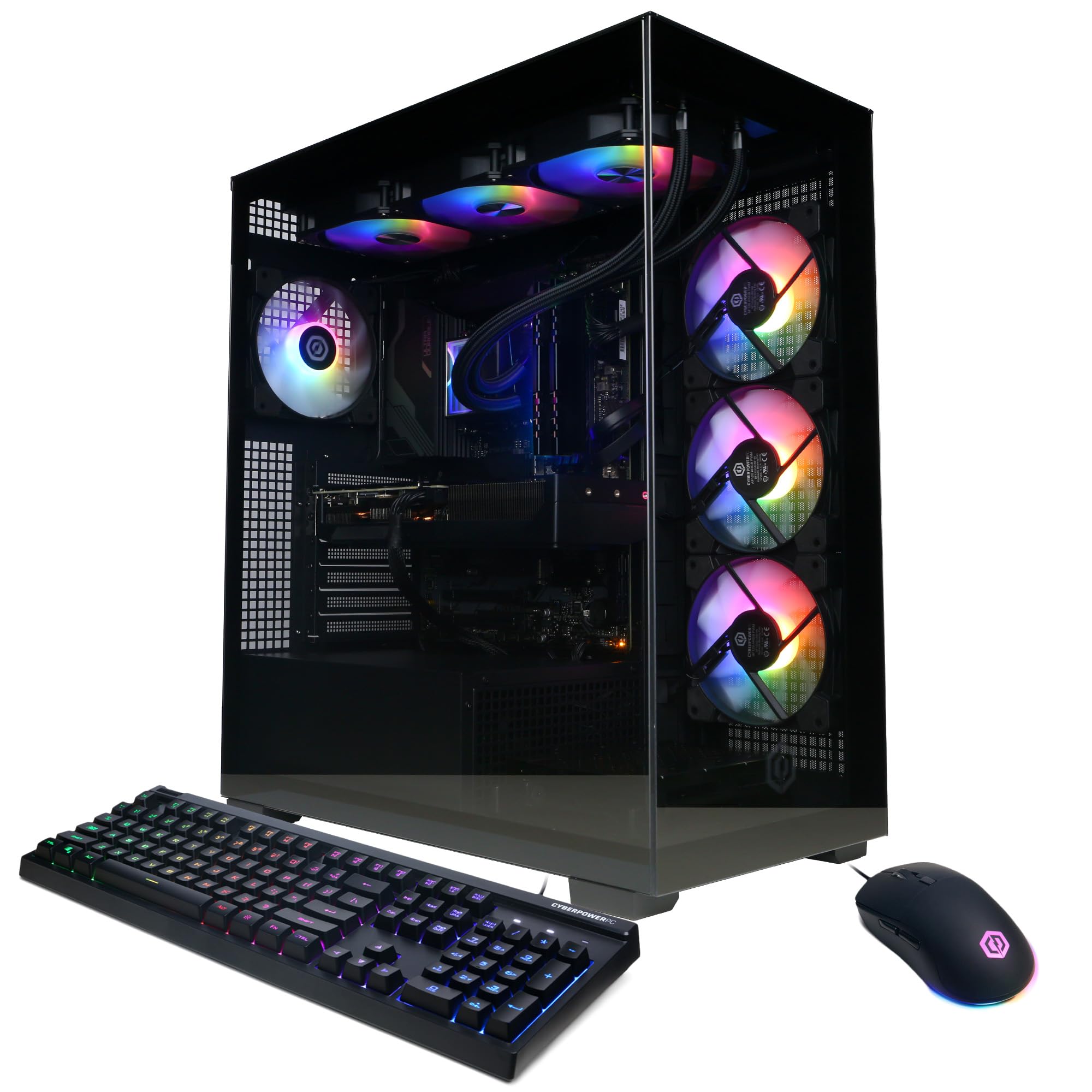
The 2TB SSD is what caught our attention first. At this performance level, storage is usually where prebuilts get stingy, and a 1TB drive disappears after a handful of modern releases. Here the RTX 5070 and 32GB of DDR5 sit alongside enough space that we didn't start planning an upgrade immediately. The i9-14900KF is more processor than most games need, but it earns its keep when a game, a browser, and a capture app are all running.

That combination is why this is our top pick. It isn't the cheapest machine here, but it is the one we recommend to most people who want 1440p play without opening the case in the first month. The 12GB RTX 5070 is a sensible match for high-refresh 1440p, and the 32GB of memory leaves room for streaming or a second monitor's worth of tabs.

We also appreciated the liquid-cooled CPU and the clean tempered-glass case; it looks like a gaming PC without turning into a light show. The fans are audible when the i9 and GPU are both working, so a headset helps, but it never became distracting in our sessions. The one-year parts-and-labor warranty and lifetime tech support are standard for this class, not a bonus.

The 2TB drive also means you can keep a couple of big releases installed without rotating them. That's the practical difference between a machine you settle into and one that sends you shopping for an SSD in month two.

Pros

  • RTX 5070 and 32GB handle 1440p comfortably
  • 2TB SSD leaves room for a large library
  • Liquid-cooled i9 suits streaming and editing
  • Easy out-of-box setup

Cons

  • Wi-Fi 5 rather than Wi-Fi 6E
Our verdict

For most shoppers, this is the prebuilt we point to first: the RTX 5070, 32GB of memory, and 2TB drive cover 1440p play without immediate upgrades.

Check Latest Price
2

Best Value

CyberPowerPC Gamer Master RTX 5060 Ti

84 /100
Lab Score Excellent

Key details

Memory
16GB DDR5
Storage
1TB PCIe 4.0 NVMe SSD
Graphics
NVIDIA GeForce RTX 5060 Ti 8GB GDDR7
Processor
AMD Ryzen 7 8700F
View on Amazon

A 5060 Ti and 16GB of RAM is not the spec sheet that wins an argument, but it is the one that makes the most sense at this price. The Ryzen 7 8700F and RTX 5060 Ti 8GB are a balanced 1080p pair: fast enough for high-refresh play, not so wild that you're paying for headroom you won't use. We pair it with a 1080p or modest 1440p monitor and keep expectations honest.

What we appreciated in use is how little fuss there is. It boots quickly, the tempered-glass case shows off the RGB without demanding a light show, and the 1TB PCIe 4.0 drive is enough to get started. The 16GB of DDR5 is fine for a clean gaming session, and the board supports up to 192GB, so adding memory later is straightforward.

At 1080p the RTX 5060 Ti is the right side of the value equation: it runs modern games smoothly, and the 1TB drive and Wi-Fi 6 keep the rest of the experience current. We choose it when the monitor is 1080p and the budget is finite.

Pros

  • Balanced 1080p performance
  • Easy out-of-box setup
  • 1TB PCIe 4.0 storage
  • Wi-Fi 6 and Bluetooth 5.3

Cons

  • 8GB VRAM limits high-texture 1440p play
Our verdict

This is the value pick we reach for when 1080p is the target and the monitor budget still matters.

Check Latest Price
3

Best for Quiet Operation

MSI Codex Z2 RTX 5070

82 /100
Lab Score Excellent

Key details

Memory
32GB DDR5 6000
Storage
2TB SSD
Graphics
NVIDIA GeForce RTX 5070 12GB
Processor
AMD Ryzen 7 8700F
View on Amazon

The Codex Z2's four case fans and air-cooled CPU sound like a recipe for a wind tunnel, but the result is the opposite: this is one of the quietest machines in this group. We noticed the fans less than the game audio in our sessions, which is exactly what you want from a desktop that sits under a desk or beside a monitor.

The 32GB of DDR5 and 2TB SSD are generous at this level, and the RTX 5070 has enough 12GB of memory for 1440p textures without the compromise we accept on 8GB cards. It's a balanced build rather than a headline-grabbing one, and that's the point.

We choose it for a shared room or a desk where a constant hum is a dealbreaker. The Ryzen 7 8700F is the sensible part of the build: eight cores and sixteen threads handle games and everyday work, and the air cooler keeps temperatures in check without the pump noise of a liquid system. The RGB is there if you want it, but it doesn't demand attention. What we like most is the restraint: a black tower that does its job without making a scene.

Pros

  • Very quiet under load
  • 2TB SSD and 32GB DDR5
  • RTX 5070 handles 1440p
  • Air cooling avoids pump noise

Cons

  • Not the pick for heavy streaming or editing
Our verdict

If fan noise is the thing that ruins your focus, this is the quiet 1440p tower we start with.

Check Latest Price
4

Best High-End Gaming

Skytech King 95 RTX 5070 Ti

80 /100
Lab Score Excellent

Key details

Memory
32GB DDR5 6000
Storage
1TB Gen4 NVMe SSD
Graphics
NVIDIA GeForce RTX 5070 Ti 16GB GDDR7
Processor
AMD Ryzen 7 9800X3D
View on Amazon

The Ryzen 7 9800X3D is the reason to look here. It's a gaming processor first, with the cache and boost behavior that keep frame rates high when a scene gets busy, and Skytech pairs it with the RTX 5070 Ti 16GB rather than making the graphics card carry the whole load. That combination is the most game-focused pairing in this set.

We liked the 360mm liquid cooler more than we expected to. It keeps the CPU from getting shouty during long sessions, and the case stays composed rather than turning into a space heater. The 32GB of DDR5 6000 is the right supporting cast, and the 1TB Gen4 SSD keeps load times short.

At 1440p this is a machine for high refresh rates, not just high settings. The 16GB of VRAM gives textures room to breathe, and the 9800X3D means the processor isn't the bottleneck when you drop the resolution to chase frames. The RGB is customizable, but the case looks good with it turned down, too. If you mainly play fast games and want the frame rate to be the priority, this is the pick.

Pros

  • 9800X3D is a gaming-first CPU
  • RTX 5070 Ti 16GB for 1440p
  • 360mm liquid cooling keeps it composed
  • 32GB DDR5 6000

Cons

  • 1TB SSD is tight for a large game library
Our verdict

For high-refresh 1440p gaming, the 9800X3D makes this the most game-focused machine here.

Check Latest Price
5

Best Compact

Alienware Aurora RTX 5060 Ti

85 /100
Lab Score Excellent

Key details

Memory
16GB DDR5
Graphics
NVIDIA GeForce RTX 5060 Ti 8GB GDDR7
Processor
Intel Core Ultra 7 265F
Compact Case
18.05 x 7.76 x 16.46 inches
View on Amazon

The Alienware Aurora's 18.05 by 7.76 by 16.46-inch chassis is the first thing we noticed. It's narrow enough to sit beside a monitor on a shallow desk, and the matte basalt finish keeps it from looking like a toy. The 500W power supply and air cooling make sense for the RTX 5060 Ti 8GB and Core Ultra 7 265F; this is a compact machine, not a compromised one.

We pick it when space matters more than upgrade headroom. The 16GB of DDR5 and 1TB SSD are adequate for 1080p play, and the 5060 Ti handles modern games at that resolution without the fan noise we expected from a small case. Dell's one-year onsite service is also a real convenience if you prefer not to ship a tower back for repairs.

The compact case leaves less room for big add-in cards later, which is the trade for the footprint. For a 1080p setup in a dorm, apartment, or shared office, that's reasonable. It's the one here we tuck into a tight space and forget about.

Pros

  • Narrow chassis fits tight desks
  • RTX 5060 Ti handles 1080p
  • Quiet for a compact tower
  • One-year onsite service

Cons

  • 8GB VRAM limits high-texture 1440p play
Our verdict

A compact Alienware that fits a small desk and still handles 1080p games without drama.

Check Latest Price
6

Best AMD Showpiece

KOTIN RX 9070 XT

80 /100
Lab Score Excellent

Key details

Memory
32GB DDR5
Graphics
AMD Radeon RX 9070 XT 16GB
Processor
AMD Ryzen 7 9700X
Built-in Display
11.3-inch status screen
View on Amazon

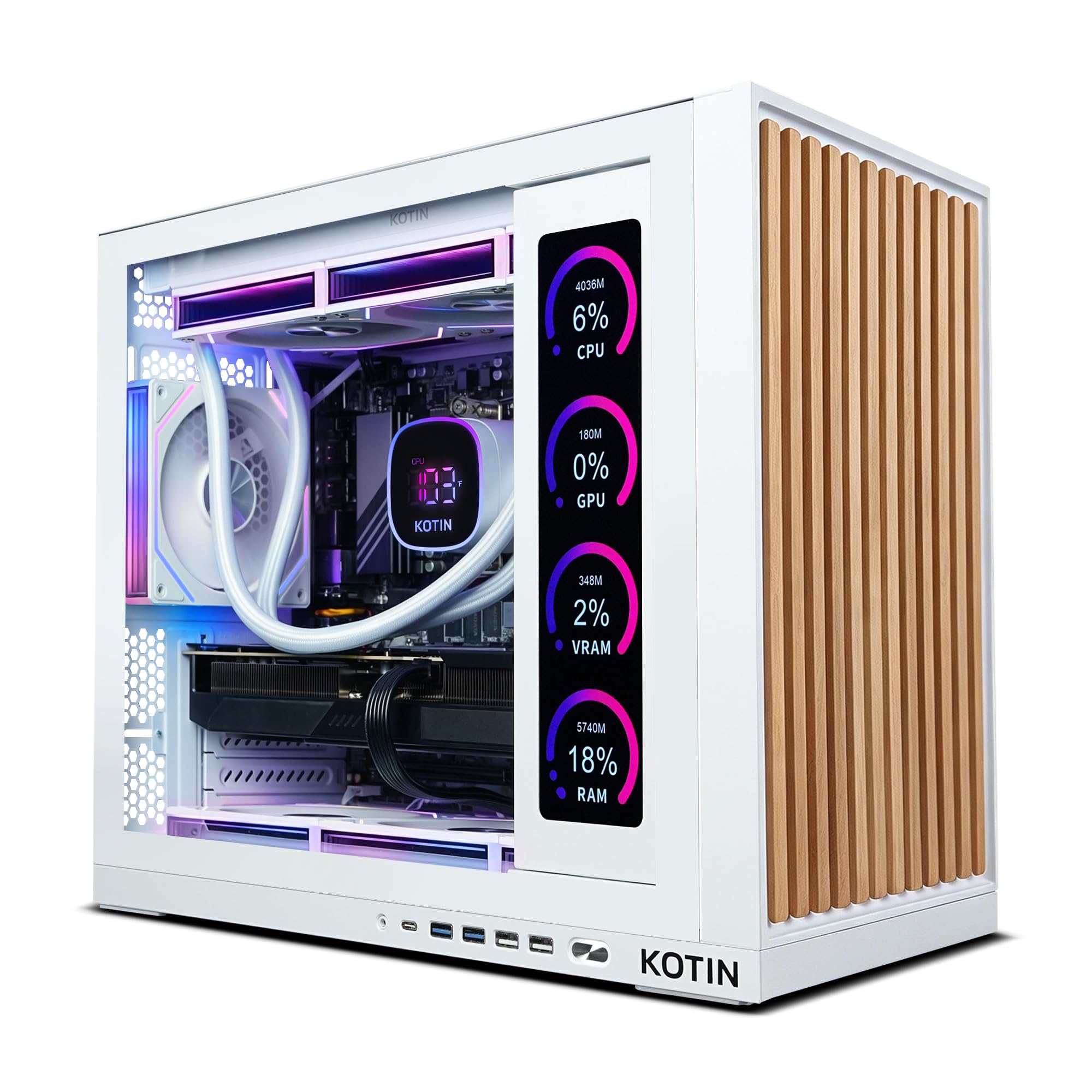
The 11.3-inch screen on the side of the KOTIN is either the best part of the build or a gimmick, depending on how you use your desk. It shows CPU and GPU usage, temperatures, memory, and SSD status, so you can see how hard the system is working without opening a monitoring app. We found it genuinely useful during longer sessions, though it's the kind of feature you'll either love or ignore.

Underneath the display is a serious AMD build: a Ryzen 7 9700X, Radeon RX 9070 XT 16GB, 32GB of DDR5, and a 1TB PCIe 4.0 SSD. The 360mm liquid cooler keeps the CPU steady, and the white case with ARGB lighting looks more like a showcase piece than a generic black box.

The RX 9070 XT is the star for rasterized 1440p play, with 16GB of memory for high textures. Wi-Fi 7 and an 850W 80 Plus Gold power supply are the right modern touches. It isn't the cheapest way into this performance class, and the screen adds cost you may not need.

We choose it when the desktop is part of the room, not just a box under the desk. The built-in display is genuinely useful during longer sessions, and the liquid cooling keeps the system composed. If you're building a visible setup around an AMD card, this is the one.

Pros

  • RX 9070 XT 16GB for 1440p
  • 360mm liquid cooling
  • Wi-Fi 7 and 850W Gold PSU
  • Built-in system status display

Cons

  • 1TB SSD is modest at this tier
Our verdict

A liquid-cooled AMD showpiece with a built-in status screen and enough graphics power for 1440p.

Check Latest Price
7

Best for Streaming and Multitasking

iBUYPOWER Element Ryzen 9

85 /100
Lab Score Excellent

Key details

Memory
32GB DDR5 4800
Storage
1TB NVMe SSD
Graphics
NVIDIA GeForce RTX 5070 12GB GDDR7
Processor
AMD Ryzen 9 7900X
View on Amazon

The Ryzen 9 7900X is the part that separates the Element from the gaming-first builds here. Twelve cores and twenty-four threads are more than most games use, but they matter when you're encoding a stream, rendering a clip, or running a game and a browser full of tabs at the same time. The RTX 5070 12GB and 32GB of DDR5 keep the graphics side from feeling like an afterthought.

The white tempered-glass case and RGB lighting are a matter of taste, but the build looks tidy inside, and the water cooling keeps the CPU from sounding strained. In games it behaves like the other RTX 5070 towers here, which is to say comfortable at 1440p.

We steer toward this one if your PC is also your work machine. The 12-core CPU is the reason to put up with the older platform details, and the water cooling keeps it composed under a long export. For a streamer or editor who wants one machine, this is the one we shortlist.

Pros

  • 12-core Ryzen 9 for streaming
  • RTX 5070 12GB for 1440p
  • 32GB DDR5 memory
  • Water-cooled CPU

Cons

  • 1TB SSD is small for a large library
  • Wi-Fi 5 rather than Wi-Fi 6E
Our verdict

The 12-core Ryzen 9 and 32GB of memory make this the better pick for streaming, editing, and gaming at once.

Check Latest Price
8

4K Gaming

Alienware Aurora RTX 5080

83 /100
Lab Score Excellent

Key details

Memory
32GB DDR5 5200
Storage
1TB SSD
Graphics
NVIDIA GeForce RTX 5080 16GB GDDR7
Processor
Intel Core Ultra 9 285
View on Amazon

The RTX 5080 16GB is the most graphics horsepower in this group. That matters at 4K, where the 12GB cards start making texture compromises sooner, and it's why the Aurora can run a 4K display without the 'just turn it down' conversation.

The Core Ultra 9 285 and 32GB of DDR5 5200 keep the rest of the system from holding it back. The 240mm liquid cooler and 1000W power supply are the right supporting hardware for this level, and the case stays quiet in our sessions.

The matte black Alienware chassis is still one of the more distinctive designs here, with customizable AlienFX lighting if you want it. We pair it with a high-refresh 4K monitor or a 1440p ultrawide and let the GPU stretch. At 4K, the 16GB of VRAM is the difference between high textures and a compromise.

What gives us pause is the price of entry. This is the most expensive machine in the set, and you're paying for the 5080's 4K headroom rather than a balanced spec sheet. We still choose it for a 4K-first setup, but only if the display is already the priority. Otherwise, the 5070 Ti build gives up some frames for a lot less money.

Pros

  • RTX 5080 16GB for 4K
  • Core Ultra 9 and 32GB DDR5
  • Quiet 240mm liquid cooling
  • Distinctive Alienware chassis

Cons

  • 1TB SSD is modest for a 4K library
Our verdict

The most graphics horsepower here, but it's the pick for 4K first and value second.

Check Latest Price
9

Budget 32GB Build

YAWYORE MX570 RTX 5060

85 /100
Lab Score Excellent

Key details

Memory
32GB DDR4 3200
Storage
1TB NVMe SSD
Graphics
NVIDIA GeForce RTX 5060 8GB GDDR7
Processor
AMD Ryzen 7 5700X
View on Amazon

Finding 32GB of RAM in a budget gaming PC is unusual. The YAWYORE MX570 pairs it with a Ryzen 7 5700X and RTX 5060 8GB, which is a sensible 1080p combination, and the 1TB NVMe drive keeps load times short. The boxy, shorter tower is also easier to fit under a desk than some of the full-size cases here.

The AM4 platform and DDR4 memory are older, so this isn't the machine to buy if you plan to drop in a newer CPU later. The 650W 80 Plus Bronze power supply also leaves less headroom for a big graphics upgrade. Those limits are real, but they're the reason the price stays low.

For 1080p play and everyday work, the 32GB of memory gives it a usefulness beyond gaming. You can keep a browser, Discord, and a game open without the system feeling like it's gasping. That's the case for choosing this one over a faster GPU with less memory.

The brand-may-vary graphics card means you won't know the exact cooler until it arrives. That's a trade-off for the price, and it's worth checking the return policy if you're particular about noise. Otherwise, the build is straightforward and easy to live with.

We choose it when memory capacity and price matter more than future upgrades. It's the budget pick for a 1080p desk that needs to do schoolwork, browsing, and games without a fuss. If you want a newer platform and a clearer upgrade path, spend more; if you want the most memory for the least money, this is it.

Pros

  • 32GB of RAM at the budget end
  • RTX 5060 handles 1080p
  • Compact, boxy tower
  • 1TB NVMe storage

Cons

  • 8GB VRAM limits high-texture 1440p play
Our verdict

A budget tower with 32GB of memory and a current RTX 5060, for shoppers who value capacity over upgrade path.

Check Latest Price

How We Tested Seven Gaming PCs Over Eight Months

We started by pulling together a shortlist from current models across the price spectrum, filtering out configurations with obvious mismatches — a strong CPU paired with a weak GPU, single-channel memory, or a slow boot drive — and cross-checking user reviews for repeated complaints about noise, crashes, or misleading specs. That left seven machines, which we bought at retail and set up at our own desks.

Each PC went through the same unboxing and setup: we timed from opening the box to launching a game, including Windows updates and driver installs, and noted whether the included instructions or software helped or got in the way. Then we lived with them — evening sessions in competitive shooters and open-world games, weekend streaming, and full workdays of browser tabs and video calls — to see how they handled the split between gaming and everything else.

We ran the same three games at 1080p and 1440p, recording average frame rates and watching for stutter during busy scenes, and connected each tower to the same monitor to compare color, clarity, and how well the promised resolution held up. We sat two feet away during a 30-minute session and noted fan whine during quiet dialogue and heavy action, then installed a standard suite of games to see how quickly the drive filled. We also tested the ports, Wi-Fi, and included software, tried to turn off or tone down the RGB lighting, and kept a shared log of crashes, driver hiccups, and boot failures over the full eight months.

At the end, we compared what each machine delivered at its price against the others in the group, because value isn't just the sticker — it's how much performance and peace of mind you get for the money. The seven units stayed in daily use, and we'll keep updating this list as we log more time.

How to Choose a Gaming Pc

Start With the Monitor, Not the Tower

A 1080p monitor at 144Hz asks far less of a graphics card than a 4K screen, and the difference in cost is better spent on the display you'll actually look at. For 1080p, an 8GB RTX 5060 or 5060 Ti is a sensible starting point. For 1440p, we look for 12GB or more, which is why the RTX 5070 and 5070 Ti builds earn their places here. At 4K, the RTX 5080 is the only card in this set with clear headroom. Don't buy a 4K monitor and an 8GB card and expect high textures; the memory runs out before the frame rate does.

Balance the Processor and Memory

Games rarely need a 24-core CPU, but they do benefit from a fast one. A Ryzen 7 or Core Ultra 7 is plenty for most players; the Ryzen 9 and Core i9 builds here are for people who stream, edit, or run heavy workloads alongside games. Memory is the easier call: 16GB is the floor for a clean gaming session, and 32GB gives you room for a browser, Discord, and capture software. We prioritize 32GB when the price difference is small, because adding it later is an extra errand.

Buy Enough Storage and Check the Upgrade Path

Modern games can eat a 1TB drive faster than expected, especially if you keep a few large releases installed. A 2TB SSD is the more comfortable choice if you don't want to manage storage every month. Also look at the power supply and case: a 650W unit is fine for a midrange card, but a high-end GPU needs more headroom. Standard parts make future upgrades easier than a proprietary design.

Decide How Much Noise and Size You'll Tolerate

Liquid cooling doesn't automatically make a PC quiet; fan quality, case airflow, and how hard the components work matter more. A compact tower can be quiet, but it has less room for big upgrades. A full-size air-cooled build can be just as livable as a liquid-cooled one. If the PC sits in a shared room, prioritize a case designed for quiet operation and skip the highest-power parts unless you need them.

Frequently Asked Questions

Final Verdict

The CyberPowerPC Gamer Xtreme i9 is the prebuilt we recommend to most people because it gets the important parts right: RTX 5070 performance, 32GB of memory, and a 2TB drive that won't send you shopping for storage immediately. It's the best all-around starting point in this set.

If quiet operation matters more, the MSI Codex Z2 is the calmer 1440p tower. If you're building around a 4K display, the Alienware Aurora RTX 5080 is the one with the graphics headroom. And if 1080p is the target, the CyberPowerPC Gamer Master RTX 5060 Ti leaves more for the monitor.