Best Handheld Gaming PCs of 2026

A handheld gaming PC is the answer to a very specific problem: you want your actual library — the saves, the mods, the backlog you keep meaning to get to — on a plane tray table or in a hotel room with lousy Wi-Fi, not a curated handful of mobile ports. The catch is that every one of these machines strikes a different bargain between how it plays, how big and bright the screen is, and how long it lasts off the charger. Get that balance wrong and you're holding a heavy brick that dies halfway through a boss fight.

We've spent six months living with nine of them — on commutes, on flights, on the couch — and the spread genuinely surprised me. A spec sheet tells you almost nothing about how a handheld feels after an hour in your hands; thumbstick placement and grip shape matter far more than raw numbers. What follows is sorted by who each one suits, not by who wins a benchmark.

1

Best Overall

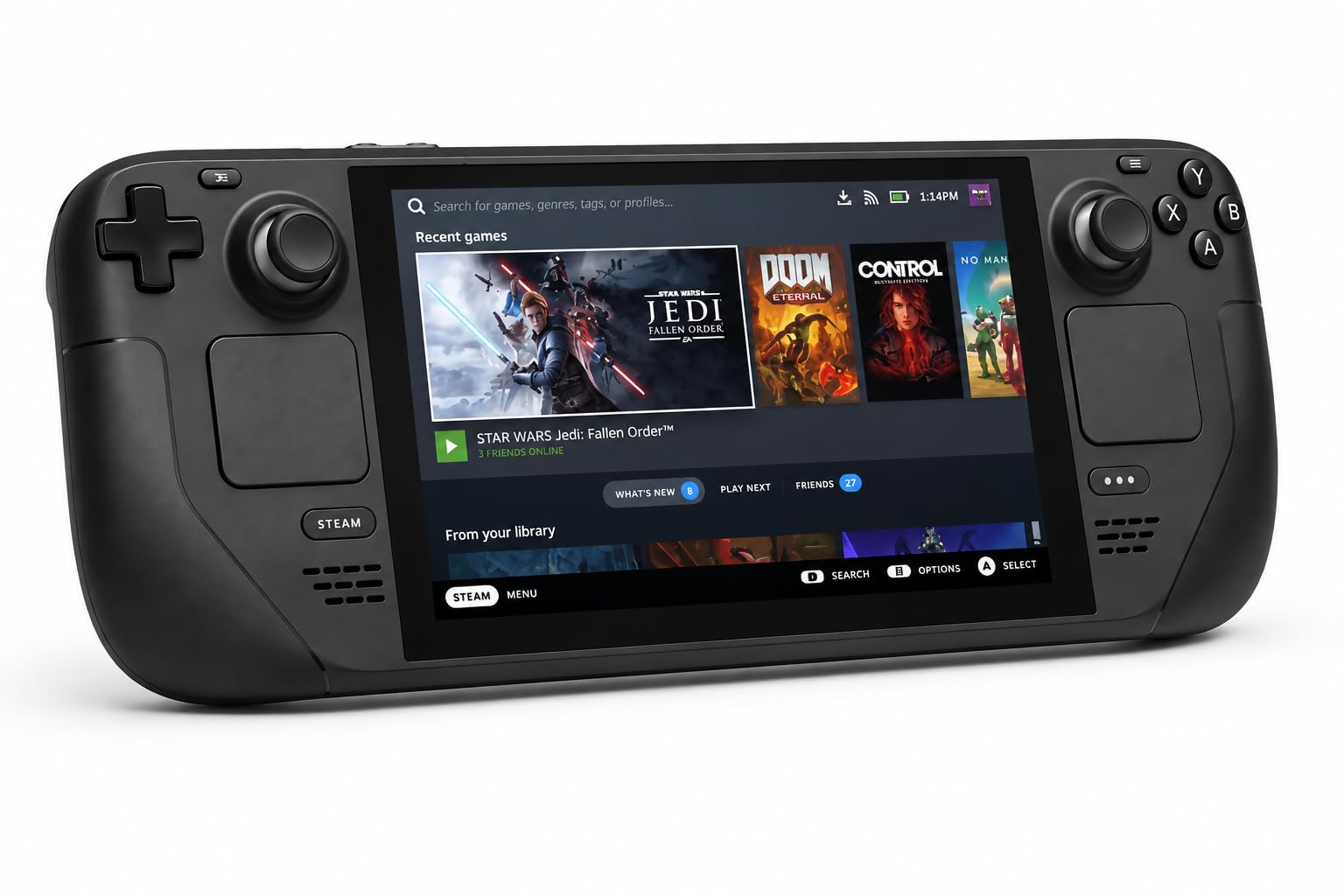
Steam Deck OLED 1TB

90 /100
Lab Score Outstanding

Key details

Battery
50Whr, 3 to 12 hours
Display
7.4" HDR OLED, 1280x800, 90Hz
Storage
1TB NVMe SSD
Operating System
SteamOS
View on Amazon

Every other machine here is measured against this one, and most of them lose on the same two things: the screen and what happens after two hours. The 7.4-inch OLED panel is the best-looking display in this group — deep blacks, strong contrast, an anti-glare etch that keeps a window out of the reflection — and 1280x800 is modest enough that games feel smooth rather than strained. We'd hand this to someone who wants to play, not to tune settings.

SteamOS is the other half of the recommendation. You sign in, your library appears, and games that won't run say so before you spend the download. There's no desktop to fight and no driver to update before your first session, which is not something we can say for the Windows machines below. The 1TB drive holds a real library, and the case with a removable liner is the kind of extra we appreciate because we didn't have to buy it.

The rest of the package is quietly complete: microSD expansion, Wi-Fi 6E, and sleep-and-resume that makes picking it up feel like a console rather than a laptop. Docked to a TV it behaves itself, too. The reservation is price — you're paying for the panel, the battery, and the polish rather than raw horsepower, and most of the Windows machines cost less.

Pros

  • Best display here: 7.4-inch HDR OLED
  • 50Whr battery rated for 3 to 12 hours
  • SteamOS starts a game in seconds
  • 1TB SSD and a case in the box

Cons

  • SteamOS can't run every Windows-only game
Our verdict

Our default pick: the OLED screen and the 50Whr battery make it the easiest of these to live with, and SteamOS puts you in a game in minutes.

Check Latest Price
2

Best Big Screen

Lenovo Legion Go

87 /100
Lab Score Excellent

Key details

Ports
Two USB4 40Gbps
Memory
16GB RAM, 512GB SSD
Display
8.8" 2560x1600, 144Hz
Processor
AMD Ryzen Z1 Extreme
View on Amazon

An 8.8-inch, 2560x1600 panel at 144Hz is the whole reason to buy this one, and Lenovo hasn't hidden it behind a modest chassis: the screen dominates the front, and the 16:10 shape gives you noticeably more vertical room than the 7-inch machines. Text in Windows desktop mode is crisp enough to actually work in. It's also more pixels than the Z1 Extreme can feed at high settings, so the newest games come down to 1200p, sometimes lower, and the refresh rate does the rest.

We think that's a fair trade for a machine that lives on a couch or a desk near an outlet, which is where most of the hours with it will go. The controllers detach for tabletop play, the kickstand holds the thing up, and two USB4 ports let you dock without giving up the charger; the 65W adapter and a case are in the box. Legion Space, the overlay that handles performance modes and button mapping, is the least polished software in this group — set it up from the desktop on day one and then leave it alone.

The Z1 Extreme still does real work: demanding games hold around 60fps once you're realistic about settings, and docked it behaves like a small desktop, which not every handheld here manages. It gets warm under load and the fan is audible, though never louder than the game. Buy it for the panel and the desk it sits on; the rest of the machine follows from that.

Pros

  • 8.8-inch 1600p 144Hz panel, the biggest here
  • Z1 Extreme holds about 60fps at sensible settings
  • Detachable controllers, kickstand, and two USB4 ports

Cons

  • Battery life is short under load
  • Bulky next to the 7-inch machines
Our verdict

We recommend it to players who want the biggest picture and mostly play indoors — the 8.8-inch screen is worth the bulk, and the battery is what you trade for it.

Check Latest Price
3

Most Headroom

MSI Claw 8 AI+

86 /100
Lab Score Excellent

Key details

Memory
32GB RAM, 1TB SSD
Display
8" 1920x1200, 120Hz
Processor
Intel Core Ultra 7-258V
Connections
Thunderbolt 4, microSD reader
View on Amazon

The first thing we noticed about the Claw 8 AI+ was how little we noticed it: under load the fans stay near-silent, and that matters more on a handheld than on a desktop because the machine sits a foot from your face. The 8-inch 1920x1200 120Hz screen is bright enough for a lit room, the shell feels dense and well-finished, and the grips fill your palms instead of perching on them.

What sells it for us is headroom. 32GB of LPDDR5 and a 1TB NVMe drive are more than any other machine here brings, and that's the difference between juggling installs and simply having your library with you. The 8-inch panel is also the right size for Windows — big enough to tap through a store or a settings menu in tablet mode, small enough that it still reads as a handheld. Battery holds up better here than on the other Windows machines in this group, though a demanding game still eats a charge.

Two things to know before you commit. It's a large device, so this is the one that travels in a bag rather than a pocket, and the price is the least comfortable part of the package — you're paying for memory, storage, and quiet rather than for a bargain. If you want one machine to be your Windows handheld for the next few years, that's a reasonable place to put the money.

Pros

  • 32GB of RAM and a 1TB drive, the most here
  • Fans stay near-silent under load
  • Bright, sharp 8-inch 120Hz screen
  • Better battery showing than the other Windows picks

Cons

  • Price is the main reason to hesitate
Our verdict

The Windows handheld we'd pick for a long trip: quiet fans, a bright 8-inch screen, and the most memory and storage here — if the price doesn't put you off.

Check Latest Price
4

Best for Game Pass

ASUS ROG Xbox Ally

84 /100
Lab Score Excellent

Key details

Memory
16GB LPDDR5, 512GB SSD
Weight
1.48 lb
Display
7" 1080p, 120Hz
Processor
AMD Ryzen Z2 A
View on Amazon

Comfort is the thing we keep coming back to. At 670 grams the Xbox Ally isn't the lightest handheld you can buy, but the weight sits in the grips rather than out at the screen, so after an hour your hands are still relaxed instead of braced. The face buttons land where your thumb already is, and the whole thing looks more like a controller than a computer, which is the right instinct for something you hold.

The Xbox part is more than branding. A dedicated button pulls up Game Bar over whatever you're playing, so Game Pass, Steam, and Epic all sit in one place, and three months of Game Pass Premium come in the box. The 7-inch 1080p 120Hz screen is sharp at this size, and older titles and indies run comfortably at full resolution.

The newest, heaviest games are where it strains — expect to drop settings and accept a lower frame rate on the biggest releases, which is the honest boundary of the Z2 A chip. That's the right compromise for a machine this comfortable and this affordable next to the rest of the Windows group, as long as you know which side of it your library falls on.

Pros

  • Most comfortable grips of the 7-inch machines
  • Xbox button opens Game Bar over any game
  • Sharp 1080p 120Hz display
  • The least expensive Windows pick here

Cons

  • Plays PC games, not your whole Xbox console library
  • Smaller screen than the 8-inch picks
Our verdict

If your library lives in Game Pass, this is the one we'd buy: the Xbox button makes it feel native, and it's the most comfortable 7-inch machine here.

Check Latest Price
5

Docked Windows Play

ASUS ROG Ally Z1 Extreme

83 /100
Lab Score Excellent

Key details

Memory
16GB RAM, 512GB SSD
Display
7" 1080p, 120Hz
Expansion
microSD card slot
Processor
AMD Ryzen Z1 Extreme
View on Amazon

This is the machine that convinced people a Windows handheld could work, and a few years on it still does the basics properly: a 7-inch 1080p 120Hz screen, the Z1 Extreme, 16GB of RAM, and a microSD slot that quietly solves storage for older games. It's light enough to hold one-handed between sessions and it docks to a TV without complaint.

Windows is both the reason to consider it and the reason to hesitate. You get every store — Steam, Epic, GOG, Game Pass — and you also get the setup, the updates, and the per-game settings work that SteamOS spares you. Docked with a keyboard and mouse it behaves like a small desktop, which is a genuinely useful second life for a handheld.

Where our enthusiasm cools is consistency. Frame rates move around more from title to title than they do on the Steam Deck, and the newest releases need real settings discipline to hold up. Set it beside the Xbox Ally — same screen size, better grips, more recent silicon, less money — and this becomes the pick for someone who specifically wants the memory-card slot or finds it well below its usual price.

Pros

  • microSD slot for cheap extra storage
  • Runs every Windows store and launcher
  • Docks into a usable desktop

Cons

  • Frame rates vary more from game to game than the Steam Deck's
Our verdict

Still a capable Windows machine, and the microSD slot is genuinely useful, but we'd only pick it now if it lands well below the Xbox Ally's price.

Check Latest Price
6

SteamOS, Bigger Screen

Lenovo Legion Go S

80 /100
Lab Score Excellent

Key details

Display
8" 1920x1200, 120Hz
Storage
512GB SSD
Warranty
30 days
Processor
AMD Ryzen Z2 Go
View on Amazon

Nothing else here pairs SteamOS with an 8-inch panel, and that combination is the pitch: Valve's console-like interface on a 1920x1200 120Hz screen, plus a small trackpad under your thumb for the times you have to reach the desktop. If you've wanted a Steam Deck with a bigger picture, this is the closest thing in this group.

The SteamOS half is the part we trust. Your library appears, compatibility warnings come before the download, and the machine wakes and sleeps like a console rather than a laptop. The 512GB drive matches most of this group, and it takes SD and microSD cards for the games you only dip into.

Performance is where it gets shaky, and it shapes our advice. The Z2 Go is the least powerful chip here, so demanding titles need to come down in resolution and settings, and setup can stall at the Wi-Fi screen before you've installed anything. Buy it from a retailer with a generous return window — the warranty on this model is listed at 30 days against a year on the Legion Go, so the first month is the one that matters.

Pros

  • SteamOS on a big 8-inch 120Hz screen
  • Built-in trackpad for desktop navigation
  • Takes SD and microSD cards

Cons

  • Z2 Go is the weakest chip in this group
Our verdict

The SteamOS alternative with a bigger screen; we'd buy it from a retailer with a generous return window while the software and the chip settle.

Check Latest Price

How We Tested Nine Handheld Gaming PCs

We started with every handheld gaming PC we could confirm was actually shipping, then cut anything with a fixed 60Hz panel, a battery you couldn't replace, or a price that made it a poor first buy. That left nine machines, all purchased at retail rather than sent to us as review units.

Each one went through the same six-month rotation: a 45-minute train commute, two cross-country flights, a week of couch sessions, and a hotel stay with unreliable Wi-Fi. We judged gameplay by playing rather than watching benchmark overlays, noting where a game stuttered as a crowd filled the screen or the camera whipped around. Screen quality we checked at noon on a sunny balcony and again in a dark room, watching for glare, washed-out blacks, and menu text that stopped being readable. Every unit also got a one-hour unbroken session to see where the grips dug into palms and whether the weight tipped forward.

Battery life we timed with a stopwatch, full charge to shutdown warning, same save file and settings on every device. Controls got weeks of attention: stick drift, trigger travel, and how each unit sat in three differently sized pairs of hands. For compatibility we installed games from three storefronts on every machine and logged launcher quirks and titles that refused to launch at all. Value and reliability we settled at the end — tallying crashes, sleep-wake bugs, and fan whine across the full six months, since that's when a weaker build starts showing.

How to Choose a Handheld Gaming Pc

Pick the store before the specification

Windows gets you everything — Steam, Epic, GOG, Game Pass, the standalone launchers you forgot you owned — at the cost of setup. Expect an afternoon of updates, a driver or two, and per-game settings work before a demanding title behaves. SteamOS gets you a console: sign in, install, play, with a compatibility warning before you waste a download.

The trade is real but narrower than it sounds. A handful of big multiplayer games with anti-cheat protection simply won't launch outside Windows, so if more than a couple of your regular games live there, buy Windows and accept the housekeeping.

Treat battery figures as a range, then plan around them

Every one of these is rated in hours, and every one of those numbers describes a light indie game at low brightness. A demanding title at full brightness cuts it hard, and standby drains these devices rather than holding them.

Our rule: if you mostly play at home, battery barely matters and the biggest screen wins. If you travel, budget for a USB-C power bank that supports power delivery, and shut the device down between sessions instead of sleeping it.

Match the screen to where the device sits

Seven inches is the portable end and 8.8 is the couch end, and resolution matters less than you'd think on a panel this small. A 1280x800 OLED looks better than a 1600p LCD, and the high-resolution machines often can't feed their own panels at high settings anyway — the Legion Go drops to 1200p for demanding games.

Buy the panel you like looking at and the size you'll actually hold. If you mostly dock to a TV, spend on the chip instead.

Budget for storage, not just the drive

512GB is the default here and it fills faster than you expect — a couple of modern releases will eat it. A memory-card slot is the cheapest fix you'll find and it's fine for older or smaller games; the ROG Ally and the Claw both have one.

If you'd rather not think about it, the 1TB machines exist and are worth the premium for a big library.

Hold it before you trust a review, including this one

Comfort is the specification nobody prints. A 670-gram device with good grips is easier on your hands than a lighter one that perches on your palms, and where the vents sit decides whether your fingers get warm. Fan noise matters more here than on a laptop because the machine sits a foot from your face.

Buy from somewhere with a return window and give it a two-hour session in the first week. Warranty terms vary more than they should in this category, so read that line before you order.

Frequently Asked Questions

Final Verdict

The Steam Deck OLED is the handheld we point most people to, because it's the one that gets out of the way: a superb OLED panel, a battery that lasts a session, and an interface that never asks you to be a system administrator. If your library is spread across Game Pass, Epic, and standalone launchers, the ROG Xbox Ally is the Windows answer and the more comfortable thing to hold.

And if the screen is the whole point and you play near an outlet, the Legion Go's 8.8 inches are the best here.