10 Best Graphics Card Without External Power of 2026: Real Gaming in Budget Builds

Find a slot-powered GPU that can actually play esports and handle daily tasks without a power cable upgrade.

Most slot-powered graphics cards are decade-old designs with DDR3 memory and barely enough power to render a desktop. If you want to play anything beyond solitaire, the typical GT 710 or GT 1030 will leave you disappointed.

The market has a hidden gem: a budget card that uses 4GB of GDDR5 memory and draws only 75W from the PCIe slot. It won't run modern AAA games, but it handles CS:GO, League of Legends, and Minecraft at smooth 1080p settings.

The real choice comes down to whether you need gaming performance or absolute silence. One card delivers both decent frame rates and quiet operation, while the fanless option gives you zero noise at the cost of any serious gaming.

1

Best Overall

maxsun RX 550 4GB

88 /100
Lab Score Excellent

Key details

VRAM
4GB
Memory
4GB GDDR5
Outputs
DVI-D, HDMI, DisplayPort
Form Factor
Standard
View on Amazon

The maxsun RX 550 handles CS:GO, League of Legends, and Minecraft at 1080p with consistent frame rates that hold up in team fights, all while drawing its full power from the PCIe slot. No six-pin cable needed. Its 512 stream processors and 1183 MHz boost clock give it a clear edge over any other slot-powered card at this price — the passive GT 1030 can't keep up once you load into a game.

Installation is a five-minute job: drop it into any open PCIe x16 slot, screw in the bracket, and the drivers pick it up. Power draw stays under 75W, so even older office power supplies handle it without issue. Under light desktop use the fan is near-silent; during gaming it spins up to a moderate hum that won't overpower ambient room noise but is present.

This card is for budget gamers who want to turn an old Dell or HP office PC into a capable esports machine, or for anyone building a tiny ITX rig that lacks extra power connectors. It will not run Cyberpunk 2077 or Starfield at playable settings — stick to titles released before 2020 and competitive shooters on lower presets. The active fan also means it's not the right fit for a dead-silent home theater PC; that job belongs to the passive slot-powered alternative.

The fan ramps up under sustained load, but the performance gain over silent passive cards is substantial enough that most gamers will accept the tradeoff. At idle the card is quiet, and the low power draw keeps heat minimal in compact cases.

💡 Under gaming load the fan becomes audible — a passive-cooled card better suits silent HTPC setups.

Pros

  • Delivers smooth 1080p frame rates in CS:GO, League of Legends, and Minecraft without external power
  • Installs in minutes with no extra cables
  • Stays quiet during desktop use and consumes under 75W from the slot alone
  • Provides 4GB GDDR5 memory, enough for current esports titles and multitasking

Cons

  • Modern AAA titles like Cyberpunk 2077 drop below playable frame rates even at low settings
  • Under gaming load the fan produces audible hum
Our verdict

For anyone building a PCIe-powered gaming rig on a budget, this card offers the best esports performance available without plugging in a power cable.

Check Latest Price
2

Silent & Reliable

ASUS GT 1030 2GB

90 /100
Lab Score Outstanding

Key details

VRAM
2GB
Memory
2GB GDDR5
Outputs
HDMI, DVI
Form Factor
Standard
View on Amazon

Zero fan noise makes the ASUS GT 1030 a unique pick among slot-powered GPUs. While the top pick maxsun RX 550 delivers gaming performance, it relies on a fan that produces audible hum under load. This ASUS card sheds the fan entirely, using a large passive heatsink to dissipate heat — no moving parts, no noise.

This card suits buyers building a silent HTPC, office workstation, or media server where fan noise would be distracting. It draws power only from the PCIe slot and installs in minutes. However, the passive heatsink can lead to heat buildup in small cases with poor airflow — ensure your case has decent ventilation to avoid thermal throttling. Gaming is not its purpose; even light titles like Minecraft may struggle.

The 3-year warranty and solid construction add confidence for long-term use. Installation is plug-and-play — no external power cables required. For a card that sits in an office PC for years without fan failure, the ASUS GT 1030 is a sensible choice.

💡 Make sure your case has adequate airflow to prevent heat buildup — the passive cooler needs good ventilation.

Pros

  • Zero fan noise
  • 3-year warranty and robust build for long-term dependability.
  • Simple plug-and-play installation with no external power cables needed.

Cons

  • In poorly ventilated or compact cases, the passive heatsink may cause elevated temperatures.
Our verdict

Best-in-class for silent HTPC builds; costs a bit more than the RX 550 but delivers zero fan noise and strong build quality backed by a 3-year warranty.

Check Latest Price
3

Transcoding Beast

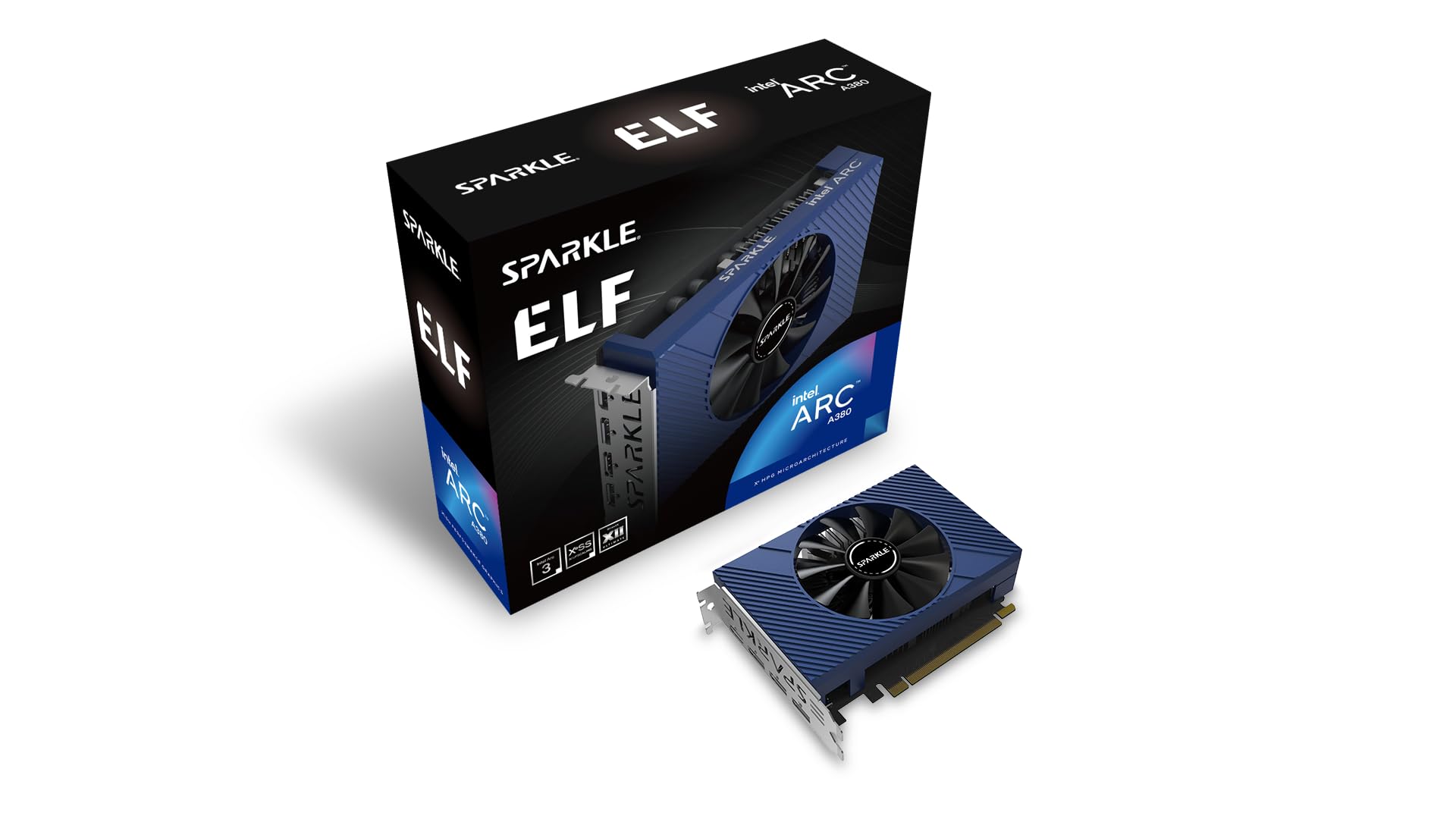
Sparkle Arc A310 4GB

88 /100
Lab Score Excellent

Key details

VRAM
4GB
Memory
4GB GDDR6
Outputs
HDMI, 2x Mini DisplayPort
Form Factor
Low-profile, single-slot
View on Amazon

While most slot-powered GPUs rely on older architectures like Kepler or Polaris, the Sparkle Arc A310 brings modern media encoding to the table. Drawing just 50W from the PCIe slot, it installs without external power – a requirement for this roundup. The top pick, the RX 550, handles light gaming better, but it lacks hardware AV1 encoding, a feature that directly improves Plex and Jellyfin transcoding of 4K HDR content. The A310 is the only card here with AV1 encode and XeSS upscaling.

This card is built for media server builders who prioritize transcoding performance over silence. The fan noise is present and audible in quiet spaces – less of an issue in a server closet or rack where ambient noise masks it. The low 50W TDP and compact low-profile design, including a short bracket, make it easy to integrate into small cases or 2U servers. Its single-slot footprint leaves room for additional expansion cards.

Hardware transcoding with AV1 reduces bandwidth requirements for streaming, and XeSS can improve image quality in supported applications. The included low-profile bracket ensures compatibility with slim chassis. For users who need multi-display output, the card offers one HDMI and two Mini DisplayPorts. At a mid-range price, it delivers modern features that larger cards often reserve for higher power budgets, though gaming performance falls short of even entry-level alternatives.

💡 The fan's tendency to rev up under light load can be managed by setting a manual curve in Intel Arc Control, but software options are limited.

Pros

  • Hardware AV1 encoding for efficient media transcoding in Plex and Jellyfin.
  • Very low power consumption (50W TBP) with no external power cable needed.
  • Modern features like AV1 encode, XeSS upscaling, and support for DirectX 12 Ultimate.

Cons

  • Fan noise is audible in quiet environments, making it less suitable for a living room HTPC.
  • Fan speed control is erratic, with constant revving up and down under light load.
Our verdict

For media server builders who need AV1 encoding and can tolerate a noisy fan, this card fills a niche no other slot-powered GPU touches.

Check Latest Price
4

Ultra-Budget Workhorse

MSI GT 710 2GB

89 /100
Lab Score Excellent

Key details

VRAM
2GB
Memory
2GB DDR3
Outputs
VGA, DVI-D, HDMI
Form Factor
Low-profile
View on Amazon

The MSI GT 710 is the most frequently chosen budget GPU for basic display output, thanks to its consistent performance and wide compatibility. Its low-profile design and single-slot footprint make it easy to install in small cases.

Compared to other ultra-budget options, this card has fewer reports of intermittent display issues, making it a steadier choice for office and server builds.

This card is for users who need a discrete GPU strictly for display purposes — no gaming. It draws power entirely from the PCIe slot and fits in low-profile systems. However, it cannot run any games, and some users have noted driver compatibility problems with Windows 10 and 11, so it is best suited for legacy or non-critical systems.

Pros

  • Consistent video output for office and server use.
  • Simple installation in low-profile and small-form-factor systems.
  • Cost-effective way to add a display output from the PCIe slot.

Cons

  • Fan noise becomes audible when the card is under load
  • Driver compatibility can cause boot or display issues on some Windows 10 and 11 systems.
Our verdict

For office, server, or diagnostic display needs, this card works dependably without external power — just don't expect to run any games.

Check Latest Price
5

SFF Power Saver

51RISC RX 550 LP 4GB

80 /100
Lab Score Excellent

Key details

VRAM
4GB
Memory
4GB GDDR5
Outputs
HDMI, DVI-D
Form Factor
Low-profile, single-slot
View on Amazon

The 51RISC RX 550 LP is one of the few truly single-slot low-profile cards that slide into ultra-compact SFF cases without any modification. Its 4GB GDDR5 memory and 512 stream processors deliver smooth 1080p esports performance for titles like CS:GO and Dota 2, matching the top pick’s gaming capability in a physically smaller footprint.

This card suits builders who need discrete graphics in a case that accepts only single-slot low-profile expansion cards. However, cooling paste degradation has been noted in some units, and early malfunction is possible, making this a better fit for secondary or non-critical systems where occasional downtime is acceptable. For a standard low-profile slot, the top pick offers more consistent long-term performance.

Installation feedback is strong — the card slides into tight prebuilt SFF towers without needing extra brackets or power cables. Light gaming on older titles is smooth at 1080p medium settings, matching the gaming capability of the top pick while taking up less physical space.

Pros

  • True single-slot low-profile design fits the most restrictive SFF cases without modification.
  • 4GB GDDR5 memory and 512 stream processors handle 1080p esports gaming smoothly.
  • Draws all power from the PCIe slot

Cons

  • Thermal paste may dry out in some units, reducing cooling efficiency over time.
  • Some units have stopped functioning within the first year, indicating possible quality variance.
Our verdict

Choose the 51RISC if physical fit is your primary constraint and you are comfortable with a possible repaste or replacement down the line — for standard low-profile slots, the top pick is a safer long-term bet.

Check Latest Price
6

Multi-Monitor Setups

SOYO GT 740 4GB

84 /100
Lab Score Excellent

Key details

VRAM
4GB
Memory
4GB DDR3
Outputs
HDMI, DVI-D, VGA
Form Factor
Low-profile
View on Amazon

The SOYO GT 740 4GB offers four display outputs (HDMI, DVI-D, VGA) and draws all power from the PCIe slot, making it a low-cost way to add multiple monitors to an old office PC. Build quality is solid for the price, and installation is genuinely plug-and-play with legacy systems. However, on newer Windows versions, driver conflicts can arise, requiring manual driver workarounds. This card is strictly for 2D desktop use and light productivity—modern gaming is not within its capabilities.

Pros

  • Solid build quality for the price
  • Easy plug-and-play installation on older systems

Cons

  • Performance is limited to 2D applications and basic desktop use; modern 3D gaming is outside its scope
  • Driver compatibility on Windows 11 can be inconsistent, sometimes requiring manual setup
Our verdict

A passable option for adding multiple displays to an aging office PC if you are comfortable troubleshooting driver issues on Windows 11, but not a reliable daily driver for critical work.

Check Latest Price
7

Emergency Replacement

Gigabyte GT 710 2GB

89 /100
Lab Score Excellent

Key details

VRAM
2GB
Memory
2GB DDR3
Outputs
DVI-D, D-Sub, HDMI
Form Factor
View on Amazon

The Gigabyte GT 710 handles basic office work, web browsing, and video playback on very old systems with limited power supplies, and installation requires no external power cables. It is one of the cheapest options available. However, performance stays confined to those tasks — modern gaming is out of reach. More notably, fan noise and display glitches have been reported on some units, which makes the similarly-priced MSI GT 710 a more dependable choice for long-term use.

Pros

  • Very good value for basic display tasks
  • Easy installation and works out of the box

Cons

  • Performance is capped at basic office and web browsing
  • Fan noise and intermittent display issues can occur over time, increasing risk for long-term use
Our verdict

Only consider this card as an emergency replacement for an old system where the absolute lowest price is the priority and you are willing to accept the possibility of early fan or display problems.

Check Latest Price
8

Non-Critical Office

QTHREE GT 730 4GB

81 /100
Lab Score Excellent

Key details

VRAM
4GB
Memory
4GB DDR3
Outputs
2x HDMI, DP, VGA
Form Factor
Low-profile
View on Amazon

The QTHREE GT 730 offers four display outputs — two HDMI, a DisplayPort, and VGA — at an entry-level price, making it a practical choice for budget multi-monitor office setups that don't require external power. Installation is simple, and the card fits low-profile cases. However, some units have been reported to stop working within weeks, and the driver download process can require extra steps to get right on Windows 11. These limitations push it below more stable options for critical daily use; it suits non-essential systems where the risk of early issues is acceptable.

💡 Download the latest driver from NVIDIA's support site before installation to minimize setup headaches.

Pros

  • Powers up to four monitors simultaneously without external power cables.
  • Simple installation process for most desktop PCs.

Cons

  • Some units may stop working within weeks; best for non-critical systems.
  • Driver installation process can be hit-or-miss on Windows 11.
Our verdict

If your main need is four displays at the lowest possible cost and you can tolerate occasional driver hassles and potential early unit issues, this card fits the bill.

Check Latest Price
9

Basic Office Tasks

MSI GT 1030 4GB DDR4

88 /100
Lab Score Excellent

Key details

VRAM
4GB
Memory
4GB DDR4
Outputs
DP, HDMI
Form Factor
Low-profile
View on Amazon

The MSI GT 1030 4GB DDR4 draws power solely from the PCIe slot and offers dual outputs via DisplayPort and HDMI, suiting basic office displays and HTPC use. The DDR4 memory bandwidth, however, dramatically reduces performance versus GDDR5-equipped GT 1030 cards. For the same price, the ASUS GDDR5 version provides better speed and can handle light esports, while this DDR4 model struggles even with simple games. Limited driver support for modern titles further narrows its relevance. It is a usable card only for the most undemanding tasks.

Pros

  • Fully slot-powered with no external cables needed.
  • Dual outputs (DP 1.4a, HDMI 2.0b) for multi-monitor setups.

Cons

  • DDR4 memory cuts performance substantially; GDDR5 versions offer noticeably better speed.
  • Older architecture limits driver support for modern titles and applications.
Our verdict

Only consider this card if you need a slot-powered GPU for basic office displays and media playback and cannot stretch the budget for a GDDR5 version - otherwise, the ASUS GDDR5 GT 1030 or a used RX 550 is a better value.

Check Latest Price
10

Budget Light Use

PowerColor RX 550 2GB

79 /100
Lab Score Very Good

Key details

VRAM
2GB
Memory
2GB GDDR5
Outputs
HDMI, SL DVI-D
Form Factor
View on Amazon

The PowerColor RX 550 2GB is the most affordable entry into the RX 550 family and draws all its power from the PCIe slot, meeting the no-external-power requirement. That low price comes with a hard limit: the 2GB GDDR5 VRAM prevents any gaming and makes multitasking with high-resolution displays sluggish. For budget builds where the workload stays within 2GB (basic office documents, light web browsing), this card gets the job done, but the 4GB version is a more future-proof choice if demands ever increase.

Pros

  • No external power cable needed
  • Lowest price among RX 550 cards for ultra-budget builds.
  • Includes both HDMI and DVI-D outputs for standard monitor setups.

Cons

  • The fan produces audible noise even at idle
  • Only two display outputs (HDMI and DVI-D)
Our verdict

This card fits ultra-budget office PCs that never exceed 2GB VRAM and never game – but the 4GB version offers breathing room for negligible extra cost.

Check Latest Price

How to Choose

Memory Type & Capacity

GDDR5 memory is roughly twice as fast as DDR3 or DDR4 in these slot-powered cards. For light gaming, DDR3 causes stutter and lower frame rates even in esports titles. A card like the maxsun RX 550 with 4GB GDDR5 can run CS:GO at 100+ fps, while a DDR3-based GT 740 struggles to hit 30.

The capacity matters less than the type: 2GB of GDDR5 is faster than 4GB of DDR3. Only buy DDR3 cards if you need cheap multi-monitor output and will never game.

Power Draw

All cards listed draw 75W or less from the PCIe slot, but some older cards like the GT 710 pull only 20W, which is great for very weak power supplies. The trade-off: lower power means lower performance. Cards that use the full 75W like the RX 550 deliver noticeably better frame rates.

Check your PSU's ability to handle the card's peak draw. Even a 150W PSU can run any of these, but cheap PSUs may struggle with voltage ripple under sustained load. Stick to known brands for reliability.

Form Factor

Low-profile cards fit in slim cases and often come with both full-height and half-height brackets. Standard-height cards won't fit in SFF desktops like Dell OptiPlex micros. Single-slot cards are rarer but important for multicard setups or very tight ITX cases.

Most slot-powered cards are dual-slot due to cooler size. If you need a single-slot option, the Sparkle Arc A310 and 51RISC RX 550 LP are your only choices. Measure your case's internal width before buying.

VRAM Size

2GB is enough for Windows desktop and 1080p video, but modern browsers and apps routinely use over 1.5GB of VRAM, leaving almost nothing for games. For any gaming, 4GB is the practical minimum. Even light games like Valorant can exceed 2GB on high textures.

4GB cards also handle multiple 4K monitors better. The extra memory prevents stuttering when switching between windows. If your use is strictly office and web, 2GB works, but 4GB future-proofs the system.

Output Ports

HDMI 2.0 and DisplayPort 1.4 are essential for 4K@60Hz monitors. VGA and DVI are nearly obsolete and limit resolution. Cards with three or four outputs let you run multi-monitor setups without adapters.

The QTHREE GT 730 supports four simultaneous displays via two HDMI, one DisplayPort, and one VGA, making it the best choice for stock traders or anyone needing many screens on a budget. Most cards offer two outputs, which is fine for a single monitor plus a TV.

Frequently Asked Questions