Best Hall Effect Controllers of 2026

A Hall effect joystick reads a magnet's position instead of dragging a wiper across a carbon track, so there's no contact to wear out and nothing to drift. That's the pitch, and it's the reason I stopped buying ordinary analog controllers after my third pair of sticks started wandering mid-match. But the sensor is only one part of the thing. The shell, triggers, face buttons, and software decide whether you actually want to hold it for four hours straight. What Hall effect fixes is drift. What it doesn't fix is a creaky grip, mushy buttons, or a receiver that drops mid-boss.

We've spent the past eight months with 12 Hall effect controllers, playing on PC and console, and the pattern is clear: the cheapest pads nail the sticks and cut corners everywhere else. One thing first-time buyers don't expect is that Hall effect thumbsticks don't guarantee Hall effect triggers — plenty of controllers mix the two, and trigger feel swings wildly from one to the next. Below are the ones actually worth your money, grouped by what they're good at.

1

Best Overall

GameSir G7 Pro

88 /100
Lab Score Excellent

Key details

Triggers
Hall effect with micro-switch stop
Polling Rate
1000Hz on PC
Stick Sensor
TMR (magnetic)
Compatibility
Xbox Series X|S, Xbox One, PC, Android
View on Amazon

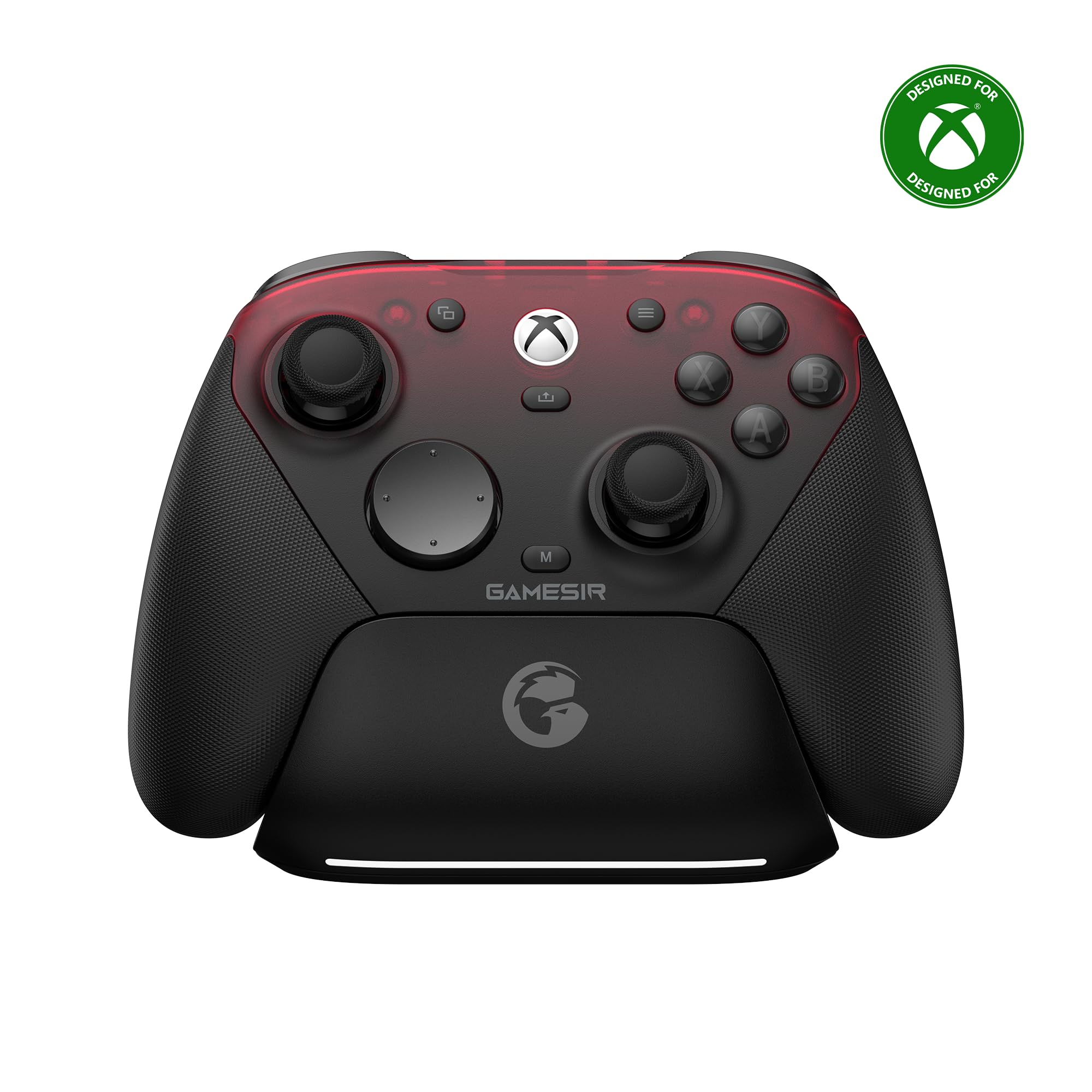
Three platforms, one pad, and a different rule for each. The G7 Pro plays on Xbox Series X|S and Xbox One through its cable, on Windows PC through the cable or the 2.4GHz dongle, and on Android over Bluetooth — the widest spread of anything here. The Xbox side is wired by design, which is worth knowing before you order rather than after.

What earns it the top spot is what sits under the shell. The sticks use GameSir's TMR sensors: magnetic, contactless, with no resistive track to wear a flat spot into. The triggers are Hall effect as well, ending in a micro-switch click that gives shooters a crisp stop without throwing away the analog travel a racing game needs. At 272 grams it has real presence in the hand, which we liked for fine aiming, and the extra buttons by the shoulders sit within reach without rearranging your grip.

The Nexus app is where those buttons get mapped, and it turns a pad with extra inputs into a pad you have actually configured. The one annoyance is the wireless link, which can drop mid-session on PC and Android; the cable fixes it instantly and is the same cable the Xbox uses. A 3.5mm jack, 1000Hz polling on PC, and a build that feels like it cost more than it did finish the case.

Pros

  • Covers Xbox, PC, and Android from one pad
  • Magnetic TMR sticks with no wearing track
  • Hall effect triggers with a crisp micro-switch stop
  • 1000Hz polling on PC, wired or 2.4G

Cons

  • Some units still develop stick drift
Our verdict

The widest platform spread here, with magnetic TMR sticks, Hall effect triggers, and 1000Hz on PC — buy it if you split your time between an Xbox and a computer.
Check Latest Price
2

Best Budget

8BitDo Ultimate 2C

89 /100
Lab Score Excellent

Key details

Extra Inputs
Remappable L4/R4 bumpers
Polling Rate
1000Hz (2.4G and wired)
Compatibility
Windows, Android
Sticks And Triggers
Hall effect
View on Amazon

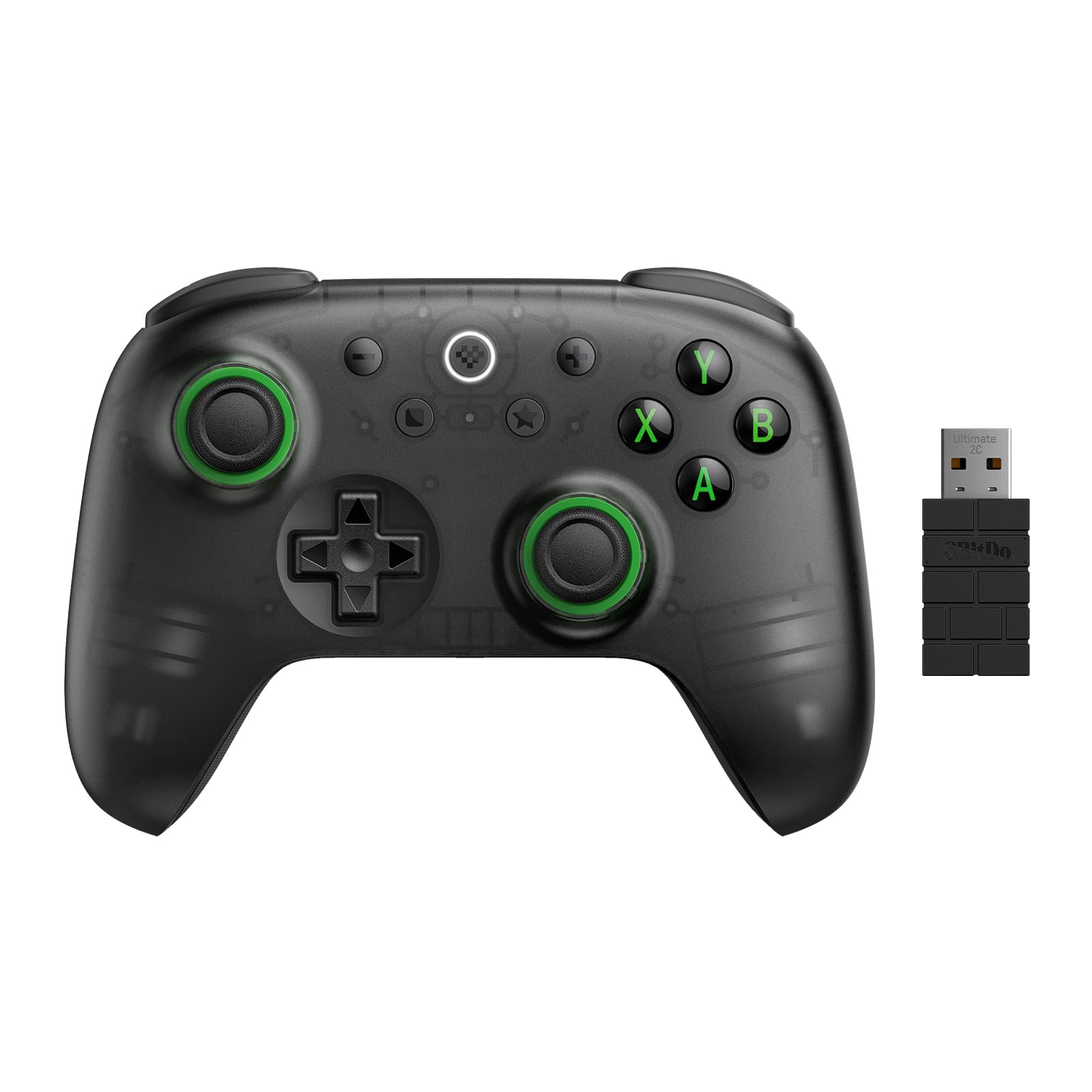
Price is the argument here, and it is a strong one: the Ultimate 2C is the cheapest pad in this group with Hall effect in both the sticks and the triggers, and it still manages 1000Hz polling over the dongle or the cable. We expected the savings to show up somewhere obvious. Instead there are wear-resistant metal rings around the sticks, a refined D-pad, and two extra L4/R4 bumpers you can remap on the pad itself without installing anything — the feature we ended up using most.

What you get for the money is otherwise complete: a light 240-gram body, USB-C charging, a battery that holds through long sessions, and a shell that does not rattle or creak in the hand. The 1000Hz figure applies wirelessly as well as wired, which is rarely true at this end of the market.

The dongle link occasionally drops or refuses to pair until you reseat it, and the included cable fixes that in about four seconds — the reason one stays attached on a desktop here. The mapping is limited to the extra bumpers, so do not plan a full face-button layout around them. Otherwise, everything that matters is the same idea done for less.

Pros

  • Hall effect in both sticks and triggers
  • 1000Hz over both 2.4G and cable
  • Extra L4/R4 bumpers map without software
  • Light 240 grams with strong battery life

Cons

  • No Xbox or Switch support
  • Some units give out within months
Our verdict

The cheapest way into Hall effect sticks and triggers, and it does not feel cheap — the pick for PC or Android players who want to spend as little as possible.

Check Latest Price
3

Best for Desk PC Setups

8BitDo Ultimate 2

91 /100
Lab Score Outstanding

Key details

Charging
Dock and USB-C adapter included
Stick Sensor
TMR
Compatibility
PC, Apple, Steam, Android
Trigger Modes
Linear Hall or tactile
View on Amazon

The dock is the reason this one is on the list, and it is a better reason than it sounds. The pad sits on your desk charging over USB-C whenever you are not playing, so the fast wireless mode is always available instead of something you ration. Charge anxiety is the quiet tax on wireless controllers, and this is the pad that removes it.

The rest of the specification is aimed at the same desk. TMR sticks, Hall effect triggers with a switch that converts them to a short tactile pull, two back paddles plus extra R4/L4 bumpers, tactile bumpers and D-pad, six-axis motion, and 8BitDo's 8Speed 2.4GHz link, rated under 1ms and behaving like a cable in our sessions.

Against the Ultimate 2C it costs a good deal more, and what that buys is the dock, the trigger switch and a nicer-feeling shell rather than better sticks — the two share the same magnetic approach. For a permanent desk setup that is money well spent. For a bag or a living-room couch, it is not the one.

Pros

  • Charging dock keeps it ready to play
  • Switchable linear and tactile triggers
  • TMR sticks with 1000Hz polling
  • Extra paddles and bumpers out of the box

Cons

  • No Xbox or PlayStation support
Our verdict

The tidiest choice for a desk PC: TMR sticks, a trigger-mode switch, and a dock that keeps it charged, as long as your gaming happens at a computer.

Check Latest Price
4

Best for Competitive PC Play

GameSir Tarantula 8K

90 /100
Lab Score Outstanding

Key details

Weight
6.35 oz
Polling Rate
8000Hz wired
Stick Sensor
Gen-2 TMR
Compatibility
Windows PC
View on Amazon

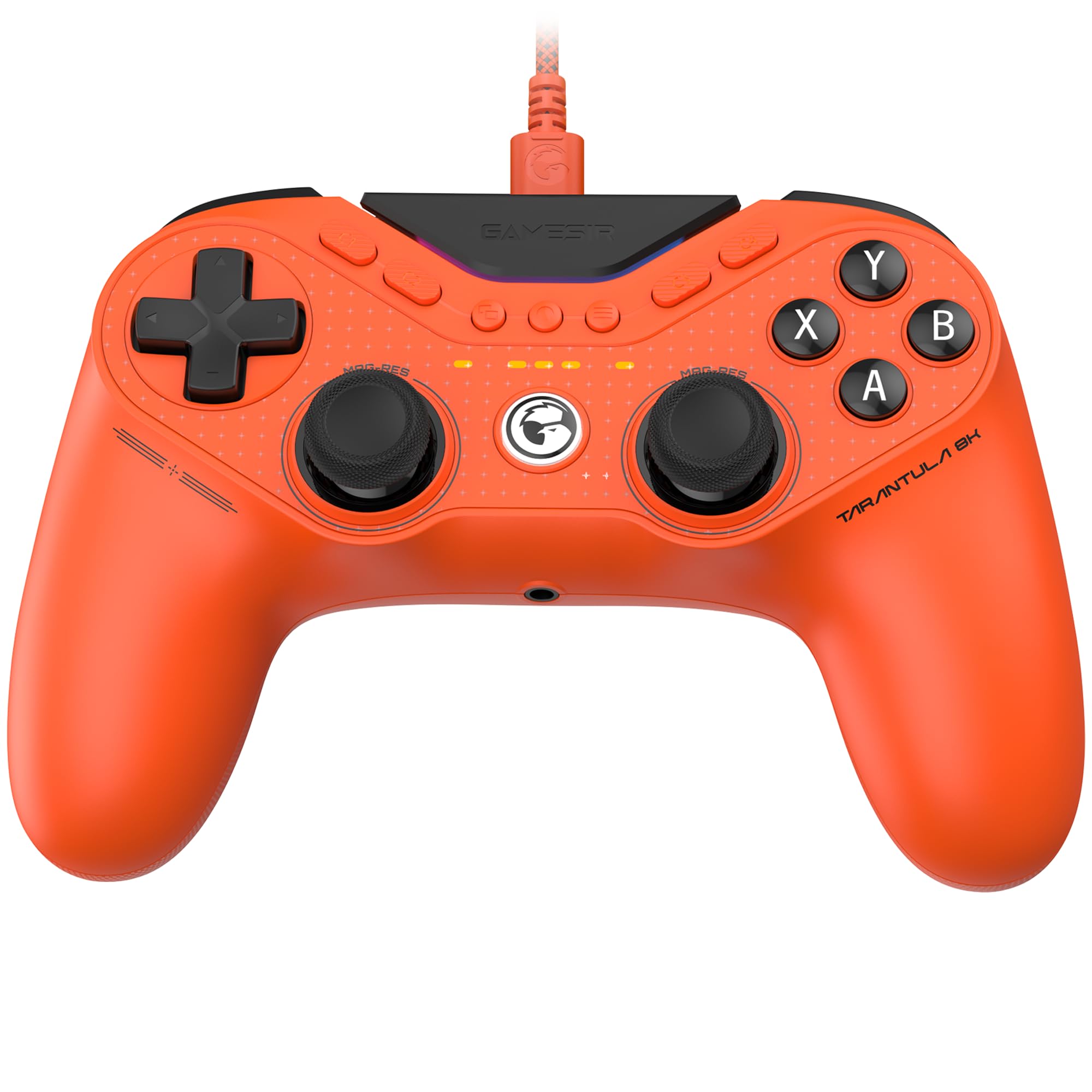
At 180 grams the Tarantula 8K is the lightest thing here by a wide margin, and that is the first thing we noticed picking it up — not flimsy, just barely there, which is what you want when your hands are making fine adjustments for an hour straight. Everything else is aimed at the same player: 8000Hz polling over the cable, Gen-2 TMR sticks, dual-mode trigger stops, a six-axis gyroscope, and nine extra inputs including two lockable back buttons, two mini bumpers and five front buttons that record 32-step macros.

The trigger switch is the feature we used most. Flip it and the pull becomes a micro-switch click for shooters; flip it back for the Hall effect travel racing games want. The GameSir app handles mapping and behaved on our PCs, and the whole pad is plug-and-play over USB-C with no pairing ritual, no dongle to lose and no battery to think about.

Two boundaries rather than faults. It is wired and PC-only by design, so there is no console mode and nothing for a couch. And the start and select buttons sit inboard enough that your thumb hunts for them in menus. Neither registers when you are queued for a match on a monitor, which is the only situation this controller is built for.

Pros

  • 8000Hz polling over a wired connection
  • Dual-mode trigger stops, Hall or micro-switch
  • Very light at 180 grams
  • Nine remappable inputs with 32-step macros

Cons

  • No rumble motors at all
Our verdict

The sharpest tool here for ranked PC shooters: 8000Hz over the cable, featherweight in the hand, and clicky everywhere it counts.

Check Latest Price
5

Best for Tunable Stick Feel

FLYDIGI Vader 5S

83 /100
Lab Score Excellent

Key details

Triggers
Hall effect or micro-click
Vibration
4 motors
Compatibility
Xbox Series X|S, Xbox One, Windows
Stick Tension
40gf to 100gf, adjustable
View on Amazon

The Vader 5S is the only controller here that changes how the sticks feel at the twist of a ring: 40gf at the light end, 100gf at the firm end, adjustable per stick, mid-session, without opening anything. It is the feature we kept returning to, and a week with it made the appeal obvious — it changes the feel more than any response curve in software.

Around that ring FLYDIGI has built the most feature-dense wired Xbox pad of the group: Hall effect sticks with zero deadzone, ForceSwitch triggers that toggle between analog Hall travel and a micro-click, four rumble motors split between the triggers and grips, six remappable buttons, a headset jack, and on-controller profile switching that moves from a shooter setup to a racing one without a PC in sight. It sits solidly in the hands and feels assembled rather than moulded.

Wired on Xbox and PC is the price of that low-latency feel, and it is a fair trade for a pad that lives on a desk. Register the one-year warranty the day it arrives — not because trouble is likely, but because a day-one faulty stick is the one thing that turns a good purchase into a chore.

Pros

  • Adjustable stick tension from 40gf to 100gf
  • Triggers switch between Hall travel and micro-click
  • Four rumble motors across triggers and grips
  • On-controller adjustments without a PC

Cons

  • Heavier than the rest of the group
  • Connection can drop mid-match and need a replug
Our verdict

The pad for people who care how a stick feels: tension adjusts from 40gf to 100gf on the fly, and the trigger switch covers shooters and racers in one controller.

Check Latest Price
6

Quiet Late-Night Play

EasySMX X05Pro

85 /100
Lab Score Excellent

Key details

Battery
1000mAh
Polling Rate
1000Hz wired and 2.4G
Stick Sensor
11-bit Hall effect
Compatibility
PC, Switch, Android, iOS
View on Amazon

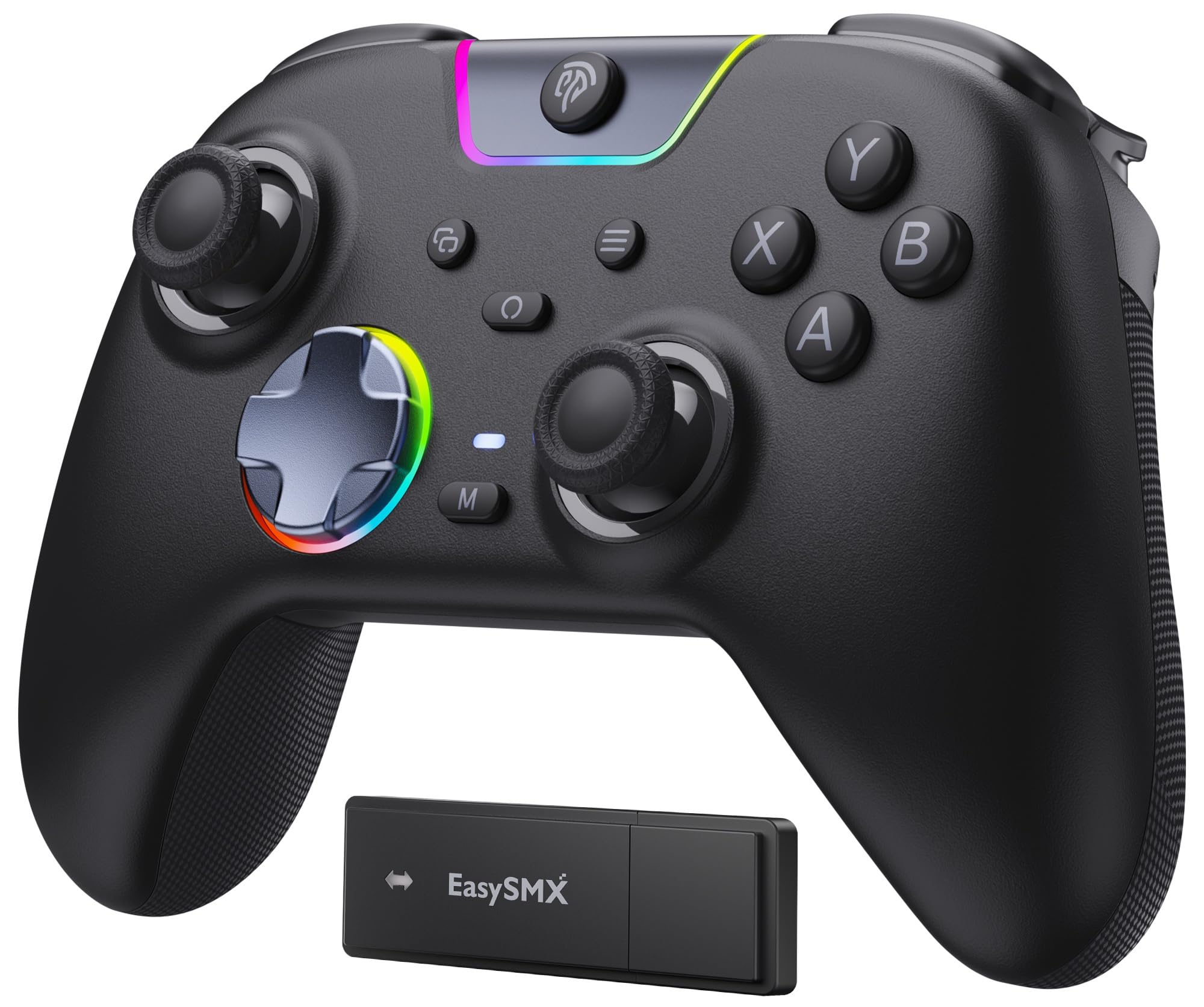
The X05Pro is the controller for a house where somebody sleeps in the next room. The face buttons are silicone-damped, and the clack that gives away a late-night session on most pads is muted to almost nothing. We noticed it most in menus, where every press is normally audible.

Underneath it is a sensible budget package: 11-bit Hall effect sticks with no deadzone, dual-stage adjustable triggers, two programmable buttons mounted on the top edge where your fingers rest without reaching, a sweat-resistant silicone grip, an upgraded 8-way D-pad with dome switches, and a 1000mAh battery the listing rates at up to 20 hours.

What keeps it in the roundup is how little it asks of you: smooth sticks, triggers that adjust without tools, programmable buttons where your fingers already are, and enough battery for a few evenings. It will not win a specification fight with the GameSir pads, but it is the one we leave out for whoever picks it up next.

Pros

  • Silicone-damped buttons keep it quiet
  • Hall effect sticks with no deadzone
  • Programmable buttons on the top edge
  • 1000mAh battery rated to 20 hours

Cons

  • No Xbox support
  • Bluetooth caps out at 125Hz
Our verdict

The quiet one: silicone-damped buttons make late-night sessions nearly inaudible, and the Hall effect sticks and adjustable triggers punch well above the price.

Check Latest Price
7

Switch Tinkerers

ManbaOne

87 /100
Lab Score Excellent

Key details

Battery
1800mAh with charging dock
Display
2-inch on-device screen
Compatibility
Switch, PC, iOS, Android
Sticks And Triggers
Hall effect
View on Amazon

There is a 2-inch screen in the middle of the ManbaOne, and it earns its place the first time you remap a button without opening a laptop. Vibration, buttons, sticks and lighting all get set on the pad itself, with no app and no pairing dance — more useful than it sounds if your PC is across the room or your Switch is the only thing you game on.

The hardware keeps up with the idea. Hall effect sticks and triggers, micro-switch face buttons with ALPS bumpers, a six-axis gyroscope that makes Switch aiming feel native, an 1800mAh battery, and a charging dock that gives it a home on the shelf rather than the floor. Setup was plug-and-play in our sessions, and the screen made tuning it faster than any companion app we have used on a controller.

Longevity is the question mark. The LB bumper is the first thing to go in some units, and the clicky face buttons take some getting used to if you are coming from a soft membrane pad. Buy it somewhere with a return window you trust rather than the cheapest listing you can find.

For a Switch player who likes to tinker, the trade is worth it: settings on the pad are faster than a phone app, the dock keeps it charged and visible, and the gyro does the work the Joy-Con layout cannot. It is a controller for someone who enjoys adjusting things, not someone who wants to plug in and never think about it again.

Pros

  • 2-inch screen handles setup without an app
  • Hall effect sticks and triggers
  • Gyro and micro-switch buttons for Switch play
  • 1800mAh battery with charging dock

Cons

  • No Xbox or PlayStation support
  • No Switch wake-up function
Our verdict

Buy it if you would rather not deal with apps: the ManbaOne puts stick, trigger, rumble and button settings on a screen built into the pad, and it handles Switch as well as PC.

Check Latest Price

How We Tested Hall Effect Controllers for Drift, Feel, and Battery Life

We started by pulling together every Hall effect controller we could find that was in stock and sold with a warranty, then cut the list down to models with a documented way to recalibrate the sticks, since a magnetic sensor you can't reset is only half the fix. That left 12 controllers, from budget wired pads to premium wireless models with swappable sticks. We bought them all at retail.

Each one got eight months of real use rather than a bench test. I played ranked fighting games on a PC, ran racing games to feel how far the triggers travel and how fast they spring back, and logged three-hour couch sessions to watch battery life, noting when the low-battery warning appeared and whether it showed up at a useful moment. I also carried each controller to a weekly game night in a backpack, unplugged and replugged the dongles, and dropped each from coffee-table height onto a rug to hear what rattled.

Button responsiveness got measured in a crude but useful way: 200 consecutive presses of every face and shoulder button, listening for a change in the click and watching an input display for dropped presses. For ergonomics, I noted where my hands cramped after two hours, whether my thumbs rested on the stick tops or slid off, and how the grips felt after a sweaty session. Customizability came down to what the software actually exposes, including dead zone, stick curve, button remapping, and whether profiles save to the controller or live only on the PC.

Reliability is the long game, so we kept a drift log: every controller got a weekly slow circle test in a stick-check tool, and I wrote down any wobble or off-center reading. Compatibility we tracked the boring way, plugging each pad into a PC, a docked console, and a phone over Bluetooth and recording what worked without extra software. Value was the last calculation, weighing price against what the shell, sticks, and software actually delivered.

How to Choose a Hall Effect Controller

What Hall Effect Actually Covers

Hall effect describes a sensor, not a whole controller. In the sticks it replaces the wiper that drags along a resistive track — the part that wears a flat spot into the arc you steer through most, which is exactly what drift is. No contact means that failure path is gone. Triggers can be Hall effect too, and there it changes the pull rather than the lifespan.

Read the two specifications separately. Plenty of listings lead with the phrase and mean sticks only, and a pad with magnetic sticks and ordinary triggers still gives you half the upgrade. If drift is the reason you are shopping, the sticks are the part that matters most.

Match the Connection to the Consoles You Own

The cheapest route to a Hall effect pad on an Xbox is a licensed wired controller — the G7 Pro and the Vader 5S are cabled on Xbox by design, not by oversight. Buying one expecting wireless is the most common way to be disappointed before you have played a game. PC is the opposite: nearly everything here does 2.4GHz, wired, or both, and the high polling rates only apply there.

Switch and phone players should confirm Bluetooth and motion support before ordering. If you own two platforms, buy for the console first — adapters and workarounds usually cost more than the difference between two pads.

How Much Polling Rate You Need

Polling rate is how often the pad reports its position. Moving from a stock console controller to 1000Hz is the jump most players can feel. Going from 1000Hz to 8000Hz is smaller, needs a wired connection and a fast display, and is really an esports spec.

Check where the number applies, too: several pads here quote 1000Hz for the cable and dongle but fall to 125Hz over Bluetooth. If your setup is a laptop, a couch and a television, we think the money is better spent on a dock or a second controller.

Triggers, Back Buttons, and Stick Feel

Analog Hall triggers give a long, smooth pull for racing; micro-switch stops give a fast click for shooters. The pads with a physical switch between the two — the Tarantula 8K, the Vader 5S, the Ultimate 2 — cover both genres, and that is the feature we pay for first.

Back buttons matter more than the count suggests: two placed where your middle fingers already rest beat four you have to reach for. Stick tension is a real preference rather than a gimmick, and the Vader 5S's 40–100gf ring is the only adjustable one in this group.

Plan for What Fails After the Sticks

Hall effect fixes drift and nothing else. Bumpers, trigger stops, USB-C ports and cables are what take pads out of service, so a detachable cable is worth having — a chewed cord should not kill a controller.

Register the warranty the day it arrives; GameSir and FLYDIGI both list a year. Buy somewhere with a return window you trust, because the failures that matter show up early. Spending more does not remove that risk, it just makes the exchange more annoying.

Frequently Asked Questions

Final Verdict

Buy the GameSir G7 Pro if one controller has to serve an Xbox, a PC, and an Android device — it is the only pad here that covers all three, and the TMR sticks and Hall effect triggers are the genuine article rather than a line on the box. If you never touch a console, the 8BitDo Ultimate 2C does the important half of the same job for a fraction of the money, and the Tarantula 8K is the one to take onto a competitive PC ladder.

Everything else on this list answers a narrower question: the Ultimate 2 for a desk that wants a dock, the Vader 5S for hands that want to feel the sticks, the X05Pro for a quiet room, the ManbaOne for a Switch and a dislike of apps.