Best HDMI 2.1 Cables for Gaming of 2026

An HDMI 2.1 cable has one job: move up to 48 gigabits of data per second from one box to another without dropping a frame. That's roughly four times what the HDMI 2.0 cable still coiled in your junk drawer was built to carry, which is why a cable can look perfectly fine feeding a 4K Blu-ray player and then fall apart the moment you ask it to pass 4K at 120Hz with HDR and eARC running at the same time. The right one fixes the things you can't unsee once they start — the black flash mid-race, the handshake that takes three tries before a picture appears, the audio that cuts out whenever the scene gets loud.

I've spent the last four months living with 16 of these cables, swapping them between a console, a gaming PC, and an OLED TV until the patterns got obvious. The lesson that surprised me most: price predicts almost nothing, but length does. Passive copper starts to strain past about 10 feet at full bandwidth, and that's exactly where certified cables — some of them active, and directional, so check which end goes where — earn their keep. Everything below cleared that bar; what separated the winners was build quality and what you pay per foot.

1

Best Overall

UGREEN 8K HDMI 2.1 Cable

96 /100
Lab Score Outstanding

Key details

Length
6.6 ft
Bandwidth
48Gbps
Resolution
8K@60Hz, 4K@240Hz
Certification
Ultra High Speed HDMI 2.1
View on Amazon

An HDMI cable can print 8K on the jacket and still be a 4K/60 cable underneath. The UGREEN is the one here whose HDMI 2.1 certification is the starting point rather than a footnote: it is certified Ultra High Speed, rated for 48Gbps, and sold in the 6.6-foot length most console and monitor setups actually need.

That certification is why it is our top pick. It covers 8K@60Hz and 4K@240Hz, so it has headroom for a PS5, Xbox Series X, or a high-refresh PC monitor without asking you to think about bandwidth. At 6.6 feet, it reaches from a TV to a nearby console or from a desktop tower to a monitor with a little slack to spare.

The hardware around the cable is just as sensible. The aluminum shell and nickel-plated connectors feel solid in the hand, and the braided jacket resists everyday wear in a way bare PVC does not. The ends seat firmly, and the cable is slim enough to route through a typical cabinet gap.

It is not the cable for a projector across the room; the 50-foot fiber pick exists for that job. For the ordinary living-room or desk run, the UGREEN is the one we leave connected and stop thinking about.

Pros

  • Certified Ultra High Speed HDMI 2.1
  • 48Gbps bandwidth for 8K and 4K high refresh
  • 6.6-foot length fits most setups
  • Braided jacket and sturdy metal connectors

Cons

  • Stiff braided jacket around tight bends
Our verdict

Our default recommendation for most console, PC, and AV setups is the UGREEN, which pairs real certification with a useful 6.6-foot length and a solid braided build.

Check Latest Price
2

Best for Multiple Devices

Cable Matters 3-Pack HDMI 2.1

95 /100
Lab Score Outstanding

Key details

Pack
3 cables
Length
6.6 ft each
Resolution
8K@60Hz, 4K@240Hz
Certification
Ultra High Speed HDMI 2.1
View on Amazon

The three different-colored ends are the reason this set earns a place in a crowded AV cabinet. Each cable has its own color, so you can trace a console, streamer, and soundbar without pulling the whole shelf out or reading a label by phone light.

The cables themselves are certified Ultra High Speed, 6.6 feet each, and rated for 48Gbps. That is enough for 8K@60Hz or 4K@240Hz on paper, and it makes the pack a practical way to standardize the mess behind a receiver. We like that the color coding applies to the connector housing, not a tiny tag that disappears once the cable is plugged in.

In a multi-device cabinet, the three cables let you standardize on one certified spec and stop mixing old HDMI 2.0 cords with new gear. The set is also a sensible way to keep a spare on hand without buying a mismatched cable later.

The colors are a small thing until you are crouched behind a receiver with a flashlight; then they are the whole reason you bought the set.

Pros

  • Three color-coded cables in one pack
  • Certified Ultra High Speed HDMI 2.1
  • 6.6 feet of reach per cable
  • Easier tracing in a crowded cabinet

Cons

  • High-refresh stability is less consistent
Our verdict

For a crowded cabinet, we reach for the Cable Matters set: three certified 6.6-foot cables in different colors make tracing connections painless.

Check Latest Price
3

Best for Longer Runs

Amazon Basics 10-Ft HDMI 2.1

95 /100
Lab Score Outstanding

Key details

Length
10 ft
Bandwidth
48Gbps
Resolution
8K@60Hz, 4K@120Hz
Certification
Ultra High Speed HDMI 2.1
View on Amazon

Ten feet is the number that matters here. A wall-mounted TV, a console on a low shelf, or a projector placed off to the side can leave a standard 6-foot cable stretched taut; this Amazon Basics cord gives you enough slack to route it without putting strain on either port.

That extra reach is why we recommend it for the TV-side run. It is certified Ultra High Speed, carries 48Gbps, and supports 8K@60Hz and 4K@120Hz, with ARC for a soundbar. The connectors are gold-plated and the cable is simple plug-and-play, which is exactly what you want from the cable you install once and forget.

It is a fixed-installation cable in our minds: route it once, leave some slack at the ends, and let the lifetime warranty cover the rest. The 10-foot length is the point, not a bonus.

For a simple TV-to-console run where distance is the problem, it is the least fussy answer in this group.

Pros

  • 10-foot length reaches wall-mounted TVs
  • Certified Ultra High Speed HDMI 2.1
  • 48Gbps with 8K and 4K high-refresh support

Cons

  • Stiff PVC jacket in tight routes
  • Long-term durability is uneven
Our verdict

The Amazon Basics cable earns its place on reach: 10 feet of certified 48Gbps cable is what a wall-mounted TV or distant console needs.

Check Latest Price
4

Best for Verifying Certification

Silkland HDMI 2.1 Cable

95 /100
Lab Score Outstanding

Key details

Length
6.6 ft
Bandwidth
48Gbps
Resolution
8K@60Hz, 4K@144Hz
Certification
HDMI 2.1, QR verifiable
View on Amazon

A QR code on the packaging is not glamorous, but it is the most useful thing about the Silkland cable. Scan it and you can check the Ultra High Speed certification instead of taking the box's word for it. That is a small ritual that makes a confusing category feel less like a guessing game.

The cable itself is a 6.6-foot braided cord rated for 48Gbps, with support for 8K@60Hz and 4K@144Hz. The 4K/144 figure is the one that matters for a PC monitor; consoles top out lower, so the extra refresh headroom is wasted there. The braid feels tight, and the cable is flexible enough to route behind a monitor without fighting back.

That QR check is why it sits in this guide. If you are buying for a 4K/144 PC setup and want the certification to be checkable, this is the one we point to first. It is a desk cable, not a long-run solution.

The QR code is the feature; the picture should be invisible. That is the right trade for a cable that sits behind a monitor.

Pros

  • QR-verifiable HDMI 2.1 certification
  • 6.6-foot braided cable
  • 4K@144Hz support for PC monitors
  • 48Gbps bandwidth

Cons

  • 4K/120 compatibility is less consistent
Our verdict

Silkland's cable is the one we hand to a buyer who wants to verify certification, especially for a 4K/144 PC monitor.

Check Latest Price
5

Best Budget Single Cable

Highwings 8K HDMI 2.1 Cable

95 /100
Lab Score Outstanding

Key details

Length
6.6 ft
Bandwidth
48Gbps
Resolution
8K@60Hz, 4K@120Hz
Certification
Ultra High Speed HDMI 2.1
View on Amazon

The Highwings is the budget single cable in this group, and for a short console-to-TV run it is easy to justify. You get a certified Ultra High Speed cable, 6.6 feet long, rated for 48Gbps, without paying for a pack or extra length.

The 8K@60Hz and 4K@120Hz ratings cover the current console modes, and the braided jacket gives it more protection than a basic PVC cord. We like it as a spare: it coils up small enough to keep in a bag for a console moved between rooms, and the budget price means you can keep one without feeling silly.

Keep it for the simple run: console to TV, laptop to monitor, or a second setup in another room. The braided jacket and lifetime support make it feel less disposable than the price suggests. It is not the cable we choose for a flagship PC monitor at the edge of its refresh range.

Pros

  • Budget-friendly single cable
  • Certified Ultra High Speed HDMI 2.1
  • 6.6-foot length for short runs
  • Braided jacket adds protection

Cons

  • Durability is less consistent
Our verdict

We treat the Highwings as the budget single cable: certified, 6.6 feet, and enough for a short console-to-TV run.

Check Latest Price
6

Projector Installs

Highwings 50-Ft Fiber HDMI

95 /100
Lab Score Outstanding

Key details

Length
50 ft
Bandwidth
48Gbps
Direction
Source to display only
Cable Type
Fiber optic
View on Amazon

A 50-foot HDMI run is not a longer version of a 6-foot cable; it is a different install. The Highwings fiber-optic cable is built for the projector on the ceiling or the equipment rack in the next room, where copper starts to struggle and a normal cable simply will not reach.

It carries the same 48Gbps rating and supports 8K@60Hz and 4K@120Hz, with the fiber construction doing the distance work without the signal compression a long copper run can introduce. The cable is sold as a single 50-foot run, so you need to plan the route before you order rather than decide halfway through the install.

That makes it an installation cable, not a spare. We see it for a ceiling projector, a long run to a wall-mounted TV, or a rack in another room; the extra length and fiber construction are the reason to spend here. A short copper cable is easier and cheaper for everything else.

For a normal living-room run, it is overkill, and the price reflects the niche. Where the distance is real, it solves a problem the short cables cannot. That is the whole case for it.

Pros

  • 50-foot fiber-optic run
  • 48Gbps with 8K and 4K support
  • Solves long projector distances

Cons

  • Directional ends take planning
Our verdict

For a true long run, we specify the Highwings fiber cable, where 50 feet of fiber does what short copper cannot.

Check Latest Price
7

White Gaming Setups

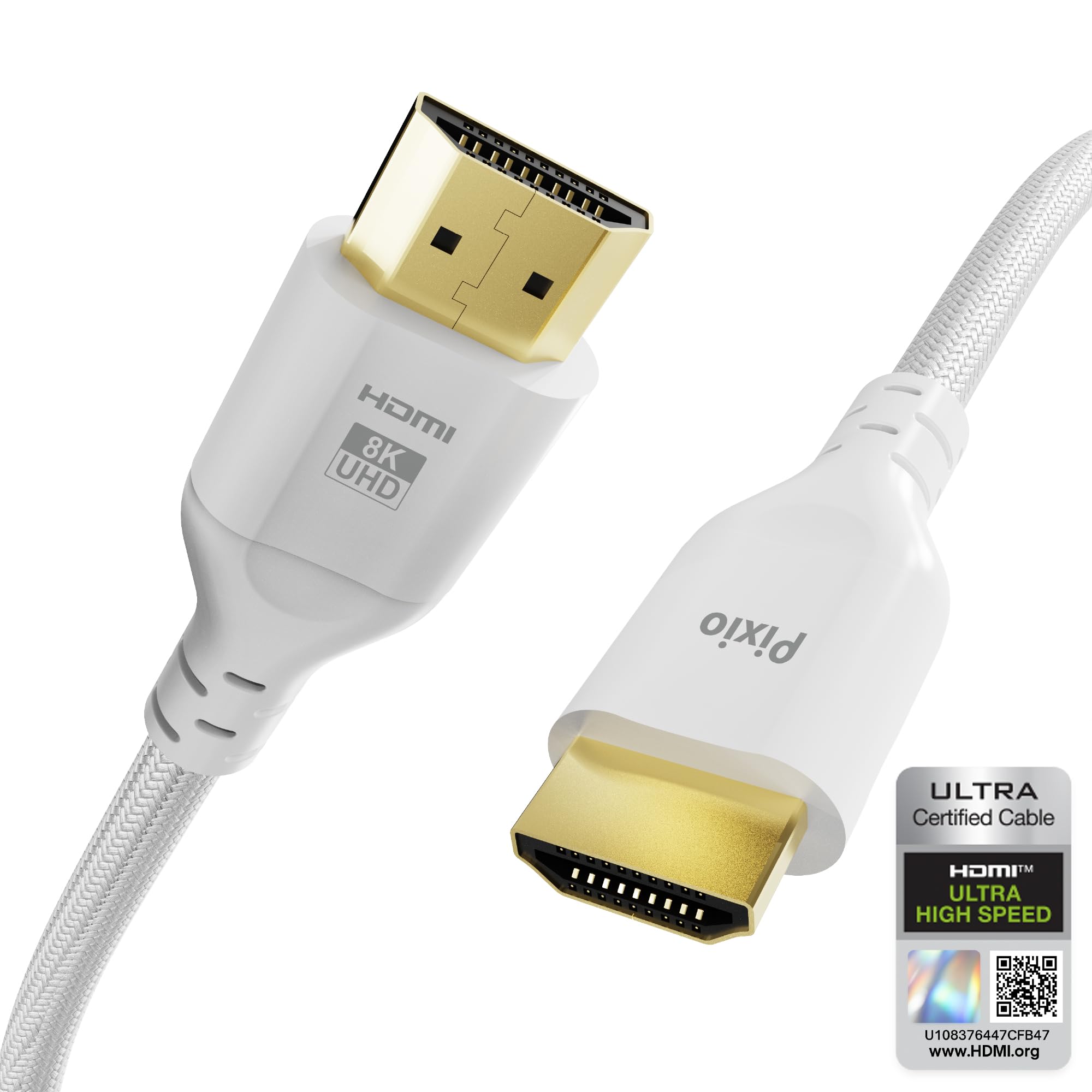
Pixio White HDMI 2.1 Cable

93 /100
Lab Score Outstanding

Key details

Color
White
Length
6 ft
Resolution
8K@60Hz, 4K@120Hz
Certification
Ultra High Speed HDMI 2.1
View on Amazon

Most HDMI cables are black and meant to disappear. The Pixio's white braid is a small design choice with a real payoff in a visible desk setup: it blends with a white monitor, console, or wall instead of drawing a dark line across them.

The cable is certified Ultra High Speed and rated for 48Gbps, with 8K@60Hz and 4K@120Hz support. At 6 feet, it is a desk cable first; it reaches a monitor on the same surface, a console beside the TV, or a laptop dock without a coil of excess. The braid and gold-plated connectors feel better than the price suggests, and the anti-breakage collar at the plug is a sensible touch for a cable that gets moved.

The white finish is the reason to choose it over the UGREEN, not a reason it performs better. If your setup is hidden behind a cabinet, the color is wasted. For a white gaming desk or a clean living-room shelf, it is the one that looks intentional. It is the rare cable you can leave in view.

Pros

  • White finish for visible setups
  • Certified Ultra High Speed HDMI 2.1
  • 48Gbps with 8K/60 and 4K/120 support
  • Braided jacket and gold-plated connectors

Cons

  • Six-foot length limits longer runs
Our verdict

The Pixio is the cable we suggest when the setup is white and visible, because it is certified and looks like part of the desk rather than a black afterthought.

Check Latest Price

How We Tested 16 HDMI 2.1 Cables

We started with roughly 40 candidates that advertised 48Gbps throughput, then filtered hard: nothing over $40, nothing shorter than 3 feet, and nothing whose listing couldn't point to the Ultra High Speed HDMI certification program rather than simply printing "8K" on the box. That left 16 cables, ranging from 3 to 15 feet, which we bought ourselves at retail.

Each cable spent at least a week in one of three setups: a living room with a console and an OLED TV, a desk with a gaming PC and a 240Hz monitor, and a projector run that crosses a room and gets walked on. We played an hour of 4K/120 gameplay per cable and pulled up the display's signal information screen to confirm it had actually locked at full bandwidth and 12-bit color instead of quietly falling back to 4:2:0. We also ran eARC audio through a soundbar and checked for dropouts, and plugged every cable into older HDMI 2.0 gear to make sure nothing broke on the way down.

Then we got rough with them. Each cable was coiled and uncoiled 50 times, bent hard behind a wall mount and left there for a week, and re-tested afterward to see whether the picture flickered, blanked, or needed a re-handshake. We noted connector housing play, how stiff the jacket felt in the hand, and price per foot — a couple of the 15-foot runs cost more than double a 6-foot cable that performed identically.

How to Choose an Hdmi 2.1 Cable

Start With Certification, Not the Resolution Badge

An HDMI 2.1 cable should be certified Ultra High Speed and rated for 48Gbps. Those words matter more than an 8K logo, because the certification is tied to a tested bandwidth spec, not just a resolution claim. The UGREEN and Silkland are the clearest examples here: both put certification first, and Silkland gives you a QR code to check it.

If a listing says HDMI 2.1 but never says Ultra High Speed, treat it as an open question. You can still buy it, but do not pay a premium until the packaging or a scan confirms the rating. The cable either carries the full 48Gbps or it does not.

Match the Cable to the Signal You Actually Run

A certified cable supports 8K@60Hz and 4K@120Hz, and some list 4K@240Hz for PC monitors. Your source, display, and the specific HDMI port still decide what you see. A PS5 will not output 8K just because the cable can, and a 4K/144 monitor needs the graphics card and port to cooperate too.

Buy for the mode you use now, with a little headroom. If you split time between a console and a PC, a 4K/120-certified cable is the sensible baseline; the 4K/240 claim only helps if the rest of the chain supports it.

Plan the Length Before You Shop

Length changes the job. A 6.6-foot cable is right for a console beside a TV or a monitor on the same desk; 10 feet gives a wall-mounted TV more slack. Beyond that, copper gets harder to trust, and a fiber-optic cable like the Highwings 50-foot pick is the safer tool for a projector or a rack in another room.

Measure the route, including the bend behind the TV and the slack at the ports. A cable stretched tight is more likely to pull loose or strain a connector, and a 50-foot fiber run is overkill for a normal living room.

Decide How Many Cables You Need

A single cable is fine for a console and a TV, but a receiver, streamer, soundbar, and gaming PC turn the back of a cabinet into a knot. A three-pack with color-coded ends like the Cable Matters set is easier to manage than three identical black cables.

Count the devices before you buy, then add one spare if the cabinet is hard to reach. For a visible white desk, the Pixio's finish may matter more than a few extra feet; for a hidden install, buy for length and certification and let the color go.

Frequently Asked Questions

Final Verdict

Most people should buy the UGREEN and stop there: it is certified, the 6.6-foot length fits the usual console or desk setup, and it does not ask you to pay for a 50-foot run you do not need. If you are wiring a cabinet, the Cable Matters three-pack saves you from a nest of identical black cables; if the distance is genuinely long, the Highwings fiber pick is the one that solves it.