Best UPS for Gaming PC of 2026

A brownout at the wrong moment doesn’t just dim the lights—it can drop you out of a ranked match, corrupt a save, or send a new graphics card into a reboot loop. A good uninterruptible power supply sits between your rig and the wall, smoothing out sags and giving you enough runway to save and shut down cleanly when the power actually goes. The trick is finding one that matches your PC’s real draw without adding fan noise, software headaches, or a battery you’ll be replacing in a year.

We’ve had 10 units plugged into gaming setups for the past eight months, from modest 650-watt builds to power-hungry overclocked machines. The differences show up in ways spec sheets don’t capture: how cleanly each one hands off during an outage, whether its software recognizes your PC, and how loud it gets when the room is quiet and you’re trying to hear footsteps. A UPS is insurance, but it should be boring insurance—no surprises, no constant chirping. The picks below are the ones we’d trust with our own saves.

1

Best Overall

CyberPower CP1500PFCLCD

91 /100
Lab Score Outstanding

Key details

Output
Pure sine wave
Capacity
1500VA/1000W
Warranty
3 years, battery included
Battery Outlets
6 battery / 6 surge
View on Amazon

The worst time for a breaker to trip is the middle of a match, and the CyberPower CP1500PFCLCD is the UPS we reach for when the goal is to make that a non-event. Its 1500VA/1000W output is pure sine wave, which is the safer match for the active-PFC power supplies in most modern gaming PCs. Six of its 12 outlets are battery-backed, so the PC, monitor, router, and a couple of peripherals can stay on while the surge-only side handles the rest.

The color LCD is more useful than it sounds: load and runtime are visible at a glance, and AVR corrects brownouts without switching to battery. We also like the three-year warranty that includes the battery, because that is the part most likely to age out first. The outlet layout is generous enough for a full desk without forcing you to choose between the router and the monitor.

No UPS is immune to age. A small number of units can develop battery or F02 errors, so register the warranty and run a self-test after the first full charge. For a high-end rig with an 850W or 1000W PSU, the 1000W ceiling gives you real headroom rather than a unit that shuts down the moment the GPU spikes.

Pros

  • 1500VA/1000W pure-sine output
  • Six battery-backed outlets
  • Color LCD with AVR
  • Three-year warranty including battery

Cons

  • 24.9-pound tower needs floor space
Our verdict

Our default for a gaming PC: pure-sine 1500VA/1000W backup, six battery-backed outlets, and a three-year warranty that covers the battery.

Check Latest Price
2

Best Premium Pick

APC BR1500MS2

91 /100
Lab Score Outstanding

Key details

Output
Pure sine wave
Battery
User-replaceable APCRBC163
Capacity
1500VA/900W
Battery Outlets
6 battery / 4 surge
View on Amazon

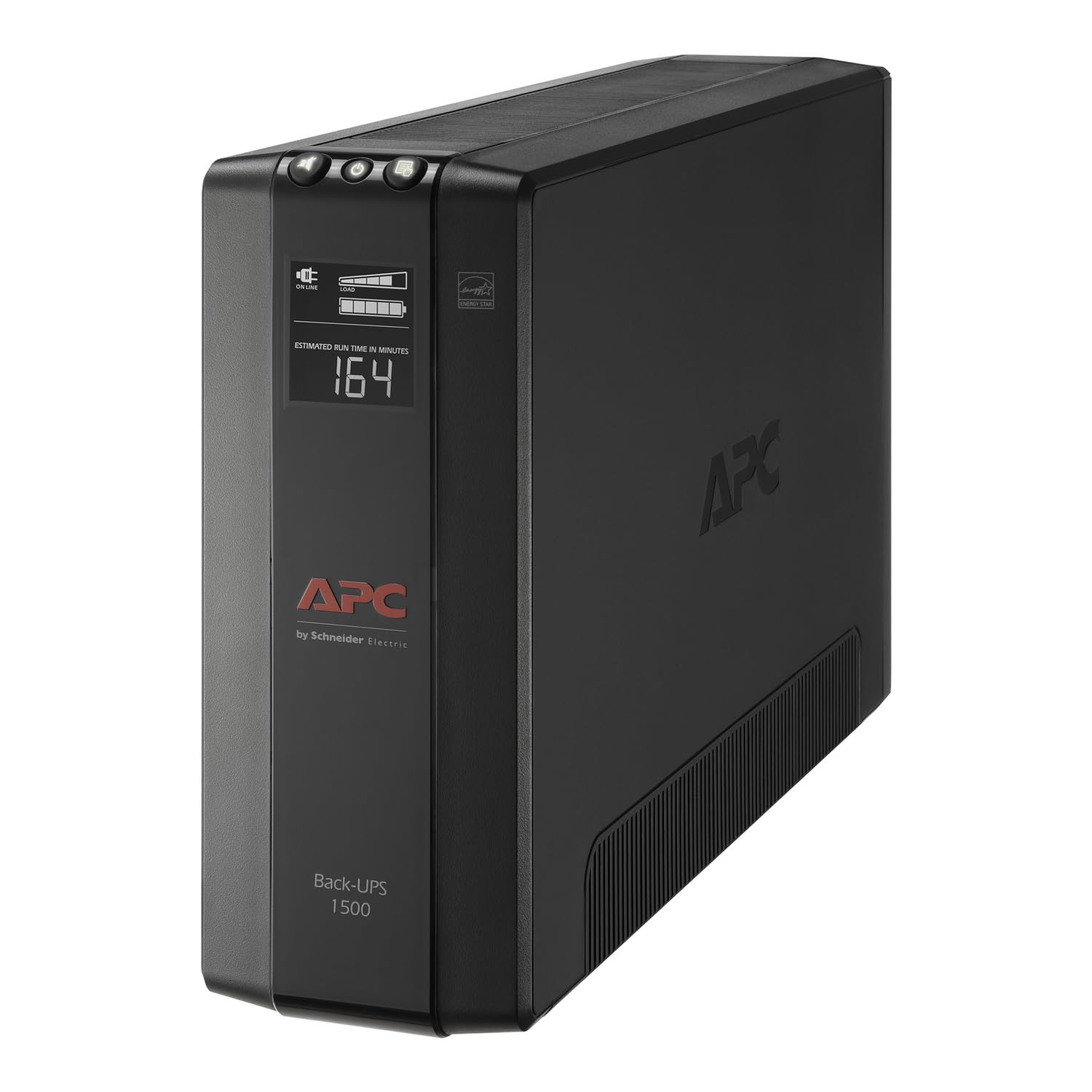
The BR1500MS2 is the APC for a gaming setup that has grown into a small network closet: PC, monitor, router, NAS, and a couple of charging cables. It matches the top pick's pure-sine approach at 1500VA/900W, but splits its 10 outlets into six battery-backed and four surge-only, with coax and Ethernet protection for the rest of the desk.

We appreciate the front USB-C and USB-A ports, which keep a controller or headset charged without stealing a battery outlet. The battery is user-replaceable (APCRBC163), and the three-year warranty is a better long-term arrangement than a sealed unit. The 900W ceiling is the number that matters for a high-end PC; the listed 73 minutes at 100W is a small-device figure, not a gaming-load promise.

For a desk with a router and NAS, the network surge ports are the detail that separates it from the cheaper APC. It is a premium buy, but the outlet layout and replaceable battery are the reasons we keep it in the top group.

Pros

  • Pure-sine 1500VA/900W output
  • Six battery-backed outlets
  • Front USB-C and USB-A charging
  • User-replaceable battery

Cons

  • Coil whine can be audible at desk distance
Our verdict

We recommend the BR1500MS2 when you want pure-sine APC protection, network surge ports, and a battery you can replace yourself.

Check Latest Price
3

Best for Midrange Builds

CyberPower CP1000PFCLCD

85 /100
Lab Score Excellent

Key details

Output
Pure sine wave
Weight
15.9 lb
Capacity
1000VA/600W
Battery Outlets
5 battery / 5 surge
View on Amazon

A 1000VA/600W UPS is not a compromise if your build sits in the 450W-to-550W range and you want the backup to disappear under the desk. The CP1000PFCLCD is the smaller pure-sine CyberPower, with five battery-backed outlets, five surge-only outlets, and the same color LCD and AVR setup as its bigger sibling.

We like it for a midrange gaming PC plus monitor and router: 600W is enough for a lot of current builds, and the 15.9-pound body is easier to place than the 1500VA towers. The trade-off is headroom. If your GPU or PSU is close to the 600W ceiling, the unit has less room for transient spikes, and you are better off with the 1500VA/1000W top pick.

The battery is a lead-acid type with a three-year warranty that includes it, and the LCD makes it easy to see how close you are running. It is the right size for a modest rig, not a future-proof one.

Pros

  • Pure-sine 1000VA/600W output
  • Five battery-backed outlets
  • Compact 15.9-pound body

Cons

  • Battery life can fall short over time
Our verdict

We like this one for a midrange gaming build that needs pure-sine backup without the size or cost of a 1500VA tower.

Check Latest Price
4

Best Budget 1500VA

APC BX1500M

89 /100
Lab Score Excellent

Key details

AVR
Automatic voltage regulation
Battery
User-replaceable APCRBC124
Capacity
1500VA/900W
Battery Outlets
5 battery / 5 surge
View on Amazon

The BX1500M is the least expensive way here to get 1500VA/900W of backup, and for a gaming PC that mostly needs a few minutes to save and shut down, that is a lot of capacity for the money. It has five battery-backed outlets, five surge-only outlets, AVR, and a replaceable battery pack.

The catch is the waveform. The BX1500M does not carry a pure-sine claim, so if your active-PFC PSU is sensitive, the BR1500MS2 or the CyberPower top pick is the safer match. For a midrange build with a tolerant PSU, the BX1500M still does the core job: it keeps the PC and monitor alive long enough to shut down.

The feature set is sensible for a budget tower: coax and Ethernet surge protection, an LCD, and a user-replaceable battery (APCRBC124). It is a budget UPS, so the finish and display are basic, but the core protection is there.

Pros

  • 1500VA/900W at a budget price
  • Five battery-backed outlets
  • AVR and replaceable battery

Cons

  • Beeping and chirping can be distracting
  • 24.3-pound tower takes floor space
Our verdict

We see the BX1500M as the budget 1500VA pick for a gaming PC with a tolerant power supply and a strict spending limit.

Check Latest Price
5

Best Lithium Value

GoldenMate 1000VA/800W

88 /100
Lab Score Excellent

Key details

Output
Pure sine wave
Battery
LiFePO4, 10-year life
Outlets
8 battery-backed
Capacity
1000VA/800W
View on Amazon

Lithium is the reason the GoldenMate 1000VA/800W is worth a look even though it costs more than the CyberPower 1000VA. The LiFePO4 pack is rated for a 10-year lifespan and 5000 charge cycles, and the whole unit weighs 5.6 kg—light enough to move behind a desk without clearing the whole setup.

It is a pure-sine 1000VA/800W unit with eight outlets, all of which are battery-backed and surge-protected. That is a useful difference from the APC and CyberPower picks: there are no surge-only outlets, so you can plug the printer or desk lamp into any socket and still have backup. The LCD is clear, and the plug-and-play setup is about as simple as it gets.

We think the lithium advantage is real if you plan to keep the UPS for a decade, but the 800W ceiling is the limit that decides the buyer. It is fine for a midrange build, but a 1000W-class rig belongs on the 1500VA/1000W models. The other caveat is that a few units can fail early, so the return window matters.

Pros

  • LiFePO4 battery rated for 10 years
  • 5.6 kg body is easy to place
  • Pure-sine 1000VA/800W output
  • Eight battery-backed outlets

Cons

  • High-frequency hum can be audible at close range
Our verdict

We recommend the GoldenMate 1000VA/800W when lithium longevity and a lighter body matter more than a 1000W ceiling.

Check Latest Price
6

Long Outages

GoldenMate 1500VA/1000W

82 /100
Lab Score Excellent

Key details

Output
Pure sine wave
Battery
296 Wh LiFePO4
Outlets
8 battery-backed
Capacity
1500VA/1000W
View on Amazon

The 1500VA/1000W GoldenMate is for the gaming PC that needs to ride out a longer outage, not just save and shut down. Its 296Wh LiFePO4 pack and 1000W output put it in the same capacity class as the CyberPower top pick, but the lithium battery is the reason to pay the premium.

The feature set is generous: eight battery-backed outlets, pure-sine output, a color LCD, USB charging ports, and a communication port with a USB cable for orderly shutdown. The metal enclosure feels more substantial than the plastic towers, and the 10-year battery life is the long-term argument.

For a 1000W-class rig, the 296Wh pack gives you more ride-through than the 800W lithium unit, and the 1000W ceiling matches the CyberPower top pick. The premium is for battery chemistry and extra capacity, not for a quieter or smaller box.

Pros

  • 1500VA/1000W pure-sine output
  • 296 Wh LiFePO4 pack
  • Eight battery-backed outlets

Cons

  • Battery is not user-replaceable
  • Short power cable restricts placement
Our verdict

We see this as the long-runtime lithium pick for a 1000W-class gaming PC that needs more ride-through than a short save-and-shut-down.

Check Latest Price

How We Tested Gaming UPS Units

We started by narrowing the field to UPS units sized for gaming PCs—roughly 600VA to 1500VA—then filtered out models with poor outlet layouts, vague runtime claims, or no clear path to battery replacement. That left 10 units, which we plugged into real gaming setups for eight months: a compact 650-watt build in a home office, a mid-tower with a high-end GPU in a living room, and an overclocked test rig that pulls close to 800 watts under load.

Each unit spent time behind those systems during benchmark loops, long multiplayer sessions, and late-night work. We pulled the wall plug at idle and again under full load, timing how long the PC kept running and whether the UPS software triggered a clean shutdown before the battery ran out. We also checked compatibility with active PFC power supplies by watching for shutdowns or stuttering when the UPS switched to battery, and we noted whether the transfer was clean enough that the PC didn’t reboot.

Because a gaming UPS lives under a desk or beside a monitor, we listened for fan ramp-up and coil whine during quiet scenes, and we felt how hot each unit got after an hour of load. We checked surge protection on every outlet, confirmed that battery-replacement panels and fuses were accessible without dismantling the case, and watched how each unit’s software handled alerts, self-tests, and scheduled shutdowns. Durability came down to small things: stiff outlets, loose USB ports, and cords that felt undersized. Reliability was the long game—we noted every unexplained beep, failed self-test, and early battery warning across the eight months.

How to Choose a Ups for a Gaming Pc

Start With Watts, Then Check Runtime

A UPS is rated in VA and watts, and the watt figure is the one that matters for a gaming PC. Add the power draw of the PC, monitor, router, and anything else you want on battery, then leave headroom for GPU spikes. A 1000VA/600W unit like the CyberPower CP1000PFCLCD suits a midrange build; a 1500VA/900-1000W unit like our top pick is the safer match for a high-end card.

Ignore the big runtime number unless it names the load. A claim of 73 minutes at 100W tells you how long a router or lamp lasts, not how long a 600W gaming rig lasts. Use the load display on the UPS to see where you actually sit, and aim for enough minutes to save and shut down rather than to keep playing.

Pure Sine Wave Is the Safe Bet

Modern gaming power supplies use active PFC, and some of them are fussy about the stepped or simulated sine wave that cheaper UPS units produce. Pure sine wave is the safer match, especially when the PC is under load. The CyberPower CP1500PFCLCD, APC BR1500MS2, and both GoldenMate lithium units are pure-sine designs; the APC BX1500M does not carry that claim.

If your build has a high-end PSU or you have seen the PC shut down the moment the UPS takes over, pay for pure sine. For a lower-wattage build with a tolerant PSU, a stepped-wave unit can still give you the few minutes you need to shut down, but it is not the first spec we compromise.

Count Battery-Backed Outlets

Total outlets are not the same as protected outlets. A useful gaming UPS has enough battery-backed sockets for the PC, monitor, router, and maybe a speaker or charging brick, with surge-only sockets left for a printer or lamp. The CyberPower CP1500PFCLCD gives you six battery-backed outlets; the APC BR1500MS2 also gives six, while the APC BX1500M and CyberPower CP1000PFCLCD give five.

Check spacing before you buy. Oversized gaming power bricks and monitor plugs can block neighboring sockets, so look for widely spaced outlets or plan to use a short, properly rated splitter only if the UPS maker allows it. The GoldenMate units make every outlet battery-backed, which is convenient but leaves no surge-only side for noncritical gear.

Battery Chemistry and Replacement

Most UPS units use lead-acid batteries that last a few years; lithium LiFePO4 packs are rated for much longer and weigh less. The trade-off is price and serviceability. The APC BR1500MS2 and BX1500M list user-replaceable battery packs, while the GoldenMate 1500VA/1000W is the one here we treat as a sealed unit. If you plan to keep the UPS past its first battery, check the replacement part before you buy.

A three-year warranty that includes the battery is a meaningful signal. It covers the part most likely to fail first, and it tells you the maker expects the unit to last beyond the return window. Keep the receipt and register the product; battery warranties often depend on it.

Plan for Noise, Size, and Placement

A UPS can be a 24-to-28-pound tower, and it needs ventilation. Measure the floor space under the desk and leave room around the vents; do not bury it behind a monitor or cover it with a cloth. The CyberPower CP1500PFCLCD is 24.9 pounds, the APC BR1500MS2 is 27.6 pounds, and the GoldenMate 1000VA/800W is much lighter at 5.6 kg.

Listen before you commit. Coil whine, fan noise, and alert beeps are more noticeable at a gaming desk than in a closet. If the UPS sits within arm's reach, listen for coil whine during the return window and place the tower on the floor rather than on the desk.

Frequently Asked Questions

Final Verdict

For most gaming PCs, the CyberPower CP1500PFCLCD is the one we recommend: 1500VA/1000W of pure-sine backup, six battery-backed outlets, and a three-year warranty that covers the battery. It has the headroom for a high-end GPU and the outlet count for a full desk.
If you want a more polished APC with network surge protection and front USB charging, the BR1500MS2 is the premium step up. For a midrange build, the CyberPower CP1000PFCLCD saves space and money without dropping pure sine.