9 Best Mini-ITX PC Cases of 2026: GPU Fit and Cooling That Actually Align

Find the best Mini-ITX case for your gaming build with verified GPU clearances and effective airflow so your components stay cool and fit right.

Building a Mini-ITX gaming PC is a balancing act: you want the smallest footprint possible, but you also need a case that actually fits your high-end GPU and keeps temperatures in check. Too many builds stall when a graphics card is just millimeters too long, or heat builds up inside a mesh panel that didn't deliver as promised.

This guide cuts through the guesswork. Each case is evaluated for how its internal clearances and airflow handle real components under gaming loads—not just theoretical maximums. You'll find picks that let you build small without sacrificing cooling or compatibility.

1

Best Overall

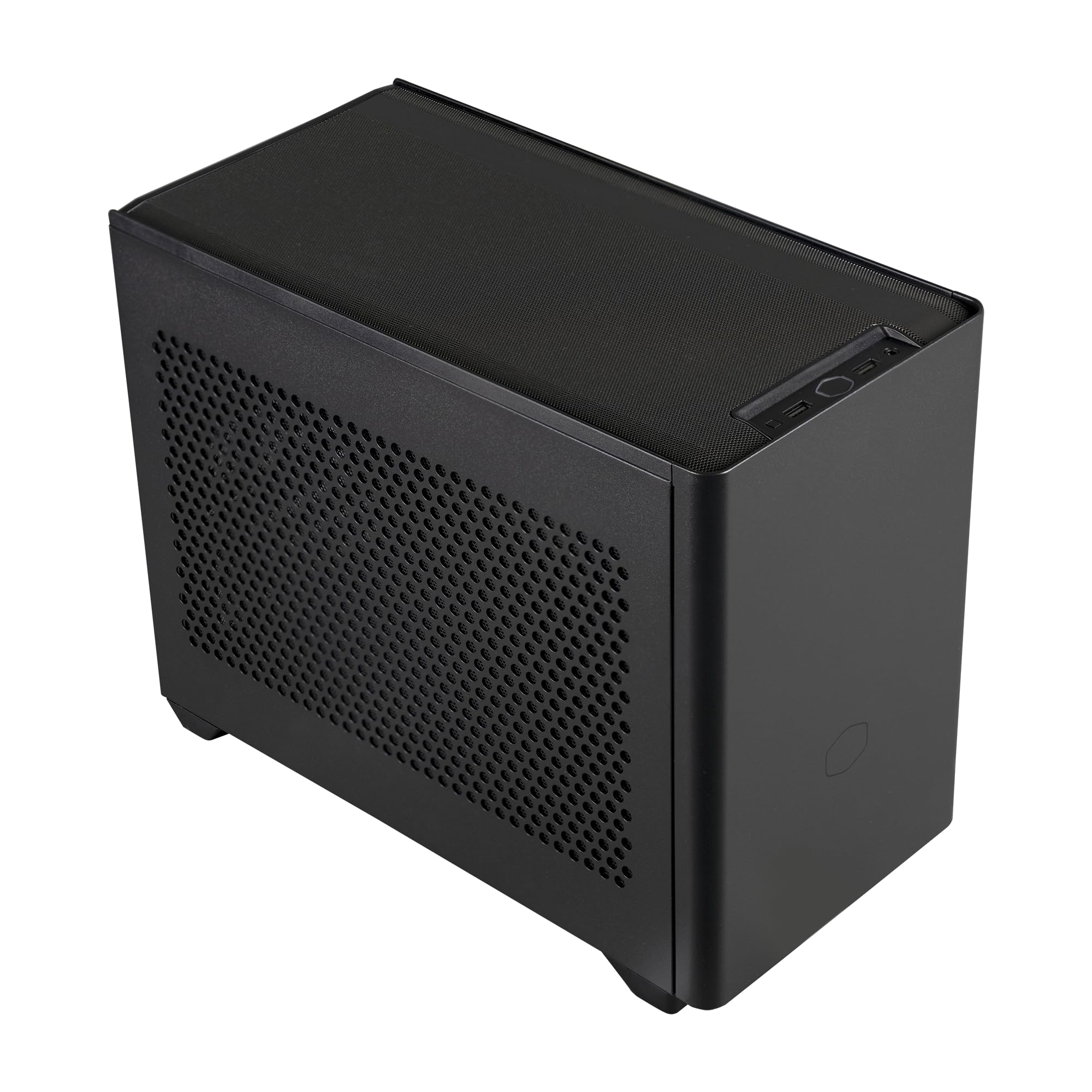
Cooler Master NR200

94 /100
Lab Score Outstanding

Key details

Volume
18.25L
PSU Type
SFX / SFX-L
Fans & Rad Support
0 fans, 280mm rad
GPU Length & Slots
330 mm, 3 slots
View on Amazon

At 18.25 liters, the NR200 accommodates full-size tower air coolers up to 165mm tall and dual-fan liquid cooling radiators along its removable side bracket. That cooling headroom is paired with support for up to six case fans and a mesh or tempered-glass panel, letting builders configure high-pressure airflow through the entire chassis without cramping components. The interior layout handles Mini-ITX and Mini-DTX motherboards, SFX power supplies, and up to a 330mm graphics card in the horizontal position, while routing cables cleanly behind the motherboard tray.

Builders consistently note how the steel frame remains rigid even when fully loaded, and tolerances are precise enough that expansion slots, drive cages, and fan mounts align without struggle. The lack of pre-installed fans encourages a custom cooling setup from the start, and the dual 2.5-inch and dual 3.5-inch drive bays tuck storage out of sight. Some larger air coolers like the NH-U14S and GPUs with tall power connectors can create a snug fit, but measuring your components before ordering eliminates surprises.

First-time SFF builders and value-minded gamers will appreciate how the NR200 forgives inexperience. The removable top, bottom, and side panels grant easy access, and the toolkit-free design speeds up trial-and-error part swapping. If your priority is the absolute smallest footprint—sub-15 liters—or a vertical GPU orientation out of the box, this case reaches its design limits; the plenum-based layout and horizontal GPU mount deliver cooling efficiency over raw compactness.

Build quality stands out for a case in this price bracket. The steel panels have a consistent powder coat, the tempered glass option adds heft, and the side bracket doubles as a radiator or fan mount without flexing under weight. The front I/O includes two USB 3.0 Type-A ports and a combo audio jack, which is functional if not forward-looking with USB-C. Still, the chassis earns long-term trust through sheer mechanical solidity and thoughtful reuse of space for all standard drive sizes.

💡 Measure your CPU cooler height and GPU power connector clearance before purchasing — a few millimeters can make the difference between an easy build and a frustrating afternoon.

Pros

  • 165mm air cooler clearance accommodates nearly every high-performance tower cooler on the market.
  • Intuitive, forgiving internal layout makes assembly easy even for first-time SFF builders.
  • Robust steel construction with precise tolerances holds components securely and minimizes vibration.
  • Side bracket supports up to a 280mm radiator and the case accepts six total fans for aggressive cooling.
  • Delivers build quality and thermal performance matching cases twice the price, making it the SFF value leader.

Cons

  • Oversized CPU coolers and graphics cards with protruding power connectors can create a tight fit, requiring careful dimension checks.
Our verdict

For builders entering the small-form-factor space, the NR200 offers uncompromised cooling and component freedom at a price that leaves room for better hardware. Those chasing sub-15L volumes or integrated luxury can find specialized alternatives, but for raw DIY capability this case sets the standard.

Check Latest Price
2

Best Premium Airflow

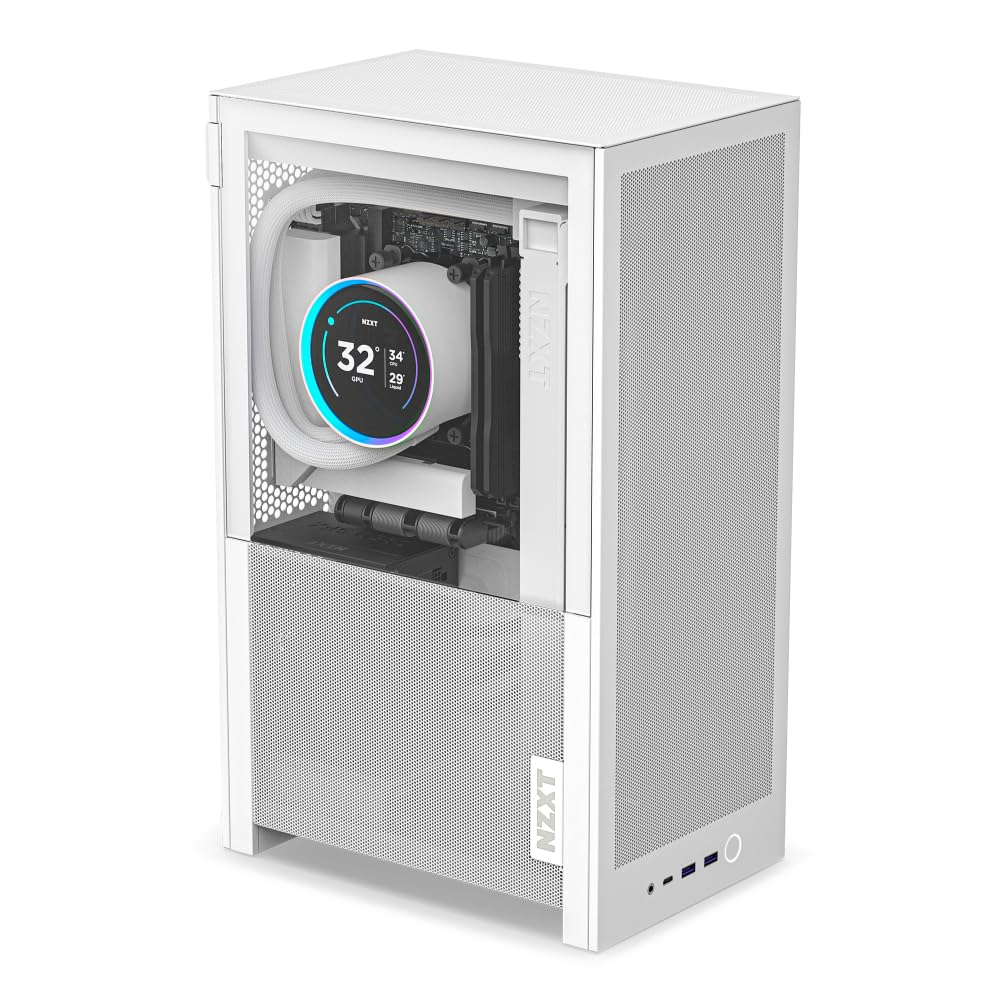
NZXT H2 Flow

91 /100
Lab Score Outstanding

Key details

Volume
20.7L
PSU Type
SFX
Fans & Rad Support
2 fans, 280mm rad
GPU Length & Slots
331 mm
View on Amazon

The H2 Flow sets itself apart with a fully tool-less panel system, a factory-installed PCIe 5.0 riser cable, and room for a 280mm liquid cooler—features that elevate build convenience and future-proofing beyond what budget-oriented alternatives like the NR200 provide. The 20.7L volume, while larger than some purist enclosures, provides the room needed to mount up to a 280mm AIO and long triple-slot GPUs without squeezing.

The hybrid side panel combines tempered glass and mesh perforations to balance component visibility with direct airflow to the GPU area, while two pre-installed 120mm top exhaust fans help extract heat. Combined with support for up to a 280mm radiator, this layout can handle sustained thermal loads from higher-wattage CPUs and GPUs without demanding extra fan purchases.

This case is best for builders who value tool-less luxury, generous GPU clearance up to 331 mm, and a PCIe 5.0 riser out of the box, and who don't mind trading a few liters for easier assembly and enhanced cooling compatibility. It fits neatly on a desk without the cramped internal volume of sub-15L SFF designs, making it a practical option for those new to ITX or anyone upgrading to a larger graphics card.

Pros

  • Rigid, well-finished panels and a solid steel frame convey a premium build quality.
  • Tool-less panels and integrated cable straps simplify assembly and future maintenance.
  • The hybrid glass-and-mesh side panel balances component visibility with direct airflow to the GPU area.
  • Included PCIe 5.0 riser cable ensures full bandwidth for modern GPUs without an extra purchase.

Cons

  • Builders aiming for the smallest possible SFF footprint may find the 20.7L volume closer to a compact M-ATX chassis, limiting desk space savings compared to sub-15L cases.
Our verdict

If your priority is a painless build with out-of-the-box PCIe 5.0 and a 280mm AIO, this case justifies its premium over smaller alternatives.

Check Latest Price
3

Best Budget Compact with ATX PSU

SilverStone SG13

90 /100
Lab Score Outstanding

Key details

Volume
11.5L
PSU Type
ATX
Fans & Rad Support
0 fans, 120mm AIO
GPU Length & Slots
266 mm
View on Amazon

At just 11.5 liters, the SG13 stands out by swallowing a standard ATX power supply while still leaving room for a 120 mm or 140 mm all-in-one liquid cooler. Unlike the top pick, which spreads its 18 liters across generous air-cooler clearance, this case compresses a full system into a footprint that slides easily onto a media shelf. The mesh front panel, when populated with a radiator and fan, creates a direct airflow path that keeps internal temperatures predictable — as long as you commit to liquid cooling.

The SG13 targets builders who already own an ATX PSU and a compact GPU, and who plan to use an AIO from day one. The 61 mm clearance under the PSU shroud rules out virtually every tower air cooler; pairing this chassis with a high-TDP chip on air invites throttling. It thrives as a home theatre PC or a secondary gaming rig where a modest 120 mm AIO handles the thermals without drama.

Assembly remains manageable despite the tight volume: cable routing tucks around the PSU cage without elaborate origami, and the removable top bracket simplifies radiator mounting. The front I/O keeps two USB 3.0 ports and audio jacks, though a USB-C port is absent. The 266 mm GPU ceiling demands a tape measure before purchase, and you’ll want to add your own front intake fan to establish positive pressure and keep dust out.

💡 Treat the SG13 as an AIO-first chassis and budget for a 120 mm liquid cooler upfront; skipping it will choke any CPU drawing more than 65 watts.

Pros

  • 11.5L chassis fits a full ATX PSU and a 120/140 mm AIO, maximizing hardware reuse in a tiny volume.
  • Build quality and metal panels feel sturdy enough for frequent transport or a crowded entertainment center.
  • Interior layout leaves components easy to reach, and the mesh front simplifies radiator installation.

Cons

  • Front I/O lacks a USB-C port, limiting direct connectivity with newer peripherals.
  • The 266 mm GPU length ceiling excludes longer triple-fan cards; double-check your card’s dimensions before ordering.
  • With only 61 mm of CPU cooler clearance, air cooling cannot handle performance CPUs
Our verdict

For ultra-budget small-form-factor builds where you already own an ATX power supply and a short graphics card, the SG13 remains a space-savvy starting point — just pair it with a 120 mm AIO from the outset.

Check Latest Price
4

Best Ultra-Budget with ATX PSU

JONSBO C6-ITX

89 /100
Lab Score Excellent

Key details

Volume
15.8L
PSU Type
ATX / SFX
Fans & Rad Support
0 fans
GPU Length & Slots
255 mm
View on Amazon

Unlike typical ITX cases that demand an SFX power supply, the JONSBO C6-ITX accepts a standard ATX unit, letting you reuse an existing component to keep the build affordable. Its 15.8L chassis includes a sturdy top-mounted handle, and a 170mm CPU cooler clearance opens the door to large air towers. Mesh panels on every face and mounts for up to three 120mm fans provide generous airflow even in this compact size — a setup that suits budget LAN party rigs or travel PCs without sacrificing thermal headroom.

Filling the interior with an ATX PSU does change the dynamic. Cable routing becomes tight, and the PSU shroud can press against wires, which may restrict airflow around the GPU. With a shorter dual-fan card under the 255mm limit and a semi-modular power supply, the space stays manageable. The all-steel frame and removable panels hold up well during repeated moves, and building inside remains straightforward enough that even first-time SFF assemblers finish without major frustration.

The C6-ITX is aimed squarely at builders whose priority is budget and portability, not maximum graphics length. It recycles an ATX PSU that many upgraders already own, pairs it with a sub-255mm GPU, and still fits a tall air cooler. That trade-off makes it a natural fit for LAN party goers, students moving between dorms, or anyone assembling a secondary rig from leftover parts. If you need longer GPU support or a roomier interior, the top pick with SFX-only mounting handles those workloads more gracefully.

💡 Pair the case with a modular or semi-modular ATX PSU and use the tie-down points to route cables away from the GPU and side panel — that keeps airflow unobstructed even in the cramped lower compartment.

Pros

  • Reuses an ATX power supply in a compact 15.8L chassis, slashing costs for budget-oriented SFF builds.
  • All-steel construction and integrated carrying handle endure frequent transport without frame flex or cosmetic damage.
  • Removable panels and a logical interior layout speed up assembly even in tight spaces.

Cons

  • GPU length limit of 255 mm excludes most triple-fan cards, restricting builds to compact dual-fan or ITX-sized models.
  • Installing an ATX PSU compresses the interior; cable management becomes difficult and airflow may be restricted around components.
Our verdict

For builders with an existing ATX PSU and a sub-255mm GPU, the C6-ITX delivers real portability and air-cooling headroom at a price that’s easy to justify.

Check Latest Price
5

Best Extreme SFF Sandwich

KXRORS S300

87 /100
Lab Score Excellent

Key details

Volume
8.1L
PSU Type
SFX / SFX-L
Fans & Rad Support
0 fans
GPU Length & Slots
305 mm, 2.5 slots
View on Amazon

The 2mm-thick aluminum panels and steel frame feel rigid, and the mesh side panels give the GPU and CPU direct access to fresh air. This extreme compaction targets builders who measure their backpack dimensions before their cooler height — and the 305mm GPU clearance means you don't have to settle for a stubby card.

Mesh alone can't compensate for a complete lack of case fans in an 8.1L volume. A high-wattage GPU can push past 80°C during extended gaming, especially with a CPU air cooler pushing against the side panel. Adjusting fan curves or applying a mild undervolt keeps thermals in check for most cards, and cooler-running mid-range GPUs sit comfortably below that threshold.

Extreme SFF enthusiasts who crave a backpackable PC that sacrifices nothing on GPU length will find the S300 compelling. Builders running high-TDP Ryzen 9 or RTX 4080-class hardware should be comfortable with custom fan curves or undervolting, because the thermal headroom is slim. This case also demands patience and meticulous cable routing; it's not a good fit for beginners or anyone who dislikes intricate assembly.

💡 Set aside extra time and follow community build videos for cable routing — the included manual offers little help for navigating the tight interior.

Pros

  • Aluminum panels feel sturdy and premium, resisting flex during transport.
  • Accepts graphics cards up to 305mm long, a rarity at this volume.
  • Minimalist mesh aesthetic keeps the build clean without sacrificing visual openness.

Cons

  • The pre-installed PCIe 3.0 riser can cause boot failures with Gen4 GPUs, requiring a BIOS forced to Gen3 mode before assembly.
  • Under sustained load, higher-wattage GPUs can push past 80°C, which may require undervolting or aggressive fan curves.
Our verdict

For SFF builders chasing the absolute smallest backpack-friendly chassis, the KXRORS S300 delivers unmatched volume-to-GPU ratio — with the understanding that you'll trade assembly ease and some thermal headroom.

Check Latest Price
6

Long GPU SFF

PCCOOLER CPS K101

80 /100
Lab Score Excellent

Key details

Volume
11.9L
PSU Type
SFX
Fans & Rad Support
3 slim fans
GPU Length & Slots
340 mm
View on Amazon

PCCOOLER's CPS K101 packages a 340mm GPU capacity and a pre-installed trio of slim 120mm fans into a sub-12-liter chassis with a sturdy carry handle, squarely aimed at travel-friendly builds with oversized graphics cards. The clearance spec, however, isn't ironclad — one builder found a 338mm card would not seat, meaning potential buyers should measure from the card's bracket to the tip of the shroud and factor in power connector clearance before committing. This variance, paired with a still-modest pool of real-world thermal and build reports, means the case sits as a use-case-specific option rather than a blanket recommendation.

Pros

  • Rugged steel carry handle integrated into the frame provides confident portability.
  • Three 120x15mm slim fans come pre-installed, cutting initial setup time and ensuring immediate airflow.
  • Accepts 3-slot, 340mm-long GPUs in an 11.9L volume, opening options for high-end compact rigs.

Cons

  • The case does not include a PCIe riser cable, a mandatory part for the vertical GPU layout
Our verdict

This case fits builders who already own a GPU comfortably under 338mm and don't mind sourcing a PCIe riser separately — the integrated handle and pre-installed fans make it a practical travel companion.

Check Latest Price
7

Tinkerer's Niche

JOYJOM 4.3L

79 /100
Lab Score Very Good

Key details

Volume
4.3L
PSU Type
Flex ATX
Fans & Rad Support
0 fans
GPU Length & Slots
170 mm
View on Amazon

The JOYJOM 4.3L case pushes miniaturization to an extreme: at just 4.3 liters, it's one of the smallest aluminum ITX chassis you can buy, with panels that feel reassuringly solid. The included PCIe 3.0 riser and 170mm GPU slot mean you can assemble a pocketable office or media PC without hunting for extra parts.

That compactness, however, comes with a static airflow ceiling. Without custom vent holes or an external fan, both CPU and GPU can thermally throttle under even light sustained loads, making this case strictly for ultra-low-power builds. If you're willing to drill ventilation or run a 35W APU, the chassis rewards you with a dense, enthusiast-level footprint — but treat it as a modding canvas, not a ready-to-cool gaming enclosure.

💡 The Flex PSU is a source of constant fan noise; replacing its stock fan with a quieter model or choosing a semi-passive unit will be necessary for silent operation.

Pros

  • Incredibly compact at 4.3L, easily sliding into cramped media centers or backpacks.
  • Aluminum panels and frame feel sturdy for a budget chassis, resisting flex during handling.
  • PCIe 3.0 riser cable comes pre-installed, saving an extra purchase and simplifying the build.

Cons

  • Internal temperatures may climb past 85°C under moderate load; keeping components safe typically requires panel removal or drilling ventilation holes.
Our verdict

For tinkerers building a silent NAS or passive-cooled HTPC that never runs sustained loads, this 4.3L chassis delivers unmatched compactness and sturdy metal build — as long as you accept a Flex PSU and zero thermal headroom.

Check Latest Price
8

Showpiece Display

JONSBO TK-0

87 /100
Lab Score Excellent

Key details

Volume
16L
PSU Type
SFX
Fans & Rad Support
0 fans
GPU Length & Slots
230 mm
View on Amazon

The TK-0 turns a PC into a furniture-grade showpiece with its 270-degree curved glass, genuine walnut veneer, and thick aluminum shell. Build quality feels premium, and the interior is surprisingly easy to work in for a 16L chassis. It supports up to a 137mm CPU cooler and multiple fan mounts, providing adequate airflow for lower-power APU systems or low-profile discrete cards. The defining boundary is GPU compatibility: the 230mm clearance rules out most modern gaming cards, making this a display-first enclosure rather than a high-performance SFF foundation. That tradeoff suits builders who prioritize aesthetic presence over upgrade flexibility — a desktop art piece for integrated graphics or short, niche GPUs.

Pros

  • Stunning aesthetics with a curved glass panel and premium materials, ideal for display builds
  • Surprisingly spacious interior for its size, easy to work in
  • Excellent build quality and premium feel

Cons

  • Max GPU length of 230mm excludes most modern gaming cards, limiting the case to APU builds or short GPUs
Our verdict

The JONSBO TK-0 fits best when visual impact is the primary goal — a living-room PC or desktop sculpture built around an APU or a compact graphics card that stays well under 230mm.

Check Latest Price
9

Plug-And-Play SFF

CM NCORE 100 MAX

83 /100
Lab Score Excellent

Key details

Volume
15.7L
PSU Type
SFX (850W included)
Fans & Rad Support
120mm AIO only
GPU Length & Slots
356 mm, 3 slots
View on Amazon

The NCORE 100 MAX bundles an 850W SFX power supply, a pre-installed 120mm AIO, and a PCIe 4.0 riser into a slim vertical chassis that accommodates graphics cards up to 356mm long. Pre-routed cables and a tool-less assembly process drastically cut typical SFF build time.

The integrated 120mm AIO struggles to keep high-TDP CPUs below throttle thresholds under sustained gaming loads, and the PSU and AIO fan become intrusive at full speed. These constraints confine the bundle to mid-range processors around 65-105W and environments where fan noise isn't a dealbreaker. For someone who values a quick, polished build over chasing the last degree of thermal headroom, it's a pragmatic pick.

💡 Consider swapping the AIO fan and power supply fan for quieter models to reduce noise under load.

Pros

  • Pre-routed cables and an all-inclusive bundle make assembly straightforward, even for first-time builders.
  • Gunmetal finish and vertical orientation create a striking, premium desktop presence.
  • Fits graphics cards up to 356mm long, covering most modern GPUs in a compact footprint.

Cons

  • PSU and AIO fan noise becomes intrusive at full speed; swapping fans may be necessary for quiet operation.
  • The bundled 120mm AIO hits its thermal limit with CPUs above 105W, leading to potential throttling under sustained loads.
Our verdict

If you're pairing the NCORE 100 MAX with a 65W-105W CPU, appreciate its gunmetal vertical footprint, and can tolerate some fan noise in exchange for a fast, pre-assembled SFF experience, this bundle saves time without unnecessary headaches.

Check Latest Price

How to Choose

Volume

A case's volume in liters defines the overall size, but the layout—sandwich, console, or traditional—determines how heat moves. Sub-10L cases can fit a full-length GPU, yet the lack of breathing room creates hot pockets that throttle your CPU unless you underclock.

GPU Length & Slot Thickness

Maximum GPU length specs often ignore the extra height of power connectors pressing against a side panel. Even a card technically within spec may not fit because the cables can't bend enough. Always measure your card's total height including the power plug, not just the listed length.

CPU Cooler Clearance

Low-profile coolers under 70mm are necessary for sandwich cases but can't handle the same thermal load as tower coolers. For high-TDP chips, you'll either need an AIO if the case supports it or plan on undervolting to keep clock speeds stable during extended gaming sessions.

PSU Type

ATX power supply support saves money but steals precious cable-management space and often blocks airflow from the front fan. SFX PSUs are more expensive and may require an adapter bracket, but they free up critical volume for GPU intake and make routing cables far less frustrating.

Cooling & Radiator Support

Cases with multiple fan mounts but no included fans require deliberate fan placement. A single well-placed intake fan can drop GPU temperatures by 8-10°C compared to relying on negative pressure alone. If you plan to use a radiator, verify the exact thickness and tube clearance before buying.

Frequently Asked Questions