7 Best MMO Gaming Mouse of 2026: Maximize Your Raid Performance

Find the best MMO gaming mouse with 12+ buttons, comfortable ergonomics for long sessions, and macro support that actually works.

Every MMO player knows the frustration: you bind your entire rotation to the side buttons, only to realize they are too close together, too stiff, or stop registering mid-fight. The difference between a smooth raid night and a wipe often comes down to how well your mouse translates key presses into actions.

The market is flooded with claims of high DPI and huge button counts, but real-world performance hinges on button feel, placement, and durability. Wired models offer zero-latency reliability, while wireless options trade battery life for cable-free convenience. The sweet spot for most players is the $30-60 range, where you get proven build quality without paying for gimmicks.

This guide focuses on the models that actually deliver on their promises — mice with well-spaced programmable buttons, reliable switches, and software that does not fight you. Whether you need 18 buttons for complex rotations or a wireless setup for a clean desk, the picks below match specific use cases without cutting corners on the specs that matter.

1

Best Overall MMO Mouse
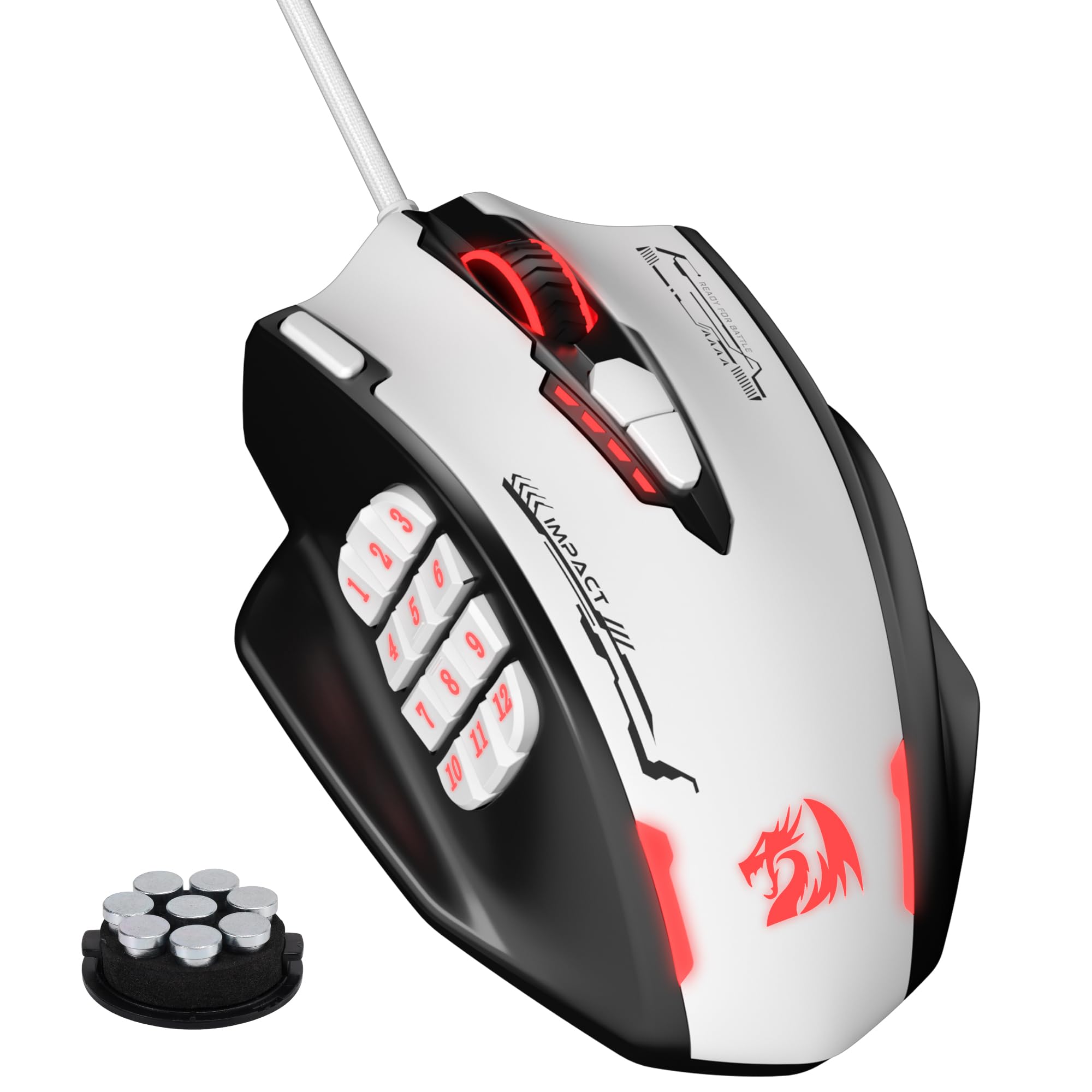
Redragon M908

89 /100
Lab Score Excellent

Key details

Weight
Adjustable
Buttons
18
Wireless
No
View on Amazon

With 18 programmable buttons, a 24000 DPI sensor, and an adjustable weight system (eight 2.4g weights), the Redragon M908 delivers MMO-specific features at a price that undercuts most competitors. The shape suits a broad range of hand sizes, and the weight tuning lets you dial in balance without adding bulk. Performance is consistent during long sessions, with responsive clicks and accurate tracking that holds up in fast-paced encounters.

The 12-button side grid is the defining feature, but the buttons are closely spaced. Larger thumbs may occasionally trigger an adjacent key during intense rotations, and the right-click switch has shown signs of degradation after several months of daily use. The ergonomic contour helps reduce fatigue, so the trade-off is more about button layout than comfort. Some users have also noted cursor tracking can drift over extended play, though this is less common.

This mouse suits MMO players who want maximum button count and customization without spending beyond a budget. The right-click durability is a known boundary — anyone who relies on a crisp, long-lived right-click for MOBA movement should consider alternatives. Similarly, gamers with very small hands may find the side grid too cramped. For everyone else, the M908 offers a feature set that rivals mice costing three times as much.

💡 If the side grid feels cramped, try mapping less-used abilities to the outer rows and repositioning your thumb to the top half of the cluster.

Pros

  • Built-in weight tuning lets you adjust balance and feel without extra accessories
  • Ergonomic shape accommodates a wide range of hand sizes comfortably
  • High DPI sensor and responsive optical switches handle rapid clicking and tracking
  • Software is straightforward and stores profiles on the mouse itself

Cons

  • Right-click switch may become unreliable after months of regular use
  • Side buttons are closely packed, which can cause accidental presses for larger thumbs
Our verdict

For MMO players who want a high button count without paying a premium, the M908 is a proven wired solution — just be aware of the right-click longevity and button spacing.

Check Latest Price
2

Best Wireless MMO

Razer Naga V2 HyperSpeed

82 /100
Lab Score Excellent

Key details

Weight
3.35 oz
Buttons
19
Wireless
2.4GHz / BT
View on Amazon

The Naga V2 HyperSpeed brings 19 programmable buttons, a HyperScroll wheel, and up to 400 hours of battery life on a single AA battery. Unlike the top pick's wired approach, this mouse offers wireless freedom in both 2.4 GHz and Bluetooth modes. The side button grid is well-spaced for MMO keybinds, and the replaceable battery means no internal degradation over time.

This mouse suits MMO players who want wireless without the hassle of internal rechargeable batteries. The layout accommodates medium to large hands, and the 19 buttons provide enough inputs for action bars and macros without extra keyboard keys.

That said, the plastic construction has a less premium feel that may develop creaks over time, and some units have experienced left-click double-clicking or scroll wheel skipping after months of use. These are known tradeoffs that buyers who prioritize build quality and longevity may find unacceptable.

💡 To reduce wireless drops, place the 2.4 GHz dongle in a USB port close to the mouse and avoid physical obstructions.

Pros

  • 19 programmable buttons with a thumb-grid layout that feels intuitive for MMO keybinds
  • HyperScroll wheel allows fast scrolling through menus and inventory
  • Long battery life with replaceable AA battery, often lasting weeks on a single charge

Cons

  • Larger size strains small hands and makes the side button grid harder to reach
  • Wireless connectivity may drop intermittently, especially in crowded RF environments
Our verdict

For MMO players who value wireless freedom and a replaceable battery over premium materials and long-term certainty, the Naga V2 delivers its intended function.

Check Latest Price
3

Best Premium Build

ASUS ROG Spatha X

84 /100
Lab Score Excellent

Key details

Weight
168 g
Buttons
12
Wireless
2.4 GHz / USB-C
View on Amazon

The ASUS ROG Spatha X distinguishes itself with a premium metal-and-plastic build, a magnetic charging dock that makes recharging effortless, and hot-swappable switch sockets for customizing click feel. These features are rare in MMO mice, where most competitors prioritize button count or low weight. The 67-hour battery life with RGB off keeps the mouse ready for days of play, while the dock’s included USB extension ensures a stable wireless connection. Its fixed 12-button layout contrasts with adjustable alternatives like the Scimitar Pro, offering a solid, unyielding platform that suits deliberate, heavy-handed grip styles.

This mouse is built for MMO players with larger hands who appreciate a weighty, anchored feel during play. The 168-gram heft provides a sense of stability but can contribute to hand fatigue over multi-hour sessions. The side buttons are stiff and placed to suit a specific hand size — they require intentional presses, making them more reliable for assigned macros than for frantic spamming. If you prioritize a luxurious charging dock and build quality over button layout flexibility, the Spatha X delivers a focused experience that narrower-palmed players should try before buying.

💡 To reduce hand strain during long sessions, consider using a wrist rest or taking breaks every hour.

Pros

  • Magnetic charging dock provides effortless daily recharging.
  • Hot-swappable switch sockets allow easy customization of click feel.
  • Premium materials and solid construction give a confident, durable grip.

Cons

  • Wireless connection may drop if the dock isn't kept plugged in, requiring a wired backup.
  • Side buttons require firm presses and may feel awkward for certain hand sizes.
  • At 168g, the mouse can cause hand fatigue during extended gaming sessions.
Our verdict

If you have large hands and value premium build quality, a magnetic dock, and swappable switches over a lightweight design or adjustable button grid, the Spatha X is a well-crafted choice — but be prepared for its heft and stiffer button feedback.

Check Latest Price
4

Most Adjustable Side Panel

Corsair Scimitar RGB Elite

79 /100
Lab Score Very Good

Key details

Weight
4.32 oz
Buttons
17
Wireless
No
View on Amazon

The Corsair Scimitar RGB Elite stands apart from other MMO mice with its patented key slider, allowing the 12-button side panel to move forward or backward to fit different thumb lengths. This adjustability addresses an ergonomic issue found in fixed-grid designs like the heavier, hot-swappable competitor whose side buttons can feel stiff for some hand sizes.

With 17 programmable buttons, the Scimitar provides ample macro mapping for complex MMO rotations. Omron switches rated for 50 million clicks underpin a build that holds up through extended sessions, and the 18,000 DPI sensor tracks fast movements without smoothing.

This mouse suits MMO players who prioritize a customizable side-button layout over wireless convenience. The iCUE software can have detection issues on some Windows builds, and the scroll wheel may warp over time — tradeoffs that matter less for users comfortable with occasional driver troubleshooting or those staying within the Corsair ecosystem.

💡 Connect the mouse to a motherboard USB port and keep iCUE updated to reduce software detection issues.

Pros

  • Adjustable side-button grid lets you reposition the 12-button layout to fit your thumb reach.
  • 17 programmable buttons support extensive macro mapping for MMO keybinds.
  • Omron switches rated for 50 million clicks provide long-term durability.

Cons

  • Scroll wheel can warp over time, affecting scrolling precision.
  • Side buttons may become unresponsive after limited use.
  • iCUE software can have detection issues on some systems, requiring troubleshooting.
Our verdict

For MMO players who need a button grid that adapts to their hand, the Scimitar delivers a unique fit — just be prepared to work around iCUE quirks and possible component variance.

Check Latest Price
5

Best Budget with Massive Review Confidence

UtechSmart Venus

89 /100
Lab Score Excellent

Key details

Weight
126 g
Buttons
18
Wireless
2.4 GHz / BT
View on Amazon

The UtechSmart Venus brings wireless freedom to the budget MMO mouse category without sacrificing button count or battery life. Its 2.4GHz and Bluetooth connectivity ensures lag-free performance during raids, while the 70-hour battery covers multiple gaming sessions between charges. This wireless approach sets it apart from the wired top pick, making it the obvious choice for gamers who despise cable drag.

This mouse is best suited for MMO players who prioritize wireless and a high button count over tactile precision. The 18 programmable buttons cover all spell rotations, though the side grid feels mushy under thumb and the spacing can lead to accidental presses during intense fights. Also, the warranty is only honored when purchased directly from UtechSmart, so buying through Amazon introduces a risk. Those who can accept these tradeoffs get a well-validated wireless MMO mouse at an entry-level price.

The ergonomic shape accommodates medium to large hands with a textured grip that maintains comfort during long sessions. The software allows for easy macro assignment, DPI adjustment, and RGB customization, supporting multiple profiles for different games. Despite the mushy buttons, the overall design and wireless reliability have resonated with a broad user base.

💡 When assigning macros, plan for the close-spaced side grid — precise thumb placement helps avoid accidental presses.

Pros

  • Exceptional value for a wireless MMO mouse with 18 buttons and 70-hour battery.
  • Ergonomic shape with textured grip stays comfortable over long gaming sessions.
  • Software enables deep macro and DPI customization with quick profile switching.

Cons

  • Warranty coverage is limited to purchases made directly from UtechSmart, not third-party sellers.
  • The side buttons feel mushy and are closely spaced, leading to misclicks in some cases.
  • Occasional units may develop sensor drift or become unresponsive after several months of use.
Our verdict

If wireless is non-negotiable and you buy directly from UtechSmart, the Venus delivers the button count and battery life MMO players need at a budget price.

Check Latest Price
6

Best Budget Wireless MMO

Redragon M811 PRO

80 /100
Lab Score Excellent

Key details

Weight
148 g
Buttons
15
Wireless
2.4 GHz
View on Amazon

The Redragon M811 PRO delivers 15 programmable buttons with 2.4 GHz wireless at a budget-friendly price, making it the most accessible wireless MMO mouse for cost-conscious gamers. Its shape is comfortable for medium to large hands, with a non-slip texture and a balanced 148-gram weight that feels solid without causing fatigue. The 15-button side grid uses a standard MMO layout, with tight spacing that larger thumbs may find cramped.

The 2.4 GHz wireless connection provides stable, low-latency performance, and the rechargeable battery lasts several days per charge. The 26000 DPI sensor offers fine sensitivity adjustments for different MMO roles, and the polling rate is sufficient for responsive gameplay. The mouse can be used wired while charging to eliminate battery anxiety during long sessions.

This mouse fits MMO gamers on a tight budget who prioritize wireless connectivity and a high button count over software sophistication and long-term durability. It is a sensible choice for casual to moderate MMO play where exact dependability is less critical.

💡 Battery life supports several days of moderate use; charging via USB-C is straightforward.

Pros

  • Good value
  • Decent build quality with a comfortable shape for medium to large hands.
  • 2.4 GHz wireless with rechargeable battery offers stable, low-latency connection.

Cons

  • Software can be clunky and occasionally fails to configure buttons properly.
  • Size may not fit smaller or extra-large hands comfortably.
  • Side buttons can stop working after weeks or months of use.
Our verdict

For budget-conscious MMO players who want wireless freedom, the M811 PRO delivers the essential features at a low price — but be prepared for software quirks and the possibility of button issues over time.

Check Latest Price
7

20-Button Classic

Logitech G600

86 /100
Lab Score Excellent

Key details

Weight
133 g
Buttons
20
Wireless
No
View on Amazon

With 20 programmable buttons and a distinctive ring-finger G-shift click, this mouse delivers macro power that few others match. The wide body fits large hands comfortably for long gaming sessions, and Logitech's software offers thorough customization. However, the current market price of around $240 is more than triple the original $80 MSRP, making it a poor value unless found cheaply. Double-click may appear on the left button after months of use, and the width can be cramped for medium or small hands. This mouse is best left to those who loved it in its heyday or encounter a leftover unit at a fair price.

Pros

  • 20 programmable buttons including a ring-finger G-shift click for extra macro layers.
  • Ergonomic shape supports large hands during extended gaming sessions.

Cons

  • Left button may develop double-click after extended use.
  • Current third-party pricing is far above the original $80 MSRP, severely undermining value.
Our verdict

Only worthwhile if you find a unit near its original $80 price from a trusted seller, and you have large hands that benefit from the G-shift button macro capabilities.

Check Latest Price

How to Choose

Programmable Buttons and Layout

More buttons is not always better. A 12-button grid crammed into a small thumb reach leads to misclicks and fatigue. Look for adjustable side panels (like Corsair’s slider) or a layout that matches your hand size — you want the buttons to fall naturally under your thumb without stretching.

Test the spacing by mapping common abilities: if you can hit 1-12 without moving your thumb base, the layout works. Mushy or overly stiff switches add delay and mis-registration, especially during rapid presses. Optical or mechanical switches rated for 50M+ clicks offer longer consistency.

Wireless vs. Wired

A high-quality 2.4 GHz wireless mouse adds no perceptible latency for MMO gaming, but battery life and connectivity stability vary. Budget wireless mice sometimes drop signal during intense moments — a risk in raids. Wired eliminates this entirely and never needs charging.

Wireless convenience comes at a cost: heavier batteries and potential pairing headaches. If you play at a fixed desk, wired is simpler; if you swap between setups, look for a mouse that uses standard AA batteries so you can swap in seconds.

Sensor and DPI

Modern optical sensors from brands like PixArt track perfectly at 16000 DPI — higher numbers are marketing fluff. What matters is the sensor’s reliability at your everyday DPI setting (usually 800-1600 for MMOs). Skip any mouse that uses a laser sensor; they introduce acceleration and skipping on textured surfaces.

A sensor that tracks without jitter or angle snapping ensures cursor stability during rapid camera panning. Check reviews for complaints of sensor drift or slowdown; those indicate poor implementation regardless of DPI rating.

Software / Macro Support

Onboard profile storage is critical — it lets you take your binds to a LAN party or new PC without reinstalling software. The best software (Logitech G Hub, iCUE, Razer Synapse) supports complex macros with delays and repeats, but they are bloated and sometimes fail to save profiles.

Budget brands like Redragon and UtechSmart offer simpler software that works fine for basic rebinding but lack advanced macro editing. If you need timed sequences (e.g., auto-attack weaving), test the software’s reliability before committing.

Ergonomics and Weight

MMO sessions can run 4+ hours. A mouse that pinches or forces your wrist into an unnatural angle causes strain. Palm-grip users need a tall, wide hump; claw-grip users prefer shorter, lighter designs. Weight matters: under 100g reduces fatigue, but heavy mice (150g+) can improve stability for large hands.

Adjustable weight systems let you tune balance, but they add complexity and internal rattle. Try to hold the mouse or check user hand-size feedback — a shape that presses into the thumb joint will worsen with time.

Frequently Asked Questions