9 Best Monitor Riser of 2026: Adjustable Heights Without Sagging

Which monitor risers stay stable under dual monitors and offer adjustable height without wobbling? Find the right ergonomic lift for your gaming setup.

The most common complaint about monitor risers is that long dual-screen stands sag in the middle within weeks, and adjustable models wobble at max height. That trade-off is baked into the design of budget risers: plastic legs keep costs low but sacrifice stability, while extra-long boards lack internal support.

This guide focuses on stands that actually hold their shape under daily use. The best options combine height adjustability with a stable base, and for dual monitors, two separate stands often outperform a single long shelf. Matching the riser to your monitor weight and desk layout is key — a wobbly stand defeats the purpose of an ergonomic lift.

1

Best Overall

HUANUO Adjustable Single

95 /100
Lab Score Outstanding

Key details

Load Capacity
44 lbs
Width / Length
15.4 inches
Surface Material
Metal platform, plastic legs
Height Adjustability
3 heights: 3.9-5.5in
View on Amazon

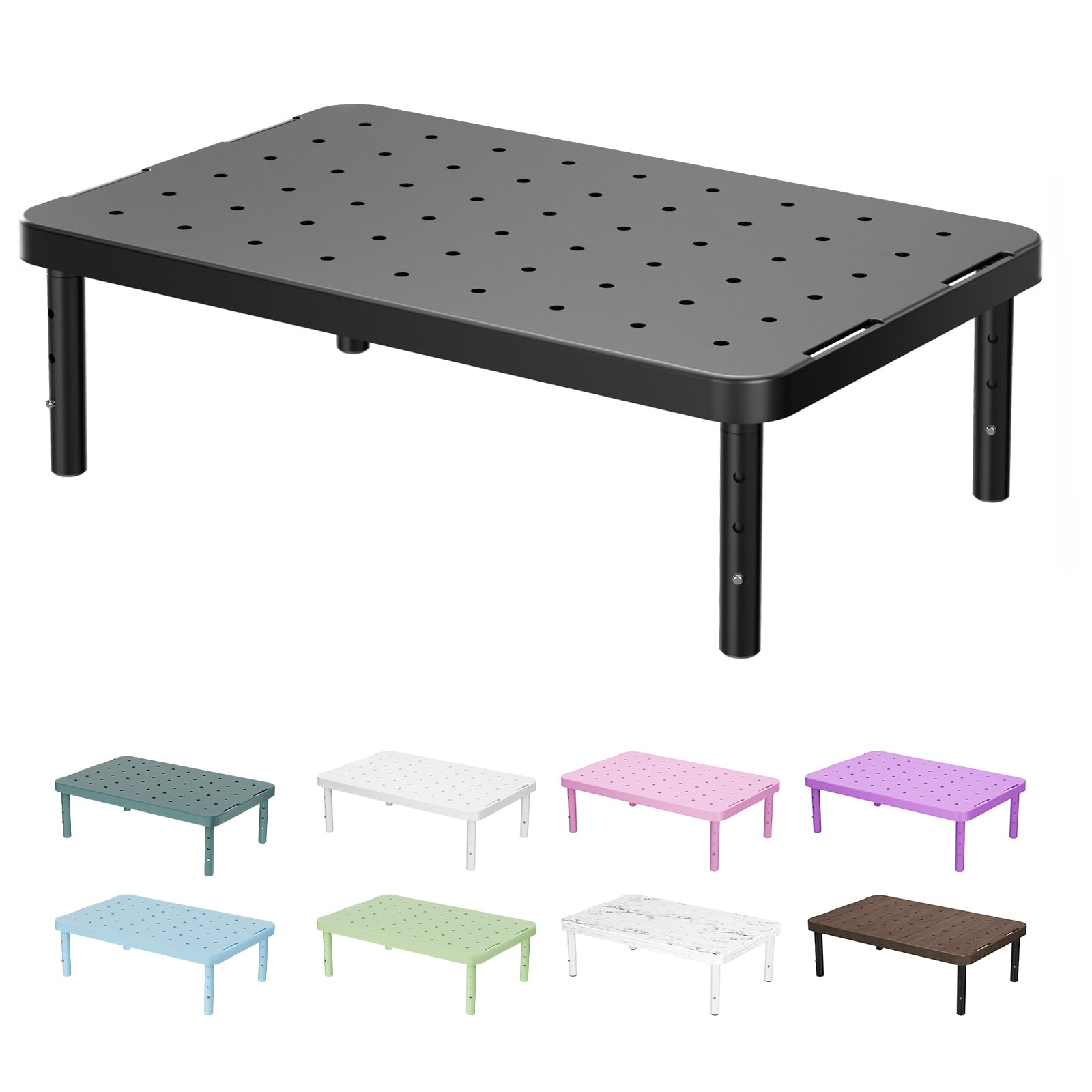
The HUANUO monitor stand offers three discrete height settings (3.94, 4.72, and 5.51 inches), letting you dial in a comfortable eye level without relying on a single fixed riser. The 15.4 x 9.8 inch powder-coated steel platform provides a stable surface for monitors or laptops up to 44 pounds, while the open design leaves room for a keyboard or documents underneath. Adjustments require no tools — each leg clicks into place, and swapping heights takes under a minute.

Owners regularly note that the stand feels secure with most 24-27 inch monitors and typical gaming laptops. The rubber pads on the platform grip well, and the steel top resists scratches from daily use. Assembly is as simple as inserting four leg plugs into the platform’s underside; no screws, bolts, or instructions beyond the diagram. The stand’s 1.8-pound weight means it stays put once loaded, though it’s light enough to reposition when empty.

This stand works best for single-monitor office workers and gamers who need height adjustability but don’t want to spend over $30. The plastic legs are the main tradeoff — they feel less dense than all-metal alternatives, and a small number of units have the leg plugs loosen over time. For a home desk or a lightly shared setup, that’s a minor concern; for a daily-driver workstation that gets moved regularly, an all-metal riser like the fixed-height WALI is worth considering.

💡 Check the leg plugs occasionally if you move the stand frequently; a dab of thread locker can prevent loosening.

Pros

  • Three height settings provide ergonomic flexibility for different desk heights and chair adjustments.
  • Assembly and height changes require no tools
  • Sturdy enough for most monitors and laptops up to 44 pounds without wobbling.
  • Great value

Cons

  • Plastic legs can feel less robust than all-metal designs; leg plugs may loosen over extended use.
Our verdict

If you need a single-monitor riser that adjusts to three heights without breaking the bank, the HUANUO is the safest bet — proven by thousands of owners and backed by a simple, durable design.

Check Latest Price
2

Best for Dual Monitors (Budget)

HUANUO 2-Pack Adjustable

94 /100
Lab Score Outstanding

Key details

Load Capacity
44 lbs each
Width / Length
14.5 inches
Surface Material
Metal platform, plastic legs
Height Adjustability
3 heights: 4.1-5.7in
View on Amazon

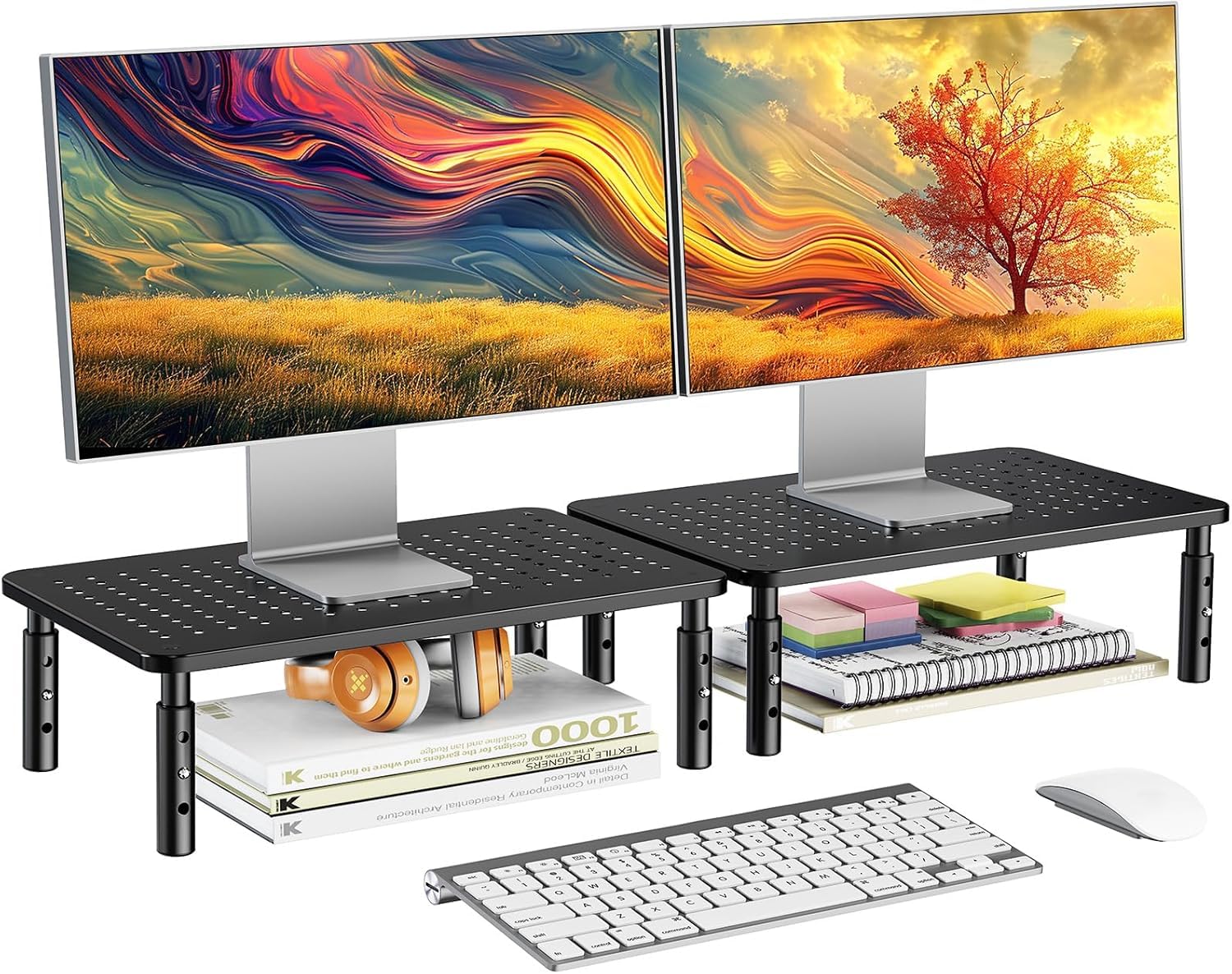
Two adjustable stands for under $20 deliver exceptional per-unit value, undercutting most single-stand options. Unlike the top pick single stand, this dual-pack covers two monitors at once without requiring a long, sag-prone platform.

Assembly takes minutes with no tools required, and each stand offers three height settings. The powder-coated steel platform supports up to 44 lbs per stand, enough for most monitors and consoles. At the tallest setting (5.7 inches), some wobble can occur – the plastic legs trade some rigidity for cost savings. At the middle or lowest heights, stability is much better.

The open space beneath each stand provides room for a keyboard or notebook when not in use. The stands can also be stacked to reach higher elevations, adding flexibility for different desk and chair arrangements.

This pair suits budget-conscious buyers setting up two screens, whether for a dual-monitor workstation or a laptop-plus-monitor combo. Those who want all-metal construction or need absolute stability at the highest setting should consider a single all-metal stand instead. The plastic legs feel less premium but the steel tops hold up well under typical use.

💡 Using the middle height setting minimizes wobble and provides a comfortable ergonomic lift.

Pros

  • Exceptional value
  • Easy assembly and height adjustment with no tools required.
  • Sturdy steel platform supports most monitors and consoles up to 44 lbs each.
  • Stands can be used separately or stacked to reach higher elevations.

Cons

  • At the tallest height setting, monitors may wobble
  • Plastic legs feel less premium than all-metal stands, though the steel platform adds strength.
Our verdict

For cost-conscious dual-screen setups, this two-pack delivers adjustable height without breaking the bank – just plan to use the middle height for a stable surface.

Check Latest Price
3

Best Stylish Glass Stand

Hemudu 2-Pack Glass Stand

96 /100
Lab Score Outstanding

Key details

Load Capacity
88 lbs each
Width / Length
14.6 inches
Surface Material
Tempered glass, steel legs
Height Adjustability
Adjustable legs 3.4-4.9in
View on Amazon

While most adjustable stands use a metal top, this Hemudu option opts for tempered glass — giving it a noticeably premium look while still supporting up to 88 pounds per stand. The height and tilt adjustability (0-15 degrees forward tilt) add ergonomic flexibility that many fixed-height stands lack.

This stand suits buyers who prioritize desk aesthetics and have heavier monitors or multiple devices to elevate. However, the glass surface offers less friction than plastic or metal tops, so devices may shift during use if not secured. Additionally, the plastic feet on the legs may lose grip or wear over time — a tradeoff for the adjustable height mechanism.

💡 Adding non-slip pads under devices can prevent sliding on the glass surface.

Pros

  • Beautiful glass top looks premium and fits modern desks
  • Excellent weight capacity of 88 lbs per stand
  • Easy to assemble and adjustable height/tilt
  • Great value for a 2-pack with stylish design

Cons

  • Glass surface can cause devices to slide during use
  • Plastic feet on legs may wear or lose grip over time
Our verdict

For users who value desk aesthetics and need a sturdy dual stand, the Hemudu two-pack delivers on style and strength, as long as you don't mind a glass surface that may need non-slip pads for certain devices.

Check Latest Price
4

Best for Desk Organization

Simple Houseware Dual Organizer

93 /100
Lab Score Outstanding

Key details

Load Capacity
Width / Length
33.3 inches
Surface Material
Engineered wood
Height Adjustability
Fixed 5in
View on Amazon

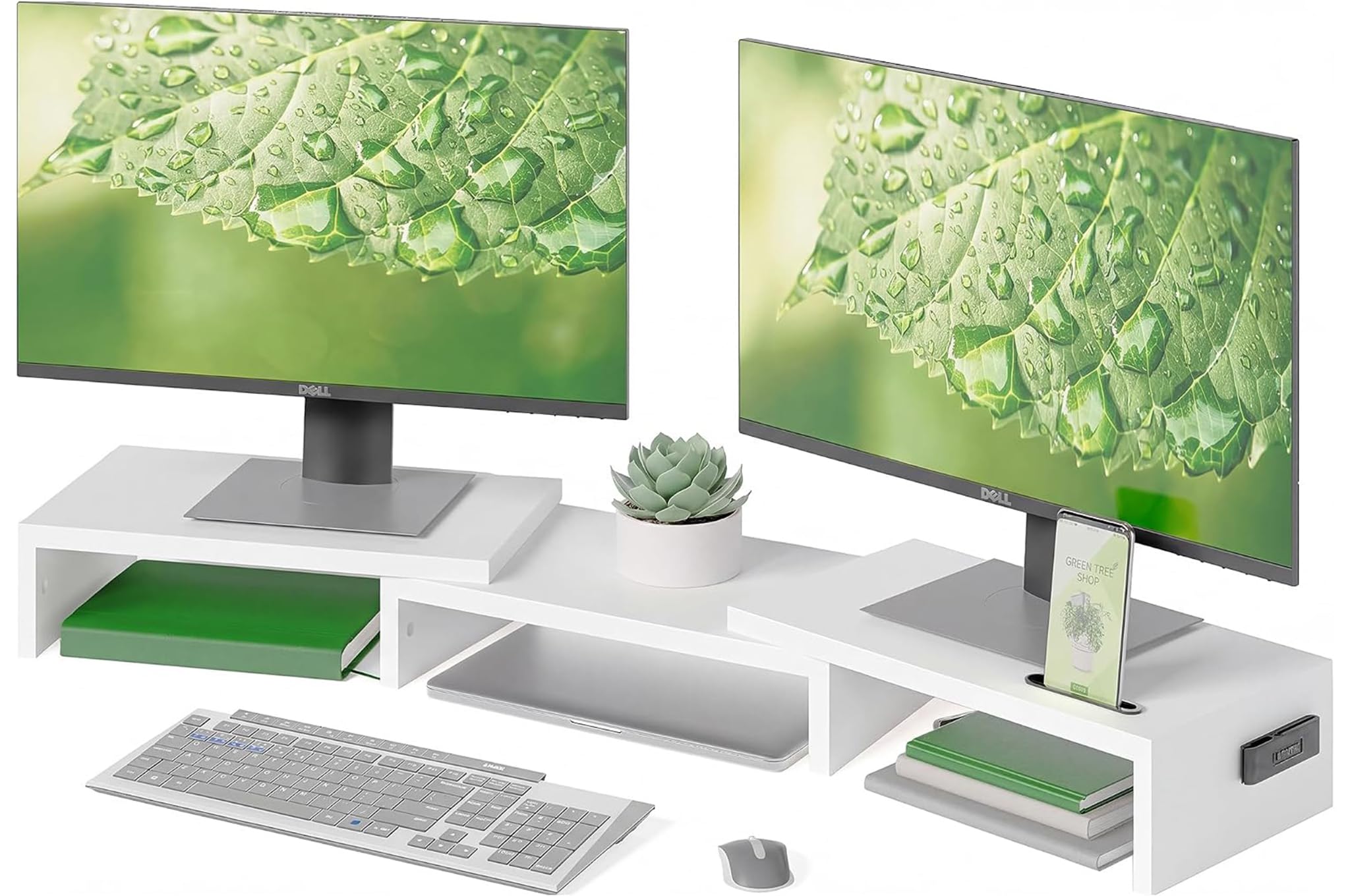
The Simple Houseware Dual Organizer stands apart from simpler risers by packing a full drawer, a built-in phone and tablet slot, and side storage caddies with removable dividers. The 5-inch height lifts monitors to a comfortable eye level, and the white engineered wood finish gives a clean, elevated look to any desk. For users who want more than just a flat platform, this stand delivers serious storage capacity without requiring a separate shelving unit.

Assembly involves 16 steps, which some may find time-consuming, but the included video instructions make the process straightforward. The stand works well with standard 24-inch office monitors — the surface supports two screens plus peripherals without sagging. Heavier monitors, especially 27-inch gaming displays or older models, can introduce wobble and flex in the center, so this stand suits lighter setups best.

This riser is ideal for office workers and home users who prioritize desk organization and use monitors up to 24 inches. The drawer, phone slot, and side caddies keep papers, pens, and devices within reach while reclaiming desk space. Avoid this stand if you run a heavy dual gaming monitor rig or need rock-solid stability — a simpler adjustable stand or a single wide board will handle those loads better.

💡 Following the video guide step by step cuts assembly time to about 20 minutes.

Pros

  • Built-in drawer and phone slot keep small items off the desk surface.
  • Spacious enough for two standard monitors plus a laptop or tablet.
  • Clean white finish and wood construction look more expensive than the price suggests.
  • Video-guided assembly makes the 16-step process manageable.

Cons

  • Assembly is more involved than simple one-piece risers, requiring 16 steps.
  • With monitors over 24 inches or heavier units, the platform can wobble or flex.
Our verdict

An excellent choice for office desks with standard 24-inch monitors where storage matters more than brute stability. Skip it for heavy gaming setups.

Check Latest Price
5

Best Compact Metal Stand

BoYata Metal Adjustable

94 /100
Lab Score Outstanding

Key details

Load Capacity
33.1 lbs
Width / Length
9.3 inches
Surface Material
All steel
Height Adjustability
Continuous twist knob
View on Amazon

Steel plates and a solid center pole give this stand a dense, premium feel that plastic competitors can’t match. The footprint is just 9.3 x 7.9 inches, leaving room for a keyboard or notebook underneath while keeping the monitor at eye level. Height is adjusted with a twist knob across a continuous range, so you can fine-tune without preset stops.

Where the top pick (HUANUO) uses plastic legs to cut costs, the BoYata trades some flex for a smaller base and all-metal construction. The tradeoff appears when pairing it with a monitor larger than 24 inches or near the 33-pound limit — the single center-pole support can introduce a wobble that the twist knob doesn’t fully eliminate. Periodic tightening helps, but a heavy screen will still feel less planted than on a wider stand.

This stand works best for single monitors or laptops under 30 pounds on a small desk where every inch of surface area counts. The metal build and small footprint suit minimalist setups, but if your monitor has a wide base or you plan to store bulky items underneath, the narrow platform may feel restrictive. Ideal for users who prioritize a compact, sturdy riser over a larger storage shelf.

💡 The twist knob allows continuous height adjustment — give it a quarter-turn now and then to maintain stability.

Pros

  • All-metal construction feels dense and stable for its size.
  • Simple assembly: one screwdriver and a few minutes.
  • Tiny desk footprint leaves space for other gear.
  • Smooth continuous height adjustment via twist knob.

Cons

  • 33-pound weight limit excludes heavier monitors and large all-in-ones.
  • With monitors over 24 inches, the center-pole design can wobble at higher heights; the twist knob may need periodic retightening.
Our verdict

For small desks with a single monitor or laptop under 33 lbs, this compact steel stand offers a sturdy, height-adjustable platform that saves space.

Check Latest Price
6

Best Stackable Dual Stand

TEAMIX 2-Pack Wood

93 /100
Lab Score Outstanding

Key details

Load Capacity
80 lbs total
Width / Length
14 inches
Surface Material
MDF wood
Height Adjustability
Stackable: 3.4 or 6.75in
View on Amazon

The TEAMIX 2-pack lets you use two separate low stands or stack them for a single elevated platform, giving two height options from one purchase. Assembly takes a few minutes with the included tools, and the wood construction feels sturdy enough to support monitors up to 80 pounds total. The clean black finish blends into most desk setups without drawing attention.

This stand works best for setups with two small monitors or laptops whose bases fit within the 9.5-inch depth. The wood finish looks clean on a desk, though some units arrive with a slightly darker color than product photos suggest, so expect some variability in appearance. If you need one continuous wide surface, the two separate stands will leave a gap between monitors rather than a single platform.

💡 Place the stand in a less visible area or pair with a dark desk mat if the color variation is a concern.

Pros

  • Stackable design provides two height options in one purchase.
  • Easy to assemble with included tools.
  • Sturdy wood construction with a clean, understated appearance.
  • Good value for a 2-pack that can be used separately or stacked.

Cons

  • Surface color may be darker than pictured; finish consistency varies between units.
  • Each stand is only 9.5 inches deep, which may not accommodate larger monitor bases.
Our verdict

A practical choice for dual small monitors on a budget, as long as you don't need a single wide surface and the base depth fits within 9.5 inches.

Check Latest Price
7

Single Monitor

WALI Adjustable Stand

95 /100
Lab Score Outstanding

Key details

Load Capacity
44 lbs
Width / Length
14.6 inches
Surface Material
Metal platform, plastic legs
Height Adjustability
3 heights: 3.9-5.5in
View on Amazon

This stand provides a metal platform with three height settings (3.9, 4.7, 5.5 inches) and supports up to 44 lbs, making it suitable for most single monitors and laptops. Assembly requires only screwing in four legs. However, the plastic legs may feel less robust than all-metal options, and the rubber feet can detach in some cases. It is nearly identical to the top-pick HUANUO adjustable stand but costs slightly more and has fewer reviews, which is why it sits as an alternative rather than the top recommendation.

Pros

  • Sturdy and stable for most single monitors and laptops.
  • Very easy assemble
  • Three height settings for ergonomic adjustment.

Cons

  • Plastic legs can feel less durable than all-metal stands.
  • Rubber feet may detach in some cases.
Our verdict

Best suited for buyers who prefer the WALI brand or want a slightly different appearance, but the HUANUO adjustable stand offers the same features for less money.

Check Latest Price
8

Dual Storage

WESTREE Dual with Drawers

94 /100
Lab Score Outstanding

Key details

Load Capacity
100 lbs
Width / Length
36.2 inches
Surface Material
Particle board
Height Adjustability
Fixed 4.92in
View on Amazon

The WESTREE stand offers a generous 36-inch surface that accommodates two monitors side by side, plus two drawers for storing small office supplies. Assembly is simple with clear instructions, and the rustic brown finish adds a warm aesthetic to the desk. However, the particle board construction can sag under sustained heavy load, and occasional drawer alignment or chipped edges have been noted. This makes it a solid choice for lighter desktop setups but not a long-term solution for heavy monitors or users who expect the sturdiness of all-metal stands.

Pros

  • Large surface area fits two monitors comfortably
  • Two drawers provide decent storage for office supplies
  • Easy to assemble with detailed instructions

Cons

  • Drawer alignment may be off, and occasional chipped edges appear
  • Particle board can sag in the center over time under sustained heavy load
Our verdict

Works well for a tidy dual-monitor desk with lighter gear, but avoid if you plan to load it with heavy monitors or expect long-term rigidity.

Check Latest Price
9

Budget Single

HUANUO Fixed Metal Stand

96 /100
Lab Score Outstanding

Key details

Load Capacity
44 lbs
Width / Length
14.57 inches
Surface Material
Powder-coated steel
Height Adjustability
Fixed 3.94in
View on Amazon

The HUANUO metal stand assembles in under two minutes with no tools required — just push the legs into the platform. Its steel frame holds up to 44 pounds without flexing, and the open design leaves room underneath for a keyboard or notebook. At this price point, you are getting a sturdy base that stays put on the desk and frees up surface area.

The tradeoff is a fixed 3.94-inch height that cannot be adjusted. If your desk and chair arrangement calls for a different elevation, this stand will not accommodate it — it only works if you already know that exact rise fits your setup. For single monitor or laptop users who have confirmed the height, it delivers solid value without the cost of adjustable options.

Pros

  • Assembly takes under two minutes with no tools
  • Steel frame feels solid and stable under load
  • Creates usable storage space below the platform

Cons

  • Height is fixed at 3.94 inches, which may be insufficient for some desk-chair setups
Our verdict

This stand is a smart buy if you have already measured your ideal monitor height and want a budget-friendly, all-metal riser that needs no assembly.

Check Latest Price

How to Choose

Height Adjustability

Fixed-height risers are simple and cheap, but they lock you into one eye level. If your chair height or desk changes, you're stuck. Adjustable models typically offer three discrete settings or a continuous twist-knob range, letting you dial in the exact height for your sitting posture.

The trade-off: adjustability often comes from plastic legs or a center-pole design, which can wobble at the highest setting. A fixed metal stand is more stable, but you must know your ideal height before buying. For most gamers, adjustable is worth the slight stability trade-off.

Load Capacity

Weight capacity numbers are often overstated. A stand rated for 44 lbs may wobble with a 30-lb monitor if the legs are narrow or the surface is flimsy. The actual stability depends on leg design, surface material, and how weight is distributed across the platform.

For a single 22-30 lb monitor, a 44 lb rated stand with a wide base is fine. For dual monitors, look for stands with separate support columns or two individual stands rather than a single long board, which tends to sag under combined weight.

Surface Material

Metal platforms (powder-coated steel) are durable and non-slip, but they can feel cold or industrial. Wood (MDF or particle board) looks warmer but may sag over time, especially in long spans. Tempered glass adds a premium look but can be slippery and requires careful cleaning.

Plastic is lightweight and cheap but degrades with UV exposure and feels less robust. For a gaming desk where vibration and occasional bumps happen, a metal platform with rubber feet offers the best combination of stability and grip.

Width and Length for Dual Monitors

A single long stand (35-43 inches) seems ideal for two monitors, but many models sag in the middle because the board isn't reinforced. The legs are at the ends, leaving the center unsupported. This is the most common complaint in the category.

Two separate adjustable stands are a workaround: each supports its own monitor independently, so there's no sag risk, and you can adjust heights individually. This setup also lets you change monitor positioning without replacing the whole riser.

Storage Features

Drawers, phone slots, and side caddies are nice extras, but they add complexity and can compromise stability. A stand with a drawer often has a thinner platform or less robust legs to keep costs down. Make sure the storage features don't make the stand wobbly.

If you prioritize organization, choose a stand where the drawer is separate from the load-bearing structure. Avoid models where the drawer uses the main shelf as its track — that can cause binding and misalignment over time.

Frequently Asked Questions