8 Best Nintendo Switch Ethernet Adapter of 2026: Gigabit Without the Official Tax

Find the best Nintendo Switch Ethernet adapter for stable online play without overpaying for official branding. Gigabit speeds at a fraction of the cost.

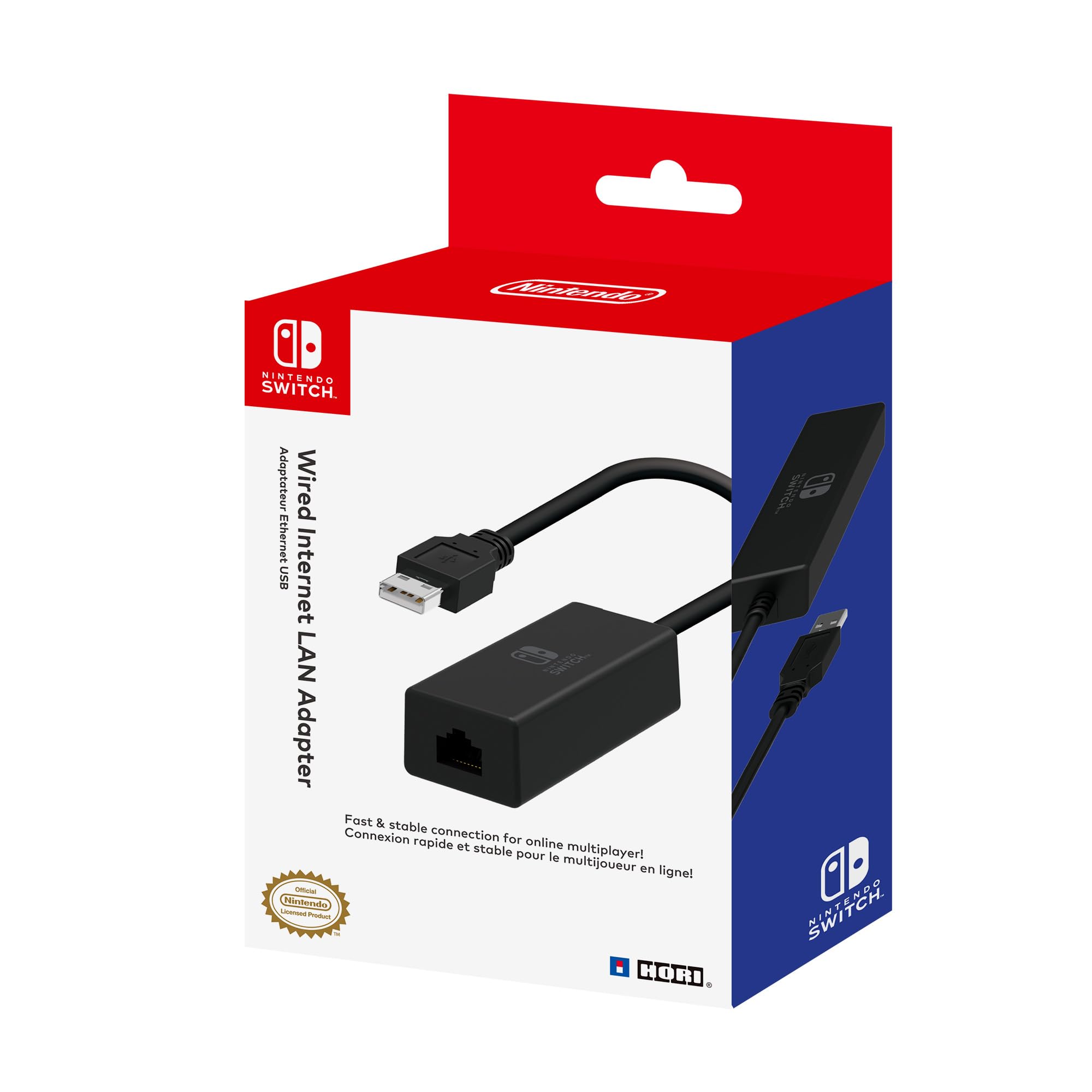
The Nintendo Switch dock has an Ethernet port waiting to be filled, but picking the wrong adapter can leave you with slower speeds than Wi-Fi. The official Nintendo-licensed HORI adapter only supports Fast Ethernet (100 Mbps), while many third-party options under $15 offer Gigabit (1000 Mbps). That means the 'official' choice might actually bottleneck your connection if your internet plan exceeds 100 Mbps.

Stability matters more than raw speed for online gaming, but neither matters if the adapter drops connections mid-match. Common complaints include intermittent disconnects and macOS compatibility issues. The right adapter uses a proven chipset, solid build, and avoids unnecessary frills that inflate the price.

The value isn't in the logo — it's in the chipset and the connection it sustains. Find the adapter that matches your internet plan and gaming habits, not the one with the best packaging.

1

Best Overall

UGREEN 20256

93 /100
Lab Score Outstanding

Key details

Build
Compact dongle
Speed
1000 Mbps
Port Type
USB-A
Official License
No
View on Amazon

The UGREEN USB 3.0 to Ethernet adapter delivers full Gigabit speeds for about the price of a takeout meal, making it the go-to option for Switch owners who want a stable wired connection without paying a premium. It works immediately with the Switch dock, Windows, macOS, and Linux — no drivers or setup fiddling required. Over 27,000 customer reviews and consistent performance across platforms confirm this as the default recommendation for most buyers.

In practice, the adapter easily saturates a Gigabit connection for fast game downloads and smooth online play on the Switch. Users report speeds matching their internet plan, which is a clear advantage over the official Nintendo-licensed adapter that caps at 100 Mbps. The compact plastic dongle runs cool enough during extended sessions and fits unobtrusively in the dock’s USB-A port without blocking adjacent ports.

This adapter suits any Nintendo Switch owner who already has a USB-A port available on their dock or prefers a cost-effective alternative to the 100 Mbps official adapter. It also works across multiple computers, so one device covers your Switch, laptop, and desktop. The main tradeoff: a small fraction of units have exhibited connection drops during use or become unresponsive after months of daily use. These incidents are infrequent relative to the massive user base, but worth noting if you rely on the adapter for uninterrupted competitive gaming and want zero downtime.

💡 If you encounter occasional disconnects, try ensuring the adapter is firmly seated in the dock’s USB port and avoid using long extension cables that can introduce interference.

Pros

  • Works immediately with Nintendo Switch and most operating systems
  • Delivers full Gigabit speeds for fast downloads and lag-free online gaming.
  • Costs significantly less than the official Nintendo adapter while offering higher throughput.
  • Compatible across Windows, macOS, Linux, and Switch

Cons

  • In some cases, the adapter may drop connection during gaming sessions
  • Under heavy daily use, a few units have been reported to become non-functional after several months
Our verdict

For most Switch owners who want a wired Ethernet connection without the premium price of the official adapter, the UGREEN gives you speed, compatibility, and a massive track record at a budget-friendly cost.

Check Latest Price
2

Best Budget

TP-Link UE306

93 /100
Lab Score Outstanding

Key details

Build
Foldable, portable
Speed
1000 Mbps
Port Type
USB-A
Official License
No
View on Amazon

For a fraction of the cost of official adapters, the TP-Link UE306 offers Gigabit Ethernet in a pocket-friendly foldable design. It works out of the box with Windows, Linux, and Nintendo Switch, making it a straightforward plug-and-play option for anyone outside the Mac ecosystem.

This adapter suits Windows and Linux users, as well as Switch owners who need a wired connection on the go. However, those on macOS Big Sur or later should plan on a different adapter – the UE306 is not natively compatible, and workarounds are not guaranteed.

Build quality is solid for the price, and speed is adequate for most gigabit connections. Some users may encounter intermittent disconnects during online gaming, and a small number of units stop functioning after several months. These limitations are worth factoring in if you need absolute uptime.

💡 If you plan to play competitive online games, test the adapter's stability with your specific setup before relying on it.

Pros

  • Works with Windows, Linux, and Nintendo Switch out of the box
  • Plug-and-play with no driver installation needed
  • Good build quality and speed for the price

Cons

  • In some cases, connection drops during online gaming
  • Not compatible with macOS Big Sur or later for some users
Our verdict

For Switch owners on a tight budget who want Gigabit speed and portability, the UE306 delivers – just be aware of the potential for occasional disconnects and the macOS gap.

Check Latest Price
3

Officially Licensed

HORI Official LAN Adapter

95 /100
Lab Score Outstanding

Key details

Build
Speed
100 Mbps
Port Type
USB-A
Official License
Yes (Nintendo)
View on Amazon

Having an official Nintendo license means the HORI adapter works with the Switch dock without any configuration — just plug it into a USB-A port and the console immediately recognizes it. That simplicity comes with a speed ceiling: the adapter is limited to 10/100 Mbps (Fast Ethernet), so it cannot take advantage of internet plans above 100 Mbps. In contrast, the top pick from UGREEN offers Gigabit speeds at a lower price, though it lacks the Nintendo seal.

This adapter is best suited for Switch owners with internet speeds under 100 Mbps and those who want the reassurance of an official accessory. Nintendo brand loyalists and first-time buyers who prefer a no-worry setup will appreciate the guaranteed compatibility. However, the premium pricing for a 100 Mbps device and the existence of cheaper Gigabit alternatives mean it is not the right choice for budget-minded buyers or anyone with faster internet.

Online multiplayer sessions in games like Super Smash Bros. and Mario Kart benefit from the stable wired connection the HORI adapter provides. The plug-and-play nature eliminates the need to dive into network settings, which is a clear advantage for casual gamers. Still, the tradeoff is clear: you pay extra for the license and get less speed than modern routers offer.

Pros

  • Official Nintendo license guarantees perfect compatibility with the Switch dock
  • Stable wired connection reduces lag in online multiplayer games like Smash and Mario Kart
  • Plug-and-play with no software or drivers required

Cons

  • Limited to 10/100 Mbps, so it cannot utilize internet plans above 100 Mbps
  • Premium price for basic functionality; cheaper Gigabit adapters are available
Our verdict

For Switch owners with sub-100 Mbps internet who prioritize official compatibility, the HORI adapter offers a no-hassle connection — just be aware that faster and cheaper options exist.

Check Latest Price
4

Best Build Quality

UGREEN 50922 Aluminium

93 /100
Lab Score Outstanding

Key details

Build
Aluminum shell
Speed
1000 Mbps
Port Type
USB-A
Official License
No
View on Amazon

The UGREEN 50922 trades the plastic shell of standard dongles for an aluminum body that stays cooler under load and feels more substantial in hand. On the Nintendo Switch dock, Gigabit speeds are consistent, and plug-and-play setup works without additional drivers.

This adapter suits Windows and Switch owners who prioritize build quality and don't need Mac support. The aluminum shell dissipates heat more effectively than plastic, which can be relevant during long gaming sessions. However, macOS Big Sur and later require driver workarounds, so Mac users should look elsewhere.

The fixed 15cm cable is short enough to avoid clutter in the dock but may require an extension if the dock is far from the router. The aluminum finish can show minor scratches over time, though that doesn't affect performance.

💡 The aluminum shell handles heat well during long sessions, but the fixed cable means it's best for nearby ports.

Pros

  • Aluminum body provides better heat dissipation and a premium feel.
  • Gigabit speeds deliver stable wired connectivity for online gaming.
  • Plug-and-play on Windows and Nintendo Switch with no driver installation needed.

Cons

  • Fixed short cable may require an extension if the dock is positioned away from the router.
  • Aluminum shell can show surface scratches from regular handling.
Our verdict

A well-built adapter for Windows and Switch users who want a cooler-running, durable option — but only if you don't need Mac support.

Check Latest Price
5

Best In-Dock Design

Bionik Giganet

83 /100
Lab Score Excellent

Key details

Build
Fits inside dock
Speed
1000 Mbps
Port Type
USB-A
Official License
No
View on Amazon

The Bionik Giganet is the only adapter that disappears completely inside the Switch dock, leaving no dangling cable or protruding dongle. That flush fit keeps the dock looking as clean as the day you bought it, and the matte finish with high-airflow grill blends right in. It delivers a steady wired connection at Gigabit speeds, so online matches and downloads run without Wi-Fi hiccups.

This adapter is for owners who prioritize a tidy dock setup over everything else – those who hide their console behind a TV panel or in a media center. The tradeoff: the plastic housing and internal components can feel less substantial than typical dongles, and some units may stop providing a connection after several months of use. If long-term durability is your top concern, the top pick in this category offers stronger build consistency.

Once installed, the Giganet stays put and doesn't introduce extra cable clutter around the dock. The hidden design works especially well for permanent setups where you don't need to remove the adapter frequently. Just plug it in, connect your Ethernet cable, and let the clean look speak for itself.

💡 Once installed inside the dock, you won't need to remove it – set it up and forget it.

Pros

  • Slots flush inside the Switch dock, eliminating loose cables entirely.
  • Delivers a steady wired connection with minimal latency for online gaming.
  • Matte finish and high-airflow grill match the dock's aesthetic.

Cons

  • Plastic housing can feel less premium, and some adapters may lose connectivity after a few months of use.
Our verdict

If a clean dock appearance matters more than long-term durability certainty, the Bionik Giganet delivers on that specific priority – otherwise, the top pick offers better value and reliability.

Check Latest Price
6

Japanese Switch Owners

HORI Japan LAN Adapter

88 /100
Lab Score Excellent

Key details

Build
Speed
480 Mbps
Port Type
USB-A
Official License
Yes (Japan)
View on Amazon

This HORI adapter carries official Nintendo licensing for the Japanese market, which matters for collectors or local buyers who want a guaranteed plug-and-play experience with their Switch dock. Its cable length is tailored to the dock's USB-A port and cable routing. However, the adapter is limited to USB 2.0 speeds (up to 480 Mbps) — sufficient for most Switch online gaming but behind cheaper third-party Gigabit alternatives. The premium pricing reflects its market-specific licensing rather than technical performance, making it a poor value for anyone outside Japan or without a need for the official branding.

Pros

  • Officially licensed for Nintendo Switch in Japan, ensuring compatibility with the dock.
  • Cable length designed specifically for the Switch dock layout.

Cons

  • In home networks with Gigabit internet, this adapter caps data at 480 Mbps
  • Premium-priced compared to third-party adapters that offer Gigabit speeds at lower cost.
Our verdict

This adapter suits Japanese Switch owners who prioritize official licensing and local market support over speed and value. For everyone else, a lower-cost Gigabit option delivers more.

Check Latest Price
7

Budget Spare Adapter

eqimaimai USB Adapter

87 /100
Lab Score Excellent

Key details

Build
Aluminum shell
Speed
1000 Mbps
Port Type
USB-A
Official License
No
View on Amazon

The eqimaimai adapter delivers Gigabit speeds and an aluminum shell for under $10, but its USB-A connector restricts use to docked Switch setups rather than handheld via USB-C. Performance track record is still being established, so this suits occasional gaming sessions or as a backup adapter rather than a daily primary connection.

Pros

  • Plugs in and works without driver installation on most systems.
  • Budget-friendly price for a Gigabit-capable adapter with aluminum shell.

Cons

  • USB-A connector restricts compatibility to docks or laptops with Type-A ports
  • Less suited for daily primary gaming connection
Our verdict

Fits if you need a cheap spare for occasional docked gaming and don't mind a less established track record.

Check Latest Price
8

Extreme Budget Adapter

Tccmebius S30A

86 /100
Lab Score Excellent

Key details

Build
Speed
1000 Mbps
Port Type
USB-A
Official License
No
View on Amazon

The Tccmebius S30A delivers Gigabit speeds at a rock-bottom price and does work with the Nintendo Switch dock via USB-A, making it a low-cost option for getting a wired connection on the TV. The occasional disconnect some units show, though, means it suits secondary or occasional use rather than a primary gaming link where stable ping matters. If you need a backup adapter for light browsing or downloads, the low price makes sense, but for regular online play, the inconsistency is a real boundary.

Pros

  • Works with Nintendo Switch dock and a wide range of other devices.
  • Very affordable price for a Gigabit-capable adapter.
  • Compact and lightweight design (25 g) for easy portability.

Cons

  • Occasional disconnects can occur during use, affecting stability.
  • Lacks USB-C connector; only works with the Switch dock, not handheld mode.
Our verdict

A budget-friendly pick for occasional docked use when WiFi is weak, but not the choice for regular online gaming where consistent connectivity is required.

Check Latest Price

How to Choose

Speed: Gigabit vs. Fast Ethernet

Gigabit (1000 Mbps) is overkill if your internet plan is under 100 Mbps, but it future-proofs your setup and helps with local network transfers. Even the Switch's Wi-Fi is limited, so a Fast Ethernet (100 Mbps) adapter like the HORI official still beats wireless in stability. The trade-off: if you ever upgrade your internet, a Gigabit adapter won't need replacing.

Cheap Gigabit adapters use chipsets like Realtek or AX88179, which have proven reliable. Paying extra for a 'Gigabit' label on an official adapter doesn't guarantee faster speeds - check the actual spec.

Port Type: USB-A vs. USB-C

The Switch dock has two USB-A ports on the side and one on the back. Almost all Ethernet adapters for Switch use USB-A. A USB-C adapter will not work directly with the dock unless you use an adapter or a third-party dock that supports USB-C. For handheld mode, USB-C is possible but requires a compatible third-party dock.

The hidden trade-off: some USB-A adapters have a short cable that makes routing from the back port tricky. Choose an adapter with a cable at least 6 inches if using the rear port.

Build: Standard Dongle vs. In-Dock Design

Standard dongles plug into the dock's USB port and dangle outside. In-dock designs (like the Bionik) fit flush inside the dock, reducing cable clutter. The trade-off: in-dock adapters can block ventilation if not designed with airflow gaps, and their build quality is often lighter. Standard dongles are more portable and easier to replace.

For travel, a foldable or compact dongle (like the TP-Link UE306) is more practical than an in-dock unit.

Official License: Guarantee vs. Flexibility

An official Nintendo license means the adapter is tested to work with Switch firmware updates and won't require driver tweaks. But license does not equal performance - the HORI official is only Fast Ethernet. Third-party adapters from reputable brands (UGREEN, TP-Link) often work just as reliably. The hidden trade-off: if a future Switch update breaks third-party compatibility, official adapters are more likely to get a firmware fix first.

Price: Value-to-Performance Ratio

The sweet spot for a Gigabit adapter is around $11 to $16. Paying more than that (like $35 for the HORI Japan) buys you branding or regional packaging, not better speed or reliability. Extremely cheap adapters (under $8) may work but have higher failure rates and less quality control. The hidden trade-off: a $10 adapter from a brand with 20,000 reviews is often a safer bet than a $15 adapter with 200 reviews.

Frequently Asked Questions