Best SSD Heatsinks for PS5 of 2026

There's a particular kind of nervousness that comes with taking a screwdriver to a $500 console. Sony requires a heatsink on any SSD you add to a PS5, so the upgrade that was supposed to solve "storage full" turns into a small hardware project — one where a heatsink a millimeter too tall leaves the console's cover sitting proud, and one that's too thin lets the drive run hot mid-session. A good heatsink fixes both: it pulls heat off the drive so it holds its speed, and it's sized so everything drops back together the way it came apart.

Over the past five months I've installed 14 of them, in my own PS5 and in a couple of friends' consoles, and the differences come down to less obvious things than the spec sheet suggests — how the thermal pads sit, whether the screws actually catch, whether the fins clear the console's internal shroud. The thing first-time buyers don't expect: pad thickness matters as much as the metal does. The picks below are the ones that went back together cleanly and stayed cool.

1

Best Overall

Sabrent SB-PSHS

96 /100
Lab Score Outstanding

Key details

Design
Replaces stock cover
PS5 Fit
Expansion slot
Material
CNC aluminum
Mounting
Screws and thermal tape
View on Amazon

The replacement-cover design is what makes the Sabrent the one we reach for first. Instead of sliding a low-profile heatsink under the PS5's stock cover, it replaces that cover with a CNC-machined aluminum body, so heat has a shorter path out of the expansion bay. The screw-clamped sandwich presses evenly across the SSD, and the kit includes thermal tape and screws. That combination earns the top spot here for most PS5 builds: it solves fit and cooling in one part, and the low profile keeps the console looking intact.

What we appreciate most is the PS5-specific thinking. The body is built around the console's expansion slot rather than a generic M.2 slab, and the design is intended to avoid trapping heat under the metal cover. The dimensions are compact enough for the bay, and the replacement cover sits flush with the plastic chassis. That matters more than a fancy fin count in a space this tight.

Installing it is a straightforward job. You get an installation guide, screws, and thermal tape, and the heatsink is meant to be fitted to the drive before the whole assembly goes into the console. There is no clip to wrestle with and no separate mounting frame to line up. The screw pressure feels deliberate, which is what you want for consistent contact across the drive.

The trade-off is that this is still a passive aluminum cooler, not a heat-pipe design. It gives a bare 2280 drive more metal and a way out of the bay, but it does not have the extra cooling headroom of the Graugear or ElecGear heat-pipe models. For a normal game drive, that is a sensible place to stop. For a drive that will spend hours writing huge files, spend up.

Pros

  • Replacement cover vents heat outside
  • Screw-clamped sandwich spreads contact
  • Compact PS5-specific dimensions
  • Includes thermal tape and screws

Cons

  • Less cooling headroom than heat-pipe picks
Our verdict

For most PS5 builds, this is the heatsink we reach for first: a replacement cover that gives a bare 2280 drive a direct, low-profile path out of the bay.
Check Latest Price
2

Best for Double-Sided SSDs

be quiet! MC1

94 /100
Lab Score Outstanding

Key details

Material
Aluminum
Dimensions
2.91 x 0.94 x 0.39 in
Drive Support
Single- and double-sided 2280
View on Amazon

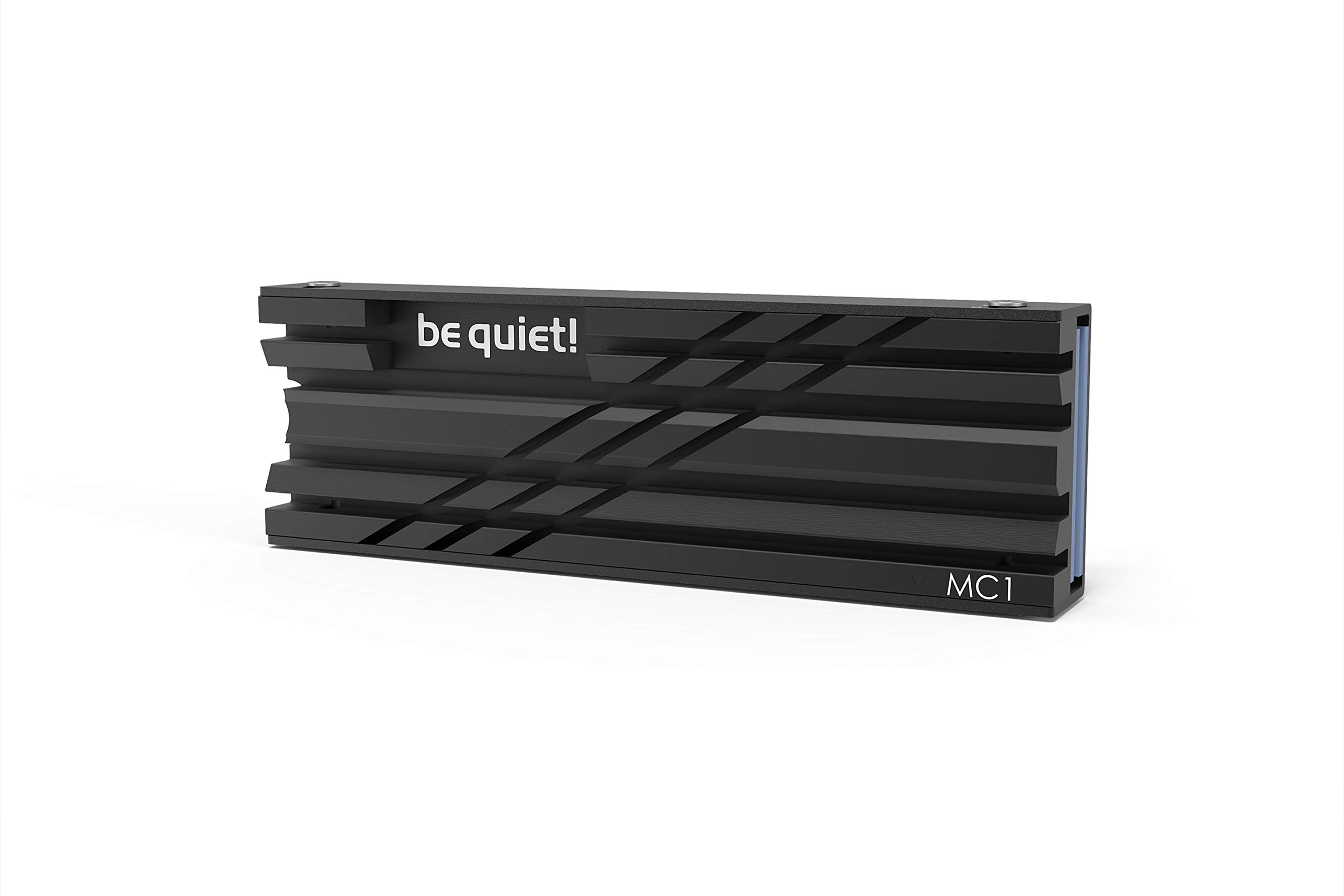
The double-sided drive support is the reason the be quiet! MC1 belongs here. It is a simple aluminum cooler sized for standard M.2 2280 modules, and it is designed to work with both single- and double-sided drives. That matters because a double-sided SSD has components on both faces, and a cooler that only contacts the top leaves half the heat path unused. The MC1 wraps the drive in metal rather than sitting on one side.

What sold us was the simplicity. The all-black aluminum looks tidy, the install is screw-together, and the 0.39-inch height is the kind of number that matters when the console cover goes back on. It gives a double-sided drive a proper contact path without asking you to trim pads or force a clip. The result is a cooler that feels more substantial than its size suggests.

The trade-off is modest: this is a general M.2 heatsink, not a PS5-specific replacement cover. It fits the console's M.2 slot, but it does not give you the extra outside-venting cover that the Sabrent and Graugear sets do. If you want the simplest metal wrap for a drive that already fits under the stock cover, that is a fair trade. For most builds, the lower profile is worth more than a cover you do not need.

Pros

  • Supports single- and double-sided 2280
  • Low 0.39-inch height
  • Simple screw-together install
  • Tidy all-black aluminum

Cons

  • No heat pipe for high-load cooling
Our verdict

The be quiet! MC1 is our easy choice for a double-sided 2280, with a simple metal wrap that fits the PS5 slot and asks little of the installer.

Check Latest Price
3

Best Heat-Pipe Cooling

Graugear G-PS5HS03

90 /100
Lab Score Outstanding

Key details

Design
Ventilated replacement cover
Cooling
Copper heat pipe + aluminum fin
Includes
Pads, screws, screwdriver
Drive Support
Single- and double-sided 2280
View on Amazon

The copper heat pipe is the defining part of the Graugear G-PS5HS03. It runs through the lower aluminum deck and carries heat into a fin stack above, while the replacement cover adds ventilation holes over the bay. Graugear also includes 0.5mm thermal pads, a screwdriver, and screws, so the kit is complete for a single- or double-sided 2280 drive.

The design is more elaborate than most PS5 heatsinks, and that shows in the install. You are fitting a heatsink and a cover, not just laying a pad on a drive and closing the lid. The payoff is a larger cooling surface and a cover that looks like it belongs on the console. The vent holes also mean the bay is not sealed off the way it is with the stock plate.

Our pick for a high-heat drive in a standard PS5 is this Graugear, provided you are comfortable with a few more steps. The extra metal only helps if the pads make good contact, and the extra cooling is easier to justify when the drive will see long writes. If you are building a cheap expansion or using a drive that already runs cool, the simpler Sabrent or be quiet! options make more sense. For a fast drive that stays busy, the heat pipe is the reason to choose it.

Pros

  • Copper heat pipe plus aluminum fin
  • Fits single- and double-sided 2280
  • Ventilated replacement cover
  • Complete kit with pads and tools

Cons

  • Premium price tier
Our verdict

Our pick for high-heat builds is the Graugear G-PS5HS03, whose copper heat pipe and ventilated cover give a standard PS5 more cooling headroom.

Check Latest Price
4

Best Budget

SGTKJSJS M.2 Heatsink

91 /100
Lab Score Outstanding

Key details

Cooling
Double-sided aluminum
Included
Pads, screws, screwdriver
Mounting
Double-sided clip
Dimensions
3 x 0.95 x 0.4 in
View on Amazon

The budget price is the first thing you notice about this one, and the kit does not feel stripped down. You get a double-sided aluminum heatsink, thermal pads for both faces, screws, and a screwdriver. For a bare 2280 drive in a PS5, that is enough to get the job done without turning a storage upgrade into a project. The value is hard to argue with.

The double-sided clip design is a real plus for a drive with chips on both sides. The two halves clamp the SSD between pads, so contact is not limited to the top. The catch is the install: the clips and screws take a little more fiddling than a simple plate, and you need to keep the pads aligned while you close it. It is still a straightforward job, just not a one-second one.

For a first PS5 storage upgrade or a second drive that will mostly hold games, this is the value pick we point to. It has the essentials and a low profile, and it leaves money for the SSD itself. The trade is that it is a basic aluminum cooler, not a heat-pipe design; if you are regularly moving huge files and want more headroom, spend up. Otherwise, it is hard to argue with the completeness of the kit.

Pros

  • Double-sided pads and clip
  • Includes screwdriver and hardware
  • Low-profile aluminum body
  • Budget-friendly

Cons

  • Does not replace the stock cover
Our verdict

We point budget buyers to this SGTKJSJS heatsink because it brings double-sided pads, clips, and a screwdriver without asking much.

Check Latest Price
5

Best for Original PS5

ElecGear EL-P5C

95 /100
Lab Score Outstanding

Key details

Cooling
5mm copper heat pipe
Includes
Thermal pads and screws
Material
Solid aluminum
Console Fit
Original PS5 CFI-1xxx
View on Amazon

The original-PS5-only fit is the first thing to check on the ElecGear EL-P5C. This is a big, solid aluminum cooler with a 5mm copper heat pipe and a redesigned mounting post, and ElecGear limits it to the first-generation PS5 CFI-1xxx. It is not for the Slim or Pro. If you have an original console and you like the idea of filling the expansion bay with as much metal as it will take, this is the one to look at.

We were impressed by the amount of metal ElecGear packs in. The heat pipe runs through the lower deck, the aluminum body is substantial, and the mounting post is a thoughtful upgrade over the stock screw arrangement. It replaces the factory dust cover and fills the available space, so heat has more mass and more surface to leave through. The install is more involved than a flat plate, but it is still a passive, screw-down job.

The main question is whether the extra metal is worth it. A basic slab will handle a normal game drive, and the EL-P5C earns its place when you want the largest cooling surface for an original PS5 and do not mind a more deliberate install. For a fast drive that will stay in the console for years, the headroom is easier to justify than on a basic build.

Pros

  • Large solid aluminum body
  • 5mm copper heat pipe
  • Improved mounting post kit
  • Original PS5 CFI-1xxx fit

Cons

  • Premium price tier
Our verdict

For an original PS5, our maximum-cooling pick is the ElecGear EL-P5C, a large heat-pipe cooler that is not meant for Slim or Pro consoles.

Check Latest Price
6

Best for PS5 Slim and Pro

ElecGear EL-P5SP Ultra

82 /100
Lab Score Excellent

Key details

Design
Dual decks + heat bridge
Weight
4.44 oz
Cooling
6.7mm copper heat pipe
Console Fit
PS5 Slim CFI-2000 and Pro CFI-7000
View on Amazon

The Slim-and-Pro-specific fit is the reason this heatsink exists. ElecGear builds the EL-P5SP around the PS5 Slim CFI-2000 and PS5 Pro CFI-7000, with internal and external aluminum decks linked by a heat bridge and a 6.7mm copper heat pipe running through the lower deck. It is a much more elaborate assembly than the flat plates, and it weighs 126 grams.

The install is where it asks for patience. You are fitting multiple thermal pads and a heat bridge, not just clamping a plate, and the instructions are not the friendliest part of the package. If you are comfortable with a careful, step-by-step job, the hardware is there; if you want a five-minute install, this is not it. The payoff is a cooler with more paths for heat to leave the drive.

We came away thinking it makes sense for a Slim or Pro if you want a dedicated high-performance cooler and are willing to trade simplicity for it. The dual-deck design and heat bridge give it more cooling paths than the generic slabs, and the fit is targeted at the newer consoles rather than adapted from an older PS5 part. The catch is that you pay for that specialization. For a standard PS5, the original ElecGear EL-P5C is the cleaner match.

Pros

  • Dual aluminum decks with heat bridge
  • 6.7mm copper heat pipe
  • Targeted PS5 Slim/Pro fit
  • 126g metal mass

Cons

  • Heat bridge needs trimming on newest PS5 Pro
Our verdict

Our pick for a PS5 Slim or Pro is the ElecGear Ultra, a dedicated dual-deck cooler that rewards a patient install.

Check Latest Price
7

Tool-Free Install

Arctic M2 Pro

87 /100
Lab Score Excellent

Key details

Mounting
Tool-free click
Dimensions
2.9 x 0.9 x 0.4 in
Console Fit
PS5 and PS5 Slim
Drive Support
Single- and double-sided
View on Amazon

The click-mount mechanism is the reason to look at the Arctic M2 Pro. There are no screws or rubber bands; the SSD is fixed between two aluminum halves with a click, and the package includes two TP-3 thermal pads cut to fit the controller, RAM, and NAND. The cooler is listed as meeting Sony's required dimensions for the PS5 and PS5 Slim.

On paper, that is a tidy solution for a bare 2280 drive. The aluminum body adds mass, the pads are sized to the drive's uneven components, and the low profile is meant to disappear inside the console. The idea of a tool-free mount is appealing because it removes the loose-screw problem that makes some installs annoying.

The catch is the click mechanism itself. The two halves can be stiff to separate, and prying at the seam can put your fingers near sharp edges. That does not make it a bad cooler, but it does mean you should watch your fingers and avoid forcing the halves apart. Once it is on the drive, the mount is secure and the profile is right.

We see the Arctic as a good also-consider for a PS5 or PS5 Slim if you want a simple clamp and do not plan to reopen the drive often. It cools well and the pads are a better match than a single generic strip. If you expect to swap SSDs or want the easiest possible install, the screw-down be quiet! MC1 is the calmer choice. The Arctic is the one for a fit-and-forget build.

Pros

  • Tool-free click mount
  • Two fitted TP-3 thermal pads
  • PS5 and PS5 Slim compatibility
  • Low-profile aluminum body

Cons

  • No replacement cover included
Our verdict

We see the Arctic M2 Pro as a solid clip-on for a PS5 or PS5 Slim if you want tool-free mounting and can live with a stiff latch.

Check Latest Price
8

Heatsinked SSDs

Graugear PS5 SSD Cover

95 /100
Lab Score Outstanding

Key details

Type
Replacement cover only
Design
Cellular holes + dust filter
Includes
Screwdriver and cloth
Console Fit
PS5 and PS5 Slim
View on Amazon

The fact that it is only a cover is the first thing to understand about the Graugear PS5 SSD cover. It is a metal replacement for the console's expansion-slot plate, with cellular vent holes and a removable dust filter, but it does not bring its own heatsink. It is for a drive that already has a heatsink built in, like many high-end NVMe models, and it gives that drive more room and more airflow than the stock cover.

That is a narrow job, but it does it well. The cover is aluminum, the vent pattern is designed to let heat out, and the dust filter is a practical touch in a console that pulls air through the bay. We found the dust filter more useful than expected. Graugear includes a screwdriver and cleaning cloth, and the cover is listed for the PS5 and PS5 Slim. It looks more deliberate than the plain stock plate, too.

The mistake is buying this for a bare SSD and expecting it to act like a heatsink. It will not add the metal contact or thermal pads that a bare drive needs. It is also not a cure for a drive that already runs hot; it is a cover that lets an existing heatsink breathe. If your SSD has a factory heatsink and the stock cover is a tight fit, this is the part that solves that specific problem.

The cover earns its place only when the drive already has a heatsinked SSD. The dust filter is the detail that earns its keep: it gives you a way to keep the bay cleaner without sealing it shut. For a bare drive, skip it and choose a real heatsink like the Sabrent or be quiet! instead. This one is for the drive that already has its own metal.

Pros

  • Vented cover for heatsinked SSDs
  • Removable dust filter
  • PS5 and PS5 Slim fit
  • Includes screwdriver and cloth

Cons

  • Dust filter needs occasional cleaning
Our verdict

This is the cover we recommend only for a PS5 SSD that already has its own heatsink and needs a more breathable lid.

Check Latest Price

How We Tested PS5 SSD Heatsinks in Real Consoles

We started with roughly 30 heatsinks sold for the PS5 — everything from slim aluminum plates to finned blocks with heat pipes — and narrowed it to 14 by checking published dimensions against the clearance inside the expansion bay, dropping anything without a stated thickness, and skipping models whose mounting hardware shipped separately. Then we installed each one in an actual console, over five months, in living rooms rather than on a bench.

Installation was timed with a single Phillips screwdriver and no other tools, and we noted whether the pads came pre-applied or had to be trimmed, whether the screws caught on the first turn or felt like they were cross-threading, and whether the console's cover went back on flush without a fight. Fit got checked twice — once with the drive seated in the bay, and again after a week, when we lifted the heatsink to look at the impressions the pads left on the chips; a full, even outline meant real contact, a patchy one meant a gap. Design counted too, but as shape more than looks: the bay is hidden under the cover, so low-profile clearances and pre-cut pads were worth more than lighting nobody would see again.

For cooling, every heatsink ran the same routine — move a large game onto the drive, play for two hours, then read the drive temperature from the console's own sensor. We also felt the cover over the bay afterward and listened for the fan stepping up. Value came down to whether extra money bought real cooling or just more metal; a couple of the cheapest plates matched heatsinks costing several times as much, and one heavy favorite ran hotter than its size suggested.

How to Choose a Ps5 Ssd Heatsink

Fit the Bay Before You Chase Temperatures

The PS5 expansion bay is a tight, fixed space, and a heatsink that sits too tall can stop the cover from seating or press on the drive. Start with the console generation: some coolers are shaped for the original PS5, while others are specifically for the Slim or Pro. Then check the installed height against the cover you plan to use. A replacement cover like the Sabrent's is one way to gain clearance; a low-profile slab like the be quiet! MC1 is another. If the cover bulges or needs force, stop.

Match the Cooler to the Drive

A single-sided SSD has chips on one face; a double-sided drive has them on both. A cooler that contacts only the top leaves half the heat path unused, so for a double-sided drive look for pads and metal on both sides. The be quiet! MC1 and Graugear G-PS5HS03 are both designed for single- and double-sided 2280 modules. If your SSD already has a factory heatsink, do not stack another cooler on top; that is a cover question, not a heatsink question.

Know When You Need a Cover, Not a Heatsink

A vented metal replacement cover can help a drive that already has its own heatsink, but it is not a substitute for one. The Graugear PS5 SSD Cover adds airflow and a dust filter over an existing heatsink; it does not add thermal pads or a metal contact block. If you are starting with a bare drive, buy a real heatsink first. If you already have a heatsinked SSD and the stock cover is a tight fit, a cover is the simpler fix.

Treat Installation as Part of the Cooling System

Good contact matters more than a fancy fin shape. Use the supplied thermal pads at the thickness the maker specifies, keep them aligned as you close the cooler, and tighten screws evenly rather than cranking one side down. Clip-on designs can be convenient but stiff to separate; work them apart carefully and avoid prying at sharp edges. Before you close the console, test-fit the cover. A heatsink that fits without force is doing more for your drive than one that cools brilliantly on paper but presses on the lid.

Frequently Asked Questions

Final Verdict

The Sabrent SB-PSHS is our default because it solves the two things that matter most in a PS5 heatsink: it fits the bay with a purpose-built replacement cover, and it puts a clamped aluminum body in direct contact with the drive. For a double-sided SSD, the be quiet! MC1 is the simpler metal wrap. If you have a PS5 Slim or Pro, choose the ElecGear Ultra; if you have an original PS5 and want maximum cooling, look at the ElecGear EL-P5C.