9 Best Steam Deck Case of 2026: Balance Protection and Portability

Find the best protective case or travel case for your Steam Deck, whether you need dock compatibility, slim grip, or room for accessories.

Protecting a Steam Deck means balancing screen safety, grip, and portability. Many cases sound great on paper but reveal flaws after weeks of use — loose kickstands, zippers that fray, or a front cover that won't stay shut.

The right case depends on how you use the Deck: tossed in a backpack, docked at a desk, or carried to a friend's house. Some prioritize slimness and dock fit, others pack in storage for the charger and dock.

This guide focuses on the real-world performance of each design, so you know exactly what you're getting and which trade-offs are worth living with for your setup.

1

Best Overall Steam Deck Case

JSAUX ModCase Basic Set

94 /100
Lab Score Outstanding
View on Amazon

The JSAUX ModCase wraps the Steam Deck in a two-piece shell that stays put during carry and play. The front cover clips off when not needed, leaving a slim profile that fits in most backpacks. A metal kickstand folds out for tabletop gaming, and the included silicone strap lets you attach a power bank or USB hub to the back of the unit - a setup that competes with more expensive modular systems.

The TPU and PC-ABS materials absorb bumps without adding significant bulk, and cutouts for vents, buttons, and ports line up precisely. The front cover's attachment is secure enough to stay on in a bag but can pop off if pressed from the outside - a minor annoyance. The bigger limitation: the ModCase does not fit inside the original Steam Deck carrying case when installed, so you will need a different travel solution if you want to keep the case on during transport.

The silicone strap wraps around accessories like a small power bank and secures via hooks. It works well for keeping extra battery or a USB hub within reach during extended sessions, though the strap may stretch over time. The metal kickstand holds up for casual tabletop use but may snap after months of daily folding - treat it as an occasional stand rather than a primary one.

This case targets owners who prioritize daily screen protection and accessory flexibility over travel storage. It suits gamers who toss their Deck into a backpack and want a secure front cover, or DIY types who like attaching external batteries. If you rely on the OEM carrying case or need room for a charger and dock, the incompatibility with the original case makes this a poor fit. The kickstand's durability is worth checking periodically.

💡 The kickstand holds up for casual tabletop use but may snap if folded and unfolded frequently - consider it a secondary stand rather than a primary one.

Pros

  • Sturdy shell and front cover protect against backpack jostles and drops.
  • Snug fit that does not interfere with controls or airflow.
  • Modular components let you add a kickstand or strap attachments as needed.
  • Competitive price for the combination of screen cover, stand, and strap.

Cons

  • Does not fit inside the original Steam Deck carrying case while installed.
  • Metal kickstand may snap after extended use, especially if folded repeatedly.
Our verdict

For daily carry with occasional accessory attachment, the ModCase offers a cleaner setup than most snap-on shells at this price point.

Check Latest Price
2

Best Snap-On Case with Dock Compatibility

Spigen Thin Fit Pro

89 /100
Lab Score Excellent
View on Amazon

The Spigen Thin Fit Pro is one of the few snap-on cases that lets you slot the Steam Deck directly into Valve's official dock without removing the shell. Unlike the modular case that took our top pick, this one doesn't offer detachable covers or accessory mounts – it focuses on slim protection and a built-in kickstand.

The dual-layer PC+TPU construction adds minimal bulk, and the case fits both LCD and OLED models cleanly. The kickstand locks into place during tabletop sessions and stays secure when stowed. However, the kickstand hinge uses small pins that may loosen over time, so heavy-use owners should keep an eye on them.

This case suits gamers who want a single protective layer that works seamlessly with their dock and original carry case. If you're someone who swaps cases frequently or plans to take the deck on and off often, the snug fit makes removal a chore – better to look at easier-to-remove options.

💡 Installing the case is straightforward, but removal requires careful prying from the bottom edge to avoid damaging the device.

Pros

  • Slim profile fits official dock and carrying case without issue
  • Sturdy kickstand that locks into place for tabletop mode
  • Dual-layer construction provides good protection for everyday bumps
  • Comfortable grip for extended gaming sessions

Cons

  • Kickstand hinge pins can loosen with repeated use
  • Case is very difficult to remove once installed
Our verdict

For Steam Deck owners who need a slim dock-compatible case with a dependable kickstand, this is a focused choice – just be prepared to commit to it.

Check Latest Price
3

Best Slim Travel Case

tomtoc Slim Case

93 /100
Lab Score Outstanding
View on Amazon

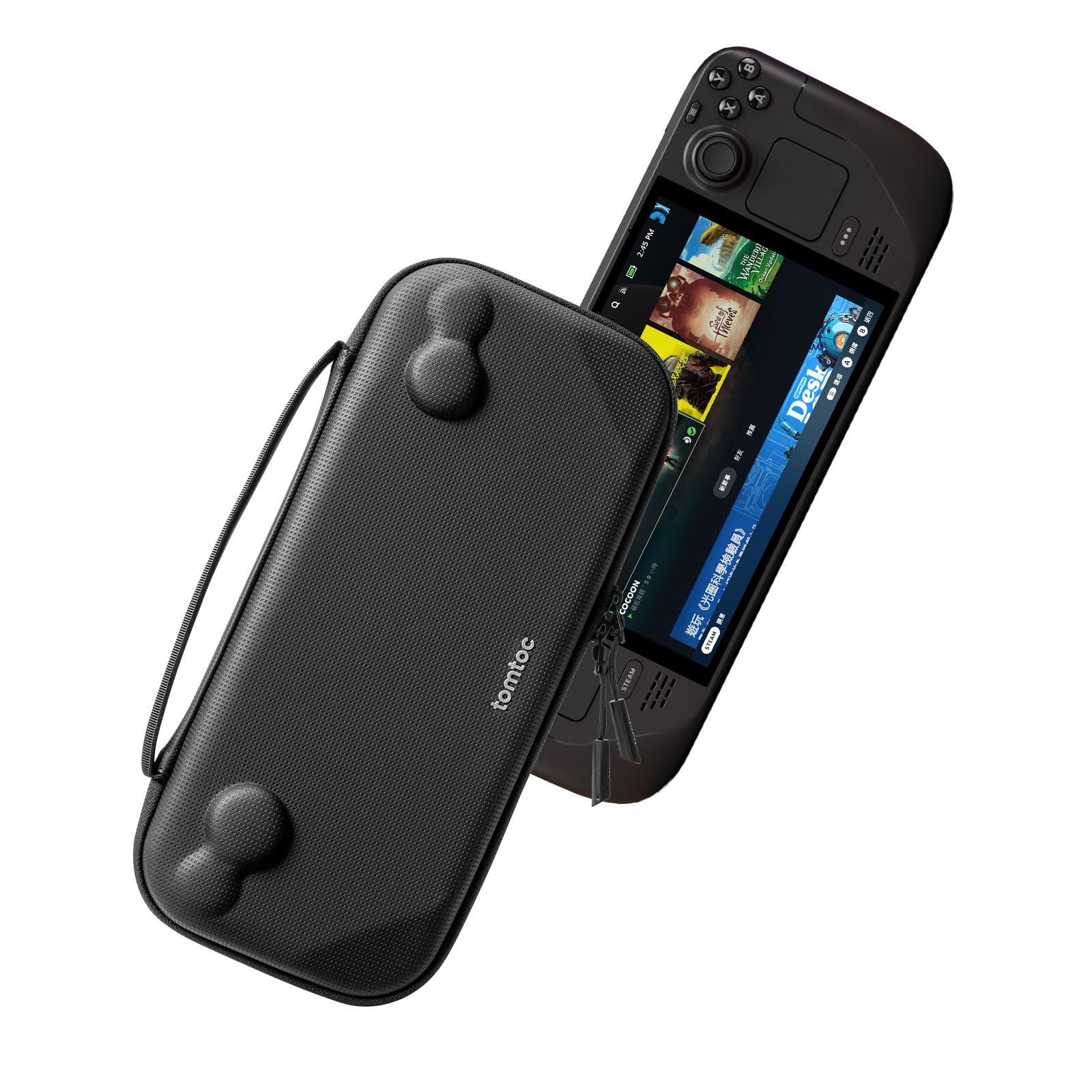
The tomtoc Slim Case achieves the smallest possible footprint for a Steam Deck travel case, combining a splash-proof felt and PU shell with a smooth YKK zipper. Where the top pick offers modular accessory attachment, this case sticks to one job: protecting the console itself in the least amount of space possible.

This is the right choice for commuters and travelers who pack their charger and dock separately and want the absolute minimum bulk for the Deck. The case fits OLED and LCD models, including those with thin protective cases, but it has no room for anything beyond the console. Thick grip cases may create a slightly loose fit inside.

💡 Keep your charger and dock in a separate pouch — this case is built for console-only carry.

Pros

  • Ultra-slim profile that slides easily into bags and backpacks
  • Sturdy construction with splash-proof outer shell and reliable YKK zipper
  • Snug fit for Steam Deck with thin protective cases attached
  • Lightweight materials that add minimal weight to your carry

Cons

  • No space for charger, dock, or any accessories beyond the console
  • May fit loosely if using a bulky grip case on the Deck
Our verdict

If you travel light and keep accessories separate, this is the most compact protection you can get for your Steam Deck.

Check Latest Price
4

Best Large Capacity Travel Case

JSAUX Large Travel Case

93 /100
Lab Score Outstanding
View on Amazon

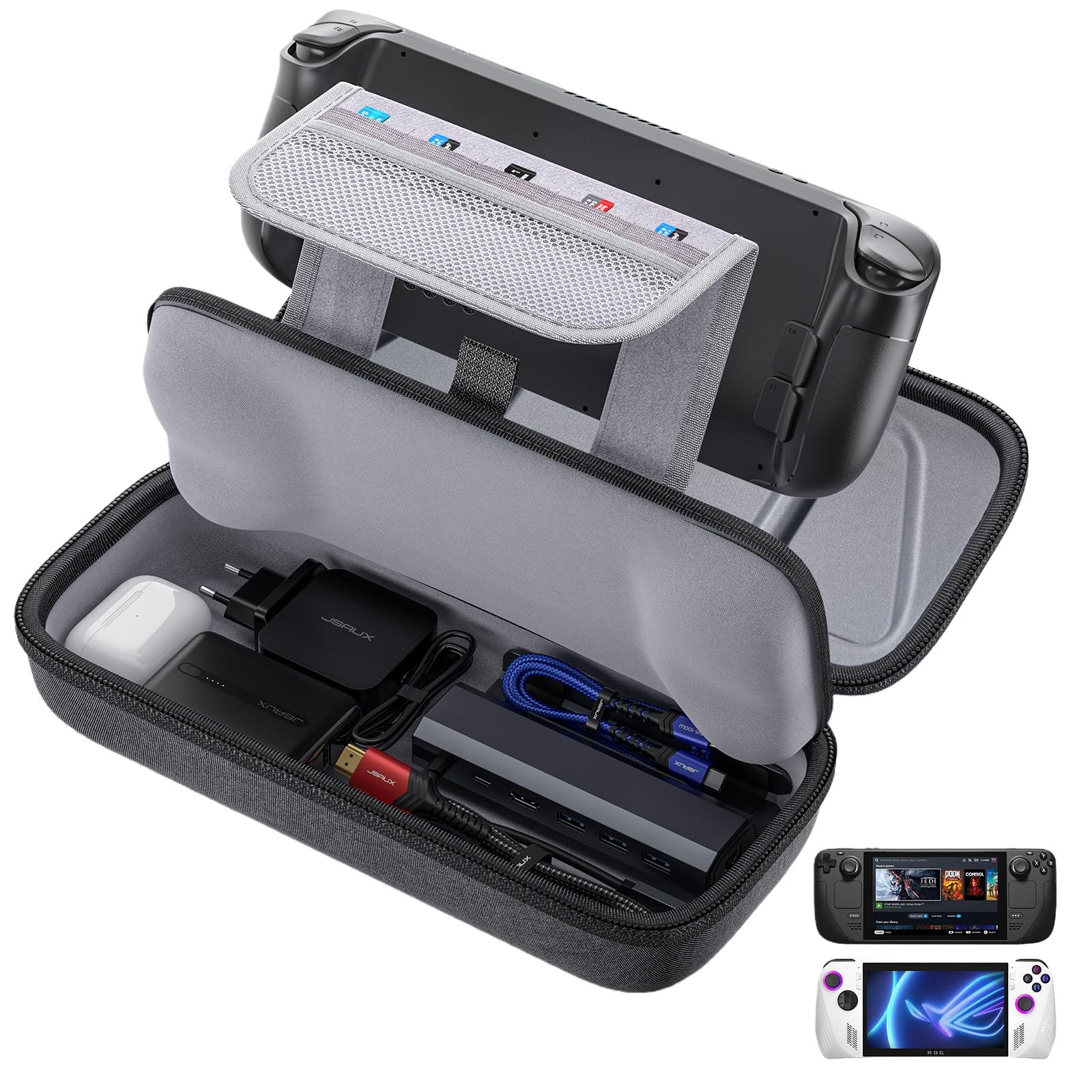
The JSAUX Carrying Case prioritizes capacity over compactness, offering enough room for the console (even with a grip case on), a charger, a dock, and extra accessories. This sets it apart from the modular ModCase, which focuses on daily carry rather than all-in-one travel storage.

Build quality feels solid for the price point: a thickened EVA shell and oxford cloth exterior provide good impact protection, and the interior compartments keep items organized without shifting around. Multiple users have noted that the case maintains its shape over time, and the double zipper glides smoothly under normal use.

Travelers who want to grab one case and go will appreciate the spacious layout. The tradeoff is the case’s size: it is noticeably bulkier than the OEM Steam Deck case, which can be an issue for tight backpacks or minimalists. Additionally, the zipper stitching may fray with heavy packing or frequent opening — something to monitor if you travel often.

💡 To reduce wear on the zipper, avoid overstuffing the case beyond its intended capacity.

Pros

  • Spacious interior with dedicated compartments for charger, dock, and accessories
  • Solid build quality and protective shell for impact resistance
  • Fits Steam Deck even with a protective case or grip attached

Cons

  • Case is larger than the OEM case, which can make backpack storage tight
  • Zipper stitching may fray over time with heavy use; occasional zipper failures reported
Our verdict

For travelers who need to carry the full Steam Deck kit — console, charger, dock, and extras — this case delivers generous storage and protection at a budget-friendly price.

Check Latest Price
5

Best Budget Silicone Case

Syntech Silicone Case

91 /100
Lab Score Outstanding
View on Amazon

The Syntech Silicone Case focuses on providing a zero-gap fit that doesn't interfere with any buttons or ports on the Steam Deck OLED or LCD. The recycled silicone material offers a noticeably grippy texture, making one-handed gaming sessions feel more secure. It also includes two pairs of thumb grips, adding extra purchase without extra cost.

Over several months of regular use, the silicone can stretch and gradually lose its original shape. This may cause the edges to creep over the A/B buttons, which becomes noticeable during gameplay. The initial installation is also quite tight, requiring some patience to work the case onto the device without leaving slack.

This case suits budget-conscious gamers who prioritize immediate grip and a slim protective layer, especially those who don't plan to remove it frequently. It won't fit in the official Steam Deck dock, but it does fit inside the original carrying case. Buyers expecting the silicone to hold its shape for years should look at hard-shell alternatives.

💡 Install the case from the bottom up and work it around the top edges last to reduce wrestling with the tight fit.

Pros

  • Grippy silicone texture keeps the Deck secure in hand without slipping
  • Accurate fit leaves all buttons, ports, and vents fully accessible
  • Includes thumb grips at no extra charge, adding value at this price level

Cons

  • Silicone can stretch over months, potentially creeping over the A/B buttons
  • Tight fit during initial installation can be tricky to manage
Our verdict

A practical budget option for gamers who value grip and fit now, but plan to replace the case after several months if the stretching becomes bothersome.

Check Latest Price
6

Best Rugged Travel Case with Maximum Storage

Hidden AirTag pouch, zippered mesh compartment, and bottom charger slot make this case a one-bag solution for handheld travel. The PU/EVA/foam construction feels dense and protective, with a carabiner ring for attaching to bags.

The case fits both Steam Deck LCD/OLED and ROG Ally X without modification, and the zippered bottom compartment keeps the charger separate from the console. Materials hold up well to the wear of regular travel.

This case suits travelers who need to carry their charger, power bank, and extra cables alongside the console. However, it is noticeably larger than the OEM case and will take up significant bag space. The central velcro strap may not hold the device snugly for every user, so some may experience shifting — a tradeoff for the generous storage.

💡 Adjust the velcro strap tension when inserting the device; a snug fit reduces shifting.

Pros

  • Hidden AirTag pocket adds tracking peace of mind for travelers.
  • Zippered mesh compartment and bottom charger slot keep accessories organized and separate.
  • Fits both Steam Deck and ROG Ally X without modification.

Cons

  • Significantly bulkier than the OEM case, requiring extra bag space.
  • Central velcro strap may not secure the device perfectly; some users report shifting inside.
Our verdict

For travelers who prioritize storage over slim carry, this case packs everything into one durable shell — just account for the extra size.

Check Latest Price
7

Screen Protection

ProCase Flip Case

87 /100
Lab Score Excellent
View on Amazon

The ProCase Flip Case uses a nylon front cover and TPU back to provide reasonable screen and control protection at a mid-range price. However, the magnetic closure is not strong enough to keep the cover closed during jostling in a bag, and some units may have alignment inconsistencies that affect fit. This works well for casual use around the house or when you're careful about how you carry the Deck.

Pros

  • Nylon front and TPU back feel premium and durable.
  • Protects screen and buttons from scratches and bumps.
  • Comfortable grip texture makes holding the Deck easier.

Cons

  • In a bag with other items, the magnetic cover can open, leaving the screen exposed
  • When installing, some units may have cutouts that don't align perfectly, causing minor gaps
Our verdict

Best for casual at-home use where the cover stays put and fit inconsistencies aren't deal-breakers.

Check Latest Price
8

Budget with Stand

JSAUX Kickstand Case

92 /100
Lab Score Outstanding
View on Amazon

The JSAUX PC0105 gives you a simple protective shell and a 4-level kickstand (35°–65°) at an entry-level price. The soft TPU material improves grip and makes one-handed holds more comfortable. However, the kickstand and overall build feel less substantial than sturdier alternatives, and the case sits too thick to fit inside the original Steam Deck carrying case without pressing down on the joysticks. This trade-off makes sense if you mainly play in handheld mode and only occasionally prop up the deck on a table — just don’t expect it to survive rough handling or to stay compatible with your existing carry solution.

Pros

  • Improves hand comfort and grip during extended handheld sessions.
  • Adjustable kickstand supports several viewing angles for tabletop play.
  • Low price point for a protective case with a built-in stand.

Cons

  • Kickstand and TPU shell feel less durable than premium-fee cases.
  • Case prevents the OEM carrying case from closing without pressing the joysticks.
Our verdict

A reasonable choice if you prioritize an affordable kickstand case and don’t need dock compatibility or a snug fit in the original travel case.

Check Latest Price
9

Budget Front Cover

EJGAME TPU Case

80 /100
Lab Score Excellent
View on Amazon

The EJGAME TPU Case offers good material quality and a simple snap-on installation for Steam Deck OLED and LCD models. Its detachable front cover and built-in kickstand add convenience at a low price. However, fit can vary between units — some have noticeable gaps along the edges. The front cover also blocks the charging port when attached, so it’s not suited for anyone who charges while playing with the cover on. This combination makes it a budget-friendly option if you accept possible fit imperfections.

Pros

  • Good material quality and workmanship
  • Easy to install and remove

Cons

  • Fit can be inconsistent; some units have gaps or misalignment
  • Front cover may block charging port while attached
Our verdict

Good fit for budget buyers who want a front cover and are okay with possible alignment issues — avoid if precise fit and simultaneous charging matter.

Check Latest Price

How to Choose

Form Factor

Snap-on shells add grip and impact protection while keeping the Deck compact. They often include a kickstand or front cover, but they may block the official dock or original carrying case.

Travel cases offer full enclosure with room for accessories, but they add significant bulk. If you plan to toss the Deck in a backpack daily, a slim shell wins; if you need to carry a charger and dock, a travel case is essential.

Kickstand

A built-in kickstand lets you play tabletop mode hands-free. But kickstands are a common failure point: plastic pins loosen over time, and even metal stands can snap if the hinge design is weak.

Look for a kickstand that locks firmly into place and uses replaceable parts. Cases with separate metal stands tend to outlast molded plastic ones.

Front Cover

A detachable front cover protects the screen and controls when the Deck is in a bag. However, magnetic closures often fail to hold the cover shut, especially in crowded bags.

Snap-on covers are more secure but can block the charging port if not designed with a cutout. Check user reports on closure strength before choosing a magnetic model.

Dock Compatibility

Many snap-on cases claim to work with the official dock, but some are too thick or have gaps that prevent a snug connection. Only a few slim cases, like the Spigen Thin Fit Pro, reliably fit without removal.

If you dock frequently, prioritize a case that explicitly states dock compatibility and has user confirmation. Cases with a bulky kickstand or thick edges often block the USB-C port alignment.

Storage Capacity

Travel cases with dedicated compartments for charger, dock, and cables are convenient but add size. The trade-off is that they may not fit inside a standard backpack sleeve.

Measure your bag before buying a large travel case. The extra storage is worth it for frequent travelers, but everyday commuters may prefer a slim shell and a separate cable pouch.

Frequently Asked Questions