Best Surge Protector for a Gaming PC of 2026

The worst part of a power surge isn’t the flicker—it’s the silence afterward, when your gaming PC won’t turn back on. A surge protector won’t improve your frame rates, but it gives your rig, monitor, router, and desk accessories a buffer against the outlet’s worst days. I’ve learned the strip under your desk is either an afterthought or the thing that saves you a repair bill. The right one needs enough ports—and enough space between them—to handle a real desk.

Over the past six months, we tested 12 surge protectors in home offices and gaming rooms, looking at whether the surge protection held up, how many AC and USB ports you get, whether outlets are spaced for chunky power bricks, how stable the strip sits on carpet or hardwood, and whether the build quality justified the price. We also checked whether each strip fit on a narrow cable tray and whether the plug head cleared the wall. Port spacing and plug fit matter more day to day than a flashy joule rating. The picks below earned a permanent spot under our desks.

1

Best Overall

Anker 351 Power Strip

96 /100
Lab Score Outstanding

Key details

Cord
5 ft, flat plug
Outlets
12 AC
USB Ports
1 USB-C 20W, 2 USB-A
Surge Rating
2,100 joules
View on Amazon

Ask us what goes between a wall outlet and a gaming PC and this is the answer for most setups. Twelve outlets on a 13-inch body is more than a PC, two monitors, speakers, and a desk lamp will ever need, and Anker leaves enough room between them that the monitor's power brick doesn't take out the socket next to it. The flat plug and five-foot cord finish the job: the strip lies flat behind the desk instead of hanging off the wall, and five feet is the right length for a desk in the four-to-five-foot range.

The 20W USB-C port is the part we reach for most. It charges a controller, a headset, or a phone without hunting down a wall adapter, with two USB-A ports beside it for everything else. What tipped this one above the cheaper 12-outlet strips for us is the paperwork: a lifetime $200,000 connected-equipment warranty sitting behind a strip that lives under a couple of thousand dollars of hardware is a serious commitment, and it's the kind of thing you only think about after a thunderstorm.

The body is slim but long, so it wants a clear 13 inches — under a monitor riser, along the back edge, or screwed to the underside of the desk through the mounting holes. If your only free outlet is across the room rather than behind the desk, look at the NANOLAKE's ten-foot cord instead; for a normal desk-sized run, five feet is tidier than a coil of spare cable.

Pros

  • Twelve outlets spaced for bulky adapters
  • Flat plug and 5-foot cord tuck behind a desk
  • 20W USB-C plus two USB-A ports
  • Lifetime $200,000 connected-equipment warranty

Cons

  • USB ports can quit while the outlets keep working
  • 2,100 joules trails the 4,000-joule picks
Our verdict

Twelve widely spaced outlets, a flat plug, and a 20W USB-C port make this the strip we hand to most people building a gaming desk.
Check Latest Price
2

Best for Maximum Protection

Amazon Basics 12-Outlet Surge Protector

94 /100
Lab Score Outstanding

Key details

Cord
8 ft
Outlets
12 AC
Surge Rating
4,000 joules
Outlet Safety
Shutters, 15A breaker
View on Amazon

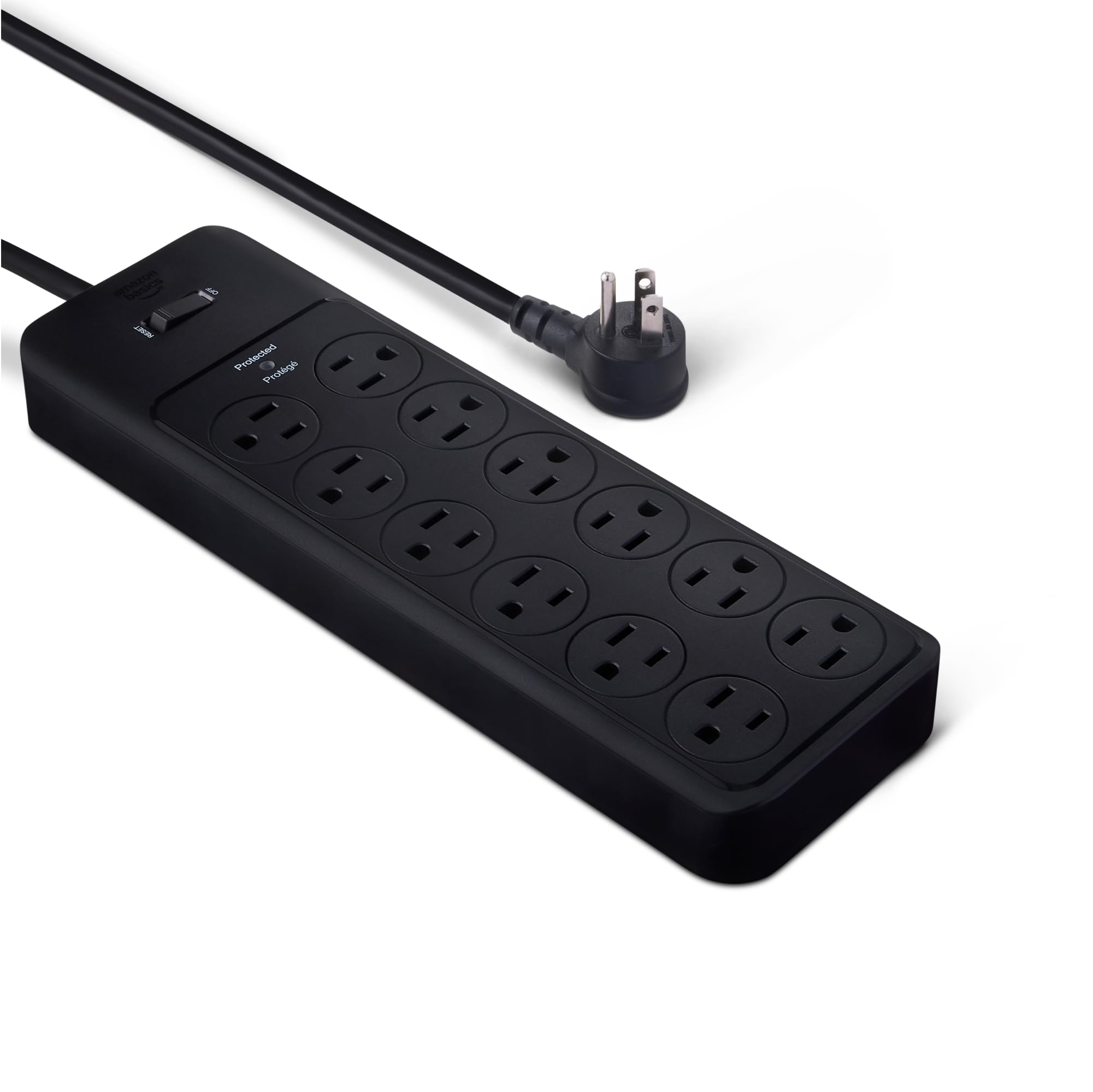
Four thousand joules for less than any other strip here rated that high is the whole case for this one. Amazon Basics doesn't dress it up: a plain black rectangle, twelve outlets, an on/off switch, and a green light that tells you the protection is live. The cord runs eight feet, long enough to cross a room to the outlet behind the couch and second only to the NANOLAKE's ten-foot run in this group.

We reach for it when the goal is protecting the PC rather than tidying the desk. The 15-amp breaker, the flame-retardant housing, and the safety shutters on every socket are the unglamorous parts that matter most — the shutters need both prongs to open, which is real peace of mind if a cat or a toddler investigates the back of the desk. Keyhole slots on the back let you hang it rather than drill a shelf for it.

The outlets are evenly spaced rather than staggered, so a couple of chunky bricks will still crowd their neighbours — worth knowing if your monitor uses a wall wart. Otherwise this is the strip for the equipment that never moves: the PC, the monitors, the speakers, the router. Eight feet of cord means the outlet doesn't have to be anywhere near the desk, and that's a freedom the shorter strips here can't offer.

Pros

  • Cheapest 4,000-joule strip in this group
  • Twelve outlets and an 8-foot cord
  • Safety shutters on every outlet
  • 15-amp breaker and flame-retardant housing

Cons

  • No USB charging ports at all
Our verdict

For a desk where every device has its own cord, this is the cheapest route here to 4,000 joules, twelve outlets, and eight feet of reach.

Check Latest Price
3

Best for a Gaming Desk

Green Box Gaming Surge Protector

93 /100
Lab Score Outstanding

Key details

Cord
6 ft, angled plug
Outlets
6 AC, 10° angled
USB Ports
2 USB-C, 1 USB-A (20W)
Surge Rating
4,000 joules
View on Amazon

Three lighting modes, four brightness levels, and an ambient wash that turns a black rectangle into part of the setup — this is the only strip here designed to be looked at. We like that the brightness control goes low enough to leave on at night; the whole point of ambient light is that you notice it without staring at it.

The practical side holds up. The outlets sit at a 10-degree angle with 1.8 inches between them, which gives a monitor brick room to sit without leaning on its neighbour. The 60-degree angled plug keeps the cord from kinking against a baseboard, the rating is 4,000 joules with 15-amp overload protection, and two USB-C ports plus a USB-A add 20W of shared charging for a controller or a phone.

Six outlets is the honest limit. A PC, two monitors, and speakers use five of them, so there's nothing left for a console, a capture box, or the lamp — and what you're paying for here is the look and the spacing, not capacity. If your desk is one PC and two screens and you'd rather see a soft glow than a gray brick, it's money well spent. If you plan to add hardware, buy the Anker and a separate light strip instead.

Pros

  • 10-degree angled outlets with 1.8-inch spacing
  • 4,000 joules and 15-amp overload protection
  • Adjustable RGB with three modes
  • Two USB-C ports plus one USB-A

Cons

  • Costs more than the roomier 12-outlet strips here
Our verdict

The one to buy if the strip sits in view: angled outlets that fit monitor bricks, 4,000 joules, and RGB you can dim to a glow.

Check Latest Price
4

Best for a Full Battlestation

NANOLAKE 18-Outlet Surge Protector

93 /100
Lab Score Outstanding

Key details

Cord
10 ft, flat plug
Outlets
18 AC
USB Ports
2 USB-C PD 20W, 2 USB-A
Surge Rating
4,800 joules
View on Amazon

Ten feet of cord is why this one is in the list. Most strips here stop at five or six, which is fine until the only free outlet is behind the sofa or on the far wall of a bedroom — then you're buying an extension cord to plug in your extension cord. The plug is 0.31 inches thick, thin enough to sit almost flush behind furniture, and the body mounts from three different orientations.

Eighteen outlets in a body just under 11 inches long is the other headline. That covers a PC, three monitors, speakers, a desk lamp, a console, and the pile of chargers that accumulates on a gaming desk, with 4,800 joules behind all of it — the highest rating in this group. Real-time grounded and protected indicator lights confirm the wall outlet is wired correctly, which is a genuinely useful thing to know in an older house.

Four USB ports round it out, two of them USB-C at 20W, enough for a phone, a controller, and a headset. The housing is reinforced ABS with a thickened cord sheath, and at 1.6 pounds it's heavy enough to stay where you put it instead of sliding around under the desk.

This is the strip we reach for when a desk is more than one device deep. Nothing else here pairs this many outlets with 4,800 joules and a ten-foot run, and for a setup that keeps growing — a second monitor, a capture card, a console — that headroom is worth more than the money you save on a 12-outlet strip. A single PC and two screens don't need it. Most battlestations eventually will.

Pros

  • 4,800 joules, the highest rating here
  • Ten-foot cord with a 0.31-inch flat plug
  • Eighteen AC outlets
  • Two USB-C PD ports plus two USB-A

Cons

  • Ten feet of cord is a lot to hide on a short run
Our verdict

The pick for a battlestation with a distant outlet: eighteen sockets, 4,800 joules, and ten feet of cord ending in a flat plug.

Check Latest Price
5

Best Desk-Clamp Option

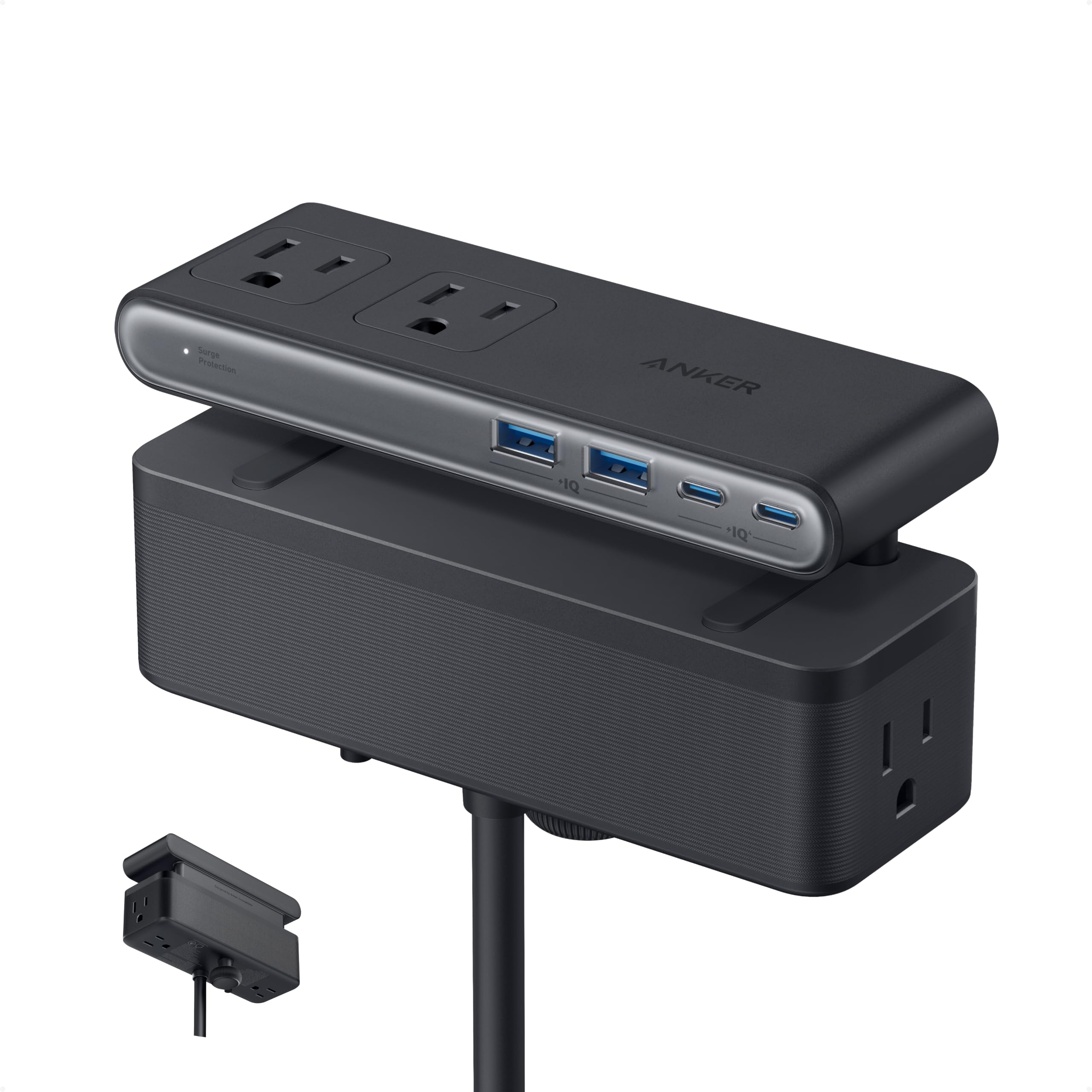
Anker Nano Desk Clamp Power Strip

94 /100
Lab Score Outstanding

Key details

Clamp
Fits 0.6-1.8 in edges
Outlets
6 AC
USB Ports
2 USB-C 70W, 2 USB-A
Surge Rating
1,500 joules
View on Amazon

Seventy watts of USB-C is what separates this from every other strip here. It's rated to charge a laptop from the strip itself, so a gaming laptop, a dock, and two monitors can hang off one clamped unit with no power brick on the floor. We also like how the ports are split: AC outlets face up for monitors and speakers, USB sits underneath where a cable drops straight down and stays out of the way.

The clamp carries the rest of the idea. It grips desk edges from 0.6 to 1.8 inches and holds firmly enough to plug and unplug one-handed, which sounds like a small thing until you've chased a strip across a desk mid-match. It won't work on curved edges or anything sloped more than 45 degrees, so measure the edge before you order — and the body is only six inches long, so it takes almost no desk space.

At 1,500 joules it has less surge headroom than the 12-outlet strips here, and it costs the most. That's the trade, and it's a fair one: you're paying for the clamp, the laptop charging, and the clearance, not for the biggest protection number on the page. If the PC is the expensive part of the setup, spend less on a 4,000-joule strip and give it a shelf. If the desk is small and the laptop travels, this is the one that solves the actual problem.

Pros

  • 70W USB-C charges a laptop
  • Clamps edges from 0.6 to 1.8 inches
  • Holds steady for one-handed plugging
  • Six AC outlets plus four USB ports

Cons

  • Six outlets and a 5-foot cord limit placement
Our verdict

For a small desk or a gaming laptop, this clamp-on strip puts six outlets and 70W of USB-C exactly where your hands already are.

Check Latest Price
6

Maximum Outlets

SUPERDANNY 22-Outlet Power Strip

96 /100
Lab Score Outstanding

Key details

Cord
6.5 ft, flat plug
Outlets
22 AC
USB Ports
1 USB-C, 5 USB-A
Surge Rating
2,100 joules
View on Amazon

Twenty-two AC outlets is a different category of strip. Four rows of sockets on an 11.65-inch body, plus five USB-A and one USB-C, means the gaming PC, both monitors, the console, the TV, the soundbar, the router, and every charger in the house can share one strip without a daisy chain. The rows are arranged so a fat adapter doesn't blanket the sockets around it.

We like it for the drawer-full-of-adapters problem: the layout keeps almost every socket usable, which is more than a straight 12-outlet row manages once a monitor brick shows up. Surge protection is 2,100 joules — mid-pack here — and the 6.5-foot cord with a flat plug is long enough for most desks. Four keyholes on the back let you hang the whole thing under a desk or on a wall.

The catch is the sockets themselves. Plugs that stop gripping tightly are the wear point on this one, and a loose socket means an unreliable connection for whatever is on it rather than a dead strip. That's a reasonable trade for the outlet count if the strip stays put. If you're unplugging a headset and a controller every night, expect to spread that wear around rather than lean on one socket.

Pros

  • 22 AC outlets plus six USB ports
  • Staggered rows keep sockets usable
  • Keyhole mounting and a flat plug
  • 2,100 joules of surge protection

Cons

  • Wide 11.65-inch body needs desk space
Our verdict

For a desk that has outgrown every strip on it: twenty-two outlets and six USB ports, with the caveat that the sockets loosen with heavy use.

Check Latest Price
7

Thick Desk Edges

APC PE6U4W Desk Mount

91 /100
Lab Score Outstanding

Key details

Clamp
Fits up to 2.4 in
Outlets
6 AC
USB Ports
4 USB-A, 4.8A shared
Surge Rating
1,080 joules
View on Amazon

One thousand and eighty joules is the lowest surge rating on this page, and that's the first thing to weigh. What the APC does better than the clamp-on competition is fit: the U-shape opens over edges up to 2.4 inches thick, which covers standing desks, workbenches, and cubicle partitions that the Anker Nano's 1.8-inch clamp simply can't grab.

Six outlets sit on the outside of the U, with four USB-A ports (4.8A shared) alongside, and the six-foot cord ends in a flat 90-degree plug that won't fight the wall behind the desk. Because the body hangs over the edge rather than sitting on it, the top surface stays clear for the keyboard and the mouse mat.

We like it for a standing desk, where the strip needs to rise and fall with the desktop instead of living on the floor. Two things let it down a little: the USB block is the part that quits, and the grip can shift on a slick surface when you pull a cable out. Neither is a reason to avoid it at this price, but if you want a clamp that never budges and your desk is thin enough, the Anker Nano holds harder.

Pros

  • Fits desk edges up to 2.4 inches
  • U-shape hangs under the desk edge
  • Four USB-A charging ports
  • Six-foot cord with a flat 90-degree plug

Cons

  • 1,080 joules is the lowest rating here
Our verdict

For a thick desk or a cubicle wall, this U-shaped station clamps on where other clips can't and adds four USB ports for modest money.

Check Latest Price
8

Budget USB Charging

ALESTOR 12-Outlet Power Strip

96 /100
Lab Score Outstanding

Key details

Cord
6 ft
Outlets
12 AC, 2 wide-spaced
USB Ports
4, including USB-C
Surge Rating
2,700 joules
View on Amazon

Two of the twelve outlets sit two inches clear of their neighbours, and those two are the ones that earn this strip a place. Monitor bricks, laptop chargers, and the occasional smart plug are the reason a 12-outlet strip turns out to hold eight things. Put the fat ones on the wide sockets and the rest of the row behaves normally.

The rest of the spec is sensible for the money: 2,700 joules, a 15-amp/1,875-watt rating, ETL certification, a six-foot cord, and four USB ports including a USB-C. The body measures 11 by 3.9 inches, so it sits along the back edge of a desk without hanging off the end, and the protected indicator tells you the surge circuit is still alive.

Where it fits best is a second desk, a dorm room, or a printer corner — somewhere the outlet count does more work than the joule rating and a dead strip is an annoyance rather than an emergency. The ETL listing and the 15-amp rating mean it's built to the same safety standard as anything here. It's the long-term odds that keep it out of the top tiers.

For the money we still think it earns its spot. Two thousand seven hundred joules and four USB ports at the bottom of this group's price range is real value, and the two wide sockets solve a problem most cheap strips ignore. Just check it every few months: if the protected light goes dark or the switch starts to feel vague, replace it instead of waiting for a thunderstorm to run the test for you.

Pros

  • Two outlets spaced 2 inches for big adapters
  • 2,700 joules and a 15-amp rating
  • Four USB ports including USB-C
  • Lowest-priced 12-outlet strip here

Cons

  • Some units stop working within months
Our verdict

A cheap way to get twelve outlets and four USB ports, with two sockets wide enough for the biggest adapters on the desk.

Check Latest Price

How We Tested the Best Surge Protectors for Gaming PCs

We started by pulling together surge protectors that were actually sized and rated for a gaming desk—not just the cheapest strip on the shelf. That meant filtering for enough outlets, at least a couple of USB ports, a cord long enough to reach an outlet from under a desk, a footprint that could fit on a cable tray or behind a monitor, and a price that made sense for the port count. We narrowed the field to 12 units and tested them for six months.

Each protector rotated through a real gaming setup: a desktop PC, two monitors, a router, speakers, a phone charger, and a headset dock. We plugged in a full desk at once to see whether the strip could handle everything without daisy-chaining, and we timed how long a phone took to charge from the USB-A and USB-C ports while all the AC outlets were full. We also tried two chunky power bricks side by side to check plug spacing, and we tugged cords at an angle to see whether the strip slid across hardwood or tipped on carpet.

After six months of daily use, we checked for loose outlets, cracked housing, frayed cords, and any sign that the surge protection light had stopped working after storms. We also noted whether the plug head fit flush behind a desk and whether the strip stayed put when we kicked it or stepped on a cord. Value came down to what you got for the price—outlet count, USB speed, cord length, and build quality—not just the sticker.

How to Choose a Surge Protector for a Gaming Pc

Start With the Joule Rating

Joules measure how much energy a strip can absorb before its protection is spent, so a bigger number is a bigger buffer rather than a guarantee. Under about 1,000 joules you're buying a switched extension cord with a badge on it. The picks here run from 1,080 up to 4,800, and for a desk with a PC, a monitor or two, and speakers attached, 2,000 joules is a sensible floor and 4,000 is comfortable.

Headroom isn't the expensive part. The 4,000-joule Amazon Basics strip costs less than the 2,100-joule Anker that leads this guide, so there's no reason to buy a low rating for the sake of the budget. Spend the extra on spacing, cord, and mounting instead.

Count Usable Outlets, Not Listed Outlets

One monitor brick with a transformer built into the plug can cover the socket beside it, and suddenly a 12-outlet strip holds ten things. Look for at least a couple of sockets with two inches of clearance, staggered rows, or an angled bank like the Green Box's 10-degree layout. The two wide sockets on the ALESTOR are worth more in practice than an extra row of evenly spaced ones.

The trap: a 13-inch strip with twelve identical sockets photographs well and feels cramped the first time you plug in a monitor and a speaker bar. Count the transformers you own before you count the outlets on the box.

Match the Cord and Plug to the Room

Five or six feet covers a desk with an outlet on the same wall. Eight to ten feet is what you need when the only free socket is across the room, which is the whole reason the NANOLAKE earns a place with its ten-foot run. A flat plug buys roughly an inch of clearance behind furniture and is often the difference between a desk sitting flush and standing off the wall.

If the strip lives under the desk, check the mounting. Keyhole slots need screws and a surface you're willing to drill; clamps need a straight, level edge. The Anker Nano grips edges from 0.6 to 1.8 inches, the APC opens to 2.4 inches, and neither tolerates a curved or steeply sloped top, so measure before you commit.

Treat USB Ports as a Bonus

USB-C at 20W charges a controller or a phone at a useful speed; 70W, as on the Anker Nano, is enough to run a laptop. But USB is the part of a power strip that quits first, and it usually quits while the AC side keeps working fine. Pick a strip whose outlets you'd want even if the ports died tomorrow, then enjoy the ports as a convenience.

On the AC side, 15 amps and 1,875 watts is the standard full-size rating among these picks. A 10-amp strip will run a gaming PC, but it leaves no headroom for a space heater, a laser printer, or anything else that draws hard, and it's the wrong foundation for a desk that keeps growing.

Frequently Asked Questions

Final Verdict

A gaming PC deserves a strip that can absorb a hit and has room for everything plugged into it, and the Anker 351 does both for midrange money: twelve outlets with real spacing, a flat plug, a 20W USB-C port, and a connected-equipment warranty that covers what's plugged in. That's the one we recommend by default.

Change one requirement and the answer changes. If the wall outlet is across the room, take the NANOLAKE's ten feet and 4,800 joules. If there's no floor space left under the desk, the Anker Nano's clamp and 70W USB-C justify the premium. And if everything on your desk already has its own charger, the Amazon Basics strip buys the most joules here for the least money.