10 Best USB Hub for Gaming of 2026: Stable Ports & Per-Port Control

Which powered USB hub keeps your gaming peripherals connected without dropouts? This guide picks the ones with reliable power and individual switches.

Plug in a few gaming peripherals and suddenly your mouse stutters or your headset drops audio. That random disconnection you blame on the PC is often the USB hub running out of power. Most basic unpowered hubs simply can't deliver enough steady current to keep multiple devices happy.

A powered hub with its own AC adapter solves that, but not all are built the same. Some deliver clean power to every port; others still sag under load or develop dead ports after a few months. The deciding factor often comes down to how much total power the hub provides versus how many ports it has to share it across.

Individual per-port power switches add another layer of control. They let you turn off unused peripherals without yanking cables, reducing electrical load and extending the hub's lifespan. This guide focuses on powered hubs with per-port switches that actually keep your gear stable over time.

1

Best Overall

Atolla 8-Port Powered Hub

93 /100
Lab Score Outstanding

Key details

Ports
7 USB-A + 1 charging
Power
5V/4A (20W) included
Speed
5 Gbps
Switches
Individual per port
View on Amazon

The Atolla 8-Port Powered Hub delivers per-port power control and a dedicated 2.4A charging port, covering the essentials for expanding a gaming rig. Each of the seven USB 3.0 ports has its own on/off switch with a clear indicator light, letting you power down idle peripherals without yanking cables. The included 20W adapter supplies 5V/4A — enough headroom for multiple devices, and the smart charging port can handle tablets and controllers at full 2.4A speed. Data transfer runs up to 5 Gbps, which is standard for USB 3.0. The 3.3-foot cable provides decent reach from the PC to the desk edge.

In typical use, the per-port switches make it easy to manage power draw and reduce desk clutter. You can leave a controller or headset dongle plugged in but switch off the port when not in use, saving wear and energy. The powered design keeps data transfers stable across connected devices, even under simultaneous load from multiple peripherals. That said, a portion of users have noted occasional connectivity drops or a port losing functionality over extended periods — variability that is worth checking early in your setup rather than assuming uniform long-term performance.

This hub suits gamers who want individual switch control and a dedicated charging port without overspending. It is a good match for setups with multiple standard peripherals like keyboards, mice, headsets, and controller charging. The 20W power budget handles most devices, though high-power external SSDs may strain it. However, if you rely on every port for critical equipment over years of heavy use, the occasional port inconsistency reported by some buyers is something to factor into your decision. For most gamers, the feature set and price make it a sensible first stop.

💡 Test each port with your most demanding peripherals soon after setup to identify any early quirks.

Pros

  • Per-port switches let you cut power to idle peripherals individually.
  • Included 20W powered adapter provides stable current for multiple devices.
  • Dedicated 2.4A smart charging port handles tablets and controllers quickly.
  • Build quality supports a mix of gaming peripherals without issues.

Cons

  • Some setups may experience intermittent device disconnections.
  • Individual port performance can vary; a unit may lose port function over time.
Our verdict

For a budget-conscious gamer who values per-port control and a charging port, the Atolla delivers where it counts — just keep an eye on long-term port performance.

Check Latest Price
2

Best High-Port Count

SABRENT 10-Port Powered Hub

92 /100
Lab Score Outstanding

Key details

Ports
10 USB-A 3.0
Power
12V/5A (60W) included
Speed
5 Gbps
Switches
Individual per port
View on Amazon

The SABRENT 10-Port Hub distinguishes itself with ten USB-A 3.0 ports, a 60W power supply, and individual on/off switches with LED indicators — a combination that supports complex gaming setups with multiple peripherals.

Each port's switch and LED give you immediate control and visual confirmation of connected devices, making it easy to manage a sim racing rig or flight sim setup without fumbling for cables. The plastic body feels adequately built for desk use.

This hub suits gamers who need many powered ports and per-port control for their peripherals. However, over time some ports may become unresponsive, and the power output may not charge tablets or smartwatches. For data connectivity and low-power devices, it is a capable option.

💡 Reserve the hub for data connections and low-draw peripherals; charge high-draw devices separately.

Pros

  • Individual power switches with LED indicators for easy device reset and monitoring
  • Sturdy construction and consistent data transfer for multiple devices
  • Ten ports accommodate a full gaming peripheral loadout

Cons

No notable drawbacks to flag.

Our verdict

This hub is a good fit for gamers who prioritize port count and individual control over long-term port consistency.

Check Latest Price
3

Best Budget/Reliability

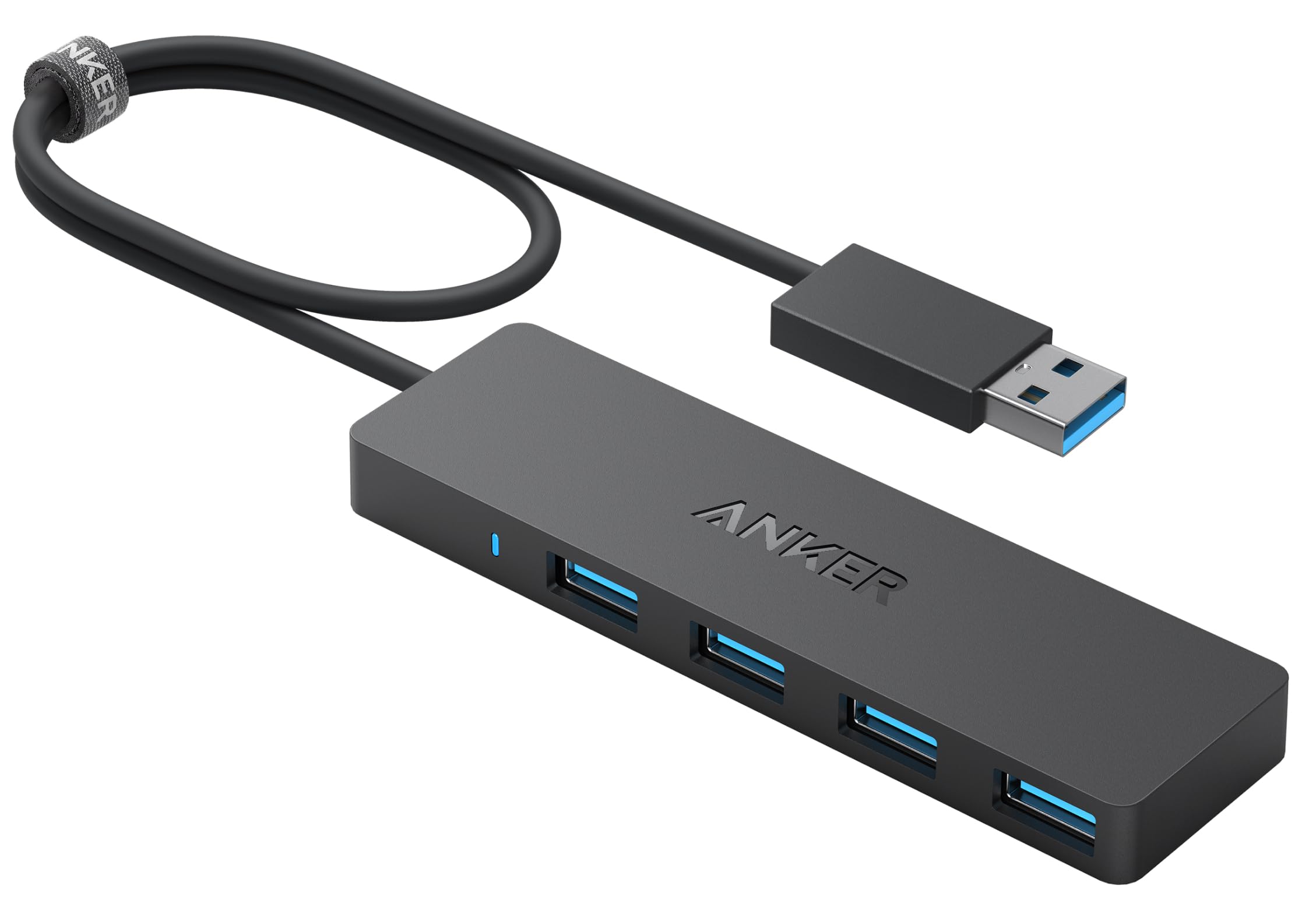
Anker 4-Port USB 3.0 Hub

95 /100
Lab Score Outstanding

Key details

Ports
4 USB-A 3.0
Power
Bus-powered
Speed
5 Gbps
Switches
None
View on Amazon

Where powered hubs offer port count and per-port control, the Anker 4-Port USB 3.0 Hub stakes its claim on sheer dependability. Its bus-powered design keeps things simple: plug in and get four extra USB-A ports that handle keyboards, mice, headsets, and controllers without hiccups. This focus on stable data transfer makes it a favorite among gamers who want expansion without extra cables or adapters.

This hub suits gamers who only need a few extra USB-A ports for low-power peripherals and place a premium on worry-free operation. The tradeoffs are clear: only four ports, no external power supply (so it cannot charge devices or run external drives), and the short 2-foot cable limits placement options. It is also not compatible with some Apple computers and PS4 consoles, so check your gear before buying.

The compact plastic body fits neatly into any desktop setup, and the 5 Gbps data rate keeps lag low for mice and keyboards. Some users have noted that the short cable can cause disconnections if stretched across a desk — positioning the hub close to the PC avoids this. Overall, the Anker delivers exactly what it promises: extra ports that work.

💡 Position the hub close to your PC to avoid cable strain — the 2-foot length works best with a static desk setup.

Pros

  • Consistent operation across a wide range of USB peripherals.
  • Compact size fits easily on a desk or mounts with included tape.
  • Great value for a no-frills data expansion solution.
  • Solid build quality

Cons

  • 2-foot cable may limit desk placement; tugging can cause signal drops.
  • Not compatible with some Apple computers or PS4 consoles.
Our verdict

For gamers who need only a handful of USB-A ports and prioritize stable, low-lag connections for peripherals like mice and keyboards, the Anker 4-Port Hub delivers exactly that — no extras, no surprises.

Check Latest Price
4

Best Unpowered with Long Cable

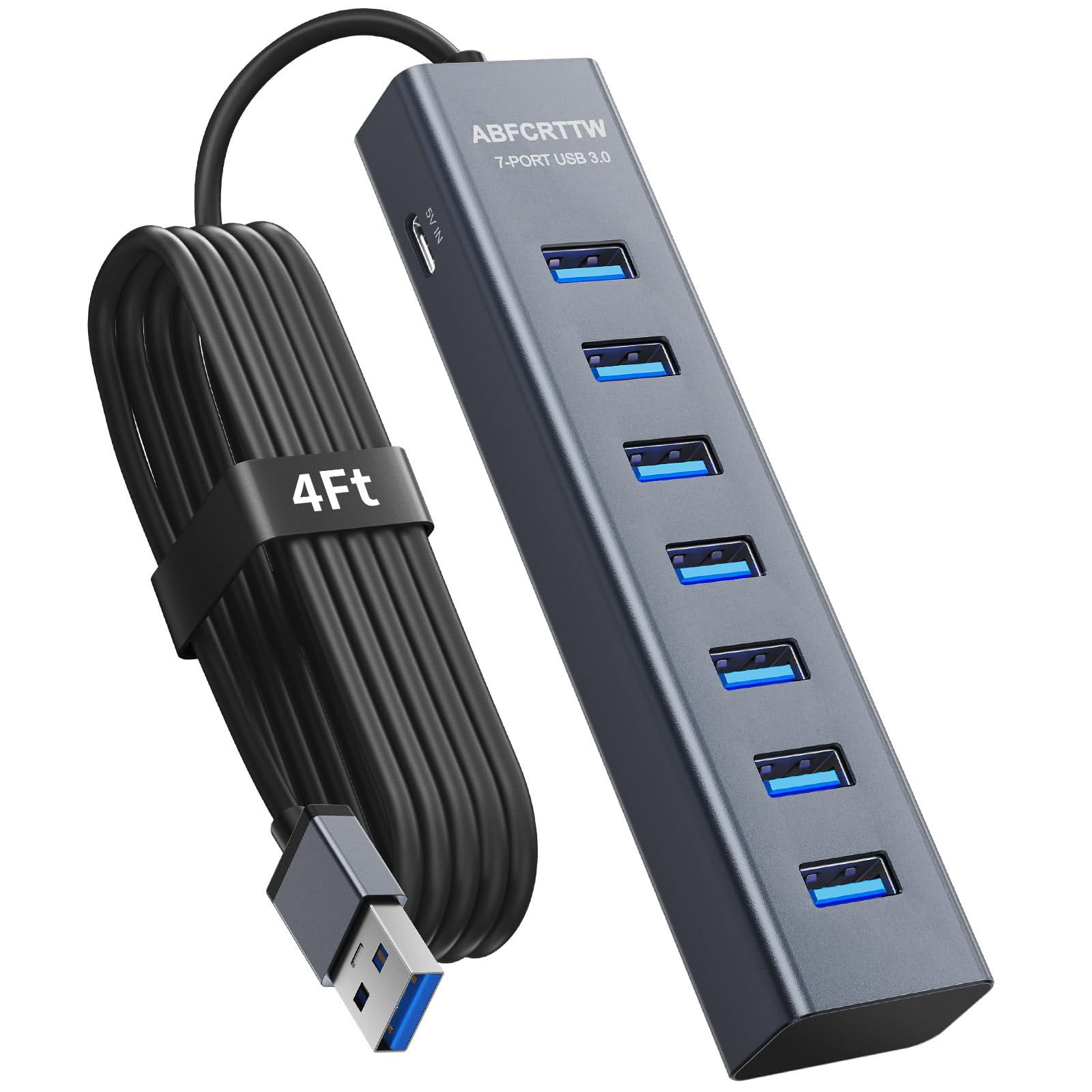
ABFCRTTW 7-Port Aluminum Hub

92 /100
Lab Score Outstanding

Key details

Ports
7 USB-A 3.0
Power
Bus-powered
Speed
5 Gbps
Switches
None
View on Amazon

With a 4-foot cable and aluminum housing, this 7-port USB 3.0 hub reaches farther than most unpowered hubs while resisting desk clutter. The metal body dissipates heat better than plastic alternatives and gives a sturdier feel when plugging in peripherals.

This hub suits gamers who need to connect a keyboard, mouse, and headset to a PC that sits far from the desk edge—the long cable lets you tuck the hub behind the monitor or under the desk. It handles data transfer at 5 Gbps for each port, but cannot charge controllers or phones. There are no per-port switches, so all connected devices stay powered as long as the host PC is on.

Setup is plug-and-play on Windows, Mac, and Linux without drivers. The optional USB-C power input can supplement bus power if a connected device draws too much current, though the hub remains fundamentally unpowered.

Pros

  • Long 4-foot cable for flexible placement around the desk
  • Aluminum housing for durability and heat dissipation
  • Seven USB 3.0 ports expand connectivity for multiple peripherals
  • Plug-and-play setup with no driver installation required

Cons

  • Cannot charge gaming controllers or phones through the hub
  • No individual per-port switches to disable unused devices
Our verdict

For gamers who only need data expansion and value a long cable and sturdy build, this hub delivers exactly that without extra features you won't use.

Check Latest Price
5

Best Value with Dedicated Charging Ports

TP-Link 7-Port Powered Hub

91 /100
Lab Score Outstanding

Key details

Ports
7 USB-A + 2 charging
Power
12V/4A (48W) included
Speed
5 Gbps
Switches
Master only
View on Amazon

Seven USB 3.0 data ports plus two ports that each deliver 2.4A for fast charging — the TP-Link separates data and charging lanes for convenience at a budget price.

This hub fits users who charge a phone, tablet, or controller while running a keyboard, mouse, and external drive — no need to toggle individual ports. The master power button controls the whole unit. Random disconnections have been noted with some USB devices, so gamers relying on constant, uninterrupted connections may want a hub with per-port switches and stronger stability.

The 48W power adapter supplies enough headroom for multiple bus-powered devices. Setup is plug-and-play. For a home office or general desktop expansion, this hub offers consistent data transfer — the occasional connectivity drop is more likely to affect high-bandwidth peripherals under sustained load.

💡 For best stability, plug the hub into a direct USB 3.0 port on the motherboard rather than a front-panel or extension cable.

Pros

  • Two dedicated 2.4A ports let you fast-charge devices without occupying data lanes.
  • Solid build quality supports long-term desktop placement.
  • Plug-and-play setup

Cons

  • No individual per-port switches
  • Occasional connectivity drops may interrupt active data transfers, especially with high-bandwidth peripherals.
Our verdict

For a budget-friendly hub with fast-charging ports, this TP-Link works well for home office or casual desktop expansion — but gamers needing per-port control and rock-steady connections should look at the top pick.

Check Latest Price
6

Budget Many Ports

WENTER 11-Port Powered Hub

91 /100
Lab Score Outstanding

Key details

Ports
10 USB-A + 1 charging
Power
12V/3A (36W) included
Speed
5 Gbps
Switches
Individual per port
View on Amazon

The WENTER hub packs 10 USB-A 3.0 ports plus a dedicated charging port, each with its own power switch — a rare combo at this price point. The included 12V/3A adapter keeps peripherals running without bus-power concerns. However, some ports may lose connectivity or fail to recognize devices, and power delivery can be insufficient for high-draw external drives. These quirks make it a capable option for casual gaming setups where per-port control is valued, but not the best choice for mission-critical peripherals that need steady performance.

Pros

  • Individual on/off switches for each port let you cut power to idle devices without unplugging.
  • Dedicated charging port provides 2.4A output for phones and tablets alongside data ports.
  • High-quality build with aluminum housing and sturdy switches for long-lasting physical feel.

Cons

  • Some ports may drop connectivity or stop working over time
  • Power delivery from the included adapter can be insufficient for larger external hard drives that draw more current.
Our verdict

For budget-conscious gamers who want per-port switches and a dedicated charging port, this hub delivers good value — as long as you can accept occasional port instability.

Check Latest Price
7

RGB Aesthetics

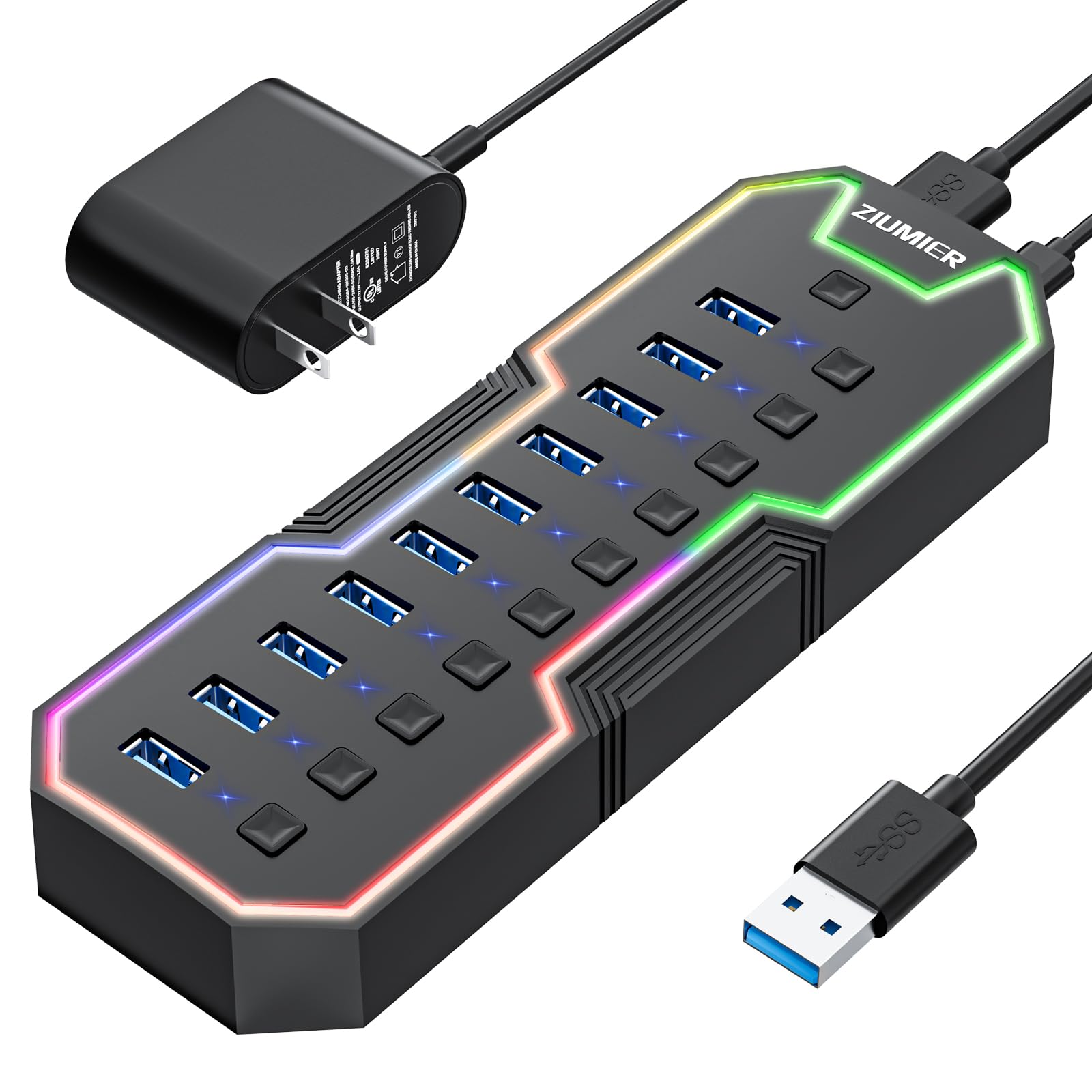
ZIUMIER 7-Port RGB Hub

90 /100
Lab Score Outstanding

Key details

Ports
7 USB-A 3.0
Power
Bus-powered
Speed
5 Gbps
Switches
Individual per port
View on Amazon

The ZIUMIER 7-Port RGB Hub delivers a built-in LED strip with an on/off button and individual switches for each port at a low price, making it an attractive option for adding color to a short-term gaming desk. The ports handle data transfer at 5 Gbps with decent quality for most peripherals. However, long-term use has shown occasional port issues after a few months, and the hub cannot reliably charge phones or controllers — it is best suited for data-only use with non-critical devices.

Pros

  • RGB strip with on/off button adds gaming aesthetic to a desk setup
  • Individual switches allow per-port control of connected devices
  • Good data transfer performance for USB 3.0 peripherals

Cons

  • Cannot reliably charge phones, controllers, or other devices
  • Occasional port issues may appear after a few months of regular use
Our verdict

Best for budget-conscious gamers who want RGB aesthetics and individual switches for a temporary or secondary setup, not for daily driver use where reliability and charging matter.

Check Latest Price
8

USB-C Heavy Setups

RSHTECH 10-Port Powered Hub

85 /100
Lab Score Excellent

Key details

Ports
6 USB-C + 4 USB-A
Power
12V/5A (60W) included
Speed
10 Gbps
Switches
Touch per port
View on Amazon

This hub provides six USB-C and four USB-A ports with individual touch switches and 10Gbps data speeds, making it well-suited for gamers with a mix of peripherals like external SSDs, controllers, and headsets. The 60W power supply handles multiple devices without dropping connections during gameplay. However, port longevity has been noted as a potential issue — some units may see individual ports stop responding after a few months. The touch switches can also be inconsistent, sometimes requiring a longer press than expected. For gamers who prioritize a high port count and USB-C flexibility over absolute long-term dependability, this hub delivers on its core features.

💡 Hold the touch switch for a full second to activate — a quick tap may not register.

Pros

  • Six USB-C ports (two at 10Gbps) plus four USB-A ports cover a wide mix of peripherals.
  • Individual touch switches let you power-cycle each port without unplugging.
  • Fast 10Gbps data transfer for external SSDs or high-bandwidth devices.

Cons

  • Some ports may stop working after months of use, with no warning.
  • Touch switches can require a long press to respond, making toggling less immediate.
Our verdict

A good fit for gamers with a mix of USB-C gear who want per-port control and don't require absolute long-term certainty.

Check Latest Price
9

Extreme Port Count

ACASIS 16-Port USB 3.2 Hub

85 /100
Lab Score Excellent

Key details

Ports
8 USB-A + 8 USB-C
Power
96W included
Speed
10 Gbps
Switches
Individual per port
View on Amazon

This hub packs 16 ports - eight USB-A and eight USB-C - each supporting 10Gbps data transfer, with individual power switches and a 96W adapter included. The aluminum housing feels sturdy, but it runs warm to the touch during use, which may affect longevity under continuous heavy load. The premium price and limited long-term user track record mean this hub is best for those who absolutely need the maximum port count and can accept the heat generation.

💡 Keep the hub in a well-ventilated area with plenty of airflow around the aluminum body to help manage heat during extended sessions.

Pros

  • Connect up to 16 peripherals with both USB-A and USB-C at high speed.
  • Individual switches let you toggle each port without unplugging devices.
  • Sturdy aluminum housing resists wear and adds stability to a desk setup.

Cons

  • Runs hot during use - heat may affect longevity if the hub is under sustained heavy load.
  • Premium-priced compared to powered hubs with fewer ports, making it a niche buy.
Our verdict

For a gaming setup that demands 16 simultaneous high-speed USB connections, this hub delivers unmatched port density - but only if heat and cost are acceptable tradeoffs.

Check Latest Price
10

Ultra Budget

Acer 4-Port USB 3.0 Hub

93 /100
Lab Score Outstanding

Key details

Ports
4 USB-A 3.0
Power
USB-C power input
Speed
5 Gbps
Switches
None
View on Amazon

At the lowest price point among the USB hubs considered here, this Acer four-port unit is a lightweight travel companion that expands your laptop's ports without adding bulk. Plug-and-play setup works instantly with any USB-C host. However, for stable high-speed data transfers — like moving game files or running a heavy peripheral — the hub requires a separate 5V power adapter. Without it, some port connections may drop under load. This makes it a suitable occasional-use hub for low-power devices (mouse, keyboard, headset), rather than a daily driver for a multi-peripheral gaming setup. Acer's name offers some assurance, but the hub's performance boundaries are clear.

💡 For consistent data transfer speeds, connect a 5V USB-C power adapter to the hub's power input before attaching high-power devices.

Pros

  • Strong value for the price
  • Plug-and-play operation with no driver installation required.

Cons

  • Port connections can drop intermittently during heavy data transfers, especially without external power.
  • An external 5V power adapter is required for stable performance and is not included.
Our verdict

Suitable as a backup or travel hub for low-power peripherals, but not a primary hub for a demanding gaming setup.

Check Latest Price

How to Choose

Port Count and Type

Count your wired peripherals: mouse, keyboard, headset, controller, maybe an external drive or stream deck. A 4-port hub is enough for a few devices, but most gamers need at least 7 ports to avoid swapping cables.

USB-C ports matter if you use modern peripherals like SSDs or laptops. A mix of USB-A and USB-C gives flexibility, but remember that each port shares the hub's total power budget.

Powered vs. Unpowered

An unpowered hub draws all its current from your PC's USB port — typically 0.9A max per port. Plug in three or four devices and the voltage drops, causing random disconnections. A powered hub has its own AC adapter, delivering consistent 5V or 12V to every port.

For a gaming setup with four or more peripherals, a powered hub is necessary. The actual power rating (watts) matters: a 20W hub can handle mice and keyboards, but external drives or charging a controller requires at least 36W to avoid brownouts.

Individual Per-Port Switches

Physical switches let you cut power to individual ports without unplugging cables. This reduces electrical noise on unused lines and prevents idle peripherals from draining power. It's especially useful for turning off a controller charger or a second monitor's USB passthrough.

Some hubs use touch-sensitive switches instead of mechanical ones. They look cleaner but can be inconsistent — requiring a precise press or long hold. If you want reliable toggling, prefer mechanical switches.

Data Transfer Speed

USB 3.0 hubs offer 5 Gbps, which is plenty for mice, keyboards, and even game streaming. USB 3.2 10 Gbps hubs are useful if you frequently transfer large files to an external SSD. In real-world use, the chipset quality matters more than the theoretical speed — a cheap 5 Gbps hub may drop packets while a well-designed one doesn't.

For almost all gaming peripherals, 5 Gbps is more than enough. The bottleneck is the power delivery, not the data rate.

Cable Length and Build Quality

A 2-foot cable forces the hub to sit right next to your PC, which can clutter the desk. A 4-foot or longer cable lets you place the hub on your desk for easy access. Look for a detachable cable if you want flexibility to replace it.

Aluminum housings dissipate heat better than plastic and feel more premium, but they don't affect electrical performance. Build quality shows in the port soldering and the switch feel — plastic hubs with cheap switches often fail at the solder joints after a year.

Frequently Asked Questions