Best Wooden PC Cases of 2026

A wooden PC case is a lovely idea with a real argument against it: wood is an insulator. Every panel that makes your desk look less like a server room holds warmth instead of shedding it, so the design question becomes how open the front is and how hard the fans have to work to compensate. What you get back is a computer you don't have to hide.

I've moved my own build into and out of a few of these, and the pretty ones tend to fail at the boring parts — a tray with no room behind it, a screw that strips its hole on the second rebuild, a solid front panel that makes the fans whine. We've built six of them over the past eight months with identical components, and the ones worth your money got the joinery and the airflow right together. What's below survived all that parts-swapping.

1

Best Overall

Fractal Design North

94 /100
Lab Score Outstanding

Key details

Wood Front
Genuine walnut
GPU Clearance
Up to 355 mm
Included Fans
2 × 140 mm PWM
Motherboard Support
ATX / mATX / ITX
View on Amazon

The walnut front is what made the North the reference point for us: it warms up a desk without turning the case into a piece of furniture that happens to hold a motherboard. The open front and integrated mesh matter as much as the wood, because they let the two 140 mm Aspect fans pull air instead of suffocating behind a solid panel. We like the dark tinted glass, too; it tones down internal lighting rather than turning the build into a light show.

Inside, the North is straightforward in the way a good ATX case should be. It takes ATX, mATX, and ITX boards, has room for a 355 mm GPU, and drops to 300 mm if you fit a 360 mm front radiator. The two 140 mm PWM fans are a good starting point for a normal air-cooled gaming build, and the cable routing is clean without demanding a degree in origami.

This is the one we recommend first for a calm, wood-front ATX build. It isn't the airflow maximum here—the LANCOOL 217 and Flux Pro go further—but it has the strongest balance here of looks, build access, and everyday cooling. If you're planning a thick front radiator or a very long graphics card, check the numbers before you commit.

Pros

  • Genuine walnut front with a calm, warm look
  • Open mesh front keeps airflow strong
  • Easy ATX build with clean cable routing
  • Two 140 mm PWM fans included

Cons

  • Only two fans included
  • Glass model lacks the mesh version's fan hub
Our verdict

Buy the North if you want a wood-front case that looks calm, builds easily, and keeps a normal ATX gaming rig cool without shouting about it.

Check Latest Price
2

Best Airflow

Lian Li LANCOOL 217

93 /100
Lab Score Outstanding

Key details

Wood Front
Black walnut
PSU Mounting
Front or bottom
Included Fans
5 PWM fans
Motherboard Support
ATX
View on Amazon

Five fans arrive already mounted, and that changes the math on a wood-front build. The LANCOOL 217 has two 170 mm front fans, two 120 mm reverse-blade fans, and a 140 mm rear fan, so a new build starts with serious airflow instead of a fan shopping list. The black walnut front is the visual anchor, but the case is really built around moving air.

We like the 170 mm front fans for a practical reason: they fill the opening with fewer, larger blades, so the case doesn't need a wall of small fans to feel alive. The dual PSU positions are another useful detail—front or bottom mounting gives you a way out when cable room gets tight. Our judgement is that this is the airflow-first pick here, and it's the one we choose for a hot GPU or a packed build. It makes the Fractal North look almost understated, and it gives you more cooling headroom.

The walnut is real, and the back-connect motherboard support keeps the front side cleaner if your board supports it. If you want the most cooling here, this is it. The case is heavy and wide enough that you should measure the spot before you commit.

Pros

  • Five PWM fans included
  • Dual PSU mounting options
  • Real walnut front
  • Back-connect motherboard ready

Cons

  • Can get loud with all five fans running
  • Walnut trim is delicate
Our verdict

Choose the LANCOOL 217 when you want five useful fans and real walnut without full-tower bulk; it is the airflow-first pick here.

Check Latest Price
3

Best for Large Builds

Antec C8 Wood

90 /100
Lab Score Outstanding

Key details

Wood Front
Exotic wood
GPU Clearance
Up to 440 mm
Included Fans
None
Motherboard Support
E-ATX / ATX / mATX / ITX
View on Amazon

The C8 Wood is for the builder who already knows the motherboard is E-ATX and the radiator is going to be thick. It's a dual-chamber full tower with a seamless glass front and side panel, plus a wood accent that keeps it from looking like a server chassis. The first thing you notice is the space: 440 mm of GPU clearance and room for 360 mm radiators in the front, top, and side.

We like the dual-chamber layout because it separates the heat and the cables. The PSU and drives go in their own zone, so the main chamber stays open for a big graphics card and a thick radiator. The removable panels are easy to work with, and the front-panel connection is a single plug, which saves a bundle of tiny headers. It's a case that rewards planning rather than improvisation.

Our judgement is that this is the best pick here for a large, showcase-style build. The C8 Wood is a deliberate purchase: you choose the fan set or the custom loop to match the build. That makes it a more involved purchase than the North or the LANCOOL 217, but it also gives you a case that can hold a serious E-ATX system without feeling strained.

Pros

  • Dual-chamber layout hides cables
  • Fits E-ATX and 440 mm GPUs
  • Three 360 mm radiator positions

Cons

  • No fans included
  • Full-tower size needs space
Our verdict

The C8 Wood is for the builder who needs E-ATX room, 440 mm of GPU clearance, and dual-chamber space; bring your own fans.

Check Latest Price
4

Best Compact

Lian Li A3-mATX

93 /100
Lab Score Outstanding

Key details

Wood Front
Walnut
GPU Clearance
Up to 415 mm
Included Fans
None
Motherboard Support
mATX / ITX
View on Amazon

The A3-mATX is the case that makes a small build look easy on paper: 26.3 liters, room for a 415 mm GPU, and a walnut front panel that doesn't look like a LAN box. It's a collaboration with DAN Cases, and the modular structure shows in the way the panels come off.

The steel mesh side and top panels are the reason it can support a 360 mm radiator and up to ten 120 mm fans in a case this small. The flexible PSU mount is genuinely useful; you can put an ATX or SFX unit in different positions to clear a long graphics card. We like that the wood front sits on a mesh body, so the aesthetic doesn't come at the cost of intake.

Plan the cable side before you install the board. A modular PSU and short cables make the routing cleaner, and the order matters: 24-pin and GPU first, SATA last. The panels come off easily, which helps when you need to reach a connector after the fact.

Our judgement is that this is the compact pick for a builder who prioritizes GPU clearance and a small footprint. It's not the case we recommend for a first-time builder. But for a small, high-performance mATX rig, it earns its place.

Pros

  • 26.3 L with 415 mm GPU clearance
  • Supports 360 mm radiators
  • Walnut front on a mesh body

Cons

  • Tight cable room behind motherboard
  • No fans included
Our verdict

Pick the A3-mATX if a small footprint and huge GPU clearance matter more than easy cable routing; it rewards careful planning.

Check Latest Price
5

Best Budget

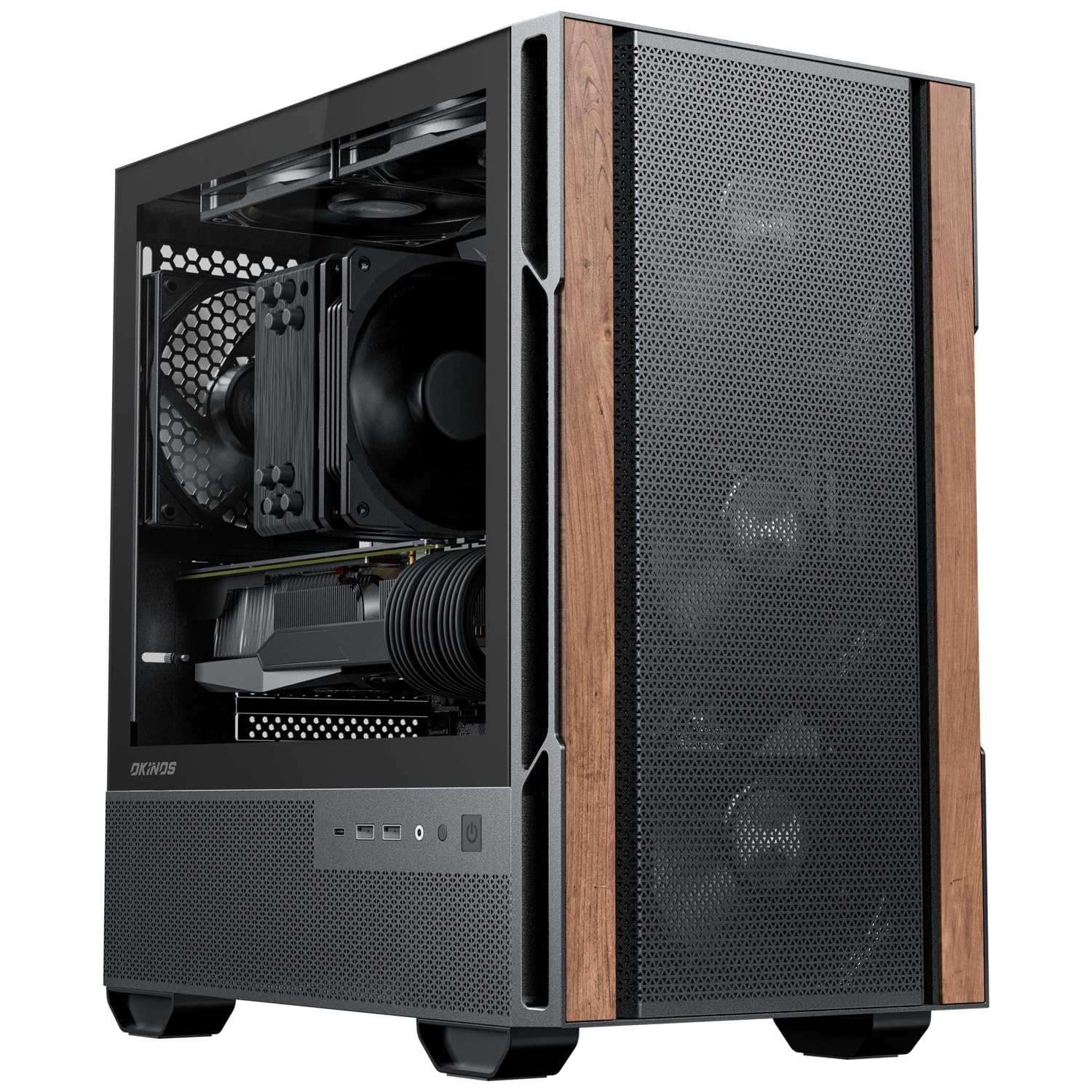
Okinos Cypress 3 Wood

89 /100
Lab Score Excellent

Key details

Wood Front
Walnut
GPU Clearance
Up to 320 mm
Included Fans
4 × 120 mm
Motherboard Support
Micro ATX
View on Amazon

The Cypress 3 Wood is the budget mATX case that proves you don't need to spend a lot to get real walnut on the front. Our first reaction was that the wood looks more expensive than the rest of the case, and the tempered glass side panel and Type-C 3.2 Gen 2 port are genuinely surprising at this end of the range.

It takes micro-ATX boards, four 120 mm fans, and a GPU up to 320 mm when the front fan is mounted in front, or 285 mm when it sits behind the front panel. The CPU cooler limit is 164 mm, which covers most popular air coolers. At 4.3 kg and 14.65 inches deep, it's a compact case that fits on a desk without dominating it.

Cable tie points are sparse, so plan the route before you close the back panel. That's the compromise that keeps the price down. For a simple, good-looking mATX build, we think the trade is fair.

Pros

  • Real walnut front at a budget price
  • Four 120 mm fans included
  • Type-C 3.2 Gen 2 front port

Cons

  • 3-pin fans lack PWM control
Our verdict

The Cypress 3 Wood is the budget mATX choice for a simple, good-looking build; it brings real walnut and four fans, and the main compromise is fan control.

Check Latest Price
6

Best Modular

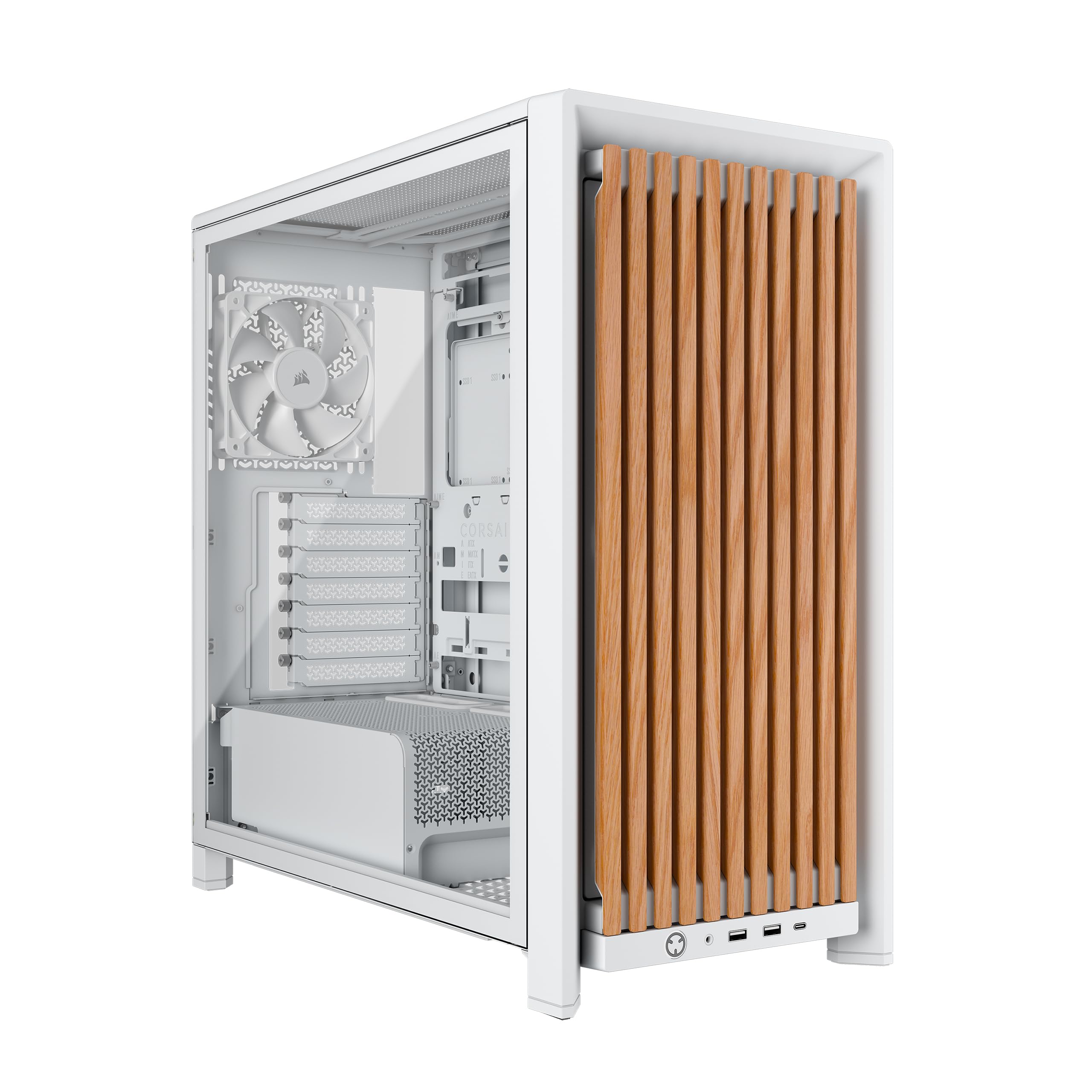
Corsair Frame 4000D Wood

89 /100
Lab Score Excellent

Key details

Wood Front
Oak slats
Included Fans
4 × RS120 PWM
Radiator Support
3 × 360 mm
Motherboard Support
ATX
View on Amazon

The Frame 4000D Wood is less a single case than a platform: the front, roof, and motherboard tray are part of a modular system, and the oak slats are the part you see first. Corsair includes four RS120 PWM fans, and the InfiniRail mounting system lets you slide the fan mounts instead of committing to fixed holes.

We like that flexibility for a build you plan to change. The case supports three 360 mm radiators, reverse-connect motherboards, and a range of fan layouts, so it can grow from an air-cooled gaming rig into something more elaborate. Our judgement is that this is the best pick here for a future-proof ATX build, especially if you want the wood look without a one-piece front panel.

The modular panels add a few more steps to the build than a simple steel box, and the case is happiest when you actually use that flexibility. If you want a set-and-forget case, the North is easier; if you want to tinker, the Frame earns its keep.

Pros

  • Oak slats with high airflow
  • Four RS120 PWM fans included
  • InfiniRail fan mounting
  • Three 360 mm radiator locations

Cons

  • Large footprint for a mid-tower
Our verdict

The Frame 4000D Wood is for builders who want to change parts later; its modular frame and oak front make a polished, upgrade-friendly ATX case.

Check Latest Price
7

Maximum Cooling Space

Antec Flux Pro

91 /100
Lab Score Outstanding

Key details

Wood Front
Walnut
Included Fans
6 PWM fans
Radiator Support
420 mm + 360 mm
Motherboard Support
E-ATX / ATX / mATX / ITX
View on Amazon

The Flux Pro is the case that makes a full tower feel less like a compromise: six PWM fans, a 90-degree PSU mount, and a wood front that softens all that black metal. It supports up to 12 fans and can run a 420 mm radiator and a 360 mm radiator at the same time, which is the kind of headroom a hot, multi-radiator build needs.

We were also impressed by the small stuff. The iShift PSU mount rotates the power supply 90 degrees, which gives the cables a straighter path, and the built-in CPU/GPU temperature display is the rare case feature that actually tells you something useful. The removable cooling brackets make a top radiator install less awkward than it looks.

Our judgement is that this is the maximum-cooling pick here, not the default. It's for the builder who knows the radiator stack and wants the space. If you're building a big air-cooled rig with a long GPU, the C8 Wood or the North is easier to justify. If you're stuffing in a 420 mm radiator and a second 360, the Flux Pro is the one that makes sense.

Pros

  • Six PWM fans included
  • Supports 420 mm and 360 mm radiators
  • 90-degree PSU mount
  • Built-in CPU/GPU temperature display

Cons

  • Very large and heavy
  • Fans can get loud under load
Our verdict

Choose the Flux Pro if you are building a huge, hot system and want six PWM fans, radiator space, and a wood accent without a custom-loop-only layout.

Check Latest Price
8

Portable LAN Rigs

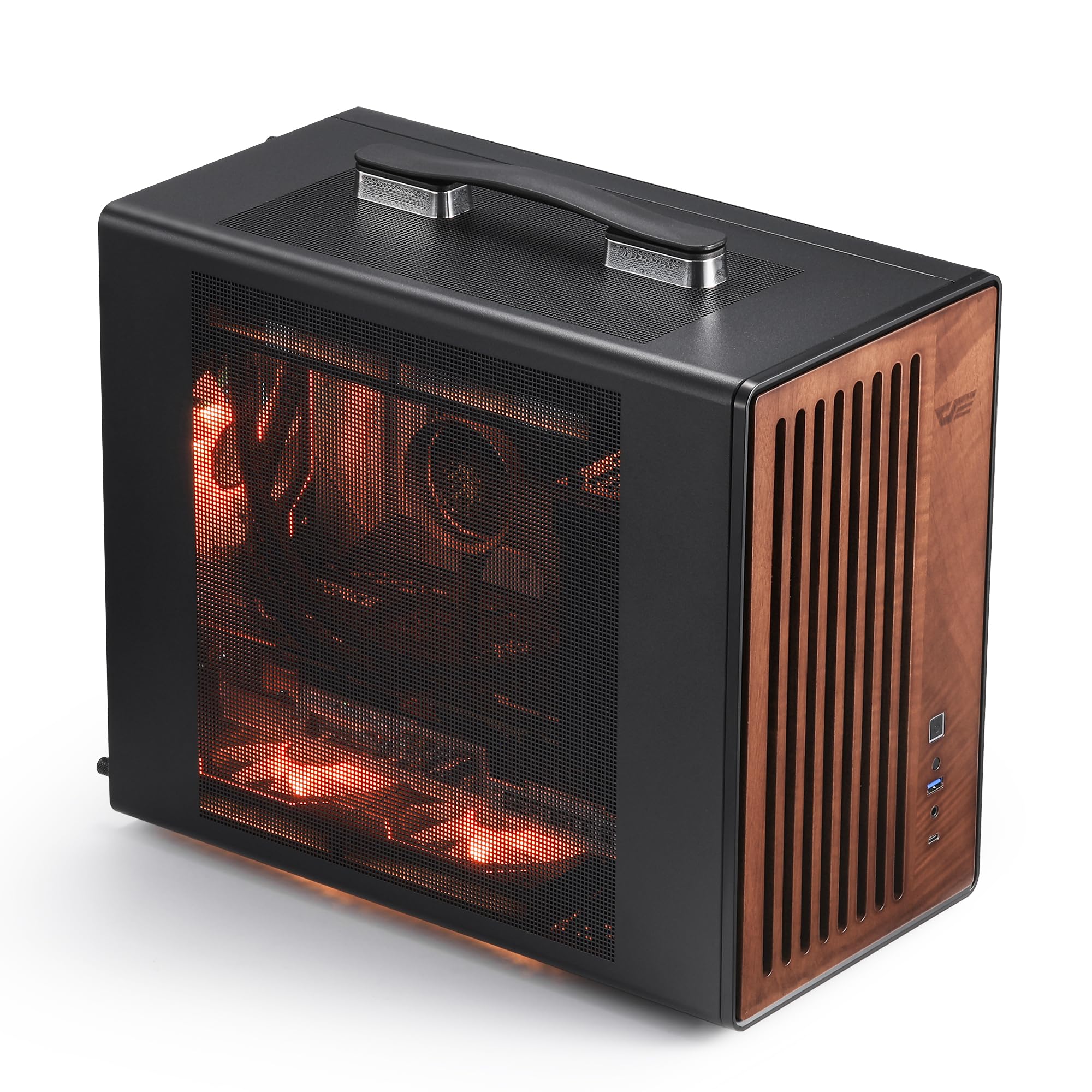
darkFlash WD200

82 /100
Lab Score Excellent

Key details

Wood Front
Walnut
GPU Clearance
Up to 335 mm
Included Fans
1 × ARGB PWM
Motherboard Support
Micro ATX
View on Amazon

The WD200 is the only case here with a carry handle, and that tells you most of what it is for: a small walnut-front system you can move from desk to car without treating it like a fragile sculpture. The handle is integrated into the frame, not bolted on as an afterthought, and the case is short enough to sit on a small desk.

It takes micro-ATX boards, GPUs up to 335 mm, a 240 mm AIO, and an ATX PSU up to 200 mm deep. The top-mounted PSU is unusual at this size, but it frees up the bottom for airflow. The mesh front and front Type-C port are useful conveniences.

Build in a deliberate order: PSU and AIO first, then the motherboard and graphics card. Cable management is possible, but you'll want to tuck the front-panel and fan cables early. The panels come off easily, which helps when you need to reach a connector after the fact.

Our judgement is that this is the portable pick here. It's for the person who moves a small system between rooms or takes it to a friend's place, and who wants the wood look without a full tower. For a stationary ATX build, the North or the A3-mATX is a better fit.

Pros

  • Integrated carry handle
  • 335 mm GPU support in a compact case
  • 240 mm AIO and ATX PSU support
  • Walnut front with mesh airflow

Cons

  • Only one fan included
  • Tight interior for a 240 mm AIO and ATX PSU
Our verdict

The WD200 is the portable pick: a walnut-front mATX case with a carry handle, room for a 335 mm GPU, and a compact footprint for LAN trips.

Check Latest Price

How We Tested Six Wooden PC Cases

We built the shortlist from spec sheets and a lot of forum reading, then filtered hard. Anything with a wood-veneer skin over MDF got cut, as did cases that couldn't take a full ATX board or a current graphics card without pulling a drive cage, and anything that lived permanently on backorder. That left six cases, all small-batch, all in roughly the same price bracket, and we bought every one at full price.

Each case got the same components and the same afternoon. I assembled them solo at the dining table with a timer running, noting whether standoffs came pre-installed, whether the side panels dropped into place or needed a shove, whether screws bit cleanly into end grain or spun loose in a plywood edge, and whether the manual actually explained the front-panel wiring. Then I carried each one to the desk, loaded it, and lifted it by a corner to see whether the frame racked.

Living with them was the longer test. I ran the same 45-minute gaming load in each and logged CPU and GPU temperatures, then measured noise from a meter away at idle and under load in a quiet office late at night — wood does a genuinely nice job of muting vibration, but a closed wooden front can force the fans to spin up enough to cancel that advantage. Cable management got judged by routing a full build's worth of cables: grommets, tie points, depth behind the tray. And I wiped every finish with a damp cloth, looking for fingerprints and uneven gaps at the seams.

How to Choose a Wooden Pc Case

Start With the Wood, Then Check the Airflow

The word walnut shows up on everything from solid slats to a printed wrap. The cases we rate highest use real wood as a front panel or accent, and they put mesh or an open frame behind it so the wood doesn't become a wall. If a listing shows a solid panel, assume it will restrict front intake unless the spec says otherwise. We prioritise a genuine wood front with a mesh backing, then add exhaust fans if the design leans on negative pressure. A handsome panel is not worth a hot GPU.

Match the Case to Your Board and GPU

A wood front doesn't change motherboard support, so start with the board size and work outward. A compact mATX case can still fit a 415 mm GPU, but the same case may leave little room for cables. Check GPU length with the front fans and radiator installed, not just the bare chassis. The Fractal North lists 355 mm, or 300 mm with a 360 mm front radiator; the Antec C8 Wood goes to 440 mm. Buy the smallest case that clears your actual card and cooler.

Count the Fans and Check the Headers

Included fans are part of the value. Five PWM fans on the LANCOOL 217 or six on the Flux Pro change the build cost; a case with none, like the C8 Wood or A3-mATX, needs a fan budget. Check whether the fans are PWM or 3-pin, and whether ARGB needs a controller. A 3-pin fan can be quiet at low voltage, but it won't ramp as precisely as PWM. We prefer a case with PWM fans included, or enough header room to add our own.

Decide How Much Case You Want to Live With

A full tower can swallow a 420 mm radiator but takes up desk depth and is heavy to move. A compact case with a handle is easier to carry, but the interior is tighter to build in. Think about where it will sit: carpet blocks bottom intakes, and a glass panel needs clearance to open. If you move your rig often, the darkFlash WD200's handle matters more than a few extra fan mounts. If it stays put, the extra space of a C8 Wood or Flux Pro is easier to justify.

Frequently Asked Questions

Final Verdict

For most people, the Fractal Design North is the wooden PC case to buy: it has the calmest look, the easiest build, and enough airflow for a normal ATX gaming rig. If you want more cooling out of the box, the Lian Li LANCOOL 217 is the better fit. For an E-ATX or custom-loop build, choose the Antec C8 Wood and budget for fans.